

Microsoft Paint’s 25H2 evolution is a surprisingly important Windows story because it shows how far a once-minimal accessory app has moved into Microsoft’s broader AI and platform strategy. Paint is no longer just a simple bitmap editor; it now combines layers, transparency, project files, AI-assisted cleanup, and hardware-sensitive features that split experiences between cloud services and Copilot+ PCs . That shift also mirrors the way Microsoft is handling Windows 11 itself: gradually, strategically, and with a growing emphasis on managed servicing, support horizons, and enablement-based transitions rather than dramatic one-off rewrites .
Paint matters because almost everyone knows it, even if they rarely use it. That familiarity gives Microsoft an unusually safe place to experiment, since new features can be introduced in a context people already trust. Thurrott’s coverage frames the app’s modern identity around a central tension: keep the low-friction simplicity that made Paint a default tool, but add enough capability to make it feel contemporary rather than merely preserved .
That tension has been visible for a while. Microsoft first modernized Paint’s appearance and basic editing behavior, then added more serious workflow features such as layers, transparency, and project files. Those changes mattered because they moved Paint from a disposable sketchpad toward something closer to a lightweight creative workspace . In practical terms, Paint became useful for tasks that used to require a different app entirely.
The bigger story, though, is AI. Microsoft has steadily inserted image generation, generative cleanup, sticker creation, and sketch-to-image assistance into Paint, while also layering in provenance features such as watermarking and content credentials. That puts the app squarely inside Microsoft’s consumer AI strategy, where everyday Windows tools become both utilities and showcases .
Just as importantly, Paint now reflects Microsoft’s broader software monetization model. Some features are local and free, some depend on Microsoft 365 and AI credits, and some are gated to Copilot+ hardware with NPUs capable of running local models. That creates a more fragmented but also more intentional product than the old Paint ever was .
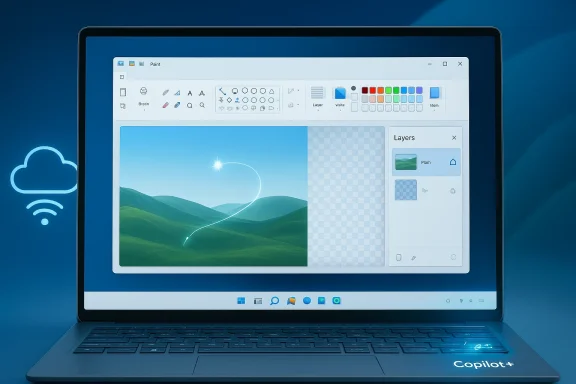
The most obvious evidence is the addition of layers and transparency, which let users build images in pieces instead of flattening everything into a single bitmap. That is not glamorous in the way AI image generation is glamorous, but it is far more consequential for real workflow continuity. It means a meme, mockup, thumbnail, or rough composition can stay editable longer and survive more revisions before export .
The cloud-facing tools are the clearest sign of that shift. Image Creator uses OpenAI’s DALL-E model, while Generative erase can remove unwanted objects by inferring surrounding context. Microsoft also added Sticker generator and Cocreator, the latter of which turns rough sketching into a polished output with style choices and a creativity slider . These features lower the skill barrier for casual image creation without pretending to replace professional design software.
That split is important because it changes the user experience in subtle but meaningful ways. Local AI feels faster, less account-dependent, and more like a normal part of the app. Cloud AI feels more service-like, with the potential for rate limits, plan friction, and varying availability depending on account state or connectivity. Microsoft is not just adding features; it is defining the economics of those features.
That matters because AI-generated images are now common enough that their origin can become ambiguous. By adding metadata or visual cues, Microsoft is acknowledging that generative tools need guardrails as much as they need convenience. The feature is not a cure-all, but it is a signal that the company expects AI content to circulate widely and wants to reduce some of the confusion around it.
It is also a subtle response to regulatory and reputational pressure. The more AI-generated content floods the web, the more enterprises and consumers alike will want ways to understand where things came from. Paint’s watermarking support suggests Microsoft believes provenance will eventually become a baseline expectation, not a niche concern.
The hardware requirements behind Copilot+ matter because they divide the Windows base into tiers of experience. A user on a standard PC may still get a useful Paint, but a Copilot+ user gets a more capable one. That is classic platform behavior: the software becomes a reason to buy the hardware, and the hardware becomes the way to unlock the better software.
That approach has a lot of appeal. Local AI is faster, less dependent on connectivity, and generally more reassuring from a privacy standpoint. It also gives Microsoft a way to sell the future of Windows as something tangible rather than abstract. Users can see the difference in a familiar app.
But it also creates fragmentation. Not every PC gets the same Paint, and that complicates the old expectation that built-in Windows tools should work the same way everywhere. Microsoft is clearly comfortable with that tradeoff.
Some tools remain accessible without AI credits. Others rely on Microsoft 365 subscriptions and associated monthly allowances. Still others are tied to local hardware capabilities. That means Paint is now a blend of free utility, subscription perk, and device differentiator.
The upside is that Microsoft can keep the app broadly available while offering richer features to paying users. The downside is that the simplest creative tasks may now be surrounded by account prompts, credit awareness, and tier awareness. That friction can be minor in isolation, but over time it changes how people perceive the app.
That makes Paint a proving ground. If users accept AI in Paint, Microsoft learns something valuable about how to introduce similar ideas elsewhere in Windows. If users resist, the company learns where the limits are. Either way, Paint gives Microsoft a low-risk laboratory with an enormous built-in audience.
It also helps Microsoft with adoption messaging. Users are more likely to try a new feature in a familiar app than in a new one. Paint lets Microsoft present AI as a practical everyday tool rather than a specialized product category.
In Windows terms, 25H2 is about standardization and support. In Paint terms, the same instinct appears as feature consolidation: keep adding pieces, but keep the release path manageable. The result is a product that feels like a continuous evolution rather than a dramatic rewrite.
For enterprises, the story is cleaner in some ways. A more modern Paint can still be managed like a standard application, but the feature tiers create new questions around standardization. If different hardware classes or subscription states produce different experiences, IT teams may need to document which Paint capabilities are actually expected on which devices.
The broader Windows trend suggests Microsoft will keep using Paint as a proving ground for consumer AI. That could mean more provenance work, better editing assistance, tighter integration with Copilot features, and perhaps additional local AI capabilities as Copilot+ hardware matures. The company has every incentive to keep the app relevant because it is one of the few Windows surfaces almost everyone recognizes.
Microsoft has done something rare here: it has turned one of Windows’ most ordinary apps into a meaningful strategic asset. If it handles the next wave carefully, Paint could remain one of the quiet success stories of the Windows 11 era. If it overreaches, it risks becoming a reminder that even the most familiar tools can feel complicated once every feature has a business model attached to it.
Source: Thurrott.com paint-25h2 - Thurrott.com
 Overview
Paint matters because almost everyone knows it, even if they rarely use it. That familiarity gives Microsoft an unusually safe place to experiment, since new features can be introduced in a context people already trust. Thurrott’s coverage frames the app’s modern identity around a central tension: keep the low-friction simplicity that made Paint a default tool, but add enough capability to make it feel contemporary rather than merely preserved .That tension has been visible for a while. Microsoft first modernized Paint’s appearance and basic editing behavior, then added more serious workflow features such as layers, transparency, and project files. Those changes mattered because they moved Paint from a disposable sketchpad toward something closer to a lightweight creative workspace . In practical terms, Paint became useful for tasks that used to require a different app entirely.
The bigger story, though, is AI. Microsoft has steadily inserted image generation, generative cleanup, sticker creation, and sketch-to-image assistance into Paint, while also layering in provenance features such as watermarking and content credentials. That puts the app squarely inside Microsoft’s consumer AI strategy, where everyday Windows tools become both utilities and showcases .
Just as importantly, Paint now reflects Microsoft’s broader software monetization model. Some features are local and free, some depend on Microsoft 365 and AI credits, and some are gated to Copilot+ hardware with NPUs capable of running local models. That creates a more fragmented but also more intentional product than the old Paint ever was .
What Paint Has Become
Paint is no longer the blunt instrument it once was. It now behaves more like a compact image studio, with enough power for genuine editing work while still remaining approachable enough for casual users. That balance is the whole point: Microsoft wants the app to feel familiar, but not frozen in time .The most obvious evidence is the addition of layers and transparency, which let users build images in pieces instead of flattening everything into a single bitmap. That is not glamorous in the way AI image generation is glamorous, but it is far more consequential for real workflow continuity. It means a meme, mockup, thumbnail, or rough composition can stay editable longer and survive more revisions before export .
Layers and persistence
The introduction of Project files is arguably the most serious non-AI change in the app. It allows users to save layered work in a reusable format, return later, and continue editing without reconstructing everything from scratch. That moves Paint closer to a real creative workflow and away from the “open, do a quick thing, flatten, and forget it” model that defined older versions .- Layers reduce the fragility of basic editing.
- Projects preserve editable structure between sessions.
- Transparency makes layer-based composition actually useful.
- Paint now supports iterative work, not just one-off edits.
- The app feels more durable without becoming complicated.
Why this matters for ordinary users
For many users, the value is not sophistication but saved effort. They do not want to learn Photoshop just to remove an object, preserve a layered mockup, or keep an image project editable for later. Paint now does just enough to close that gap, which is why the app’s modernization has broader resonance than its humble brand might suggest .The AI Layer
If layers made Paint more serious, AI made it strategic. Microsoft has turned the app into a small showcase for its consumer AI stack, with features designed to be easy to understand, easy to demonstrate, and easy to connect to Windows hardware or Microsoft services. That is exactly why Paint now matters beyond nostalgia .The cloud-facing tools are the clearest sign of that shift. Image Creator uses OpenAI’s DALL-E model, while Generative erase can remove unwanted objects by inferring surrounding context. Microsoft also added Sticker generator and Cocreator, the latter of which turns rough sketching into a polished output with style choices and a creativity slider . These features lower the skill barrier for casual image creation without pretending to replace professional design software.
Cloud AI versus local AI
The most revealing distinction is that not all AI is treated the same. Some features rely on cloud infrastructure and may consume AI credits tied to Microsoft 365 Personal, Family, or Premium plans. Others are local, especially on Copilot+ PCs, where Paint can use the NPU and run without the same subscription overhead .That split is important because it changes the user experience in subtle but meaningful ways. Local AI feels faster, less account-dependent, and more like a normal part of the app. Cloud AI feels more service-like, with the potential for rate limits, plan friction, and varying availability depending on account state or connectivity. Microsoft is not just adding features; it is defining the economics of those features.
- Cloud features can introduce subscription friction.
- Local AI reduces latency and dependency on the internet.
- Copilot+ hardware becomes a differentiator.
- Users experience different Paints depending on what they own.
- The app is now a policy surface, not just a tool.
Assisted creativity as a product philosophy
Paint’s AI story is really about assisted creativity. Microsoft is not trying to turn every user into an illustrator; it is trying to make ordinary people feel more capable. Object selection, sticker generation, and sketch refinement all reduce tedious manual work and compensate for limited drawing skill. That is a smart bet for a default app that millions of people use reflexively .Provenance, Watermarking, and Trust
One of the most interesting aspects of modern Paint is that Microsoft is not only thinking about creation, but about traceability. The company has added watermarking support for AI-generated images, which means the app now participates in the broader conversation about provenance and content authenticity .That matters because AI-generated images are now common enough that their origin can become ambiguous. By adding metadata or visual cues, Microsoft is acknowledging that generative tools need guardrails as much as they need convenience. The feature is not a cure-all, but it is a signal that the company expects AI content to circulate widely and wants to reduce some of the confusion around it.
Why provenance is strategic
This is not just a trust feature. It is also a platform feature. If Microsoft can normalize provenance handling inside everyday Windows apps, it strengthens the case for using Microsoft’s ecosystem across creation, sharing, and collaboration. In other words, the company is building not just an editor, but an ecosystem of trustworthy outputs .It is also a subtle response to regulatory and reputational pressure. The more AI-generated content floods the web, the more enterprises and consumers alike will want ways to understand where things came from. Paint’s watermarking support suggests Microsoft believes provenance will eventually become a baseline expectation, not a niche concern.
- Watermarking helps signal AI involvement.
- Content credentials support future interoperability.
- Provenance tools can reduce accidental misuse.
- Microsoft is aligning Paint with broader AI trust efforts.
- The app becomes part of the authenticity conversation.
Copilot+ Hardware and the Local AI Divide
Paint’s Copilot+ features reveal a separate Microsoft strategy: hardware differentiation. The app behaves more richly on systems with a modern NPU, more memory, and enough local AI capability to run features offline. That is a powerful incentive for premium PC purchases, whether Microsoft says so explicitly or not .The hardware requirements behind Copilot+ matter because they divide the Windows base into tiers of experience. A user on a standard PC may still get a useful Paint, but a Copilot+ user gets a more capable one. That is classic platform behavior: the software becomes a reason to buy the hardware, and the hardware becomes the way to unlock the better software.
Features that benefit from the NPU
Paint’s local AI features include experiences such as Object select, Sticker generator, Cocreator, and, on certain Snapdragon systems, Generative fill. These run locally and are designed to work without the cloud-based credit model attached to other features . The implication is obvious: Microsoft wants the user to feel the speed and convenience of on-device AI, while reserving some cloud features for the broader Microsoft account ecosystem.That approach has a lot of appeal. Local AI is faster, less dependent on connectivity, and generally more reassuring from a privacy standpoint. It also gives Microsoft a way to sell the future of Windows as something tangible rather than abstract. Users can see the difference in a familiar app.
But it also creates fragmentation. Not every PC gets the same Paint, and that complicates the old expectation that built-in Windows tools should work the same way everywhere. Microsoft is clearly comfortable with that tradeoff.
- Copilot+ turns Paint into a hardware showcase.
- Local AI improves responsiveness and offline usability.
- Hardware requirements split the user base.
- Premium PCs get a more advanced creative experience.
- The app becomes a selling point for new devices.
The business logic behind the split
The strategic logic is straightforward. If Microsoft can make AI feel obviously better on newer machines, it supports the larger Windows refresh cycle. That is especially useful in a market where many users only upgrade hardware when they have a compelling reason. Paint may not sell a laptop on its own, but it can be part of the pitch.The Subscription and Credit Economy
Paint used to be the last place most people expected to encounter platform monetization. That is no longer true. Microsoft has divided the app’s AI-powered capabilities into multiple access paths, and the result is a product that looks simple but hides a fairly complex entitlement structure underneath .Some tools remain accessible without AI credits. Others rely on Microsoft 365 subscriptions and associated monthly allowances. Still others are tied to local hardware capabilities. That means Paint is now a blend of free utility, subscription perk, and device differentiator.
Why this is a big shift
This matters because it changes user expectations. A built-in Windows app traditionally feels like something the operating system provides. Once the best features are tied to subscriptions or account state, the app starts to feel less like a utility and more like a service endpoint. That is a substantial psychological change, even if the technical implementation is elegant .The upside is that Microsoft can keep the app broadly available while offering richer features to paying users. The downside is that the simplest creative tasks may now be surrounded by account prompts, credit awareness, and tier awareness. That friction can be minor in isolation, but over time it changes how people perceive the app.
- Some features are free and local.
- Some require Microsoft 365 and AI credits.
- Some depend on Copilot+ hardware.
- The app feels more capable, but also more commercial.
- Users may encounter feature fragmentation for the first time in Paint.
Paint as a Windows Strategy Platform
The most important thing about Paint is not the app itself. It is what the app says about Windows. Microsoft is using a deeply familiar utility to normalize AI, hardware differentiation, and service-based entitlements in a place where users are likely to notice them, but not necessarily reject them immediately .That makes Paint a proving ground. If users accept AI in Paint, Microsoft learns something valuable about how to introduce similar ideas elsewhere in Windows. If users resist, the company learns where the limits are. Either way, Paint gives Microsoft a low-risk laboratory with an enormous built-in audience.
Why Paint is the right experiment
Paint is ideal for this role because it sits between nostalgia and usefulness. If Microsoft added AI to a niche design tool, only enthusiasts would care. Adding it to Paint means every user suddenly has a front-row seat to the company’s ideas about the future of computing. That is why the app has more strategic weight than it might appear to have at first glance .It also helps Microsoft with adoption messaging. Users are more likely to try a new feature in a familiar app than in a new one. Paint lets Microsoft present AI as a practical everyday tool rather than a specialized product category.
What it means for rivals
For competing creative tools, Paint’s evolution is both a warning and a compliment. It is a warning because Microsoft can now offer “good enough” image editing to millions of Windows users without requiring a separate download. It is a compliment because Microsoft has effectively acknowledged that the baseline user expectation has changed. A modern built-in tool must do more than draw rectangles and lines.- Paint lowers the barrier to AI adoption.
- It exposes mainstream users to Microsoft’s AI stack.
- It reinforces the value of Copilot+ PCs.
- It normalizes subscription-based feature tiers.
- It creates a familiar gateway into more advanced editing.
What Changed in the 25H2 Era
The 25H2 label matters less because it transformed Paint and more because it marks the current phase of Microsoft’s Windows 11 strategy. The company has increasingly moved toward annual servicing with features staged over time, then formally unlocked through versioning and enablement-style transitions. That pattern is visible both in Windows itself and in apps like Paint that ride on top of it .In Windows terms, 25H2 is about standardization and support. In Paint terms, the same instinct appears as feature consolidation: keep adding pieces, but keep the release path manageable. The result is a product that feels like a continuous evolution rather than a dramatic rewrite.
The practical result for users
For consumers, that means less shock and more accumulation. Paint changes by accretion: first better editing primitives, then AI assistance, then provenance, then hardware-aware capabilities. The old mental model of “Paint is just Paint” no longer fits the product.For enterprises, the story is cleaner in some ways. A more modern Paint can still be managed like a standard application, but the feature tiers create new questions around standardization. If different hardware classes or subscription states produce different experiences, IT teams may need to document which Paint capabilities are actually expected on which devices.
Why versioning still matters
Even though Paint is an app, not an OS release, its development mirrors Windows’ own servicing logic. Microsoft wants to reduce fragmentation, stage capabilities carefully, and keep the ecosystem on a more predictable track. Paint fits that model neatly because it can be modernized without becoming disruptive.- Feature additions arrive gradually.
- The app’s identity remains recognizable.
- Support and servicing stay manageable.
- Users get more value without a hard reset.
- Microsoft can use the app as a rolling demonstration of Windows 11’s direction.
Strengths and Opportunities
Paint’s current direction has several clear advantages. Microsoft has managed to make the app more capable without turning it into a heavyweight, and that is harder than it sounds. It also gives Windows a fresh, familiar surface for showcasing AI in a way that feels useful instead of abstract.- Low-friction adoption: users already trust Paint, so new features land in a familiar context.
- Clear utility gains: layers, transparency, and projects solve real editing annoyances.
- AI mainstreaming: Paint helps make AI feel practical rather than experimental.
- Hardware differentiation: Copilot+ PCs get a stronger pitch through local AI.
- Provenance support: watermarking and credentials align with future trust needs.
- Workflow continuity: project files make casual editing less disposable.
- Broad audience reach: Paint still serves both casual users and light creators.
Risks and Concerns
The same moves that make Paint more powerful also make it more complicated, and that is where the risks begin. If Microsoft pushes too hard, the app could lose the very simplicity that made it culturally durable in the first place. If it pushes too little, the new features may feel tacked on and inconsistent.- Feature fragmentation: users see different Paint capabilities depending on hardware and subscription state.
- Subscription friction: AI credits can make the app feel less like a built-in utility.
- Perceived bloat: users who want a simple editor may resent AI-heavy additions.
- Opaque entitlements: not every feature is equally free or equally local.
- Trust confusion: watermarking helps, but it does not eliminate misuse or misunderstanding.
- Compatibility drift: enterprise teams may need to validate feature behavior more carefully.
- Identity risk: Paint could become a symbol of platform overreach if Microsoft is not careful.
Looking Ahead
Paint’s next phase will likely depend on how Microsoft balances power and restraint. The app already has enough features to justify its modernization, but it still needs to feel lightweight in daily use. That means future updates will probably focus on refinement, integration, and clearer boundaries rather than wholesale reinvention.The broader Windows trend suggests Microsoft will keep using Paint as a proving ground for consumer AI. That could mean more provenance work, better editing assistance, tighter integration with Copilot features, and perhaps additional local AI capabilities as Copilot+ hardware matures. The company has every incentive to keep the app relevant because it is one of the few Windows surfaces almost everyone recognizes.
What to watch next
- More refinements to Project files and layer handling.
- Expanded availability of Copilot+ features across more hardware.
- Changes to watermarking and content credentials.
- Possible expansion beyond square-only image generation.
- Further integration with Windows 11 AI features.
- Adjustments to AI credits or Microsoft 365 access rules.
- More UI cleanup options to preserve Paint’s simplicity.
Microsoft has done something rare here: it has turned one of Windows’ most ordinary apps into a meaningful strategic asset. If it handles the next wave carefully, Paint could remain one of the quiet success stories of the Windows 11 era. If it overreaches, it risks becoming a reminder that even the most familiar tools can feel complicated once every feature has a business model attached to it.
Source: Thurrott.com paint-25h2 - Thurrott.com
Last edited:
