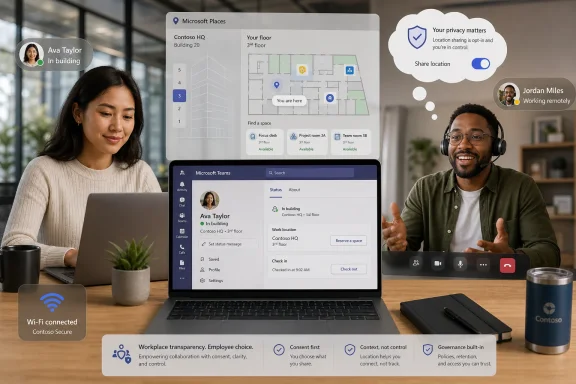
Microsoft began rolling out Workplace Check-in via Wi-Fi for Microsoft Teams and Microsoft Places in June 2026, letting organizations automatically update a worker’s office location when a Teams desktop client connects to a configured corporate wireless network. The feature arrives after months of delay, public unease, and Microsoft’s repeated insistence that this is workplace coordination rather than employee surveillance. That distinction is technically meaningful, but politically fragile. In hybrid work, the difference between “I can find my colleague” and “my employer can prove I was there” is not a product setting; it is a power relationship.
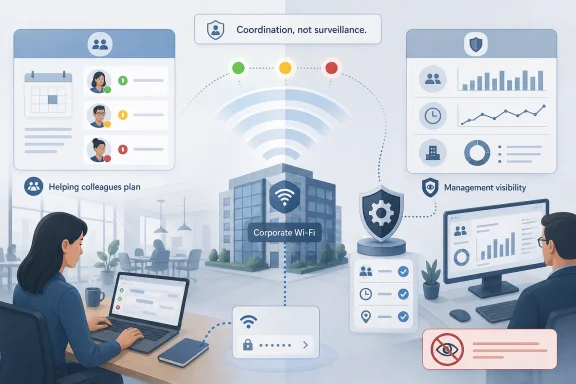
Teams has always been a presence machine. Green dot, yellow clock, red meeting badge, calendar inference, focus time, mobile availability: the app already converts workplace behavior into a visible signal. Workplace Check-in via Wi-Fi extends that logic from availability to place, and that is why the reaction has been sharper than the feature’s narrow technical description might suggest.
Microsoft’s framing is straightforward. If an employee walks into an office, opens a laptop, and connects to an approved corporate Wi-Fi network, Teams can update that user’s work location for the day. If buildings are configured in Microsoft Places, that signal can indicate a specific building rather than merely “in office.” If the device disconnects, Teams falls back on the user’s calendar schedule or manual settings rather than continuously following them around the premises.
That is not GPS tracking. It is not a heat map of a worker moving from desk to kitchen to meeting room. Microsoft’s documentation and executive messaging have been careful on this point, and the company has said the feature is not designed to monitor attendance or store historical location trails for administrators.
But the controversy was never only about whether Teams knows the latitude and longitude of your laptop. The controversy is that a collaboration platform used by millions of workers is adding another automated signal that can be interpreted by management. The fact that it operates at the building level does not make it socially neutral. In many offices, “in the building” is the only data point management wants.
The trouble is that “choice” in enterprise software rarely means the same thing for an employee as it does for a consumer. In a personal app, opt-in is a clean moral boundary. In a managed workplace, opt-in often means the employer decides whether the prompt exists, the default experience may be configured centrally, and the employee makes a decision inside a hierarchy that signs their paycheck.
Microsoft’s configuration model captures that tension. Admins can leave automatic work-location detection disabled. If they enable it, they can choose a mode that asks users to opt in, or a mode where users are informed that the feature is active and can opt out. That is a real control surface for IT, but it also means the strongest privacy posture depends on administrative policy, not merely individual preference.
This is why critics are not reassured by the phrase “users can opt out.” In a workplace with a strict return-to-office policy, declining to share location may itself become a signal. The worker who opts out is not necessarily invisible; they may simply become exceptional. The technology does not need to generate an attendance report to influence behavior if social pressure and managerial expectation do the rest.
Microsoft appears to have heard at least part of that complaint. The revised documentation emphasizes consent, default-off deployment, lack of historical admin reporting, and a collaboration-first rationale. Lan Ye, Microsoft’s president of Teamwork Experiences, used a June 2026 Reddit AMA to push back directly against the idea that Teams is designed to tattle on employees, saying Teams does not track movements or attendance and calling the feature neither monitoring nor surveillance.
That response is notable because it addresses the most inflammatory version of the criticism. It also leaves the harder version intact. A tool can be built for coordination and still be used in a culture of compliance. Enterprise software does not live inside the product team’s intent; it lives inside HR policy, manager incentives, and the quiet fear of being judged by a dashboard.
The result is a familiar Microsoft pattern. The company builds a capability that makes sense in a well-governed organization, documents the privacy boundaries, and then discovers that users evaluate it through the worst manager they have ever had. That may be unfair to the engineers. It is not irrational from the employee’s point of view.
That is a legitimate product problem. Hybrid work made office coordination harder. If half a team commutes on Tuesday and the other half shows up Wednesday, the office becomes expensive theater. A good workplace-location system can reduce wasted trips, improve room planning, and make in-person collaboration less accidental.
Wi-Fi check-in is attractive because it removes friction. Manual status updates are unreliable because humans forget, refuse, or update them inconsistently. Desk peripherals are useful only where desk booking is mature. Corporate Wi-Fi is already there, already managed, and already tied to buildings. From an IT architecture standpoint, it is the obvious signal.
The same obviousness is what makes it sensitive. The office has become a data source. Once buildings, networks, desks, calendars, and presence are all modeled in the Microsoft 365 graph of workplace activity, the line between coordination and analysis becomes thinner. Even if this particular feature does not expose historical attendance reports, it contributes to a world where the office is increasingly measured through software.
A cautious organization should treat Workplace Check-in as a policy launch, not a toggle. Employees need to know what is being collected, who can see it, whether it affects attendance expectations, whether opting out has consequences, and how long any derived data persists elsewhere. If the answer is “we are not sure,” the feature is not ready for production.
There is also a technical hygiene problem. Mapping SSIDs and BSSIDs to buildings sounds simple until someone has to maintain it across remodels, merged offices, shared floors, guest networks, and inconsistent wireless deployments. If the signal is wrong, users will not experience a neutral glitch. They will experience a workplace system misrepresenting where they are.
Admins should also think carefully about mode selection. Ask mode, where users explicitly opt in before Wi-Fi-based updates begin, is the cleaner trust posture. Inform mode may be more convenient for coordination, but it creates the predictable perception that management enabled location sharing first and asked questions later. In a sensitive workplace, that perception can matter as much as the underlying data flow.
Yet privacy is not only about precision. A building-level presence signal can still be sensitive if it confirms compliance with a three-day office mandate, reveals patterns around medical appointments, exposes which employees avoid certain locations, or creates pressure to be visible when deep work would be better done elsewhere. Low-resolution data can still have high-resolution consequences.
This is the uncomfortable truth behind modern workplace telemetry. Employers often do not need exact surveillance to change behavior. They need enough ambient visibility to make workers feel observable. Teams is already the daily interface for meetings, chat, calls, files, apps, and status; adding office location gives that interface a stronger managerial shadow, even if Microsoft never intended one.
The labor groups and privacy advocates objecting to the control structure are therefore arguing about institutional power, not packet capture. An employee’s right to opt out is weaker if the employer can normalize opting in. A feature that is harmless in a high-trust engineering culture may be toxic in a call center, sales floor, or compliance-heavy bureaucracy.
In that environment, every presence feature becomes political. A Teams indicator that says someone is in the office may help a colleague plan a whiteboard session. It may also help a manager challenge an employee’s version of the week. The same signal supports both use cases, and software cannot reliably separate them once deployed.
This is where Microsoft’s language of “coordination” starts to sound insufficient. Coordination is real, but it is not the only likely use. If an employer has mandated office attendance, a tool that automatically marks office presence is obviously relevant to enforcement, even if it was not built as an enforcement console. Pretending otherwise weakens Microsoft’s credibility with the very users it is trying to reassure.
The company’s best argument is that customers already have stronger tools for attendance enforcement if they want them. Badge systems, network access logs, endpoint management, and physical security records can all reveal office presence. Teams Workplace Check-in may be less invasive than many existing systems. But that does not make it benign; it makes it part of a larger ecosystem that workers increasingly experience as cumulative monitoring.
For Windows users, the feature’s reliance on the desktop client and operating-system location permission will raise familiar questions. Is this controlled by Windows location settings? Does it apply on macOS as well? What happens on personal devices? What if Wi-Fi is connected but the user is not actually working from that office? The answers may be documented, but the lived experience will be shaped by prompts, tenant policy, and whatever explanation IT provides.
The risk for Microsoft is that Teams becomes synonymous not just with collaboration but with workplace scrutiny. That brand problem has been building for years. Every performance complaint, every unwanted notification, every “away” status dispute, and every manager who treats presence as productivity contributes to a reservoir of mistrust. Wi-Fi check-in pours directly into it.
The irony is that the feature could be genuinely useful. Many hybrid teams do need better awareness of who is physically present. Nobody wants to commute for a meeting only to discover the relevant people stayed home. A humane implementation would make office presence a cooperative planning tool. A clumsy implementation will make it feel like a badge swipe with emoji.
That burden falls on organizations. Before enabling the feature, employers should publish a plain-language policy that distinguishes collaboration visibility from attendance enforcement. If Teams work location will not be used for discipline, say so. If it may be used to verify office attendance, say that too. Ambiguity will be read as a trap.
There is also a retention and secondary-use problem. Microsoft may not provide historical location reporting through this feature, but workplace data often leaks into screenshots, exports, compliance searches, manager notes, calendar analytics, and third-party processes. The official feature boundary is only one part of the actual data lifecycle.
For regulated industries, unions, works councils, and multinational employers, this is more than a vibes issue. Location-related workplace data can trigger legal and consultation obligations depending on jurisdiction. A global tenant toggle may be technically convenient and legally naive. Admins should involve privacy, legal, HR, and employee representatives before treating this as another Teams policy rollout.
Microsoft’s own configuration options point in that direction. Ask mode respects the idea that location sharing should begin with affirmative user action. Inform mode may still satisfy the letter of opt-out control, but it reverses the social burden. Employees must notice, understand, and decline a feature their employer has already activated for them.
IT departments should also avoid overpromising accuracy. Wi-Fi association is a signal, not a sworn affidavit. Devices sleep, roam, disconnect, connect to the wrong SSID, or remain online when a person has walked away. Buildings are messy. Networks are messier. If a manager treats Teams location as ground truth, the organization has converted a convenience feature into a liability.
The better managerial norm is to treat work location as coordination metadata. It can answer “is Alex likely in the office today?” It should not answer “prove Alex complied with policy.” If the business wants attendance enforcement, it should say so openly and use systems designed, governed, and audited for that purpose. Sneaking enforcement through a collaboration app is how trust dies by admin center.
 Microsoft Repackages Presence as Proof of Place
Teams has always been a presence machine. Green dot, yellow clock, red meeting badge, calendar inference, focus time, mobile availability: the app already converts workplace behavior into a visible signal. Workplace Check-in via Wi-Fi extends that logic from availability to place, and that is why the reaction has been sharper than the feature’s narrow technical description might suggest.Microsoft’s framing is straightforward. If an employee walks into an office, opens a laptop, and connects to an approved corporate Wi-Fi network, Teams can update that user’s work location for the day. If buildings are configured in Microsoft Places, that signal can indicate a specific building rather than merely “in office.” If the device disconnects, Teams falls back on the user’s calendar schedule or manual settings rather than continuously following them around the premises.
That is not GPS tracking. It is not a heat map of a worker moving from desk to kitchen to meeting room. Microsoft’s documentation and executive messaging have been careful on this point, and the company has said the feature is not designed to monitor attendance or store historical location trails for administrators.
But the controversy was never only about whether Teams knows the latitude and longitude of your laptop. The controversy is that a collaboration platform used by millions of workers is adding another automated signal that can be interpreted by management. The fact that it operates at the building level does not make it socially neutral. In many offices, “in the building” is the only data point management wants.
The Opt-In Story Has an Asterisk Big Enough for an Admin Center
Microsoft’s privacy pitch rests on three claims: the feature is off by default, tenant administrators must enable it, and users have a choice about whether to share their work location. Those details matter, especially in a Microsoft 365 environment where admins are rightly suspicious of surprise defaults and silent behavior changes.The trouble is that “choice” in enterprise software rarely means the same thing for an employee as it does for a consumer. In a personal app, opt-in is a clean moral boundary. In a managed workplace, opt-in often means the employer decides whether the prompt exists, the default experience may be configured centrally, and the employee makes a decision inside a hierarchy that signs their paycheck.
Microsoft’s configuration model captures that tension. Admins can leave automatic work-location detection disabled. If they enable it, they can choose a mode that asks users to opt in, or a mode where users are informed that the feature is active and can opt out. That is a real control surface for IT, but it also means the strongest privacy posture depends on administrative policy, not merely individual preference.
This is why critics are not reassured by the phrase “users can opt out.” In a workplace with a strict return-to-office policy, declining to share location may itself become a signal. The worker who opts out is not necessarily invisible; they may simply become exceptional. The technology does not need to generate an attendance report to influence behavior if social pressure and managerial expectation do the rest.
The 2025 Backlash Was a Warning, Not a Bug Report
The earlier version of this rollout became radioactive because it landed in the middle of a broader fight over hybrid work. By late 2025, many employers had moved from coaxing workers back into offices to measuring compliance. Badge swipes, desk bookings, VPN logs, meeting-room telemetry, and device-management data were already part of the corporate toolkit. Teams adding Wi-Fi-based check-in looked, to many employees, like one more layer in the same surveillance stack.Microsoft appears to have heard at least part of that complaint. The revised documentation emphasizes consent, default-off deployment, lack of historical admin reporting, and a collaboration-first rationale. Lan Ye, Microsoft’s president of Teamwork Experiences, used a June 2026 Reddit AMA to push back directly against the idea that Teams is designed to tattle on employees, saying Teams does not track movements or attendance and calling the feature neither monitoring nor surveillance.
That response is notable because it addresses the most inflammatory version of the criticism. It also leaves the harder version intact. A tool can be built for coordination and still be used in a culture of compliance. Enterprise software does not live inside the product team’s intent; it lives inside HR policy, manager incentives, and the quiet fear of being judged by a dashboard.
The result is a familiar Microsoft pattern. The company builds a capability that makes sense in a well-governed organization, documents the privacy boundaries, and then discovers that users evaluate it through the worst manager they have ever had. That may be unfair to the engineers. It is not irrational from the employee’s point of view.
Places Turns the Office Into a Software Object
The deeper story is not just Teams. It is Microsoft Places, the company’s attempt to make hybrid offices legible to Microsoft 365. Places connects calendars, desks, rooms, buildings, presence, and eventually Copilot-style recommendations into a system that can answer the question every hybrid worker asks: who is where, and when is it worth going in?That is a legitimate product problem. Hybrid work made office coordination harder. If half a team commutes on Tuesday and the other half shows up Wednesday, the office becomes expensive theater. A good workplace-location system can reduce wasted trips, improve room planning, and make in-person collaboration less accidental.
Wi-Fi check-in is attractive because it removes friction. Manual status updates are unreliable because humans forget, refuse, or update them inconsistently. Desk peripherals are useful only where desk booking is mature. Corporate Wi-Fi is already there, already managed, and already tied to buildings. From an IT architecture standpoint, it is the obvious signal.
The same obviousness is what makes it sensitive. The office has become a data source. Once buildings, networks, desks, calendars, and presence are all modeled in the Microsoft 365 graph of workplace activity, the line between coordination and analysis becomes thinner. Even if this particular feature does not expose historical attendance reports, it contributes to a world where the office is increasingly measured through software.
Admins Now Own the Trust Problem
For WindowsForum readers wearing the admin hat, the practical question is not whether Microsoft has written a perfect privacy statement. It is whether enabling this feature will create a support, compliance, or employee-relations headache. The answer depends less on PowerShell than on governance.A cautious organization should treat Workplace Check-in as a policy launch, not a toggle. Employees need to know what is being collected, who can see it, whether it affects attendance expectations, whether opting out has consequences, and how long any derived data persists elsewhere. If the answer is “we are not sure,” the feature is not ready for production.
There is also a technical hygiene problem. Mapping SSIDs and BSSIDs to buildings sounds simple until someone has to maintain it across remodels, merged offices, shared floors, guest networks, and inconsistent wireless deployments. If the signal is wrong, users will not experience a neutral glitch. They will experience a workplace system misrepresenting where they are.
Admins should also think carefully about mode selection. Ask mode, where users explicitly opt in before Wi-Fi-based updates begin, is the cleaner trust posture. Inform mode may be more convenient for coordination, but it creates the predictable perception that management enabled location sharing first and asked questions later. In a sensitive workplace, that perception can matter as much as the underlying data flow.
The Privacy Boundary Is Clearer Than the Labor Boundary
Microsoft can credibly say this is not a live location tracker. The feature depends on configured corporate wireless networks, works through Teams desktop behavior, and is aimed at updating workplace presence rather than producing a minute-by-minute movement trail. It is narrower than many angry summaries suggest.Yet privacy is not only about precision. A building-level presence signal can still be sensitive if it confirms compliance with a three-day office mandate, reveals patterns around medical appointments, exposes which employees avoid certain locations, or creates pressure to be visible when deep work would be better done elsewhere. Low-resolution data can still have high-resolution consequences.
This is the uncomfortable truth behind modern workplace telemetry. Employers often do not need exact surveillance to change behavior. They need enough ambient visibility to make workers feel observable. Teams is already the daily interface for meetings, chat, calls, files, apps, and status; adding office location gives that interface a stronger managerial shadow, even if Microsoft never intended one.
The labor groups and privacy advocates objecting to the control structure are therefore arguing about institutional power, not packet capture. An employee’s right to opt out is weaker if the employer can normalize opting in. A feature that is harmless in a high-trust engineering culture may be toxic in a call center, sales floor, or compliance-heavy bureaucracy.
The Return-to-Office War Keeps Finding New Dashboards
The timing is impossible to ignore. The last few years of hybrid work have turned return-to-office policies into a proxy fight over productivity, autonomy, real estate, and managerial identity. Executives want predictability. Employees want flexibility. Middle managers want clarity. IT is asked to make the ambiguity measurable.In that environment, every presence feature becomes political. A Teams indicator that says someone is in the office may help a colleague plan a whiteboard session. It may also help a manager challenge an employee’s version of the week. The same signal supports both use cases, and software cannot reliably separate them once deployed.
This is where Microsoft’s language of “coordination” starts to sound insufficient. Coordination is real, but it is not the only likely use. If an employer has mandated office attendance, a tool that automatically marks office presence is obviously relevant to enforcement, even if it was not built as an enforcement console. Pretending otherwise weakens Microsoft’s credibility with the very users it is trying to reassure.
The company’s best argument is that customers already have stronger tools for attendance enforcement if they want them. Badge systems, network access logs, endpoint management, and physical security records can all reveal office presence. Teams Workplace Check-in may be less invasive than many existing systems. But that does not make it benign; it makes it part of a larger ecosystem that workers increasingly experience as cumulative monitoring.
Windows Users Will Feel This Through Teams, Not Through Places
Most employees will not encounter this as a Microsoft Places architecture decision. They will see it in Teams, the app they already blame when a status light turns yellow during lunch or a call notification arrives after hours. That matters because Teams has become the emotional front end of Microsoft 365.For Windows users, the feature’s reliance on the desktop client and operating-system location permission will raise familiar questions. Is this controlled by Windows location settings? Does it apply on macOS as well? What happens on personal devices? What if Wi-Fi is connected but the user is not actually working from that office? The answers may be documented, but the lived experience will be shaped by prompts, tenant policy, and whatever explanation IT provides.
The risk for Microsoft is that Teams becomes synonymous not just with collaboration but with workplace scrutiny. That brand problem has been building for years. Every performance complaint, every unwanted notification, every “away” status dispute, and every manager who treats presence as productivity contributes to a reservoir of mistrust. Wi-Fi check-in pours directly into it.
The irony is that the feature could be genuinely useful. Many hybrid teams do need better awareness of who is physically present. Nobody wants to commute for a meeting only to discover the relevant people stayed home. A humane implementation would make office presence a cooperative planning tool. A clumsy implementation will make it feel like a badge swipe with emoji.
The Compliance Conversation Cannot Be Delegated to a Banner
Microsoft’s end-user banners and settings are necessary, but they cannot carry the whole ethical load. A banner can tell a user that workplace check-in is active or available. It cannot explain how a manager will interpret absence, whether HR will compare Teams presence with badge data, or whether opting out will be respected in practice.That burden falls on organizations. Before enabling the feature, employers should publish a plain-language policy that distinguishes collaboration visibility from attendance enforcement. If Teams work location will not be used for discipline, say so. If it may be used to verify office attendance, say that too. Ambiguity will be read as a trap.
There is also a retention and secondary-use problem. Microsoft may not provide historical location reporting through this feature, but workplace data often leaks into screenshots, exports, compliance searches, manager notes, calendar analytics, and third-party processes. The official feature boundary is only one part of the actual data lifecycle.
For regulated industries, unions, works councils, and multinational employers, this is more than a vibes issue. Location-related workplace data can trigger legal and consultation obligations depending on jurisdiction. A global tenant toggle may be technically convenient and legally naive. Admins should involve privacy, legal, HR, and employee representatives before treating this as another Teams policy rollout.
The Sensible Deployment Is the One That Gives Up Some Convenience
The safest version of Workplace Check-in is not the most automated one. It is the version that defaults to asking, explains itself clearly, limits visibility to peer coordination, and refuses to turn presence into performance evidence. That may reduce adoption. It may also be the difference between a useful hybrid-work feature and an internal revolt.Microsoft’s own configuration options point in that direction. Ask mode respects the idea that location sharing should begin with affirmative user action. Inform mode may still satisfy the letter of opt-out control, but it reverses the social burden. Employees must notice, understand, and decline a feature their employer has already activated for them.
IT departments should also avoid overpromising accuracy. Wi-Fi association is a signal, not a sworn affidavit. Devices sleep, roam, disconnect, connect to the wrong SSID, or remain online when a person has walked away. Buildings are messy. Networks are messier. If a manager treats Teams location as ground truth, the organization has converted a convenience feature into a liability.
The better managerial norm is to treat work location as coordination metadata. It can answer “is Alex likely in the office today?” It should not answer “prove Alex complied with policy.” If the business wants attendance enforcement, it should say so openly and use systems designed, governed, and audited for that purpose. Sneaking enforcement through a collaboration app is how trust dies by admin center.
This Is the Teams Check-In Windows Shops Should Not Sleepwalk Into
For organizations considering the feature, the headline is not simply that Microsoft turned on Wi-Fi location detection. The headline is that Microsoft has handed tenants a choice about the culture they want Teams to represent. The configuration is technical, but the consequence is managerial.- Workplace Check-in via Wi-Fi is disabled by default and requires tenant-level administrator action before it can affect users.
- The feature can update a user’s work location when Teams detects a connection to configured corporate Wi-Fi, with building-level precision if Microsoft Places has been mapped accordingly.
- Administrators can choose a user experience that asks employees to opt in or one that enables Wi-Fi check-in by default while allowing opt-out.
- Microsoft says the feature is for coordination, not attendance monitoring, and says it does not provide admin reporting views or historical movement tracking.
- The practical privacy risk is not only what Teams collects, but how managers may interpret visible office-presence signals in return-to-office environments.
- The least inflammatory deployment path is explicit opt-in, clear internal policy, narrow use for coworker coordination, and a written commitment against repurposing the signal for discipline without separate notice.
References
- Primary source: SOFX
Published: Mon, 22 Jun 2026 04:49:16 GMT
Microsoft Teams Rolls Out Wi-Fi Location Check-In After 2025 Pushback
Microsoft has begun rolling out Workplace Check-in via Wi-Fi for Teams and Microsoft Places, a feature that automatically updates anwww.sofx.com - Related coverage: techradar.com
I can't believe Microsoft Teams is still releasing this new feature which might rat you out to your boss | TechRadar
Microsoft Teams will use Wi-Fi connectivity to automatically update your work locationwww.techradar.com - Related coverage: pcworld.com
Microsoft Teams introduces office attendance tracking via Wi-Fi | PCWorld
Microsoft plans to launch a new Teams feature as early as June 2026 that will allow managers and colleagues to see whether an employee is in the office.www.pcworld.com - Related coverage: windowslatest.com
Microsoft Teams will auto-detect when you're at the office via Wi-Fi, roll out confirmed, but you can opt-out
Microsoft Teams is moving ahead with the rollout of a controversial feature that lets organizations track when you're at the office via Wi-Fi. www.windowslatest.com
- Related coverage: techspot.com
Microsoft Teams is getting Wi-Fi location "check-in," but it's less creepy than it sounds | TechSpot
Microsoft first introduced its location detection feature in December 2025. Now, the company has detailed how the capability will actually work and how users can control it....www.techspot.com - Official source: techcommunity.microsoft.com
Workplace presence, made effortless: Workplace check-in via Wi-Fi for Microsoft Places and Teams | Microsoft Community Hub
We’re introducing workplace check-in via Wi-Fi for Microsoft Places and Teams, designed to help employees coordinate in-person work by keeping their... techcommunity.microsoft.com
- Official source: learn.microsoft.com
Microsoft Places overview - Microsoft Places | Microsoft Learn
Learn more about managing a hybrid workspace with Microsoft Places.learn.microsoft.com - Related coverage: windowscentral.com
Microsoft Teams clarifies automatic work location tracking | Windows Central
Microsoft says Teams' "Automatic Update of work location" feature isn't for employee surveillance but rather collaboration.www.windowscentral.com - Related coverage: archynewsy.com
Microsoft Teams Adds Controversial Workplace Check-in and Location Tracking - Archynewsy
Microsoft has introduced a new "Workplace Presence" insight feature to Microsoft Teams, designed to help organizations track employee office attendance. www.archynewsy.com
- Related coverage: newsbytesapp.com
Microsoft Teams to launch opt-in workplace check-in using Wi-Fi
Microsoft's new Workplace Check-in feature for Teams uses Wi-Fi connections to share employees' locations with their teams, raising privacy concerns.www.newsbytesapp.com
- Related coverage: ad-hoc-news.de
Teams Workplace Check-In: Microsoft führt WLAN-basiertes Büro-Tracking ein
Microsofts „Workplace Check-In“ in Teams erkennt per WLAN, wer im Büro ist. Datenschützer warnen vor indirektem Druck auf Mitarbeiter.www.ad-hoc-news.de