
The advertised refurbished HP Elite desktop bundle is a budget Windows 11 Pro package built around an Intel Core i5, 16GB of RAM, a 1TB hard drive, Wi-Fi, and a 20-inch monitor, but the listing leaves out the one specification that matters most in 2026: the exact processor generation. That omission turns a seemingly straightforward bargain into a Windows compatibility and longevity puzzle. For buyers, the question is not whether this machine can open Word, Chrome, Teams, or a school portal. It almost certainly can. The question is whether it is a sensible Windows 11 PC, or merely an old business desktop wearing a modern operating system like a borrowed suit.
On paper, the offer has the familiar shape of a good refurbished-office-PC deal. HP Elite desktops were built for corporate fleets, not bargain-bin theatrics, and that usually means decent cases, serviceable internals, plentiful ports, and fewer novelty compromises than consumer towers. A Core i5 with 16GB of RAM is still enough for everyday productivity, especially when the alternative is a low-end new machine with 8GB of memory and a processor designed more for battery life than responsiveness.
But “Intel Core i5 at 3.20 GHz” is not a real buying specification in the Windows 11 era. Intel has sold Core i5 chips across many generations, socket types, thermal envelopes, and security baselines. A decade-old Core i5 can show a respectable clock speed while missing the platform features Microsoft wants for Windows 11 support.
That is the tension at the heart of this listing. It advertises Windows 11 Pro, which sounds reassuring, but Microsoft’s Windows 11 requirements are not satisfied by the words “Core i5” alone. They depend on a compatible 64-bit processor, TPM 2.0, Secure Boot capability, memory, storage, graphics support, and firmware configuration. A buyer who does not know the exact model number cannot know whether the machine is officially supported or merely capable of running Windows 11 through a workaround.
For WindowsForum readers, that difference matters. Unsupported Windows 11 installations may work today and still become a maintenance headache tomorrow. A cheap PC becomes less cheap if the first major feature update turns into a reinstall project, or if a driver stack inherited from an older corporate image starts behaving badly.
The problem is that “comes with Windows 11 Pro installed” is not the same as “is eligible for Windows 11 Pro.” Microsoft’s official requirements include TPM 2.0 and a supported CPU list that largely pushed older pre-2018 systems out of the normal upgrade path. Many HP Elite desktops from the Windows 7 and early Windows 10 fleet-refresh era are excellent little machines, but not all of them are Windows 11-era machines.
This is where refurbished listings often blur the line between function and support. A system can boot Windows 11, receive updates for now, and run everyday apps while still failing Microsoft’s compatibility checks. Enthusiasts may be comfortable with that bargain. A parent buying a school computer, a small business owner buying a reception desk PC, or a remote worker who just needs reliability should be more cautious.
The safest reading is simple: without the exact HP model number and exact CPU model, Windows 11 Pro should be treated as a claim to verify, not a guarantee to trust. Ask for the processor name as it appears in System Information, the TPM version, Secure Boot status, and the Windows activation status. If the seller cannot provide those, the buyer is being asked to accept the most important part of the deal on faith.
That memory also gives the refurbished HP some practical headroom. Office work, web apps, light accounting, school assignments, remote learning portals, video calls, and basic photo organization should all be within reach. For many users, RAM capacity has a bigger day-to-day impact than a modest CPU upgrade, particularly when the workload is mostly browser-bound.
But RAM cannot solve every problem. It does not make an unsupported processor supported. It does not turn a spinning hard drive into flash storage. It does not make a 20-inch LCD panel more comfortable for long work sessions if the resolution is low or the backlight is tired.
Still, 16GB is the reason this bundle deserves analysis rather than dismissal. Many refurbished desktop packages are hobbled by 4GB or 8GB configurations that make them feel obsolete almost immediately. This one, at least, starts from a memory baseline that still makes sense for general Windows use in 2026.
But as a boot drive for Windows 11, an HDD is the part most likely to make the computer feel old. Modern Windows spends much of its life touching small files, indexing content, scanning updates, writing logs, launching services, and juggling background tasks. Those operations punish mechanical latency far more than they reward raw capacity.
The result is a machine that may benchmark acceptably in one dimension and still feel sluggish in the moments users actually notice: startup, login, app launch, Windows Update cleanup, antivirus scans, and the first five minutes after waking from sleep. A Core i5 with 16GB of RAM can feel surprisingly spry with a SATA SSD. The same PC with a mechanical boot drive can feel as if it is dragging a filing cabinet across the floor.
That makes the HDD less a dealbreaker than a mandatory upgrade path. If the desktop has room for a 2.5-inch SATA SSD, the best version of this system is probably the one the buyer creates after purchase: install a 500GB or 1TB SSD as the boot drive, keep the HDD as secondary storage, and reinstall or clone Windows only after verifying activation and support status. The cost of that SSD should be mentally added to the purchase price before calling the bundle a bargain.
But older bundled monitors are often where refurbished deals hide their least exciting hardware. A 20-inch LCD may be perfectly usable for a kitchen desk or point-of-sale station, yet it may also be low-resolution, dim, thick-bezeled, and less comfortable than a modern 24-inch 1080p display. If the monitor is 1600x900 or worse, the desktop workspace will feel cramped almost immediately.
Wi-Fi is similarly useful but worth interrogating. “Built-in Wi-Fi” can mean a proper internal card, a tiny USB adapter, or an older wireless standard that technically connects but struggles with range and throughput. For a stationary desktop, Ethernet remains the better choice when available, particularly for video calls, remote work, and large Windows updates.
DisplayPort and Ethernet are positive signs because they suggest business-class origins. DisplayPort is common on HP Elite systems and makes it easier to connect modern monitors, though many low-cost displays still rely on HDMI. Buyers should check what cable is included, because the wrong port combination can turn a simple setup into an adapter hunt.
HP’s Elite-class machines also tend to be designed for predictable maintenance. Side panels come off, memory is accessible, storage bays are obvious, and the power supply is usually sized for the system as shipped. That is good news for anyone who wants to add an SSD, replace a CMOS battery, clean dust from the heatsink, or refresh thermal paste.
The drawback is expansion. Small-form-factor systems often use low-profile PCIe slots and modest power supplies. That makes them poor candidates for gaming GPUs, heavy workstation graphics, or elaborate storage builds. If a buyer imagines turning this into a gaming tower later, they are probably buying the wrong chassis.
For its natural role, though, the form factor makes sense. This is a desk PC, a family admin station, a schoolwork box, a church-office machine, a workshop terminal, or a spare system for remote access and document work. It should not be judged as a creator workstation or gaming rig unless the seller provides far more detail than the listing currently does.
But “tested and in good working condition” is a low bar. It may mean the machine powered on, booted Windows, and passed a quick inspection. It does not necessarily mean the HDD has a clean health history, the fans are dust-free, the BIOS is updated, the Windows license is properly transferred, or the included monitor has even brightness across the panel.
A serious refurbisher should be willing to state what was replaced, what was tested, and what warranty applies. The warranty is especially important because the most common failures on older desktops are not always visible during a quick demo. Storage devices fail. Fans get noisy. Power supplies age. Front USB ports loosen. CMOS batteries die and cause time or boot-order problems.
The best buyer attitude is neither paranoia nor blind trust. Treat the machine as a platform with unknown history. On first boot, check activation, run Windows Update, inspect Device Manager, review storage health with a reputable tool, verify TPM and Secure Boot, and create recovery media. That first hour determines whether the system becomes a dependable bargain or a recurring chore.
That is why Windows 11 Pro is not just a feature in the listing. It is the entire argument for buying the system in 2026. If the HP Elite is officially supported, the bundle is a plausible low-cost productivity station. If it is unsupported, then the buyer is accepting a machine whose future depends on Microsoft’s tolerance, community workarounds, and the user’s willingness to troubleshoot.
There is a defensible enthusiast case for unsupported hardware. Plenty of older Core i5 desktops are stable, repairable, and fast enough with SSDs. Linux, ChromeOS Flex, and carefully maintained Windows installations can extend their usefulness. But that is not the same proposition as selling a general-purpose Windows 11 Pro desktop to ordinary users.
The danger is not that the PC will explode on the desk. The danger is softer and more familiar: a user buys what appears to be a current Windows system, only to discover later that a feature update, security baseline, driver issue, or app requirement exposes the age of the platform. Cheap hardware often delays the bill rather than eliminating it.
The wrong buyer is just as clear. Anyone expecting modern gaming, AI acceleration, video editing, CAD work, heavy multitasking across multiple high-resolution displays, or years of hands-off Windows support should look elsewhere. The system’s value depends on modest expectations and verified specifications.
Price also matters, though the listing as presented here is more descriptive than transparent. A refurbished desktop with monitor can be a good deal at one price and a trap at another. If a buyer must immediately add an SSD, replace the monitor, buy adapters, and accept no meaningful warranty, the “full setup” premium evaporates quickly.
In other words, this should be bought like a used business tool, not a mystery box. The buyer should ask what job it must do, how long it must do it, and what failure would cost. A cheap PC for occasional household use is one thing. A cheap PC that becomes the only workstation for a small business is another.
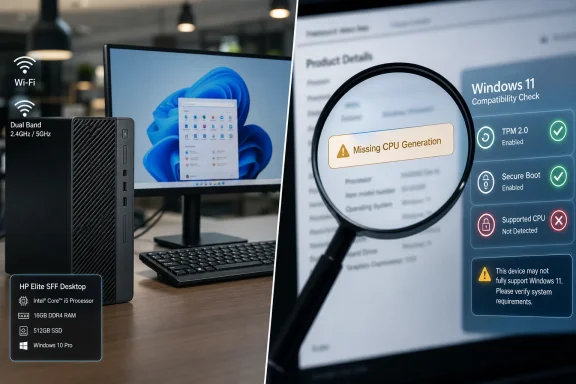 The Refurbished Desktop Deal Is Really a Bet on the Missing CPU
On paper, the offer has the familiar shape of a good refurbished-office-PC deal. HP Elite desktops were built for corporate fleets, not bargain-bin theatrics, and that usually means decent cases, serviceable internals, plentiful ports, and fewer novelty compromises than consumer towers. A Core i5 with 16GB of RAM is still enough for everyday productivity, especially when the alternative is a low-end new machine with 8GB of memory and a processor designed more for battery life than responsiveness.But “Intel Core i5 at 3.20 GHz” is not a real buying specification in the Windows 11 era. Intel has sold Core i5 chips across many generations, socket types, thermal envelopes, and security baselines. A decade-old Core i5 can show a respectable clock speed while missing the platform features Microsoft wants for Windows 11 support.
That is the tension at the heart of this listing. It advertises Windows 11 Pro, which sounds reassuring, but Microsoft’s Windows 11 requirements are not satisfied by the words “Core i5” alone. They depend on a compatible 64-bit processor, TPM 2.0, Secure Boot capability, memory, storage, graphics support, and firmware configuration. A buyer who does not know the exact model number cannot know whether the machine is officially supported or merely capable of running Windows 11 through a workaround.
For WindowsForum readers, that difference matters. Unsupported Windows 11 installations may work today and still become a maintenance headache tomorrow. A cheap PC becomes less cheap if the first major feature update turns into a reinstall project, or if a driver stack inherited from an older corporate image starts behaving badly.
Windows 11 Pro Is the Headline, but Support Is the Story
Windows 11 Pro has real value on a refurbished business desktop. It brings BitLocker management, Remote Desktop host capability, Group Policy support, Hyper-V, domain join, and other features that matter to small offices, labs, power users, and households that treat a PC as infrastructure rather than an appliance. If the license is legitimate and properly activated, it is a meaningful part of the bundle.The problem is that “comes with Windows 11 Pro installed” is not the same as “is eligible for Windows 11 Pro.” Microsoft’s official requirements include TPM 2.0 and a supported CPU list that largely pushed older pre-2018 systems out of the normal upgrade path. Many HP Elite desktops from the Windows 7 and early Windows 10 fleet-refresh era are excellent little machines, but not all of them are Windows 11-era machines.
This is where refurbished listings often blur the line between function and support. A system can boot Windows 11, receive updates for now, and run everyday apps while still failing Microsoft’s compatibility checks. Enthusiasts may be comfortable with that bargain. A parent buying a school computer, a small business owner buying a reception desk PC, or a remote worker who just needs reliability should be more cautious.
The safest reading is simple: without the exact HP model number and exact CPU model, Windows 11 Pro should be treated as a claim to verify, not a guarantee to trust. Ask for the processor name as it appears in System Information, the TPM version, Secure Boot status, and the Windows activation status. If the seller cannot provide those, the buyer is being asked to accept the most important part of the deal on faith.
Sixteen Gigabytes of RAM Saves the Machine From Feeling Ancient
The strongest part of the configuration is the 16GB of RAM. For Windows 11, that is the difference between a machine that merely runs and one that can survive modern multitasking without collapsing into swap-file misery. A browser with a dozen tabs, Outlook, Teams, a PDF viewer, OneDrive sync, and an antivirus agent can make 8GB feel cramped very quickly.That memory also gives the refurbished HP some practical headroom. Office work, web apps, light accounting, school assignments, remote learning portals, video calls, and basic photo organization should all be within reach. For many users, RAM capacity has a bigger day-to-day impact than a modest CPU upgrade, particularly when the workload is mostly browser-bound.
But RAM cannot solve every problem. It does not make an unsupported processor supported. It does not turn a spinning hard drive into flash storage. It does not make a 20-inch LCD panel more comfortable for long work sessions if the resolution is low or the backlight is tired.
Still, 16GB is the reason this bundle deserves analysis rather than dismissal. Many refurbished desktop packages are hobbled by 4GB or 8GB configurations that make them feel obsolete almost immediately. This one, at least, starts from a memory baseline that still makes sense for general Windows use in 2026.
The 1TB Hard Drive Is Spacious, Cheap, and the Wrong Kind of Fast
The 1TB HDD is the most obvious compromise. It gives the buyer plenty of space for documents, downloads, photos, and local backups, which is useful in a household or small office where cloud storage is not the whole answer. For bulk capacity, hard drives remain economical and understandable.But as a boot drive for Windows 11, an HDD is the part most likely to make the computer feel old. Modern Windows spends much of its life touching small files, indexing content, scanning updates, writing logs, launching services, and juggling background tasks. Those operations punish mechanical latency far more than they reward raw capacity.
The result is a machine that may benchmark acceptably in one dimension and still feel sluggish in the moments users actually notice: startup, login, app launch, Windows Update cleanup, antivirus scans, and the first five minutes after waking from sleep. A Core i5 with 16GB of RAM can feel surprisingly spry with a SATA SSD. The same PC with a mechanical boot drive can feel as if it is dragging a filing cabinet across the floor.
That makes the HDD less a dealbreaker than a mandatory upgrade path. If the desktop has room for a 2.5-inch SATA SSD, the best version of this system is probably the one the buyer creates after purchase: install a 500GB or 1TB SSD as the boot drive, keep the HDD as secondary storage, and reinstall or clone Windows only after verifying activation and support status. The cost of that SSD should be mentally added to the purchase price before calling the bundle a bargain.
The Monitor and Wi-Fi Make It a Bundle, Not Necessarily a Better PC
The included 20-inch LCD monitor changes the psychology of the deal. A complete setup feels easier to justify than a bare desktop, especially for students, home offices, and family members who do not want to shop for cables, displays, adapters, keyboards, and wireless dongles. “Just plug it in and get to work” is a powerful sales pitch because it removes friction.But older bundled monitors are often where refurbished deals hide their least exciting hardware. A 20-inch LCD may be perfectly usable for a kitchen desk or point-of-sale station, yet it may also be low-resolution, dim, thick-bezeled, and less comfortable than a modern 24-inch 1080p display. If the monitor is 1600x900 or worse, the desktop workspace will feel cramped almost immediately.
Wi-Fi is similarly useful but worth interrogating. “Built-in Wi-Fi” can mean a proper internal card, a tiny USB adapter, or an older wireless standard that technically connects but struggles with range and throughput. For a stationary desktop, Ethernet remains the better choice when available, particularly for video calls, remote work, and large Windows updates.
DisplayPort and Ethernet are positive signs because they suggest business-class origins. DisplayPort is common on HP Elite systems and makes it easier to connect modern monitors, though many low-cost displays still rely on HDMI. Buyers should check what cable is included, because the wrong port combination can turn a simple setup into an adapter hunt.
Small Form Factor Is a Strength Until It Is Time to Upgrade
The small-form-factor desktop is one of the great survivors of corporate computing. It is compact, quiet enough for an office, and often easier to service than a laptop. For users who do not need portability, a used business desktop can be a better value than a used notebook because it avoids battery wear, fragile hinges, and heat-soaked compact designs.HP’s Elite-class machines also tend to be designed for predictable maintenance. Side panels come off, memory is accessible, storage bays are obvious, and the power supply is usually sized for the system as shipped. That is good news for anyone who wants to add an SSD, replace a CMOS battery, clean dust from the heatsink, or refresh thermal paste.
The drawback is expansion. Small-form-factor systems often use low-profile PCIe slots and modest power supplies. That makes them poor candidates for gaming GPUs, heavy workstation graphics, or elaborate storage builds. If a buyer imagines turning this into a gaming tower later, they are probably buying the wrong chassis.
For its natural role, though, the form factor makes sense. This is a desk PC, a family admin station, a schoolwork box, a church-office machine, a workshop terminal, or a spare system for remote access and document work. It should not be judged as a creator workstation or gaming rig unless the seller provides far more detail than the listing currently does.
The Refurbished Label Should Trigger a Checklist, Not Fear
Refurbished business PCs are not inherently risky. In many cases, they are among the sanest ways to buy computing power cheaply. Corporate desktops often lived in climate-controlled offices, ran predictable workloads, and were replaced on accounting schedules rather than because they failed.But “tested and in good working condition” is a low bar. It may mean the machine powered on, booted Windows, and passed a quick inspection. It does not necessarily mean the HDD has a clean health history, the fans are dust-free, the BIOS is updated, the Windows license is properly transferred, or the included monitor has even brightness across the panel.
A serious refurbisher should be willing to state what was replaced, what was tested, and what warranty applies. The warranty is especially important because the most common failures on older desktops are not always visible during a quick demo. Storage devices fail. Fans get noisy. Power supplies age. Front USB ports loosen. CMOS batteries die and cause time or boot-order problems.
The best buyer attitude is neither paranoia nor blind trust. Treat the machine as a platform with unknown history. On first boot, check activation, run Windows Update, inspect Device Manager, review storage health with a reputable tool, verify TPM and Secure Boot, and create recovery media. That first hour determines whether the system becomes a dependable bargain or a recurring chore.
The Windows 10 Deadline Still Haunts Deals Like This
This sort of listing exists in the shadow of the Windows 10 transition. As Windows 10’s mainstream support era ended in October 2025, millions of older PCs became less attractive unless they could make the jump to Windows 11. That market pressure created a strange refurbished ecosystem: older business desktops are still physically useful, but their software legitimacy depends on details many sellers do not foreground.That is why Windows 11 Pro is not just a feature in the listing. It is the entire argument for buying the system in 2026. If the HP Elite is officially supported, the bundle is a plausible low-cost productivity station. If it is unsupported, then the buyer is accepting a machine whose future depends on Microsoft’s tolerance, community workarounds, and the user’s willingness to troubleshoot.
There is a defensible enthusiast case for unsupported hardware. Plenty of older Core i5 desktops are stable, repairable, and fast enough with SSDs. Linux, ChromeOS Flex, and carefully maintained Windows installations can extend their usefulness. But that is not the same proposition as selling a general-purpose Windows 11 Pro desktop to ordinary users.
The danger is not that the PC will explode on the desk. The danger is softer and more familiar: a user buys what appears to be a current Windows system, only to discover later that a feature update, security baseline, driver issue, or app requirement exposes the age of the platform. Cheap hardware often delays the bill rather than eliminating it.
The Right Buyer Will Be Practical, Not Hopeful
There is a buyer for this bundle. A student who needs web access, document editing, and printing may be well served. A home user who wants a fixed desktop for bills, email, photos, and light browsing may find it more comfortable than a bargain laptop. A small office that needs a secondary workstation, label-printing station, or front-desk terminal may appreciate the ports and Windows Pro features.The wrong buyer is just as clear. Anyone expecting modern gaming, AI acceleration, video editing, CAD work, heavy multitasking across multiple high-resolution displays, or years of hands-off Windows support should look elsewhere. The system’s value depends on modest expectations and verified specifications.
Price also matters, though the listing as presented here is more descriptive than transparent. A refurbished desktop with monitor can be a good deal at one price and a trap at another. If a buyer must immediately add an SSD, replace the monitor, buy adapters, and accept no meaningful warranty, the “full setup” premium evaporates quickly.
In other words, this should be bought like a used business tool, not a mystery box. The buyer should ask what job it must do, how long it must do it, and what failure would cost. A cheap PC for occasional household use is one thing. A cheap PC that becomes the only workstation for a small business is another.
The Bargain Lives or Dies on Five Verifications
The advertised configuration has enough promise to be worth a closer look, but not enough detail to be bought blindly. Before money changes hands, the buyer should reduce the uncertainty to facts.- The seller should provide the exact HP Elite model and the exact Intel Core i5 processor model, not just the clock speed.
- The system should show TPM 2.0, Secure Boot capability, and official Windows 11 compatibility before the installed copy of Windows 11 Pro is treated as a selling point.
- Windows 11 Pro should be activated with a legitimate digital license or product key that survives a reset or clean installation.
- The 1TB hard drive should have a clean health report, but buyers should still budget for an SSD if the HDD is the boot drive.
- The included 20-inch monitor, Wi-Fi hardware, power adapter or cable, video cable, and warranty terms should be confirmed as part of the actual bundle.
- The machine should be tested after purchase with Windows Update, Device Manager, storage diagnostics, and a basic workload that resembles how it will really be used.
References
- Primary source: Santo André BIZ
Published: 2026-06-21T23:10:09.866473
Santo André
Notícias sobre Santo André. Empregos, política, curiosidades, prestação de serviços e memória. santoandre.biz
- Official source: learn.microsoft.com
Windows processor requirements Windows 11 supported Intel processors | Microsoft Learn
This specification details the Intel processors that can be used with Windows 11 customer systems that include Windows products, including custom images.learn.microsoft.com - Official source: microsoft.com
Windows 11 Specs and System Requirements | Microsoft Windows
View Windows 11 specs, system requirements, and features from Microsoft. Learn about the device specifications, versions, and languages available for Windows 11.www.microsoft.com - Official source: support.microsoft.com
Requisitos del sistema de Windows 11 - Soporte técnico de Microsoft
Obtén información sobre Windows 11 requisitos mínimos del sistema y cómo evaluar la idoneidad para la actualización.support.microsoft.com - Related coverage: windowscentral.com
Unsupported Windows 10 PC gets a surprise Windows 11 upgrade | Windows Central
A Windows 10 user reportedly received an offer to upgrade to Windows 11 despite having a TPM 2.0 chip disabled on their PC.www.windowscentral.com - Related coverage: tomshardware.com
How to Bypass Windows 11's TPM, CPU and RAM Requirements | Tom's Hardware
Use simple utilities to install Windows 11 on any PC.www.tomshardware.com
