

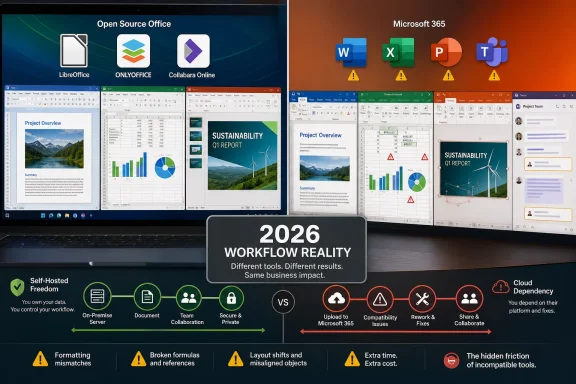
The Free Office Dream Now Has Real Software Behind It
It would be lazy to dismiss open-source office suites as hobbyist toys. LibreOffice is not a weekend project duct-taped together by idealists; it is a mature descendant of OpenOffice.org, stewarded by The Document Foundation, shipped across Windows, macOS, and Linux, and updated with the boring regularity that real software requires. Writer, Calc, Impress, Base, Draw, and Math cover the expected productivity-suite terrain with enough competence that many users could move in and get work done immediately.
ONLYOFFICE has taken a different route to respectability. Its desktop editors are open source, and its interface borrows enough visual grammar from Microsoft Office that the first hour feels less like switching religions and more like changing hotels. It is particularly attractive for people who mostly handle Microsoft-style files but dislike Microsoft subscriptions, Microsoft accounts, or the gravity well of Microsoft 365.
Collabora Online and ONLYOFFICE Docs add another layer to the story. Pair them with Nextcloud or another self-hosted platform, and suddenly the open-source Office argument is not just about replacing Word on a laptop. It becomes a pitch for replacing Google Workspace and Microsoft 365 with something an organization can host, inspect, govern, and adapt.
That matters. Schools, public agencies, charities, small businesses, and privacy-minded professionals have legitimate reasons to avoid recurring license fees and cloud lock-in. The open-source Office ecosystem is not an ideological pamphlet in search of an application; it is a practical toolkit with real users and real institutional value.
The problem is that office suites are not judged by how well they handle a blank page. They are judged by how well they survive contact with other people’s files.
Microsoft Won the Format War by Making Compatibility a Daily Chore
The central fact of productivity software is not that Word is beloved. It is that Word documents are everywhere. The same is true of Excel spreadsheets and PowerPoint decks, which have become not merely file formats but business customs encoded as software.
LibreOffice supports Microsoft Office formats, including DOCX, XLSX, and PPTX. ONLYOFFICE markets itself even more aggressively around Microsoft Office compatibility. Both claims are true enough to be useful and incomplete enough to be dangerous.
The trouble shows up in the margins, literally and figuratively. A table shifts. A heading style mutates. A font substitution looks harmless until pagination changes. A comment thread survives the trip but not quite in the form the sender expected. Track changes appear, but the reviewer’s intent is wrapped in enough formatting weirdness that someone has to stop and inspect the file instead of trusting it.
None of this matters much when the document is disposable. A two-page memo, a personal budget, a school worksheet, or a family slideshow can tolerate minor drift. The open-source suites shine in exactly these situations because the stakes are low and the user controls the workflow.
Professional documents are different. Contracts, grant applications, RFP responses, board packets, regulated reports, and client deliverables are social artifacts as much as technical ones. If a file returns looking wrong, the explanation “my office suite handled the format differently” may be accurate, but it is not reassuring.
This is where Microsoft’s advantage becomes self-reinforcing. Because so many organizations standardize on Microsoft Office, the safest way to preserve a Microsoft Office document is still to use Microsoft Office. Compatibility is not a feature in that world; it is an expectation so basic that people notice it only when it fails.
Excel Is the Moat That Free Suites Still Cannot Cross
Word compatibility gets the headlines because malformed documents are easy to see. Excel compatibility is the deeper trap because spreadsheets often hide their complexity until something breaks. A workbook can look ordinary while carrying years of accumulated formulas, named ranges, pivot tables, external links, conditional formatting, data validation rules, and macros that nobody fully understands anymore.
LibreOffice Calc is an impressive spreadsheet application. For conventional calculations, charts, filters, and small-business bookkeeping, it can be perfectly adequate. ONLYOFFICE Spreadsheet Editor likewise handles many common XLSX workflows with a smoother Microsoft-like surface.
But Excel is not just a spreadsheet; in many companies, it is the unofficial application platform. It is where finance teams build models, operations teams track logistics, HR teams manage templates, and technically inclined employees create automation long before IT knows a process exists. That shadow infrastructure is messy, fragile, and absolutely real.
The hardest wall is VBA. Microsoft’s macro ecosystem has decades of institutional sediment behind it, and countless workbooks rely on scripts that were written for Excel specifically. LibreOffice has its own scripting capabilities and can preserve some macros in some scenarios, but “can open the file” is not the same as “can run this business process with confidence.”
This is why spreadsheet migration projects so often begin with optimism and end with an inventory. The basic files move first. The dangerous files are discovered later. Then come the exceptions, the department-specific workbooks, the undocumented automations, and the awkward realization that the license fee was not paying merely for a grid of cells.
Excel is Microsoft’s most durable productivity moat because it is both a product and a folk programming environment. Open-source alternatives can compete with the product. Competing with the folk infrastructure is another matter entirely.
PowerPoint Compatibility Fails in the Room, Not at the Desk
Presentations are deceptively forgiving until they are not. A slide deck that opens in LibreOffice Impress or ONLYOFFICE may look acceptable during a quick skim, especially if it uses simple layouts, static images, and basic transitions. That is enough for many classroom and internal uses.
The moment a deck leans on PowerPoint-specific behavior, the risk rises. Animations, embedded media, SmartArt, custom fonts, master layouts, transitions, and precise object positioning can all become compatibility fault lines. A deck that looked polished in PowerPoint may become subtly awkward elsewhere, and subtle awkwardness is exactly what presenters do not want when a meeting starts.
This is not merely aesthetic. Presentation software is performance software. The file is part script, part stage prop, part confidence device. When a build sequence misfires or a chart renders slightly wrong in front of a client, the presenter experiences the failure as public, not technical.
Open-source tools can create perfectly good presentations from scratch. They are much less stressful when the entire workflow stays inside the same suite. But that condition is increasingly rare in professional settings, where decks move among teams, agencies, clients, vendors, and executives with no shared commitment to open standards.
The irony is that PowerPoint’s excesses make compatibility harder while also making PowerPoint harder to replace. Many users would be better off with simpler decks. But as long as the dominant tool encourages complex decks, alternatives must parse that complexity or take the blame for not doing so.
Collaboration Is Where the Suite Becomes the Platform
The old Office debate was about desktop applications. The modern Office debate is about infrastructure. Microsoft 365 bundles the familiar apps with OneDrive, SharePoint, Teams, Exchange, identity management, compliance features, mobile access, web editing, and increasingly Copilot-infused automation. Whether one likes that bundle is almost beside the point; it is the bundle that many organizations now buy.
Open-source alternatives can reproduce parts of this stack. Nextcloud plus Collabora Online or ONLYOFFICE Docs can offer document storage, browser-based editing, and collaboration under an organization’s control. For privacy-conscious deployments, European digital-sovereignty projects, and self-hosting enthusiasts, that is a serious proposition.
But self-hosting is never free. Someone must patch it, monitor it, back it up, secure it, integrate authentication, manage storage, support users, and explain why co-authoring behaves differently from the Microsoft workflow people already know. In a small team with technical confidence, that can be empowering. In a larger organization, it can turn the Office replacement into another platform to administer.
Microsoft’s advantage is not that Teams is universally loved or SharePoint is elegant. It is that the pieces are already wired together in ways that purchasing departments and IT administrators understand. The same identity signs into mail, chat, storage, meetings, mobile apps, and document editing. The experience is imperfect, but it is legible.
That is the platform effect open-source suites struggle to counter. A better word processor does not automatically replace a collaboration environment. A cheaper spreadsheet does not replace a governance model. A self-hosted editor does not replace the accumulated convenience of a vendor stack that has spent years inserting itself into organizational muscle memory.
The Subscription Looks Worse Until You Price the Friction
The strongest argument against Microsoft 365 is obvious: renting productivity software forever feels bad. For users who remember buying Office once and using it for years, the subscription model can look like a tax on basic computing. The resentment is not irrational.
But subscriptions compete against time, not just against free downloads. If Microsoft 365 Personal costs roughly the price of a couple of coffees each month and includes Word, Excel, PowerPoint, OneNote, Outlook features, OneDrive storage, and mobile/web access, the economic question changes. The comparison is no longer “free versus paid.” It is “free plus friction versus paid plus predictability.”
For a student writing papers in a mostly self-contained workflow, the friction may be minimal. For a retiree managing household files, LibreOffice may be more than enough. For a Linux user who prefers open formats and rarely exchanges complex Office files, Microsoft 365 may be unnecessary overhead.
For a consultant, administrator, lawyer, analyst, project manager, or job seeker exchanging files with Microsoft-centric organizations, the calculation is harsher. One corrupted layout before a deadline can wipe out months of subscription savings. One macro-dependent workbook that will not run can turn a philosophical preference into a business problem.
This is where the How-To Geek experience resonates because it is so ordinary. The writer did not discover that open-source suites were unusable. He discovered that they were good until the moments that mattered most, and those moments were expensive in attention. Many users do not return to Microsoft because they love it; they return because they are tired.
Open Source Still Wins When the Workflow Belongs to You
The case for open-source Office is strongest where the user or organization controls the whole document lifecycle. If files are created, edited, shared, archived, and printed within an open-source workflow, the compatibility problem shrinks dramatically. ODF becomes a sane default rather than a political statement.
That is why LibreOffice remains important. It gives individuals and institutions a full productivity suite without asking them to accept a Microsoft account, a cloud dependency, telemetry concerns, or recurring fees. It keeps competitive pressure on Microsoft and preserves a viable path for users who cannot or will not participate in the Microsoft 365 model.
Governments and public-sector organizations have an additional reason to care. Document formats are not neutral when public records are involved. If citizens, agencies, and courts depend on proprietary implementation details to access official documents, the software vendor becomes part of the civic infrastructure. Open formats and open-source suites provide a counterweight, even when migration is difficult.
There is also an educational argument. Teaching students that productivity equals Microsoft Office narrows their understanding of computing. LibreOffice, ONLYOFFICE, and other alternatives show that documents are not magic objects owned by one vendor. They are structured files, interpreted by software, shaped by standards, and distorted by market power.
Still, those arguments do not erase the daily reality of mixed environments. Open source wins most cleanly where there is governance, discipline, and a willingness to standardize on open formats. It struggles where users must constantly interoperate with Microsoft’s world on Microsoft’s terms.
The Ideological Argument Is Stronger Than the Convenience Argument
The best reason to choose open-source Office may not be that it is easier. Often, it is not. The best reason is that software freedom, inspectability, local control, and resistance to lock-in matter enough to justify inconvenience.
That is a perfectly respectable position. Many of the best choices in technology are not the most convenient ones. Running Linux on the desktop, self-hosting services, using encrypted email, blocking invasive telemetry, or avoiding platform monopolies all impose some cost. The point is not that the cost is imaginary; the point is that the user believes the trade is worth making.
What weakens the open-source Office pitch is pretending there is no trade. A user who switches from Microsoft 365 to LibreOffice and mostly works alone may experience the transition as painless. Another user who lives in tracked-changes negotiations, Excel automation, and PowerPoint reviews may experience the same switch as death by a thousand paper cuts.
That difference should be stated plainly. Open-source advocates do their cause no favors by minimizing compatibility failures as user error or Microsoft sabotage alone. Microsoft’s market power is absolutely part of the story, but users still have work to finish by Friday.
The honest pitch is more durable: open-source suites are capable, improving, and strategically important, but they demand awareness of workflow boundaries. If your world can be made open, they may serve you beautifully. If your world is already a Microsoft document exchange, they may make you the compatibility department.
Microsoft’s Real Product Is Certainty
Microsoft Office is not always the best tool in a narrow design sense. Word can be fussy, Excel can be dangerous, PowerPoint can encourage theatrical nonsense, Outlook can feel like a workplace simulator from which there is no escape, and Teams has generated enough user irritation to power a small datacenter. Yet Microsoft 365 continues to win because its real product is certainty.
The certainty is not absolute. Microsoft has outages. Sync conflicts happen. Office documents still corrupt. Teams meetings still find new ways to humble otherwise competent adults. But the baseline expectation remains that a Microsoft-authored file will behave most predictably inside Microsoft’s own apps and services.
That expectation has enormous value. It means users spend less time wondering whether a formatting glitch is their fault. It means IT departments can point to a standard supported stack. It means recruiters, clients, auditors, teachers, and vendors can exchange files without a preliminary negotiation over formats.
This is a network effect disguised as productivity. The more people use Microsoft Office, the more costly it is to be the person who does not. The more costly it is to be the person who does not, the more people keep paying Microsoft. The suite’s dominance is not just a consequence of product quality; it is a consequence of social coordination.
Open-source alternatives can chip away at this only by winning clusters, not isolated individuals. A whole school district can standardize on LibreOffice. A company can mandate ODF internally. A technical team can build a Nextcloud-and-Collabora workflow. But a lone worker surrounded by DOCX, XLSX, and PPTX files is not migrating an ecosystem. He is swimming upstream.
Windows Users Sit at the Center of the Compromise
For WindowsForum readers, the issue lands in a particularly familiar place. Windows has always been the platform of pragmatic compromise: open enough to run almost anything, commercial enough to be shaped by the vendors that dominate it, and popular enough that compatibility often matters more than purity. Office alternatives on Windows inherit that contradiction.
LibreOffice on Windows is easy to install and perfectly usable. ONLYOFFICE Desktop Editors feel at home on Windows in a way that will reassure Microsoft Office veterans. WPS Office, while not open source, further complicates the landscape by offering a familiar interface and strong format compatibility for users who care more about price than software freedom.
But Windows users are also the users most likely to be surrounded by Microsoft Office defaults. The file associations, workplace expectations, OneDrive prompts, Teams meetings, Outlook calendars, and Microsoft account nudges all point in the same direction. The operating system does not force Microsoft 365 on everyone, but the ecosystem makes it the path of least resistance.
That creates an odd split. Windows is one of the best platforms for testing Office alternatives because the software is available and easy to compare. It is also one of the hardest platforms on which to escape Microsoft Office culturally, because so much of the surrounding workflow assumes it.
The decision, then, should not be framed as loyalty versus betrayal. It is a deployment question. If LibreOffice or ONLYOFFICE matches the files you actually touch, use them proudly. If Microsoft 365 saves you hours of avoidable cleanup, paying for it is not a moral failure.
The Article’s Quiet Confession Is the One Microsoft Counts On
The How-To Geek piece is persuasive because its conclusion is not triumphant. There is no grand conversion, no dramatic denunciation of open source, no claim that LibreOffice is useless. The writer simply tries the alternatives, appreciates them, hits the limits, and renews Microsoft 365.
That is exactly the kind of user behavior Microsoft’s model depends on. The company does not need every customer to adore the subscription. It needs the subscription to feel less annoying than the alternative. In productivity software, that is often enough.
There is a lesson here for open-source projects as well. The next frontier is not merely adding features. It is reducing the number of moments when a user has to think about the suite at all. Compatibility failures, collaboration quirks, font issues, and macro gaps are not edge cases to the people who encounter them under deadline pressure.
There is also a lesson for users tempted by a clean break. Run a pilot before making a declaration. Test the ugliest files you actually use, not the clean files you wish you used. Open old spreadsheets, shared templates, tracked-change documents, PowerPoint decks from clients, and anything with macros. If those survive, your odds improve.
The open-source Office ecosystem deserves respect precisely because it has become good enough for this test to be meaningful. A decade ago, many users could dismiss the idea before lunch. In 2026, the right answer is more contingent: it depends on documents, collaborators, automation, governance, and tolerance for friction.
The Renewal Button Tells the Whole Story
The practical lesson from a month inside open-source Office is not that free software failed. It is that Microsoft’s formats, workflows, and collaboration services remain the terrain on which most office work is conducted. Anyone choosing an alternative should do so with a clear-eyed view of where the traps are.
- LibreOffice is the strongest general-purpose open-source replacement for users who control their own documents or can standardize on open formats.
- ONLYOFFICE offers a more Microsoft-like interface and often feels smoother for users moving between DOCX, XLSX, and PPTX files.
- Excel automation, especially VBA-dependent workbooks, remains the most serious obstacle for many professional migrations.
- PowerPoint compatibility is acceptable for simple decks but becomes risky when animations, embedded media, custom layouts, or client-facing polish matter.
- Self-hosted collaboration can work well, but it shifts cost from licensing to administration, support, security, and user training.
- Microsoft 365 remains compelling not because it is cheap or universally loved, but because it reduces uncertainty in Microsoft-shaped workplaces.
The future is unlikely to deliver a single clean victory. Microsoft will keep binding Office more tightly to cloud storage, identity, collaboration, AI assistance, and Windows-adjacent services, while open-source suites will keep improving as both practical tools and strategic escape hatches. The wisest users will stop asking whether free is better than paid and start asking who controls the workflow, which files can fail, and how much friction they are willing to buy back with a subscription.
References
- Open-source Office alternatives are good until they aren't—here's where they fail - How-To Geek How-To Geek · Mon, 15 Jun 2026 16:30:19 GMT