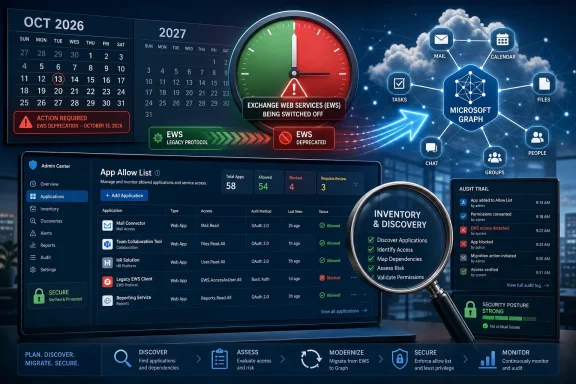
Microsoft is rolling out EWSAllowedAppIDs in Exchange Online in June 2026 so tenant administrators can restrict remaining Exchange Web Services access to specific application IDs before phased EWS disablement begins in October 2026 and full Exchange Online retirement arrives in April 2027. The feature is not a reprieve so much as a controlled demolition plan. Microsoft is turning a long-running compatibility bridge into an explicit exception system, and the burden is shifting from “does this still work?” to “can you prove this still deserves to work?”
For years, Exchange Web Services has been one of those enterprise technologies that survived because it was useful, embedded, and difficult to kill cleanly. It powered mailbox access, calendar integrations, backup tools, room scheduling systems, public folder workflows, line-of-business applications, and vendor products whose Exchange support often began before Microsoft Graph existed.
That history is why EWS retirement has always been more complicated than simply publishing a deadline. Microsoft announced in 2018 that EWS would no longer receive feature updates, then later set October 2026 as the start of Exchange Online disablement. The intervening years have been spent closing Graph parity gaps, pressuring vendors, and giving customers increasingly pointed telemetry about which applications still call EWS.
EWSAllowedAppIDs is the next stage in that pressure campaign. It gives administrators a tenant-level allow list based on application ID, rather than the older and weaker EWSAllowList mechanism based on user agent strings. In practical terms, Microsoft is asking admins to move from broad protocol enablement to named, auditable exceptions.
That matters because user agents were always a messy control plane. They can be inconsistent, spoofed, or simply too vague to map cleanly to real business ownership. App IDs are not magic, but they are closer to how modern Microsoft 365 administration thinks about application identity, permissions, consent, and accountability.
The political message is as important as the technical one. Microsoft is no longer treating EWS as a service that happens to be deprecated. It is treating EWS as legacy exposure that must be justified application by application.
Before October 2026, Exchange Online remains intentionally permissive. If
That pre-enforcement model gives administrators a sandbox for discovery. They can set a list, test known dependencies, find what breaks, and revise the list before Microsoft begins the retirement rollout. The danger is that many tenants will interpret today’s behavior as tomorrow’s guarantee.
Starting in October 2026, the logic changes. Once enforcement begins,
That is the sort of behavioral shift that creates outages not because administrators ignored the deadline, but because they misunderstood the state model. A tenant could appear deliberately configured and still block all EWS traffic if the allow list has not been populated. In the old world,
This is Microsoft’s way of removing ambiguity. If a customer still needs EWS after the enforcement window begins, Microsoft wants that need expressed as a list of applications, not as a tenant-wide protocol exception.
Later is now on the calendar. During the phased rollout beginning in October 2026, Microsoft says tenants that have not taken action will eventually have EWS disabled by setting
The recommended escape route is straightforward but unforgiving. Administrators must validate or configure EWSAllowedAppIDs, then set
That distinction will matter in large organizations, where application ownership is often fragmented. The Exchange team may see an App ID in reporting, but the business owner may sit in finance, legal, facilities, HR, or a regional subsidiary. A vendor may say Graph support is coming. A procurement team may own the contract. A security team may own the risk. The mailbox outage, however, will land on IT.
This is why EWSAllowedAppIDs should be read less as a new Exchange setting and more as a forcing function for governance. Microsoft is giving administrators a mechanism to ask the uncomfortable questions now, while there is still time to answer them.
But the migration story has never been as simple as “replace EWS with Graph.” EWS accumulated almost two decades of edge-case behavior, and enterprise software tends to depend on edge cases. Calendar semantics, public folders, mailbox import and export, archive access, delegated workflows, and administrative operations have all had parity issues at various points in the retirement timeline.
Microsoft has been closing those gaps, including preview work around administrative APIs and user configuration scenarios. It has also released usage reports, migration tooling, code analysis, and guidance intended to help customers find and refactor EWS dependencies. Those are useful moves, but they do not erase the real-world complexity of replacing a production integration.
For developers, the hard part is not simply swapping endpoints. It is revisiting assumptions about permissions, throttling, identity, delegated versus application access, event models, and object behavior. A migration that looks small in a vendor slide deck can become a regression hunt when it touches calendars, shared mailboxes, or legacy public folder processes.
For administrators, the hard part is vendor accountability. If a product still requires EWS in mid-2026, the question is no longer whether the vendor has read Microsoft’s announcement. The question is whether the vendor has shipped, documented, and supported a Graph-based path that works for the customer’s actual deployment.
That is where EWSAllowedAppIDs becomes useful even before it becomes mandatory. A populated allow list is a living inventory of technical debt. Every App ID on it should have an owner, a reason, a migration plan, and an expiration date.
That does not mean every EWS app is inherently unsafe. It does mean broad EWS availability is difficult to reconcile with the way Microsoft now wants tenants to manage application access. The modern Microsoft 365 security model prefers explicit consent, least privilege, conditional controls, sign-in visibility, and application identity that can be investigated.
A tenant-wide “EWS is on” setting cuts against that direction. It says that if an app can authenticate and has the necessary access, the protocol is available. An App ID allow list changes the posture from ambient availability to named exception.
This is not perfect least privilege. An allowed application may still have excessive permissions, stale credentials, or poor operational controls. But the allow list narrows the field of concern. It gives security teams a smaller set of integrations to review and gives administrators a cleaner answer when auditors ask why a deprecated protocol remains enabled.
The best use of EWSAllowedAppIDs, then, is not merely to avoid an October outage. It is to shrink the blast radius before October arrives. If an application is obsolete, remove it. If a vendor cannot explain its Graph timeline, escalate it. If an internal script has no owner, treat it as a risk rather than a convenience.
That means an administrator who wants to add one App ID must first read the existing list, append the new value, and write the full combined list back. Removing an App ID requires the same pattern in reverse. A careless command can replace the entire list and unintentionally evict working applications.
This is manageable, but it belongs in change control. Treat the allow list like a firewall rule set or conditional access policy, not like a casual Exchange tweak. Export the current state before changes. Track approvals. Keep the business owner and application owner attached to each entry. Test after every update.
The retrieval command also has a performance-minded quirk. Microsoft says administrators must use
There is also a rollout caveat. Tenants may be able to see the parameter in
In mature IT shops, the PowerShell will be the easiest part. The harder part will be building a trustworthy map between App IDs, real products, real users, data access, and retirement plans.
The more dangerous dependencies are the small ones. A departmental script that checks shared mailbox folders. A facilities tool that reads room calendars. A compliance export process built years ago by a consultant. A public folder contact sync that “just runs.” A vendor module enabled by one administrator and forgotten by the next.
These are the integrations that make retirement projects painful. They often lack documentation, budget, and clear ownership. They may not fail loudly until a business process quietly stops updating. They may also be used infrequently, which means a short test window can miss them.
Microsoft’s EWS usage reporting and Message Center summaries are therefore not optional reading. They are the starting point for an investigation. Administrators should correlate reported App IDs with Entra application registrations, enterprise applications, sign-in logs, vendor documentation, service accounts, and network or SIEM telemetry where available.
The goal is not simply to produce a list. The goal is to know what each item does, who depends on it, whether it has a Graph replacement, and what happens if it stops. Without that context, an allow list is just a prettier version of the same old uncertainty.
This is also where WindowsForum readers in hybrid and long-lived Microsoft environments should be careful. Microsoft’s retirement applies to Exchange Online, not the continued existence of EWS in on-premises Exchange Server. But hybrid organizations often have workflows that cross boundaries, and cloud mailbox access is exactly where old assumptions can break.
A vendor whose product still depends on EWS can no longer hide behind the general complexity of Microsoft 365 integration. Customers will ask for the App ID. They will ask why it needs to be allow-listed. They will ask when the Graph version ships. They will ask whether the current version will survive April 2027.
That changes procurement conversations. A product that requires EWS after October 2026 may still be usable as a temporary exception, but it carries a visible retirement liability. By April 2027, Exchange Online EWS is expected to be fully disabled, which means an exception list is not a permanent product strategy.
The best vendors will make this boring. They will publish clear migration paths, identify affected product versions, document required Graph permissions, explain feature gaps, and provide test procedures. They will tell customers which App IDs may appear during transition and when those IDs should disappear.
The weaker vendors will offer vague roadmap language and tell customers to allow-list them for now. That may buy time, but it also transfers risk to the tenant. Administrators should not confuse a temporary allow-list entry with vendor readiness.
This is where security, procurement, and operations need to align. If a business-critical vendor has no credible Graph plan, the organization needs escalation now, not during a Microsoft-controlled disablement wave.
That matters because customers have heard “move to Graph” for years while still encountering Microsoft-side gaps or dependencies. The company’s credibility depends not only on telling third parties to modernize, but on proving that its own ecosystem can live without EWS.
To its credit, Microsoft has made the retirement timeline more concrete and has published resources around gaps and migration tools. It has also acknowledged that parity work is part of the journey, rather than pretending Graph covered every EWS scenario from day one.
Still, the calendar is tight for slow-moving enterprises. October 2026 is close enough that procurement cycles, change freezes, compliance testing, and vendor certification timelines now matter. April 2027 is close enough that temporary exceptions need a runway to disappear.
The practical reading is simple: EWSAllowedAppIDs helps with the October transition, not the final state. It is a bridge over the first phase of disablement, not a bridge over retirement itself.
First, prove which applications still use EWS. That means using Microsoft’s EWS usage reports, Message Center posts, sign-in data, and vendor inventories. If an App ID cannot be tied to a business process, it should not be casually preserved.
Second, scope what remains. The allow list should contain only applications that are known to require EWS and have a defensible reason to keep using it during the transition. “We are not sure what this is” is not a reason to allow it; it is a reason to investigate it urgently.
Third, create an exit plan. Every allowed App ID should be temporary by design. It should have a target migration path, a vendor commitment, or a retirement decision. If April 2027 arrives and the application still needs EWS in Exchange Online, the allow list will not save it.
This is also the right moment to rehearse failure. Disable EWS in a controlled test where feasible. Remove a suspected obsolete App ID and watch for impact. Validate that help desk teams know what EWS-related failures look like. Make sure business owners understand that “mail integration” can include calendars, contacts, resources, public folders, and background automation, not just inbox access.
The organizations that do this well will not necessarily be the ones with the fewest EWS dependencies today. They will be the ones that can name them, justify them, and remove them on purpose.
 Microsoft Turns the Escape Hatch Into a Register of Known Debt
For years, Exchange Web Services has been one of those enterprise technologies that survived because it was useful, embedded, and difficult to kill cleanly. It powered mailbox access, calendar integrations, backup tools, room scheduling systems, public folder workflows, line-of-business applications, and vendor products whose Exchange support often began before Microsoft Graph existed.That history is why EWS retirement has always been more complicated than simply publishing a deadline. Microsoft announced in 2018 that EWS would no longer receive feature updates, then later set October 2026 as the start of Exchange Online disablement. The intervening years have been spent closing Graph parity gaps, pressuring vendors, and giving customers increasingly pointed telemetry about which applications still call EWS.
EWSAllowedAppIDs is the next stage in that pressure campaign. It gives administrators a tenant-level allow list based on application ID, rather than the older and weaker EWSAllowList mechanism based on user agent strings. In practical terms, Microsoft is asking admins to move from broad protocol enablement to named, auditable exceptions.
That matters because user agents were always a messy control plane. They can be inconsistent, spoofed, or simply too vague to map cleanly to real business ownership. App IDs are not magic, but they are closer to how modern Microsoft 365 administration thinks about application identity, permissions, consent, and accountability.
The political message is as important as the technical one. Microsoft is no longer treating EWS as a service that happens to be deprecated. It is treating EWS as legacy exposure that must be justified application by application.
The October 2026 Change Is a Semantics Trap for the Unprepared
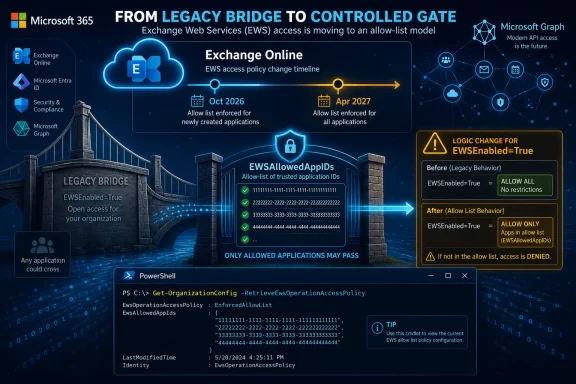
The most dangerous part of Microsoft’s new guidance is not the existence of an allow list. It is the change in meaning aroundEWSEnabled=True.Before October 2026, Exchange Online remains intentionally permissive. If
EWSEnabled is null, EWS traffic is allowed. If EWSEnabled=True and the new allow list is empty, EWS traffic is also allowed. If the allow list is populated, only those listed applications are permitted. If EWSEnabled=False, EWS is blocked.That pre-enforcement model gives administrators a sandbox for discovery. They can set a list, test known dependencies, find what breaks, and revise the list before Microsoft begins the retirement rollout. The danger is that many tenants will interpret today’s behavior as tomorrow’s guarantee.
Starting in October 2026, the logic changes. Once enforcement begins,
EWSEnabled=True with an empty EWSAllowedAppIDs list no longer means “allow everything.” It means “allow nothing.” Only a populated allow list keeps named applications working.That is the sort of behavioral shift that creates outages not because administrators ignored the deadline, but because they misunderstood the state model. A tenant could appear deliberately configured and still block all EWS traffic if the allow list has not been populated. In the old world,
True was a broad enablement switch. In the new world, it becomes a gate that only opens for named App IDs.This is Microsoft’s way of removing ambiguity. If a customer still needs EWS after the enforcement window begins, Microsoft wants that need expressed as a list of applications, not as a tenant-wide protocol exception.
Doing Nothing Is Now an Operational Decision
Many Exchange Online tenants still haveEWSEnabled unset, which today effectively means unrestricted EWS access. That default has been convenient for years because it let old integrations keep running while everyone agreed, vaguely, that modernization was coming later.Later is now on the calendar. During the phased rollout beginning in October 2026, Microsoft says tenants that have not taken action will eventually have EWS disabled by setting
EWSEnabled=False. That means inaction is no longer neutral; it is a vote for eventual shutdown on Microsoft’s schedule.The recommended escape route is straightforward but unforgiving. Administrators must validate or configure EWSAllowedAppIDs, then set
EWSEnabled=True. Microsoft has also signaled that it may populate allow lists for tenants that have not done so, but it is not transferring responsibility for correctness. The admin still owns whether that list reflects reality.That distinction will matter in large organizations, where application ownership is often fragmented. The Exchange team may see an App ID in reporting, but the business owner may sit in finance, legal, facilities, HR, or a regional subsidiary. A vendor may say Graph support is coming. A procurement team may own the contract. A security team may own the risk. The mailbox outage, however, will land on IT.
This is why EWSAllowedAppIDs should be read less as a new Exchange setting and more as a forcing function for governance. Microsoft is giving administrators a mechanism to ask the uncomfortable questions now, while there is still time to answer them.
Graph Is the Destination, but Parity Is Still the Friction
Microsoft’s official answer to EWS retirement is Microsoft Graph, and for many workloads that answer is now credible. Graph is the strategic API layer for Microsoft 365, and it aligns better with modern authentication, permissions, consent, auditing, and cloud-scale service design than a protocol from an earlier Exchange era.But the migration story has never been as simple as “replace EWS with Graph.” EWS accumulated almost two decades of edge-case behavior, and enterprise software tends to depend on edge cases. Calendar semantics, public folders, mailbox import and export, archive access, delegated workflows, and administrative operations have all had parity issues at various points in the retirement timeline.
Microsoft has been closing those gaps, including preview work around administrative APIs and user configuration scenarios. It has also released usage reports, migration tooling, code analysis, and guidance intended to help customers find and refactor EWS dependencies. Those are useful moves, but they do not erase the real-world complexity of replacing a production integration.
For developers, the hard part is not simply swapping endpoints. It is revisiting assumptions about permissions, throttling, identity, delegated versus application access, event models, and object behavior. A migration that looks small in a vendor slide deck can become a regression hunt when it touches calendars, shared mailboxes, or legacy public folder processes.
For administrators, the hard part is vendor accountability. If a product still requires EWS in mid-2026, the question is no longer whether the vendor has read Microsoft’s announcement. The question is whether the vendor has shipped, documented, and supported a Graph-based path that works for the customer’s actual deployment.
That is where EWSAllowedAppIDs becomes useful even before it becomes mandatory. A populated allow list is a living inventory of technical debt. Every App ID on it should have an owner, a reason, a migration plan, and an expiration date.
Security Is the Subtext Microsoft No Longer Hides
Microsoft’s EWS retirement messaging has increasingly leaned on security, and for good reason. Legacy integration surfaces are attractive because they are widely deployed, deeply privileged, and hard for customers to reason about at scale. The January 2024 Midnight Blizzard incident added urgency to Microsoft’s EWS deprecation effort and expanded the scope from third-party applications to Microsoft’s own remaining dependencies.That does not mean every EWS app is inherently unsafe. It does mean broad EWS availability is difficult to reconcile with the way Microsoft now wants tenants to manage application access. The modern Microsoft 365 security model prefers explicit consent, least privilege, conditional controls, sign-in visibility, and application identity that can be investigated.
A tenant-wide “EWS is on” setting cuts against that direction. It says that if an app can authenticate and has the necessary access, the protocol is available. An App ID allow list changes the posture from ambient availability to named exception.
This is not perfect least privilege. An allowed application may still have excessive permissions, stale credentials, or poor operational controls. But the allow list narrows the field of concern. It gives security teams a smaller set of integrations to review and gives administrators a cleaner answer when auditors ask why a deprecated protocol remains enabled.
The best use of EWSAllowedAppIDs, then, is not merely to avoid an October outage. It is to shrink the blast radius before October arrives. If an application is obsolete, remove it. If a vendor cannot explain its Graph timeline, escalate it. If an internal script has no owner, treat it as a risk rather than a convenience.
The Cmdlet Design Rewards Careful Change Control
Microsoft’s implementation has one operational wrinkle that deserves attention: setting EWSAllowedAppIDs writes the full list value. There is no incremental add or remove operation today.That means an administrator who wants to add one App ID must first read the existing list, append the new value, and write the full combined list back. Removing an App ID requires the same pattern in reverse. A careless command can replace the entire list and unintentionally evict working applications.
This is manageable, but it belongs in change control. Treat the allow list like a firewall rule set or conditional access policy, not like a casual Exchange tweak. Export the current state before changes. Track approvals. Keep the business owner and application owner attached to each entry. Test after every update.
The retrieval command also has a performance-minded quirk. Microsoft says administrators must use
Get-OrganizationConfig -RetrieveEwsOperationAccessPolicy to retrieve the list explicitly. That is a small detail, but it reinforces the idea that this setting is not just another lightweight property in the general organization configuration view.There is also a rollout caveat. Tenants may be able to see the parameter in
Get-OrganizationConfig before they can set it. That creates a short period where administrators know what they need to do but cannot yet complete the configuration. The right response is not to wait passively. Inventory, ownership mapping, vendor escalation, and test planning can begin before the switch is writable.In mature IT shops, the PowerShell will be the easiest part. The harder part will be building a trustworthy map between App IDs, real products, real users, data access, and retirement plans.
The Hidden Risk Is the App Nobody Thinks About
The obvious EWS dependencies will surface quickly. Backup platforms, archival systems, migration tools, room and resource scheduling products, CRM connectors, voicemail integrations, and legacy service desk workflows tend to be known to somebody. They may be awkward to migrate, but at least they have names.The more dangerous dependencies are the small ones. A departmental script that checks shared mailbox folders. A facilities tool that reads room calendars. A compliance export process built years ago by a consultant. A public folder contact sync that “just runs.” A vendor module enabled by one administrator and forgotten by the next.
These are the integrations that make retirement projects painful. They often lack documentation, budget, and clear ownership. They may not fail loudly until a business process quietly stops updating. They may also be used infrequently, which means a short test window can miss them.
Microsoft’s EWS usage reporting and Message Center summaries are therefore not optional reading. They are the starting point for an investigation. Administrators should correlate reported App IDs with Entra application registrations, enterprise applications, sign-in logs, vendor documentation, service accounts, and network or SIEM telemetry where available.
The goal is not simply to produce a list. The goal is to know what each item does, who depends on it, whether it has a Graph replacement, and what happens if it stops. Without that context, an allow list is just a prettier version of the same old uncertainty.
This is also where WindowsForum readers in hybrid and long-lived Microsoft environments should be careful. Microsoft’s retirement applies to Exchange Online, not the continued existence of EWS in on-premises Exchange Server. But hybrid organizations often have workflows that cross boundaries, and cloud mailbox access is exactly where old assumptions can break.
Vendors Are Running Out of Calendar
For independent software vendors, EWSAllowedAppIDs is both a mercy and a warning. The mercy is that Microsoft is not flipping a single global switch in October 2026 and leaving customers to sort through rubble. The warning is that every remaining EWS dependency will become more visible and more embarrassing.A vendor whose product still depends on EWS can no longer hide behind the general complexity of Microsoft 365 integration. Customers will ask for the App ID. They will ask why it needs to be allow-listed. They will ask when the Graph version ships. They will ask whether the current version will survive April 2027.
That changes procurement conversations. A product that requires EWS after October 2026 may still be usable as a temporary exception, but it carries a visible retirement liability. By April 2027, Exchange Online EWS is expected to be fully disabled, which means an exception list is not a permanent product strategy.
The best vendors will make this boring. They will publish clear migration paths, identify affected product versions, document required Graph permissions, explain feature gaps, and provide test procedures. They will tell customers which App IDs may appear during transition and when those IDs should disappear.
The weaker vendors will offer vague roadmap language and tell customers to allow-list them for now. That may buy time, but it also transfers risk to the tenant. Administrators should not confuse a temporary allow-list entry with vendor readiness.
This is where security, procurement, and operations need to align. If a business-critical vendor has no credible Graph plan, the organization needs escalation now, not during a Microsoft-controlled disablement wave.
Microsoft Also Has to Finish Its Own Migration
One uncomfortable part of the EWS retirement story is that Microsoft has had to include its own products in the cleanup. Outlook, Office, Teams, Dynamics 365, and other Microsoft services have historically had EWS dependencies in various places. Microsoft has said it is working to remove those dependencies as part of the broader retirement effort.That matters because customers have heard “move to Graph” for years while still encountering Microsoft-side gaps or dependencies. The company’s credibility depends not only on telling third parties to modernize, but on proving that its own ecosystem can live without EWS.
To its credit, Microsoft has made the retirement timeline more concrete and has published resources around gaps and migration tools. It has also acknowledged that parity work is part of the journey, rather than pretending Graph covered every EWS scenario from day one.
Still, the calendar is tight for slow-moving enterprises. October 2026 is close enough that procurement cycles, change freezes, compliance testing, and vendor certification timelines now matter. April 2027 is close enough that temporary exceptions need a runway to disappear.
The practical reading is simple: EWSAllowedAppIDs helps with the October transition, not the final state. It is a bridge over the first phase of disablement, not a bridge over retirement itself.
The Admin Playbook Has Narrowed to Proof, Scope, and Exit
The arrival of EWSAllowedAppIDs gives administrators a clearer way to structure the remaining work. The task is no longer an abstract modernization program. It is a sequence of proof points that can be tested against Microsoft’s enforcement model.First, prove which applications still use EWS. That means using Microsoft’s EWS usage reports, Message Center posts, sign-in data, and vendor inventories. If an App ID cannot be tied to a business process, it should not be casually preserved.
Second, scope what remains. The allow list should contain only applications that are known to require EWS and have a defensible reason to keep using it during the transition. “We are not sure what this is” is not a reason to allow it; it is a reason to investigate it urgently.
Third, create an exit plan. Every allowed App ID should be temporary by design. It should have a target migration path, a vendor commitment, or a retirement decision. If April 2027 arrives and the application still needs EWS in Exchange Online, the allow list will not save it.
This is also the right moment to rehearse failure. Disable EWS in a controlled test where feasible. Remove a suspected obsolete App ID and watch for impact. Validate that help desk teams know what EWS-related failures look like. Make sure business owners understand that “mail integration” can include calendars, contacts, resources, public folders, and background automation, not just inbox access.
The organizations that do this well will not necessarily be the ones with the fewest EWS dependencies today. They will be the ones that can name them, justify them, and remove them on purpose.
The Short List Microsoft Has Forced Onto Every Exchange Desk
By introducing EWSAllowedAppIDs before enforcement begins, Microsoft has given Exchange Online administrators a narrow but useful window to turn uncertainty into an actionable register. The organizations that use it as an inventory and governance tool will be in far better shape than those that treat it as a last-minute compatibility switch.- EWSAllowedAppIDs is a tenant-level App ID allow list for Exchange Online EWS access, separate from the older user-agent-based EWSAllowList feature.
- Before October 2026,
EWSEnabled=Truewith an empty allow list still permits all EWS traffic, which makes the current period useful for testing. - Starting in October 2026,
EWSEnabled=Truewith an empty allow list blocks EWS traffic, so administrators must populate the list if they still need exceptions. - Tenants that leave
EWSEnabledunset should expect Microsoft’s phased retirement process to disable EWS during the rollout. - The allow list must be written as a full value today, so administrators should read, edit, and write it back carefully under change control.
- The final Exchange Online EWS retirement in April 2027 means allow-listing is a temporary mitigation, not a long-term platform strategy.
References
- Primary source: Microsoft Exchange Team Blog
Published: Fri, 19 Jun 2026 12:22:17 GMT
Introducing EWSAllowedAppIDs: Preparing for the Final Phase of EWS Retirement | Microsoft Community Hub
We wanted to share details about the EWSAllowedAppIDs, to help you manage retirement of EWS applications in Exchange Online.   techcommunity.microsoft.com
- Official source: learn.microsoft.com
Deprecation of Exchange Web Services in Exchange Online | Microsoft Learn
Learn about deprecation of Exchange Web Services (EWS) in Exchange Onlinelearn.microsoft.com - Related coverage: support.workspace365.net
Microsoft EWS API deprecation | Workspace 365 Support Portal
Microsoft will disable the Exchange Web Services (EWS) API for Exchange Online in October 2026.support.workspace365.net - Related coverage: community.cisco.com
*ACTION* CUC UM w/O365 - EWS Deprecation by Microsoft begins Oct. 2026 - Cisco Community
All, Microsoft has previously announced (2023) they will be decommissioning EWS beginning in October 2026 until full deprecation is completed for all customers by April 2027 ( community.cisco.com
- Related coverage: avepoint.com
EWS Retirement in Exchange Online for AvePoint Customers | AvePoint | AvePoint
Microsoft is retiring EWS in Exchange Online by October 2026. Learn how AvePoint is ensuring a smooth transition to Microsoft Graph for all users.www.avepoint.com - Related coverage: digg.com
- Related coverage: techradar.com
Microsoft starts the countdown for the end of Exchange Web Services | TechRadar
Exchange Web Services will be shut down from April 2027www.techradar.com - Related coverage: windowscentral.com
EWS is shutting down in Microsoft 365 and Exchange Online | Windows Central
It's a drawn-out affair, but that gives users plenty of time to take the necessary migration steps.www.windowscentral.com - Related coverage: techriver.com