
Microsoft used the June 2026 Windows quality updates to broaden automatic deployment of 2023 Secure Boot certificates to eligible Windows 10 and Windows 11 PCs before the first major 2011-era certificate expired on June 24, 2026. That sounds like a quiet plumbing job, but it is really the first mass replacement of one of the trust anchors Windows has leaned on since the UEFI era began. The good news is that most supported consumer PCs should not wake up to a boot crisis. The less comforting news is that Microsoft’s last-minute success exposes how much of modern PC security still depends on firmware behavior the operating system vendor can only partially control.
The immediate story is simple: Microsoft expanded the automatic rollout of Secure Boot 2023 certificates through Windows Update just as the old 2011 certificates began aging out. The Microsoft Corporation KEK CA 2011 certificate reached its expiration date on June 24, 2026, with the Microsoft UEFI CA 2011 following on June 27 and the Microsoft Windows Production PCA 2011 not expiring until October 19.
That staggered calendar matters. This was not a single midnight cliff where every Windows PC either booted or bricked. It was a slow collision between certificate lifetimes, firmware databases, bootloader signing, OEM readiness, and Microsoft’s confidence that a given machine could safely accept new trust material.
Microsoft’s statement about “high confidence device targeting data” is the real tell. The company did not simply blast the new certificates to every PC that asked for updates. It used telemetry and compatibility signals to decide which machines were safe enough to update automatically, because a Secure Boot certificate update writes into the firmware trust store rather than merely replacing a file in Windows.
That caution was not bureaucratic theater. A bad operating system patch can usually be rolled back. A botched Secure Boot trust update can strand a device before Windows starts, tangle with BitLocker recovery, or produce exactly the sort of pre-OS failure that remote support desks dread.
That makes Secure Boot less like antivirus and more like border control for the boot chain. It does not inspect every application you run, and it will not save a user from every malicious download. Its job is narrower and earlier: stop untrusted bootloaders, bootkits, and other pre-operating-system code from gaining control before Windows security services are awake.
The 2011 certificates were foundational because they shipped with the first broad generation of Secure Boot-capable Windows PCs. They helped validate the Windows Boot Manager, third-party UEFI components, and updates to the trust databases themselves. For 15 years, they were part of the furniture.
Certificate expiration is the moment when invisible infrastructure becomes news. A certificate is designed to expire; that is part of what makes it a certificate rather than a permanent skeleton key. But when that certificate is baked into firmware across millions of PCs from countless vendors, refreshing it becomes an industry-wide choreography problem.
That distinction is easy to underplay, but it is the whole story. A machine missing the 2023 certificates may continue to start and may continue to receive ordinary Windows updates. What it may lose is the ability to receive future boot-level protections that depend on the new signing authorities, including certain updates to early boot components and Secure Boot revocation data.
This is why the “just in time” language is both fair and a little misleading. Microsoft avoided a broad consumer crisis, but the deadline was never only about whether PCs would power on after June 24. The more serious issue is whether the trust chain can keep evolving after the old certificates are no longer suitable for new signing work.
For attackers, the boot layer remains attractive precisely because it sits beneath the operating system. The BlackLotus episode made that point painfully clear: Secure Boot bypasses are not theoretical curiosities for firmware conferences. They are part of the real threat model for machines that need to resist persistence below Windows.
That is useful, but it is also a translation layer over something far messier. The operating system can report what it sees, schedule update tasks, and deliver payloads. It cannot make every UEFI implementation behave correctly, and it cannot guarantee that a decade-old consumer motherboard will receive a BIOS update from a vendor that has already moved on.
The PCWorld advice to check Windows Security is therefore sensible for home users. Go to Settings, open Privacy & security, launch Windows Security, and inspect Device security for Secure Boot status. If Secure Boot is absent, disabled, or bypassed during installation, the story changes again because the machine may not be participating in this protection path at all.
For administrators, a green badge on one test laptop is not a deployment plan. Managed fleets need inventory, firmware version tracking, event log monitoring, and representative hardware rings. The certificate update may be delivered through Windows Update, but the blast radius of a failure belongs to the firmware estate.
That is the right approach, but it is also an admission that Windows Update cannot treat the PC ecosystem as homogeneous. Two machines may both report Windows 11, Secure Boot on, and current cumulative updates installed. Underneath, they may differ in UEFI implementation, OEM firmware policy, TPM behavior, BitLocker configuration, and whether the vendor has shipped a necessary BIOS update.
This is why some users will see yellow rather than green even after installing the June cumulative update. They may not have done anything wrong. Their device may simply lack enough compatibility signal, require OEM firmware, or fall into a category Microsoft is not yet willing to update automatically.
The red state is harsher. It suggests the machine is blocked in a way that may not be solved by waiting for another cumulative update. In practical terms, users should check the PC maker’s support page, look for BIOS or UEFI updates, and treat firmware maintenance as part of the Windows security lifecycle rather than an exotic chore reserved for overclockers.
Microsoft’s Secure Boot certificate update is not a Windows 11-only concern. Supported Windows 10 devices can receive the new certificates, and that is important because Secure Boot was already widely present long before Windows 11 raised the hardware floor. The risk is concentrated less by operating system branding than by support status, firmware quality, and whether Secure Boot is actually enabled.
This creates a confusing middle ground for users with older machines. A Windows 10 PC may continue to boot, may look perfectly normal, and may still feel fast enough for daily work. But if it cannot receive or apply the new boot trust material, its security posture is diverging from the platform Microsoft is maintaining.
For enterprises, this is another argument against treating Windows 10 retirement as a purely desktop-experience issue. The visible interface may be familiar and stable. The invisible substrate — certificates, firmware trust, revocation lists, boot manager signing — is moving on.
That division of responsibility becomes painfully visible when the thing being updated lives in UEFI variables. Microsoft can provide the replacement certificates and automate much of the process, but it cannot rewrite every firmware implementation in the field. When a device needs an OEM update first, the customer’s experience depends on whether that OEM has done the unglamorous work.
This is where consumer and enterprise expectations split. A home user may reasonably ask why a PC that still runs Windows should need a BIOS update to preserve a security feature that was advertised as standard. An IT department, by contrast, should already know that firmware is part of the asset lifecycle, even if procurement and help desk processes often pretend otherwise.
The uncomfortable truth is that Secure Boot made the PC more secure by moving trust into firmware, and that also made long-term maintenance harder. Security features that begin before the operating system necessarily depend on code and keys outside the operating system’s direct control.
That drift is operationally dangerous because it corrodes assumptions. Security teams may believe Secure Boot-backed protections are uniform across the fleet. Compliance tools may report high-level device health while missing the nuance of certificate state. Incident responders may discover during a crisis that a subset of machines cannot accept the next boot-level mitigation.
Microsoft’s guidance for organizations has therefore emphasized staged deployment, representative testing, and management through tools such as Intune, Group Policy, registry controls, and automation scripts. That is the correct advice, but it also means this is not a one-click housekeeping task for serious environments.
Servers raise the stakes further. A laptop stuck at a recovery screen is expensive and annoying. A host in a data center that will not come back cleanly after a maintenance reboot is a business incident. Secure Boot certificate work should be treated with the same respect as firmware updates, storage controller changes, and TPM-sensitive configuration changes.
That firmware shadow explains Microsoft’s conservative pacing. If the company had waited too long, it would have risked leaving a large installed base in a degraded boot-security state. If it had moved too aggressively, it could have triggered failures on devices whose firmware was not ready.
The June 2026 update appears to have pushed the balance toward broader coverage. Microsoft said the quality updates included additional targeting data that expanded the pool of devices eligible for automatic certificate delivery. In plainer English: the company learned enough about more PCs to feel safe updating more of them.
That is a modern Windows pattern. The update is not just a package; it is a decision system. Telemetry, compatibility holds, phased rollout, and device confidence are now part of the servicing machinery, especially when the update crosses the boundary between OS and firmware.
If it is yellow, patience may be part of the answer, but not the whole answer. Users should check whether their PC maker has published a BIOS or UEFI update and make sure Windows Update is not being blocked by pause settings, metered network behavior, or third-party update managers. A yellow badge is not necessarily a failure; it is a prompt to keep the machine current and watch for the state to change.
If it is red, waiting alone is less persuasive. That state points to a blocking issue, and firmware is the likely suspect. Users should look up their exact PC or motherboard model, apply vendor firmware updates carefully, and back up recovery keys and important data before changing low-level boot settings.
It is worth saying plainly that users should not start toggling Secure Boot settings at random. Disabling Secure Boot to make a warning disappear is not remediation. It is removing the security feature whose certificate state you were trying to fix.
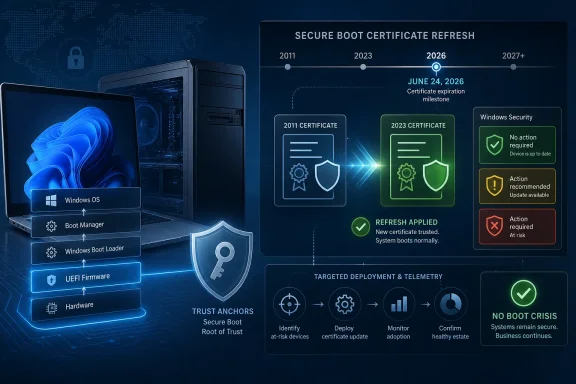 Microsoft Beat the Date, Not the Deadline
The immediate story is simple: Microsoft expanded the automatic rollout of Secure Boot 2023 certificates through Windows Update just as the old 2011 certificates began aging out. The Microsoft Corporation KEK CA 2011 certificate reached its expiration date on June 24, 2026, with the Microsoft UEFI CA 2011 following on June 27 and the Microsoft Windows Production PCA 2011 not expiring until October 19.That staggered calendar matters. This was not a single midnight cliff where every Windows PC either booted or bricked. It was a slow collision between certificate lifetimes, firmware databases, bootloader signing, OEM readiness, and Microsoft’s confidence that a given machine could safely accept new trust material.
Microsoft’s statement about “high confidence device targeting data” is the real tell. The company did not simply blast the new certificates to every PC that asked for updates. It used telemetry and compatibility signals to decide which machines were safe enough to update automatically, because a Secure Boot certificate update writes into the firmware trust store rather than merely replacing a file in Windows.
That caution was not bureaucratic theater. A bad operating system patch can usually be rolled back. A botched Secure Boot trust update can strand a device before Windows starts, tangle with BitLocker recovery, or produce exactly the sort of pre-OS failure that remote support desks dread.
Secure Boot Is the Tiny Gate With an Enormous Job
Secure Boot exists to answer one question before Windows loads: is the code trying to start this machine trusted? On a modern Windows PC, that answer comes from certificates stored in UEFI firmware databases, including the keys that authorize updates to the allowed and revoked signature lists.That makes Secure Boot less like antivirus and more like border control for the boot chain. It does not inspect every application you run, and it will not save a user from every malicious download. Its job is narrower and earlier: stop untrusted bootloaders, bootkits, and other pre-operating-system code from gaining control before Windows security services are awake.
The 2011 certificates were foundational because they shipped with the first broad generation of Secure Boot-capable Windows PCs. They helped validate the Windows Boot Manager, third-party UEFI components, and updates to the trust databases themselves. For 15 years, they were part of the furniture.
Certificate expiration is the moment when invisible infrastructure becomes news. A certificate is designed to expire; that is part of what makes it a certificate rather than a permanent skeleton key. But when that certificate is baked into firmware across millions of PCs from countless vendors, refreshing it becomes an industry-wide choreography problem.
The PC Did Not Explode Because Expiration Is Not Revocation
The most important correction to the panic cycle is this: an expired Secure Boot certificate does not automatically mean a Windows PC stops booting. Existing signatures do not simply evaporate into invalidity at dawn. Microsoft has been careful to frame the risk as a degraded security state, not universal boot failure.That distinction is easy to underplay, but it is the whole story. A machine missing the 2023 certificates may continue to start and may continue to receive ordinary Windows updates. What it may lose is the ability to receive future boot-level protections that depend on the new signing authorities, including certain updates to early boot components and Secure Boot revocation data.
This is why the “just in time” language is both fair and a little misleading. Microsoft avoided a broad consumer crisis, but the deadline was never only about whether PCs would power on after June 24. The more serious issue is whether the trust chain can keep evolving after the old certificates are no longer suitable for new signing work.
For attackers, the boot layer remains attractive precisely because it sits beneath the operating system. The BlackLotus episode made that point painfully clear: Secure Boot bypasses are not theoretical curiosities for firmware conferences. They are part of the real threat model for machines that need to resist persistence below Windows.
The Color Badges Are Consumer UX for a Firmware Problem
Microsoft’s green, yellow, and red Secure Boot status indicators in Windows Security are a rare attempt to turn firmware trust into something ordinary users can understand. Green means the machine has the needed certificate state. Yellow means the update has not yet landed or still needs more compatibility confidence. Red means something is blocking the transition, often firmware-related.That is useful, but it is also a translation layer over something far messier. The operating system can report what it sees, schedule update tasks, and deliver payloads. It cannot make every UEFI implementation behave correctly, and it cannot guarantee that a decade-old consumer motherboard will receive a BIOS update from a vendor that has already moved on.
The PCWorld advice to check Windows Security is therefore sensible for home users. Go to Settings, open Privacy & security, launch Windows Security, and inspect Device security for Secure Boot status. If Secure Boot is absent, disabled, or bypassed during installation, the story changes again because the machine may not be participating in this protection path at all.
For administrators, a green badge on one test laptop is not a deployment plan. Managed fleets need inventory, firmware version tracking, event log monitoring, and representative hardware rings. The certificate update may be delivered through Windows Update, but the blast radius of a failure belongs to the firmware estate.
Microsoft’s Confidence Model Is a Quiet Admission of Risk
The phrase “high confidence device targeting” deserves more attention than it will get. It means Microsoft is making a probabilistic call: this device, with this firmware, this update history, and this observed behavior, is likely to accept the new Secure Boot certificates safely.That is the right approach, but it is also an admission that Windows Update cannot treat the PC ecosystem as homogeneous. Two machines may both report Windows 11, Secure Boot on, and current cumulative updates installed. Underneath, they may differ in UEFI implementation, OEM firmware policy, TPM behavior, BitLocker configuration, and whether the vendor has shipped a necessary BIOS update.
This is why some users will see yellow rather than green even after installing the June cumulative update. They may not have done anything wrong. Their device may simply lack enough compatibility signal, require OEM firmware, or fall into a category Microsoft is not yet willing to update automatically.
The red state is harsher. It suggests the machine is blocked in a way that may not be solved by waiting for another cumulative update. In practical terms, users should check the PC maker’s support page, look for BIOS or UEFI updates, and treat firmware maintenance as part of the Windows security lifecycle rather than an exotic chore reserved for overclockers.
Windows 10 Gets One More Reminder That Support Status Matters
The timing is especially awkward for Windows 10. By mid-2026, Windows 10 is already past the mainstream support era for ordinary consumers unless they are covered by extended security arrangements or specific supported channels. Yet plenty of Windows 10 machines remain in service, including older PCs that may also be most likely to have stale firmware.Microsoft’s Secure Boot certificate update is not a Windows 11-only concern. Supported Windows 10 devices can receive the new certificates, and that is important because Secure Boot was already widely present long before Windows 11 raised the hardware floor. The risk is concentrated less by operating system branding than by support status, firmware quality, and whether Secure Boot is actually enabled.
This creates a confusing middle ground for users with older machines. A Windows 10 PC may continue to boot, may look perfectly normal, and may still feel fast enough for daily work. But if it cannot receive or apply the new boot trust material, its security posture is diverging from the platform Microsoft is maintaining.
For enterprises, this is another argument against treating Windows 10 retirement as a purely desktop-experience issue. The visible interface may be familiar and stable. The invisible substrate — certificates, firmware trust, revocation lists, boot manager signing — is moving on.
OEMs Are the Weak Link Microsoft Cannot Patch Away
The PC industry likes to present Windows as a single platform, but Secure Boot reveals it as a federation. Microsoft signs components and ships updates. OEMs implement firmware, expose settings, maintain BIOS packages, and decide how long specific models remain viable. Silicon vendors and component makers sit underneath both.That division of responsibility becomes painfully visible when the thing being updated lives in UEFI variables. Microsoft can provide the replacement certificates and automate much of the process, but it cannot rewrite every firmware implementation in the field. When a device needs an OEM update first, the customer’s experience depends on whether that OEM has done the unglamorous work.
This is where consumer and enterprise expectations split. A home user may reasonably ask why a PC that still runs Windows should need a BIOS update to preserve a security feature that was advertised as standard. An IT department, by contrast, should already know that firmware is part of the asset lifecycle, even if procurement and help desk processes often pretend otherwise.
The uncomfortable truth is that Secure Boot made the PC more secure by moving trust into firmware, and that also made long-term maintenance harder. Security features that begin before the operating system necessarily depend on code and keys outside the operating system’s direct control.
The Enterprise Risk Is Less Drama, More Drift
For corporate fleets, the scariest outcome is not a wave of bricked laptops on June 25. It is gradual drift: some devices green, some yellow, some red, some with Secure Boot disabled, some with BitLocker recovery prompts after firmware work, and some servers waiting for maintenance windows that never quite arrive.That drift is operationally dangerous because it corrodes assumptions. Security teams may believe Secure Boot-backed protections are uniform across the fleet. Compliance tools may report high-level device health while missing the nuance of certificate state. Incident responders may discover during a crisis that a subset of machines cannot accept the next boot-level mitigation.
Microsoft’s guidance for organizations has therefore emphasized staged deployment, representative testing, and management through tools such as Intune, Group Policy, registry controls, and automation scripts. That is the correct advice, but it also means this is not a one-click housekeeping task for serious environments.
Servers raise the stakes further. A laptop stuck at a recovery screen is expensive and annoying. A host in a data center that will not come back cleanly after a maintenance reboot is a business incident. Secure Boot certificate work should be treated with the same respect as firmware updates, storage controller changes, and TPM-sensitive configuration changes.
The June Patch Was a Security Update With a Firmware Shadow
Monthly Windows updates are often discussed as if they are one thing: fixes arrive, machines reboot, users complain, administrators approve or defer. The Secure Boot certificate rollout shows how misleading that picture can be. Some updates repair Windows itself; others carry instructions and trust changes that reach below it.That firmware shadow explains Microsoft’s conservative pacing. If the company had waited too long, it would have risked leaving a large installed base in a degraded boot-security state. If it had moved too aggressively, it could have triggered failures on devices whose firmware was not ready.
The June 2026 update appears to have pushed the balance toward broader coverage. Microsoft said the quality updates included additional targeting data that expanded the pool of devices eligible for automatic certificate delivery. In plainer English: the company learned enough about more PCs to feel safe updating more of them.
That is a modern Windows pattern. The update is not just a package; it is a decision system. Telemetry, compatibility holds, phased rollout, and device confidence are now part of the servicing machinery, especially when the update crosses the boundary between OS and firmware.
The Part Users Should Actually Do Today
For most home users, the practical response is refreshingly small. Install the June 2026 Windows updates, open Windows Security, and check the Secure Boot certificate status under Device security. If it is green, move on.If it is yellow, patience may be part of the answer, but not the whole answer. Users should check whether their PC maker has published a BIOS or UEFI update and make sure Windows Update is not being blocked by pause settings, metered network behavior, or third-party update managers. A yellow badge is not necessarily a failure; it is a prompt to keep the machine current and watch for the state to change.
If it is red, waiting alone is less persuasive. That state points to a blocking issue, and firmware is the likely suspect. Users should look up their exact PC or motherboard model, apply vendor firmware updates carefully, and back up recovery keys and important data before changing low-level boot settings.
It is worth saying plainly that users should not start toggling Secure Boot settings at random. Disabling Secure Boot to make a warning disappear is not remediation. It is removing the security feature whose certificate state you were trying to fix.
The Certificate Refresh Leaves a Checklist Behind
Microsoft’s rollout reduces the chance of a mass Windows Secure Boot mess, but it does not erase the work for people who manage machines or own aging hardware. The useful lesson is not that the sky fell. It is that the PC’s trust chain has a maintenance schedule, and 2026 is the year many users noticed.- Windows 10 and Windows 11 PCs that installed the June 2026 quality updates may have received the 2023 Secure Boot certificates automatically if Microsoft considered the device eligible.
- The June 24, 2026 expiration of the Microsoft Corporation KEK CA 2011 certificate was the first major date, not the only relevant deadline.
- A PC without the updated certificates may still boot and install ordinary Windows updates, but it can lose access to future boot-level security protections.
- A green Secure Boot status in Windows Security is the desired consumer signal, while yellow or red should push users toward Windows Update, OEM firmware updates, and support guidance.
- Enterprise administrators should inventory certificate status across hardware models instead of assuming cumulative update compliance equals Secure Boot readiness.
- Disabling Secure Boot is not a fix for certificate warnings; it trades a maintenance problem for a weaker boot-security posture.
References
- Primary source: PCWorld
Published: Wed, 24 Jun 2026 13:24:00 GMT
Loading…
www.pcworld.com - Official source: microsoft.com
Prepare your servers for Secure Boot certificate updates | Microsoft Windows Server Blog
The original Secure Boot certificates introduced in 2011 are approaching the end of their planned lifecycle, with expirations beginning in late June 2026.www.microsoft.com - Official source: learn.microsoft.com
Update Secure Boot Certificates for Windows Devices - Windows Client | Microsoft Learn
Update your Windows devices to maintain Secure Boot protection with 2023 certificates before they expire in June 2026.learn.microsoft.com - Related coverage: notebookcheck.net
Microsoft sets 2026 deadline for Secure Boot certificate expiration - Notebookcheck News
Microsoft has issued new guidance warning that 2011 Secure Boot certificates begin expiring in June 2026. Windows updates are rolling out 2023 replacement certificates, with some PCs requiring OEM firmware updates. www.notebookcheck.net
- Related coverage: windowslatest.com
I tested Windows 11 June 2026 Updates: Here's everything new, improved, and fixed
Windows 11 June 2026 Patch Tuesday update brings Low Latency Profile, Shared Audio, Multi-App Camera, NPU tracking, and Secure Boot updates. www.windowslatest.com
- Official source: docs.cloud.google.com
Microsoft Secure Boot certificates expiration guide | Compute Engine | Google Cloud Documentation
Guidance for migrating Shielded VM instances to support the Microsoft UEFI CA 2023 for Secure Boot.docs.cloud.google.com
- Related coverage: dell.com
Microsoft Secure Boot 2011 Certificate Expiration Impact on Dell PowerEdge Servers | Dell US
Microsoft Secure Boot 2011 certificates begin expiring in June 2026. Dell is working to ensure supported PowerEdge platforms are updated with the new 2023 Secure Boot certificates.www.dell.com - Related coverage: windowscentral.com
Microsoft warns Secure Boot certificates will expire in 2026 | Windows Central
After 15 years, the original Secure Boot certificates that keep your PC secure during boot are expiring. Here's what you need to know.www.windowscentral.com - Related coverage: tomshardware.com
Microsoft is refreshing Secure Boot certificates to plug security holes before they happen — if you bought a PC last year, you should be set | Tom's Hardware
Be sure to keep Windows 11 systems updated to get refreshed security certificates.www.tomshardware.com - Related coverage: pcgamer.com
Secure Boot certificates used by anti-cheat software are set to expire in June but new ones are already in the mail | PC Gamer
You shouldn't have to worry about expired certificates if you keep your PC up-to-date.www.pcgamer.com - Related coverage: techradar.com
Still using Windows 10? Microsoft is automatically replacing Secure Boot certificates on older PCs ahead of expiration, so you might want to update ASAP | TechRadar
Secure Boot certificate upgrades is bad news for Windows 10www.techradar.com - Related coverage: tomsguide.com
Windows 10 users warned to upgrade now or risk a ‘degraded security state’ as Microsoft ends Secure Boot support | Tom's Guide
Support for Windows 10 officially ended in October 2025, and Microsoft says devices that don’t upgrade could enter a degraded security state — leaving them vulnerable to threats. Here’s what it means for your PC and how to protect it.www.tomsguide.com - Related coverage: cisco.com