
Microsoft plans to bring custom “My Team” audience targeting to Viva Engage Storyline Announcements in August 2026, letting leaders and delegates choose recipients at posting time by organizational attributes, Microsoft 365 groups, distribution lists, security groups, or named individuals. The change looks modest on the roadmap, but it is really a shift in how Microsoft wants executive communication to work inside Microsoft 365. Viva Engage is moving away from static broadcast lists and toward a more dynamic, identity-driven communications layer. For IT, that means the plumbing behind “who should see this?” is becoming as important as the message itself.
For years, enterprise social tools have lived with a contradiction. They promise openness, culture, and connection, but the most important messages are rarely meant for everyone. A chief people officer may need to reach managers in Germany, frontline workers in retail, or employees under a specific business unit. A product leader may need to address only one engineering division, while a regional executive may need to talk to workers in one country without spamming the rest of the company.
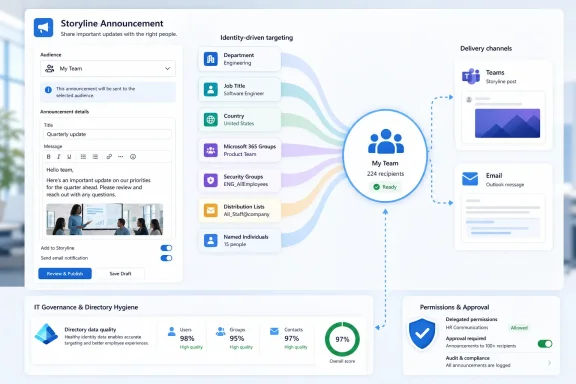
Microsoft’s new Viva Engage targeting feature is an answer to that problem. Instead of forcing leaders to rely on pre-configured Leader Audiences, Storyline Announcements will allow a custom audience to be defined when the post is created. That audience can be assembled from organizational attributes such as department, job title, and country; from existing groups such as Microsoft 365 Groups, distribution lists, and security groups; and from individual users selected by name.
That is more than a convenience feature. It shifts audience selection from an administrative setup task into the act of publishing itself. The executive, communications manager, or delegate writing the announcement can shape the intended reach at the moment the message is ready, rather than waiting for an admin-maintained audience structure to catch up with the org chart.
The feature is listed as in development for Viva Engage on desktop and web, with preview and general availability rings, and a planned general availability date of August 2026. As always with Microsoft 365 roadmap dates, that should be treated as a target rather than a guarantee. But the direction is clear: Microsoft wants Viva Engage to become less of a company-wide megaphone and more of a precision channel for leadership communication.
But in practice, broad distribution often weakens communication. Employees learn to skim past messages that do not apply to them. Managers receive announcements they cannot act on. Frontline workers get corporate prose meant for headquarters. Headquarters gets operational updates meant for field teams. The result is the familiar enterprise disease of over-communication: more messages, less attention.
Viva Engage’s existing Leader Audiences helped by letting organizations associate leaders with particular sets of employees. That model works when the audience is predictable and stable. It is less effective when the audience changes by issue, geography, project, reorganization, incident, or campaign.
The new model recognizes that leadership communication is rarely one-size-fits-all. A leader’s “team” may not map neatly to a single reporting structure. It may include dotted-line employees, contractors, people in a region, members of an employee resource group, or a cross-functional cohort assembled for a transformation program. The phrase “My Team” sounds simple, but in a modern Microsoft 365 tenant, “team” is often a query, not a static list.
That is why the attribute-based targeting matters. If the data behind department, title, country, and group membership is accurate, Viva Engage can create audiences that reflect how people actually work. If that data is messy, the new flexibility will expose the mess faster than before.
Targeting by department, job title, country, groups, and individual users assumes that the tenant’s directory is reliable. Many organizations know it is not. Titles drift. Departments are renamed. Country fields may reflect payroll entities rather than actual work locations. Distribution lists may be outdated. Security groups may have been created for access control, not communications. Microsoft 365 Groups may represent collaboration spaces that no longer map to living teams.
That creates a new operational burden. Corporate communications teams will be tempted to treat flexible targeting as an editorial feature. IT will recognize it as an identity hygiene feature.
If the audience builder says “Sales, United Kingdom, managers,” the quality of that audience depends on whether those attributes mean what the sender thinks they mean. If a leader sends a sensitive restructuring note to the wrong subset of employees, the problem will not feel like a directory synchronization issue. It will feel like a communications failure.
This is where administrators should pay attention before rollout. The feature makes targeting easier, but it also makes mistakes easier to make at speed. A pre-configured Leader Audience at least forces some planning and governance. A custom audience created during posting can be more agile, but also more dependent on the judgment of the person holding the publishing rights.
Giving delegates flexible audience-building capabilities is powerful. It lets the people closest to the communications workflow tailor the message without filing tickets or waiting for audience maintenance. It also widens the circle of people who can decide who receives a high-visibility leadership announcement.
That is not inherently bad. In many organizations, it is necessary. But it does mean the permissions model around delegates becomes more consequential. A delegate who can post on behalf of a leader and define a custom audience is not merely drafting text. They are shaping the perceived reach and authority of the leader’s voice.
Administrators should expect policy questions to follow. Who is allowed to target by individual user? Who can save reusable audiences? Should saved audiences require naming conventions? Should some attributes be discouraged for sensitive use cases? How should communications teams document the intended audience for compliance, HR, or internal audit purposes?
Microsoft is not turning Viva Engage into an eDiscovery nightmare by adding audience targeting. But it is increasing the need for process around leadership posts. The more precise the tool becomes, the more organizations will need to prove that precision was used responsibly.
Viva Engage is not isolated from the rest of Microsoft 365. A Storyline Announcement can surface through channels employees actually watch, especially Teams and email. Flexible targeting therefore affects not only what appears in Engage, but also which users are nudged through adjacent Microsoft 365 surfaces.
That is part of Microsoft’s broader Viva strategy. The company does not need every employee to open Viva Engage voluntarily every morning. It needs leadership communication to travel through the Microsoft 365 substrate: Teams notifications, email delivery, profile-driven identity, and workplace analytics. Engage becomes the social and conversational layer, but Microsoft 365 provides the distribution machinery.
For WindowsForum readers, this is the familiar Microsoft pattern. A feature launches inside one branded app, but the real product is the integration fabric around it. SharePoint is not just SharePoint, Teams is not just chat, and Viva Engage is not just the descendant of Yammer. Each service becomes another front end for Microsoft Graph, Entra ID, Exchange, Teams, and the admin controls that bind them together.
That makes the feature more useful, but also harder to evaluate in isolation. A badly targeted announcement may not merely sit in the wrong Engage feed. It may generate email, Teams activity, and leadership visibility in places employees treat as higher priority than an enterprise social network.
The new targeting feature is a sign of that evolution. Classic enterprise social tools often celebrated openness by default. The modern workplace platform is more pragmatic. It knows that relevance drives participation, that leaders want measurable reach, and that employees have limited patience for generic corporate broadcasts.
Still, the risk is that better targeting turns social communication into another managed channel. If every leadership message is narrowly segmented, polished, delegated, measured, and delivered through Teams and email, the “engage” part of Viva Engage can become secondary. The platform can start to feel less like a conversation space and more like an internal marketing automation system.
That tension is not unique to Microsoft. Every enterprise communications platform has to balance authenticity with governance, reach with relevance, and discussion with control. Microsoft’s advantage is that it already owns the workplace identity and productivity stack. Its challenge is that employees already feel surrounded by Microsoft 365 notifications.
Flexible targeting helps solve the relevance problem. It does not automatically solve the trust problem.
Reusable audiences are where convenience turns into institutional memory. Once a communications team creates “US people managers,” “EMEA field sales,” or “all engineering directors,” those audiences can become de facto communication channels. They may be reused for quarterly updates, policy reminders, crisis messages, and leadership campaigns.
That is efficient, but saved audiences age. Organizations reorganize. Group membership changes. Departments merge. Job titles are standardized or abandoned. A saved audience that was correct in September may be misleading by February. If Viva Engage makes it easy to save audiences, organizations will need a way to review them.
The roadmap description does not spell out every governance detail. That absence is not surprising for a roadmap item, but it is where admins should focus their planning. Saved audiences should have owners, names that make sense, and some expectation of review. Otherwise, they become yet another layer of semi-official Microsoft 365 objects that everyone relies on and nobody cleans up.
This is where the feature intersects with a broader Microsoft 365 problem: the platform makes it easy to create durable collaboration and communication artifacts, but the lifecycle management often depends on organizational discipline. Teams, Groups, SharePoint sites, distribution lists, and security groups already suffer from sprawl. Saved announcement audiences could join that list if Microsoft does not give administrators enough visibility.
But precision also changes expectations. Once employees know that announcements can be targeted, they may assume that every message they receive was intentionally meant for them. That raises the cost of sloppy targeting. A generic company-wide message is often forgiven as corporate noise. A targeted leadership announcement feels more personal, and therefore more accountable.
There is also a cultural risk. Over-segmentation can fragment the employee experience. If every department, region, and role receives a slightly different leadership narrative, the organization may gain relevance while losing shared context. Not every message should be narrowed. Some announcements are valuable precisely because everyone hears the same thing at the same time.
Microsoft’s framing emphasizes reaching the right people with the right message. That is sensible, but it should not become an excuse to hide uncomfortable information in narrow audiences. Internal communications always carry power dynamics. A tool that makes audience selection more precise can be used to improve relevance, but it can also be used to manage visibility.
The best organizations will treat the feature as a scalpel, not a silencer. They will use it to reduce noise, not to quietly partition truth.
Why is this country missing people? Why did contractors receive the announcement? Why does the saved group include former employees? Why does the department filter not match HR’s structure? Why did the distribution list behave differently from the security group? Why can one delegate find an audience and another cannot?
These are not Viva Engage questions in the narrow sense. They are Microsoft 365 identity, governance, and data ownership questions. The answers may involve Entra ID attributes, HR system synchronization, group lifecycle policy, naming conventions, licensing, guest access, and administrator roles.
That is why admins should not wait until August 2026 to think about the rollout. Even if Microsoft handles the interface elegantly, the underlying data still belongs to the tenant. Flexible targeting is only as good as the directory, and many directories were built for authentication first, not editorial segmentation.
A healthy rollout plan should include communications, HR, IT, compliance, and security. HR often owns the authoritative org data. IT owns the identity systems. Communications owns message strategy. Compliance may care about retention and discoverability. Security may care about whether groups used for access control are being repurposed for communications targeting.
The feature sits at the intersection of all of those responsibilities. Treating it as “just a Viva update” would be the first mistake.
Flexible targeting supports that reset. It gives Viva Engage a clearer operational role: leadership communications that can be personalized by identity data and delivered through familiar Microsoft 365 channels. That is a more concrete value proposition than “enterprise social,” especially for organizations that already live in Teams and Outlook.
The timing also reflects the maturity of Microsoft 365 as a workplace graph. Microsoft can offer targeting by department, title, country, groups, and users because those objects already exist in the cloud productivity estate. The company’s competitive advantage is not that it invented audience segmentation. It is that it can attach segmentation to the identity, collaboration, and notification systems enterprises already use.
That also explains why Viva Engage keeps mattering even when Teams dominates daily work. Teams is good at collaboration among known groups. Engage is better suited to broader, leader-led, community-driven, and cross-organizational communication. Flexible targeting narrows the gap between those worlds by letting a leader speak to a precisely defined group without reducing the message to a Teams channel post.
In other words, Microsoft is not trying to make Viva Engage beat Teams. It is trying to make Engage useful because Teams, Outlook, Entra ID, and Microsoft 365 already surround it.
Internal communications often contain material that is sensitive without being formally classified. Workforce planning, policy changes, regional legal notices, executive commentary, incident response updates, and pre-announcement operational guidance may not be “confidential documents” in the traditional sense. But sending them to the wrong audience can still cause disruption.
Microsoft says delivery channels will follow existing Storyline Announcement behavior. That continuity is helpful because organizations do not have to learn a wholly new notification model. But it also means audience mistakes can propagate through existing delivery paths. If a targeted announcement triggers email and Teams notifications, the blast radius is not confined to a single feed.
Administrators should therefore think about controls before incidents. Who can post Storyline Announcements? Who can act as a delegate? Are leaders trained on the difference between groups, distribution lists, and security groups? Are communications teams aware that “country” or “department” may not mean what they expect? Are saved audiences reviewed?
The right answer is not to lock the feature down so tightly that nobody uses it. The right answer is to pair flexibility with visibility. If Microsoft gives admins reporting on targeted announcements and saved audiences, the feature will be easier to govern. If not, organizations may need to create their own procedural controls.
That is the ideal. The less ideal version is a new wave of hyper-targeted corporate messaging that feels more intrusive because it appears to know exactly who the employee is. Relevance can delight, but it can also unsettle. Employees may wonder why they were included, why others were excluded, or whether their attributes are being used to classify them in ways they cannot see.
This is especially true when targeting uses job title, geography, or named individuals. A department-wide announcement feels normal. A message that reaches a hand-picked set of users may feel different, particularly if the subject is sensitive. Transparency in the message itself may sometimes matter as much as technical targeting accuracy.
Communications teams should not over-explain every audience definition, but they should be thoughtful. Phrases such as “sharing this with people managers in Canada” or “this update is for members of the North America field organization” can reduce confusion. In a targeted world, context becomes part of trust.
Microsoft’s feature will make it easier to reach the right people. It will not automatically make employees believe the right people were chosen.
Microsoft’s flexible targeting push is the right move for a workplace where attention is scarce and generic corporate broadcasts are increasingly ignored, but it also makes leadership communication more dependent on the invisible machinery of Microsoft 365. If organizations prepare the data, permissions, and review process, Viva Engage can become a sharper channel for relevant executive communication. If they do not, August 2026 may bring a new way to send the wrong message to precisely the wrong people.
 Microsoft Is Turning Viva Engage Into an Audience Engine
For years, enterprise social tools have lived with a contradiction. They promise openness, culture, and connection, but the most important messages are rarely meant for everyone. A chief people officer may need to reach managers in Germany, frontline workers in retail, or employees under a specific business unit. A product leader may need to address only one engineering division, while a regional executive may need to talk to workers in one country without spamming the rest of the company.Microsoft’s new Viva Engage targeting feature is an answer to that problem. Instead of forcing leaders to rely on pre-configured Leader Audiences, Storyline Announcements will allow a custom audience to be defined when the post is created. That audience can be assembled from organizational attributes such as department, job title, and country; from existing groups such as Microsoft 365 Groups, distribution lists, and security groups; and from individual users selected by name.
That is more than a convenience feature. It shifts audience selection from an administrative setup task into the act of publishing itself. The executive, communications manager, or delegate writing the announcement can shape the intended reach at the moment the message is ready, rather than waiting for an admin-maintained audience structure to catch up with the org chart.
The feature is listed as in development for Viva Engage on desktop and web, with preview and general availability rings, and a planned general availability date of August 2026. As always with Microsoft 365 roadmap dates, that should be treated as a target rather than a guarantee. But the direction is clear: Microsoft wants Viva Engage to become less of a company-wide megaphone and more of a precision channel for leadership communication.
The Old Broadcast Model Was Too Blunt for Real Organizations
The appeal of company-wide announcements is obvious. They are simple, visible, and politically safe. Nobody can complain they were left out of the CEO’s update if everyone received it.But in practice, broad distribution often weakens communication. Employees learn to skim past messages that do not apply to them. Managers receive announcements they cannot act on. Frontline workers get corporate prose meant for headquarters. Headquarters gets operational updates meant for field teams. The result is the familiar enterprise disease of over-communication: more messages, less attention.
Viva Engage’s existing Leader Audiences helped by letting organizations associate leaders with particular sets of employees. That model works when the audience is predictable and stable. It is less effective when the audience changes by issue, geography, project, reorganization, incident, or campaign.
The new model recognizes that leadership communication is rarely one-size-fits-all. A leader’s “team” may not map neatly to a single reporting structure. It may include dotted-line employees, contractors, people in a region, members of an employee resource group, or a cross-functional cohort assembled for a transformation program. The phrase “My Team” sounds simple, but in a modern Microsoft 365 tenant, “team” is often a query, not a static list.
That is why the attribute-based targeting matters. If the data behind department, title, country, and group membership is accurate, Viva Engage can create audiences that reflect how people actually work. If that data is messy, the new flexibility will expose the mess faster than before.
Identity Data Becomes the Editorial Control Plane
The most important dependency here is not Viva Engage itself. It is the quality of organizational data in Microsoft 365.Targeting by department, job title, country, groups, and individual users assumes that the tenant’s directory is reliable. Many organizations know it is not. Titles drift. Departments are renamed. Country fields may reflect payroll entities rather than actual work locations. Distribution lists may be outdated. Security groups may have been created for access control, not communications. Microsoft 365 Groups may represent collaboration spaces that no longer map to living teams.
That creates a new operational burden. Corporate communications teams will be tempted to treat flexible targeting as an editorial feature. IT will recognize it as an identity hygiene feature.
If the audience builder says “Sales, United Kingdom, managers,” the quality of that audience depends on whether those attributes mean what the sender thinks they mean. If a leader sends a sensitive restructuring note to the wrong subset of employees, the problem will not feel like a directory synchronization issue. It will feel like a communications failure.
This is where administrators should pay attention before rollout. The feature makes targeting easier, but it also makes mistakes easier to make at speed. A pre-configured Leader Audience at least forces some planning and governance. A custom audience created during posting can be more agile, but also more dependent on the judgment of the person holding the publishing rights.
Delegates Get More Power, and Governance Needs to Follow
Microsoft’s description explicitly includes leaders and their delegates. That matters because in most large organizations, executives are not personally composing every Viva Engage announcement. Communications staff, executive assistants, chiefs of staff, HR partners, and regional comms leads often write, schedule, and manage the actual posts.Giving delegates flexible audience-building capabilities is powerful. It lets the people closest to the communications workflow tailor the message without filing tickets or waiting for audience maintenance. It also widens the circle of people who can decide who receives a high-visibility leadership announcement.
That is not inherently bad. In many organizations, it is necessary. But it does mean the permissions model around delegates becomes more consequential. A delegate who can post on behalf of a leader and define a custom audience is not merely drafting text. They are shaping the perceived reach and authority of the leader’s voice.
Administrators should expect policy questions to follow. Who is allowed to target by individual user? Who can save reusable audiences? Should saved audiences require naming conventions? Should some attributes be discouraged for sensitive use cases? How should communications teams document the intended audience for compliance, HR, or internal audit purposes?
Microsoft is not turning Viva Engage into an eDiscovery nightmare by adding audience targeting. But it is increasing the need for process around leadership posts. The more precise the tool becomes, the more organizations will need to prove that precision was used responsibly.
Teams and Email Keep the Announcement From Staying Inside Engage
The roadmap note says notifications and delivery channels, including Teams and email, will continue to follow existing Storyline Announcement behavior. That line is easy to overlook, but it is central to the feature’s impact.Viva Engage is not isolated from the rest of Microsoft 365. A Storyline Announcement can surface through channels employees actually watch, especially Teams and email. Flexible targeting therefore affects not only what appears in Engage, but also which users are nudged through adjacent Microsoft 365 surfaces.
That is part of Microsoft’s broader Viva strategy. The company does not need every employee to open Viva Engage voluntarily every morning. It needs leadership communication to travel through the Microsoft 365 substrate: Teams notifications, email delivery, profile-driven identity, and workplace analytics. Engage becomes the social and conversational layer, but Microsoft 365 provides the distribution machinery.
For WindowsForum readers, this is the familiar Microsoft pattern. A feature launches inside one branded app, but the real product is the integration fabric around it. SharePoint is not just SharePoint, Teams is not just chat, and Viva Engage is not just the descendant of Yammer. Each service becomes another front end for Microsoft Graph, Entra ID, Exchange, Teams, and the admin controls that bind them together.
That makes the feature more useful, but also harder to evaluate in isolation. A badly targeted announcement may not merely sit in the wrong Engage feed. It may generate email, Teams activity, and leadership visibility in places employees treat as higher priority than an enterprise social network.
The Yammer Lesson Still Hangs Over Viva Engage
Viva Engage carries the long shadow of Yammer. Microsoft bought Yammer in 2012, spent years trying to fit it into the Microsoft 365 universe, and eventually folded its identity into the Viva brand. That history matters because Yammer’s old pitch was enterprise social networking; Viva Engage’s newer pitch is employee connection, leadership communication, communities, campaigns, and knowledge-sharing inside the flow of work.The new targeting feature is a sign of that evolution. Classic enterprise social tools often celebrated openness by default. The modern workplace platform is more pragmatic. It knows that relevance drives participation, that leaders want measurable reach, and that employees have limited patience for generic corporate broadcasts.
Still, the risk is that better targeting turns social communication into another managed channel. If every leadership message is narrowly segmented, polished, delegated, measured, and delivered through Teams and email, the “engage” part of Viva Engage can become secondary. The platform can start to feel less like a conversation space and more like an internal marketing automation system.
That tension is not unique to Microsoft. Every enterprise communications platform has to balance authenticity with governance, reach with relevance, and discussion with control. Microsoft’s advantage is that it already owns the workplace identity and productivity stack. Its challenge is that employees already feel surrounded by Microsoft 365 notifications.
Flexible targeting helps solve the relevance problem. It does not automatically solve the trust problem.
Saved Audiences Will Be the Feature Administrators Argue About Later
The ability to build and save audiences for reuse sounds like a minor productivity enhancement. It may become one of the most important parts of the rollout.Reusable audiences are where convenience turns into institutional memory. Once a communications team creates “US people managers,” “EMEA field sales,” or “all engineering directors,” those audiences can become de facto communication channels. They may be reused for quarterly updates, policy reminders, crisis messages, and leadership campaigns.
That is efficient, but saved audiences age. Organizations reorganize. Group membership changes. Departments merge. Job titles are standardized or abandoned. A saved audience that was correct in September may be misleading by February. If Viva Engage makes it easy to save audiences, organizations will need a way to review them.
The roadmap description does not spell out every governance detail. That absence is not surprising for a roadmap item, but it is where admins should focus their planning. Saved audiences should have owners, names that make sense, and some expectation of review. Otherwise, they become yet another layer of semi-official Microsoft 365 objects that everyone relies on and nobody cleans up.
This is where the feature intersects with a broader Microsoft 365 problem: the platform makes it easy to create durable collaboration and communication artifacts, but the lifecycle management often depends on organizational discipline. Teams, Groups, SharePoint sites, distribution lists, and security groups already suffer from sprawl. Saved announcement audiences could join that list if Microsoft does not give administrators enough visibility.
Precision Communication Cuts Both Ways
The case for flexible targeting is strong. Employees are more likely to read messages that apply to them. Leaders can avoid over-notifying the whole company. Communications teams can move faster. Regional and departmental nuance becomes easier. Sensitive operational updates can be sent to those who need them without turning every post into a global announcement.But precision also changes expectations. Once employees know that announcements can be targeted, they may assume that every message they receive was intentionally meant for them. That raises the cost of sloppy targeting. A generic company-wide message is often forgiven as corporate noise. A targeted leadership announcement feels more personal, and therefore more accountable.
There is also a cultural risk. Over-segmentation can fragment the employee experience. If every department, region, and role receives a slightly different leadership narrative, the organization may gain relevance while losing shared context. Not every message should be narrowed. Some announcements are valuable precisely because everyone hears the same thing at the same time.
Microsoft’s framing emphasizes reaching the right people with the right message. That is sensible, but it should not become an excuse to hide uncomfortable information in narrow audiences. Internal communications always carry power dynamics. A tool that makes audience selection more precise can be used to improve relevance, but it can also be used to manage visibility.
The best organizations will treat the feature as a scalpel, not a silencer. They will use it to reduce noise, not to quietly partition truth.
IT Will Be Asked to Fix a Communications Problem With Directory Hygiene
When this feature arrives, the first wave of enthusiasm will likely come from communications teams. The second wave of tickets may land with IT.Why is this country missing people? Why did contractors receive the announcement? Why does the saved group include former employees? Why does the department filter not match HR’s structure? Why did the distribution list behave differently from the security group? Why can one delegate find an audience and another cannot?
These are not Viva Engage questions in the narrow sense. They are Microsoft 365 identity, governance, and data ownership questions. The answers may involve Entra ID attributes, HR system synchronization, group lifecycle policy, naming conventions, licensing, guest access, and administrator roles.
That is why admins should not wait until August 2026 to think about the rollout. Even if Microsoft handles the interface elegantly, the underlying data still belongs to the tenant. Flexible targeting is only as good as the directory, and many directories were built for authentication first, not editorial segmentation.
A healthy rollout plan should include communications, HR, IT, compliance, and security. HR often owns the authoritative org data. IT owns the identity systems. Communications owns message strategy. Compliance may care about retention and discoverability. Security may care about whether groups used for access control are being repurposed for communications targeting.
The feature sits at the intersection of all of those responsibilities. Treating it as “just a Viva update” would be the first mistake.
The Roadmap Timing Fits Microsoft’s Larger Viva Reset
The planned August 2026 availability lands in a period where Microsoft has been steadily reshaping Viva around measurable employee engagement rather than broad suite branding. Viva’s early story was expansive: learning, insights, goals, topics, connections, engagement, and more. Over time, Microsoft has had to make the product feel less like a bundle of HR-adjacent apps and more like a practical layer inside Microsoft 365.Flexible targeting supports that reset. It gives Viva Engage a clearer operational role: leadership communications that can be personalized by identity data and delivered through familiar Microsoft 365 channels. That is a more concrete value proposition than “enterprise social,” especially for organizations that already live in Teams and Outlook.
The timing also reflects the maturity of Microsoft 365 as a workplace graph. Microsoft can offer targeting by department, title, country, groups, and users because those objects already exist in the cloud productivity estate. The company’s competitive advantage is not that it invented audience segmentation. It is that it can attach segmentation to the identity, collaboration, and notification systems enterprises already use.
That also explains why Viva Engage keeps mattering even when Teams dominates daily work. Teams is good at collaboration among known groups. Engage is better suited to broader, leader-led, community-driven, and cross-organizational communication. Flexible targeting narrows the gap between those worlds by letting a leader speak to a precisely defined group without reducing the message to a Teams channel post.
In other words, Microsoft is not trying to make Viva Engage beat Teams. It is trying to make Engage useful because Teams, Outlook, Entra ID, and Microsoft 365 already surround it.
The Security Story Is Mostly About Misdelivery
This update is not a classic security feature, but security-minded admins should still pay attention. The obvious risk is not that Viva Engage suddenly exposes secrets by design. The risk is misdelivery: a message intended for one population reaches another because the audience definition was wrong, outdated, misunderstood, or too broad.Internal communications often contain material that is sensitive without being formally classified. Workforce planning, policy changes, regional legal notices, executive commentary, incident response updates, and pre-announcement operational guidance may not be “confidential documents” in the traditional sense. But sending them to the wrong audience can still cause disruption.
Microsoft says delivery channels will follow existing Storyline Announcement behavior. That continuity is helpful because organizations do not have to learn a wholly new notification model. But it also means audience mistakes can propagate through existing delivery paths. If a targeted announcement triggers email and Teams notifications, the blast radius is not confined to a single feed.
Administrators should therefore think about controls before incidents. Who can post Storyline Announcements? Who can act as a delegate? Are leaders trained on the difference between groups, distribution lists, and security groups? Are communications teams aware that “country” or “department” may not mean what they expect? Are saved audiences reviewed?
The right answer is not to lock the feature down so tightly that nobody uses it. The right answer is to pair flexibility with visibility. If Microsoft gives admins reporting on targeted announcements and saved audiences, the feature will be easier to govern. If not, organizations may need to create their own procedural controls.
The Employee Experience Depends on Restraint
From the employee’s perspective, the feature should be invisible when used well. A worker receives a relevant leadership announcement in Engage, Teams, or email. The content applies to their role, region, department, or group. They do not need to know how the audience was built.That is the ideal. The less ideal version is a new wave of hyper-targeted corporate messaging that feels more intrusive because it appears to know exactly who the employee is. Relevance can delight, but it can also unsettle. Employees may wonder why they were included, why others were excluded, or whether their attributes are being used to classify them in ways they cannot see.
This is especially true when targeting uses job title, geography, or named individuals. A department-wide announcement feels normal. A message that reaches a hand-picked set of users may feel different, particularly if the subject is sensitive. Transparency in the message itself may sometimes matter as much as technical targeting accuracy.
Communications teams should not over-explain every audience definition, but they should be thoughtful. Phrases such as “sharing this with people managers in Canada” or “this update is for members of the North America field organization” can reduce confusion. In a targeted world, context becomes part of trust.
Microsoft’s feature will make it easier to reach the right people. It will not automatically make employees believe the right people were chosen.
The Small Roadmap Item With a Big Admin Shadow
The practical reading of this roadmap item is straightforward, and IT teams should treat it as a coming governance project rather than a mere feature toggle.- Microsoft is planning general availability for Viva Engage flexible targeting of Storyline Announcements in August 2026 for Worldwide standard multi-tenant customers on desktop and web.
- Leaders and delegates will be able to define custom audiences at posting time instead of relying only on pre-configured Leader Audiences.
- Audiences can be built from organizational attributes, Microsoft 365 Groups, distribution lists, security groups, and named individual users.
- Saved audiences may improve communications efficiency, but they will need ownership and review because org data and group membership change over time.
- Existing Storyline Announcement delivery behavior, including Teams and email notification paths, makes targeting accuracy more important because mistakes can travel beyond Viva Engage.
- The biggest readiness task is likely directory and group hygiene, not end-user training on the posting interface.
Microsoft’s flexible targeting push is the right move for a workplace where attention is scarce and generic corporate broadcasts are increasingly ignored, but it also makes leadership communication more dependent on the invisible machinery of Microsoft 365. If organizations prepare the data, permissions, and review process, Viva Engage can become a sharper channel for relevant executive communication. If they do not, August 2026 may bring a new way to send the wrong message to precisely the wrong people.
References
- Primary source: Microsoft 365 Roadmap
Published: 2026-06-24T23:15:55.6812517Z
Microsoft 365 Roadmap | Microsoft 365
The Microsoft 365 Roadmap lists updates that are currently planned for applicable subscribers. Check here for more information on the status of new features and updates.www.microsoft.com
- Related coverage: m365admin.handsontek.net
Microsoft Viva: Flexible targeting of Storyline Announcements - M365 Admin
We’re introducing more flexible and precise targeting capabilities in Viva Engage, starting with Storyline Announcements. This new feature allows leaders and their delegates to define a custom audience at the time of posting, without relying on pre-configured Leader Audiences. Audiences can be...m365admin.handsontek.net - Official source: techcommunity.microsoft.com
Relevance is the new reach: modern leadership communications in Viva Engage | Microsoft Community Hub
Leadership communication has never been more important... Or more complex. Leaders want to communicate clearly and consistently, but every message comes with... techcommunity.microsoft.com
