
Cloud-based security monitoring is essential for K–12 schools using Google Workspace and Microsoft 365 because student data, staff communications, file sharing, identity activity, and app permissions now live inside cloud platforms that traditional perimeter tools cannot continuously see or reliably protect. The Security Boulevard piece, syndicated from ManagedMethods, is vendor content, but its central argument is not vendor fiction. Schools have moved the classroom into SaaS; attackers, careless users, and risky integrations have followed. The real debate is no longer whether districts need cloud visibility, but whether they can afford to treat it as optional.
For years, school cybersecurity was built around a physical premise: protect the network, protect the school. Firewalls, web filters, endpoint agents, and content filtering appliances were designed for a world where most student and staff activity passed through district-controlled infrastructure. That model did not vanish, but it stopped being sufficient the moment teaching, grading, collaboration, and administration moved into browser tabs.
Google Workspace and Microsoft 365 are not simply productivity suites in K–12. They are identity systems, document repositories, communications platforms, workflow engines, and informal records systems. A shared Drive folder can contain individualized education program documents, HR files, health information, disciplinary records, lesson plans, student work, and budget materials, often separated less by architecture than by permission settings.
That makes the cloud account the new security perimeter. A compromised teacher mailbox or over-permissive SharePoint folder may matter more than a blocked port at the edge of the district network. The risk is not merely that attackers can get in; it is that legitimate users can expose data at cloud speed without ever tripping a traditional alarm.
The ManagedMethods article is right to emphasize file sharing, email behavior, login events, and third-party app permissions. Those are not secondary details. In a SaaS-first school environment, they are the places where risk actually expresses itself.
But those tools cannot tell an administrator that a staff member has shared a sensitive spreadsheet with “anyone with the link.” They cannot reliably explain why a student account suddenly granted a third-party app broad access to Google Drive. They cannot reconstruct whether a compromised Microsoft 365 account created a forwarding rule, searched a mailbox, downloaded files, and then began sending phishing messages internally.
This is the uncomfortable gap in many school environments. Districts may have spent years improving perimeter defenses while the most sensitive workflows migrated beyond the perimeter’s field of view. The result is a security architecture that can look mature on paper while remaining blind to the most common cloud-native failure modes.
For K–12, that mismatch is especially dangerous because staffing is thin. A large enterprise might have a security operations center, identity engineers, cloud administrators, compliance specialists, and incident responders. A school district may have a small IT team responsible for Chromebooks, classroom displays, SIS integrations, help desk tickets, Wi-Fi, phones, printers, board meetings, and cybersecurity all at once.
Monitoring cannot replace staff judgment, but it can change the signal-to-noise ratio. The point is not to produce more dashboards. It is to surface the events that a small team would otherwise never have time to hunt manually.
In business environments, oversharing is often discussed as a governance problem. In schools, it can become a student privacy problem. A folder shared too broadly may not look like a breach in the cinematic sense. There is no ransomware note, no defaced homepage, no dramatic outage. But if sensitive student or personnel information becomes available to the wrong audience, the damage is real.
The trickier point is that many of these exposures are not malicious. A user clicks the wrong sharing option. A department reuses an old folder. A student collaborator is added with more permissions than intended. A staff member leaves the district and ownership or access is not cleaned up properly.
This is where continuous monitoring becomes less of a luxury and more of a control surface. Schools need to know when files become public, when sharing expands outside the domain, when large numbers of documents are downloaded, and when permissions change in ways that contradict district policy. Without that visibility, “secure collaboration” becomes a slogan rather than an operational reality.
Once inside, the attacker does not have to behave like malware. They can behave like a user. They can search mail, review documents, set forwarding rules, impersonate staff, send internal phishing messages, or quietly collect information for later fraud. That is why cloud monitoring has to focus on behavior, not just malware signatures.
Unusual login activity is one clue, but it is not enough by itself. Students and staff often move between home, school, mobile networks, and travel locations. A login from a new place may be benign. A login from a new place followed by mailbox rule creation, bulk downloads, OAuth consent to an unfamiliar app, and internal phishing messages is a very different story.
The value of cloud monitoring is correlation. It helps administrators see patterns across identity, mail, files, and permissions. In a district where no one has time to manually inspect audit logs all day, automated detection is not about replacing expertise. It is about giving expertise something actionable to inspect.
Some of those integrations are essential. Some are harmless. Some are over-permissioned. Some are abandoned. Some may be installed by users who do not understand the scope of access they are granting.
This is one of the less glamorous but most important parts of cloud security in schools. OAuth permissions and app consent can create durable access paths that do not look like a traditional compromise. A user may authorize an app once, and the district may live with the consequences long after the classroom experiment has ended.
Cloud monitoring should therefore include visibility into app permissions, consent events, and changes in access scope. A district that cannot answer which apps can read user files or mail is not governing its cloud environment; it is hoping the marketplace behaves.
Those built-in tools matter. They are also unevenly available depending on licensing, edition, configuration, and administrative maturity. A district may have some audit visibility but not the staffing to review it. Another may have powerful controls but inconsistent policies across organizational units. A third may have the right licenses but lack the time to tune alerts or investigate anomalies.
This is the space where products like ManagedMethods’ Cloud Monitor pitch themselves: not as replacements for Google or Microsoft security, but as a K–12-focused layer that centralizes monitoring, alerting, and investigation. That vendor framing should be read critically, as all vendor framing should be. Still, the underlying operational problem is real.
The question for districts is not simply “Do we already have logs?” It is “Can we turn cloud activity into timely, understandable, and enforceable action?” Logs that no one reviews are not monitoring. Alerts that no one trusts are not security. Dashboards that require a specialist a district does not employ are shelfware.
But the day-to-day cloud risk is often quieter. A compromised account sends phishing messages. A student discovers an exposed folder. A staff member forwards mail to a personal account. A third-party app retains access longer than expected. A file containing sensitive information is shared externally and forgotten.
These incidents may not produce the same headlines, but they erode trust. Parents expect schools to protect student information. Teachers expect their accounts not to become attack infrastructure. Administrators expect collaboration tools to support instruction without creating a shadow compliance nightmare.
Cloud-based monitoring is therefore not just a breach-detection tool. It is a hygiene tool, a governance tool, and, increasingly, a safety tool. The more a district’s educational mission depends on cloud platforms, the more cloud visibility becomes part of basic operational resilience.
A monitoring product that requires constant tuning, complex rule writing, and specialist interpretation may fail even if it is technically capable. The K–12 market needs tools that reduce investigative burden: plain-language alerts, prioritized events, searchable timelines, user-centric views, and fast answers to simple questions. What happened? Who did it? What data was touched? Was it internal or external? What changed?
That does not mean automation should be trusted blindly. False positives can exhaust small teams, and automated remediation can create its own problems if poorly designed. But without some degree of automated detection, districts are left depending on chance, user reports, or after-the-fact discovery.
Security vendors love to sell “real time” as a magic phrase. In schools, the more important phrase may be usable time. An alert that lets a two-person IT team intervene before a compromised account spreads phishing internally is materially different from a log entry discovered during an audit weeks later.
Schools are custodians of unusually sensitive data about minors. That includes academic records, behavioral information, disability accommodations, family contact details, health-related information, and sometimes financial or legal records. The ethical duty to protect that information exists whether or not a particular regulation is front of mind.
Cloud monitoring helps districts demonstrate that they are not merely setting policies but observing whether those policies hold in practice. It gives administrators a way to identify risky sharing, suspicious access, and account misuse before they become community crises. In that sense, monitoring is part of institutional trust.
The trap is to treat compliance as a checklist and cloud monitoring as the checkbox. That would miss the point. The real value is not owning a tool; it is building a repeatable ability to see, understand, and respond.
The broader market signal is that K–12 cloud security has matured from “nice to have” into a distinct operational category. Districts are no longer just asking whether they have Google Workspace or Microsoft 365 configured. They are asking whether they can monitor them continuously, detect abuse quickly, and investigate incidents without needing an enterprise-scale security team.
ManagedMethods is one answer. Microsoft-native tooling is another. Google-native tooling is another. Managed detection providers, CASB-like platforms, identity security tools, and security information and event management systems can all play roles depending on district size, licensing, budget, and staffing.
The important thing is not to confuse product selection with strategy. A district should begin by identifying its highest-risk cloud events, its legal and policy obligations, its staffing reality, and its incident response process. Only then can it decide whether a K–12-specific monitoring platform, native tooling, or a broader security stack makes sense.
Yet many districts struggle to operationalize even these basics because the cloud environment changes constantly. New users arrive. Students graduate. Staff leave. Vendors rotate. Apps appear. Folders multiply. Permissions drift.
That is the argument for continuous monitoring over periodic review. A quarterly audit may catch some problems, but it cannot match the pace of cloud collaboration. In a school environment, risk is not a static configuration snapshot. It is a stream of user activity.
The best monitoring programs therefore combine policy and observation. Policies define what should happen. Monitoring reveals what is happening. Incident response closes the gap.
This requires a cultural shift. Teachers and staff need collaboration tools that work, not security controls that make their jobs impossible. Students need access appropriate to learning, not blanket restrictions that break instruction. IT teams need enough authority to enforce policy without becoming the department of “no.”
The strongest cloud security programs will be the ones that make safe behavior the default. External sharing should be limited where it is not needed and visible where it is allowed. Risky app permissions should be blocked or reviewed. Suspicious account behavior should trigger fast investigation. Sensitive data should not depend on every user making the perfect sharing decision every time.
This is where monitoring and governance meet. Visibility alone does not secure a district. But without visibility, governance is mostly aspiration.
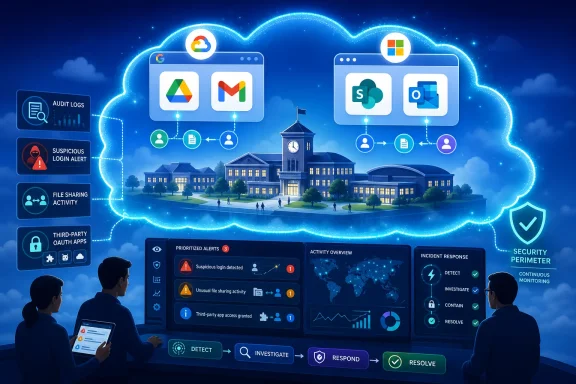 The School Network Is No Longer Where the School Work Happens
For years, school cybersecurity was built around a physical premise: protect the network, protect the school. Firewalls, web filters, endpoint agents, and content filtering appliances were designed for a world where most student and staff activity passed through district-controlled infrastructure. That model did not vanish, but it stopped being sufficient the moment teaching, grading, collaboration, and administration moved into browser tabs.Google Workspace and Microsoft 365 are not simply productivity suites in K–12. They are identity systems, document repositories, communications platforms, workflow engines, and informal records systems. A shared Drive folder can contain individualized education program documents, HR files, health information, disciplinary records, lesson plans, student work, and budget materials, often separated less by architecture than by permission settings.
That makes the cloud account the new security perimeter. A compromised teacher mailbox or over-permissive SharePoint folder may matter more than a blocked port at the edge of the district network. The risk is not merely that attackers can get in; it is that legitimate users can expose data at cloud speed without ever tripping a traditional alarm.
The ManagedMethods article is right to emphasize file sharing, email behavior, login events, and third-party app permissions. Those are not secondary details. In a SaaS-first school environment, they are the places where risk actually expresses itself.
Perimeter Security Still Matters, but It Is Watching the Wrong Door
The old tools still have a job. Firewalls block hostile traffic, endpoint protection catches malware, web filters help enforce student safety policies, and DNS controls can stop users from reaching known bad infrastructure. No serious district should abandon them.But those tools cannot tell an administrator that a staff member has shared a sensitive spreadsheet with “anyone with the link.” They cannot reliably explain why a student account suddenly granted a third-party app broad access to Google Drive. They cannot reconstruct whether a compromised Microsoft 365 account created a forwarding rule, searched a mailbox, downloaded files, and then began sending phishing messages internally.
This is the uncomfortable gap in many school environments. Districts may have spent years improving perimeter defenses while the most sensitive workflows migrated beyond the perimeter’s field of view. The result is a security architecture that can look mature on paper while remaining blind to the most common cloud-native failure modes.
For K–12, that mismatch is especially dangerous because staffing is thin. A large enterprise might have a security operations center, identity engineers, cloud administrators, compliance specialists, and incident responders. A school district may have a small IT team responsible for Chromebooks, classroom displays, SIS integrations, help desk tickets, Wi-Fi, phones, printers, board meetings, and cybersecurity all at once.
Monitoring cannot replace staff judgment, but it can change the signal-to-noise ratio. The point is not to produce more dashboards. It is to surface the events that a small team would otherwise never have time to hunt manually.
Cloud Collaboration Turns Convenience Into Exposure
Google Workspace and Microsoft 365 are popular in education because they make collaboration easy. That is also why they are risky. The same features that let a teacher share a worksheet with a class can let a staff member accidentally expose a spreadsheet outside the district.In business environments, oversharing is often discussed as a governance problem. In schools, it can become a student privacy problem. A folder shared too broadly may not look like a breach in the cinematic sense. There is no ransomware note, no defaced homepage, no dramatic outage. But if sensitive student or personnel information becomes available to the wrong audience, the damage is real.
The trickier point is that many of these exposures are not malicious. A user clicks the wrong sharing option. A department reuses an old folder. A student collaborator is added with more permissions than intended. A staff member leaves the district and ownership or access is not cleaned up properly.
This is where continuous monitoring becomes less of a luxury and more of a control surface. Schools need to know when files become public, when sharing expands outside the domain, when large numbers of documents are downloaded, and when permissions change in ways that contradict district policy. Without that visibility, “secure collaboration” becomes a slogan rather than an operational reality.
Identity Is the Attack Path That Looks Like Normal Work
Credential theft remains one of the most practical attacks against schools because it does not require breaking into the network in the traditional sense. A convincing phishing email, a reused password, or a weak account recovery process can give an attacker what they need: a valid login.Once inside, the attacker does not have to behave like malware. They can behave like a user. They can search mail, review documents, set forwarding rules, impersonate staff, send internal phishing messages, or quietly collect information for later fraud. That is why cloud monitoring has to focus on behavior, not just malware signatures.
Unusual login activity is one clue, but it is not enough by itself. Students and staff often move between home, school, mobile networks, and travel locations. A login from a new place may be benign. A login from a new place followed by mailbox rule creation, bulk downloads, OAuth consent to an unfamiliar app, and internal phishing messages is a very different story.
The value of cloud monitoring is correlation. It helps administrators see patterns across identity, mail, files, and permissions. In a district where no one has time to manually inspect audit logs all day, automated detection is not about replacing expertise. It is about giving expertise something actionable to inspect.
The Third-Party App Problem Is a Quiet Governance Failure
The ManagedMethods piece briefly mentions third-party apps and vendors, but this deserves more attention. Modern classrooms are full of integrations. Learning apps, assessment tools, classroom utilities, extensions, rostering systems, parent communication platforms, and administrative services all want access to identity or data.Some of those integrations are essential. Some are harmless. Some are over-permissioned. Some are abandoned. Some may be installed by users who do not understand the scope of access they are granting.
This is one of the less glamorous but most important parts of cloud security in schools. OAuth permissions and app consent can create durable access paths that do not look like a traditional compromise. A user may authorize an app once, and the district may live with the consequences long after the classroom experiment has ended.
Cloud monitoring should therefore include visibility into app permissions, consent events, and changes in access scope. A district that cannot answer which apps can read user files or mail is not governing its cloud environment; it is hoping the marketplace behaves.
Microsoft and Google Provide Tools, but Districts Still Need Operational Discipline
Both Microsoft and Google have invested heavily in security capabilities for education customers. Microsoft 365 can use Entra ID controls, multifactor authentication, Conditional Access in licensed environments, Defender integrations, audit logs, and administrative reporting. Google Workspace for Education offers admin controls, audit and investigation features, security center capabilities in higher editions, and policy settings across Drive, Gmail, Classroom, and identity.Those built-in tools matter. They are also unevenly available depending on licensing, edition, configuration, and administrative maturity. A district may have some audit visibility but not the staffing to review it. Another may have powerful controls but inconsistent policies across organizational units. A third may have the right licenses but lack the time to tune alerts or investigate anomalies.
This is the space where products like ManagedMethods’ Cloud Monitor pitch themselves: not as replacements for Google or Microsoft security, but as a K–12-focused layer that centralizes monitoring, alerting, and investigation. That vendor framing should be read critically, as all vendor framing should be. Still, the underlying operational problem is real.
The question for districts is not simply “Do we already have logs?” It is “Can we turn cloud activity into timely, understandable, and enforceable action?” Logs that no one reviews are not monitoring. Alerts that no one trusts are not security. Dashboards that require a specialist a district does not employ are shelfware.
Ransomware Made the Headlines, but SaaS Misuse Is the Daily Grind
K–12 cybersecurity is often discussed through the lens of ransomware, and understandably so. Ransomware can close schools, disrupt instruction, expose data, and force districts into expensive recovery efforts. It is visible, dramatic, and politically painful.But the day-to-day cloud risk is often quieter. A compromised account sends phishing messages. A student discovers an exposed folder. A staff member forwards mail to a personal account. A third-party app retains access longer than expected. A file containing sensitive information is shared externally and forgotten.
These incidents may not produce the same headlines, but they erode trust. Parents expect schools to protect student information. Teachers expect their accounts not to become attack infrastructure. Administrators expect collaboration tools to support instruction without creating a shadow compliance nightmare.
Cloud-based monitoring is therefore not just a breach-detection tool. It is a hygiene tool, a governance tool, and, increasingly, a safety tool. The more a district’s educational mission depends on cloud platforms, the more cloud visibility becomes part of basic operational resilience.
Lean IT Teams Need Fewer Mysteries, Not More Consoles
The strongest practical argument for cloud monitoring in K–12 is not sophistication. It is scarcity. Schools need security systems that acknowledge how understaffed many districts are.A monitoring product that requires constant tuning, complex rule writing, and specialist interpretation may fail even if it is technically capable. The K–12 market needs tools that reduce investigative burden: plain-language alerts, prioritized events, searchable timelines, user-centric views, and fast answers to simple questions. What happened? Who did it? What data was touched? Was it internal or external? What changed?
That does not mean automation should be trusted blindly. False positives can exhaust small teams, and automated remediation can create its own problems if poorly designed. But without some degree of automated detection, districts are left depending on chance, user reports, or after-the-fact discovery.
Security vendors love to sell “real time” as a magic phrase. In schools, the more important phrase may be usable time. An alert that lets a two-person IT team intervene before a compromised account spreads phishing internally is materially different from a log entry discovered during an audit weeks later.
The Compliance Story Is Really a Trust Story
Student privacy laws, state breach notification rules, cyber insurance requirements, and district policies all push schools toward better cloud controls. Compliance can be a useful forcing function. But it is not the whole story.Schools are custodians of unusually sensitive data about minors. That includes academic records, behavioral information, disability accommodations, family contact details, health-related information, and sometimes financial or legal records. The ethical duty to protect that information exists whether or not a particular regulation is front of mind.
Cloud monitoring helps districts demonstrate that they are not merely setting policies but observing whether those policies hold in practice. It gives administrators a way to identify risky sharing, suspicious access, and account misuse before they become community crises. In that sense, monitoring is part of institutional trust.
The trap is to treat compliance as a checklist and cloud monitoring as the checkbox. That would miss the point. The real value is not owning a tool; it is building a repeatable ability to see, understand, and respond.
ManagedMethods Is Selling a Product, but the Market Signal Is Bigger Than One Vendor
The Security Boulevard article is syndicated vendor content from ManagedMethods, and readers should recognize the genre. It identifies a real problem, frames the problem around capabilities the vendor sells, and ends with a trial offer. That does not invalidate the argument, but it does shape the presentation.The broader market signal is that K–12 cloud security has matured from “nice to have” into a distinct operational category. Districts are no longer just asking whether they have Google Workspace or Microsoft 365 configured. They are asking whether they can monitor them continuously, detect abuse quickly, and investigate incidents without needing an enterprise-scale security team.
ManagedMethods is one answer. Microsoft-native tooling is another. Google-native tooling is another. Managed detection providers, CASB-like platforms, identity security tools, and security information and event management systems can all play roles depending on district size, licensing, budget, and staffing.
The important thing is not to confuse product selection with strategy. A district should begin by identifying its highest-risk cloud events, its legal and policy obligations, its staffing reality, and its incident response process. Only then can it decide whether a K–12-specific monitoring platform, native tooling, or a broader security stack makes sense.
The Cloud Controls Schools Should Stop Treating as Advanced
The practical baseline is becoming clearer. Multifactor authentication for staff and administrators should not be controversial. Privileged accounts should be tightly controlled. External sharing should be intentionally governed. Audit logs should be retained and reviewed. Third-party app access should be approved, monitored, and revoked when no longer needed.Yet many districts struggle to operationalize even these basics because the cloud environment changes constantly. New users arrive. Students graduate. Staff leave. Vendors rotate. Apps appear. Folders multiply. Permissions drift.
That is the argument for continuous monitoring over periodic review. A quarterly audit may catch some problems, but it cannot match the pace of cloud collaboration. In a school environment, risk is not a static configuration snapshot. It is a stream of user activity.
The best monitoring programs therefore combine policy and observation. Policies define what should happen. Monitoring reveals what is happening. Incident response closes the gap.
The Districts That Win Will Treat Cloud Security as a Daily Practice
There is a temptation to frame cloud monitoring as a defensive add-on, something districts buy after adopting Google Workspace or Microsoft 365. That sequence is understandable, but it is backward. If the cloud platform is central to instruction and administration, monitoring should be part of the operating model from the start.This requires a cultural shift. Teachers and staff need collaboration tools that work, not security controls that make their jobs impossible. Students need access appropriate to learning, not blanket restrictions that break instruction. IT teams need enough authority to enforce policy without becoming the department of “no.”
The strongest cloud security programs will be the ones that make safe behavior the default. External sharing should be limited where it is not needed and visible where it is allowed. Risky app permissions should be blocked or reviewed. Suspicious account behavior should trigger fast investigation. Sensitive data should not depend on every user making the perfect sharing decision every time.
This is where monitoring and governance meet. Visibility alone does not secure a district. But without visibility, governance is mostly aspiration.
The New Homework for Google and Microsoft Districts
The message for K–12 leaders is not that every district must buy the same cloud monitoring product. It is that every district using Google Workspace or Microsoft 365 needs a credible answer for how it sees and responds to cloud risk. The answer should be specific enough to survive an incident, not vague enough to satisfy a planning document.- Districts should know when sensitive files are shared publicly or outside the organization.
- Districts should receive timely alerts for suspicious logins, abnormal account behavior, and risky email activity.
- Districts should monitor third-party app permissions and remove access that is unnecessary, excessive, or abandoned.
- Districts should treat audit logs as operational security data, not as records to consult only after something goes wrong.
- Districts should evaluate cloud monitoring tools against staffing reality, because a powerful console that no one can operate is not a control.
- Districts should integrate cloud alerts into incident response procedures so that detection leads to action rather than confusion.
References
- Primary source: Security Boulevard
Published: Thu, 25 Jun 2026 14:09:06 GMT
Why Cloud-Based Security Monitoring Is Essential for K–12 Schools Using Google Workspace and Microsoft 365 - Security Boulevard
Schools have rapidly adopted cloud-based platforms such as Google Workspace and Microsoft 365 to support teaching, learning, communication, and collaboration. These tools have transformed how students, teachers, and administrators work together, providing greater flexibility and access to...securityboulevard.com - Official source: support.google.com
- Official source: docs.cloud.google.com
- Official source: learn.microsoft.com
Design tenant configuration - M365 Education | Microsoft Learn
How to configure Microsoft Entra tenants in a multi-tenant-environmentlearn.microsoft.com - Official source: edu.google.com
Education Standard - Google for Education
Discover how Education Standard helps to protect your school community with data analytics tools and advanced digital security. edu.google.com
- Official source: microsoft.com
Multifactor Authentication (MFA) | Microsoft Security
Strengthen your organization’s security with Microsoft Entra ID Multifactor Authentication (MFA). Protect identities, enable secure sign-in, and prevent breaches.www.microsoft.com

- Related coverage: workspaceupdates.googleblog.com
Google Workspace Updates: Workspace audit logs: New functionality and expanded event fields
workspaceupdates.googleblog.com
- Official source: services.google.com
[External] Google Workspace for Education - Preventing and Investigating Abuse and Inappropriate Content Checklist
PDF documentservices.google.com
- Related coverage: techriver.com
