

A West Virginia school district serving about 11,000 students and 1,500 staff is using ManagedMethods Cloud Monitor to watch Microsoft 365 activity across email, OneDrive, and shared files, after concluding that web filtering alone left major safety and security gaps. The case is not really about one vendor win. It is about the uncomfortable truth that K–12 cloud adoption has outrun the monitoring habits schools built for an earlier internet. Microsoft 365 has become the classroom, the locker, the hallway, and sometimes the crisis note, and districts can no longer pretend that perimeter filtering is enough.
For years, school technology safety meant blocking websites. Districts bought filters, tuned categories, wrestled with YouTube, and treated the browser as the main frontier between students and trouble. That model was never perfect, but it mapped reasonably well to a world where the most visible risks arrived through public web pages.
Then the classroom moved into cloud suites. Microsoft 365 became email, storage, collaboration, assignments, Teams chats, shared folders, and ad hoc student-to-student communication. Google Workspace did the same in many districts. A web filter could still stop a student from visiting an obvious harmful site, but it could not necessarily see the content of a suicide note drafted in Word, a threatening message sent by email, or sensitive data shared through OneDrive.
That is the gap the West Virginia district’s IT director describes in unusually plain terms. The district had filtered internet access, but it had “nothing touching email and OneDrive.” In other words, the district had secured the road to the school but not enough of the rooms inside the building.
This matters because Microsoft 365 is not a side channel in modern K–12. It is core infrastructure. When schools hand students a managed identity and a cloud account, they create a digital space where academic work, peer communication, personal distress, disciplinary issues, and cyber risk can all converge. The old assumption that danger is mostly “out there” on the open web looks increasingly obsolete.
The West Virginia IT director’s comment cuts to the point: the district did not know what it had done to students by putting so many devices in front of them. That is not an anti-technology argument. It is an operational admission that access and accountability did not scale at the same speed.
This is the pattern many K–12 sysadmins will recognize. The device rollout gets funded, the accounts get created, the help desk survives the first year, and only later does the district ask whether it can actually understand what is happening across all those inboxes, drives, files, shares, and logins. By then, the cloud platform has become deeply embedded in daily school life.
In a district with 11,000 students, manual inspection is not a safety strategy. Searching one account after a report comes in may help investigate a known incident, but it does little for hidden distress, off-radar bullying, credential compromise, or slow-burn data exposure. The scale of the environment changes the nature of the problem.
That map can be useful, but only if someone can read it in time. The West Virginia district says Cloud Monitor helped identify students writing suicide notes, students struggling with self-harm, and situations where counselors could be involved before conditions worsened. Those are not minor operational improvements. They are moments where cloud visibility becomes part of a school’s duty of care.
The same environment also produces cybersecurity signals. Password compromise attempts, logins from unexpected countries, risky external messages, and sensitive information being shared outside the expected boundary are all familiar problems for enterprise administrators. In K–12, those problems arrive with smaller IT teams, younger users, limited budgets, and intense community stakes.
This is where the story becomes more interesting than a standard customer case study. Student safety and cybersecurity are usually discussed as separate disciplines. In Microsoft 365, they increasingly share the same telemetry. A strange login, a suspicious file share, a harmful message, and a distressing document are different categories of risk, but they may all be discovered through the same cloud monitoring layer.
The West Virginia district’s experience shows why that matters. If the monitoring model depends on traffic passing through a school firewall, the model weakens the moment students leave campus. If it depends on teachers noticing every concerning document or message, it collapses under human limits. If it depends on IT staff manually rummaging through accounts, it becomes reactive by design.
But the simplicity of the vendor pitch should not obscure the governance burden. Monitoring student email and files is powerful. It can surface self-harm risks and cyber incidents, but it also creates sensitive access to student expression, peer conflict, disciplinary evidence, and private communications inside a school-managed account.
That means districts need more than a dashboard. They need rules about who receives alerts, who can open files, how counselors are notified, how false positives are handled, how long records are retained, and how parents and students are informed. A tool can reduce blind spots, but it cannot by itself define the ethical boundary between protection and overreach.
In many school systems, technology teams are treated as infrastructure plumbers. They keep accounts running, reset passwords, manage devices, and take blame when the network hiccups during testing week. Student safety sits elsewhere, often with counselors, principals, school resource officers, and district administrators. Cloud platforms blur those boundaries.
When an alert suggests self-harm, the IT department should not be making clinical judgments alone. When an email thread suggests bullying or threats, a sysadmin should not become the sole investigator. When a login suggests compromise, a technician can reset a password quickly, but the district still needs a process for determining whether data was accessed or messages were sent.
The West Virginia district appears to have moved toward that cross-functional model. Counselors ask for context, IT provides what it sees, and administrators can act faster. That is the operational maturity other districts should study, because the tool is only the first half of the response chain.
The IT director’s report of frequent password compromise alerts is unsurprising. Microsoft 365 accounts are useful to attackers. A compromised school account can be used to send convincing internal phishing messages, access shared files, impersonate staff, or pivot into other systems. If the account belongs to a student, the incident may still matter; if it belongs to a staff member, the stakes can escalate quickly.
Cloud monitoring gives districts a way to notice patterns that would otherwise remain buried in logs. A sign-in attempt from another country may be harmless in some enterprise contexts, but in a local school district it is often a clear anomaly. A sudden burst of external sharing may indicate carelessness, compromise, or an attempt to move data somewhere it should not go.
Microsoft provides native security and compliance capabilities across its ecosystem, especially in higher-tier licensing and Purview tooling. But K–12 districts frequently operate under cost constraints and staffing realities that make “just configure the platform” an incomplete answer. Third-party products succeed in this market when they turn complex platform telemetry into alerts a small school IT team can actually work.
The physical analogy is imperfect, but useful. Schools have long asserted authority over lockers, desks, and school-issued equipment, while still navigating expectations around student privacy and reasonable searches. OneDrive is now part of that institutional space, but it is far more searchable, persistent, and easily shared than a metal locker in a hallway.
That persistence changes investigations. A harmful file can be copied, reshared, renamed, or stored indefinitely. A student can draft a document without sending it. A folder can be shared externally by mistake or on purpose. A staff member can place sensitive information in the wrong location and create a compliance issue without realizing it.
Monitoring does not solve all of that, but it shifts the district from rumor-driven discovery to signal-driven response. The distinction matters. Schools will always rely on human reporting, but digital environments generate evidence before a human witness speaks up.
This is not a reason to reject monitoring. It is a reason to govern it seriously. Students using district-provided Microsoft 365 accounts should understand that those accounts are managed educational spaces, not private consumer accounts. Parents should understand what categories of content may trigger alerts. Staff should know that sensitive district data must be handled according to policy, not convenience.
The best governance makes monitoring boring in the right ways. It defines roles, logs access, limits who can view content, documents escalation paths, and treats false positives as inevitable rather than embarrassing. It also recognizes that student safety alerts are not disciplinary shortcuts. A self-harm flag should not be handled like a cheating investigation, and a bullying concern should not be reduced to a keyword hit.
Schools already make trade-offs between supervision and privacy every day. The cloud raises the stakes because the supervision can be automated and the records can be durable. That demands restraint, transparency, and regular review.
But the West Virginia case shows why filtering is no longer the center of gravity. Students can communicate harmfully inside approved platforms. They can store concerning material in sanctioned cloud drives. They can expose data without visiting a blocked site. They can use VPNs or alternative channels in ways that reveal behavioral trends even when the filter does its job.
The IT director’s comment that students are “creative” is a polite way of describing a permanent condition. Students will route around restrictions, test boundaries, and discover platforms adults have not yet heard of. Security architecture that assumes compliance from young users will always disappoint.
The better approach is layered visibility. Web filtering handles the open internet. Identity controls handle access. Device management handles configuration. Cloud monitoring handles the collaboration space. Human teams handle interpretation and intervention. No single layer is sufficient, and the absence of one layer creates predictable blind spots.
The risk is that districts mistake centralization for visibility. Having everything inside Microsoft 365 does not automatically mean the right people see the right signals at the right time. A tenant can be technically well managed and still operationally opaque if alerts are not tuned, responsibilities are unclear, or licensing leaves critical controls unused.
This is where third-party K–12-focused monitoring tools find their market. They promise to translate the sprawl of Exchange Online, OneDrive, SharePoint, and related activity into school-specific categories: self-harm, bullying, violence, account compromise, external sharing, and sensitive data exposure. That framing speaks to superintendents and principals in a way raw audit logs do not.
Microsoft will continue adding security, compliance, and AI-assisted administration features to its own stack. Districts should evaluate those native tools carefully. But the practical question for many K–12 leaders is not whether Microsoft has a capability somewhere. It is whether a small district team can deploy, tune, understand, and act on it before the next crisis.
Still, the details align with a broader reality in K–12 IT. Districts are under pressure to protect student data, respond to mental health concerns, prevent cyber incidents, support remote access, and do it all without enterprise-scale teams. Products that promise consolidated visibility will continue to gain traction because the institutional pain is real.
The most effective vendors in this space do not merely sell “security.” They sell reduced uncertainty. They tell districts they can know when a student may be in danger, when an account may be compromised, when sensitive data may be exposed, and when cloud tools are being misused. That is a powerful message to administrators who are tired of learning about problems only after they become community incidents.
But outcomes are harder to measure than alerts. A prevented crisis is not always provable. A useful warning may be surrounded by dozens of low-value notifications. A district may feel safer because it has more dashboards, even if its response process remains weak. Buyers should demand evidence not just that a tool can detect, but that the district can act.
This is especially important because alerts can create liability as well as protection. If a system flags a serious risk and no one acts, the district may be in a worse position than if it never had the tool. Monitoring creates knowledge, and knowledge creates responsibility.
That is why districts should avoid treating these platforms as “set it and forget it” appliances. They should run tabletop exercises around likely scenarios: a self-harm document, a credible threat, a compromised staff account, a student sharing explicit material, a folder containing special education records exposed externally. Each scenario should have a named response path.
The West Virginia district’s experience suggests that even partial maturity can make a difference. The IT director says automated alerts and summaries help make a large amount of data manageable. That is the right framing. The goal is not omniscience. The goal is to make the next action clearer, faster, and more accountable.
That blind spot is not theoretical. It includes self-harm notes, bullying, inappropriate content, compromised accounts, suspicious logins, sensitive data exposure, and external sharing. Some of those risks are student welfare issues. Some are cybersecurity incidents. Some are both.
The West Virginia district’s story is compelling because it ties those categories together. It shows an IT department becoming part of an early-warning system without pretending to replace counselors or administrators. It also shows how modern school security is less about blocking a destination and more about understanding behavior inside approved systems.
For WindowsForum readers, the Microsoft angle is straightforward. If your district, college, nonprofit, or small organization has standardized on Microsoft 365, the tenant is now one of your most important risk surfaces. Treating it as merely “email and Office” is an outdated mental model.
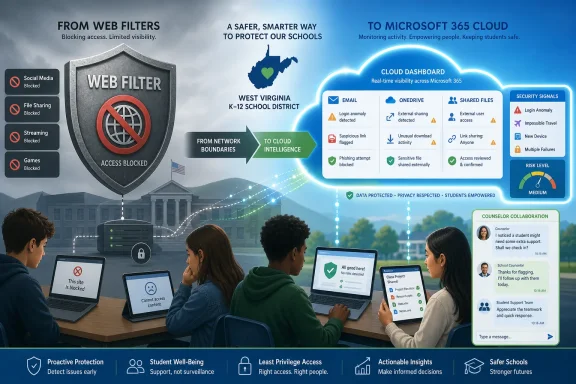 The School Network Moved, but the Safety Model Stayed Behind
For years, school technology safety meant blocking websites. Districts bought filters, tuned categories, wrestled with YouTube, and treated the browser as the main frontier between students and trouble. That model was never perfect, but it mapped reasonably well to a world where the most visible risks arrived through public web pages.Then the classroom moved into cloud suites. Microsoft 365 became email, storage, collaboration, assignments, Teams chats, shared folders, and ad hoc student-to-student communication. Google Workspace did the same in many districts. A web filter could still stop a student from visiting an obvious harmful site, but it could not necessarily see the content of a suicide note drafted in Word, a threatening message sent by email, or sensitive data shared through OneDrive.
That is the gap the West Virginia district’s IT director describes in unusually plain terms. The district had filtered internet access, but it had “nothing touching email and OneDrive.” In other words, the district had secured the road to the school but not enough of the rooms inside the building.
This matters because Microsoft 365 is not a side channel in modern K–12. It is core infrastructure. When schools hand students a managed identity and a cloud account, they create a digital space where academic work, peer communication, personal distress, disciplinary issues, and cyber risk can all converge. The old assumption that danger is mostly “out there” on the open web looks increasingly obsolete.
COVID-Era Device Programs Created a Visibility Debt
The pandemic did not invent school cloud computing, but it compressed years of adoption into months. Districts that once moved cautiously suddenly had to distribute laptops, provision accounts, enable collaboration, and keep instruction alive under emergency conditions. That scramble was necessary. It also left behind what might be called visibility debt.The West Virginia IT director’s comment cuts to the point: the district did not know what it had done to students by putting so many devices in front of them. That is not an anti-technology argument. It is an operational admission that access and accountability did not scale at the same speed.
This is the pattern many K–12 sysadmins will recognize. The device rollout gets funded, the accounts get created, the help desk survives the first year, and only later does the district ask whether it can actually understand what is happening across all those inboxes, drives, files, shares, and logins. By then, the cloud platform has become deeply embedded in daily school life.
In a district with 11,000 students, manual inspection is not a safety strategy. Searching one account after a report comes in may help investigate a known incident, but it does little for hidden distress, off-radar bullying, credential compromise, or slow-burn data exposure. The scale of the environment changes the nature of the problem.
Microsoft 365 Is Both the Productivity Suite and the Evidence Locker
The core lesson from this case is that Microsoft 365 is not merely a software subscription. In schools, it becomes a living archive of student behavior and institutional risk. Email threads, OneDrive files, shared folders, attachments, logins, and permissions together form a map of what students and staff are doing with district-provided tools.That map can be useful, but only if someone can read it in time. The West Virginia district says Cloud Monitor helped identify students writing suicide notes, students struggling with self-harm, and situations where counselors could be involved before conditions worsened. Those are not minor operational improvements. They are moments where cloud visibility becomes part of a school’s duty of care.
The same environment also produces cybersecurity signals. Password compromise attempts, logins from unexpected countries, risky external messages, and sensitive information being shared outside the expected boundary are all familiar problems for enterprise administrators. In K–12, those problems arrive with smaller IT teams, younger users, limited budgets, and intense community stakes.
This is where the story becomes more interesting than a standard customer case study. Student safety and cybersecurity are usually discussed as separate disciplines. In Microsoft 365, they increasingly share the same telemetry. A strange login, a suspicious file share, a harmful message, and a distressing document are different categories of risk, but they may all be discovered through the same cloud monitoring layer.
The Vendor Pitch Is Simple; the Governance Problem Is Not
ManagedMethods positions Cloud Monitor as an API-based layer for K–12 districts using Microsoft 365 and Google Workspace. The appeal is obvious: no endpoint agent, no browser extension, no proxy, and no requirement that activity occur on the school network. For districts dealing with take-home devices, mixed networks, personal hotspots, and after-hours usage, that architecture fits the way students actually work.The West Virginia district’s experience shows why that matters. If the monitoring model depends on traffic passing through a school firewall, the model weakens the moment students leave campus. If it depends on teachers noticing every concerning document or message, it collapses under human limits. If it depends on IT staff manually rummaging through accounts, it becomes reactive by design.
But the simplicity of the vendor pitch should not obscure the governance burden. Monitoring student email and files is powerful. It can surface self-harm risks and cyber incidents, but it also creates sensitive access to student expression, peer conflict, disciplinary evidence, and private communications inside a school-managed account.
That means districts need more than a dashboard. They need rules about who receives alerts, who can open files, how counselors are notified, how false positives are handled, how long records are retained, and how parents and students are informed. A tool can reduce blind spots, but it cannot by itself define the ethical boundary between protection and overreach.
The Best Alert Is Only as Good as the Human Response
The most encouraging detail in the West Virginia account is not merely that alerts appeared. It is that the IT team now works with counselors and administrators to interpret them. That partnership is the difference between surveillance as an end in itself and monitoring as part of a care process.In many school systems, technology teams are treated as infrastructure plumbers. They keep accounts running, reset passwords, manage devices, and take blame when the network hiccups during testing week. Student safety sits elsewhere, often with counselors, principals, school resource officers, and district administrators. Cloud platforms blur those boundaries.
When an alert suggests self-harm, the IT department should not be making clinical judgments alone. When an email thread suggests bullying or threats, a sysadmin should not become the sole investigator. When a login suggests compromise, a technician can reset a password quickly, but the district still needs a process for determining whether data was accessed or messages were sent.
The West Virginia district appears to have moved toward that cross-functional model. Counselors ask for context, IT provides what it sees, and administrators can act faster. That is the operational maturity other districts should study, because the tool is only the first half of the response chain.
Password Attacks Do Not Care That the Tenant Belongs to a School
It is tempting to view the student-safety dimension as the headline and the cybersecurity dimension as background noise. That would be a mistake. K–12 districts are attractive targets precisely because they combine large identity populations, uneven security staffing, valuable personal data, and users who are easy to phish.The IT director’s report of frequent password compromise alerts is unsurprising. Microsoft 365 accounts are useful to attackers. A compromised school account can be used to send convincing internal phishing messages, access shared files, impersonate staff, or pivot into other systems. If the account belongs to a student, the incident may still matter; if it belongs to a staff member, the stakes can escalate quickly.
Cloud monitoring gives districts a way to notice patterns that would otherwise remain buried in logs. A sign-in attempt from another country may be harmless in some enterprise contexts, but in a local school district it is often a clear anomaly. A sudden burst of external sharing may indicate carelessness, compromise, or an attempt to move data somewhere it should not go.
Microsoft provides native security and compliance capabilities across its ecosystem, especially in higher-tier licensing and Purview tooling. But K–12 districts frequently operate under cost constraints and staffing realities that make “just configure the platform” an incomplete answer. Third-party products succeed in this market when they turn complex platform telemetry into alerts a small school IT team can actually work.
OneDrive Is the New Hallway Locker
The most revealing phrase in the district’s account may be “things in OneDrive that made us uneasy.” It sounds vague, but every school technologist understands it. Student cloud storage can contain classwork, memes, screenshots, rumors, personal journals, copied content, inappropriate images, threats, and cries for help.The physical analogy is imperfect, but useful. Schools have long asserted authority over lockers, desks, and school-issued equipment, while still navigating expectations around student privacy and reasonable searches. OneDrive is now part of that institutional space, but it is far more searchable, persistent, and easily shared than a metal locker in a hallway.
That persistence changes investigations. A harmful file can be copied, reshared, renamed, or stored indefinitely. A student can draft a document without sending it. A folder can be shared externally by mistake or on purpose. A staff member can place sensitive information in the wrong location and create a compliance issue without realizing it.
Monitoring does not solve all of that, but it shifts the district from rumor-driven discovery to signal-driven response. The distinction matters. Schools will always rely on human reporting, but digital environments generate evidence before a human witness speaks up.
The Privacy Trade-Off Cannot Be Brushed Aside
The hardest part of this story is that the strongest argument for monitoring is also the strongest reason to constrain it. If a district can find a suicide note in a school cloud account quickly enough to intervene, few parents will object in that moment. If the same system is used casually, broadly, or without clear policy, the district risks normalizing continuous inspection of student life.This is not a reason to reject monitoring. It is a reason to govern it seriously. Students using district-provided Microsoft 365 accounts should understand that those accounts are managed educational spaces, not private consumer accounts. Parents should understand what categories of content may trigger alerts. Staff should know that sensitive district data must be handled according to policy, not convenience.
The best governance makes monitoring boring in the right ways. It defines roles, logs access, limits who can view content, documents escalation paths, and treats false positives as inevitable rather than embarrassing. It also recognizes that student safety alerts are not disciplinary shortcuts. A self-harm flag should not be handled like a cheating investigation, and a bullying concern should not be reduced to a keyword hit.
Schools already make trade-offs between supervision and privacy every day. The cloud raises the stakes because the supervision can be automated and the records can be durable. That demands restraint, transparency, and regular review.
Filters Still Matter, but They Are No Longer the Center of Gravity
None of this means web filtering is obsolete. Districts still need to comply with internet safety requirements, block obvious harmful categories, reduce malware exposure, and manage classroom distraction. Filtering remains part of the stack.But the West Virginia case shows why filtering is no longer the center of gravity. Students can communicate harmfully inside approved platforms. They can store concerning material in sanctioned cloud drives. They can expose data without visiting a blocked site. They can use VPNs or alternative channels in ways that reveal behavioral trends even when the filter does its job.
The IT director’s comment that students are “creative” is a polite way of describing a permanent condition. Students will route around restrictions, test boundaries, and discover platforms adults have not yet heard of. Security architecture that assumes compliance from young users will always disappoint.
The better approach is layered visibility. Web filtering handles the open internet. Identity controls handle access. Device management handles configuration. Cloud monitoring handles the collaboration space. Human teams handle interpretation and intervention. No single layer is sufficient, and the absence of one layer creates predictable blind spots.
Microsoft’s Platform Scale Makes the Stakes Bigger
Microsoft 365’s strength in education is also what makes this issue urgent. The platform is broad, integrated, familiar, and deeply tied into identity. For administrators, that creates central control and powerful security options. For students and staff, it creates a single workspace that can follow them across devices and locations.The risk is that districts mistake centralization for visibility. Having everything inside Microsoft 365 does not automatically mean the right people see the right signals at the right time. A tenant can be technically well managed and still operationally opaque if alerts are not tuned, responsibilities are unclear, or licensing leaves critical controls unused.
This is where third-party K–12-focused monitoring tools find their market. They promise to translate the sprawl of Exchange Online, OneDrive, SharePoint, and related activity into school-specific categories: self-harm, bullying, violence, account compromise, external sharing, and sensitive data exposure. That framing speaks to superintendents and principals in a way raw audit logs do not.
Microsoft will continue adding security, compliance, and AI-assisted administration features to its own stack. Districts should evaluate those native tools carefully. But the practical question for many K–12 leaders is not whether Microsoft has a capability somewhere. It is whether a small district team can deploy, tune, understand, and act on it before the next crisis.
The K–12 Security Market Is Selling Outcomes, Not Just Controls
The Security Boulevard article is syndicated from ManagedMethods, so readers should treat it for what it is: a customer success story, not an independent audit. The district is unnamed, the account is built around quotes from the IT director, and the product’s failures or limitations are not explored. That does not make the story useless. It means the claims should be read through the lens of vendor marketing.Still, the details align with a broader reality in K–12 IT. Districts are under pressure to protect student data, respond to mental health concerns, prevent cyber incidents, support remote access, and do it all without enterprise-scale teams. Products that promise consolidated visibility will continue to gain traction because the institutional pain is real.
The most effective vendors in this space do not merely sell “security.” They sell reduced uncertainty. They tell districts they can know when a student may be in danger, when an account may be compromised, when sensitive data may be exposed, and when cloud tools are being misused. That is a powerful message to administrators who are tired of learning about problems only after they become community incidents.
But outcomes are harder to measure than alerts. A prevented crisis is not always provable. A useful warning may be surrounded by dozens of low-value notifications. A district may feel safer because it has more dashboards, even if its response process remains weak. Buyers should demand evidence not just that a tool can detect, but that the district can act.
The Hard Part Is Turning Alerts Into Institutional Discipline
A cloud monitoring deployment can begin as a technology project, but it eventually becomes an institutional discipline. Someone must decide thresholds. Someone must review alerts during school breaks. Someone must separate student safety concerns from conduct issues. Someone must coordinate with counselors, legal staff, principals, and parents when necessary.This is especially important because alerts can create liability as well as protection. If a system flags a serious risk and no one acts, the district may be in a worse position than if it never had the tool. Monitoring creates knowledge, and knowledge creates responsibility.
That is why districts should avoid treating these platforms as “set it and forget it” appliances. They should run tabletop exercises around likely scenarios: a self-harm document, a credible threat, a compromised staff account, a student sharing explicit material, a folder containing special education records exposed externally. Each scenario should have a named response path.
The West Virginia district’s experience suggests that even partial maturity can make a difference. The IT director says automated alerts and summaries help make a large amount of data manageable. That is the right framing. The goal is not omniscience. The goal is to make the next action clearer, faster, and more accountable.
West Virginia’s Lesson Is That the Cloud Is Now a Student Safety Surface
The practical meaning of this case is not that every district should buy the same product tomorrow. It is that every district using Microsoft 365 should ask whether it has visibility into the spaces where students actually communicate and create. If the honest answer is no, then the district is accepting a blind spot by default.That blind spot is not theoretical. It includes self-harm notes, bullying, inappropriate content, compromised accounts, suspicious logins, sensitive data exposure, and external sharing. Some of those risks are student welfare issues. Some are cybersecurity incidents. Some are both.
The West Virginia district’s story is compelling because it ties those categories together. It shows an IT department becoming part of an early-warning system without pretending to replace counselors or administrators. It also shows how modern school security is less about blocking a destination and more about understanding behavior inside approved systems.
For WindowsForum readers, the Microsoft angle is straightforward. If your district, college, nonprofit, or small organization has standardized on Microsoft 365, the tenant is now one of your most important risk surfaces. Treating it as merely “email and Office” is an outdated mental model.
The District Dashboard Is Becoming the New Front Office
The concrete lesson from this West Virginia case is that K–12 cloud monitoring has moved from nice-to-have visibility into the realm of operational safety. The district’s experience points to a wider shift that administrators should confront before the next incident forces the conversation.- Districts that monitor only web traffic are likely missing important activity inside Microsoft 365 email, OneDrive, SharePoint, and collaboration tools.
- Automated alerts are most valuable when they feed a defined human process involving IT, counselors, administrators, and, when appropriate, families.
- Student safety monitoring and cybersecurity monitoring increasingly depend on the same cloud signals, including file content, sharing behavior, email activity, and login anomalies.
- Privacy protections should be designed before deployment, with clear limits on access, escalation, retention, and the handling of false positives.
- Microsoft’s native security stack and third-party K–12 tools should be evaluated against the district’s actual staffing capacity, not against an idealized enterprise security team.
- The most important metric is not how many alerts a platform generates, but whether the district can respond quickly, consistently, and proportionately when an alert matters.
References
- Primary source: Security Boulevard
Published: Tue, 23 Jun 2026 12:45:00 GMT
How One West Virginia School District Protects Microsoft 365—And Helped Prevent Student Crises - Security Boulevard
Cloud Monitor helps identify student safety concerns, investigate incidents faster, and strengthen Microsoft 365 security Cloud Monitor helps identify student safety concerns, investigate incidents faster, and strengthen Microsoft 365 security With approximately 11,000 students, 1,500 staff...securityboulevard.com - Official source: support.microsoft.com
Meet compliance standards with school data - Microsoft Support
Keep student information accessible and secure by leveraging Microsoft 365 security controls and configurations. support.microsoft.com - Official source: marketplace.microsoft.com
- Related coverage: managedmethods.zendesk.com
Student Safety Teams- A High Level Overview – ManagedMethods
What Is ManagedMethods? ManagedMethods is a cyber security and safety solution for K-12. The platform operates by scanning student's...managedmethods.zendesk.com - Official source: learn.microsoft.com
Microsoft compliance addons for education - M365 Education | Microsoft Learn
Learn about security and compliance addons and their features as part of the Microsoft Education Solution Guide.learn.microsoft.com - Related coverage: edtechmagazine.com
ManagedMethods Survey Finds Gaps in K–12 Cloud Security
Many districts lack adequate cybersecurity for cloud-based environments — possibly because they don’t know what protections are already in place.edtechmagazine.com
- Official source: info.microsoft.com
Education Security Toolkit | Microsoft Security
Learn how to safeguard student data and deliver measurable value for your educational institution with the Microsoft Education Security Toolkit.info.microsoft.com - Related coverage: managedmethods.com
- Official source: microsoft.com
Safeguard your students, online and on campus | Microsoft Education Blog
When students and parents are choosing a college or university, safety and security are often key considerations. And for educators, security is one of thewww.microsoft.com
