
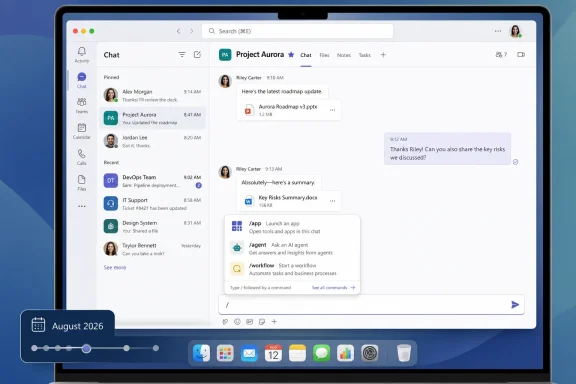
Microsoft is developing Teams slash commands for apps, a desktop and Mac feature due for general availability in August 2026 that will let users invoke apps, agents, and workflows directly from the chat and channel compose box by typing
The old promise of Teams apps was that work could happen “where conversations happen.” The lived reality was often less elegant: pinned tabs, side panels, pop-out dialogs, bot mentions, adaptive cards, app flyouts, and a growing number of places where a user might reasonably expect a feature to be hiding. Slash commands are Microsoft’s latest attempt to collapse that sprawl into a single gesture.
Type
The roadmap item is also narrowly scoped in a way that matters. Microsoft lists the feature for Teams on desktop and Mac, in the Worldwide standard cloud, with General Availability and Targeted Release both attached to an August 2026 timeline. This is not a mobile-first consumer flourish, and it is not a sovereign-cloud promise yet. It is a workplace productivity affordance aimed squarely at the users who live in Teams all day.
What makes the timing notable is that Teams has been moving through a long transition from meeting-and-chat client to operational hub. Microsoft has already made the compose box more capable with built-in commands and workflow creation. App slash commands extend that pattern from Microsoft-owned shortcuts into the broader ecosystem.
Teams already supports slash commands for common actions, and users have seen commands such as adding apps or creating workflows surface in the compose experience. The new roadmap item shifts the emphasis from Teams as the actor to installed apps and agents as the actors. That makes the feature less about shortcuts and more about routing intent.
In practical terms, the slash menu becomes a catalog of things the current conversation can do. A project-management app might expose a command to create a task from the current context. A support agent might expose a command to check ticket status. A workflow might be invoked without leaving the channel where the work is being discussed.
This is the kind of interaction Teams has always wanted to normalize. The difference is that slash commands reduce the amount of ceremonial UI needed to get there. A user does not need to remember whether a capability lives in a bot, a message extension, a tab, a Power Automate template, or a Copilot-style agent. They need only remember that commands begin with
Agents make that problem more urgent. Microsoft’s current collaboration story depends heavily on the idea that workers will delegate narrow tasks to agents embedded in the flow of work. But an agent that is theoretically available and practically invisible is not an agent; it is shelfware with a chat interface.
Slash commands give agents a native ritual. The user enters
That distinction is not cosmetic. In a busy channel, a public bot interaction can feel like clutter. A targeted command can feel like using a tool. Microsoft’s developer guidance around targeted messages and slash commands makes clear that response visibility and user expectations are part of the design problem, not an afterthought.
The best version of this feature will make agents feel less like another participant awkwardly wedged into a thread and more like contextual utilities attached to the conversation. The worst version will turn
That matters because the compose box is where intent is freshest. A user is already in a project channel, already thinking about a customer issue, already replying to a colleague, already looking at the conversation that gives the action meaning. Asking that user to move somewhere else in the interface creates a tax.
Microsoft is trying to eliminate that tax. If workflows, agents, and apps can be invoked from the compose box, the conversation itself becomes the operating context. That is exactly where Teams has an advantage over standalone workflow tools or browser-based dashboards.
It also explains why the feature is bigger than a convenience shortcut. The compose box is becoming a command bar with social context. It can send a message, insert content, invoke a dialog, start a workflow, address an agent, or produce a private result. The humble text field is now a runtime surface.
That has consequences for app developers. A Teams app that only exists as a tab may increasingly feel buried. A Teams app that exposes a few crisp slash commands can appear at the moment of need. Microsoft is nudging the ecosystem toward smaller, named actions rather than monolithic app experiences.
That sounds simple, but the implementation burden does not disappear. Microsoft’s own guidance notes that surfacing a command in the client does not implement the command’s behavior. The app or agent still has to parse the request, decide what the user meant, handle errors gracefully, and respond in a way that matches the setting.
This is where many Teams integrations have historically stumbled. A feature can be technically available but socially awkward. If a command posts too much into a channel, users will resent it. If it replies privately when the user expected a shared result, the team loses visibility. If it opens a heavyweight dialog for a simple action, the command becomes slower than the menu it replaced.
The winning apps will treat slash commands as product primitives, not as marketing entries in an autocomplete list. Short names, predictable verbs, clear descriptions, and fast failure states will matter. So will tenant-aware behavior, because an app command in a regulated enterprise cannot behave like a toy integration in a small team’s test tenant.
The most interesting opportunities are likely to be mundane. Create a Jira issue. Check a PagerDuty incident. Start an approval. Summarize a customer record. File a follow-up. Pull a runbook. In a collaboration platform, boring commands are often the ones that save the most time.
If an organization already curates its app catalog, reviews permissions, and limits third-party integrations by policy, slash commands can be a usability win. Approved tools become easier to find and invoke. Users rely less on shadow workflows because sanctioned workflows are closer to hand. Agents become less mysterious because their commands show up where the work happens.
If an organization’s Teams environment is already a thicket of abandoned apps and overlapping bots, the slash menu could become another junk drawer. Users may see too many commands with similar names, unclear descriptions, or inconsistent behavior. Help desks may end up troubleshooting not Teams itself, but the interaction between Teams, an app manifest, a tenant policy, and an external service.
This is the tradeoff Microsoft keeps making with Teams. The platform becomes more powerful by becoming more extensible. The platform becomes more exhausting when extensibility is treated as an end in itself. Slash commands sharpen both edges.
Admins should pay particular attention to app permission policies, custom app controls, and the user education around response visibility. A private targeted command in a channel can be exactly what a user wants, but it can also create confusion if the resulting action affects shared systems. The UI affordance is small; the audit and compliance implications may not be.
A command that used to require opening an app, confirming context, and choosing an action might soon be invoked from a channel with a few keystrokes. That is good for productivity. It also increases the value of clear authorization boundaries, logging, and safe defaults.
The obvious concern is not that typing
There is also the question of prompt-like ambiguity. As agents become more common, some commands will behave less like fixed buttons and more like structured openings for natural-language input. That blurs the line between a deterministic workflow and an AI-mediated request. Users may not always know whether a command is executing a fixed action, asking an agent to reason over context, or opening a task module that hands data to an external service.
Microsoft’s challenge is to make the UX fast without making it opaque. The slash menu should help users understand which app owns a command, what it will do, and whether the result is private or shared. In enterprise software, discoverability without explainability is just another way to manufacture tickets.
The roadmap entry’s status is “In development,” which means the feature is not yet something administrators should assume is stable in production. Developer documentation has already described slash command support in public developer preview contexts, which suggests Microsoft is preparing the ecosystem before the broader release. That is the right order: app developers need time to declare useful commands before users see much value.
The platform list is also important. Desktop and Mac are named; mobile is not in the roadmap details provided. Microsoft documentation around the underlying command model may discuss broader client support, but the roadmap item itself should be read conservatively. For WindowsForum readers, the practical expectation is that this first wave is about the primary Teams desktop experience.
Release rings add another wrinkle. Targeted Release tenants may see the feature before the broader population, but that does not mean every app will suddenly become slash-command aware. The client capability and the app ecosystem are separate moving parts. Users may get the slash surface before their favorite app exposes anything useful through it.
That lag is normal for platform features. The day a new extension point reaches GA is rarely the day it becomes indispensable. The more important question is whether Microsoft can convince major Teams app developers, internal enterprise developers, and agent builders to treat slash commands as a first-class entry point.
Slash commands are a bet that coherence can come from intent-based access rather than another navigation redesign. Instead of asking users to remember where an integration lives, Teams can ask them what they want to do. That is a better question.
It also aligns with Microsoft’s broader Copilot-era posture. The company wants users to summon capabilities from within their current context, whether those capabilities are deterministic workflows, app actions, or agent conversations. The slash command is the lowest-tech version of that idea, which may be exactly why it matters. Not every task needs a generative AI panel; many just need a fast verb.
There is a risk that Microsoft over-AI-ifies the pattern. If every slash command becomes a branded agent interaction, the menu will lose its precision. The beauty of slash commands is that they are crisp. They work best when the user can predict the outcome before pressing Enter.
For Teams to benefit, Microsoft and developers need to preserve that crispness. A command should not be a mystery box. It should be a contract.
Power users will adopt them first. They are the people who already prefer keyboard shortcuts, who resent context switching, and who know that shaving five seconds from a repeated action compounds across a workday. But the bigger prize is the ordinary Teams user who never explores the app store and never pins custom tabs.
For those users, the slash menu can be a guided discovery surface. It can show that a workflow exists, that an app has a useful action, or that an agent can handle a specific request. The menu is not merely a shortcut; it is an invitation.
The danger is overpopulation. If every app exposes every conceivable action, users will stop trusting the menu. Teams has lived through this problem before with notifications, tabs, and app surfaces that accumulated faster than organizations could govern them. Microsoft should resist celebrating raw command count as ecosystem health.
A small set of high-quality commands per app is more valuable than a long tail of vanity entries. The goal is not to reproduce the ribbon in text form. The goal is to make the next obvious action available without leaving the conversation.
The feature also acknowledges an uncomfortable truth: users do not want to “use apps” as much as vendors want to “drive app engagement.” Users want outcomes. If the fastest path to an outcome is a command in the conversation they already have open, the standalone app surface becomes secondary.
That could reshape how internal IT teams build for Teams. Instead of asking employees to open a custom app, IT can expose a few well-designed commands tied to common processes. Instead of training users on a portal, departments can teach a verb. The implementation may still be complex, but the user-facing model becomes simpler.
For developers selling into Microsoft 365 environments, this is also a distribution opportunity. Being present in the slash menu at the right moment may matter more than having the most elaborate Teams tab. In a crowded collaboration client, immediacy is a feature.
The pressure will be on Microsoft to keep the experience fast. Autocomplete latency, command ranking, duplicate names, and confusing ownership labels can turn a good idea into a mess. A command surface lives or dies by trust; users must believe that typing
There is a reason the feature is arriving as Teams continues to absorb more of Microsoft’s AI and automation strategy. Agents need handles. Workflows need triggers. Apps need discovery. Users need fewer places to look. Slash commands sit neatly at the intersection of all four.
Still, the feature should not be oversold. It will not fix poor app governance. It will not make bad bots useful. It will not turn vague workflows into reliable processes. It will not eliminate the need for training, documentation, or sensible tenant policies.
What it can do is make the right action easier to find at the right moment. In enterprise software, that is no small thing. Much of productivity is not about adding capability; it is about reducing the distance between intent and execution.
/. The feature looks small because the interface is small. But in Teams, the compose box is not just a text field; it is the front door to Microsoft’s collaboration platform, automation layer, app store, and increasingly its agent strategy. By moving app invocation into the same muscle memory as sending a message, Microsoft is trying to make Teams feel less like a container full of tabs and more like a command surface for work.
 Microsoft Is Turning the Message Box Into a Launcher
The old promise of Teams apps was that work could happen “where conversations happen.” The lived reality was often less elegant: pinned tabs, side panels, pop-out dialogs, bot mentions, adaptive cards, app flyouts, and a growing number of places where a user might reasonably expect a feature to be hiding. Slash commands are Microsoft’s latest attempt to collapse that sprawl into a single gesture.Type
/, pick a command, and Teams can hand the user to an app, agent, or workflow without requiring a hunt through menus. That is the entire pitch, and it is a good one. The keyboard has always been the fastest interface for people who already know what they want to do.The roadmap item is also narrowly scoped in a way that matters. Microsoft lists the feature for Teams on desktop and Mac, in the Worldwide standard cloud, with General Availability and Targeted Release both attached to an August 2026 timeline. This is not a mobile-first consumer flourish, and it is not a sovereign-cloud promise yet. It is a workplace productivity affordance aimed squarely at the users who live in Teams all day.
What makes the timing notable is that Teams has been moving through a long transition from meeting-and-chat client to operational hub. Microsoft has already made the compose box more capable with built-in commands and workflow creation. App slash commands extend that pattern from Microsoft-owned shortcuts into the broader ecosystem.
The Slash Command Is Old; Its Job in Teams Is New
Slash commands are hardly novel. IRC users had them decades ago, Slack popularized them for modern workplace chat, and developer tools from GitHub to Discord have made the pattern familiar. The value has never been the slash itself; it is the blend of speed, discoverability, and constrained intent.Teams already supports slash commands for common actions, and users have seen commands such as adding apps or creating workflows surface in the compose experience. The new roadmap item shifts the emphasis from Teams as the actor to installed apps and agents as the actors. That makes the feature less about shortcuts and more about routing intent.
In practical terms, the slash menu becomes a catalog of things the current conversation can do. A project-management app might expose a command to create a task from the current context. A support agent might expose a command to check ticket status. A workflow might be invoked without leaving the channel where the work is being discussed.
This is the kind of interaction Teams has always wanted to normalize. The difference is that slash commands reduce the amount of ceremonial UI needed to get there. A user does not need to remember whether a capability lives in a bot, a message extension, a tab, a Power Automate template, or a Copilot-style agent. They need only remember that commands begin with
/.Microsoft’s Agent Push Needed a Less Awkward Doorway
The Teams app model has always suffered from a discovery problem. Apps can be powerful, but the path to using them is often indirect. Bots require mentions. Message extensions hide behind compose buttons. Tabs are useful once pinned but easy to ignore. Workflows can be transformative for teams that invest in them, but casual users often never get past the setup friction.Agents make that problem more urgent. Microsoft’s current collaboration story depends heavily on the idea that workers will delegate narrow tasks to agents embedded in the flow of work. But an agent that is theoretically available and practically invisible is not an agent; it is shelfware with a chat interface.
Slash commands give agents a native ritual. The user enters
/, sees what is available, and invokes a named capability. For agents in group conversations, the command can also signal that the user intends to talk to the agent privately or semi-privately rather than broadcast an instruction to every human participant.That distinction is not cosmetic. In a busy channel, a public bot interaction can feel like clutter. A targeted command can feel like using a tool. Microsoft’s developer guidance around targeted messages and slash commands makes clear that response visibility and user expectations are part of the design problem, not an afterthought.
The best version of this feature will make agents feel less like another participant awkwardly wedged into a thread and more like contextual utilities attached to the conversation. The worst version will turn
/ into a noisy drawer of duplicate verbs, branded commands, and half-implemented demos. The difference will be governance, app quality, and restraint.The Compose Box Is Becoming the New Command Bar
There is a subtle product philosophy shift here. Teams once had a prominent command/search box at the top of the client, a place where power users could jump around, run commands, and find people or content. But work in Teams increasingly starts at the bottom of the conversation, not the top of the window.That matters because the compose box is where intent is freshest. A user is already in a project channel, already thinking about a customer issue, already replying to a colleague, already looking at the conversation that gives the action meaning. Asking that user to move somewhere else in the interface creates a tax.
Microsoft is trying to eliminate that tax. If workflows, agents, and apps can be invoked from the compose box, the conversation itself becomes the operating context. That is exactly where Teams has an advantage over standalone workflow tools or browser-based dashboards.
It also explains why the feature is bigger than a convenience shortcut. The compose box is becoming a command bar with social context. It can send a message, insert content, invoke a dialog, start a workflow, address an agent, or produce a private result. The humble text field is now a runtime surface.
That has consequences for app developers. A Teams app that only exists as a tab may increasingly feel buried. A Teams app that exposes a few crisp slash commands can appear at the moment of need. Microsoft is nudging the ecosystem toward smaller, named actions rather than monolithic app experiences.
Developers Get a Cleaner Hook, but Not Free Product Design
For developers, slash commands are exposed through app and agent configuration rather than magic. Apps and agents declare what they support, and Teams surfaces those capabilities in the slash command menu. Agent slash commands can be defined through bot command lists, while message extension commands can be configured to appear as slash-triggered entries where appropriate.That sounds simple, but the implementation burden does not disappear. Microsoft’s own guidance notes that surfacing a command in the client does not implement the command’s behavior. The app or agent still has to parse the request, decide what the user meant, handle errors gracefully, and respond in a way that matches the setting.
This is where many Teams integrations have historically stumbled. A feature can be technically available but socially awkward. If a command posts too much into a channel, users will resent it. If it replies privately when the user expected a shared result, the team loses visibility. If it opens a heavyweight dialog for a simple action, the command becomes slower than the menu it replaced.
The winning apps will treat slash commands as product primitives, not as marketing entries in an autocomplete list. Short names, predictable verbs, clear descriptions, and fast failure states will matter. So will tenant-aware behavior, because an app command in a regulated enterprise cannot behave like a toy integration in a small team’s test tenant.
The most interesting opportunities are likely to be mundane. Create a Jira issue. Check a PagerDuty incident. Start an approval. Summarize a customer record. File a follow-up. Pull a runbook. In a collaboration platform, boring commands are often the ones that save the most time.
IT Admins Will See Both Adoption and Sprawl
For administrators, the feature lands in familiar Teams territory: anything that makes apps easier to use also makes app governance more important. Slash commands will not create the Teams app ecosystem’s management challenges, but they will make the consequences more visible.If an organization already curates its app catalog, reviews permissions, and limits third-party integrations by policy, slash commands can be a usability win. Approved tools become easier to find and invoke. Users rely less on shadow workflows because sanctioned workflows are closer to hand. Agents become less mysterious because their commands show up where the work happens.
If an organization’s Teams environment is already a thicket of abandoned apps and overlapping bots, the slash menu could become another junk drawer. Users may see too many commands with similar names, unclear descriptions, or inconsistent behavior. Help desks may end up troubleshooting not Teams itself, but the interaction between Teams, an app manifest, a tenant policy, and an external service.
This is the tradeoff Microsoft keeps making with Teams. The platform becomes more powerful by becoming more extensible. The platform becomes more exhausting when extensibility is treated as an end in itself. Slash commands sharpen both edges.
Admins should pay particular attention to app permission policies, custom app controls, and the user education around response visibility. A private targeted command in a channel can be exactly what a user wants, but it can also create confusion if the resulting action affects shared systems. The UI affordance is small; the audit and compliance implications may not be.
Security Teams Should Care About Intent, Not Just Permissions
Security-minded readers may be tempted to dismiss slash commands as UI sugar. That would be a mistake. Interfaces that lower friction change behavior, and changed behavior changes risk.A command that used to require opening an app, confirming context, and choosing an action might soon be invoked from a channel with a few keystrokes. That is good for productivity. It also increases the value of clear authorization boundaries, logging, and safe defaults.
The obvious concern is not that typing
/ is dangerous. It is that commands can make powerful actions feel casual. Creating records, launching workflows, querying internal systems, or triggering agent behavior from a chat surface should still respect the same controls that apply elsewhere. The shortcut must not become a privilege shortcut.There is also the question of prompt-like ambiguity. As agents become more common, some commands will behave less like fixed buttons and more like structured openings for natural-language input. That blurs the line between a deterministic workflow and an AI-mediated request. Users may not always know whether a command is executing a fixed action, asking an agent to reason over context, or opening a task module that hands data to an external service.
Microsoft’s challenge is to make the UX fast without making it opaque. The slash menu should help users understand which app owns a command, what it will do, and whether the result is private or shared. In enterprise software, discoverability without explainability is just another way to manufacture tickets.
The Roadmap Date Is a Promise Written in Pencil
The Microsoft 365 Roadmap lists August 2026 for general availability, but roadmap dates are estimates, not shipping guarantees. That distinction matters for admins planning training, developers planning app updates, and users wondering when the feature will appear in their tenant. Microsoft often rolls features through Targeted Release before broader availability, and client-side experiences can arrive unevenly across platforms and tenants.The roadmap entry’s status is “In development,” which means the feature is not yet something administrators should assume is stable in production. Developer documentation has already described slash command support in public developer preview contexts, which suggests Microsoft is preparing the ecosystem before the broader release. That is the right order: app developers need time to declare useful commands before users see much value.
The platform list is also important. Desktop and Mac are named; mobile is not in the roadmap details provided. Microsoft documentation around the underlying command model may discuss broader client support, but the roadmap item itself should be read conservatively. For WindowsForum readers, the practical expectation is that this first wave is about the primary Teams desktop experience.
Release rings add another wrinkle. Targeted Release tenants may see the feature before the broader population, but that does not mean every app will suddenly become slash-command aware. The client capability and the app ecosystem are separate moving parts. Users may get the slash surface before their favorite app exposes anything useful through it.
That lag is normal for platform features. The day a new extension point reaches GA is rarely the day it becomes indispensable. The more important question is whether Microsoft can convince major Teams app developers, internal enterprise developers, and agent builders to treat slash commands as a first-class entry point.
This Is Microsoft’s Bet Against App Fatigue
Teams has an app fatigue problem because modern work has an app fatigue problem. Every department has its system of record, every vendor wants a notification channel, and every workflow tool wants to be the place where collaboration happens. Teams won the distribution war in many organizations, but distribution alone does not make an experience coherent.Slash commands are a bet that coherence can come from intent-based access rather than another navigation redesign. Instead of asking users to remember where an integration lives, Teams can ask them what they want to do. That is a better question.
It also aligns with Microsoft’s broader Copilot-era posture. The company wants users to summon capabilities from within their current context, whether those capabilities are deterministic workflows, app actions, or agent conversations. The slash command is the lowest-tech version of that idea, which may be exactly why it matters. Not every task needs a generative AI panel; many just need a fast verb.
There is a risk that Microsoft over-AI-ifies the pattern. If every slash command becomes a branded agent interaction, the menu will lose its precision. The beauty of slash commands is that they are crisp. They work best when the user can predict the outcome before pressing Enter.
For Teams to benefit, Microsoft and developers need to preserve that crispness. A command should not be a mystery box. It should be a contract.
The Best Commands Will Be the Ones Users Stop Noticing
The feature’s success will not be measured by how many commands appear in the menu. It will be measured by whether users internalize a handful of commands that remove daily friction. In that sense, the most successful slash commands may become almost invisible.Power users will adopt them first. They are the people who already prefer keyboard shortcuts, who resent context switching, and who know that shaving five seconds from a repeated action compounds across a workday. But the bigger prize is the ordinary Teams user who never explores the app store and never pins custom tabs.
For those users, the slash menu can be a guided discovery surface. It can show that a workflow exists, that an app has a useful action, or that an agent can handle a specific request. The menu is not merely a shortcut; it is an invitation.
The danger is overpopulation. If every app exposes every conceivable action, users will stop trusting the menu. Teams has lived through this problem before with notifications, tabs, and app surfaces that accumulated faster than organizations could govern them. Microsoft should resist celebrating raw command count as ecosystem health.
A small set of high-quality commands per app is more valuable than a long tail of vanity entries. The goal is not to reproduce the ribbon in text form. The goal is to make the next obvious action available without leaving the conversation.
The August 2026 Signal Hides a Bigger Platform Shift
Read narrowly, Roadmap ID 495002 is a Teams feature for typing slash commands in the compose box. Read strategically, it is another step in Microsoft’s effort to make Teams the place where work is initiated, not merely discussed. That is the platform story Microsoft has been telling for years, but slash commands make it more plausible at the interaction level.The feature also acknowledges an uncomfortable truth: users do not want to “use apps” as much as vendors want to “drive app engagement.” Users want outcomes. If the fastest path to an outcome is a command in the conversation they already have open, the standalone app surface becomes secondary.
That could reshape how internal IT teams build for Teams. Instead of asking employees to open a custom app, IT can expose a few well-designed commands tied to common processes. Instead of training users on a portal, departments can teach a verb. The implementation may still be complex, but the user-facing model becomes simpler.
For developers selling into Microsoft 365 environments, this is also a distribution opportunity. Being present in the slash menu at the right moment may matter more than having the most elaborate Teams tab. In a crowded collaboration client, immediacy is a feature.
The pressure will be on Microsoft to keep the experience fast. Autocomplete latency, command ranking, duplicate names, and confusing ownership labels can turn a good idea into a mess. A command surface lives or dies by trust; users must believe that typing
/ will help more often than it distracts.The Slash Menu Becomes a Test of Teams Maturity
The next year will show whether Teams has matured enough to handle another extensibility surface without burying users under choices. Microsoft has the pieces: app policies, manifest controls, developer guidance, workflow integration, agent support, and a massive installed base. The question is whether those pieces add up to a disciplined user experience.There is a reason the feature is arriving as Teams continues to absorb more of Microsoft’s AI and automation strategy. Agents need handles. Workflows need triggers. Apps need discovery. Users need fewer places to look. Slash commands sit neatly at the intersection of all four.
Still, the feature should not be oversold. It will not fix poor app governance. It will not make bad bots useful. It will not turn vague workflows into reliable processes. It will not eliminate the need for training, documentation, or sensible tenant policies.
What it can do is make the right action easier to find at the right moment. In enterprise software, that is no small thing. Much of productivity is not about adding capability; it is about reducing the distance between intent and execution.
The Admin Checklist Microsoft Just Hid Behind a Slash
The practical story for WindowsForum readers is that this is a small interface change with outsized operational implications. If your organization treats Teams as a managed platform, slash commands can make approved apps and workflows more usable. If your tenant is loosely governed, the same feature can expose that looseness in a very visible place.- Microsoft lists Teams slash commands for apps as an in-development feature for desktop and Mac, with general availability currently planned for August 2026.
- The feature will let users invoke apps, agents, and workflows from the chat and channel compose box by typing
/. - Developers will need to expose useful commands through app or agent configuration, and the Teams client surfacing a command does not implement the business logic behind it.
- Administrators should review app permission policies, custom app governance, and workflow controls before the feature reaches broad deployment.
- The best user experience will come from a small number of clear, action-oriented commands rather than crowded menus full of overlapping app entries.
- Security teams should treat slash commands as a lower-friction path to existing capabilities, not as a reason to relax authorization, logging, or data-handling expectations.
References
- Primary source: Microsoft 365 Roadmap
Published: 2026-06-25T23:15:45.5477468Z
Loading…
www.microsoft.com - Official source: learn.microsoft.com
Loading…
learn.microsoft.com - Official source: support.microsoft.com
Loading…
support.microsoft.com - Related coverage: supersimple365.com
Loading…
supersimple365.com - Related coverage: office365itpros.com
Loading…
office365itpros.com - Official source: developer.microsoft.com
Loading…
developer.microsoft.com
- Official source: download.microsoft.com
- Official source: cdn-dynmedia-1.microsoft.com
- Related coverage: choc.org
Loading…
choc.org