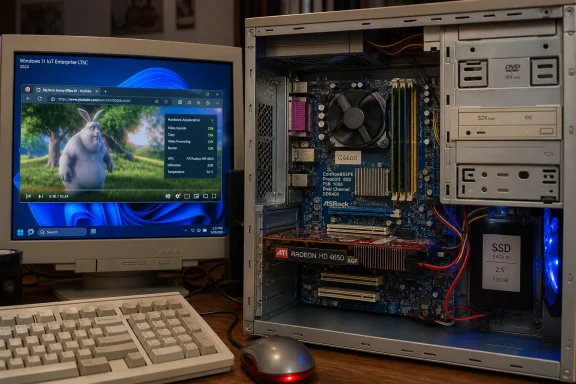
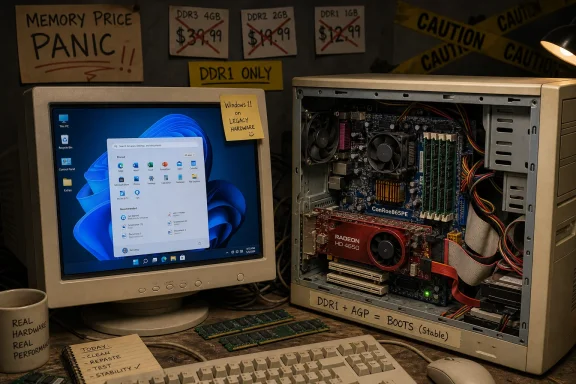
A Windows tinkerer known as Omores has demonstrated Windows 11 running in June 2026 on a DDR1-era desktop built around an ASRock ConRoe865PE motherboard, Intel Core 2 Quad Q6600, and ATI Radeon HD 4650 AGP graphics card, while claiming the machine is stable. The stunt is funny because it arrives during a memory-price panic, but it is interesting because it exposes how elastic Windows 11 really is once Microsoft’s consumer hardware gate is bypassed. This is not a buying guide for ancient AGP rigs, and nobody should confuse “boots” with “belongs in production.” It is, however, a useful reminder that Windows compatibility is often less about raw capability than about policy, drivers, security posture, and the business Microsoft wants to be in.
Windows 11 has always had two identities. In public, it is the operating system that drew a hard line under the Windows 10 era: TPM 2.0, Secure Boot, newer CPUs, WDDM 2.0 graphics, and a cleaner break from the anything-goes ecosystem that made Windows so dominant. In practice, it is still Windows, an operating system whose deepest instinct is to keep running on hardware that should have been retired three office refreshes ago.
That contradiction is why Omores’ DDR1 build landed so neatly. The headline components are almost comic in 2026: DDR1 memory from the early 2000s, an Intel 865PE-era motherboard, an AGP graphics card, and a Core 2 Quad Q6600 that now functions as both retro icon and proof of how long a “fast enough” CPU can remain useful. The platform predates the assumptions Windows 11 was marketed around, including UEFI, modern firmware security, and contemporary driver models.
Yet the operating system reportedly runs, browsers open, video plays, hardware decoding works after driver wrangling, benchmarks launch, and the inevitable Crysis test completes. That does not demolish Microsoft’s Windows 11 requirements. It does something more irritating for anyone who wants the story to be simple: it shows that the requirements are not a clean proxy for whether the OS kernel, desktop, and application stack can function.
The result is a vintage-computing stunt with a policy argument hiding inside it. Windows 11’s official consumer requirements are not merely about minimum performance. They are about standardizing the PC security baseline, reducing support permutations, encouraging OEM refresh cycles, and making the Windows ecosystem less haunted by twenty years of firmware and driver compromises.
The idea that a user might flee expensive modern RAM by reaching all the way back to DDR1 is absurd, of course. DDR1 is not an answer to DDR5 pricing, and a 3GB or 4GB early-2000s platform is not going to rescue anyone building a serious modern workstation. But the joke works because PC enthusiasts have always treated hardware longevity as both economic strategy and moral stance.
That is the part of the story that makes the ASRock ConRoe865PE more than a trivia answer. Boards like this existed because users wanted to carry forward expensive DDR memory and AGP graphics cards into the Core 2 era. ASRock made a business out of bridge boards that looked ungainly on spec sheets but made perfect sense to buyers trying to upgrade one piece at a time.
Today’s platform transitions are less forgiving. DDR5, PCIe generations, TPM expectations, firmware modes, Windows support lists, and vendor driver cutoffs create cliffs where older transition periods had ramps. Enthusiasts notice this because they are often the last people still trying to make the ramps work.
That matters because many modern low-end systems are not fast in the way enthusiasts imagine modern hardware should be fast. Cheap dual-core and low-power Celeron-class systems have spent years doing the minimum necessary to ship a browser, Teams, and a Windows desktop. A Q6600 is inefficient and old, but it was once a high-end desktop part, and that pedigree still leaves traces.
The motherboard is the real magic trick. The ConRoe865PE bridged eras that were not supposed to overlap cleanly: LGA775 Core 2 processors on a platform with DDR1 memory and AGP graphics. It is the kind of board that makes modern platform segmentation look sterile by comparison. It also illustrates how much of PC history consists of strange compatibility hacks that later become invisible.
A Windows 11 desktop on this hardware is therefore not a miracle. It is the end result of several layers of compatibility debt lining up in the user’s favor. The CPU can execute the code. The chipset can expose enough ACPI and storage functionality. The graphics card can be forced into service. The operating system still contains enough legacy machinery to tolerate the situation.
Omores reportedly had to force old Windows 7-era ATI drivers into place to get AGP 8X and H.264 hardware decoding working properly. That detail is more important than the successful boot. A functional desktop without acceleration is a museum placard. A functional desktop with video decode, browser rendering, and enough graphics support to run tests is a usable artifact.
This is also where the experiment stops being broadly reproducible. Old GPU drivers are a swamp of unsigned packages, modified installers, device IDs, abandoned control panels, and version-specific quirks. A skilled hobbyist can make them work. A normal user should not be expected to, and an administrator would be reckless to depend on them.
Windows’ backward compatibility is famously deep, but drivers are the practical border fence. Once a vendor stops maintaining a driver, every new OS release becomes a negotiation between luck and breakage. The Radeon HD 4650 AGP working on Windows 11 is impressive precisely because it required a crowbar.
A DDR1 Core 2 Quad box can run Windows 11 in the same limited sense that a car from the 1970s can drive on a modern highway. It may move at acceptable speed under the right conditions, but it lacks the assumptions baked into the modern system around crash safety, emissions, diagnostics, parts availability, and maintenance. Windows 11’s consumer requirements are similarly about ecosystem hygiene as much as immediate function.
TPM, Secure Boot, virtualization-based security, measured boot, driver standards, and modern firmware behavior are not cosmetic concerns. They define what Microsoft, OEMs, security vendors, and enterprise administrators can reasonably assume about a machine. The older the platform, the more those assumptions dissolve.
That is why the unsupported-PC debate has always been frustrating. Enthusiasts argue from observed capability: the machine works. Microsoft argues from fleet-level risk: the machine lacks the security and support baseline the company wants Windows 11 to represent. Both can be true, and this build makes both truths visible.
This distinction matters. Windows 11 Home and Pro requirements are aimed at general-purpose consumer PCs. Windows 11 IoT Enterprise LTSC is aimed at fixed-function and specialized devices where the device maker controls the workload, validates the image, and accepts trade-offs. The same operating-system generation can therefore have different hardware bars depending on the business and deployment model.
That is not hypocrisy so much as product segmentation. Microsoft is willing to let Windows 11 run on less conventional hardware when the customer is an OEM or enterprise building an appliance-like system. It is less willing to bless the same looseness for the general PC market, where every unsupported configuration becomes a support case, a Reddit complaint, or a security headline.
For enthusiasts, though, the distinction feels academic. If a Microsoft-sanctioned Windows 11 variant can tolerate BIOS and lower hardware baselines in one context, the claim that older PCs are technically unfit in all contexts becomes harder to defend. The problem shifts from “Windows 11 cannot run there” to “Microsoft does not want that class of machine in the mainstream Windows 11 support pool.”
Old BIOS firmware does not provide the same foundation as modern UEFI with Secure Boot. Ancient chipsets lack modern platform protections. Driver packages from 2012 were not built for today’s threat model. Even if Windows Defender runs and the OS receives updates, the platform underneath it remains a weak foundation by modern standards.
That does not make the project irresponsible as a lab experiment. Retro computing has always involved controlled risk, especially when old operating systems and drivers are involved. The problem comes when a successful experiment gets flattened into a recommendation. “It works” is not the same as “it should hold your passwords, banking session, and work email.”
For sysadmins, the lesson is sharper. Unsupported hardware is not scary because it instantly bursts into flames. It is scary because it creates exceptions that are difficult to inventory, patch, validate, and defend. A single enthusiast box is a curiosity. A fleet of “still works” exceptions is how organizations end up with permanent risk disguised as thrift.
The web is now the heaviest everyday application stack most users run. It brings sandboxing, GPU compositing, video codecs, JavaScript-heavy applications, password managers, conferencing tools, and endless background processes. An old PC that can boot Windows but cannot browse comfortably is little more than a retro launcher.
Hardware H.264 decoding is therefore not a footnote. It is the difference between the CPU drowning in video playback and the machine feeling surprisingly competent in carefully chosen tasks. The Radeon HD 4650 is ancient, but if its decode block is alive and the driver cooperates, it can still offload work that would otherwise expose the Q6600’s age quickly.
Even so, modern web life is not kind to small memory pools. DDR1 capacity limits are a hard ceiling. A few tabs, a chat client, a browser update, and background services can make 3GB feel claustrophobic quickly. The machine may be stable, but stability is not the same thing as headroom.
Games from the DirectX 9 and early DirectX 10 era often map surprisingly well onto old high-end hardware, especially when run at period-appropriate settings. That makes them useful demonstrations, but not proof of broad modern gaming viability. The real pain points for newer games would arrive through instruction-set expectations, anti-cheat requirements, driver models, shader support, VRAM limits, storage behavior, and online platform overhead.
Still, there is something revealing about Crysis surviving the trip. Windows’ great strength has always been its absurdly broad software inheritance. People tolerate its messiness because that inheritance has value. A modern OS that can run a nearly two-decade-old game on a nearly two-decade-old platform is doing something technically impressive, even if the path there involves duct tape.
The danger for Microsoft is that these demonstrations make the company’s compatibility decisions look more political than technical. The danger for enthusiasts is the reverse: they can mistake a spectacular edge case for evidence that hardware support policy is meaningless. The truth is less satisfying and more useful. Compatibility is a stack, and one successful stack does not guarantee another.
That tension is not new, but Windows 11 sharpened it. Microsoft did not merely release a new OS; it told a large population of Windows 10-era PCs that they were outside the future, even when many remained perfectly serviceable for everyday tasks. Some users accepted that as a necessary security reset. Others saw it as artificial obsolescence with a TPM-shaped logo.
A DDR1 Windows 11 rig pours gasoline on that argument because it is so extreme. If a machine with AGP graphics and early-2000s memory can reach the Windows 11 desktop, why should a 2016 or 2017 office PC be treated as e-waste? Microsoft’s answer is security and supportability, but the optics are difficult.
This is where Microsoft’s October 2025 Windows 10 support milestone still casts a long shadow. As Windows 10 moved out of mainstream consumer support, users with unsupported Windows 11 hardware faced a choice among extended updates, replacement hardware, Linux, unofficial bypasses, or doing nothing. Vintage experiments are not migration plans, but they keep reminding people that the line between obsolete and unsupported is not the same line.
But the environmental case for extending hardware life is not limited to keeping the oldest possible PC in daily service. It is about resisting unnecessary replacement when a machine still meets a user’s needs. The more Microsoft tightens Windows eligibility around platform features, the more users ask whether the replacement cycle is being driven by genuine need or by ecosystem policy.
That question becomes especially sensitive during component shortages. If memory prices are volatile and new systems become more expensive, old hardware looks different. What was previously a drawer full of obsolete parts becomes a hedge against supply-chain absurdity, at least for hobbyists and low-stakes use cases.
The sensible position is not that everyone should resurrect DDR1. It is that operating-system vendors should be honest about why hardware is excluded. If the reason is security, say security. If the reason is support cost, say support cost. If the reason is feature enablement for the next decade of Windows, say that too. Users may still disagree, but they are less likely to feel gaslit.
The obvious problem is manageability. A machine running forced legacy GPU drivers and unsupported platform firmware is a snowflake, and snowflakes are expensive. They break differently, patch differently, image differently, and fail compliance checks in ways that generate tickets no one wants to own.
The less obvious problem is precedent. Once users learn that Windows 11 can be made to run on almost anything, they may interpret organizational hardware standards as bureaucracy rather than risk management. IT departments then have to explain the difference between a hobbyist’s one-off installation and an auditable fleet with security obligations.
That distinction is increasingly important as Windows becomes more tied to identity, endpoint detection, conditional access, device health signals, and compliance posture. A PC is not just a box that runs Word. It is a node in a security model. Ancient hardware can sometimes run the software, but it cannot necessarily participate in the trust architecture.
This matters for more than nostalgia. Industrial systems, lab equipment, point-of-sale terminals, signage, and embedded controllers often depend on old Windows drivers long after the consumer market has moved on. The IoT and LTSC worlds exist partly because reality does not upgrade on retail schedules.
But old driver reuse is a dangerous art. Modified INF files and forced installations can restore function, but they do not restore maintenance. A driver that was good enough for Windows 7 may be a liability on a networked Windows 11 system. The more obscure the hardware, the harder it is to know whether a problem is a harmless quirk or a serious security flaw.
That is why Microsoft’s stricter model is understandable even when it is unpopular. A cleaner driver ecosystem helps Windows become more secure and more reliable. It also leaves behind hardware that enthusiasts can still make work, creating a gap between official support and practical possibility.
Omores’ build appears to sit near the most adventurous end of that spectrum. It is not merely outside the Windows 11 consumer support list; it is outside the assumptions of contemporary PC architecture. That makes the success more impressive, but also less transferable to normal users deciding what to do with an aging laptop.
The more useful comparison is with the millions of PCs that miss Windows 11 support by a narrower margin. Sixth- and seventh-generation Intel systems, early Ryzen machines, and business desktops without the right TPM or firmware configuration are not DDR1 curiosities. Many are still competent machines. The policy question around those systems is much harder than the policy question around an AGP tower.
This is where Microsoft’s messaging has struggled. By drawing a bright line, it made administration and OEM planning cleaner. But by leaving enough technical flexibility in Windows for enthusiasts to demonstrate absurd counterexamples, it ensured that the line would always look debatable.
Linux can often revive old hardware more gracefully, and specialized retro operating systems can provide cleaner period-correct experiences. But Windows carries the mainstream software archive: games, utilities, drivers, productivity apps, obscure vendor tools, and institutional workflows. When Windows 11 runs on a DDR1 board, it is not just an OS booting. It is a continuity machine doing what continuity machines do.
The irony is that Microsoft both benefits from and fights against this legacy. The company wants Windows to be trusted, manageable, and modern enough for a world of firmware attacks, ransomware, cloud identity, and AI-inflected client computing. But Windows’ emotional contract with users has always been broader: your old stuff will probably still work.
That contract is fraying, not because Microsoft has abandoned compatibility, but because compatibility now collides with security and platform economics more often. The DDR1 build is a flamboyant reminder of the old promise. Windows 11’s requirements are the new terms and conditions.
 A Museum Piece Finds the Weak Spot in Windows 11’s Story
Windows 11 has always had two identities. In public, it is the operating system that drew a hard line under the Windows 10 era: TPM 2.0, Secure Boot, newer CPUs, WDDM 2.0 graphics, and a cleaner break from the anything-goes ecosystem that made Windows so dominant. In practice, it is still Windows, an operating system whose deepest instinct is to keep running on hardware that should have been retired three office refreshes ago.That contradiction is why Omores’ DDR1 build landed so neatly. The headline components are almost comic in 2026: DDR1 memory from the early 2000s, an Intel 865PE-era motherboard, an AGP graphics card, and a Core 2 Quad Q6600 that now functions as both retro icon and proof of how long a “fast enough” CPU can remain useful. The platform predates the assumptions Windows 11 was marketed around, including UEFI, modern firmware security, and contemporary driver models.
Yet the operating system reportedly runs, browsers open, video plays, hardware decoding works after driver wrangling, benchmarks launch, and the inevitable Crysis test completes. That does not demolish Microsoft’s Windows 11 requirements. It does something more irritating for anyone who wants the story to be simple: it shows that the requirements are not a clean proxy for whether the OS kernel, desktop, and application stack can function.
The result is a vintage-computing stunt with a policy argument hiding inside it. Windows 11’s official consumer requirements are not merely about minimum performance. They are about standardizing the PC security baseline, reducing support permutations, encouraging OEM refresh cycles, and making the Windows ecosystem less haunted by twenty years of firmware and driver compromises.
The RAMpocalypse Gives Retro Computing a Fresh Punchline
The memory shortage gives this experiment its cultural hook. In a normal year, running Windows 11 on DDR1 would be filed as retro-computing mischief: an enthusiast does a technically awkward thing because technically awkward things are fun. In 2026, with memory prices and supply anxiety turning into a running joke across the PC-building community, the project reads more like satire.The idea that a user might flee expensive modern RAM by reaching all the way back to DDR1 is absurd, of course. DDR1 is not an answer to DDR5 pricing, and a 3GB or 4GB early-2000s platform is not going to rescue anyone building a serious modern workstation. But the joke works because PC enthusiasts have always treated hardware longevity as both economic strategy and moral stance.
That is the part of the story that makes the ASRock ConRoe865PE more than a trivia answer. Boards like this existed because users wanted to carry forward expensive DDR memory and AGP graphics cards into the Core 2 era. ASRock made a business out of bridge boards that looked ungainly on spec sheets but made perfect sense to buyers trying to upgrade one piece at a time.
Today’s platform transitions are less forgiving. DDR5, PCIe generations, TPM expectations, firmware modes, Windows support lists, and vendor driver cutoffs create cliffs where older transition periods had ramps. Enthusiasts notice this because they are often the last people still trying to make the ramps work.
The Core 2 Quad Was the Right Antique for the Job
The Q6600 is a perfect CPU for this stunt because it occupies a strange place in PC memory. It is old enough to be ridiculous in a Windows 11 context, but not so primitive that the result is pure theater. Four cores at 2.4GHz, a 64-bit instruction set, and the sheer overbuilt charm of Intel’s late-2000s desktop parts give it just enough credibility to keep the experiment from collapsing into nostalgia.That matters because many modern low-end systems are not fast in the way enthusiasts imagine modern hardware should be fast. Cheap dual-core and low-power Celeron-class systems have spent years doing the minimum necessary to ship a browser, Teams, and a Windows desktop. A Q6600 is inefficient and old, but it was once a high-end desktop part, and that pedigree still leaves traces.
The motherboard is the real magic trick. The ConRoe865PE bridged eras that were not supposed to overlap cleanly: LGA775 Core 2 processors on a platform with DDR1 memory and AGP graphics. It is the kind of board that makes modern platform segmentation look sterile by comparison. It also illustrates how much of PC history consists of strange compatibility hacks that later become invisible.
A Windows 11 desktop on this hardware is therefore not a miracle. It is the end result of several layers of compatibility debt lining up in the user’s favor. The CPU can execute the code. The chipset can expose enough ACPI and storage functionality. The graphics card can be forced into service. The operating system still contains enough legacy machinery to tolerate the situation.
AGP Is Where the Romance Meets the Driver Wall
The ATI Radeon HD 4650 AGP is the component that turns the build from “old PC boots Windows” into a more serious compatibility story. CPUs age slowly when the software stack remains broadly x86-compatible. Graphics hardware ages through drivers, APIs, display models, browser acceleration paths, and video decode support. That is where old Windows machines usually become unpleasant.Omores reportedly had to force old Windows 7-era ATI drivers into place to get AGP 8X and H.264 hardware decoding working properly. That detail is more important than the successful boot. A functional desktop without acceleration is a museum placard. A functional desktop with video decode, browser rendering, and enough graphics support to run tests is a usable artifact.
This is also where the experiment stops being broadly reproducible. Old GPU drivers are a swamp of unsigned packages, modified installers, device IDs, abandoned control panels, and version-specific quirks. A skilled hobbyist can make them work. A normal user should not be expected to, and an administrator would be reckless to depend on them.
Windows’ backward compatibility is famously deep, but drivers are the practical border fence. Once a vendor stops maintaining a driver, every new OS release becomes a negotiation between luck and breakage. The Radeon HD 4650 AGP working on Windows 11 is impressive precisely because it required a crowbar.
Microsoft’s Requirements Were Never Only About Speed
The tempting read is that this experiment proves Microsoft’s Windows 11 requirements were arbitrary. That is too easy. The more accurate read is that Microsoft’s requirements were designed to solve problems other than “can Explorer open on this PC?”A DDR1 Core 2 Quad box can run Windows 11 in the same limited sense that a car from the 1970s can drive on a modern highway. It may move at acceptable speed under the right conditions, but it lacks the assumptions baked into the modern system around crash safety, emissions, diagnostics, parts availability, and maintenance. Windows 11’s consumer requirements are similarly about ecosystem hygiene as much as immediate function.
TPM, Secure Boot, virtualization-based security, measured boot, driver standards, and modern firmware behavior are not cosmetic concerns. They define what Microsoft, OEMs, security vendors, and enterprise administrators can reasonably assume about a machine. The older the platform, the more those assumptions dissolve.
That is why the unsupported-PC debate has always been frustrating. Enthusiasts argue from observed capability: the machine works. Microsoft argues from fleet-level risk: the machine lacks the security and support baseline the company wants Windows 11 to represent. Both can be true, and this build makes both truths visible.
Windows 11 IoT Complicates the Purity Test
The most interesting wrinkle is Windows 11 IoT Enterprise LTSC. Microsoft’s IoT requirements give device makers more flexibility than ordinary consumer Windows 11, including optional paths where BIOS, lower RAM, reduced storage, and optional TPM requirements can be acceptable for specialized devices. That does not mean Microsoft wants hobbyists turning old gaming towers into pseudo-appliances, but it does puncture the idea that Windows 11 is intrinsically inseparable from UEFI and TPM 2.0.This distinction matters. Windows 11 Home and Pro requirements are aimed at general-purpose consumer PCs. Windows 11 IoT Enterprise LTSC is aimed at fixed-function and specialized devices where the device maker controls the workload, validates the image, and accepts trade-offs. The same operating-system generation can therefore have different hardware bars depending on the business and deployment model.
That is not hypocrisy so much as product segmentation. Microsoft is willing to let Windows 11 run on less conventional hardware when the customer is an OEM or enterprise building an appliance-like system. It is less willing to bless the same looseness for the general PC market, where every unsupported configuration becomes a support case, a Reddit complaint, or a security headline.
For enthusiasts, though, the distinction feels academic. If a Microsoft-sanctioned Windows 11 variant can tolerate BIOS and lower hardware baselines in one context, the claim that older PCs are technically unfit in all contexts becomes harder to defend. The problem shifts from “Windows 11 cannot run there” to “Microsoft does not want that class of machine in the mainstream Windows 11 support pool.”
The Security Trade-Off Is Real Even When the Desktop Feels Fine
It is easy to over-index on the desktop experience. If the Start menu opens, Edge or Firefox launches, YouTube plays, and Crysis runs, the machine feels vindicated. But the missing pieces on a platform like this are not always visible to the user who is just enjoying the absurdity of the boot screen.Old BIOS firmware does not provide the same foundation as modern UEFI with Secure Boot. Ancient chipsets lack modern platform protections. Driver packages from 2012 were not built for today’s threat model. Even if Windows Defender runs and the OS receives updates, the platform underneath it remains a weak foundation by modern standards.
That does not make the project irresponsible as a lab experiment. Retro computing has always involved controlled risk, especially when old operating systems and drivers are involved. The problem comes when a successful experiment gets flattened into a recommendation. “It works” is not the same as “it should hold your passwords, banking session, and work email.”
For sysadmins, the lesson is sharper. Unsupported hardware is not scary because it instantly bursts into flames. It is scary because it creates exceptions that are difficult to inventory, patch, validate, and defend. A single enthusiast box is a curiosity. A fleet of “still works” exceptions is how organizations end up with permanent risk disguised as thrift.
The Browser Has Become the Real Operating System Test
The old benchmark for compatibility was whether Windows installed and whether drivers loaded. In 2026, the more meaningful test is whether a modern browser can deliver the web without turning the machine into a space heater. Omores’ demonstration reportedly includes modern browsing and embedded video playback, which is why the AGP acceleration detail matters.The web is now the heaviest everyday application stack most users run. It brings sandboxing, GPU compositing, video codecs, JavaScript-heavy applications, password managers, conferencing tools, and endless background processes. An old PC that can boot Windows but cannot browse comfortably is little more than a retro launcher.
Hardware H.264 decoding is therefore not a footnote. It is the difference between the CPU drowning in video playback and the machine feeling surprisingly competent in carefully chosen tasks. The Radeon HD 4650 is ancient, but if its decode block is alive and the driver cooperates, it can still offload work that would otherwise expose the Q6600’s age quickly.
Even so, modern web life is not kind to small memory pools. DDR1 capacity limits are a hard ceiling. A few tabs, a chat client, a browser update, and background services can make 3GB feel claustrophobic quickly. The machine may be stable, but stability is not the same thing as headroom.
Crysis Still Runs, But the Meme Has Changed
The inevitable “but can it run Crysis?” moment is funny because the meme now points in the opposite direction. Crysis was once shorthand for excessive modern demand. On a Windows 11 DDR1 machine, it becomes shorthand for the long tail of old software that is easier to preserve than the hardware ecosystems around it.Games from the DirectX 9 and early DirectX 10 era often map surprisingly well onto old high-end hardware, especially when run at period-appropriate settings. That makes them useful demonstrations, but not proof of broad modern gaming viability. The real pain points for newer games would arrive through instruction-set expectations, anti-cheat requirements, driver models, shader support, VRAM limits, storage behavior, and online platform overhead.
Still, there is something revealing about Crysis surviving the trip. Windows’ great strength has always been its absurdly broad software inheritance. People tolerate its messiness because that inheritance has value. A modern OS that can run a nearly two-decade-old game on a nearly two-decade-old platform is doing something technically impressive, even if the path there involves duct tape.
The danger for Microsoft is that these demonstrations make the company’s compatibility decisions look more political than technical. The danger for enthusiasts is the reverse: they can mistake a spectacular edge case for evidence that hardware support policy is meaningless. The truth is less satisfying and more useful. Compatibility is a stack, and one successful stack does not guarantee another.
Vintage Hardware Is Becoming an Argument About Ownership
There is a reason these stories resonate beyond the retro-computing niche. Enthusiasts see old hardware as something they own. Vendors increasingly treat computing platforms as managed endpoints in a lifecycle defined by firmware attestation, cloud accounts, update eligibility, AI feature requirements, and security baselines.That tension is not new, but Windows 11 sharpened it. Microsoft did not merely release a new OS; it told a large population of Windows 10-era PCs that they were outside the future, even when many remained perfectly serviceable for everyday tasks. Some users accepted that as a necessary security reset. Others saw it as artificial obsolescence with a TPM-shaped logo.
A DDR1 Windows 11 rig pours gasoline on that argument because it is so extreme. If a machine with AGP graphics and early-2000s memory can reach the Windows 11 desktop, why should a 2016 or 2017 office PC be treated as e-waste? Microsoft’s answer is security and supportability, but the optics are difficult.
This is where Microsoft’s October 2025 Windows 10 support milestone still casts a long shadow. As Windows 10 moved out of mainstream consumer support, users with unsupported Windows 11 hardware faced a choice among extended updates, replacement hardware, Linux, unofficial bypasses, or doing nothing. Vintage experiments are not migration plans, but they keep reminding people that the line between obsolete and unsupported is not the same line.
The Environmental Case Is Stronger Than the Performance Case
Nobody should argue that a DDR1 Core 2 Quad machine is energy-efficient. It is not. A modern mini PC can outperform it in many tasks while using far less power. If the question is what someone should run every day, the old tower usually loses on electricity, noise, thermals, reliability, and convenience.But the environmental case for extending hardware life is not limited to keeping the oldest possible PC in daily service. It is about resisting unnecessary replacement when a machine still meets a user’s needs. The more Microsoft tightens Windows eligibility around platform features, the more users ask whether the replacement cycle is being driven by genuine need or by ecosystem policy.
That question becomes especially sensitive during component shortages. If memory prices are volatile and new systems become more expensive, old hardware looks different. What was previously a drawer full of obsolete parts becomes a hedge against supply-chain absurdity, at least for hobbyists and low-stakes use cases.
The sensible position is not that everyone should resurrect DDR1. It is that operating-system vendors should be honest about why hardware is excluded. If the reason is security, say security. If the reason is support cost, say support cost. If the reason is feature enablement for the next decade of Windows, say that too. Users may still disagree, but they are less likely to feel gaslit.
Enterprise IT Will See the Cool Demo and the Nightmare Behind It
For enterprise administrators, this story is entertaining in the same way a successful building climb is entertaining. Impressive, yes. Also not something you want your employees attempting in the parking lot.The obvious problem is manageability. A machine running forced legacy GPU drivers and unsupported platform firmware is a snowflake, and snowflakes are expensive. They break differently, patch differently, image differently, and fail compliance checks in ways that generate tickets no one wants to own.
The less obvious problem is precedent. Once users learn that Windows 11 can be made to run on almost anything, they may interpret organizational hardware standards as bureaucracy rather than risk management. IT departments then have to explain the difference between a hobbyist’s one-off installation and an auditable fleet with security obligations.
That distinction is increasingly important as Windows becomes more tied to identity, endpoint detection, conditional access, device health signals, and compliance posture. A PC is not just a box that runs Word. It is a node in a security model. Ancient hardware can sometimes run the software, but it cannot necessarily participate in the trust architecture.
The Driver Archive Is the New Junk Drawer
The experiment also highlights a preservation problem that the PC industry has never solved elegantly. Old hardware often remains physically functional long after its drivers, installers, documentation, and vendor support pages have vanished. The difference between a working retro build and a dead end can be one archived driver package from 2012.This matters for more than nostalgia. Industrial systems, lab equipment, point-of-sale terminals, signage, and embedded controllers often depend on old Windows drivers long after the consumer market has moved on. The IoT and LTSC worlds exist partly because reality does not upgrade on retail schedules.
But old driver reuse is a dangerous art. Modified INF files and forced installations can restore function, but they do not restore maintenance. A driver that was good enough for Windows 7 may be a liability on a networked Windows 11 system. The more obscure the hardware, the harder it is to know whether a problem is a harmless quirk or a serious security flaw.
That is why Microsoft’s stricter model is understandable even when it is unpopular. A cleaner driver ecosystem helps Windows become more secure and more reliable. It also leaves behind hardware that enthusiasts can still make work, creating a gap between official support and practical possibility.
The Real Lesson Is That “Unsupported” Is a Spectrum
The word unsupported does too much work in Windows conversations. It can mean blocked by setup. It can mean installable with bypasses. It can mean no vendor drivers. It can mean no guarantee of updates. It can mean no compliance with security baselines. It can mean “works today, breaks tomorrow, and you get to keep both pieces.”Omores’ build appears to sit near the most adventurous end of that spectrum. It is not merely outside the Windows 11 consumer support list; it is outside the assumptions of contemporary PC architecture. That makes the success more impressive, but also less transferable to normal users deciding what to do with an aging laptop.
The more useful comparison is with the millions of PCs that miss Windows 11 support by a narrower margin. Sixth- and seventh-generation Intel systems, early Ryzen machines, and business desktops without the right TPM or firmware configuration are not DDR1 curiosities. Many are still competent machines. The policy question around those systems is much harder than the policy question around an AGP tower.
This is where Microsoft’s messaging has struggled. By drawing a bright line, it made administration and OEM planning cleaner. But by leaving enough technical flexibility in Windows for enthusiasts to demonstrate absurd counterexamples, it ensured that the line would always look debatable.
The DDR1 Box Shows Where the Windows Compact Still Holds
There is still something admirable in the fact that this works at all. Windows has spent decades carrying forward compatibility layers, hardware abstractions, and user expectations that other platforms would have cut loose more aggressively. That baggage is why Windows is difficult to modernize. It is also why Windows remains uniquely valuable.Linux can often revive old hardware more gracefully, and specialized retro operating systems can provide cleaner period-correct experiences. But Windows carries the mainstream software archive: games, utilities, drivers, productivity apps, obscure vendor tools, and institutional workflows. When Windows 11 runs on a DDR1 board, it is not just an OS booting. It is a continuity machine doing what continuity machines do.
The irony is that Microsoft both benefits from and fights against this legacy. The company wants Windows to be trusted, manageable, and modern enough for a world of firmware attacks, ransomware, cloud identity, and AI-inflected client computing. But Windows’ emotional contract with users has always been broader: your old stuff will probably still work.
That contract is fraying, not because Microsoft has abandoned compatibility, but because compatibility now collides with security and platform economics more often. The DDR1 build is a flamboyant reminder of the old promise. Windows 11’s requirements are the new terms and conditions.
The Ancient AGP Rig Leaves Five Modern Lessons Behind
The practical lesson is not that readers should start hoarding DDR1 sticks or scouring auction sites for bridge motherboards. It is that one strange success can clarify a lot about Windows in 2026: what Microsoft blocks, what the OS can still tolerate, and where the real limits now sit.- Windows 11 can be more technically tolerant than its mainstream consumer requirements suggest, especially when using editions and installation paths designed for specialized hardware.
- The hardest part of reviving very old systems is often not the CPU or memory, but the graphics, storage, chipset, and audio driver stack.
- A stable desktop demonstration does not erase the security gap created by legacy BIOS firmware, abandoned drivers, and missing modern platform protections.
- Vintage compatibility experiments are valuable because they expose the difference between hardware capability, vendor support, and enterprise acceptability.
- The Windows 10-to-Windows 11 transition remains controversial because many excluded PCs are far newer and more practical than this DDR1-era curiosity.
- The best use for a build like this is education, preservation, and enthusiast fun, not daily work on a machine that must be secure, compliant, and predictable.
References
- Primary source: Tom's Hardware
Published: Sat, 27 Jun 2026 10:00:00 GMT
RAM crisis provokes enthusiast to try Windows 11 on DDR1-era hardware — other key vintage components included the Core 2 Q6600 and ATI Radeon HD 4650 AGP | Tom's Hardware
'The best part,' says our hacky hero. 'It's completely stable.'www.tomshardware.com - Related coverage: windowslatest.com
Microsoft details Windows 11 24H2 LTSC requirements, TPM optional for IoT
Microsoft may have lowered the minimum system requirements for Windows 11 24H2 on IoT to support more specialized use cases.www.windowslatest.com - Related coverage: windowsforum.com
Booting Windows 11 on a Core 2 Quad AGP PC: Where Compatibility Ends | Windows Forum
On June 5, 2026, Hackaday highlighted an experiment by Omores that gets Windows 11 running on an early-2000s LGA 775 desktop with an AGP Radeon HD 4650, a...windowsforum.com - Related coverage: tomsguide.com
RAM prices keep going up — what is RAMageddon, and why is it getting worse? | Tom's Guide
The RAM pricing crisis continues to get worse. Here's everything you need to know about what's happening, why it's happening, and how you will be affected.www.tomsguide.com - Official source: microsoft.com
Windows 11 IoT Enterprise LTSC
Windows 11 IoT Enterprise LTSC is intended for fixed-function, specialized, commercial devices that require a long support lifecycle of 10 years.www.microsoft.com
- Related coverage: hackaday.com
Using Windows 11 On An LGA 775 PC With AGP Videocard | Hackaday
Although the thought of installing a modern operating system like Windows 11 on something as archaic as a Core 2 Quad Q6600 Intel CPU may seem ridiculous, it being the flagship CPU of the time mean…hackaday.com
- Related coverage: dtptips.com
How to Install the Official Lightweight Windows 11 (IoT Enterprise LTSC) - Digital Tech & Productivity Tips
Share with Friends:If you’ve ever wanted a truly lightweight, clean, and stable version of Windows 11, without TPM 2.0 requirements, without Secure Boot, without forced Microsoft account login, and without the heavy AI features and background services, then this guide is exactly for you. This is...dtptips.com - Related coverage: windowscentral.com
How to enable Secure Boot on PC to install Windows 11 | Windows Central
In this guide, we'll show you the general steps to check and enable Secure Boot on your computer to meet the requirements to install Windows 11.www.windowscentral.com - Related coverage: everything.explained.today
Windows 11 Explained
Windows 11 is the current major release of Microsoft 's Windows NT operating system, released on October 5, 2021, as the ...everything.explained.today - Related coverage: windowsarea.de
Microsoft reduziert Systemanforderungen für Windows 11 24H2 LTSC: TPM für IoT nun optional
Microsoft hat damit erstmals die Anforderungen für Windows 11 reduziert. Die Anforderungen sind im Grunde dieselben wie bei Windows 7.windowsarea.de - Related coverage: hardwarecanucks.com
Asrock 4coredual vsta install Core2 quad Q6600 cpu | Hardware Canucks
I have a problem that someone may be able to help me with. ASRock 4CoreDual-VSTA Bios 2.39 4GB DDR2 ram Installed an Intel core2 quad Q6600 cpu. All fans...hardwarecanucks.com - Related coverage: computerbase.de
E6600 + Agp + Ddr1 | ComputerBase Forum
Hi, da leider mein altes Mainboard defekt ist, brauch ich ein neues...da meine CPU (P4 2,66GHz, Sockel 478) schon etwas älter ist, und in Spielen nicht...www.computerbase.de - Related coverage: gfx3.senetic.com
Windows 11 IoT Enterprise LTSC 2024 Administrator’s Guide
The devices that run the Windows 11 IoT Enterprise LTSC 2024 operating system provide access to applications, files, and network resources. The locally installed software applications permit remote administration of devices and also provide local maintenance functions.gfx3.senetic.com
- Related coverage: premio.blob.core.windows.net