

On June 5, 2026, Hackaday highlighted an experiment by Omores that gets Windows 11 running on an early-2000s LGA 775 desktop with an AGP Radeon HD 4650, a Core 2 Quad Q6600, and 3GB of DDR1 memory. The trick works because some of Windows 11’s missing AGP plumbing can be borrowed from older Windows builds, and because legacy Vista-era graphics drivers can still speak enough of Microsoft’s display-driver language to function. But the project is less a recipe for daily computing than a tidy demonstration of where Windows compatibility now ends: not at the installer screen, but at the silicon boundary Microsoft has finally made impossible to paper over.
There is something wonderfully irritating about a Core 2 Quad Q6600 refusing to become irrelevant. Intel launched the chip in the Windows Vista era, and by every support-matrix standard it belongs in a museum, a recycling bin, or a retro gaming desk with beige speakers and a pile of driver CDs. Yet the Q6600’s four physical cores still complicate the tidy story that “old” automatically means “incapable.”
That is the tension Hackaday’s post captures so well. The PC in question is not merely old; it is defiantly transitional. It has an LGA 775 processor from the late Core 2 era, a motherboard rooted in the Pentium 4 chipset world, DDR1 memory, AGP graphics, and enough historical baggage to boot operating systems across several generations of Microsoft design assumptions.
The comparison to low-end supported Windows 11 hardware is the sting. A machine with a Q6600 may be wildly unsupported, but in some raw CPU workloads it can still embarrass cheap modern Celeron-class systems that satisfy Microsoft’s official requirements. Windows 11’s hardware line was never purely about whether a machine could execute desktop code at an acceptable speed.
It was about the platform Microsoft wants Windows to assume beneath it: TPM 2.0, Secure Boot, modern driver stacks, newer CPU instructions, and a servicing model that does not need to keep excavating tunnels back to the AGP era. Omores’ build shows that the old PC can still make the argument. Windows 11 24H2 shows that Microsoft has stopped listening.
Accelerated Graphics Port was once the mainstream PC graphics slot, wedged historically between PCI and PCI Express. It was where late-1990s and early-2000s graphics ambition lived: Voodoo, GeForce, Radeon, BIOS quirks, motherboard jumpers, and drivers that could make or ruin an entire weekend. By the time Windows 11 arrived, AGP was not just obsolete; it was below the floorboards.
Windows 11 does not meaningfully support AGP as a living platform. That does not mean the operating system contains a philosophical objection to an AGP card rendering the desktop. It means the required supporting files and pathways are no longer shipped in the default stack, because Microsoft is not testing or maintaining that terrain.
The workaround described in the Hackaday write-up is the kind of practical archaeology that keeps retrocomputing interesting. If the missing AGP support file exists in an old Windows 10 1507 installation, and if the right service entries and driver references can be massaged into place, Windows 11 can be persuaded to load a piece of infrastructure it no longer carries around.
That distinction matters. This is not Windows 11 being secretly designed for AGP. It is Windows still having enough ancestral continuity that a determined user can reintroduce a removed part and make the larger system behave. The OS is less a clean break than a long geological record, and sometimes the old layer can still be exposed with the right shovel.
The Radeon HD 4650 makes the stunt even better. It was one of the last relatively capable GPUs to appear in AGP form, arriving at the tail end of a slot that had already lost the future to PCI Express. With 1GB of VRAM and old Catalyst drivers, it is not a Windows 11 gaming platform so much as a proof that Microsoft’s driver model has retained enough backwards tolerance to keep improbable hardware alive.
Windows enthusiasts often remember Vista for its irritations: UAC prompts, driver breakage, performance complaints, and a hardware ecosystem that was not ready on day one. But Vista also marked a major architectural reset for graphics. The old XP display-driver world gave way to a model built for GPU scheduling, desktop composition, recovery from driver hangs, and the increasingly complex relationship between the OS and graphics hardware.
That is why the Windows 11 experiment can work at all. The Radeon HD 4650 may be ancient by modern standards, but its Windows Vista and Windows 7-era driver lineage still speaks a dialect Windows 11 understands. The card is not being supported because Microsoft cares about AGP; it is being carried by the long tail of a driver architecture that was meant to survive beyond a single hardware generation.
This is a recurring theme in Windows history. Microsoft is often mocked for carrying too much baggage, but that baggage is also why strange things keep working. Old applications run. Old devices sometimes enumerate. Old APIs remain callable long after their designers have retired. Compatibility is not a sentimental feature in Windows; it is part of the product’s market contract.
But the contract has limits. A user-mode application from 2009 is one thing. A graphics stack that depends on abandoned bus infrastructure is another. A CPU missing instructions now used by the kernel is something else entirely.
That is where the Windows 11-on-AGP project stops being a cute retrocomputing story and becomes a useful map of Microsoft’s new priorities. Drivers can sometimes be dragged forward. Unsupported setup blocks can sometimes be bypassed. Missing files can sometimes be restored. CPU instructions cannot be edited into a Core 2 Quad.
That created a strange twilight category of machines. They were unsupported but functional. Microsoft would warn users that updates were not guaranteed, but many such systems continued to receive patches. The result was a gray market of Windows 11 installs on PCs Microsoft did not endorse but did not technically prevent from running.
Windows 11 24H2 changed the tone because it introduced a more fundamental dependency. The issue is not only whether setup approves of the processor. It is whether the operating system can boot and run on a CPU that lacks the instructions now assumed by the code path.
The key term is SSE4.2, often discussed alongside POPCNT. The Core 2 Quad Q6600 predates those capabilities. Earlier Windows 11 releases could be coaxed onto that processor because the hard architectural dependency had not yet moved past it. With 24H2 and later, the unsupported line is no longer merely administrative; it is operational.
That distinction is easy to miss because Windows 11’s original hardware controversy trained people to think in terms of artificial barriers. A TPM requirement can feel like a policy decision. A supported-CPU list can feel like a spreadsheet. Secure Boot can feel like a firmware setting Microsoft has chosen to emphasize. But an instruction-set dependency is different. If the code expects the CPU to perform an operation the CPU cannot perform, the workaround stops being a clever installer trick and starts becoming an operating-system rewrite.
This is why 23H2 becomes the ceiling for the Q6600 build. Not because the machine has suddenly become less clever, and not because the AGP workaround fails to impress, but because 24H2 moves the floor under the kernel. There are old PCs that Windows 11 does not want. Then there are old PCs that Windows 11 can no longer physically inhabit.
That is why comparisons with low-end supported chips resonate. Modern low-power Celerons and entry-level mobile processors may carry newer platform features while delivering a user experience that is not always dramatically better than an old desktop quad-core in lightly threaded or basic multitasking scenarios. Microsoft’s compatibility regime can therefore look perverse: a wheezing cheap laptop passes, while a once-premium desktop fails.
But Windows 11’s requirements are not a benchmark leaderboard. They are a support strategy. Microsoft is trying to reduce the number of combinations it must validate, improve the baseline for security features, and align Windows with a hardware world where firmware, virtualization-based security, and modern driver behavior are assumed rather than optional.
That does not make the policy painless. For enthusiasts, the frustration is that Windows has historically been the OS that allowed the edge cases. It ran on weird motherboards, dubious BIOS implementations, hand-me-down graphics cards, and machines assembled out of surplus parts. The PC ecosystem’s looseness was a feature, not a bug.
Windows 11 narrows that looseness. It does so in the name of security and reliability, but also in a way that reinforces hardware churn. A machine can be computationally adequate and still fall outside the trust boundary. That is a hard sell to anyone who sees a usable PC as a PC that should be allowed to keep working.
AGP support is absent, but recoverable. The graphics driver is ancient, but loadable. The machine lacks official blessing, but can reach a Windows 11 desktop on 23H2. Then 24H2 arrives and the CPU instruction gap becomes final.
That is useful because it shows the layered nature of Windows compatibility. At the top layer, applications are often surprisingly forgiving. Beneath that, drivers are stricter but still sometimes portable across generations. Beneath that, firmware and bus support become fragile. At the bottom, the CPU instruction set is the foundation. If that foundation is missing, the rest of the stack has nowhere to stand.
Retrocomputing projects tend to reveal truths that spec sheets hide. A supported hardware list tells administrators what Microsoft will stand behind. A hobbyist installation tells us what still works when the paperwork is thrown away. Both are valuable, but they answer different questions.
For WindowsForum readers, that distinction should feel familiar. The forum world has always lived in the space between official documentation and actual behavior. A driver marked for Windows 7 works on Windows 10. A registry key revives a removed option. A BIOS setting fixes an installer error no one at the vendor documented. These stories matter because Windows in the field is messier than Windows in the support matrix.
But 24H2’s CPU requirement is a reminder that not all messes are equally negotiable. Some breakages are policy. Some are architecture. The former invites hacks; the latter demands hardware.
The problem is that Microsoft’s public message often lands as an upgrade pitch. Users hear that they need new hardware to be “modern,” “secure,” or “ready,” but the practical experience can be muddier. A modest Windows 11 laptop with supported silicon can feel slower than a well-kept older desktop. A TPM requirement does not make a cheap machine pleasant to use. A supported CPU list does not guarantee a satisfying PC.
That gap creates resentment. Enthusiasts see machines like the Q6600 build and conclude that Microsoft is discarding usable hardware. Microsoft sees machines like the Q6600 build and sees a validation nightmare with no hardware root of trust, legacy buses, abandoned drivers, and CPU capabilities that no longer fit the OS roadmap. Both views contain truth.
The security argument becomes more convincing when framed honestly. Microsoft is not saying every unsupported PC is too slow to draw the Start menu. It is saying that Windows’ future depends on assuming a newer platform floor. That floor may exclude hardware that still has life left in it, but it also lets Microsoft design Windows around mitigations and features that are painful to support as optional exceptions forever.
The enthusiast counterargument is also legitimate. A personal computer owner should be able to experiment, repurpose, and extend the life of hardware without being treated as an enemy of progress. The right answer is not to pretend a Core 2 Quad is a sensible enterprise endpoint in 2026. It is to admit that the PC’s cultural value has always included unsupported experimentation.
That is why the Hackaday experiment feels like a pyrrhic victory. Getting Windows 11 to boot on an AGP-equipped LGA 775 system is impressive. Keeping that system patched as a general-purpose internet-connected machine is another matter. The more interesting the hack, the less advisable it becomes as a daily driver.
There is also the performance problem. Hackaday notes that Windows 7 benchmarks faster on the same hardware, which should surprise nobody who has installed modern Windows on old disks, chipsets, and memory-starved platforms. Windows 11 can be made to run, but “run” is doing a lot of work. A modern OS brings modern services, modern background activity, modern security overhead, and assumptions about storage and memory that a 2003-era motherboard was never designed to satisfy.
That does not invalidate the project. Retrocomputing is often about making something work because it should not. The point is exploration, not procurement advice. But it does limit the lesson for ordinary users still trying to keep aging PCs productive after Windows 10’s mainstream sunset.
If the goal is a secure daily system on old hardware, Windows 11 23H2 on an unsupported Core 2 platform is not a strategy. It is a museum exhibit with networking enabled. That may be fun, but it is not the same thing as support.
But benchmarking old Windows against new Windows is not just a contest of frame rates and boot times. Windows 7 is no longer a safe default for a broadly connected PC. Its speed on old hardware is real, but so is its age as a security target. The faster operating system is not automatically the better one if the machine is browsing the modern web, handling credentials, or sitting on a home network with devices that matter.
This is where the retro and practical worlds part ways. For a multi-boot project that spans DOS, Windows 98, Windows 7, and Windows 11, the joy is in the range. The same tower can become a time machine, a compatibility lab, and a hardware history lesson. In that context, Windows 7 being faster is part of the comparative fun.
For a user trying to decide what to run every day, the calculus is harsher. Windows 7 is fast but unsupported. Windows 11 23H2 is newer but unofficial and nearing its own end of runway on the editions that still receive updates. Windows 10 may remain the saner compromise for some legacy systems, particularly in specialized editions with longer servicing, but even that path depends on licensing, use case, and tolerance for being outside the mainstream.
The broader point is that old PCs no longer have a single obvious Windows answer. They have tradeoffs. Performance, security, driver support, application compatibility, and licensing all pull in different directions. The Q6600 AGP build dramatizes that fragmentation beautifully.
That durability clashes with modern platform planning. Microsoft, Intel, AMD, OEMs, and security vendors all benefit from clearer baselines. Developers benefit when they can assume newer instructions and APIs. Administrators benefit when fleets are less weird. Consumers benefit, too, when machines are more secure and reliable out of the box.
But the environmental and economic reality is less tidy. Not every unsupported PC is e-waste. Some are perfectly adequate for offline tasks, retro gaming, lab work, education, light productivity, or donation use cases where expectations are modest. The industry’s tendency to equate unsupported with worthless is wasteful.
The Q6600 system is an extreme example, not a mainstream sustainability plan. Few people should be hunting down AGP drivers to run Windows 11 on DDR1. But the principle scales down to less absurd machines: 6th- and 7th-generation Intel systems, early Ryzen desktops, workstation-class hardware, and perfectly serviceable PCs stranded by a support line drawn for reasons broader than speed.
Microsoft is not wrong to move on. The question is whether the ecosystem gives users enough dignified off-ramps. A world with clearer long-term servicing options, better lightweight Windows modes, or more graceful unsupported-use messaging would feel less like a cliff.
That dismissal misses the point. Stunts are often how the edges of a platform become visible. They show what is policy, what is habit, what is missing by omission, and what is impossible by design. They also keep alive a kind of user agency that modern computing increasingly discourages.
Windows has always had two identities. One is the managed platform Microsoft sells to enterprises, with lifecycle charts, security baselines, deployment rings, compliance rules, and certified hardware. The other is the enthusiast playground where people install the wrong OS on the wrong machine and learn something from the smoke. The health of the PC ecosystem depends on both, even if only one belongs in production.
Omores’ build sits proudly in the second camp. It is not a deployment recommendation. It is a proof that the Windows stack remains more historically continuous than Microsoft’s marketing suggests, and also that the continuity now has a hard stop. That combination makes the project more valuable than a simple “look what booted” post.
The system succeeds because Windows remains Windows: layered, backward-looking, tolerant in surprising places. It fails to go further because Windows is becoming something stricter: security-focused, instruction-dependent, and less willing to carry hardware that cannot meet the next baseline.
For enthusiasts, that map is useful. For administrators, it is a warning. For Microsoft, it is probably the intended outcome: enough compatibility to preserve continuity where it is cheap, and enough hard requirements to stop the oldest machines from following Windows indefinitely.
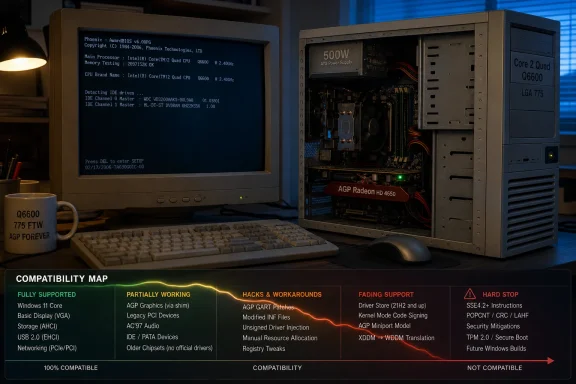 The Ancient PC Still Has One Last Argument
There is something wonderfully irritating about a Core 2 Quad Q6600 refusing to become irrelevant. Intel launched the chip in the Windows Vista era, and by every support-matrix standard it belongs in a museum, a recycling bin, or a retro gaming desk with beige speakers and a pile of driver CDs. Yet the Q6600’s four physical cores still complicate the tidy story that “old” automatically means “incapable.”That is the tension Hackaday’s post captures so well. The PC in question is not merely old; it is defiantly transitional. It has an LGA 775 processor from the late Core 2 era, a motherboard rooted in the Pentium 4 chipset world, DDR1 memory, AGP graphics, and enough historical baggage to boot operating systems across several generations of Microsoft design assumptions.
The comparison to low-end supported Windows 11 hardware is the sting. A machine with a Q6600 may be wildly unsupported, but in some raw CPU workloads it can still embarrass cheap modern Celeron-class systems that satisfy Microsoft’s official requirements. Windows 11’s hardware line was never purely about whether a machine could execute desktop code at an acceptable speed.
It was about the platform Microsoft wants Windows to assume beneath it: TPM 2.0, Secure Boot, modern driver stacks, newer CPU instructions, and a servicing model that does not need to keep excavating tunnels back to the AGP era. Omores’ build shows that the old PC can still make the argument. Windows 11 24H2 shows that Microsoft has stopped listening.
AGP Is Not Dead Until the Driver Store Says It Is
The most charming part of the build is not the CPU. It is the AGP bus.Accelerated Graphics Port was once the mainstream PC graphics slot, wedged historically between PCI and PCI Express. It was where late-1990s and early-2000s graphics ambition lived: Voodoo, GeForce, Radeon, BIOS quirks, motherboard jumpers, and drivers that could make or ruin an entire weekend. By the time Windows 11 arrived, AGP was not just obsolete; it was below the floorboards.
Windows 11 does not meaningfully support AGP as a living platform. That does not mean the operating system contains a philosophical objection to an AGP card rendering the desktop. It means the required supporting files and pathways are no longer shipped in the default stack, because Microsoft is not testing or maintaining that terrain.
The workaround described in the Hackaday write-up is the kind of practical archaeology that keeps retrocomputing interesting. If the missing AGP support file exists in an old Windows 10 1507 installation, and if the right service entries and driver references can be massaged into place, Windows 11 can be persuaded to load a piece of infrastructure it no longer carries around.
That distinction matters. This is not Windows 11 being secretly designed for AGP. It is Windows still having enough ancestral continuity that a determined user can reintroduce a removed part and make the larger system behave. The OS is less a clean break than a long geological record, and sometimes the old layer can still be exposed with the right shovel.
The Radeon HD 4650 makes the stunt even better. It was one of the last relatively capable GPUs to appear in AGP form, arriving at the tail end of a slot that had already lost the future to PCI Express. With 1GB of VRAM and old Catalyst drivers, it is not a Windows 11 gaming platform so much as a proof that Microsoft’s driver model has retained enough backwards tolerance to keep improbable hardware alive.
The Driver Model Is the Real Compatibility Hero
If there is a hero in this story, it is not the AGP card, the Q6600, or the tweaked installation. It is WDDM, Microsoft’s Windows Display Driver Model, introduced with Windows Vista and refined ever since.Windows enthusiasts often remember Vista for its irritations: UAC prompts, driver breakage, performance complaints, and a hardware ecosystem that was not ready on day one. But Vista also marked a major architectural reset for graphics. The old XP display-driver world gave way to a model built for GPU scheduling, desktop composition, recovery from driver hangs, and the increasingly complex relationship between the OS and graphics hardware.
That is why the Windows 11 experiment can work at all. The Radeon HD 4650 may be ancient by modern standards, but its Windows Vista and Windows 7-era driver lineage still speaks a dialect Windows 11 understands. The card is not being supported because Microsoft cares about AGP; it is being carried by the long tail of a driver architecture that was meant to survive beyond a single hardware generation.
This is a recurring theme in Windows history. Microsoft is often mocked for carrying too much baggage, but that baggage is also why strange things keep working. Old applications run. Old devices sometimes enumerate. Old APIs remain callable long after their designers have retired. Compatibility is not a sentimental feature in Windows; it is part of the product’s market contract.
But the contract has limits. A user-mode application from 2009 is one thing. A graphics stack that depends on abandoned bus infrastructure is another. A CPU missing instructions now used by the kernel is something else entirely.
That is where the Windows 11-on-AGP project stops being a cute retrocomputing story and becomes a useful map of Microsoft’s new priorities. Drivers can sometimes be dragged forward. Unsupported setup blocks can sometimes be bypassed. Missing files can sometimes be restored. CPU instructions cannot be edited into a Core 2 Quad.
Microsoft’s Soft Wall Became a Brick Wall
For most of Windows 11’s life, “unsupported hardware” has been an elastic phrase. The official requirements have been strict on paper, but hobbyists quickly found ways around many of the most visible gates. TPM checks could be bypassed. CPU allow-lists could be worked around. Installation media could be modified. Registry keys could smooth over setup’s objections.That created a strange twilight category of machines. They were unsupported but functional. Microsoft would warn users that updates were not guaranteed, but many such systems continued to receive patches. The result was a gray market of Windows 11 installs on PCs Microsoft did not endorse but did not technically prevent from running.
Windows 11 24H2 changed the tone because it introduced a more fundamental dependency. The issue is not only whether setup approves of the processor. It is whether the operating system can boot and run on a CPU that lacks the instructions now assumed by the code path.
The key term is SSE4.2, often discussed alongside POPCNT. The Core 2 Quad Q6600 predates those capabilities. Earlier Windows 11 releases could be coaxed onto that processor because the hard architectural dependency had not yet moved past it. With 24H2 and later, the unsupported line is no longer merely administrative; it is operational.
That distinction is easy to miss because Windows 11’s original hardware controversy trained people to think in terms of artificial barriers. A TPM requirement can feel like a policy decision. A supported-CPU list can feel like a spreadsheet. Secure Boot can feel like a firmware setting Microsoft has chosen to emphasize. But an instruction-set dependency is different. If the code expects the CPU to perform an operation the CPU cannot perform, the workaround stops being a clever installer trick and starts becoming an operating-system rewrite.
This is why 23H2 becomes the ceiling for the Q6600 build. Not because the machine has suddenly become less clever, and not because the AGP workaround fails to impress, but because 24H2 moves the floor under the kernel. There are old PCs that Windows 11 does not want. Then there are old PCs that Windows 11 can no longer physically inhabit.
The Q6600 Exposes the Problem With Generational Labels
The Q6600 is a particularly effective troublemaker because it does not feel as weak as its age suggests. Released in the late 2000s, it became a favorite among enthusiasts precisely because it offered real quad-core capability at a time when multithreaded consumer computing was beginning to matter. Overclocked, cooled properly, and paired with enough memory, it could remain useful far longer than a simple launch-date chart would imply.That is why comparisons with low-end supported chips resonate. Modern low-power Celerons and entry-level mobile processors may carry newer platform features while delivering a user experience that is not always dramatically better than an old desktop quad-core in lightly threaded or basic multitasking scenarios. Microsoft’s compatibility regime can therefore look perverse: a wheezing cheap laptop passes, while a once-premium desktop fails.
But Windows 11’s requirements are not a benchmark leaderboard. They are a support strategy. Microsoft is trying to reduce the number of combinations it must validate, improve the baseline for security features, and align Windows with a hardware world where firmware, virtualization-based security, and modern driver behavior are assumed rather than optional.
That does not make the policy painless. For enthusiasts, the frustration is that Windows has historically been the OS that allowed the edge cases. It ran on weird motherboards, dubious BIOS implementations, hand-me-down graphics cards, and machines assembled out of surplus parts. The PC ecosystem’s looseness was a feature, not a bug.
Windows 11 narrows that looseness. It does so in the name of security and reliability, but also in a way that reinforces hardware churn. A machine can be computationally adequate and still fall outside the trust boundary. That is a hard sell to anyone who sees a usable PC as a PC that should be allowed to keep working.
Retrocomputing Turns Support Policy Into a Bench Test
What makes Omores’ project more than a parlor trick is that it turns Microsoft’s support language into something observable. “Unsupported” is often vague. It can mean no driver updates, no guarantee of patches, no vendor help, poor performance, or total failure. On this build, those categories separate cleanly.AGP support is absent, but recoverable. The graphics driver is ancient, but loadable. The machine lacks official blessing, but can reach a Windows 11 desktop on 23H2. Then 24H2 arrives and the CPU instruction gap becomes final.
That is useful because it shows the layered nature of Windows compatibility. At the top layer, applications are often surprisingly forgiving. Beneath that, drivers are stricter but still sometimes portable across generations. Beneath that, firmware and bus support become fragile. At the bottom, the CPU instruction set is the foundation. If that foundation is missing, the rest of the stack has nowhere to stand.
Retrocomputing projects tend to reveal truths that spec sheets hide. A supported hardware list tells administrators what Microsoft will stand behind. A hobbyist installation tells us what still works when the paperwork is thrown away. Both are valuable, but they answer different questions.
For WindowsForum readers, that distinction should feel familiar. The forum world has always lived in the space between official documentation and actual behavior. A driver marked for Windows 7 works on Windows 10. A registry key revives a removed option. A BIOS setting fixes an installer error no one at the vendor documented. These stories matter because Windows in the field is messier than Windows in the support matrix.
But 24H2’s CPU requirement is a reminder that not all messes are equally negotiable. Some breakages are policy. Some are architecture. The former invites hacks; the latter demands hardware.
The Security Argument Is Stronger Than the Upgrade Pitch
Microsoft’s strongest case for the Windows 11 hardware line has always been security, not performance. TPM 2.0, virtualization-based security, memory integrity, Secure Boot, and modern firmware expectations all point toward a Windows ecosystem that assumes a more defensible baseline. In enterprise environments, that is not cosmetic. It affects credential protection, device attestation, fleet management, and the ability to make security features default rather than aspirational.The problem is that Microsoft’s public message often lands as an upgrade pitch. Users hear that they need new hardware to be “modern,” “secure,” or “ready,” but the practical experience can be muddier. A modest Windows 11 laptop with supported silicon can feel slower than a well-kept older desktop. A TPM requirement does not make a cheap machine pleasant to use. A supported CPU list does not guarantee a satisfying PC.
That gap creates resentment. Enthusiasts see machines like the Q6600 build and conclude that Microsoft is discarding usable hardware. Microsoft sees machines like the Q6600 build and sees a validation nightmare with no hardware root of trust, legacy buses, abandoned drivers, and CPU capabilities that no longer fit the OS roadmap. Both views contain truth.
The security argument becomes more convincing when framed honestly. Microsoft is not saying every unsupported PC is too slow to draw the Start menu. It is saying that Windows’ future depends on assuming a newer platform floor. That floor may exclude hardware that still has life left in it, but it also lets Microsoft design Windows around mitigations and features that are painful to support as optional exceptions forever.
The enthusiast counterargument is also legitimate. A personal computer owner should be able to experiment, repurpose, and extend the life of hardware without being treated as an enemy of progress. The right answer is not to pretend a Core 2 Quad is a sensible enterprise endpoint in 2026. It is to admit that the PC’s cultural value has always included unsupported experimentation.
The Servicing Calendar Makes the Victory Temporary
Even when Windows 11 23H2 runs, the clock is loud. Consumer editions of 23H2 have already aged out of regular servicing, while Enterprise and Education editions continue only for a longer, finite window. For this particular class of unsupported machine, that means the “newest viable Windows 11” is also a branch with an expiration date close enough to matter.That is why the Hackaday experiment feels like a pyrrhic victory. Getting Windows 11 to boot on an AGP-equipped LGA 775 system is impressive. Keeping that system patched as a general-purpose internet-connected machine is another matter. The more interesting the hack, the less advisable it becomes as a daily driver.
There is also the performance problem. Hackaday notes that Windows 7 benchmarks faster on the same hardware, which should surprise nobody who has installed modern Windows on old disks, chipsets, and memory-starved platforms. Windows 11 can be made to run, but “run” is doing a lot of work. A modern OS brings modern services, modern background activity, modern security overhead, and assumptions about storage and memory that a 2003-era motherboard was never designed to satisfy.
That does not invalidate the project. Retrocomputing is often about making something work because it should not. The point is exploration, not procurement advice. But it does limit the lesson for ordinary users still trying to keep aging PCs productive after Windows 10’s mainstream sunset.
If the goal is a secure daily system on old hardware, Windows 11 23H2 on an unsupported Core 2 platform is not a strategy. It is a museum exhibit with networking enabled. That may be fun, but it is not the same thing as support.
Windows 7 Wins the Benchmark and Loses the Future
The reported Windows 7 performance advantage is the detail that will tempt many readers into the wrong conclusion. Of course Windows 7 feels at home on a Core 2-era machine. It belongs to that hardware generation in a way Windows 11 never will. Its driver ecosystem, service load, desktop assumptions, and memory expectations all fit the platform more naturally.But benchmarking old Windows against new Windows is not just a contest of frame rates and boot times. Windows 7 is no longer a safe default for a broadly connected PC. Its speed on old hardware is real, but so is its age as a security target. The faster operating system is not automatically the better one if the machine is browsing the modern web, handling credentials, or sitting on a home network with devices that matter.
This is where the retro and practical worlds part ways. For a multi-boot project that spans DOS, Windows 98, Windows 7, and Windows 11, the joy is in the range. The same tower can become a time machine, a compatibility lab, and a hardware history lesson. In that context, Windows 7 being faster is part of the comparative fun.
For a user trying to decide what to run every day, the calculus is harsher. Windows 7 is fast but unsupported. Windows 11 23H2 is newer but unofficial and nearing its own end of runway on the editions that still receive updates. Windows 10 may remain the saner compromise for some legacy systems, particularly in specialized editions with longer servicing, but even that path depends on licensing, use case, and tolerance for being outside the mainstream.
The broader point is that old PCs no longer have a single obvious Windows answer. They have tradeoffs. Performance, security, driver support, application compatibility, and licensing all pull in different directions. The Q6600 AGP build dramatizes that fragmentation beautifully.
The PC Industry Forgot How Long PCs Can Last
One reason this story resonates is that the PC industry has never been fully comfortable with the longevity of its own products. A desktop assembled in the late 2000s can still post, boot, render a desktop, browse lightly, and run a surprising amount of software if treated kindly. Capacitors, power supplies, spinning disks, and thermal paste may fail, but the basic architecture can endure.That durability clashes with modern platform planning. Microsoft, Intel, AMD, OEMs, and security vendors all benefit from clearer baselines. Developers benefit when they can assume newer instructions and APIs. Administrators benefit when fleets are less weird. Consumers benefit, too, when machines are more secure and reliable out of the box.
But the environmental and economic reality is less tidy. Not every unsupported PC is e-waste. Some are perfectly adequate for offline tasks, retro gaming, lab work, education, light productivity, or donation use cases where expectations are modest. The industry’s tendency to equate unsupported with worthless is wasteful.
The Q6600 system is an extreme example, not a mainstream sustainability plan. Few people should be hunting down AGP drivers to run Windows 11 on DDR1. But the principle scales down to less absurd machines: 6th- and 7th-generation Intel systems, early Ryzen desktops, workstation-class hardware, and perfectly serviceable PCs stranded by a support line drawn for reasons broader than speed.
Microsoft is not wrong to move on. The question is whether the ecosystem gives users enough dignified off-ramps. A world with clearer long-term servicing options, better lightweight Windows modes, or more graceful unsupported-use messaging would feel less like a cliff.
Unsupported Does Not Mean Uninteresting
There is a temptation in professional IT circles to dismiss projects like this as stunts. No sensible admin is going to standardize on AGP graphics cards and Core 2 Quads for Windows 11. No security team wants endpoints built from copied legacy drivers and edited system files. No help desk wants to troubleshoot a machine whose very existence is a rebuttal to the hardware compatibility list.That dismissal misses the point. Stunts are often how the edges of a platform become visible. They show what is policy, what is habit, what is missing by omission, and what is impossible by design. They also keep alive a kind of user agency that modern computing increasingly discourages.
Windows has always had two identities. One is the managed platform Microsoft sells to enterprises, with lifecycle charts, security baselines, deployment rings, compliance rules, and certified hardware. The other is the enthusiast playground where people install the wrong OS on the wrong machine and learn something from the smoke. The health of the PC ecosystem depends on both, even if only one belongs in production.
Omores’ build sits proudly in the second camp. It is not a deployment recommendation. It is a proof that the Windows stack remains more historically continuous than Microsoft’s marketing suggests, and also that the continuity now has a hard stop. That combination makes the project more valuable than a simple “look what booted” post.
The system succeeds because Windows remains Windows: layered, backward-looking, tolerant in surprising places. It fails to go further because Windows is becoming something stricter: security-focused, instruction-dependent, and less willing to carry hardware that cannot meet the next baseline.
The AGP Windows 11 Build Leaves a Clear Map of the Cliff Edge
The practical lesson from this experiment is not that readers should copy it. It is that the unsupported Windows 11 landscape now has distinct territories. Some are merely inconvenient. Some are unstable. Some are ending. Some are impossible.For enthusiasts, that map is useful. For administrators, it is a warning. For Microsoft, it is probably the intended outcome: enough compatibility to preserve continuity where it is cheap, and enough hard requirements to stop the oldest machines from following Windows indefinitely.
- Windows 11 23H2 can still be coerced onto some very old x86-64 hardware, but that does not make the installation supported, secure, or sensible for everyday use.
- AGP graphics can work only through legacy driver archaeology, not because Windows 11 retains AGP as a maintained platform.
- The Radeon HD 4650 succeeds because older WDDM-era graphics drivers can still interoperate with Windows 11’s display stack in limited circumstances.
- Windows 11 24H2 and later draw a harder line on CPUs that lack required instruction support, making some older processors unbootable rather than merely unsupported.
- The servicing timeline matters as much as the installation trick, because a working Windows 11 23H2 desktop on unsupported hardware still faces a shrinking security-update window.
- Windows 7 may perform better on this class of machine, but performance alone does not solve the security and software-support problems of running an old OS in 2026.
References
- Primary source: Hackaday
Published: Fri, 05 Jun 2026 18:30:00 GMT
Using Windows 11 On An LGA 775 PC With AGP Videocard | Hackaday
Although the thought of installing a modern operating system like Windows 11 on something as archaic as a Core 2 Quad Q6600 Intel CPU may seem ridiculous, it being the flagship CPU of the time mean…hackaday.com
- Official source: learn.microsoft.com
Windows 11 Enterprise and Education - Microsoft Lifecycle | Microsoft Learn
Windows 11 Enterprise and Education follows the Modern Lifecycle Policy.learn.microsoft.com - Related coverage: tomshardware.com
Microsoft blocks some PCs from Windows 11 24H2 — CPU must support SSE4.2 or the OS will not boot | Tom's Hardware
This is the second system requirement added to Windows 11 since it first came out.www.tomshardware.com - Related coverage: memstechtips.com
How To Check If Your PC Supports Windows 11 24H2 (SSE 4.2)
Windows 11 24H2 requires SSE 4.2 / POPCNT CPU support. Check with CPU-Z or FlyOOBE, and install 23H2 / 22H2 as a fallback on older CPUs.memstechtips.com - Related coverage: windowslatest.com
Microsoft’s 2026 end-of-support wave includes Windows 11 24H2, Office 2021, and more
Microsoft plans to end support for several products in 2026, and the list of those products also includes Windows 11 24H2. www.windowslatest.com
- Related coverage: techspot.com
Windows 11 24H2 will block processors that lack the SSE4.2 instruction set | TechSpot
Windows 11 is approaching its third anniversary, and Microsoft is gearing up for the next major upgrade. Following the system requirement policy introduced in 2021, the upcoming...www.techspot.com
- Related coverage: allthings.how
Windows 11 support end dates — Home, Pro, Enterprise, and more
There’s no single cutoff; support depends on your edition and the specific Windows 11 version you’re running.allthings.how - Related coverage: techyorker.com
How to Check If This PC Can Run Windows 11 24H2 (PopCnt Instruction) - TechYorker
×Recommended: Maximize Your PC's Performance with Chipps AI Assistant →Recommended: Click Here to Fix Windows Issues and Optimize System Performance... techyorker.com
- Related coverage: pcworld.com
Still on Windows 11 23H2? Act soon! Your update deadline is almost here | PCWorld
Both Home and Pro editions of Windows 11 23H2 will reach end of support this November. Here's what you need to know.www.pcworld.com - Related coverage: windowscentral.com
Microsoft forces Windows 11 update for PC security | Windows Central
Microsoft is starting to automatically install the latest feature update (25H2) on older Windows 11 versions like 23H2 because they have reached End-of-Service and pose a security risk without patches.www.windowscentral.com - Related coverage: eolstatus.com

Windows 11 23H2 EOL | Microsoft - End of Life Tracking
Track end-of-life date for Windows 11 23H2 by Microsoft. EOL Date: 11/11/2025. Status: End of Life - Support Ended. Upgrade all Home/Pro devices running Windows 11 23H2 before November 11, 2025, when security updates end; Enterprise/Education devices have coverage only until November 10, 2026.
eolstatus.com
- Related coverage: techradar.com
Still on Windows 11 23H2? Microsoft will soon force you to upgrade to 25H2 – for your own good | TechRadar
Support has ended for version 23H2 as of earlier this weekwww.techradar.com - Related coverage: compusers.hcc.nl
- Official source: support.microsoft.com
Windows 11 System Requirements | Microsoft Support
Learn about Windows 11 minimum system requirements and how to assess your upgrade eligibility.support.microsoft.com - Official source: microsoft.com
Windows 11 Specs and System Requirements | Microsoft Windows
View Windows 11 specs, system requirements, and features from Microsoft. Learn about the device specifications, versions, and languages available for Windows 11.www.microsoft.com - Related coverage: dir.md

Windows 11 System Requirements 2026: Check If Your PC Is Compatible (Avoid Upgrade Failures!)
Can your PC run Windows 11? Discover official system requirements, compatibility checks, and expert tips before upgrading. Check your device now!
dir.md
