

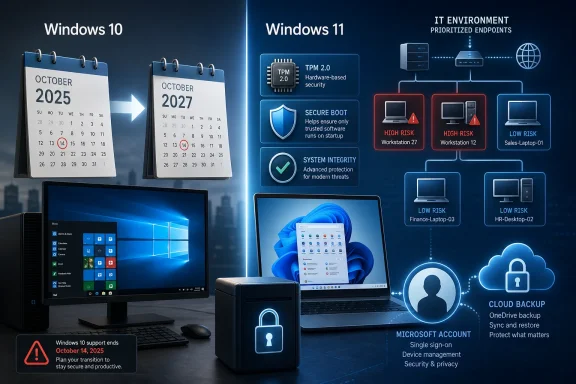
Microsoft extended consumer Windows 10 Extended Security Updates through October 2027, giving eligible Home and Pro PCs another year of critical and important security fixes after Windows 10’s official support ended on October 14, 2025. The decision is more than a calendar tweak. It is Microsoft’s clearest admission yet that the Windows 11 migration is still constrained by hardware requirements, user resistance, and enterprise inertia. For Windows users, the story is not that Windows 10 lives forever; it is that Microsoft has bought itself another year to make the end of Windows 10 survivable.
For years, Microsoft treated October 14, 2025 as the hard edge of the Windows 10 era. The message was simple: upgrade to Windows 11, buy a compatible PC, or accept life without routine security patches. That posture made sense as a product strategy, but it always collided with the installed base reality.
Windows 10 is not an obscure legacy operating system hiding in a few forgotten offices. It remains the default Windows experience for millions of people whose PCs still work, whose workflows are stable, and whose machines may be blocked from Windows 11 by TPM, CPU, or firmware requirements. That is the uncomfortable fact behind the new extension.
The extra year of consumer ESU support does not reverse Windows 10’s end of life. Microsoft is not restarting feature development, refreshing the interface, or pretending Windows 10 is the future. It is instead narrowing the promise to security: critical and important fixes for eligible users who enroll.
That distinction matters. Microsoft is not saying Windows 10 is healthy. It is saying the ecosystem around Windows 10 is too large to abandon abruptly without creating a security mess.
Microsoft wants the security extension to double as an account-conversion funnel. A local-account Windows 10 machine is not just an old PC in Redmond’s eyes; it is a device outside the modern Microsoft cloud graph. ESU gives the company a strong incentive to pull that device closer.
That will annoy a familiar subset of Windows users, especially those who have deliberately kept local accounts for privacy, simplicity, or administrative control. They are not wrong to see a tradeoff here. The patch pipeline may be free in dollars, but it is not free of policy.
Still, Microsoft’s position is not difficult to understand. If it is going to keep servicing an aging consumer OS, it wants a cleaner enrollment mechanism, clearer device identity, and a way to nudge users toward backup and recovery services. The security argument and the ecosystem argument are now bundled together.
But preference is only one layer. The deeper issue is eligibility. Microsoft raised the Windows 11 floor in the name of security, and that decision left a large number of otherwise usable PCs outside the official upgrade path. Those machines did not stop being useful just because the support lifecycle said they should.
This is where Microsoft’s security logic becomes self-complicating. Windows 11’s hardware requirements were framed as a way to create a safer baseline, especially around secure boot, virtualization-based security, and TPM-backed protections. But if the result is a massive population of unpatched Windows 10 machines, the ecosystem-level security win becomes harder to defend.
The ESU extension is therefore a pressure valve. It lets Microsoft preserve the Windows 11 hardware line while reducing the risk that millions of people are pushed into unsupported computing overnight. That is pragmatic, but it also confirms that the original deadline was more brittle than Microsoft wanted to admit.
The real significance is psychological. When Microsoft extends consumer security coverage, it validates what many administrators have been saying quietly: the Windows 10 exit was always going to be uneven. Some machines will move to Windows 11. Some will be replaced. Some will be isolated, repurposed, or retired. And some will remain in service because the business case for replacing them is weak.
That does not mean IT should relax. Extended Security Updates are a bridge, not a destination. ESU does not solve application modernization, device management debt, or the creeping risk of unsupported third-party software.
But it changes the risk conversation. Instead of framing every remaining Windows 10 device as an immediate emergency, administrators can prioritize. High-risk endpoints, internet-facing systems, and machines handling sensitive data should move first. Low-risk devices can be managed with more deliberate timing.
New features will continue to target Windows 11 and whatever comes next. Driver support will gradually tilt toward newer platforms. OEMs will keep optimizing for current hardware. Software vendors will eventually test less aggressively on Windows 10, especially as the remaining user base becomes older and more fragmented.
There is also the subtle problem of browser-era computing. A patched operating system is essential, but it is not the whole attack surface. Browsers, document readers, remote access tools, printer drivers, VPN clients, and line-of-business apps all carry risk. Keeping Windows 10 patched buys time; it does not freeze the rest of the software stack in a safe state.
That is why the best reading of Microsoft’s extension is not “Windows 10 is fine.” It is “Windows 10 is less dangerous than it would have been without this extension.” Those are very different conclusions.
That context makes Windows 10 feel older than its interface does. The OS still runs plenty of workloads well, but the industry’s investment is increasingly going into assistants, app-store intelligence, model routing, cloud identity, and device-to-service continuity. Microsoft’s own Windows strategy is inseparable from that trend.
This is why the Microsoft account requirement matters beyond enrollment paperwork. The future Microsoft wants is not a standalone Windows desktop that occasionally receives patches. It is a signed-in device participating in backup, identity, Copilot, OneDrive, Store, Defender, and cross-device services.
Windows 10 can be kept secure for another year. It cannot be made central to that future without becoming something closer to Windows 11’s cloud-connected model. Microsoft knows this, and so do its competitors.
Those arguments are valid, but they are not always persuasive to users staring at a perfectly functional laptop. A hard deadline can force motion in managed environments, but it can also breed resentment among consumers who see the upgrade path as unnecessary, expensive, or blocked by requirements they did not choose.
The extra ESU year gives Microsoft a chance to make a more affirmative case. Windows 11 needs to win more users because it is better for them, not merely because Windows 10 is being withdrawn. That means fewer dark-pattern upgrade prompts, fewer account surprises, better performance on mainstream hardware, and clearer benefits for people who do not care about AI demos.
For enthusiasts, the argument is even sharper. Windows users have long memories. They remember forced upgrades, telemetry fights, Start menu reversals, control panel migrations, and hardware compatibility cliffs. Microsoft cannot patch its way out of that trust problem.
If the machine does not support Windows 11, the ESU extension creates breathing room. It may make sense to enroll, keep the device patched, and plan a replacement on your own schedule rather than panic-buying hardware. That is especially true for secondary PCs, family machines, and systems used for basic browsing, office work, or media.
For administrators, the extension should be treated as a reprioritization tool. It is not a reason to pause migration programs. It is a reason to stop pretending every Windows 10 endpoint has the same urgency.
The systems that deserve immediate attention are the ones with sensitive data, weak isolation, unusual software dependencies, or heavy exposure to email and web threats. ESU can reduce the blast radius while those machines are remediated, but it should not become a permanent exception process.
The shape of the deal is now plain. Windows 10 is past normal support. Security fixes can continue for enrolled eligible systems for a limited time. Windows 11 remains the supported destination for modern Windows PCs. Unsupported hardware will eventually need replacement, repurposing, or a different operating system.
That clarity is useful. It turns a vague anxiety into a planning window. Two years is enough time to inventory devices, identify blockers, budget replacements, test critical apps, and decide which machines are worth carrying forward.
It is not enough time to do nothing.
 Microsoft Blinks After Setting the Clock
For years, Microsoft treated October 14, 2025 as the hard edge of the Windows 10 era. The message was simple: upgrade to Windows 11, buy a compatible PC, or accept life without routine security patches. That posture made sense as a product strategy, but it always collided with the installed base reality.Windows 10 is not an obscure legacy operating system hiding in a few forgotten offices. It remains the default Windows experience for millions of people whose PCs still work, whose workflows are stable, and whose machines may be blocked from Windows 11 by TPM, CPU, or firmware requirements. That is the uncomfortable fact behind the new extension.
The extra year of consumer ESU support does not reverse Windows 10’s end of life. Microsoft is not restarting feature development, refreshing the interface, or pretending Windows 10 is the future. It is instead narrowing the promise to security: critical and important fixes for eligible users who enroll.
That distinction matters. Microsoft is not saying Windows 10 is healthy. It is saying the ecosystem around Windows 10 is too large to abandon abruptly without creating a security mess.
The Microsoft Account Requirement Is the Policy Hidden Inside the Patch
The extension comes with strings attached, and the most important one is identity. For consumers, free enrollment is tied to signing in with a Microsoft account and syncing settings through Windows Backup. Alternative routes reportedly remain available, including Microsoft Rewards points or a one-time payment, but the direction of travel is obvious.Microsoft wants the security extension to double as an account-conversion funnel. A local-account Windows 10 machine is not just an old PC in Redmond’s eyes; it is a device outside the modern Microsoft cloud graph. ESU gives the company a strong incentive to pull that device closer.
That will annoy a familiar subset of Windows users, especially those who have deliberately kept local accounts for privacy, simplicity, or administrative control. They are not wrong to see a tradeoff here. The patch pipeline may be free in dollars, but it is not free of policy.
Still, Microsoft’s position is not difficult to understand. If it is going to keep servicing an aging consumer OS, it wants a cleaner enrollment mechanism, clearer device identity, and a way to nudge users toward backup and recovery services. The security argument and the ecosystem argument are now bundled together.
Windows 11’s Adoption Problem Was Never Just About Taste
The popular explanation for Windows 10’s staying power is that people simply prefer it. That is partly true. Windows 10 is familiar, fast enough, and largely free of the visual and behavioral disruptions that made Windows 11 controversial among power users.But preference is only one layer. The deeper issue is eligibility. Microsoft raised the Windows 11 floor in the name of security, and that decision left a large number of otherwise usable PCs outside the official upgrade path. Those machines did not stop being useful just because the support lifecycle said they should.
This is where Microsoft’s security logic becomes self-complicating. Windows 11’s hardware requirements were framed as a way to create a safer baseline, especially around secure boot, virtualization-based security, and TPM-backed protections. But if the result is a massive population of unpatched Windows 10 machines, the ecosystem-level security win becomes harder to defend.
The ESU extension is therefore a pressure valve. It lets Microsoft preserve the Windows 11 hardware line while reducing the risk that millions of people are pushed into unsupported computing overnight. That is pragmatic, but it also confirms that the original deadline was more brittle than Microsoft wanted to admit.
Enterprises Already Knew the Migration Would Spill Past the Deadline
For IT departments, the new consumer ESU extension is less surprising than it may look. Enterprises have long treated Windows migrations as multi-year programs, not button-click upgrades. Application compatibility, fleet age, compliance testing, procurement cycles, and user training all move slower than Microsoft’s marketing cadence.The real significance is psychological. When Microsoft extends consumer security coverage, it validates what many administrators have been saying quietly: the Windows 10 exit was always going to be uneven. Some machines will move to Windows 11. Some will be replaced. Some will be isolated, repurposed, or retired. And some will remain in service because the business case for replacing them is weak.
That does not mean IT should relax. Extended Security Updates are a bridge, not a destination. ESU does not solve application modernization, device management debt, or the creeping risk of unsupported third-party software.
But it changes the risk conversation. Instead of framing every remaining Windows 10 device as an immediate emergency, administrators can prioritize. High-risk endpoints, internet-facing systems, and machines handling sensitive data should move first. Low-risk devices can be managed with more deliberate timing.
Security Support Is Not the Same as Product Support
The danger of an ESU extension is that users hear “supported until 2027” and stop listening. That would be a mistake. Security updates are the minimum viable form of support, not a guarantee that Windows 10 will remain a first-class citizen.New features will continue to target Windows 11 and whatever comes next. Driver support will gradually tilt toward newer platforms. OEMs will keep optimizing for current hardware. Software vendors will eventually test less aggressively on Windows 10, especially as the remaining user base becomes older and more fragmented.
There is also the subtle problem of browser-era computing. A patched operating system is essential, but it is not the whole attack surface. Browsers, document readers, remote access tools, printer drivers, VPN clients, and line-of-business apps all carry risk. Keeping Windows 10 patched buys time; it does not freeze the rest of the software stack in a safe state.
That is why the best reading of Microsoft’s extension is not “Windows 10 is fine.” It is “Windows 10 is less dangerous than it would have been without this extension.” Those are very different conclusions.
The AI News Around It Shows How Fast the Platform Story Is Moving
The Windows 10 extension landed in the same news cycle as another kind of platform shift: AI vendors racing ahead with new model tiers, deeper app integration, and more restrictive access controls. OpenAI’s GPT-5.6 preview, Google’s Gemini expansion into Play Store discovery, and reports of constrained model capacity all point to the same reality. The center of gravity in consumer and enterprise computing is moving upward into cloud services and AI agents.That context makes Windows 10 feel older than its interface does. The OS still runs plenty of workloads well, but the industry’s investment is increasingly going into assistants, app-store intelligence, model routing, cloud identity, and device-to-service continuity. Microsoft’s own Windows strategy is inseparable from that trend.
This is why the Microsoft account requirement matters beyond enrollment paperwork. The future Microsoft wants is not a standalone Windows desktop that occasionally receives patches. It is a signed-in device participating in backup, identity, Copilot, OneDrive, Store, Defender, and cross-device services.
Windows 10 can be kept secure for another year. It cannot be made central to that future without becoming something closer to Windows 11’s cloud-connected model. Microsoft knows this, and so do its competitors.
The Upgrade Argument Now Has to Be Better Than Fear
Microsoft’s original Windows 10 deadline relied heavily on negative motivation. Upgrade because support is ending. Upgrade because unpatched machines are dangerous. Upgrade because new security features require new hardware.Those arguments are valid, but they are not always persuasive to users staring at a perfectly functional laptop. A hard deadline can force motion in managed environments, but it can also breed resentment among consumers who see the upgrade path as unnecessary, expensive, or blocked by requirements they did not choose.
The extra ESU year gives Microsoft a chance to make a more affirmative case. Windows 11 needs to win more users because it is better for them, not merely because Windows 10 is being withdrawn. That means fewer dark-pattern upgrade prompts, fewer account surprises, better performance on mainstream hardware, and clearer benefits for people who do not care about AI demos.
For enthusiasts, the argument is even sharper. Windows users have long memories. They remember forced upgrades, telemetry fights, Start menu reversals, control panel migrations, and hardware compatibility cliffs. Microsoft cannot patch its way out of that trust problem.
The 2027 Date Changes the Practical Advice
For ordinary users, the best move depends on the machine. If a PC supports Windows 11 cleanly and the apps you need work properly, the case for upgrading is strong. You get the current security baseline, the current feature path, and better long-term compatibility.If the machine does not support Windows 11, the ESU extension creates breathing room. It may make sense to enroll, keep the device patched, and plan a replacement on your own schedule rather than panic-buying hardware. That is especially true for secondary PCs, family machines, and systems used for basic browsing, office work, or media.
For administrators, the extension should be treated as a reprioritization tool. It is not a reason to pause migration programs. It is a reason to stop pretending every Windows 10 endpoint has the same urgency.
The systems that deserve immediate attention are the ones with sensitive data, weak isolation, unusual software dependencies, or heavy exposure to email and web threats. ESU can reduce the blast radius while those machines are remediated, but it should not become a permanent exception process.
The Real Deadline Is Now Operational, Not Symbolic
October 2025 was symbolic. October 2027 is operational. The difference is that organizations and users can no longer claim the transition is distant, hypothetical, or waiting on Microsoft to clarify its position.The shape of the deal is now plain. Windows 10 is past normal support. Security fixes can continue for enrolled eligible systems for a limited time. Windows 11 remains the supported destination for modern Windows PCs. Unsupported hardware will eventually need replacement, repurposing, or a different operating system.
That clarity is useful. It turns a vague anxiety into a planning window. Two years is enough time to inventory devices, identify blockers, budget replacements, test critical apps, and decide which machines are worth carrying forward.
It is not enough time to do nothing.
The Extra Year Is a Gift With an Expiration Date
The most concrete lesson from Microsoft’s move is that the Windows 10 transition is now less abrupt but no less real. Users should treat the extension as a planning tool, not a reprieve from planning.- Windows 10’s normal support ended on October 14, 2025, and the ESU extension does not bring back feature updates.
- Eligible consumer PCs can receive security updates through October 2027 if they enroll through Microsoft’s approved paths.
- The free route pushes users toward Microsoft account sign-in and Windows Backup syncing.
- Windows 11 remains Microsoft’s long-term client platform, especially for newer security, AI, and cloud-connected features.
- IT teams should use the extra year to prioritize risky endpoints rather than slow migration work.
- Unsupported but still-useful PCs now have more time, not a permanent exemption from replacement decisions.
References
- Primary source: TechPP
Published: 2026-06-29T05:20:13.144461
Loading…
techpp.com - Related coverage: techradar.com
'We don’t believe this kind of government access process should become the long-term default': OpenAI unveils big GPT-5.6 upgrades for ChatGPT, but you can't use them yet | TechRadar
Only select partners for nowwww.techradar.com - Related coverage: davarion.com
Loading…
davarion.com