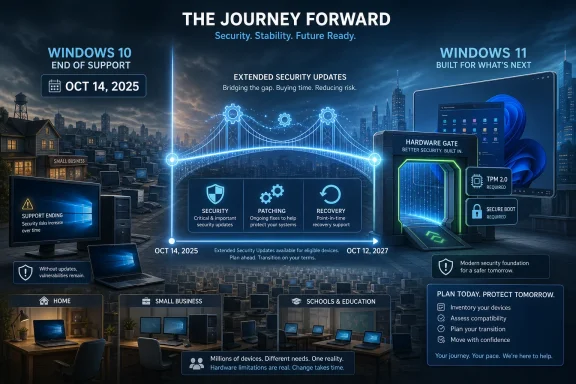
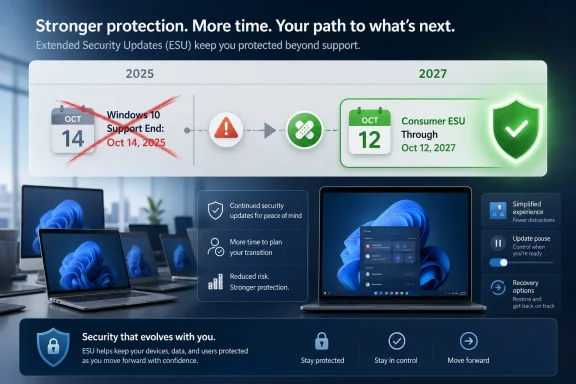
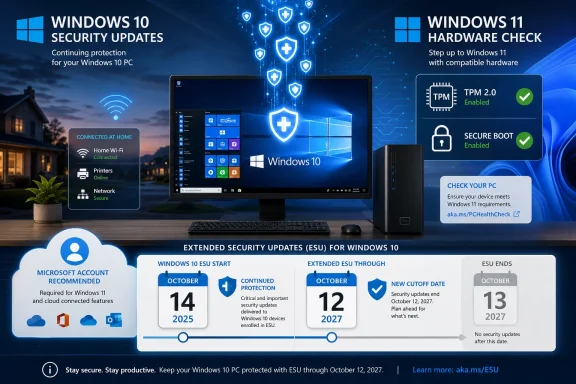
Microsoft has extended consumer Windows 10 Extended Security Updates through October 12, 2027, letting enrolled personal PCs keep receiving critical and important security patches for another year after the operating system’s October 14, 2025 end of support. The move is not a resurrection of Windows 10 so much as an admission that its retirement was always going to be messier than the lifecycle chart suggested. Microsoft still wants users on Windows 11, still limits what ESU provides, and still nudges consumers toward a Microsoft account. But the company has now conceded that security reality, hardware friction, and public pressure matter more than a clean marketing transition.
Windows 10 was supposed to be the operating system Microsoft could finally move past on schedule. Its mainstream consumer support ended on October 14, 2025, the date Microsoft had repeated for years while pushing Windows 11 as the safer, more modern destination. The usual end-of-life script was familiar: upgrade, replace the PC, move to the cloud, or accept risk.
That script ran into an inconvenient fact. Windows 10 was not Windows 7 in its final months, fading into the distance while a broadly compatible successor absorbed the world. It remained a living desktop for home users, gamers, small offices, schools, labs, and perfectly serviceable machines that failed Windows 11’s hardware checks.
The extension to October 12, 2027 does not change the official end-of-support date. Windows 10 still ended regular support in 2025. What changed is the length of the consumer safety net: enrolled personal devices can now stay on security updates for roughly two years beyond the official cutoff rather than one.
That distinction matters. Microsoft is not promising feature work, design changes, reliability improvements on demand, or normal technical support. It is promising continued security servicing for enrolled machines, which is both narrower than “support” and far more important than nothing.
That arrangement tells us as much about Microsoft’s priorities as the extension itself. The company does not want Windows 10 users to treat ESU as a neutral holding pattern. It wants the delay to pull users deeper into the Microsoft account ecosystem, normalize cloud backup, and keep the migration funnel warm.
For WindowsForum readers, that is the key practical distinction. If you run a personal Windows 10 machine and are willing to enroll it through Microsoft’s consumer path, the runway is longer. If you manage business PCs joined to Active Directory, Entra ID, or mobile device management, the consumer freebie is not the plan you should be building around.
Commercial ESU remains a licensing exercise, with year-based coverage and the usual enterprise machinery. Microsoft’s documentation has long framed organizational ESU as a paid bridge, not a consumer-style concession. The new free window is therefore best understood as a consumer pressure valve, not a broad retreat from Windows lifecycle enforcement.
The TPM 2.0 requirement, supported CPU lists, Secure Boot expectations, and related baseline assumptions turned a routine upgrade into a replacement decision for many users. Some of those requirements are defensible from a security architecture standpoint. They also created a class of Windows 10 PCs that are fast enough for their owners, useful enough to keep, and officially unwelcome on Windows 11.
That is where Microsoft’s old lifecycle muscle memory fails. In previous transitions, a large portion of the installed base could upgrade in place if the owner was sufficiently motivated. This time, motivation often does not matter. The machine either passes the checks or it does not.
That distinction has environmental, economic, and political consequences. A five- or seven-year-old PC that handles browsers, Office, media, coding, and light gaming is not obviously obsolete to its owner. Telling that owner to replace it for security updates turns Microsoft’s lifecycle policy into an e-waste story, a household budget story, and in some regions a consumer-rights story.
That matters because unsupported Windows machines do not disappear. They remain on home networks, connect to printers and NAS boxes, run point-of-sale terminals in tiny businesses, sit in workshops controlling equipment, and become the old laptop someone gives to a relative. An unsupported PC is not merely a private risk; at scale, it becomes part of the background noise of the internet.
Microsoft knows this better than anyone. The company spent decades dealing with the consequences of old Windows versions remaining online long after their intended retirement. Security servicing may cost money, but botnets, ransomware, and emergency out-of-band crises cost something too.
Seen that way, the extension is not charity. It is risk management. Microsoft would rather keep Windows 10 users in a controlled ESU program than watch a massive tail of unpatched devices harden into a security liability.
That low-key approach is understandable. A loud announcement would invite the obvious question: if Windows 10 can be safely patched until 2027 for consumers, why was 2025 presented as the hard edge for so long? It would also undercut years of messaging that Windows 11 is the secure path forward.
Silence gives Microsoft room to preserve both stories. To consumers, it can say there is more time. To the Windows 11 business, OEM partners, and security marketers, it can say nothing fundamental has changed.
But something has changed. The company has implicitly acknowledged that the Windows 10 cliff was too steep. Whether the pressure came from market share, advocacy groups, regulators, support telemetry, or plain customer resistance, the outcome is the same: the retirement schedule bent.
That did not automatically force a global policy reversal. But it did expose the awkwardness of Microsoft’s pitch. The company was effectively saying that security for Windows 10 after 2025 was technically possible, operationally available, and in some cases free, but only if users accepted certain conditions.
Once that door opened, the argument became harder to contain. If free security updates could be justified for one year, why not two? If the threat environment remains real in 2026, why would it become acceptable to strand millions of PCs in 2027 purely because a migration campaign needed urgency?
Microsoft’s answer is still that Windows 11 is the supported future. But the extension shows that lifecycle policy is no longer made in a vacuum. Regulators, consumer groups, sustainability arguments, and user inertia now shape the calendar alongside engineering plans.
ESU enrollment is not the same as a normal Windows Update experience magically continuing for everyone. Users should expect eligibility checks, account prompts, and regional differences. The safest assumption is that a PC must be deliberately enrolled and kept in whatever state Microsoft requires to remain eligible.
It is also worth remembering what ESU does not do. It will not bring Windows 11 features to Windows 10. It will not make old drivers immortal. It will not guarantee support from app vendors, browser makers, anticheat systems, VPN clients, tax software, or peripheral utilities forever.
Security updates buy time. They do not freeze the ecosystem. A Windows 10 PC that is acceptable in mid-2026 may become more annoying in 2027 as third parties shift testing, support, and development elsewhere.
The danger is that a one-year reprieve becomes a one-year delay in decision-making. Every IT department has a corner of the estate where “temporary” becomes a permanent operating model. Windows 10 ESU can easily become that corner if asset inventories, application compatibility testing, and procurement plans are not already in motion.
The right enterprise reading is pragmatic. Microsoft has bought the ecosystem more time, but not unlimited time. Organizations should use that time to reduce the number of exceptions, not beautify the exception list.
There is also a support-boundary issue. Security patches may continue, but general support does not return from the dead. If a line-of-business app behaves badly, a driver stack becomes unstable, or a user’s device falls into a weird post-ESU activation state, admins should not expect the normal Windows 10 support universe to reassemble itself.
Some users cannot upgrade because their hardware is blocked. Some can upgrade but dislike Windows 11’s interface changes, account pressure, ads, recommendations, and AI-forward direction. Some small businesses have old software that works and no appetite to disturb it. Some gamers and creators have carefully tuned systems they do not want to destabilize.
Those groups require different answers. A Windows 11-capable gaming desktop staying on Windows 10 out of preference is not the same problem as a community center running donated PCs that fail the CPU list. A family laptop used for email and banking is not the same as an industrial workstation tied to a specialized device.
Microsoft’s extension wisely avoids adjudicating those motives. It simply keeps security patches flowing for enrolled consumers. That is the rare Windows compromise that accepts user behavior as it exists, rather than as a product manager wishes it were.
But Windows 11 has struggled to deliver a universally compelling reason for satisfied Windows 10 users to move voluntarily. Its best arguments are security baseline, future compatibility, and inevitability. Those are real arguments, but they are not the same as delight.
Microsoft has also complicated the pitch by making Windows 11 feel like the front line for account nudges, cloud integration, Start menu experiments, Copilot branding, and promotional surfaces. Enthusiasts may appreciate under-the-hood improvements, but many mainstream users experience the upgrade as a negotiation over defaults.
That is why the free Windows 10 extension cuts deeper than a date change. It gives users permission to ask whether Windows 11 has earned the upgrade or merely inherited it. Microsoft can still win that argument, but it has to win it in the product, not just in the lifecycle policy.
There is nothing inherently wrong with that. Operating systems have long tails, and Microsoft has always served multiple Windows generations at once. The problem is one of emphasis: the louder Microsoft talks about AI-native PCs, the more alienated some Windows 10 users feel when their immediate need is simply a secure, stable machine that does not nag them into a new identity model.
For OEMs, the extension is a mixed signal. More security runway may reduce panic buying before the deadline, especially among consumers who were not eager to replace hardware. But it may also preserve goodwill, preventing users from treating Windows 11 machines as coerced purchases.
The long-term PC market may benefit from that patience. A user who replaces a machine in 2027 because the hardware and software case is clearer is a better customer than one who replaces it in 2026 under protest.
But the win has boundaries. The extension applies to enrolled consumer PCs, not every Windows 10 installation in every context. It covers security updates, not a full continuation of Windows 10 as a maintained consumer platform. It still leaves a final deadline on the calendar.
The broader lesson is that the Windows lifecycle is becoming more political. Once an operating system becomes infrastructure, its end date is not merely a vendor milestone. It becomes a public safety, household affordability, small-business continuity, and environmental issue.
Microsoft can insist that Windows 10 is over. The world can simultaneously insist that hundreds of millions of working PCs do not become irrelevant on command. The 2027 extension is what happens when both statements are true.
That gives users a clearer set of near-term choices:
 Microsoft’s Deadline Met the Installed Base and Blinked
Windows 10 was supposed to be the operating system Microsoft could finally move past on schedule. Its mainstream consumer support ended on October 14, 2025, the date Microsoft had repeated for years while pushing Windows 11 as the safer, more modern destination. The usual end-of-life script was familiar: upgrade, replace the PC, move to the cloud, or accept risk.That script ran into an inconvenient fact. Windows 10 was not Windows 7 in its final months, fading into the distance while a broadly compatible successor absorbed the world. It remained a living desktop for home users, gamers, small offices, schools, labs, and perfectly serviceable machines that failed Windows 11’s hardware checks.
The extension to October 12, 2027 does not change the official end-of-support date. Windows 10 still ended regular support in 2025. What changed is the length of the consumer safety net: enrolled personal devices can now stay on security updates for roughly two years beyond the official cutoff rather than one.
That distinction matters. Microsoft is not promising feature work, design changes, reliability improvements on demand, or normal technical support. It is promising continued security servicing for enrolled machines, which is both narrower than “support” and far more important than nothing.
The Free Extension Still Comes With a Microsoft-Shaped Catch
The headline says free, and for many consumers that is true. But “free” in modern Windows rarely means frictionless. Microsoft’s consumer ESU path has been tied to account sign-in and Windows Backup-style cloud syncing, with alternatives such as redeeming Microsoft Rewards points or paying a fee in some regions and configurations.That arrangement tells us as much about Microsoft’s priorities as the extension itself. The company does not want Windows 10 users to treat ESU as a neutral holding pattern. It wants the delay to pull users deeper into the Microsoft account ecosystem, normalize cloud backup, and keep the migration funnel warm.
For WindowsForum readers, that is the key practical distinction. If you run a personal Windows 10 machine and are willing to enroll it through Microsoft’s consumer path, the runway is longer. If you manage business PCs joined to Active Directory, Entra ID, or mobile device management, the consumer freebie is not the plan you should be building around.
Commercial ESU remains a licensing exercise, with year-based coverage and the usual enterprise machinery. Microsoft’s documentation has long framed organizational ESU as a paid bridge, not a consumer-style concession. The new free window is therefore best understood as a consumer pressure valve, not a broad retreat from Windows lifecycle enforcement.
Windows 11’s Hardware Wall Became Microsoft’s Problem Too
The Windows 10 extension would be less remarkable if Windows 11 were merely unpopular. Microsoft has survived unpopular transitions before. What makes this one different is that Windows 11 is not just a preference shift; it is a hardware eligibility shift.The TPM 2.0 requirement, supported CPU lists, Secure Boot expectations, and related baseline assumptions turned a routine upgrade into a replacement decision for many users. Some of those requirements are defensible from a security architecture standpoint. They also created a class of Windows 10 PCs that are fast enough for their owners, useful enough to keep, and officially unwelcome on Windows 11.
That is where Microsoft’s old lifecycle muscle memory fails. In previous transitions, a large portion of the installed base could upgrade in place if the owner was sufficiently motivated. This time, motivation often does not matter. The machine either passes the checks or it does not.
That distinction has environmental, economic, and political consequences. A five- or seven-year-old PC that handles browsers, Office, media, coding, and light gaming is not obviously obsolete to its owner. Telling that owner to replace it for security updates turns Microsoft’s lifecycle policy into an e-waste story, a household budget story, and in some regions a consumer-rights story.
Security Updates Are the One Thing Microsoft Could Not Withhold Casually
The most important part of ESU is also the least glamorous: critical and important security updates. Those patches do not make Windows 10 new. They make it less dangerous to keep using.That matters because unsupported Windows machines do not disappear. They remain on home networks, connect to printers and NAS boxes, run point-of-sale terminals in tiny businesses, sit in workshops controlling equipment, and become the old laptop someone gives to a relative. An unsupported PC is not merely a private risk; at scale, it becomes part of the background noise of the internet.
Microsoft knows this better than anyone. The company spent decades dealing with the consequences of old Windows versions remaining online long after their intended retirement. Security servicing may cost money, but botnets, ransomware, and emergency out-of-band crises cost something too.
Seen that way, the extension is not charity. It is risk management. Microsoft would rather keep Windows 10 users in a controlled ESU program than watch a massive tail of unpatched devices harden into a security liability.
The Quiet Rollout Says Microsoft Wanted the Outcome, Not the Argument
One of the strangest things about the extension is how quietly it arrived. Microsoft did not stage a triumphant Windows blog victory lap declaring that customers had been heard. The change surfaced through updated program language and reporting that noticed the new October 2027 date.That low-key approach is understandable. A loud announcement would invite the obvious question: if Windows 10 can be safely patched until 2027 for consumers, why was 2025 presented as the hard edge for so long? It would also undercut years of messaging that Windows 11 is the secure path forward.
Silence gives Microsoft room to preserve both stories. To consumers, it can say there is more time. To the Windows 11 business, OEM partners, and security marketers, it can say nothing fundamental has changed.
But something has changed. The company has implicitly acknowledged that the Windows 10 cliff was too steep. Whether the pressure came from market share, advocacy groups, regulators, support telemetry, or plain customer resistance, the outcome is the same: the retirement schedule bent.
Europe’s Pressure Previewed the Broader Retreat
The European angle matters because it showed where Microsoft’s position was vulnerable. Consumer advocates had already challenged the idea that security updates for otherwise functional PCs should be gated behind narrow account or payment mechanics. In the European Economic Area, Microsoft’s consumer ESU posture had to account for a more aggressive consumer-rights environment.That did not automatically force a global policy reversal. But it did expose the awkwardness of Microsoft’s pitch. The company was effectively saying that security for Windows 10 after 2025 was technically possible, operationally available, and in some cases free, but only if users accepted certain conditions.
Once that door opened, the argument became harder to contain. If free security updates could be justified for one year, why not two? If the threat environment remains real in 2026, why would it become acceptable to strand millions of PCs in 2027 purely because a migration campaign needed urgency?
Microsoft’s answer is still that Windows 11 is the supported future. But the extension shows that lifecycle policy is no longer made in a vacuum. Regulators, consumer groups, sustainability arguments, and user inertia now shape the calendar alongside engineering plans.
For Home Users, the Best Move Is Boring and Immediate
For ordinary Windows 10 users, the practical advice is refreshingly dull: make sure the machine is on Windows 10 version 22H2, keep it patched, and enroll in ESU if you intend to keep using it online. This is not the moment for clever delay tactics or “I’ll deal with it later” energy.ESU enrollment is not the same as a normal Windows Update experience magically continuing for everyone. Users should expect eligibility checks, account prompts, and regional differences. The safest assumption is that a PC must be deliberately enrolled and kept in whatever state Microsoft requires to remain eligible.
It is also worth remembering what ESU does not do. It will not bring Windows 11 features to Windows 10. It will not make old drivers immortal. It will not guarantee support from app vendors, browser makers, anticheat systems, VPN clients, tax software, or peripheral utilities forever.
Security updates buy time. They do not freeze the ecosystem. A Windows 10 PC that is acceptable in mid-2026 may become more annoying in 2027 as third parties shift testing, support, and development elsewhere.
For IT Departments, the Extension Is a Budget Breather, Not a Strategy
Enterprise admins should resist the temptation to treat the consumer extension as a signal that migration pressure has vanished. It has not. If anything, the new date gives organizations a cleaner planning window to separate machines that can move to Windows 11 from machines that need replacement, virtualization, isolation, or paid ESU coverage.The danger is that a one-year reprieve becomes a one-year delay in decision-making. Every IT department has a corner of the estate where “temporary” becomes a permanent operating model. Windows 10 ESU can easily become that corner if asset inventories, application compatibility testing, and procurement plans are not already in motion.
The right enterprise reading is pragmatic. Microsoft has bought the ecosystem more time, but not unlimited time. Organizations should use that time to reduce the number of exceptions, not beautify the exception list.
There is also a support-boundary issue. Security patches may continue, but general support does not return from the dead. If a line-of-business app behaves badly, a driver stack becomes unstable, or a user’s device falls into a weird post-ESU activation state, admins should not expect the normal Windows 10 support universe to reassemble itself.
The Windows 10 Holdouts Are Not a Single Tribe
Microsoft’s messaging often treats Windows 10 users as people who simply have not accepted the future yet. That is too convenient. The holdout population is a jumble of constraints, preferences, distrust, and economics.Some users cannot upgrade because their hardware is blocked. Some can upgrade but dislike Windows 11’s interface changes, account pressure, ads, recommendations, and AI-forward direction. Some small businesses have old software that works and no appetite to disturb it. Some gamers and creators have carefully tuned systems they do not want to destabilize.
Those groups require different answers. A Windows 11-capable gaming desktop staying on Windows 10 out of preference is not the same problem as a community center running donated PCs that fail the CPU list. A family laptop used for email and banking is not the same as an industrial workstation tied to a specialized device.
Microsoft’s extension wisely avoids adjudicating those motives. It simply keeps security patches flowing for enrolled consumers. That is the rare Windows compromise that accepts user behavior as it exists, rather than as a product manager wishes it were.
Windows 11 Still Has to Win on Merit
The extension does not mean Windows 11 is failing in any simple sense. It has continued to gain share as new PCs ship, enterprises refresh fleets, and consumers replace aging hardware. Over time, the default gravity of the PC market favors the newer OS.But Windows 11 has struggled to deliver a universally compelling reason for satisfied Windows 10 users to move voluntarily. Its best arguments are security baseline, future compatibility, and inevitability. Those are real arguments, but they are not the same as delight.
Microsoft has also complicated the pitch by making Windows 11 feel like the front line for account nudges, cloud integration, Start menu experiments, Copilot branding, and promotional surfaces. Enthusiasts may appreciate under-the-hood improvements, but many mainstream users experience the upgrade as a negotiation over defaults.
That is why the free Windows 10 extension cuts deeper than a date change. It gives users permission to ask whether Windows 11 has earned the upgrade or merely inherited it. Microsoft can still win that argument, but it has to win it in the product, not just in the lifecycle policy.
The AI PC Push Makes the Timing Even More Awkward
Microsoft’s current Windows strategy is increasingly tied to AI PCs, NPUs, Copilot experiences, and hardware refresh narratives. That makes the Windows 10 extension awkward. The company is trying to sell the future while extending the life of the past.There is nothing inherently wrong with that. Operating systems have long tails, and Microsoft has always served multiple Windows generations at once. The problem is one of emphasis: the louder Microsoft talks about AI-native PCs, the more alienated some Windows 10 users feel when their immediate need is simply a secure, stable machine that does not nag them into a new identity model.
For OEMs, the extension is a mixed signal. More security runway may reduce panic buying before the deadline, especially among consumers who were not eager to replace hardware. But it may also preserve goodwill, preventing users from treating Windows 11 machines as coerced purchases.
The long-term PC market may benefit from that patience. A user who replaces a machine in 2027 because the hardware and software case is clearer is a better customer than one who replaces it in 2026 under protest.
This Is a Win for Users, but Not a Permanent Reprieve
It is tempting to frame the extension as Microsoft “relenting,” because in plain English that is what happened. The company set a hard transition, then softened it. Users who were staring at a 2026 ESU wall now have another year.But the win has boundaries. The extension applies to enrolled consumer PCs, not every Windows 10 installation in every context. It covers security updates, not a full continuation of Windows 10 as a maintained consumer platform. It still leaves a final deadline on the calendar.
The broader lesson is that the Windows lifecycle is becoming more political. Once an operating system becomes infrastructure, its end date is not merely a vendor milestone. It becomes a public safety, household affordability, small-business continuity, and environmental issue.
Microsoft can insist that Windows 10 is over. The world can simultaneously insist that hundreds of millions of working PCs do not become irrelevant on command. The 2027 extension is what happens when both statements are true.
The Calendar Now Says What the Fine Print Always Implied
The cleanest way to understand the new policy is not as a Windows 10 revival, but as a managed decline. Microsoft is keeping the security floor under enrolled consumer systems while continuing to steer the market toward Windows 11 and newer hardware.That gives users a clearer set of near-term choices:
- Windows 10 users who plan to stay online should enroll in the consumer ESU program rather than assume updates will continue automatically.
- Personal devices now have a security runway through October 12, 2027, but that does not restore normal Windows 10 feature development or general support.
- Business and school environments should treat consumer ESU news as separate from commercial licensing, management, and compliance planning.
- Windows 11-ineligible PCs are the real center of the controversy, because many remain useful even though Microsoft’s current upgrade path excludes them.
- The extra year should be used to plan migrations, replacements, Linux conversions, device isolation, or retirement rather than to postpone the same decision until 2027.
References
- Primary source: afterdawn.com
Published: 2026-07-01T10:10:16.840119
Microsoft relented: Windows 10 support extended to 2027 - For free - AfterDawn
Microsoft has relented in the face of the fact that some users simply do not seem to be switching from Windows 10 to the newer Windows 11. The company has extended Windows 10's support period until 2027.www.afterdawn.com
- Related coverage: windowscentral.com
Critics on Microsoft extending Windows 10 support for free through 2027: "Are they admitting Windows 11 isn't good enough 5 years later?" | Windows Central
Windows 10 holdouts are already calling on Microsoft to extend support for the operating system beyond 2027.www.windowscentral.com - Related coverage: techradar.com
Microsoft extends Windows 10 support out of the blue — consumers now get updates for another year to October 2027 | TechRadar
Windows 10 stays alive for another year with an extension for extended supportwww.techradar.com - Related coverage: pcgamer.com
Windows 10 gets yet another year of life as Microsoft extends security updates into 2027 | PC Gamer
Vive la Windows 10!www.pcgamer.com - Related coverage: tomshardware.com
Microsoft extends free Windows 10 security updates for a second year — program now ends on October 12, 2027 | Tom's Hardware
Just as the memory shortage pushes PC prices even higher.www.tomshardware.com - Related coverage: notebookcheck.net
Microsoft quietly extends Windows 10 security update support to 2027 - Notebookcheck News
Microsoft has extended Windows 10 Extended Security Updates through October 12, 2027, giving enrolled users an additional year of security patch coverage after mainstream support ends. The move offers a reprieve for millions of users delaying Windows 11 upgrades amid rising hardware costs. www.notebookcheck.net
- Related coverage: techspot.com
Windows 10's free security updates now extend to October 2027 | TechSpot
Microsoft's support page explaining how to continue receiving security updates on Windows 10 now states that the company will continue providing patches through October 12, 2027 –...www.techspot.com - Official source: learn.microsoft.com
Extended Security Updates (ESU) program for Windows 10 | Microsoft Learn
Learn about the Extended Security Updates (ESU) program for Windows 10. The ESU program gives customers the option to receive security updates for Windows 10.learn.microsoft.com - Related coverage: scworld.com
Microsoft extends free Windows 10 security updates for consumers | brief | SC Media
The extension provides users with more time to transition to a new Windows 11 PC while continuing to receive critical security updates.www.scworld.com - Related coverage: thecoolest.info
Microsoft quietly extends free Windows 10 security updates to October 2027 - The Coolest Info
Microsoft has pushed back the end-of-life date for free Windows 10 Extended Security Updates by another year, now covering devices through October 12, 2027. The change was slipped into an editor’s note on a Windows Experience Blog post rather than announced formally. Windows 10 officially...thecoolest.info - Related coverage: techrepublic.com
Microsoft Extends Windows 10 Security Updates to 2027
Microsoft extended Windows 10 security updates for personal devices through Oct. 12, 2027, giving users more time to upgrade.www.techrepublic.com
- Related coverage: lowyat.net
- Related coverage: gadgets360.com
- Related coverage: pcworld.com
Surprise! Microsoft gives Windows 10 users another year of free support | PCWorld
Microsoft has quietly extended its Windows 10 Extended Security Updates (ESU) program until 2027, giving users more time to buy a new PC.www.pcworld.com - Related coverage: euroconsumers.org
- Related coverage: aha.org
</rdf:Alt> </dc:title> <dc:description> <rdf:Alt> <rdf:li xml:lang="x-default"/> </rdf:Alt> </dc:description> <dc:creator> <rdf:Seq> <rdf:li>Katheri
</rdf:Alt> </dc:description> <dc:creator> <rdf:Seq> <rdf:li>Katherine Higgins (SLALOM INC)www.aha.org
- Official source: microsoft.com