

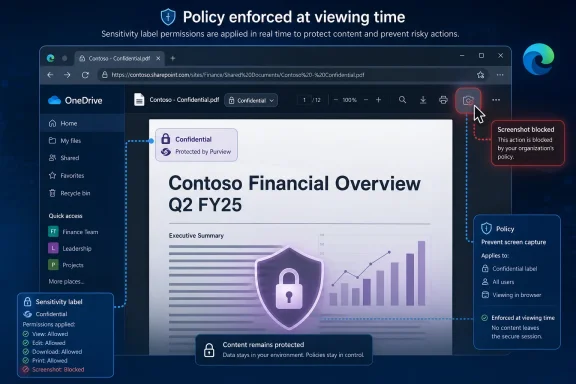
Microsoft added Roadmap ID 566695 on July 1, 2026, promising that the OneDrive and SharePoint web PDF viewer will block screenshots and screen capture in Microsoft Edge for PDFs protected by a Microsoft Purview sensitivity label that includes the Do Not Allow Screen Capture permission. The feature is in development, targets web users across commercial and government Microsoft 365 clouds, and is slated for general availability in August 2026. On paper, it is a narrow viewer enhancement. In practice, it is Microsoft trying to close one of the most awkward gaps in cloud document protection: the moment sensitive content is decrypted just enough to be seen.
For years, Microsoft’s information protection story has had an obvious tension. Sensitivity labels can classify files, encrypt them, restrict who can open them, block printing, prevent copying, and keep policy attached as the document moves through Microsoft 365. But when a permitted user opens a document and sees it on a screen, policy becomes harder to enforce.
That is the problem Roadmap ID 566695 is designed to address. The new OneDrive and SharePoint capability is not about discovering sensitive PDFs or deciding which files deserve protection. It is about enforcing an existing rights-management decision at the point of viewing, inside the web PDF viewer, when the user is in Microsoft Edge.
The distinction matters. Microsoft is not saying that every labeled PDF will become screenshot-proof. It is saying that when a PDF has a Microsoft Information Protection sensitivity label whose permissions include Do Not Allow Screen Capture, OneDrive and SharePoint’s web viewer will honor that restriction in Edge.
That turns a sensitivity label from a classification marker into a runtime control. A PDF marked confidential is not merely stamped as confidential; the viewer is expected to behave differently because of it. For compliance teams, that is the point of the entire Purview labeling model.
OneDrive and SharePoint are central to that shift. They are not just storage systems; they are document execution environments. Previewing a PDF in the browser now sits somewhere between opening a local file and accessing a line-of-business web app.
That makes Edge’s role less incidental than it first appears. Microsoft Edge is becoming the enforcement surface for Microsoft 365 data controls that previously depended on native Office clients, endpoint agents, or user discipline. If the browser can see label metadata, understand usage rights, and block capture APIs or native screenshot paths, then Microsoft can make web viewing behave more like a managed app.
There is an obvious platform strategy here. Microsoft is giving organizations another reason to standardize on Edge for work, especially Edge for Business. Competitors may describe that as browser lock-in; administrators may describe it as one fewer unmanaged path for sensitive data. Both readings can be true.
Microsoft’s own rights-management guidance has long made that point in plainer terms than some vendors would prefer. Screen capture prevention can reduce accidental or negligent disclosure, but it is not a complete defense against determined exfiltration. Once information is visible to a human being, perfect technical control is gone.
That does not make the feature useless. Enterprise security is full of controls that are bypassable in theory but valuable in practice. Seatbelts do not prevent every crash, and door locks do not defeat every burglar. Their value is in reducing common failure modes, increasing friction, and creating a policy boundary ordinary users cannot casually cross.
The likely win here is not stopping a spy with a second phone. It is stopping the employee who reflexively presses Print Screen, the contractor who grabs a quick crop of a confidential invoice, or the well-meaning manager who pastes a restricted PDF excerpt into an unsecured chat. In corporate data loss, “casual” is often the category that hurts.
That portability creates a governance problem. A PDF is easy to share, easy to preview, easy to download, and easy to treat as “finished.” In many organizations, the PDF is the final copy that leaves the authoring workflow and enters the circulation workflow.
Microsoft has been expanding sensitivity label support for PDFs in SharePoint and OneDrive, including the ability to apply labels, extract and display labels, include PDFs in search and eDiscovery scenarios, and support auto-labeling and library defaults when PDF protection is enabled. The new screen capture block builds on that broader shift: PDFs are no longer second-class citizens in Purview’s information protection model.
There are caveats. Signed PDFs remain a special case, and organizations must already have the relevant PDF sensitivity-label support configured. But the strategic direction is clear. Microsoft wants the same protection model to apply whether the sensitive file is a Word document in draft or a PDF in final circulation.
That model is powerful because it avoids one-off controls scattered across libraries and applications. An organization can define a label for highly restricted legal material, apply that label to a PDF, and expect the relevant usage restrictions to follow the file into supported Microsoft 365 experiences. That is the promise, anyway.
The Roadmap entry suggests Microsoft is tightening the contract between label permissions and browser behavior. If a label says screen capture is not allowed, the OneDrive and SharePoint PDF viewer in Edge should not behave as though the file were merely another web object.
For administrators, the operational question becomes less “Can I block screenshots in SharePoint?” and more “Which labels grant or deny capture, and where are those labels applied?” That is a healthier control model, but it also requires label hygiene. A messy sensitivity-label taxonomy will produce messy enforcement.
The inclusion of GCC High and DoD also signals that Microsoft sees the feature as more than a convenience enhancement for commercial tenants. Blocking capture for labeled PDFs fits into a broader compliance and controlled-unclassified-information story, especially where organizations need to demonstrate that policy follows content through cloud collaboration.
Still, availability across cloud instances does not mean identical timing everywhere in practice. Microsoft 365 roadmap dates are estimates, and government cloud rollouts often involve additional validation, service dependencies, and staged deployment. Administrators should treat August 2026 as the target, not a promise etched in stone.
The better planning posture is to start with policy review now. If the labels and permissions are not right before the feature arrives, the rollout will not magically create a coherent protection strategy.
This PDF screen capture feature fits that pattern neatly. It is not a generic web standard that every browser will automatically honor. The roadmap specifically calls out Microsoft Edge, which means organizations depending on Chrome, Firefox, Safari, or mixed browser fleets will need to test behavior carefully.
That will annoy some users and admins. It also reflects a real technical constraint. Browsers differ in how they expose capture surfaces, integrate with operating-system screenshot behavior, and participate in enterprise policy enforcement. Microsoft can move faster when it controls the browser, the cloud storage service, the identity layer, and the information protection stack.
The trade-off is strategic dependence. The more security controls Microsoft concentrates in Edge, the more Microsoft 365 security architecture becomes browser architecture. For some enterprises, that is an acceptable consolidation. For others, it is another reminder that “best supported” increasingly means “best supported in Microsoft’s own client.”
That does not mean the restriction is wrong. It means administrators need to know where the restriction will appear. A PDF that opens normally for one label may resist capture under another. A browser that enforces the restriction may behave differently from one that does not. A file opened in the web viewer may not behave the same way as a downloaded copy opened in a desktop app.
The preparation work is therefore mostly governance work. Security teams should review which labels include Do Not Allow Screen Capture, which groups receive those labels, and whether existing auto-labeling policies might apply them to PDFs at scale. SharePoint admins should confirm PDF label support, especially in tenants where PDF protection was never enabled or was enabled only for narrow scenarios.
Help desks need a script, too. “The screenshot tool is broken” will be the user’s framing. The correct answer may be that the screenshot tool is working exactly as policy intends.
Microsoft has learned this lesson unevenly across its security portfolio. Some Purview and Defender experiences are explicit and educational; others surface as opaque denials that send users spelunking through admin portals and policy traces. For this feature to work in the real world, the viewer needs to communicate the reason without leaking the protected content or overwhelming the user.
The best version of this feature would make the label visible, explain the blocked action, and direct users toward approved alternatives. If a user needs to share content from the PDF, the answer should be a governed sharing workflow, not a screenshot. If the user does not have rights, the answer should be an access request, not a workaround.
There is also an accessibility angle. Some users rely on capture-like workflows to magnify, annotate, convert, or reference content. Microsoft will need to ensure that blocking screenshots does not unintentionally break legitimate assistive or compliance workflows without offering sanctioned paths.
That is an ambitious model. It is also the only plausible model at Microsoft 365 scale. Modern organizations do not have one file server, one editing app, one device type, or one collaboration boundary. They have SharePoint sites, Teams chats, OneDrive links, Edge sessions, mobile apps, guest users, retention labels, DLP rules, eDiscovery holds, and Copilot-adjacent content flows all touching the same underlying files.
In that world, the label becomes the closest thing to a portable policy passport. The more places Microsoft enforces it, the more valuable the label becomes. The more places that ignore it, the more it becomes a decorative sticker.
Roadmap ID 566695 is therefore small but revealing. Microsoft is not merely adding a PDF viewer trick. It is extending the idea that the web browser should participate in information rights management as a first-class enforcement point.
The feature depends on decisions that should already exist: which information is sensitive, who should view it, which actions are allowed, and where exceptions belong. If those decisions are buried in tribal knowledge, the new viewer behavior will expose the weakness. If they are encoded cleanly in Purview labels and policies, the August rollout becomes another enforcement layer rather than another project.
The most concrete planning points are straightforward:
Microsoft’s new OneDrive and SharePoint PDF screen capture block is a modest feature with a larger message: the company is moving information protection deeper into the everyday act of viewing a file. It will not defeat a malicious insider with a phone, and it will not eliminate the hard human problem of deciding who should see sensitive information in the first place. But it does make the browser a more serious policy enforcement point, and that is where Microsoft 365 work increasingly happens. If August 2026 arrives on schedule, the next phase of document security will look less like locking files away and more like making every supported viewer obey the label already attached to them.
 Microsoft Moves the Last Mile of PDF Protection Into the Browser
For years, Microsoft’s information protection story has had an obvious tension. Sensitivity labels can classify files, encrypt them, restrict who can open them, block printing, prevent copying, and keep policy attached as the document moves through Microsoft 365. But when a permitted user opens a document and sees it on a screen, policy becomes harder to enforce.That is the problem Roadmap ID 566695 is designed to address. The new OneDrive and SharePoint capability is not about discovering sensitive PDFs or deciding which files deserve protection. It is about enforcing an existing rights-management decision at the point of viewing, inside the web PDF viewer, when the user is in Microsoft Edge.
The distinction matters. Microsoft is not saying that every labeled PDF will become screenshot-proof. It is saying that when a PDF has a Microsoft Information Protection sensitivity label whose permissions include Do Not Allow Screen Capture, OneDrive and SharePoint’s web viewer will honor that restriction in Edge.
That turns a sensitivity label from a classification marker into a runtime control. A PDF marked confidential is not merely stamped as confidential; the viewer is expected to behave differently because of it. For compliance teams, that is the point of the entire Purview labeling model.
The Browser Has Become the New Document Perimeter
The old enterprise perimeter was the network. The newer perimeter was identity. The emerging one is the browser, because that is where employees now read contracts, strategy decks, HR files, board packets, customer exports, and litigation documents without necessarily downloading them.OneDrive and SharePoint are central to that shift. They are not just storage systems; they are document execution environments. Previewing a PDF in the browser now sits somewhere between opening a local file and accessing a line-of-business web app.
That makes Edge’s role less incidental than it first appears. Microsoft Edge is becoming the enforcement surface for Microsoft 365 data controls that previously depended on native Office clients, endpoint agents, or user discipline. If the browser can see label metadata, understand usage rights, and block capture APIs or native screenshot paths, then Microsoft can make web viewing behave more like a managed app.
There is an obvious platform strategy here. Microsoft is giving organizations another reason to standardize on Edge for work, especially Edge for Business. Competitors may describe that as browser lock-in; administrators may describe it as one fewer unmanaged path for sensitive data. Both readings can be true.
This Is Not DRM Magic, and Microsoft Knows It
The most important thing about screenshot blocking is what it cannot do. It cannot stop someone from taking a photo of the screen with a phone. It cannot stop a malicious insider from memorizing a number, retyping a paragraph, or using another device pointed at the display. It cannot turn a trusted viewer into an untrusted one.Microsoft’s own rights-management guidance has long made that point in plainer terms than some vendors would prefer. Screen capture prevention can reduce accidental or negligent disclosure, but it is not a complete defense against determined exfiltration. Once information is visible to a human being, perfect technical control is gone.
That does not make the feature useless. Enterprise security is full of controls that are bypassable in theory but valuable in practice. Seatbelts do not prevent every crash, and door locks do not defeat every burglar. Their value is in reducing common failure modes, increasing friction, and creating a policy boundary ordinary users cannot casually cross.
The likely win here is not stopping a spy with a second phone. It is stopping the employee who reflexively presses Print Screen, the contractor who grabs a quick crop of a confidential invoice, or the well-meaning manager who pastes a restricted PDF excerpt into an unsecured chat. In corporate data loss, “casual” is often the category that hurts.
PDFs Were the Hole Microsoft Had to Patch
Office files have received most of the sensitivity-label attention because Word, Excel, and PowerPoint sit at the center of Microsoft 365. But PDFs are where a great deal of business actually ends up when the writing is done. Final contracts, signed policies, financial statements, legal filings, statements of work, medical forms, engineering specs, and executive packets often land as PDFs precisely because the format feels fixed and portable.That portability creates a governance problem. A PDF is easy to share, easy to preview, easy to download, and easy to treat as “finished.” In many organizations, the PDF is the final copy that leaves the authoring workflow and enters the circulation workflow.
Microsoft has been expanding sensitivity label support for PDFs in SharePoint and OneDrive, including the ability to apply labels, extract and display labels, include PDFs in search and eDiscovery scenarios, and support auto-labeling and library defaults when PDF protection is enabled. The new screen capture block builds on that broader shift: PDFs are no longer second-class citizens in Purview’s information protection model.
There are caveats. Signed PDFs remain a special case, and organizations must already have the relevant PDF sensitivity-label support configured. But the strategic direction is clear. Microsoft wants the same protection model to apply whether the sensitive file is a Word document in draft or a PDF in final circulation.
The Permission Setting Is the Real Control Plane
The phrase “Do Not Allow Screen Capture” sounds like a feature toggle, but administratively it belongs to a larger rights-management vocabulary. Sensitivity labels can combine visible markings, encryption, access scope, and usage rights. The label is the policy object; the viewer is merely the place where that policy becomes visible to the user.That model is powerful because it avoids one-off controls scattered across libraries and applications. An organization can define a label for highly restricted legal material, apply that label to a PDF, and expect the relevant usage restrictions to follow the file into supported Microsoft 365 experiences. That is the promise, anyway.
The Roadmap entry suggests Microsoft is tightening the contract between label permissions and browser behavior. If a label says screen capture is not allowed, the OneDrive and SharePoint PDF viewer in Edge should not behave as though the file were merely another web object.
For administrators, the operational question becomes less “Can I block screenshots in SharePoint?” and more “Which labels grant or deny capture, and where are those labels applied?” That is a healthier control model, but it also requires label hygiene. A messy sensitivity-label taxonomy will produce messy enforcement.
Government Clouds Are Not an Afterthought This Time
The roadmap lists Worldwide, GCC, GCC High, and DoD cloud instances. That is notable because screenshot prevention is most attractive in environments where the cost of mishandled information is not merely reputational. Government, defense, regulated healthcare, finance, legal, and critical infrastructure tenants are exactly the places where PDF circulation and strict handling rules collide.The inclusion of GCC High and DoD also signals that Microsoft sees the feature as more than a convenience enhancement for commercial tenants. Blocking capture for labeled PDFs fits into a broader compliance and controlled-unclassified-information story, especially where organizations need to demonstrate that policy follows content through cloud collaboration.
Still, availability across cloud instances does not mean identical timing everywhere in practice. Microsoft 365 roadmap dates are estimates, and government cloud rollouts often involve additional validation, service dependencies, and staged deployment. Administrators should treat August 2026 as the target, not a promise etched in stone.
The better planning posture is to start with policy review now. If the labels and permissions are not right before the feature arrives, the rollout will not magically create a coherent protection strategy.
Edge Gets Another Enterprise-Only Superpower
Microsoft’s browser strategy has become less about convincing consumers that Edge is nicer than Chrome and more about convincing enterprises that Edge is the safest place to do Microsoft 365 work. Protected clipboard controls, browser-based DLP enforcement, profile separation, management through Microsoft 365 admin surfaces, and sensitivity-label-aware experiences all point in the same direction.This PDF screen capture feature fits that pattern neatly. It is not a generic web standard that every browser will automatically honor. The roadmap specifically calls out Microsoft Edge, which means organizations depending on Chrome, Firefox, Safari, or mixed browser fleets will need to test behavior carefully.
That will annoy some users and admins. It also reflects a real technical constraint. Browsers differ in how they expose capture surfaces, integrate with operating-system screenshot behavior, and participate in enterprise policy enforcement. Microsoft can move faster when it controls the browser, the cloud storage service, the identity layer, and the information protection stack.
The trade-off is strategic dependence. The more security controls Microsoft concentrates in Edge, the more Microsoft 365 security architecture becomes browser architecture. For some enterprises, that is an acceptable consolidation. For others, it is another reminder that “best supported” increasingly means “best supported in Microsoft’s own client.”
The Admin Work Begins Before the Rollout
The worst way to adopt this feature is to wait until users notice that screenshots fail. Screen capture blocking changes user behavior in small but highly visible ways. People who use screenshots for ticketing, review workflows, accessibility workarounds, audit packets, or internal reporting will encounter a hard edge where they previously had a convenience.That does not mean the restriction is wrong. It means administrators need to know where the restriction will appear. A PDF that opens normally for one label may resist capture under another. A browser that enforces the restriction may behave differently from one that does not. A file opened in the web viewer may not behave the same way as a downloaded copy opened in a desktop app.
The preparation work is therefore mostly governance work. Security teams should review which labels include Do Not Allow Screen Capture, which groups receive those labels, and whether existing auto-labeling policies might apply them to PDFs at scale. SharePoint admins should confirm PDF label support, especially in tenants where PDF protection was never enabled or was enabled only for narrow scenarios.
Help desks need a script, too. “The screenshot tool is broken” will be the user’s framing. The correct answer may be that the screenshot tool is working exactly as policy intends.
The User Experience Will Decide Whether This Feels Like Security or Sabotage
Screen capture blocking is one of those controls where the user experience determines whether the policy feels legitimate. If Edge clearly explains that the PDF is protected because of its sensitivity label, users are more likely to understand the restriction. If the screen simply goes black or capture silently fails, the help desk will inherit the confusion.Microsoft has learned this lesson unevenly across its security portfolio. Some Purview and Defender experiences are explicit and educational; others surface as opaque denials that send users spelunking through admin portals and policy traces. For this feature to work in the real world, the viewer needs to communicate the reason without leaking the protected content or overwhelming the user.
The best version of this feature would make the label visible, explain the blocked action, and direct users toward approved alternatives. If a user needs to share content from the PDF, the answer should be a governed sharing workflow, not a screenshot. If the user does not have rights, the answer should be an access request, not a workaround.
There is also an accessibility angle. Some users rely on capture-like workflows to magnify, annotate, convert, or reference content. Microsoft will need to ensure that blocking screenshots does not unintentionally break legitimate assistive or compliance workflows without offering sanctioned paths.
Screenshot Blocking Is a Signal, Not a Strategy
It is tempting to overread this feature as Microsoft “solving” PDF data leakage. It is better understood as one signal in a larger strategy: Microsoft wants sensitivity labels to become the durable policy language of enterprise content. Storage location, app choice, and file format should matter less than the label attached to the data.That is an ambitious model. It is also the only plausible model at Microsoft 365 scale. Modern organizations do not have one file server, one editing app, one device type, or one collaboration boundary. They have SharePoint sites, Teams chats, OneDrive links, Edge sessions, mobile apps, guest users, retention labels, DLP rules, eDiscovery holds, and Copilot-adjacent content flows all touching the same underlying files.
In that world, the label becomes the closest thing to a portable policy passport. The more places Microsoft enforces it, the more valuable the label becomes. The more places that ignore it, the more it becomes a decorative sticker.
Roadmap ID 566695 is therefore small but revealing. Microsoft is not merely adding a PDF viewer trick. It is extending the idea that the web browser should participate in information rights management as a first-class enforcement point.
The August Rollout Will Reward Tenants That Already Did the Boring Work
The practical lesson is not that every organization should rush to block screenshots. The lesson is that organizations with mature labels will benefit fastest, while tenants with confused labels will experience confused outcomes.The feature depends on decisions that should already exist: which information is sensitive, who should view it, which actions are allowed, and where exceptions belong. If those decisions are buried in tribal knowledge, the new viewer behavior will expose the weakness. If they are encoded cleanly in Purview labels and policies, the August rollout becomes another enforcement layer rather than another project.
The most concrete planning points are straightforward:
- Organizations should identify which sensitivity labels include Do Not Allow Screen Capture before the OneDrive and SharePoint PDF viewer begins enforcing the restriction in Edge.
- Administrators should confirm that PDF support for sensitivity labels is enabled and understood across SharePoint and OneDrive, especially in Multi-Geo tenants.
- Security teams should test labeled PDFs in Microsoft Edge, other browsers, downloaded viewers, managed devices, and unmanaged devices to document where enforcement does and does not apply.
- Help desks should be prepared to explain that blocked screenshots are a policy result, not a broken Snipping Tool or Edge defect.
- Governance teams should treat screenshot blocking as a friction control that reduces casual leakage, not as a complete defense against intentional disclosure.
Microsoft’s new OneDrive and SharePoint PDF screen capture block is a modest feature with a larger message: the company is moving information protection deeper into the everyday act of viewing a file. It will not defeat a malicious insider with a phone, and it will not eliminate the hard human problem of deciding who should see sensitive information in the first place. But it does make the browser a more serious policy enforcement point, and that is where Microsoft 365 work increasingly happens. If August 2026 arrives on schedule, the next phase of document security will look less like locking files away and more like making every supported viewer obey the label already attached to them.
References
- Primary source: Microsoft 365 Roadmap
Published: 2026-07-01T23:03:18.2442931Z
Loading…
www.microsoft.com - Official source: learn.microsoft.com
Enable sensitivity labels for files in SharePoint and OneDrive | Microsoft Learn
Administrators can enable sensitivity label support for Word, Excel, PowerPoint, and PDF files in SharePoint and OneDrive.learn.microsoft.com - Official source: support.microsoft.com
Loading…
support.microsoft.com - Related coverage: cybersecuritynews.com
Loading…
cybersecuritynews.com - Related coverage: windowsreport.com
Loading…
www.windowsreport.com - Official source: download.microsoft.com
PDF_MSFT_Cloud_architecture_information protection for GDPR.vsdx
PDF documentdownload.microsoft.com
- Official source: cdn-dynmedia-1.microsoft.com
- Official source: techcommunity.microsoft.com
Loading…
techcommunity.microsoft.com - Related coverage: techriver.com
- Official source: news.microsoft.com