

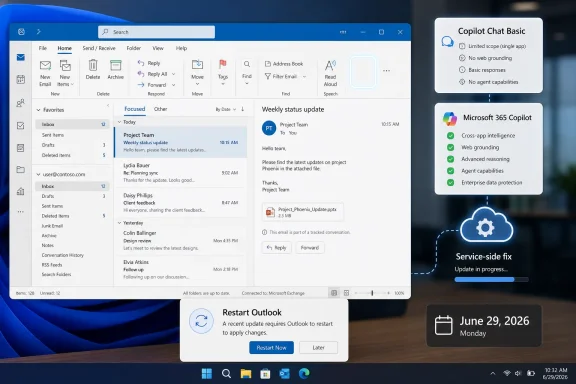
Microsoft fixed a Classic Outlook for Windows bug on June 29, 2026, after an update to build 20026.20182 or later caused Copilot Chat and Copilot entry points to disappear for some users with only the Copilot Chat Basic license. The repair was delivered as a service-side change, not a grand client redesign, but the episode says more about Microsoft’s current productivity strategy than its small surface area suggests. Outlook remains the workplace command center for millions of users, and when a button disappears there, the failure is not cosmetic. It is a reminder that Microsoft’s AI rollout now depends on licensing logic, service flags, client builds, and user interface plumbing all arriving in the same place at the same time.
The bug was narrow, but it landed in a product with an unusually low tolerance for ambiguity. Classic Outlook is not a playground for interface experiments; it is where people triage clients, approve invoices, manage calendars, respond to executives, and search years of institutional memory. If a Copilot button disappears in an app like this, users do not experience it as a minor UI regression. They experience it as a capability being withdrawn.
Microsoft’s own description makes the scope clear. The issue affected Classic Outlook for Windows users who had Copilot Chat Basic, while users with a paid Microsoft 365 Copilot license were not affected. After the affected Outlook build arrived, the Copilot button could vanish from the top-right area above the ribbon, the left app bar, or the More Apps section.
That licensing distinction matters because it is exactly where Microsoft has been drawing finer lines in its Copilot strategy. The company is not merely adding AI to Office; it is segmenting AI by plan, endpoint, tenant setting, app surface, and administrative control. This incident exposed how brittle that segmentation can feel when the interface gives users no clear explanation.
A missing button is a poor error message. It does not say “your client build is affected,” “your license is still valid,” or “restart Outlook to receive a service-side fix.” It simply removes the affordance and leaves users to wonder whether their admin changed policy, Microsoft changed licensing, an update broke the app, or Copilot itself is unavailable.
That is a reasonable fix path for a managed productivity app. It is also a revealing one. The problem appeared after a client update, but the fix came from the service. In modern Microsoft 365, the visible application is only one part of the product. Feature availability is mediated through cloud-side configuration, entitlement checks, deployment rings, account identity, and Office update channels.
For administrators, this is now familiar terrain. When something disappears in Microsoft 365, the first question is no longer “what changed on the PC?” It is “what changed across the PC, the tenant, the license, the app service, the account, and the rollout ring?” That diagnostic burden keeps growing as Microsoft turns Office into a continuously updated front end for cloud-delivered capabilities.
The company’s workaround guidance reinforces the same reality. Users who could not update immediately could switch to New Outlook or Outlook on the web, while Current Channel users could temporarily roll back to build 16.0.20026.20168. That rollback is useful, but it is not the answer Microsoft wants anyone to live with. Disabling Office updates to preserve a known-good state is sometimes necessary in the short term, but it also means stepping away from future security and reliability fixes.
New Outlook and Outlook on the web were named as temporary alternatives for affected users, and that is not accidental. Microsoft wants users to understand the web-backed Outlook experience as the safer long-term bet. It is easier for Microsoft to update, easier to align across platforms, and better matched to a cloud-first Copilot model.
Yet Classic Outlook remains stubbornly relevant because enterprise software is not adopted by roadmap slide. It is adopted by workflow confidence. Many users still prefer Classic Outlook because it feels faster, more predictable, and more deeply integrated with years of local habits. Even as Microsoft improves New Outlook, including expanded PST support, complaints about notification latency and missing legacy behaviors keep Classic Outlook in the daily rotation.
That creates a strange tension. Microsoft must maintain Classic Outlook well enough to avoid alienating its most committed productivity users, while also making New Outlook good enough that switching no longer feels like a downgrade. The Copilot disappearance bug does not decide that battle, but it illustrates why the transition remains sensitive. If users believe Classic Outlook is being destabilized while New Outlook is still maturing, they will read every bug through that lens.
But availability is not the same as trust. A user who sees Copilot one day and loses it the next is not being trained to depend on AI. They are being trained to treat it as conditional. That is especially true for Copilot Chat Basic users, who occupy a complicated middle ground between free access and the full paid Microsoft 365 Copilot experience.
This is where Microsoft’s product language can work against it. “Copilot” now means several things depending on context: a chat surface, an Office-integrated assistant, a licensed enterprise feature, a consumer feature, a Windows companion, and a tenant-governed service. If the button disappears, even experienced users may not know which Copilot they have lost.
The result is a support problem disguised as a design problem. Users may search ribbon customization, check add-ins, reinstall Office, blame administrators, or assume Microsoft changed the licensing model. Some of those theories are plausible because Microsoft’s AI packaging has changed repeatedly. A clean service fix solves the immediate defect, but it does not solve the larger interpretability problem.
Copilot Chat Basic is meant to give organizations an entry point into Microsoft’s AI ecosystem. It lets users engage with Copilot without immediately committing to the full paid Microsoft 365 Copilot license for every worker. That is strategically useful for Microsoft because it seeds habits, familiarizes tenants with controls, and creates a path toward broader adoption.
The danger is that a lower-tier experience can start to feel unreliable if the boundaries are not obvious. If Basic users lose buttons while paid users do not, the immediate explanation may be technical, but the emotional interpretation may be commercial. Users will ask whether Microsoft is nudging them toward paid plans, even when the simpler answer is that a service flag broke.
That perception risk is not trivial. AI features are still earning their place in daily work. If users believe access is unpredictable, they will not build workflows around it. If administrators believe feature availability is hard to explain, they will be slower to evangelize it internally. Microsoft’s success with Copilot depends as much on boring reliability as it does on model capability.
A sensible help desk response starts with entitlement. Confirm whether the user has Copilot Chat Basic, a paid Microsoft 365 Copilot license, or neither. Then confirm the Outlook build, update channel, and whether the user is on build 20026.20182 or later. From there, restart Outlook, check for Office updates, and test Outlook on the web or the Microsoft 365 Copilot app to determine whether the service itself remains accessible.
The rollback option should be treated carefully. Reverting Current Channel to build 16.0.20026.20168 can restore access in environments where the fix has not landed or where updating is blocked. But rollback is not a clean long-term posture. Once Office updates are disabled, administrators inherit the job of remembering to re-enable them.
This is exactly the kind of incident that should push organizations toward clearer internal Copilot runbooks. Not every worker needs to know the difference between a service-side change and a Click-to-Run rollback. But the help desk does. Without that clarity, every Copilot UI issue becomes a round of guesswork.
That is the upside of cloud-connected Office. Microsoft can correct behavior centrally, adjust entitlement handling, and restore UI entry points without asking every administrator to rebuild the fleet. For global organizations, that model can be far more efficient than old-style desktop remediation.
The weakness is that the same machinery can make failures opaque. If a feature is controlled partly by the cloud and partly by the local build, users cannot easily tell where the fault lies. The local app looks broken, but the fix may be remote. The account appears licensed, but the button may still be missing. The web app works, but the desktop app does not.
That ambiguity is now the price of Microsoft 365’s flexibility. The more Microsoft composes Office from services, flags, and entitlements, the more it needs better in-product diagnostics. A vanished AI button should not require a support article to explain. Outlook should be able to say, plainly, that Copilot is temporarily unavailable in this client build and suggest the next step.
Users do not migrate happily because the old app breaks. They migrate happily when the new app is better. Classic Outlook’s staying power is not nostalgia alone; it is the accumulated result of deep features, local data expectations, mature add-in ecosystems, keyboard habits, and a performance profile that many users still prefer.
New Outlook has improved, and Microsoft’s recent PST work is an important concession to real-world usage. But users who depend on fast desktop notifications, complex mailbox workflows, or legacy integration points still judge it against Classic Outlook, not against Microsoft’s roadmap. If New Outlook is offered as a workaround during a Classic Outlook bug, it must behave like an upgrade, not an emergency exit.
The Copilot bug therefore cuts two ways. It gives Microsoft another reason to point users toward the newer Outlook architecture. It also reminds everyone why trust in the transition is fragile. A cloud-first client can be easier to fix, but only if users believe it will respect the workflows that kept them in Classic Outlook in the first place.
Microsoft has placed AI at the center of its productivity narrative. Copilot is not presented as a minor optional feature; it is marketed as the next interface for work. That raises the stakes for every inconsistent surface. If Copilot is the future of Office, users expect it to be more stable than a preview add-in.
This is especially true in Outlook because email is where AI assistance has an obvious use case. Summarizing long threads, drafting replies, extracting action items, and grounding responses in mailbox context are exactly the tasks that make Copilot feel practical rather than ornamental. Losing those entry points in Outlook makes the value proposition vanish at the moment it should be most visible.
The irony is that the affected users may still have had access elsewhere. Microsoft noted that Copilot could remain available through Outlook on the web and the standalone Microsoft 365 Copilot app or web experience. But telling users the feature works somewhere else is not the same as preserving the workflow. For many people, the value of Copilot in Outlook is that it sits where the work already is.
That is why disappearance bugs matter. The location of Copilot tells users how important Microsoft thinks it is. A top-right button above the ribbon suggests a central assistant. A left app bar icon suggests a persistent workspace. A grayed-out customized command suggests something is present but inaccessible. Each state carries meaning, even if it is accidental.
When those signals conflict, users lose confidence. Seeing Copilot in Add Apps but finding that Open does nothing is worse than not seeing it at all. A visible but inert feature teaches users that the product is inconsistent. A grayed-out command suggests policy or licensing even when the real cause is a transient defect.
Microsoft’s challenge is to make AI integration feel inevitable without making it feel imposed, confusing, or unstable. That requires more than adding entry points. It requires making each entry point explain itself when something goes wrong.
That sequence is not complicated. But the incident should still be logged as a warning about how Copilot support will behave in the field. AI features are not isolated widgets. They depend on identity, licensing, client versions, service state, and Microsoft’s changing product boundaries.
Organizations deploying Copilot should assume that more of these edge cases will appear. That does not mean Copilot is uniquely unreliable; it means it is deeply integrated into products that were not originally designed around AI entitlement layers. Every integration point is another place where policy, build timing, and UX can fall out of sync.
The best response is not panic. It is discipline. Keep Office update channels documented. Track Copilot license assignments. Give the help desk a standard test matrix across Classic Outlook, New Outlook, Outlook on the web, and the Microsoft 365 Copilot app. Most importantly, do not let a temporary rollback become invisible technical debt.
 Microsoft’s AI Shortcut Vanished in the App That Still Matters Most
The bug was narrow, but it landed in a product with an unusually low tolerance for ambiguity. Classic Outlook is not a playground for interface experiments; it is where people triage clients, approve invoices, manage calendars, respond to executives, and search years of institutional memory. If a Copilot button disappears in an app like this, users do not experience it as a minor UI regression. They experience it as a capability being withdrawn.Microsoft’s own description makes the scope clear. The issue affected Classic Outlook for Windows users who had Copilot Chat Basic, while users with a paid Microsoft 365 Copilot license were not affected. After the affected Outlook build arrived, the Copilot button could vanish from the top-right area above the ribbon, the left app bar, or the More Apps section.
That licensing distinction matters because it is exactly where Microsoft has been drawing finer lines in its Copilot strategy. The company is not merely adding AI to Office; it is segmenting AI by plan, endpoint, tenant setting, app surface, and administrative control. This incident exposed how brittle that segmentation can feel when the interface gives users no clear explanation.
A missing button is a poor error message. It does not say “your client build is affected,” “your license is still valid,” or “restart Outlook to receive a service-side fix.” It simply removes the affordance and leaves users to wonder whether their admin changed policy, Microsoft changed licensing, an update broke the app, or Copilot itself is unavailable.
The Fix Arrived Quickly, But the Confusion Was Built In
Microsoft says the Outlook Team resolved the issue through a service change on June 29, 2026. For affected users, the company’s advice is straightforward: restart Classic Outlook to pick up the change, then install the latest Office build through File, Office Account, Update Options, and Update Now if the buttons are still missing.That is a reasonable fix path for a managed productivity app. It is also a revealing one. The problem appeared after a client update, but the fix came from the service. In modern Microsoft 365, the visible application is only one part of the product. Feature availability is mediated through cloud-side configuration, entitlement checks, deployment rings, account identity, and Office update channels.
For administrators, this is now familiar terrain. When something disappears in Microsoft 365, the first question is no longer “what changed on the PC?” It is “what changed across the PC, the tenant, the license, the app service, the account, and the rollout ring?” That diagnostic burden keeps growing as Microsoft turns Office into a continuously updated front end for cloud-delivered capabilities.
The company’s workaround guidance reinforces the same reality. Users who could not update immediately could switch to New Outlook or Outlook on the web, while Current Channel users could temporarily roll back to build 16.0.20026.20168. That rollback is useful, but it is not the answer Microsoft wants anyone to live with. Disabling Office updates to preserve a known-good state is sometimes necessary in the short term, but it also means stepping away from future security and reliability fixes.
Classic Outlook Keeps Becoming the Control Group
This story also lands in the middle of Microsoft’s long, uneven migration from Classic Outlook to New Outlook. Microsoft has spent years signaling that New Outlook is the future, while Classic Outlook remains the tool many professionals still trust when speed, offline behavior, add-ins, PST handling, or familiar workflows matter. Every bug in Classic Outlook becomes part of that larger argument.New Outlook and Outlook on the web were named as temporary alternatives for affected users, and that is not accidental. Microsoft wants users to understand the web-backed Outlook experience as the safer long-term bet. It is easier for Microsoft to update, easier to align across platforms, and better matched to a cloud-first Copilot model.
Yet Classic Outlook remains stubbornly relevant because enterprise software is not adopted by roadmap slide. It is adopted by workflow confidence. Many users still prefer Classic Outlook because it feels faster, more predictable, and more deeply integrated with years of local habits. Even as Microsoft improves New Outlook, including expanded PST support, complaints about notification latency and missing legacy behaviors keep Classic Outlook in the daily rotation.
That creates a strange tension. Microsoft must maintain Classic Outlook well enough to avoid alienating its most committed productivity users, while also making New Outlook good enough that switching no longer feels like a downgrade. The Copilot disappearance bug does not decide that battle, but it illustrates why the transition remains sensitive. If users believe Classic Outlook is being destabilized while New Outlook is still maturing, they will read every bug through that lens.
Copilot’s Real Challenge Is Trust, Not Placement
Microsoft has been aggressive about putting Copilot into its productivity surfaces. Sometimes that means a button above the ribbon. Sometimes it means a left-rail icon, a compose assistant, a summarization prompt, or a standalone Microsoft 365 Copilot app. The company’s goal is obvious: make AI assistance feel ambient, available, and normal.But availability is not the same as trust. A user who sees Copilot one day and loses it the next is not being trained to depend on AI. They are being trained to treat it as conditional. That is especially true for Copilot Chat Basic users, who occupy a complicated middle ground between free access and the full paid Microsoft 365 Copilot experience.
This is where Microsoft’s product language can work against it. “Copilot” now means several things depending on context: a chat surface, an Office-integrated assistant, a licensed enterprise feature, a consumer feature, a Windows companion, and a tenant-governed service. If the button disappears, even experienced users may not know which Copilot they have lost.
The result is a support problem disguised as a design problem. Users may search ribbon customization, check add-ins, reinstall Office, blame administrators, or assume Microsoft changed the licensing model. Some of those theories are plausible because Microsoft’s AI packaging has changed repeatedly. A clean service fix solves the immediate defect, but it does not solve the larger interpretability problem.
The Licensing Boundary Made the Bug Feel Bigger
The most important detail is that paid Microsoft 365 Copilot users were not affected. That does not imply favoritism or intentional degradation; bugs often strike one entitlement path and not another. But in a market where Microsoft is carefully upselling premium AI seats, any difference between Basic and paid behavior is going to be scrutinized.Copilot Chat Basic is meant to give organizations an entry point into Microsoft’s AI ecosystem. It lets users engage with Copilot without immediately committing to the full paid Microsoft 365 Copilot license for every worker. That is strategically useful for Microsoft because it seeds habits, familiarizes tenants with controls, and creates a path toward broader adoption.
The danger is that a lower-tier experience can start to feel unreliable if the boundaries are not obvious. If Basic users lose buttons while paid users do not, the immediate explanation may be technical, but the emotional interpretation may be commercial. Users will ask whether Microsoft is nudging them toward paid plans, even when the simpler answer is that a service flag broke.
That perception risk is not trivial. AI features are still earning their place in daily work. If users believe access is unpredictable, they will not build workflows around it. If administrators believe feature availability is hard to explain, they will be slower to evangelize it internally. Microsoft’s success with Copilot depends as much on boring reliability as it does on model capability.
Admins Need Fewer Mysteries, Not More Buttons
For IT teams, the practical lesson is not simply “restart Outlook.” It is that Copilot support now belongs in the same operational category as Exchange Online, Office update channels, identity policy, and endpoint management. The button is the symptom; the stack behind it is the system.A sensible help desk response starts with entitlement. Confirm whether the user has Copilot Chat Basic, a paid Microsoft 365 Copilot license, or neither. Then confirm the Outlook build, update channel, and whether the user is on build 20026.20182 or later. From there, restart Outlook, check for Office updates, and test Outlook on the web or the Microsoft 365 Copilot app to determine whether the service itself remains accessible.
The rollback option should be treated carefully. Reverting Current Channel to build 16.0.20026.20168 can restore access in environments where the fix has not landed or where updating is blocked. But rollback is not a clean long-term posture. Once Office updates are disabled, administrators inherit the job of remembering to re-enable them.
This is exactly the kind of incident that should push organizations toward clearer internal Copilot runbooks. Not every worker needs to know the difference between a service-side change and a Click-to-Run rollback. But the help desk does. Without that clarity, every Copilot UI issue becomes a round of guesswork.
Microsoft’s Service Fix Shows the Strength and Weakness of Cloud Office
There is a charitable reading of this incident: Microsoft found a bug, shipped a service-side correction, and gave users workarounds. Compared with the old boxed-software era, that is a fast recovery loop. No one had to wait for a quarterly Office service pack or manually install a hotfix from an obscure download page.That is the upside of cloud-connected Office. Microsoft can correct behavior centrally, adjust entitlement handling, and restore UI entry points without asking every administrator to rebuild the fleet. For global organizations, that model can be far more efficient than old-style desktop remediation.
The weakness is that the same machinery can make failures opaque. If a feature is controlled partly by the cloud and partly by the local build, users cannot easily tell where the fault lies. The local app looks broken, but the fix may be remote. The account appears licensed, but the button may still be missing. The web app works, but the desktop app does not.
That ambiguity is now the price of Microsoft 365’s flexibility. The more Microsoft composes Office from services, flags, and entitlements, the more it needs better in-product diagnostics. A vanished AI button should not require a support article to explain. Outlook should be able to say, plainly, that Copilot is temporarily unavailable in this client build and suggest the next step.
New Outlook Benefits From Every Classic Outlook Stumble, But Not Enough
Microsoft would probably prefer that incidents like this accelerate acceptance of New Outlook. If Classic Outlook feels complicated and legacy-bound, while New Outlook and Outlook on the web keep Copilot visible, the strategic direction becomes easier to sell. But the company should be careful not to overestimate the conversion power of frustration.Users do not migrate happily because the old app breaks. They migrate happily when the new app is better. Classic Outlook’s staying power is not nostalgia alone; it is the accumulated result of deep features, local data expectations, mature add-in ecosystems, keyboard habits, and a performance profile that many users still prefer.
New Outlook has improved, and Microsoft’s recent PST work is an important concession to real-world usage. But users who depend on fast desktop notifications, complex mailbox workflows, or legacy integration points still judge it against Classic Outlook, not against Microsoft’s roadmap. If New Outlook is offered as a workaround during a Classic Outlook bug, it must behave like an upgrade, not an emergency exit.
The Copilot bug therefore cuts two ways. It gives Microsoft another reason to point users toward the newer Outlook architecture. It also reminds everyone why trust in the transition is fragile. A cloud-first client can be easier to fix, but only if users believe it will respect the workflows that kept them in Classic Outlook in the first place.
The Copilot Era Makes Small UI Failures Strategically Loud
In another era, this might have been a small toolbar bug. A button disappeared, Microsoft fixed it, and the story ended. In 2026, it is harder to separate the defect from the broader Copilot campaign.Microsoft has placed AI at the center of its productivity narrative. Copilot is not presented as a minor optional feature; it is marketed as the next interface for work. That raises the stakes for every inconsistent surface. If Copilot is the future of Office, users expect it to be more stable than a preview add-in.
This is especially true in Outlook because email is where AI assistance has an obvious use case. Summarizing long threads, drafting replies, extracting action items, and grounding responses in mailbox context are exactly the tasks that make Copilot feel practical rather than ornamental. Losing those entry points in Outlook makes the value proposition vanish at the moment it should be most visible.
The irony is that the affected users may still have had access elsewhere. Microsoft noted that Copilot could remain available through Outlook on the web and the standalone Microsoft 365 Copilot app or web experience. But telling users the feature works somewhere else is not the same as preserving the workflow. For many people, the value of Copilot in Outlook is that it sits where the work already is.
The Ribbon Is Now a Battleground for Product Strategy
Office UI has always carried more politics than it appears to. The ribbon itself was once Microsoft’s answer to menu sprawl. The left rail, app bar, and More Apps sections are now prime territory for Microsoft 365’s service ambitions. Copilot’s placement in those areas is not decorative; it is a bid for user attention.That is why disappearance bugs matter. The location of Copilot tells users how important Microsoft thinks it is. A top-right button above the ribbon suggests a central assistant. A left app bar icon suggests a persistent workspace. A grayed-out customized command suggests something is present but inaccessible. Each state carries meaning, even if it is accidental.
When those signals conflict, users lose confidence. Seeing Copilot in Add Apps but finding that Open does nothing is worse than not seeing it at all. A visible but inert feature teaches users that the product is inconsistent. A grayed-out command suggests policy or licensing even when the real cause is a transient defect.
Microsoft’s challenge is to make AI integration feel inevitable without making it feel imposed, confusing, or unstable. That requires more than adding entry points. It requires making each entry point explain itself when something goes wrong.
The Practical Fix Is Simple; the Operational Lesson Is Not
For an affected user today, the remediation path is mercifully short. Restart Classic Outlook first. If Copilot still does not appear, install the latest Office update from the account page. If the business cannot update immediately, use New Outlook or Outlook on the web, or consider a temporary Current Channel rollback to build 16.0.20026.20168 with a plan to re-enable updates.That sequence is not complicated. But the incident should still be logged as a warning about how Copilot support will behave in the field. AI features are not isolated widgets. They depend on identity, licensing, client versions, service state, and Microsoft’s changing product boundaries.
Organizations deploying Copilot should assume that more of these edge cases will appear. That does not mean Copilot is uniquely unreliable; it means it is deeply integrated into products that were not originally designed around AI entitlement layers. Every integration point is another place where policy, build timing, and UX can fall out of sync.
The best response is not panic. It is discipline. Keep Office update channels documented. Track Copilot license assignments. Give the help desk a standard test matrix across Classic Outlook, New Outlook, Outlook on the web, and the Microsoft 365 Copilot app. Most importantly, do not let a temporary rollback become invisible technical debt.
A Missing Button Leaves a Useful Paper Trail
This incident is small enough to fix quickly and large enough to teach something. The immediate facts are clear, and the recommended actions are practical.- Microsoft fixed the Classic Outlook Copilot disappearance issue with a service-side change on June 29, 2026.
- The bug affected some Classic Outlook for Windows users with Copilot Chat Basic after updating to build 20026.20182 or later.
- Users with a paid Microsoft 365 Copilot license were not affected by this specific issue.
- Affected users should restart Classic Outlook and then install the latest Office build if the buttons remain missing.
- New Outlook, Outlook on the web, and the Microsoft 365 Copilot app remain practical temporary alternatives.
- Rolling back to build 16.0.20026.20168 can help Current Channel users, but disabled Office updates should be re-enabled as soon as possible.
References
- Primary source: Windows Report
Published: 2026-07-02T14:14:08.807834
Microsoft Fixes Classic Outlook Copilot Button Disappearance Issue
Classic Outlook Copilot buttons disappeared for some Windows users, but Microsoft says the issue was fixed with a June 29 service change. windowsreport.com
- Official source: support.microsoft.com
Copilot buttons are missing in classic Outlook for Windows | Microsoft Support
This article describes the issue regarding Copilit buttons missing in classic Outlook for Windowssupport.microsoft.com - Official source: learn.microsoft.com
copilot is no longer working on outlook classic - Microsoft Q&A
i'm facing a problem with my outlook classic, copilot was working before fine but suddenly it's stopped working for outlook only, out of the sudden the summarize button no longer displaying inside emails, i have tried all the solutions i found online but…learn.microsoft.com - Related coverage: bleepingcomputer.com
Microsoft fixes bug that removed Copilot buttons in Outlook
Microsoft has fixed a known issue causing the Copilot Chat or Copilot buttons in Classic Outlook to disappear for Windows users with the Copilot Chat (Basic) license.www.bleepingcomputer.com
- Related coverage: windowsforum.com
Missing Copilot Buttons in Classic Outlook: Restart, Update, Verify License Fix | Windows Forum
Microsoft says its service-side fix for missing Copilot buttons in classic Outlook for Windows landed on June 29, 2026, and affected users should first...windowsforum.com - Related coverage: wisechecker.com
Classic Outlook Copilot Button Missing After Update: Fix – WiseChecker
After installing a recent Microsoft 365 update, some users report that the Copilot button in the classic version of Outlook has disappeared from the ribbon…wisechecker.com
- Related coverage: windowscentral.com
Microsoft admits forcing the floating Copilot button on Office users was a mistake—but engagement went up anyway | Windows Central
After a wave of user backlash over "intrusive" design, Microsoft is rolling out a fix that allows Word and Excel users to move the AI assistant back to the ribbon.www.windowscentral.com
