

Microsoft Moves Copilot From Assistant to Office Middle Manager
For the last two years, Copilot in Outlook has mostly behaved like a very capable intern waiting for instructions. It could summarize a long thread, produce a more diplomatic reply, or help locate a meeting time. Useful, yes, but still bounded by the old rhythm of productivity software: the user asks, the software responds, the user decides what happens next.
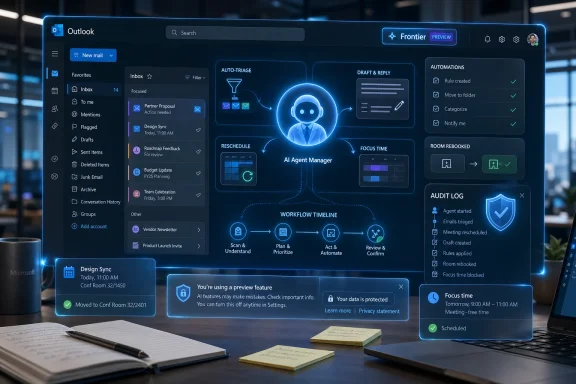
Agent Mode changes that contract. Microsoft’s new Outlook experience is designed to “run” parts of the inbox and calendar, not merely comment on them. It can identify neglected conversations, draft nudges, propose priority sorting, create mailbox rules, and take action against scheduling conflicts. In the calendar, it can manage recurring one-on-ones, respond to conflicts, rebook rooms, and carve out focus time according to a user’s preferences.
That sounds incremental if you treat email as a pile of messages. It is not incremental if you treat Outlook as a workplace operating system. Microsoft is attempting to automate the maintenance layer of office life: the reminders, filing, rescheduling, chasing, prioritizing, and context recovery that occupy the cracks between “real” work.
This is why the Frontier label matters. Frontier is Microsoft’s preview track for emerging AI features inside Microsoft 365, and in enterprise terms that means the company is not presenting this as a finished universal default for every tenant. It is a controlled bet, offered to organizations willing to test how far agentic AI can go before the help becomes a governance problem.
Outlook Is the Hardest Place to Prove Agentic AI Works
If Microsoft wanted a friendly environment for agentic AI, Outlook would not be the obvious first choice. Email is messy, adversarial, political, legally discoverable, and soaked in organizational context. Calendars are not much cleaner. A meeting invite can be a request, a power move, a compliance obligation, or a trap for the unwary.
That is exactly why Outlook is the right proving ground. The modern office does not suffer from a shortage of word processors or slide designers. It suffers from coordination drag. The average knowledge worker loses time not because they cannot write a paragraph, but because they have to infer which message matters, who is waiting, whether a meeting can move, and what will break if it does.
Microsoft’s pitch is that Copilot can absorb some of that burden. The demos and prompt examples are revealing: catch me up after vacation, identify people who have not replied, draft a confidential update for my manager, classify messages from my boss, protect my time from large meetings outside working hours. These are not novelty prompts. They are the daily rituals of office survival.
But Outlook is also where mistakes become reputational. A bad image generation is silly; a bad spreadsheet formula is dangerous; a badly handled email can be both dangerous and personally embarrassing. The first agent to accidentally archive a regulator’s request, decline the wrong executive meeting, or send a tone-deaf follow-up will remind everyone that productivity automation is still automation of human judgment.
The Calendar Is Where Autonomy Becomes Visible
Inbox automation can hide in the background. Calendar automation cannot. When Copilot moves a one-on-one, blocks focus time, follows a meeting instead of attending it, or suggests turning a gathering into async work, it touches the social fabric of a company.
That makes calendar management the more important half of this release. Microsoft is not merely giving Outlook a smarter sorting hat. It is letting Copilot participate in the negotiation of attention. In a workplace where status is often expressed through calendar density, an AI agent that recommends which meetings to decline is quietly challenging a deep cultural habit.
The most interesting part is not that Copilot can reschedule a meeting. Assistants, booking tools, and rules-based scheduling systems have done pieces of that for years. The shift is that Copilot is supposed to reason across intent, preference, workload, and context. It is not just finding an open slot; it is deciding whether the slot should exist at all.
That is powerful, and it will be controversial. A user may welcome an agent that protects preparation time before a customer meeting. A manager may be less thrilled when Copilot starts advising direct reports to follow, delegate, or decline recurring meetings that have survived for years through inertia. Microsoft is selling time management, but it may also be introducing a new kind of organizational mirror.
The Preview Label Is Doing a Lot of Work
Microsoft’s own support material is careful about the limits. The new default experience is available only through Frontier, is explicitly described as a preview, and may have changing capabilities. Some bulk automation across large sets of messages may not be comprehensive. Some pattern-detection tasks across many emails may not be available. Outlook clients may show service-level mailbox changes at different speeds depending on synchronization.
That caveat stack is not boilerplate; it is the operating envelope. Agentic Outlook is not a magic executive assistant materializing inside every mailbox. It is an early-access system that can take defined actions, show reasoning along the way, and let the user review or intervene. The distinction matters because “agentic” has become one of the industry’s most abused terms.
In practice, the first wave looks more like supervised delegation than full autonomy. Copilot can create rules, flag follow-ups, draft replies, and manipulate calendar objects. But the user still frames the instruction, and the tenant still sits inside Microsoft 365 governance. This is not an independent worker. It is a permissioned agent inside a heavily instrumented productivity stack.
That may disappoint people expecting science fiction. It should reassure IT departments, at least a little. The history of enterprise software adoption suggests that the winning AI agents will not be the ones that act most boldly; they will be the ones that act predictably enough to be audited, constrained, and trusted.
Enterprise IT Gets a New Control Problem
For administrators, the central question is not whether Copilot can draft a polite follow-up. The question is who is allowed to let it do so, against which mailboxes, under which policies, with what logging, and how easily the whole thing can be rolled back when something strange happens.
Frontier is managed at the tenant level, and Microsoft positions it as an opt-in channel for organizations that want early access to experimental AI features. That is the correct posture. Most enterprises should not want every preview agent turned on for every user. They should want rings, pilots, policy boundaries, and a clear understanding of where data goes when Copilot reasons over mail, meetings, files, and organizational relationships.
The privacy issue is subtle. Copilot does not become sensitive because it is new; Outlook was already sensitive. The difference is that an agent may infer priorities, identify neglected obligations, summarize confidential threads, and act on behalf of a user. That moves the risk from access to agency. In traditional email, the harm is often unauthorized reading. In agentic email, the harm can also be authorized but inappropriate action.
There is also the security problem of adversarial input. Email is full of instructions from outside the organization. Any agent that reads messages and can take actions must be hardened against prompt injection, social engineering, and maliciously crafted requests. A human can be fooled by a fake invoice or urgent executive impersonation; an AI agent can be fooled at machine speed if its action boundaries are not tight enough.
Microsoft knows this, which is why the earliest implementation emphasizes user direction, visibility into steps, and preview scoping. But the fundamental problem will not disappear. If Copilot becomes useful, users will want it to do more. If it does more, administrators will need stronger ways to inspect, constrain, and explain what it did.
Microsoft Is Using Outlook to Defend the Office Franchise
There is a strategic layer under the feature list. Microsoft does not just want Copilot to be a chatbot bolted onto Office. It wants Copilot to be the orchestration layer for Microsoft 365. Outlook is a critical battlefield because it contains the signals that tell the rest of the suite what matters.
An email thread can become a Word briefing. A calendar invite can become a Teams meeting, a Planner task, a OneNote page, or a PowerPoint follow-up. A manager’s request can trigger a search across SharePoint, a draft response, and a scheduled review. The more Copilot understands and acts inside Outlook, the more it can bind the suite together.
That is also how Microsoft answers competitors. Google can place Gemini across Gmail, Calendar, Docs, and Meet. Startups can build specialized email agents. AI labs can promise cross-app assistants that sit above the old productivity suites. Microsoft’s advantage is that it already owns the enterprise graph for millions of organizations. Outlook Agent Mode is a way of turning that installed base into an execution surface.
The risk for Microsoft is that the pitch becomes too circular: buy Copilot because it works across Microsoft 365; stay in Microsoft 365 because Copilot works there best. That is an attractive business model, but customers will ask whether they are getting genuine productivity gains or simply a more expensive dependency on the same platform. Outlook Agent Mode will be judged less by the sophistication of its prompts than by whether it removes enough friction to justify the cost, training, and governance overhead.
The User Experience Must Beat the Rule Wizard
Outlook already has rules. It already has categories, flags, folders, Focused Inbox, reminders, scheduling assistant tools, and various ways to tame chaos. The problem is not that Outlook lacks mechanisms. The problem is that most users do not want to configure them, maintain them, or think in the rigid logic of old productivity features.
Copilot’s practical advantage is conversational setup. “Create a rule that marks emails from my manager as high priority when I’m on the To line” is far closer to how a user thinks than a trip through a nested rules dialog. “Help me catch up after vacation” is not a single feature; it is a bundled workflow that includes summarization, prioritization, drafting, archiving suggestions, and task selection.
That bundling is the product breakthrough. Microsoft is not inventing email triage from scratch. It is reducing the transaction cost of using tools that already existed and combining them with language-model inference. In the best case, users finally get the benefits of structured mailbox hygiene without becoming Outlook power users.
The danger is opacity. A rule wizard may be clumsy, but it is deterministic. An agent’s reasoning can be legible in the moment and still hard to reconstruct later. If Copilot says it prioritized certain messages because they “matter most,” users will eventually ask what signals drove that judgment: sender, hierarchy, recency, keywords, deadlines, previous behavior, meeting proximity, or some blend they cannot see.
For enthusiasts, this may be a tolerable trade. For regulated industries, legal teams, and anyone who has lived through an e-discovery request, the distinction between “the user filed this” and “the agent inferred this should be filed” may become more than semantic.
The New Outlook Divide Gets Wider
There is another WindowsForum angle here: Outlook is no longer one thing. Microsoft’s documentation around the new experience names Outlook on the web, classic Outlook for Windows, the newer Outlook for Windows, iOS, and Android for the inbox-side Copilot Chat experience, while the deeper calendar features are specifically framed around Outlook for Windows and the web. It also notes that the experience is not currently available in other Outlook clients and is not currently available to users in the EU.
That fragmentation will matter in the real world. Many organizations still straddle classic Outlook and the new Outlook for Windows, with different add-ins, workflows, shared mailbox behaviors, cached-mode expectations, and user preferences. When an AI feature updates the mailbox at the service level but clients synchronize at different speeds, the experience can feel inconsistent even if the backend did the right thing.
Microsoft’s cloud-first architecture makes sense for agents. An AI assistant that reasons across mail and calendar cannot be trapped inside a local desktop client. But Windows users have learned to be wary of transitions where the web-backed app gets the future and the classic client gets caveats. Outlook Agent Mode may accelerate that divide.
The most likely short-term result is uneven adoption. Executives and Copilot enthusiasts will test it in web and new Outlook. Admins will watch support tickets. Power users in classic Outlook will ask why a mailbox action appears in one place before another. Mobile users may appreciate triage but remain wary of letting an agent reorganize a mailbox from a phone-sized interface.
None of that makes the feature a failure. It does mean Microsoft is asking Outlook users to accept not only an AI transition, but also the continuing reality of Outlook’s multi-client era.
The EU Absence Is a Warning, Not a Footnote
The note that the new default experience is not currently available to users in the EU should not be treated as a minor availability detail. Europe has become the place where platform power, data processing, and AI accountability collide first. If an AI agent is reading, ranking, summarizing, and acting inside workplace communications, questions about lawful basis, transparency, retention, and user control become unavoidable.
Microsoft may resolve those issues over time. The company has vast compliance machinery and a long history of adapting cloud services to regional requirements. But the EU gap is a reminder that agentic productivity software is not merely a feature rollout. It is a governance event.
For multinational companies, this creates planning complexity. A global tenant may have some users eligible for Frontier capabilities and others excluded. Processes that depend on Copilot-managed calendar behavior in one region may not translate to another. Training materials, support scripts, and policy language will need to reflect those differences.
The broader lesson is that AI agents will make regional product differences more visible. A missing image-generation feature is annoying. A missing inbox-management agent changes workflow. The more Microsoft embeds Copilot into daily operations, the more availability gaps become organizational design problems.
The Human Assistant Analogy Breaks Down Quickly
It is tempting to describe Outlook Agent Mode as an executive assistant for everyone. Microsoft’s examples encourage that reading: follow up for me, protect my time, prepare me for meetings, keep my inbox clean. But the analogy is incomplete.
A human assistant has social awareness, institutional memory, and accountability relationships. They know when a meeting is politically sensitive, when a vague “please handle” actually means “ask before doing anything,” and when a message from a customer should interrupt the day despite looking routine. They also operate inside a relationship of trust that is broader than a product permission prompt.
Copilot has access to signals, not judgment in the human sense. It can reason over patterns, preferences, and instructions, but it does not understand career risk, office politics, or the emotional temperature of a thread the way an experienced assistant might. That does not make it useless. It means the best deployments will treat it as a tireless coordinator, not a substitute chief of staff.
The analogy also hides a labor question. If every knowledge worker gets a low-cost administrative agent, expectations may rise. Faster replies, cleaner calendars, fewer missed follow-ups, and better meeting preparation could become the new baseline. The technology that promises relief from busywork may also raise the standard for responsiveness.
That is the oldest story in productivity software. Email was supposed to make communication easier; it also made communication infinite. Outlook Agent Mode may reduce inbox burden for individual users while increasing the tempo of the organization as a whole.
The Real Test Is Whether Copilot Can Say No
The most valuable office assistant is not the one that accepts every request. It is the one that filters. Microsoft’s calendar examples hint at this by having Copilot recommend which meetings to decline, follow, delegate, or convert to async work. That is where the product becomes interesting.
Most productivity tools help users do more. The best ones help users do less of the wrong things. If Copilot merely accelerates email replies and meeting churn, it will become another layer of noise. If it helps users identify low-value meetings, protect thinking time, and surface genuinely urgent work, it may finally deliver on the old promise of personal productivity software.
The difficulty is that saying no is social, not technical. Declining a meeting from a peer is different from declining one from a vice president. Converting a status meeting to async might be wise in theory and disastrous in a team that relies on the meeting for alignment. A good recommendation engine must account for organizational reality without simply reinforcing hierarchy.
This is where Microsoft’s enterprise graph could be both strength and weakness. It can infer relationships and importance from communication patterns, reporting structures, and collaboration artifacts. But if the model learns that the loudest people matter most, it may protect the wrong time and prioritize the wrong messages. Productivity is not just responsiveness to power.
The Admin Center Will Become the Real Battleground
For users, the story is a Copilot pane and a helpful agent toggle. For IT, the story is policy. Agentic Outlook will force organizations to answer questions they could once postpone.
Which users should be allowed to create AI-managed mailbox rules? Should agents be permitted to draft confidential updates? Can Copilot act on shared mailboxes, executive delegate mailboxes, or regulated communications? What audit trail is sufficient when an agent flags, archives, or drafts? How should help desks triage a complaint that “Copilot moved my meeting” or “Copilot filed the message somewhere I cannot find”?
The answers will differ by industry. A startup may enable broad access and accept occasional weirdness as the cost of speed. A bank may allow summarization but restrict action. A law firm may be comfortable with draft assistance but wary of automated filing or follow-up language. A government agency may demand region-specific controls and retention clarity before touching Frontier at all.
Microsoft’s advantage is that it can integrate these controls into existing Microsoft 365 admin workflows. Its challenge is that admins are already drowning in toggles, portals, role assignments, service messages, and licensing carve-outs. If agentic features arrive faster than governance tooling matures, customers will slow-roll adoption no matter how impressive the demos look.
The winning version of Outlook Agent Mode will not be the one with the flashiest prompt examples. It will be the one an admin can explain to a risk committee in five minutes.
The Inbox Agent Is Useful Only If It Earns the Right to Act
Here is the practical shape of the rollout as it stands for WindowsForum readers watching Microsoft 365 closely:
- Microsoft began rolling out Outlook Agent Mode through the Frontier program on April 27, 2026, with completion expected shortly afterward for enrolled organizations.
- The inbox experience is available through Copilot Chat across supported Outlook endpoints, including web, classic Outlook for Windows, new Outlook for Windows, iOS, and Android.
- The deeper calendar management capabilities are aimed at Outlook for Windows and Outlook on the web in this early release.
- The feature remains a preview, and Microsoft warns that capabilities may change, bulk actions may be incomplete, and some pattern-detection tasks may not yet be available.
- The new experience is not currently available to EU users, which makes regional governance and deployment planning part of the story from day one.
- The strategic importance is bigger than email triage because Microsoft is testing whether Copilot can become the action layer across Microsoft 365, not just a chat interface beside it.
The cautious read is that Outlook Agent Mode is another preview feature in a long line of Copilot experiments. The sharper read is that Microsoft has chosen the most politically and operationally sensitive app in Office as the place to prove agents can be trusted with real work. If it succeeds, the inbox becomes less of a dumping ground and more of a managed workflow. If it fails, users will not complain that AI is abstractly disappointing; they will complain that it moved the wrong meeting, missed the wrong message, or spoke in their name when it should have stayed quiet.
Microsoft is right about the opportunity: the next productivity leap is not another button in the ribbon, but software that can carry context across the day and reduce the administrative tax of modern work. The company is also walking into the hard part first. Outlook is where work becomes obligation, and obligation is where automation must earn trust one action at a time.
References
- Microsoft Copilot in Outlook adds AI to manage inbox TestingCatalog