

Microsoft is turning Copilot in Outlook from a writing assistant into something much closer to an autonomous workplace agent, with new Frontier features that can triage inboxes, draft follow-ups, manage recurring meetings, reschedule conflicts, block focus time, and help users decide which meetings deserve their attention. The change matters because Outlook remains the daily control panel for many Windows and Microsoft 365 users, where email, calendar, identity, documents, and Teams context converge. If Microsoft gets this right, Copilot stops being a sidebar that waits for prompts and becomes an active participant in the workday.
Microsoft’s first wave of Copilot features in Outlook focused on assistance, not autonomy. Users could ask for a summary of a long email thread, request a cleaner draft, adjust tone, or use Copilot to prepare for a meeting by gathering relevant context. These were useful additions, but they still depended on a familiar pattern: the human opened a message, clicked a button, wrote a prompt, reviewed the result, and decided what to do next.
The new Outlook announcement is part of Microsoft’s broader push toward agentic AI, a phrase that has quickly become central to the company’s Microsoft 365 strategy. In practical terms, agentic AI means software that can pursue a goal across multiple steps rather than simply answering a one-off question. Instead of asking Copilot to summarize a thread, a user might ask it to monitor overdue replies, draft follow-ups, flag urgent mail, and recommend what can be archived after a week away.
That is a significant shift for Outlook because the app has always been more than a mailbox. It is a scheduling hub, a task intake system, a compliance surface, a customer communications record, and, for many workers, the place where priorities are negotiated hour by hour. The promise of an agentic Copilot is that it can handle more of this connective tissue without forcing users to build rules, macros, Power Automate flows, or elaborate folder systems.
Microsoft is initially placing these capabilities in its Frontier program, the early-access track for organizations and users willing to test experimental AI features before broad release. That choice is important. Inbox and calendar automation touches sensitive areas of professional life, so Microsoft appears to be balancing ambition with controlled rollout, feedback gathering, and enterprise governance expectations.
That distinction may sound subtle, but it changes the psychological contract between user and application. A drafting assistant is easy to evaluate because it produces text in front of you. An agent that manages follow-ups and schedule changes requires greater trust because it may affect relationships, deadlines, and meetings before the user has fully examined every detail.
For Microsoft, Outlook is a logical place to test this future because inbox and calendar overload are among the most obvious pain points in knowledge work. Almost everyone understands the friction of missed follow-ups, bloated meeting schedules, and the dreaded post-vacation inbox. Copilot’s new role is to turn those recurring pain points into repeatable workflows.
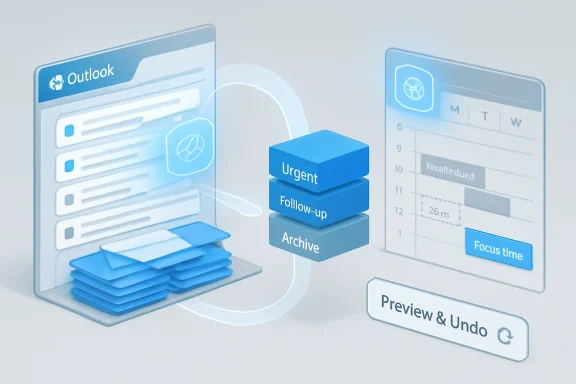
In practice, this could make Outlook feel less like a static application and more like a managed workspace. A user may start the day by asking Copilot to identify urgent follow-ups, prepare for a client meeting, and reduce next week’s meeting load. Outlook then becomes a command center where the AI agent turns messy communications into prioritized actions.
Key differences from earlier Copilot experiences include:
This is also where Copilot’s integration with Outlook data becomes more meaningful than a generic chatbot. A general AI assistant can draft a follow-up template, but it cannot reliably know which messages are overdue, which recipients matter most, and which threads are linked to current work. Outlook-native context gives Microsoft an advantage if the system can interpret intent accurately.
The feature may be especially valuable for sales teams, recruiters, project managers, customer success staff, legal teams, and executives who depend on timely replies. It could also help employees who struggle with inbox triage because of workload, accessibility needs, or role complexity. The best automation is often not glamorous; it simply prevents important small things from slipping.
Traditional Outlook rules can be powerful, but many users avoid them because the interface feels mechanical and unforgiving. Natural language rule creation makes the capability more approachable and allows users to describe business intent instead of translating that intent into menus and conditions. This is classic Microsoft strategy: take a long-standing enterprise feature and wrap it in an AI layer that makes it easier to use.
Practical inbox scenarios include:
The calendar is a more sensitive automation surface than the inbox because changes are visible to others. Declining a meeting, moving a 1:1, or delegating attendance sends a signal. That means Copilot must understand not only availability but also hierarchy, urgency, relationship context, and organizational norms.
This is why the Frontier-only rollout makes sense. Microsoft needs real-world feedback on the gray areas that make calendar management hard. A calendar agent that protects focus time is useful, but one that casually declines a politically important meeting could create problems.
If effective, this could push organizations toward more intentional meeting culture. Copilot could surface patterns that individuals already sense but rarely quantify, such as too many recurring status meetings, too many context switches, or too little preparation time before high-stakes calls. The risk is that meeting value is often political, relational, and implicit rather than purely informational.
A sensible calendar-agent workflow might look like this:
Microsoft’s advantage is that it can tie Copilot to existing Microsoft 365 security and compliance boundaries. Organizations already manage Exchange Online, Entra ID, Purview, Defender, Intune, and retention policies across Microsoft environments. If Copilot actions respect those same controls, Microsoft can argue that agentic automation is not a separate shadow system but part of the managed productivity stack.
That argument will appeal to CIOs, but it will not eliminate scrutiny. Enterprises will still want logs, admin controls, role-based access, data residency assurances, retention behavior, eDiscovery clarity, and ways to disable risky actions. Agentic Outlook may save time, but it also expands the set of events that administrators must understand and govern.
This matters competitively because enterprises do not buy productivity suites solely for features anymore. They buy ecosystems, compliance models, integrations, and predictable administration. Microsoft is trying to make Copilot the orchestration layer for work, with Outlook serving as one of the most important entry points.
Enterprise priorities will likely include:
Small businesses could benefit significantly once these features mature. Owners often act as salesperson, scheduler, support agent, bookkeeper, and operations manager at the same time. An Outlook agent that tracks unanswered customer messages, prepares meeting briefs, and protects focus time could be far more valuable than another generic AI chat window.
Consumers may be more cautious. Personal mailboxes include family, finance, healthcare, travel, education, and account security messages. A personal inbox agent must be extremely careful, especially if it recommends archiving, categorizing, or responding to messages that carry legal or financial weight.
However, accessibility benefits depend on predictability. If Copilot produces inconsistent recommendations, hides too much reasoning, or requires constant correction, it could add cognitive load instead of reducing it. Microsoft will need to design these experiences with clear explanations, reversible actions, and simple controls.
Potential small business and consumer benefits include:
Google has a similar opportunity with Gmail, Calendar, and Gemini, especially in organizations standardized on Google Workspace. Slack, Notion, Zoom, Salesforce, and dedicated AI productivity startups are also racing to automate fragments of the workday. But Microsoft’s strength is the breadth of Microsoft 365: email, calendar, Teams, Word, Excel, PowerPoint, SharePoint, OneDrive, Planner, Loop, and identity all sit within one commercial relationship.
That breadth gives Microsoft Copilot a strong claim to workplace context. The downside is complexity. The more systems Copilot touches, the harder it becomes to ensure that every recommendation is explainable, compliant, and aligned with user expectations.
The market will likely divide between broad platforms and specialized tools. Microsoft and Google will compete on suite-level intelligence, while startups will focus on sharper experiences for executives, sales teams, recruiters, founders, or support workflows. Specialized tools may innovate faster, but Microsoft can win by making “good enough” AI available where people already work.
Competitive pressure will likely increase around:
Those judgments are hard because workplace meaning is often implicit. A short email from a senior leader may matter more than a long thread from a peer. A meeting with no agenda may still be politically essential. A delayed reply may be intentional, not forgotten.
This is where Microsoft’s claims about Work IQ become relevant. The company wants Copilot to understand how employees work, whom they work with, and what content they collaborate on. That kind of intelligence can make recommendations more accurate, but it also raises expectations that the system should understand nuance rather than merely scan keywords.
A calendar reschedule is not just a local edit; it sends updates and reshapes other people’s days. A draft follow-up is not just text; it may affect customer tone or internal escalation. An archive recommendation may hide a message that later becomes important.
Technical requirements for trust include:
Microsoft often uses staged rollouts to test performance, usability, telemetry, and enterprise readiness before broader availability. With agentic Outlook, staged deployment is not just operationally convenient; it is necessary. The company needs to observe how users phrase instructions, where Copilot succeeds, where it overreaches, and what controls admins demand.
For WindowsForum readers, the Windows angle is especially notable. Outlook for Windows remains one of Microsoft’s most important surfaces for bringing cloud AI into daily desktop workflows. As the new Outlook continues to evolve, Copilot capabilities may become a central reason Microsoft pushes users toward the modern client experience.
The broader Copilot licensing picture also remains important. Microsoft has been steadily building premium AI value into Microsoft 365 Copilot and related enterprise offerings. Agentic Outlook makes the business case clearer because it moves Copilot from nice-to-have writing help toward measurable time savings.
Rollout considerations include:
The second issue is user trust. Microsoft needs to show that Copilot can explain its reasoning without overwhelming users with AI chatter. The sweet spot is a system that says enough to justify its recommendation, provides a clear preview, and makes undoing changes effortless.
The third question is whether Outlook becomes the template for agentic behavior across Microsoft 365. If users grow comfortable delegating inbox and calendar work, Microsoft can extend the same pattern into Word for document production, Excel for analysis, Teams for collaboration, Planner for task orchestration, and PowerPoint for narrative building.
Important milestones to monitor include:
Microsoft’s agentic Copilot update for Outlook is not just another AI feature drop; it is a signal that Microsoft wants the inbox and calendar to become active, managed workspaces. The company is betting that users will delegate more routine coordination to AI if the experience remains transparent, controllable, and deeply integrated with Microsoft 365. If that balance holds, Outlook could become one of the clearest examples of how AI moves from answering questions to actually running parts of the modern workday.
Source: Neowin Copilot in Outlook gets superpowers that enable automatic management of inbox and calendar
 Background
Microsoft’s first wave of Copilot features in Outlook focused on assistance, not autonomy. Users could ask for a summary of a long email thread, request a cleaner draft, adjust tone, or use Copilot to prepare for a meeting by gathering relevant context. These were useful additions, but they still depended on a familiar pattern: the human opened a message, clicked a button, wrote a prompt, reviewed the result, and decided what to do next.The new Outlook announcement is part of Microsoft’s broader push toward agentic AI, a phrase that has quickly become central to the company’s Microsoft 365 strategy. In practical terms, agentic AI means software that can pursue a goal across multiple steps rather than simply answering a one-off question. Instead of asking Copilot to summarize a thread, a user might ask it to monitor overdue replies, draft follow-ups, flag urgent mail, and recommend what can be archived after a week away.
That is a significant shift for Outlook because the app has always been more than a mailbox. It is a scheduling hub, a task intake system, a compliance surface, a customer communications record, and, for many workers, the place where priorities are negotiated hour by hour. The promise of an agentic Copilot is that it can handle more of this connective tissue without forcing users to build rules, macros, Power Automate flows, or elaborate folder systems.
Microsoft is initially placing these capabilities in its Frontier program, the early-access track for organizations and users willing to test experimental AI features before broad release. That choice is important. Inbox and calendar automation touches sensitive areas of professional life, so Microsoft appears to be balancing ambition with controlled rollout, feedback gathering, and enterprise governance expectations.
- Traditional Copilot helped with visible tasks such as summarizing and drafting.
- Agentic Copilot can work across multiple inbox and calendar steps.
- Frontier access signals that Microsoft still considers these capabilities experimental.
- Outlook on Windows and the web is receiving the deepest calendar support first.
- All Outlook endpoints are included for the new inbox management experiences.
From Assistant to Agent
Why this shift matters
The most important part of this update is not any single email feature. It is the change in Microsoft’s model for how productivity software should behave. Outlook is moving from a tool that waits for direct manipulation to a system that can interpret intent, perform background analysis, and propose or execute actions.That distinction may sound subtle, but it changes the psychological contract between user and application. A drafting assistant is easy to evaluate because it produces text in front of you. An agent that manages follow-ups and schedule changes requires greater trust because it may affect relationships, deadlines, and meetings before the user has fully examined every detail.
For Microsoft, Outlook is a logical place to test this future because inbox and calendar overload are among the most obvious pain points in knowledge work. Almost everyone understands the friction of missed follow-ups, bloated meeting schedules, and the dreaded post-vacation inbox. Copilot’s new role is to turn those recurring pain points into repeatable workflows.
The new operating model
Microsoft’s agentic Outlook design appears to rest on three ideas: instruction, transparency, and user control. The user tells Copilot what outcome they want, Copilot works through the necessary steps, and the experience is supposed to show what it is doing so the user can review, adjust, or intervene. That last point is crucial because invisible automation in email can quickly become risky.In practice, this could make Outlook feel less like a static application and more like a managed workspace. A user may start the day by asking Copilot to identify urgent follow-ups, prepare for a client meeting, and reduce next week’s meeting load. Outlook then becomes a command center where the AI agent turns messy communications into prioritized actions.
Key differences from earlier Copilot experiences include:
- Multi-step execution instead of single-response prompting.
- Ongoing inbox monitoring rather than one-time summarization.
- Calendar intervention instead of simple meeting suggestions.
- Natural language rules instead of manual rule-building.
- Contextual preparation across mail, meetings, and organizational data.
Inbox Management Gets a Practical Upgrade
Follow-ups become a first-class workflow
The clearest business use case is follow-up management. Users can ask Copilot to identify people who have not replied after a specified period, prioritize the most important cases, and draft polite follow-up messages. That is exactly the kind of task professionals often postpone because it is repetitive, mildly uncomfortable, and easy to lose track of during a busy week.This is also where Copilot’s integration with Outlook data becomes more meaningful than a generic chatbot. A general AI assistant can draft a follow-up template, but it cannot reliably know which messages are overdue, which recipients matter most, and which threads are linked to current work. Outlook-native context gives Microsoft an advantage if the system can interpret intent accurately.
The feature may be especially valuable for sales teams, recruiters, project managers, customer success staff, legal teams, and executives who depend on timely replies. It could also help employees who struggle with inbox triage because of workload, accessibility needs, or role complexity. The best automation is often not glamorous; it simply prevents important small things from slipping.
Rules without rule-building
Another notable feature is Copilot’s ability to create inbox rules from natural language instructions. Users can ask it to categorize mail from a manager when they are on the “To” line, or presumably create similar routing rules based on senders, importance, recipients, or topics. That lowers the barrier for one of Outlook’s most powerful but underused productivity tools.Traditional Outlook rules can be powerful, but many users avoid them because the interface feels mechanical and unforgiving. Natural language rule creation makes the capability more approachable and allows users to describe business intent instead of translating that intent into menus and conditions. This is classic Microsoft strategy: take a long-standing enterprise feature and wrap it in an AI layer that makes it easier to use.
Practical inbox scenarios include:
- Escalation tracking for unanswered client or leadership emails.
- Automatic categorization of messages tied to key projects.
- Post-vacation triage that separates urgent updates from noise.
- Drafting complex status updates from recent inbox activity.
- Archiving recommendations to clear low-value mail safely.
Calendar Automation Is the Bigger Bet
Scheduling moves from convenience to delegation
Outlook has offered scheduling assistance for years, but the new Copilot calendar features point toward deeper delegation. Microsoft says Copilot can respond to meeting invites, reschedule meetings, block focus time, handle recurring meetings, and draft agendas. That is no longer just finding an open slot; it is managing the trade-offs that define a workweek.The calendar is a more sensitive automation surface than the inbox because changes are visible to others. Declining a meeting, moving a 1:1, or delegating attendance sends a signal. That means Copilot must understand not only availability but also hierarchy, urgency, relationship context, and organizational norms.
This is why the Frontier-only rollout makes sense. Microsoft needs real-world feedback on the gray areas that make calendar management hard. A calendar agent that protects focus time is useful, but one that casually declines a politically important meeting could create problems.
Meeting load as an AI target
The most ambitious part of the calendar update is the ability to review a schedule and recommend meetings to decline, follow, delegate, or move to asynchronous communication. This directly targets one of the most persistent complaints in enterprise work: calendars packed with meetings that leave too little time for actual execution. Meeting reduction has become a productivity priority, and Microsoft now wants Copilot to help make those trade-offs.If effective, this could push organizations toward more intentional meeting culture. Copilot could surface patterns that individuals already sense but rarely quantify, such as too many recurring status meetings, too many context switches, or too little preparation time before high-stakes calls. The risk is that meeting value is often political, relational, and implicit rather than purely informational.
A sensible calendar-agent workflow might look like this:
- Ask Copilot to review next week’s meetings against current project priorities.
- Have it identify conflicts, low-value meetings, and missing preparation time.
- Review suggested declines, delegations, follow options, or async conversions.
- Approve only the changes that make sense in context.
- Ask Copilot to draft short explanations where meeting changes affect others.
Enterprise Impact: Productivity Meets Governance
IT will care about control
For enterprises, the Outlook announcement lands at the intersection of productivity, compliance, and identity. Email and calendars contain sensitive information: customer negotiations, HR conversations, legal discussions, executive plans, acquisition chatter, security incidents, and regulated communications. Any AI feature that can act on that data will invite serious review from IT, legal, and security leaders.Microsoft’s advantage is that it can tie Copilot to existing Microsoft 365 security and compliance boundaries. Organizations already manage Exchange Online, Entra ID, Purview, Defender, Intune, and retention policies across Microsoft environments. If Copilot actions respect those same controls, Microsoft can argue that agentic automation is not a separate shadow system but part of the managed productivity stack.
That argument will appeal to CIOs, but it will not eliminate scrutiny. Enterprises will still want logs, admin controls, role-based access, data residency assurances, retention behavior, eDiscovery clarity, and ways to disable risky actions. Agentic Outlook may save time, but it also expands the set of events that administrators must understand and govern.
A new layer of workplace infrastructure
Outlook automation also strengthens Microsoft’s long-term platform position. If Copilot becomes the layer that interprets inboxes, calendars, files, chats, and meetings, Microsoft 365 becomes harder to replace. The value shifts from individual apps to the intelligence that spans them.This matters competitively because enterprises do not buy productivity suites solely for features anymore. They buy ecosystems, compliance models, integrations, and predictable administration. Microsoft is trying to make Copilot the orchestration layer for work, with Outlook serving as one of the most important entry points.
Enterprise priorities will likely include:
- Auditability of AI-recommended and AI-executed actions.
- Admin policy controls for inbox and calendar automation.
- Clear user consent models for sending, declining, or rescheduling.
- Compatibility with retention and eDiscovery obligations.
- **Separation of sensitive, encrypted, shared, and delegated mailbox scenarios.
- Training materials that teach employees when not to delegate judgment.
Consumer and Small Business Implications
A helpful preview, but not yet a mainstream feature
For consumers and small businesses, the announcement is more of a preview of where Outlook is going than an immediate universal upgrade. Frontier availability means many everyday Outlook users will not see these features right away. Still, the direction is clear: Microsoft wants AI to manage routine communications, not merely decorate emails with better prose.Small businesses could benefit significantly once these features mature. Owners often act as salesperson, scheduler, support agent, bookkeeper, and operations manager at the same time. An Outlook agent that tracks unanswered customer messages, prepares meeting briefs, and protects focus time could be far more valuable than another generic AI chat window.
Consumers may be more cautious. Personal mailboxes include family, finance, healthcare, travel, education, and account security messages. A personal inbox agent must be extremely careful, especially if it recommends archiving, categorizing, or responding to messages that carry legal or financial weight.
The accessibility angle
There is also an accessibility story here that should not be overlooked. Inbox overload can be especially difficult for users with ADHD, visual impairments, cognitive fatigue, or other conditions that make prioritization and context switching harder. A well-designed Copilot agent could reduce the burden of scanning, sorting, and remembering.However, accessibility benefits depend on predictability. If Copilot produces inconsistent recommendations, hides too much reasoning, or requires constant correction, it could add cognitive load instead of reducing it. Microsoft will need to design these experiences with clear explanations, reversible actions, and simple controls.
Potential small business and consumer benefits include:
- Fewer missed replies to clients, schools, vendors, or service providers.
- Better preparation for meetings and appointments.
- Simpler inbox organization without manual rule setup.
- More protected work blocks for owners and freelancers.
- Lower administrative burden for people without dedicated assistants.
Competitive Implications
Microsoft is leaning into distribution
The biggest competitive advantage Microsoft has is not that it invented AI-assisted email. It is that Outlook already sits at the center of millions of workdays. When Microsoft adds an agentic layer to Outlook, the feature appears inside an existing workflow rather than asking users to adopt a separate product.Google has a similar opportunity with Gmail, Calendar, and Gemini, especially in organizations standardized on Google Workspace. Slack, Notion, Zoom, Salesforce, and dedicated AI productivity startups are also racing to automate fragments of the workday. But Microsoft’s strength is the breadth of Microsoft 365: email, calendar, Teams, Word, Excel, PowerPoint, SharePoint, OneDrive, Planner, Loop, and identity all sit within one commercial relationship.
That breadth gives Microsoft Copilot a strong claim to workplace context. The downside is complexity. The more systems Copilot touches, the harder it becomes to ensure that every recommendation is explainable, compliant, and aligned with user expectations.
The Outlook battleground
Email is still one of the most competitive AI productivity categories because it offers immediate, measurable pain. Every vendor can promise summaries and drafts, but fewer can manage calendar conflicts, organizational relationships, document context, and enterprise governance at scale. Outlook gives Microsoft a powerful place to demonstrate that Copilot can do more than generate text.The market will likely divide between broad platforms and specialized tools. Microsoft and Google will compete on suite-level intelligence, while startups will focus on sharper experiences for executives, sales teams, recruiters, founders, or support workflows. Specialized tools may innovate faster, but Microsoft can win by making “good enough” AI available where people already work.
Competitive pressure will likely increase around:
- AI email triage and priority scoring.
- Calendar defense and automatic focus-time protection.
- Meeting preparation using documents, chats, and CRM context.
- Cross-app task extraction from email and meeting history.
- Enterprise governance for autonomous AI actions.
The Technical Challenge Beneath the Demo
Context is powerful, but fragile
Agentic Outlook depends on context, and context is both the feature and the risk. To recommend a follow-up, Copilot must understand the thread, sender, timing, organizational relationship, and likely importance. To suggest declining a meeting, it must infer whether the meeting is optional, duplicative, low-impact, or better handled asynchronously.Those judgments are hard because workplace meaning is often implicit. A short email from a senior leader may matter more than a long thread from a peer. A meeting with no agenda may still be politically essential. A delayed reply may be intentional, not forgotten.
This is where Microsoft’s claims about Work IQ become relevant. The company wants Copilot to understand how employees work, whom they work with, and what content they collaborate on. That kind of intelligence can make recommendations more accurate, but it also raises expectations that the system should understand nuance rather than merely scan keywords.
Automation needs reversibility
The safest path for Microsoft is to make agentic actions reviewable, reversible, and clearly attributed. Users should be able to see what Copilot changed, why it recommended the change, and how to undo it. That is especially important in Outlook, where mistakes can affect other people.A calendar reschedule is not just a local edit; it sends updates and reshapes other people’s days. A draft follow-up is not just text; it may affect customer tone or internal escalation. An archive recommendation may hide a message that later becomes important.
Technical requirements for trust include:
- Transparent reasoning behind priority and scheduling recommendations.
- Action previews before external-facing changes are sent.
- Undo controls for calendar and inbox changes.
- Policy-aware behavior for sensitive mail and regulated content.
- Consistent labeling of Copilot-created drafts, rules, and actions.
- Fallback behavior when context is incomplete or ambiguous.
Availability and Rollout Strategy
Frontier first, broader rollout later
The new inbox management features are available through the Frontier program for all Outlook endpoints, while the calendar actions are rolling out through Frontier for Outlook on Windows and Outlook on the web. That distinction matters for organizations with mixed device fleets. Users on Mac or mobile may see some inbox benefits without receiving the full depth of calendar automation immediately.Microsoft often uses staged rollouts to test performance, usability, telemetry, and enterprise readiness before broader availability. With agentic Outlook, staged deployment is not just operationally convenient; it is necessary. The company needs to observe how users phrase instructions, where Copilot succeeds, where it overreaches, and what controls admins demand.
For WindowsForum readers, the Windows angle is especially notable. Outlook for Windows remains one of Microsoft’s most important surfaces for bringing cloud AI into daily desktop workflows. As the new Outlook continues to evolve, Copilot capabilities may become a central reason Microsoft pushes users toward the modern client experience.
Licensing and expectations
Frontier features are not the same as general availability. Early access often means limitations, changing interfaces, incomplete platform coverage, and features that may behave differently as Microsoft gathers feedback. Organizations should treat these tools as promising but still evolving.The broader Copilot licensing picture also remains important. Microsoft has been steadily building premium AI value into Microsoft 365 Copilot and related enterprise offerings. Agentic Outlook makes the business case clearer because it moves Copilot from nice-to-have writing help toward measurable time savings.
Rollout considerations include:
- Confirm which users are eligible for Frontier features.
- Test with a small pilot group before broad organizational exposure.
- Document acceptable use for email and calendar delegation.
- Train employees to review AI-generated actions carefully.
- Monitor support tickets for confusion, errors, or unexpected behavior.
- Coordinate with compliance teams before enabling sensitive workflows.
Strengths and Opportunities
Microsoft’s Outlook update is compelling because it targets real friction rather than abstract AI novelty. Email and calendar management consume hours every week, and even modest improvements could produce meaningful productivity gains across large organizations. The opportunity is not just faster drafting; it is a rebalancing of attention away from administrative overhead and toward judgment-heavy work.- Inbox triage becomes proactive, helping users identify urgent items before they drown in messages.
- Follow-up drafting reduces relationship friction, especially in roles that depend on timely responses.
- Natural language rules make Outlook automation more accessible to nontechnical users.
- Calendar recommendations could reduce meeting overload and improve focus time.
- Meeting preparation becomes more contextual, drawing from recent communication and priorities.
- Enterprise integration gives Microsoft an advantage over standalone AI assistants.
- Frontier testing creates a feedback loop before these features reach broader production use.
Risks and Concerns
The risks are just as real as the opportunity because Outlook is a high-trust environment. A bad AI answer in a sandboxed chat is annoying, but a bad AI action in an inbox or calendar can create missed commitments, awkward declines, compliance exposure, or reputational damage. The more useful Copilot becomes, the more consequential its mistakes become.- Over-automation could create social misfires if Copilot declines or reschedules meetings without enough nuance.
- Incorrect prioritization may bury important messages that do not look urgent to the model.
- Drafted follow-ups could sound generic or inappropriate in sensitive negotiations.
- Compliance teams may worry about audit trails for AI-generated actions and recommendations.
- Users may become dependent on Copilot and lose visibility into their own communications.
- Platform fragmentation may frustrate users if Windows, web, Mac, and mobile experiences differ.
- Frontier features may change quickly, creating training and support challenges for IT departments.
What to Watch Next
The first thing to watch is how much control Microsoft gives administrators. Enterprises will want granular switches for actions such as drafting, sending, archiving, categorizing, declining meetings, rescheduling meetings, and creating rules. A single on-off toggle will not be enough for organizations with regulated data, executive communications, shared mailboxes, or strict retention requirements.The second issue is user trust. Microsoft needs to show that Copilot can explain its reasoning without overwhelming users with AI chatter. The sweet spot is a system that says enough to justify its recommendation, provides a clear preview, and makes undoing changes effortless.
The third question is whether Outlook becomes the template for agentic behavior across Microsoft 365. If users grow comfortable delegating inbox and calendar work, Microsoft can extend the same pattern into Word for document production, Excel for analysis, Teams for collaboration, Planner for task orchestration, and PowerPoint for narrative building.
Important milestones to monitor include:
- Broader availability beyond Frontier and any timeline for standard release.
- Expansion of calendar actions to Mac, mobile, and additional Outlook clients.
- Admin controls and audit capabilities for AI-managed inbox and calendar events.
- Integration with Teams, Planner, Loop, and Microsoft To Do for task follow-through.
- Real-world feedback from enterprise pilots on accuracy, trust, and productivity gains.
Microsoft’s agentic Copilot update for Outlook is not just another AI feature drop; it is a signal that Microsoft wants the inbox and calendar to become active, managed workspaces. The company is betting that users will delegate more routine coordination to AI if the experience remains transparent, controllable, and deeply integrated with Microsoft 365. If that balance holds, Outlook could become one of the clearest examples of how AI moves from answering questions to actually running parts of the modern workday.
Source: Neowin Copilot in Outlook gets superpowers that enable automatic management of inbox and calendar
