

ConsentFix and ClickFix attacks hijack Microsoft 365 accounts by tricking users into completing familiar browser or OAuth prompts that hand attackers executable commands, authorization codes, or session tokens, allowing account access within seconds without stealing a password or defeating MFA in the traditional sense. The uncomfortable lesson is that Microsoft 365’s identity perimeter is now being attacked through the workflows users have been trained to trust. The phish is no longer a misspelled login page; it is a plausible instruction at exactly the wrong moment. For Windows shops, that means the boundary between endpoint security, browser behavior, and Entra ID governance has become much thinner than most policies admit.
For years, the mental model of phishing was simple enough to fit on a poster: don’t type your password into a fake site. That model is now actively misleading. In ClickFix and ConsentFix campaigns, the attacker often does not need the user to surrender a password at all.
ClickFix works by inserting a lie into a routine web interaction. The user sees what appears to be a CAPTCHA, browser check, document-viewing step, or verification prompt. The page tells the user to press a key sequence, open the Windows Run dialog, paste something, or follow a short “fix” procedure.
The trick is that the page has already prepared the payload. A command may be placed on the clipboard, and the user’s compliance becomes the execution mechanism. No browser exploit is necessary, no memory corruption bug has to be chained, and no attachment has to be obviously opened. The attack succeeds because the user is persuaded to operate Windows on the attacker’s behalf.
ConsentFix moves the same philosophy into the identity layer. Instead of convincing the user to run a command, it convinces the user to complete what looks like a legitimate Microsoft authentication or consent flow. The moment of compromise is not “enter your password here.” It is “approve this,” “drag this link,” “finish verification,” or “continue signing in.”
That is why the “three seconds” framing matters. It is not that attackers have discovered a magical three-second exploit for every Microsoft 365 tenant. It is that once the user has been maneuvered into the right interaction, the valuable object — a token, code, session, or consent grant — can be captured almost immediately. The slow part is the social engineering. The theft itself is fast.
That is why token theft and OAuth abuse are so damaging. A password is a credential the defender understands how to rotate. A token is a proof of access that may remain useful after the user has done the “right” things, including passing MFA. A malicious OAuth grant can let an application keep reading data without the attacker needing to maintain an interactive browser session.
This also explains why MFA has become both essential and insufficient. Multifactor authentication still blocks enormous volumes of commodity credential attacks. But OAuth consent phishing and device-code-style attacks can happen after the user has successfully authenticated. In those cases, MFA is not bypassed by breaking it; it is sidestepped by stealing the downstream artifact that MFA helped issue.
Microsoft’s own guidance on illicit consent grants has long made this point in plainer administrative language: if a user grants a malicious application access to mail, files, or contacts, password resets and MFA prompts are not the cleanup by themselves. The defender has to find and revoke the app permissions, invalidate tokens where possible, and inspect what the application did while it had access.
That is a different operational discipline from phishing response circa 2016. The inbox is still where many attacks begin, but the blast radius lives in Entra ID, Microsoft Graph, OAuth permissions, audit logs, and sign-in telemetry. A helpdesk script that ends at “reset the password and re-enroll MFA” is now a partial response masquerading as closure.
The attack often uses fake CAPTCHAs or verification pages because users have been conditioned to tolerate friction from anti-bot systems. We click traffic lights, identify buses, accept cookies, wait through “checking your browser,” and reload pages without much thought. ClickFix simply adds one more step to that exhausted ritual.
On Windows, the dangerous step is frequently a command execution path. If a user is told to press Win+R, paste, and hit Enter, the attacker has effectively borrowed the user’s desktop. If the command launches PowerShell, mshta, wscript, or another trusted Windows component, defensive tools must distinguish a malicious self-pwn from the thousands of legitimate administrative actions that resemble it.
The social engineering is deliberately banal. A page that says “run this command to fix your browser” would once have seemed absurd. But modern web apps routinely ask users to clear caches, grant permissions, install helpers, accept device prompts, copy codes, paste verification strings, and reauthenticate. Attackers are not inventing strange behaviors; they are remixing normal ones.
That is why user awareness training has to evolve beyond “look for bad grammar” and “check the sender.” A ClickFix lure can be visually polished, hosted behind legitimate infrastructure, and introduced through a compromised or trusted site. The giveaway is not always appearance. It is the category of request: a website should not need you to open Run, paste a command, or drag an unexplained callback link to prove you are human.
That normality is the weakness. OAuth was designed so users and administrators could delegate access without handing over passwords. That is a good thing. But any system that lets a user authorize an application to read mail, files, contacts, or profile data creates a high-value moment that attackers can target.
In a classic consent phishing scenario, the malicious application asks for permissions, and the user grants them. The app may then access data through APIs without logging in as a conventional user. Depending on the permissions granted and tenant policy, the attacker can read messages, search files, enumerate contacts, and prepare internal phishing from a position of trust.
ConsentFix-style attacks sharpen that pattern by making the flow feel like troubleshooting rather than consent. The reported technique uses familiar verification steps and OAuth mechanics to capture what the attacker needs from the session. The victim is not necessarily typing credentials into a fake Microsoft form. The victim is completing a process that appears to belong to Microsoft 365.
That distinction matters for defenders because many security controls are still optimized around credential submission. Secure email gateways look for suspicious links and attachments. Browser filters look for known phishing pages. MFA policies challenge sign-ins. But if the attack leans on legitimate OAuth behavior, valid Microsoft endpoints, and user-completed authorization steps, detection has to look at the consequences rather than only the page.
A user trying to access a shared document may expect a sign-in prompt. A user reaching a protected page may expect a CAPTCHA. A user troubleshooting a browser error may expect a copy-and-paste fix from an IT guide. The attacker’s genius is not technical novelty alone; it is knowing which small inconvenience users will accept without escalation.
This is the same pattern that made push fatigue attacks effective. Users were taught that MFA prompts are a normal part of the day. Attackers then buried the malicious prompt among legitimate ones. ConsentFix applies that lesson to OAuth and browser-mediated identity flows.
The corporate response often lags because security teams prefer crisp categories. Is this phishing, malware, identity compromise, or endpoint execution? The answer is yes. ClickFix can begin as a web lure, become a clipboard attack, execute through Windows-native tools, and end in credential or session theft. ConsentFix can begin as a document lure, pass through OAuth, and land in Microsoft 365 data access.
That cross-domain nature is exactly why these attacks are hard to stop with a single product checkbox. Email security may see a link. Endpoint security may see a suspicious process. Identity security may see a new consent grant or token use from an odd location. Each signal alone can look ambiguous. Together, they tell the story.
The central question for Microsoft 365 tenants is not whether OAuth is dangerous. It is whether users should be allowed to grant risky permissions without administrative review. In many environments, the honest answer is no. Users are not equipped to evaluate scopes, publisher identity, redirect behavior, and long-term data access in the middle of a workday.
Microsoft provides controls to restrict user consent, allow verified publishers, require admin approval for higher-risk permissions, and investigate suspicious applications. Those controls are not glamorous, and they can create friction for legitimate SaaS adoption. But they directly address the failure mode these attacks exploit: a user making an irreversible-looking security decision in a hurry.
The practical defense is to make consent boring and centralized. Low-risk, verified, business-approved applications can pass through a managed process. Anything asking for mail, files, offline access, or broad Graph permissions should face scrutiny. The goal is not to ban integrations; it is to prevent every employee from becoming an OAuth administrator by accident.
Admins should also assume that old grants matter. An attacker does not need today’s phishing email if yesterday’s malicious application still has access. Reviewing enterprise applications, delegated permissions, service principals, and consent audit logs should be a recurring control, not a once-a-year cleanup performed after an incident.
This puts browser policy back on the security agenda. Clipboard protections, download warnings, SmartScreen-style reputation checks, extension governance, isolation for unknown sites, and restrictions on risky script behavior all matter more when attacks depend on nudging the user through a browser-mediated workflow. The endpoint agent is still important, but it may see the attack only after the user has already cooperated.
There is also a design problem here. The web has normalized too many security-adjacent prompts that ordinary people cannot meaningfully evaluate. CAPTCHA pages, cookie banners, permission dialogs, OAuth consent screens, SSO redirects, and device-code prompts all blur together. When every site asks for something, users stop asking why.
Microsoft, browser vendors, and SaaS providers have an incentive to reduce that ambiguity. A legitimate Microsoft 365 authorization flow should be distinguishable from a fake verification ritual not just by domain inspection, but by clearer UX boundaries and stronger platform enforcement. Users should not have to become OAuth protocol analysts to avoid losing their mailbox.
Still, enterprises cannot wait for perfect UX. Managed browsers, hardened defaults, attack surface reduction rules, script controls, and web content filtering are immediate levers. The point is not to make the browser invulnerable. It is to make the attacker’s preferred instructions fail, look weird, or generate telemetry before the account is gone.
That changes triage. Responders need to ask whether suspicious OAuth grants were created, whether refresh tokens remain valid, whether sessions should be revoked, whether sign-ins appeared from unfamiliar locations or clients, and whether mailbox rules or forwarding settings were modified. The password reset is one step, not the finish line.
Mailbox investigation remains critical because attackers often monetize access quickly. They search for invoices, payroll threads, password reset messages, VPN instructions, internal org charts, and active business conversations. A Microsoft 365 account is both a data source and a launchpad for more believable phishing.
Endpoint review is equally important in ClickFix cases. If the user executed a command, defenders need process trees, command lines, script block logs where available, downloaded payloads, persistence checks, and lateral movement indicators. The compromise may not stop at the cloud account. It may have begun with a browser prompt and ended with code running locally.
The best response teams will correlate identity and endpoint timelines. What did the user click? What process launched? Was PowerShell involved? Did a new OAuth grant appear? Were tokens used from unexpected infrastructure? Did Exchange Online show unusual access? The answer is rarely in one console.
OAuth is not a bug. Consent is not a bug. Browser redirects are not a bug. Windows scripting tools are not inherently malicious. But attackers thrive in the gap between “working as designed” and “safe under adversarial pressure.”
Microsoft has been pushing customers toward stronger identity controls for years: Conditional Access, phishing-resistant MFA, device compliance, application governance, Defender XDR, and richer audit trails. Those controls matter. But the average tenant is still a patchwork of legacy exceptions, user-consented apps, unmanaged devices, stale service principals, and business units that adopted SaaS before security reviewed it.
This is where enterprise IT sees the real cost. The defense against ConsentFix is not a single emergency patch. It is the grinding work of reducing unnecessary consent, tightening app approval, monitoring token behavior, training users on categories of dangerous requests, and making sure responders know what to revoke when the alert fires.
That work is less satisfying than blocking a malicious hash. It is also more aligned with how cloud compromise actually happens in 2026. The attacker is not always breaking the door. Sometimes they are asking the receptionist to badge them in through a process that technically exists.
The defender’s problem is not absence of evidence. It is fragmentation. Email, endpoint, identity, cloud app, and browser telemetry often live in separate tools with different owners. A SOC analyst may see a suspicious PowerShell command without knowing that the same user just approved an OAuth application. An identity admin may see a risky consent grant without knowing that the user arrived through a fake CAPTCHA.
This is where Microsoft’s XDR story has merit, but it is not automatic. Tools can connect signals only if they are deployed, licensed, configured, and watched. Many organizations own parts of the stack but do not operationalize the detections that matter for OAuth and token abuse.
Even smaller environments can improve quickly by focusing on a few high-value checks. Review who can consent to applications. Audit recent consent grants. Watch for PowerShell launched from browsers or Office-adjacent workflows. Investigate mailbox rule creation and external forwarding. Revoke sessions during account compromise response rather than assuming a password reset is enough.
The aim is not perfection. It is to make the three-second theft produce a fifteen-minute alarm instead of a three-month dwell time.
A site that asks a user to open Run, paste a command, install a script, drag a local callback link, or approve unexpected access to mail is not asking for normal verification. It is asking for power. That distinction is teachable, memorable, and more durable than another slideshow of fake phishing domains.
IT teams should reinforce that message with technical friction. If users cannot grant high-risk OAuth permissions, ConsentFix loses much of its reach. If suspicious script execution is blocked or logged aggressively, ClickFix becomes noisier. If session revocation and OAuth grant review are built into incident response, token theft becomes less durable.
Security programs often talk about layered defense as if the layers are independent walls. These attacks show the layers are now braided together. Browser UX, Windows execution paths, Entra ID consent, Microsoft Graph permissions, endpoint telemetry, and user training all meet in the same few seconds.
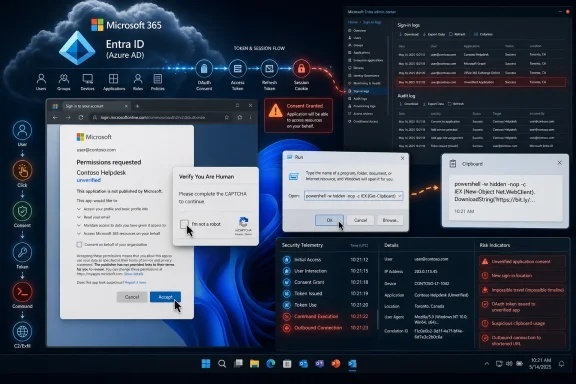 The Phishing Page Is No Longer the Center of the Attack
For years, the mental model of phishing was simple enough to fit on a poster: don’t type your password into a fake site. That model is now actively misleading. In ClickFix and ConsentFix campaigns, the attacker often does not need the user to surrender a password at all.ClickFix works by inserting a lie into a routine web interaction. The user sees what appears to be a CAPTCHA, browser check, document-viewing step, or verification prompt. The page tells the user to press a key sequence, open the Windows Run dialog, paste something, or follow a short “fix” procedure.
The trick is that the page has already prepared the payload. A command may be placed on the clipboard, and the user’s compliance becomes the execution mechanism. No browser exploit is necessary, no memory corruption bug has to be chained, and no attachment has to be obviously opened. The attack succeeds because the user is persuaded to operate Windows on the attacker’s behalf.
ConsentFix moves the same philosophy into the identity layer. Instead of convincing the user to run a command, it convinces the user to complete what looks like a legitimate Microsoft authentication or consent flow. The moment of compromise is not “enter your password here.” It is “approve this,” “drag this link,” “finish verification,” or “continue signing in.”
That is why the “three seconds” framing matters. It is not that attackers have discovered a magical three-second exploit for every Microsoft 365 tenant. It is that once the user has been maneuvered into the right interaction, the valuable object — a token, code, session, or consent grant — can be captured almost immediately. The slow part is the social engineering. The theft itself is fast.
Microsoft 365 Made Identity the Prize, and Attackers Followed
Microsoft 365 is not just email with better branding. It is the operating layer for a modern office: Exchange Online, SharePoint, OneDrive, Teams, calendars, contacts, documents, compliance records, and often the password reset trail for everything else. A mailbox compromise is not a single-app incident; it is a staging ground.That is why token theft and OAuth abuse are so damaging. A password is a credential the defender understands how to rotate. A token is a proof of access that may remain useful after the user has done the “right” things, including passing MFA. A malicious OAuth grant can let an application keep reading data without the attacker needing to maintain an interactive browser session.
This also explains why MFA has become both essential and insufficient. Multifactor authentication still blocks enormous volumes of commodity credential attacks. But OAuth consent phishing and device-code-style attacks can happen after the user has successfully authenticated. In those cases, MFA is not bypassed by breaking it; it is sidestepped by stealing the downstream artifact that MFA helped issue.
Microsoft’s own guidance on illicit consent grants has long made this point in plainer administrative language: if a user grants a malicious application access to mail, files, or contacts, password resets and MFA prompts are not the cleanup by themselves. The defender has to find and revoke the app permissions, invalidate tokens where possible, and inspect what the application did while it had access.
That is a different operational discipline from phishing response circa 2016. The inbox is still where many attacks begin, but the blast radius lives in Entra ID, Microsoft Graph, OAuth permissions, audit logs, and sign-in telemetry. A helpdesk script that ends at “reset the password and re-enroll MFA” is now a partial response masquerading as closure.
ClickFix Turns Windows Muscle Memory Into an Attack Surface
ClickFix is so effective because it weaponizes a behavior Windows users have learned over decades: when something breaks, follow the prompt. A browser says verification failed. A document viewer says content cannot load. A collaboration site says a security check is required. The instruction looks procedural rather than suspicious.The attack often uses fake CAPTCHAs or verification pages because users have been conditioned to tolerate friction from anti-bot systems. We click traffic lights, identify buses, accept cookies, wait through “checking your browser,” and reload pages without much thought. ClickFix simply adds one more step to that exhausted ritual.
On Windows, the dangerous step is frequently a command execution path. If a user is told to press Win+R, paste, and hit Enter, the attacker has effectively borrowed the user’s desktop. If the command launches PowerShell, mshta, wscript, or another trusted Windows component, defensive tools must distinguish a malicious self-pwn from the thousands of legitimate administrative actions that resemble it.
The social engineering is deliberately banal. A page that says “run this command to fix your browser” would once have seemed absurd. But modern web apps routinely ask users to clear caches, grant permissions, install helpers, accept device prompts, copy codes, paste verification strings, and reauthenticate. Attackers are not inventing strange behaviors; they are remixing normal ones.
That is why user awareness training has to evolve beyond “look for bad grammar” and “check the sender.” A ClickFix lure can be visually polished, hosted behind legitimate infrastructure, and introduced through a compromised or trusted site. The giveaway is not always appearance. It is the category of request: a website should not need you to open Run, paste a command, or drag an unexplained callback link to prove you are human.
ConsentFix Is the More Dangerous Idea Because It Feels Native
ConsentFix deserves special attention because it sits inside a world users are told to trust: Microsoft sign-in, OAuth consent, and cloud application authorization. The user sees a Microsoft-branded flow or something close enough to it, and the action requested may not feel technically outrageous. In a SaaS-heavy workplace, approving app access is a normal part of getting work done.That normality is the weakness. OAuth was designed so users and administrators could delegate access without handing over passwords. That is a good thing. But any system that lets a user authorize an application to read mail, files, contacts, or profile data creates a high-value moment that attackers can target.
In a classic consent phishing scenario, the malicious application asks for permissions, and the user grants them. The app may then access data through APIs without logging in as a conventional user. Depending on the permissions granted and tenant policy, the attacker can read messages, search files, enumerate contacts, and prepare internal phishing from a position of trust.
ConsentFix-style attacks sharpen that pattern by making the flow feel like troubleshooting rather than consent. The reported technique uses familiar verification steps and OAuth mechanics to capture what the attacker needs from the session. The victim is not necessarily typing credentials into a fake Microsoft form. The victim is completing a process that appears to belong to Microsoft 365.
That distinction matters for defenders because many security controls are still optimized around credential submission. Secure email gateways look for suspicious links and attachments. Browser filters look for known phishing pages. MFA policies challenge sign-ins. But if the attack leans on legitimate OAuth behavior, valid Microsoft endpoints, and user-completed authorization steps, detection has to look at the consequences rather than only the page.
The Old Advice Fails Because the Workflow Is the Lure
Security awareness programs have spent years teaching users to distrust anomalies: misspellings, odd domains, urgent wire-transfer requests, strange attachments, and password forms. That advice is not useless, but it is no longer enough. ClickFix and ConsentFix are effective precisely because they can hide inside expected friction.A user trying to access a shared document may expect a sign-in prompt. A user reaching a protected page may expect a CAPTCHA. A user troubleshooting a browser error may expect a copy-and-paste fix from an IT guide. The attacker’s genius is not technical novelty alone; it is knowing which small inconvenience users will accept without escalation.
This is the same pattern that made push fatigue attacks effective. Users were taught that MFA prompts are a normal part of the day. Attackers then buried the malicious prompt among legitimate ones. ConsentFix applies that lesson to OAuth and browser-mediated identity flows.
The corporate response often lags because security teams prefer crisp categories. Is this phishing, malware, identity compromise, or endpoint execution? The answer is yes. ClickFix can begin as a web lure, become a clipboard attack, execute through Windows-native tools, and end in credential or session theft. ConsentFix can begin as a document lure, pass through OAuth, and land in Microsoft 365 data access.
That cross-domain nature is exactly why these attacks are hard to stop with a single product checkbox. Email security may see a link. Endpoint security may see a suspicious process. Identity security may see a new consent grant or token use from an odd location. Each signal alone can look ambiguous. Together, they tell the story.
OAuth Governance Is Now a Front-Line Security Control
For many organizations, OAuth app governance is still treated as hygiene rather than incident prevention. Admins periodically review enterprise applications, users complain when a useful integration breaks, and broad consent settings remain in place because locking them down is politically annoying. ConsentFix should end that complacency.The central question for Microsoft 365 tenants is not whether OAuth is dangerous. It is whether users should be allowed to grant risky permissions without administrative review. In many environments, the honest answer is no. Users are not equipped to evaluate scopes, publisher identity, redirect behavior, and long-term data access in the middle of a workday.
Microsoft provides controls to restrict user consent, allow verified publishers, require admin approval for higher-risk permissions, and investigate suspicious applications. Those controls are not glamorous, and they can create friction for legitimate SaaS adoption. But they directly address the failure mode these attacks exploit: a user making an irreversible-looking security decision in a hurry.
The practical defense is to make consent boring and centralized. Low-risk, verified, business-approved applications can pass through a managed process. Anything asking for mail, files, offline access, or broad Graph permissions should face scrutiny. The goal is not to ban integrations; it is to prevent every employee from becoming an OAuth administrator by accident.
Admins should also assume that old grants matter. An attacker does not need today’s phishing email if yesterday’s malicious application still has access. Reviewing enterprise applications, delegated permissions, service principals, and consent audit logs should be a recurring control, not a once-a-year cleanup performed after an incident.
The Browser Has Become Part of the Identity Perimeter
The browser used to be treated as a window to applications. Now it is an active participant in authentication, device posture, conditional access, data loss prevention, and session control. ClickFix and ConsentFix exploit that reality by making the browser the stage on which the user is tricked.This puts browser policy back on the security agenda. Clipboard protections, download warnings, SmartScreen-style reputation checks, extension governance, isolation for unknown sites, and restrictions on risky script behavior all matter more when attacks depend on nudging the user through a browser-mediated workflow. The endpoint agent is still important, but it may see the attack only after the user has already cooperated.
There is also a design problem here. The web has normalized too many security-adjacent prompts that ordinary people cannot meaningfully evaluate. CAPTCHA pages, cookie banners, permission dialogs, OAuth consent screens, SSO redirects, and device-code prompts all blur together. When every site asks for something, users stop asking why.
Microsoft, browser vendors, and SaaS providers have an incentive to reduce that ambiguity. A legitimate Microsoft 365 authorization flow should be distinguishable from a fake verification ritual not just by domain inspection, but by clearer UX boundaries and stronger platform enforcement. Users should not have to become OAuth protocol analysts to avoid losing their mailbox.
Still, enterprises cannot wait for perfect UX. Managed browsers, hardened defaults, attack surface reduction rules, script controls, and web content filtering are immediate levers. The point is not to make the browser invulnerable. It is to make the attacker’s preferred instructions fail, look weird, or generate telemetry before the account is gone.
Incident Response Must Start After MFA, Not Before It
The most damaging assumption in a token-theft incident is that successful MFA means the account is safe. In these attacks, successful MFA may be part of the compromise path. The user authenticated correctly, and the attacker stole or abused what came next.That changes triage. Responders need to ask whether suspicious OAuth grants were created, whether refresh tokens remain valid, whether sessions should be revoked, whether sign-ins appeared from unfamiliar locations or clients, and whether mailbox rules or forwarding settings were modified. The password reset is one step, not the finish line.
Mailbox investigation remains critical because attackers often monetize access quickly. They search for invoices, payroll threads, password reset messages, VPN instructions, internal org charts, and active business conversations. A Microsoft 365 account is both a data source and a launchpad for more believable phishing.
Endpoint review is equally important in ClickFix cases. If the user executed a command, defenders need process trees, command lines, script block logs where available, downloaded payloads, persistence checks, and lateral movement indicators. The compromise may not stop at the cloud account. It may have begun with a browser prompt and ended with code running locally.
The best response teams will correlate identity and endpoint timelines. What did the user click? What process launched? Was PowerShell involved? Did a new OAuth grant appear? Were tokens used from unexpected infrastructure? Did Exchange Online show unusual access? The answer is rarely in one console.
Microsoft’s Platform Strength Is Also Its Attack Surface
There is a temptation to frame ConsentFix as a Microsoft failure and ClickFix as a user failure. Both simplifications miss the point. Microsoft 365 is targeted because it is valuable, ubiquitous, and deeply integrated into business workflows. The same platform traits that make it productive also make its trust relationships worth abusing.OAuth is not a bug. Consent is not a bug. Browser redirects are not a bug. Windows scripting tools are not inherently malicious. But attackers thrive in the gap between “working as designed” and “safe under adversarial pressure.”
Microsoft has been pushing customers toward stronger identity controls for years: Conditional Access, phishing-resistant MFA, device compliance, application governance, Defender XDR, and richer audit trails. Those controls matter. But the average tenant is still a patchwork of legacy exceptions, user-consented apps, unmanaged devices, stale service principals, and business units that adopted SaaS before security reviewed it.
This is where enterprise IT sees the real cost. The defense against ConsentFix is not a single emergency patch. It is the grinding work of reducing unnecessary consent, tightening app approval, monitoring token behavior, training users on categories of dangerous requests, and making sure responders know what to revoke when the alert fires.
That work is less satisfying than blocking a malicious hash. It is also more aligned with how cloud compromise actually happens in 2026. The attacker is not always breaking the door. Sometimes they are asking the receptionist to badge them in through a process that technically exists.
The Three-Second Theft Leaves a Longer Trail Than It Seems
The speed of these attacks can make them sound unstoppable. They are not. The user interaction may be brief, but the surrounding campaign creates traces: delivery infrastructure, suspicious redirects, odd clipboard-driven execution, unusual process launches, new OAuth grants, unfamiliar clients, impossible travel, mailbox access anomalies, and API activity inconsistent with the user’s normal work.The defender’s problem is not absence of evidence. It is fragmentation. Email, endpoint, identity, cloud app, and browser telemetry often live in separate tools with different owners. A SOC analyst may see a suspicious PowerShell command without knowing that the same user just approved an OAuth application. An identity admin may see a risky consent grant without knowing that the user arrived through a fake CAPTCHA.
This is where Microsoft’s XDR story has merit, but it is not automatic. Tools can connect signals only if they are deployed, licensed, configured, and watched. Many organizations own parts of the stack but do not operationalize the detections that matter for OAuth and token abuse.
Even smaller environments can improve quickly by focusing on a few high-value checks. Review who can consent to applications. Audit recent consent grants. Watch for PowerShell launched from browsers or Office-adjacent workflows. Investigate mailbox rule creation and external forwarding. Revoke sessions during account compromise response rather than assuming a password reset is enough.
The aim is not perfection. It is to make the three-second theft produce a fifteen-minute alarm instead of a three-month dwell time.
The Practical Lesson Is to Distrust the Tiny Instruction
The most useful near-term shift is cultural, but not in the old “users are the weakest link” sense. Users are being attacked at the point where consumer web habits, enterprise SSO, and Windows administration overlap. They need simpler rules that match the new threat model.A site that asks a user to open Run, paste a command, install a script, drag a local callback link, or approve unexpected access to mail is not asking for normal verification. It is asking for power. That distinction is teachable, memorable, and more durable than another slideshow of fake phishing domains.
IT teams should reinforce that message with technical friction. If users cannot grant high-risk OAuth permissions, ConsentFix loses much of its reach. If suspicious script execution is blocked or logged aggressively, ClickFix becomes noisier. If session revocation and OAuth grant review are built into incident response, token theft becomes less durable.
Security programs often talk about layered defense as if the layers are independent walls. These attacks show the layers are now braided together. Browser UX, Windows execution paths, Entra ID consent, Microsoft Graph permissions, endpoint telemetry, and user training all meet in the same few seconds.
The Microsoft 365 Admin’s New Short List
The response to ConsentFix and ClickFix should be concrete rather than theatrical. Panic helps attackers by making the problem seem mystical. The controls are knowable, even if the cleanup is tedious.- Organizations should restrict user consent so employees cannot approve high-risk Microsoft 365 application permissions without administrative review.
- Administrators should audit existing OAuth grants and remove unused, overprivileged, unverified, or suspicious applications from the tenant.
- Security teams should treat password resets as incomplete until sessions, refresh tokens, mailbox rules, forwarding settings, and application grants have been reviewed.
- Endpoint policies should watch for browsers spawning scripting engines, command shells, Windows Run abuse, or suspicious clipboard-driven execution patterns.
- User training should focus on dangerous actions rather than ugly pages, especially prompts that ask users to paste commands, approve unexpected data access, or drag unexplained links into a browser.
- Microsoft 365 monitoring should correlate email clicks, OAuth consent events, sign-in anomalies, endpoint process activity, and mailbox access instead of investigating each signal in isolation.
References
- Primary source: oodaloop.com
Published: Fri, 03 Jul 2026 16:31:27 GMT
ConsentFix and ClickFix: How Microsoft 365 Accounts are Hijacked in 3 Seconds — OODAloop
It can start with something as mundane as dragging a link into your browser. Three seconds later, a threat actor has the tokens needed to take over your oodaloop.com
- Related coverage: techradar.com
81 million login attempts hit Microsoft 365 accounts as hackers try password-spraying to force entry using stolen credentials and OAuth to bypass authentication | TechRadar
Hackers successfully compromised multiple accountswww.techradar.com - Related coverage: itpro.com
Opera browser thinks it has the solution to stopping ClickFix malware attacks | IT Pro
Opera browser has started to block ClickFix-style attacks with a new feature that blocks malicious clipboard copy-and-paste techniques.www.itpro.com - Official source: learn.microsoft.com
Detect and Remediate Illicit Consent Grants - Microsoft Defender for Office 365 | Microsoft Learn
Learn how to recognize and remediate the illicit consent grant attacks in Microsoft 365.learn.microsoft.com - Official source: microsoft.com
OAuth redirection abuse enables phishing and malware delivery | Microsoft Security Blog
OAuth redirection is being repurposed as a phishing delivery path. Trusted authentication flows are weaponized to move users from legitimate sign‑in pages to attacker‑controlled infrastructure.www.microsoft.com - Related coverage: atworkstudio.it
OAuth Consent Phishing on Microsoft 365: how it bypasses MFA | AtWorkStudio
Italy’s CSIRT has reported an OAuth campaign against Microsoft 365 that bypasses MFA. Consent Phishing and Device Code Grant: mechanism, risks and practical Entra ID countermeasures.www.atworkstudio.it
- Official source: techcommunity.microsoft.com
- Related coverage: cybersecurefox.com
EvilTokens: OAuth Device Code Phishing In Microsoft 365
In the case of OAuth consent phishing, the user themselves completes authentication with the legitimate provider. MFA triggers and is successfully passedcybersecurefox.com - Related coverage: gblock.app
ConsentFix v3: The OAuth Attack That Skips Your Microsoft Password
ConsentFix v3 hijacks Microsoft 365 accounts without asking for your password—it abuses Azure CLI's first-party trust to steal OAuth tokens that bypass MFA. www.gblock.app
- Related coverage: windowscentral.com
Windows CAPTCHA scam uses ClickFix to spread StealC malware | Windows Central
Bad actors are using fake CAPTCHA checks to spread StealC malware on Windows, stealing passwords, crypto wallets, and more.www.windowscentral.com - Related coverage: bleepingcomputer.com
ConsentFix and ClickFix: How Microsoft 365 Accounts are Hijacked in 3 Seconds
ConsentFix and ClickFix attacks steal Microsoft 365 tokens in seconds using fake prompts and OAuth flows. Learn how these MFA bypass tactics work and how to defend against them.www.bleepingcomputer.com - Related coverage: penligent.ai
ConsentFix Attack, OAuth Trust Turned Into Account Takeover
ConsentFix is a browser-native OAuth phishing technique that can hijack Microsoft 365 sessions without stealing passwords. Learn how it works, how to detect it in Entra ID logs, and how to reduce OAuth token abuse risk.www.penligent.ai - Related coverage: thehackernews.com
ClickFix Attacks Expand Using Fake CAPTCHAs, Microsoft Scripts, and Trusted Web Services
ClickFix uses fake CAPTCHAs and a signed Microsoft App-V script to deploy Amatera stealer on enterprise Windows systems.thehackernews.com
- Related coverage: kiplinger.com
New Scam Targets Microsoft Users, FBI Warns. Here's How to Protect Yourself | Kiplinger
This phishing scam doesn't rely on a fake website. Instead, it tricks users into approving access themselves.www.kiplinger.com - Related coverage: as.com
- Related coverage: cincodias.elpais.com
EvilTokens: el nuevo fraude que usa páginas reales de Microsoft para colarse en cuentas corporativas | Lifestyle | SmartLife | Cinco Días
Un peligro muy realcincodias.elpais.com - Related coverage: cyber.levelblue.com
