

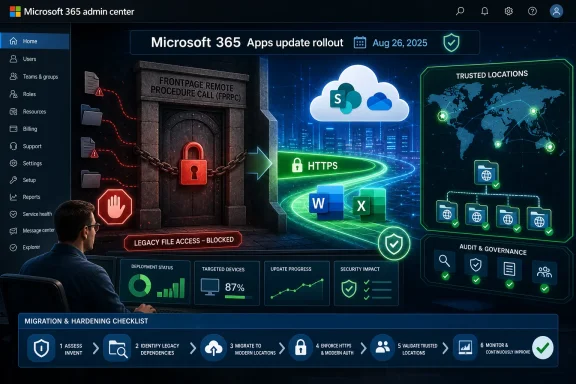
Microsoft 365 Apps for Windows version 2508, dated August 26, 2025, blocks FrontPage Remote Procedure Call file access by default, meaning Office file-open paths that still depend on FPRPC should be found and replaced before that release reaches users. Admins should inventory Office and SharePoint web-folder access now, identify Trusted Locations that rely on legacy web folders, move affected workflows to HTTPS-backed access paths, and enforce the Baseline Security Mode setting so users cannot override the safer default. The practical risk is not that most tenants knowingly use FrontPage-era publishing; it is that some still inherit it through old SharePoint, Office automation, mapped web folders, templates, and trusted-location shortcuts nobody has audited in years.
The important part of Microsoft’s version 2508 change is not the branding around yet another security default. It is the protocol being pushed out of the normal Office file-open path: FPRPC, or FrontPage Remote Procedure Call, a legacy mechanism associated with remote web authoring and old FrontPage Server Extensions-era workflows.
Microsoft’s Baseline Security Mode documentation says Microsoft 365 apps now block FPRPC by default in favor of HTTPS. The same page says that when the relevant setting is enabled, users in the environment cannot override the default configuration. That matters because the policy is not merely a prompt, warning, or nudge; it is an administrative line drawn around a file-access path that Microsoft no longer wants Office apps to trust.
For most modern Microsoft 365 tenants, nothing dramatic should happen. Word, Excel, PowerPoint, and the rest of the Office estate already live in a world of SharePoint Online, OneDrive sync, Teams files, HTTPS links, and cloud-aware authentication. But enterprises are museums with payroll systems, and the rooms nobody visits are often the ones still running a business process.
The preflight procedure is straightforward. Before August 26, 2025, admins should review Microsoft 365 Apps update targeting for version 2508, audit Office Trusted Locations for web-folder entries, search documentation and scripts for legacy FPRPC-style access assumptions, test representative Office files from SharePoint and intranet locations on a pilot ring, and replace any FPRPC-dependent path with HTTPS or another supported file-access method. If a workflow breaks only when the new default is enforced, that workflow is the problem.
Start with the Microsoft 365 Apps servicing plan. Confirm which devices will receive version 2508 and when, especially if you maintain multiple update channels or staged deployment rings. Microsoft’s update history lists Version 2508 on August 26, 2025, so the administrative calendar should work backward from that date rather than from a vague “late August” milestone.
Then review Baseline Security Mode in the Microsoft 365 admin center. The relevant control is the setting that blocks FrontPage Remote Procedure Call protocol for file opens. Enabling it locks in the default posture so users cannot locally reverse the behavior, which is exactly what security teams want and exactly why help desks need to know which exceptions are going to surface.
The next stop is Trust Center configuration. Microsoft’s Trusted Locations documentation says only web folders that support WebDAV or FPRPC are recognized as Trusted Locations. That sentence is the buried lede: if your organization ever used web folders as trusted Office locations, the FPRPC change is not abstract hardening but a direct prompt to examine whether some of those locations depend on the wrong half of that old compatibility pair.
Look for Trusted Locations created through Group Policy, cloud policy, local Office configuration, deployment scripts, golden images, and legacy endpoint-management baselines. The most revealing entries are not the clean local paths under Program Files or known document repositories; they are old intranet paths, web-folder entries, and departmental locations with descriptions nobody has updated since the last SharePoint migration.
In Office terms, the danger zone is file opening from locations that behave like web folders or old authoring endpoints rather than modern HTTPS-backed document locations. A user may not know or care whether the path behind a template, spreadsheet, database front end, or intranet shortcut is using an ancient access method. They only know that after an Office update, the file no longer opens the way it used to.
This is why the Trusted Locations detail is so important. Trusted Locations are not ordinary bookmarks. They can change how Office treats files, active content, macros, data connections, and Protected View behavior. If a web folder has been treated as trusted for years, the organization may have quietly built business process around assumptions that were never meant to survive modern cloud security defaults.
The question for admins is not “Do we use FrontPage?” Most organizations will confidently answer no. The better question is “Do any Office file-open paths, web folders, or Trusted Locations still rely on FrontPage Server Extensions-era behavior?” That is harder to answer, and therefore more useful.
Begin with known Office Trusted Locations. Export or review configured trusted paths across Word, Excel, PowerPoint, Access, and Visio where relevant. Pay special attention to web-folder entries and any trusted location that is not a local folder or a conventional network share.
Next, search endpoint configuration sources. Group Policy Objects, Intune settings, Office cloud policies, login scripts, packaging scripts, and configuration-management repositories often contain the durable truth long after the person who created the setting has moved on. Search for references to web folders, old intranet hostnames, SharePoint legacy paths, and any Office trust-center configuration that allows network or web locations.
Then test from the user side. Build a pilot group with version 2508 or a configuration that enforces the new blocking behavior, and have users open the exact files they rely on from the exact places they normally use. A lab test that opens a modern SharePoint Online document tells you almost nothing about the line-of-business workbook launched from a ten-year-old intranet shortcut.
Finally, trace failures back to ownership. The correct remediation is rarely “turn the old thing back on,” especially when Microsoft is moving the baseline in the other direction. The better outcome is to identify the document library, site, application, or team that owns the file path and migrate it to a supported access pattern before the update becomes a help-desk event.
The Microsoft documentation’s WebDAV-or-FPRPC line gives admins a practical filter. If a trusted web folder is present, determine whether it uses WebDAV, FPRPC, or a modern HTTPS-backed access model that does not depend on the legacy protocol being blocked. Do not assume that because a path begins with a familiar intranet name it is using a safe file-open mechanism.
This also intersects with macro and active-content governance. WindowsForum readers have already seen Microsoft tighten defaults around legacy Office behaviors, including the earlier move to block ActiveX by default in Microsoft 365 Apps and broader security changes aimed at legacy protocols. FPRPC belongs in that same pattern: Microsoft is shrinking the set of old compatibility features that can silently carry risk into a modern tenant.
The operational lesson is to stop treating Trust Center settings as a one-time deployment artifact. They should be reviewed like firewall rules: still necessary, still owned, still documented, and still aligned with current security assumptions. Anything that exists only because “the old finance workbook needs it” should be scheduled for replacement, not blessed indefinitely.
That means the work should happen before late August, not after the first ticket. A sensible rollout uses a pilot ring with real business users, not only IT staff. The people most likely to expose buried FPRPC dependencies are not the users who live entirely in Teams and OneDrive; they are the people whose job still involves ancient templates, departmental SharePoint sites, Access front ends, exported reports, and intranet portals.
Administrators should also coordinate with help desk teams. The front-line symptom may not say “FPRPC blocked” in terms a user understands. It may arrive as “Excel won’t open this file,” “the template link is broken,” or “the old SharePoint folder stopped working.” If support staff do not know the version 2508 change is in play, they will waste time chasing permissions, profile corruption, sync issues, or generic Office repair steps.
The calendar also creates a useful forcing function. Any organization that cannot identify whether it has FPRPC dependencies probably needs a broader Office file-access audit. The protocol is the immediate trigger, but the underlying problem is unmanaged legacy access paths.
For SharePoint-backed content, that usually means validating that files are accessed through supported SharePoint Online or current SharePoint paths, OneDrive sync where appropriate, or modern browser and Office integration. For intranet-hosted files, it means checking whether the business need is really web authoring, document distribution, template access, or application integration. Each of those has a different modern answer.
The temptation will be to carve out exceptions for influential departments. That may buy time, but it also preserves the ambiguity that created the problem. If enabling the Baseline Security Mode setting prevents users from overriding the default configuration, then exception handling belongs at the administrative and architectural layer, not as a user-by-user escape hatch.
This is also a documentation moment. When a legacy path is replaced, record the owner, the new access method, the affected Office apps, and any remaining Trust Center assumptions. The next security default will be easier if today’s cleanup leaves behind evidence instead of folklore.
Large organizations should be less relaxed. Size correlates with forgotten migrations, inherited SharePoint farms, departmental autonomy, and Office automation that sits outside central IT’s clean diagrams. The path that breaks may be used by 12 people, but if those 12 people close the books, process invoices, or generate compliance reports, the business impact will feel much larger than the user count suggests.
Regulated and security-sensitive environments have the clearest incentive to enforce the new default. Blocking a legacy protocol in favor of HTTPS fits the broader Microsoft 365 direction of reducing insecure defaults and limiting user override. The cost is discovery work; the benefit is removing an access method whose continued presence is difficult to justify in a modern environment.
There is also a Windows lifecycle backdrop. Organizations already juggling Microsoft 365 Apps support changes around Windows 10 should view the FPRPC shift as part of the same operational reality: Office servicing is now a steady stream of security posture changes, not a quiet productivity-suite maintenance track. The old model of “patch Office and hope documents still open” is wearing out.
That is why admins should capture examples before the rollout. Identify a handful of representative file-open paths from intranet pages, SharePoint locations, mapped web folders, Office templates, and trusted web locations. Test them in a controlled ring and document both successful and failed behavior.
If something fails, resist the urge to solve only the immediate symptom. Determine whether the path relies on FPRPC, whether it is also listed as a Trusted Location, whether the same file opens through HTTPS, and whether the workflow depends on active content that was already living on borrowed time. A single broken workbook can reveal three separate governance problems.
This is also where enthusiasts and homelab admins can be useful canaries. Smaller environments with old SharePoint experiments, archived intranet sites, or inherited Office templates may surface edge cases before larger companies finish their change board paperwork. The details will vary, but the pattern will be familiar: old Office integration works until a security default finally stops pretending it is modern.
This is the part existing coverage often underplays. The story is not simply that Microsoft changed another default in Microsoft 365 Apps. The story is that every default change forces organizations to prove they have actually retired the past they claim to have retired.
For WindowsForum’s IT pro audience, the lesson is blunt. If you cannot answer where Office files are opened from, which locations are trusted, and which protocols those paths rely on, then your Microsoft 365 posture is less modern than your licensing portal suggests. Security defaults are increasingly becoming discovery tools for neglected architecture.
The better organizations will use version 2508 as a rehearsal. They will find dependencies, remove old access paths, document ownership, and tighten policy so users cannot undo the safer baseline. The weaker ones will wait until late August, treat each failure as a one-off Office problem, and recreate the same uncertainty before the next hardening switch flips.
 Microsoft Is Turning Off a Door Most Admins Forgot Existed
The important part of Microsoft’s version 2508 change is not the branding around yet another security default. It is the protocol being pushed out of the normal Office file-open path: FPRPC, or FrontPage Remote Procedure Call, a legacy mechanism associated with remote web authoring and old FrontPage Server Extensions-era workflows.Microsoft’s Baseline Security Mode documentation says Microsoft 365 apps now block FPRPC by default in favor of HTTPS. The same page says that when the relevant setting is enabled, users in the environment cannot override the default configuration. That matters because the policy is not merely a prompt, warning, or nudge; it is an administrative line drawn around a file-access path that Microsoft no longer wants Office apps to trust.
For most modern Microsoft 365 tenants, nothing dramatic should happen. Word, Excel, PowerPoint, and the rest of the Office estate already live in a world of SharePoint Online, OneDrive sync, Teams files, HTTPS links, and cloud-aware authentication. But enterprises are museums with payroll systems, and the rooms nobody visits are often the ones still running a business process.
The preflight procedure is straightforward. Before August 26, 2025, admins should review Microsoft 365 Apps update targeting for version 2508, audit Office Trusted Locations for web-folder entries, search documentation and scripts for legacy FPRPC-style access assumptions, test representative Office files from SharePoint and intranet locations on a pilot ring, and replace any FPRPC-dependent path with HTTPS or another supported file-access method. If a workflow breaks only when the new default is enforced, that workflow is the problem.
The Checklist Starts in Office, Not in SharePoint
The easiest mistake is to treat this as a SharePoint cleanup project. SharePoint is part of the story, but the first place to look is Office configuration, because the user-visible failure will occur when Microsoft 365 Apps attempt to open files through a path Microsoft now considers insecure.Start with the Microsoft 365 Apps servicing plan. Confirm which devices will receive version 2508 and when, especially if you maintain multiple update channels or staged deployment rings. Microsoft’s update history lists Version 2508 on August 26, 2025, so the administrative calendar should work backward from that date rather than from a vague “late August” milestone.
Then review Baseline Security Mode in the Microsoft 365 admin center. The relevant control is the setting that blocks FrontPage Remote Procedure Call protocol for file opens. Enabling it locks in the default posture so users cannot locally reverse the behavior, which is exactly what security teams want and exactly why help desks need to know which exceptions are going to surface.
The next stop is Trust Center configuration. Microsoft’s Trusted Locations documentation says only web folders that support WebDAV or FPRPC are recognized as Trusted Locations. That sentence is the buried lede: if your organization ever used web folders as trusted Office locations, the FPRPC change is not abstract hardening but a direct prompt to examine whether some of those locations depend on the wrong half of that old compatibility pair.
Look for Trusted Locations created through Group Policy, cloud policy, local Office configuration, deployment scripts, golden images, and legacy endpoint-management baselines. The most revealing entries are not the clean local paths under Program Files or known document repositories; they are old intranet paths, web-folder entries, and departmental locations with descriptions nobody has updated since the last SharePoint migration.
FPRPC Is a Legacy Workflow Smell, Not Just a Protocol Name
FPRPC sounds obscure because it is obscure to most people running Microsoft 365 in 2025. That is precisely why the change deserves attention. Mature environments rarely keep legacy protocols because someone made a fresh architectural decision; they keep them because removing the old path would require finding the owner of a workflow that still technically works.In Office terms, the danger zone is file opening from locations that behave like web folders or old authoring endpoints rather than modern HTTPS-backed document locations. A user may not know or care whether the path behind a template, spreadsheet, database front end, or intranet shortcut is using an ancient access method. They only know that after an Office update, the file no longer opens the way it used to.
This is why the Trusted Locations detail is so important. Trusted Locations are not ordinary bookmarks. They can change how Office treats files, active content, macros, data connections, and Protected View behavior. If a web folder has been treated as trusted for years, the organization may have quietly built business process around assumptions that were never meant to survive modern cloud security defaults.
The question for admins is not “Do we use FrontPage?” Most organizations will confidently answer no. The better question is “Do any Office file-open paths, web folders, or Trusted Locations still rely on FrontPage Server Extensions-era behavior?” That is harder to answer, and therefore more useful.
Inventory the Places Users Actually Open Files From
A good preflight starts with the messy reality of user behavior. Interviewing application owners helps, but it will miss the spreadsheet launched from a finance intranet page, the Word template embedded in a departmental wiki, or the Access file opened from a shortcut that predates the current SharePoint tenant.Begin with known Office Trusted Locations. Export or review configured trusted paths across Word, Excel, PowerPoint, Access, and Visio where relevant. Pay special attention to web-folder entries and any trusted location that is not a local folder or a conventional network share.
Next, search endpoint configuration sources. Group Policy Objects, Intune settings, Office cloud policies, login scripts, packaging scripts, and configuration-management repositories often contain the durable truth long after the person who created the setting has moved on. Search for references to web folders, old intranet hostnames, SharePoint legacy paths, and any Office trust-center configuration that allows network or web locations.
Then test from the user side. Build a pilot group with version 2508 or a configuration that enforces the new blocking behavior, and have users open the exact files they rely on from the exact places they normally use. A lab test that opens a modern SharePoint Online document tells you almost nothing about the line-of-business workbook launched from a ten-year-old intranet shortcut.
Finally, trace failures back to ownership. The correct remediation is rarely “turn the old thing back on,” especially when Microsoft is moving the baseline in the other direction. The better outcome is to identify the document library, site, application, or team that owns the file path and migrate it to a supported access pattern before the update becomes a help-desk event.
Trusted Locations Are the Audit Trail Hiding in Plain Sight
Trusted Locations deserve more scrutiny than they usually receive because they encode institutional exceptions. They are where Office has been told, explicitly or implicitly, “treat files from here as safe.” When those locations include web folders, they become a map of old trust decisions that may now collide with Microsoft’s default security model.The Microsoft documentation’s WebDAV-or-FPRPC line gives admins a practical filter. If a trusted web folder is present, determine whether it uses WebDAV, FPRPC, or a modern HTTPS-backed access model that does not depend on the legacy protocol being blocked. Do not assume that because a path begins with a familiar intranet name it is using a safe file-open mechanism.
This also intersects with macro and active-content governance. WindowsForum readers have already seen Microsoft tighten defaults around legacy Office behaviors, including the earlier move to block ActiveX by default in Microsoft 365 Apps and broader security changes aimed at legacy protocols. FPRPC belongs in that same pattern: Microsoft is shrinking the set of old compatibility features that can silently carry risk into a modern tenant.
The operational lesson is to stop treating Trust Center settings as a one-time deployment artifact. They should be reviewed like firewall rules: still necessary, still owned, still documented, and still aligned with current security assumptions. Anything that exists only because “the old finance workbook needs it” should be scheduled for replacement, not blessed indefinitely.
The August 26 Date Is a Change Window, Not a Trivia Point
Version 2508 being dated August 26, 2025, gives admins a concrete planning anchor. Whether every device receives that build on that exact day depends on servicing choices, channels, deployment rings, and enterprise controls. But the date still matters because it marks the point where this behavior belongs to the production version stream rather than a theoretical roadmap.That means the work should happen before late August, not after the first ticket. A sensible rollout uses a pilot ring with real business users, not only IT staff. The people most likely to expose buried FPRPC dependencies are not the users who live entirely in Teams and OneDrive; they are the people whose job still involves ancient templates, departmental SharePoint sites, Access front ends, exported reports, and intranet portals.
Administrators should also coordinate with help desk teams. The front-line symptom may not say “FPRPC blocked” in terms a user understands. It may arrive as “Excel won’t open this file,” “the template link is broken,” or “the old SharePoint folder stopped working.” If support staff do not know the version 2508 change is in play, they will waste time chasing permissions, profile corruption, sync issues, or generic Office repair steps.
The calendar also creates a useful forcing function. Any organization that cannot identify whether it has FPRPC dependencies probably needs a broader Office file-access audit. The protocol is the immediate trigger, but the underlying problem is unmanaged legacy access paths.
Replacement Should Mean HTTPS, Not a New Exception
Microsoft’s stated direction is HTTPS. That should shape remediation. If a file or workflow depends on FPRPC, the target state should be a supported HTTPS-based access path or another current Microsoft 365 file-access pattern, not a clever workaround that preserves the old dependency under a new name.For SharePoint-backed content, that usually means validating that files are accessed through supported SharePoint Online or current SharePoint paths, OneDrive sync where appropriate, or modern browser and Office integration. For intranet-hosted files, it means checking whether the business need is really web authoring, document distribution, template access, or application integration. Each of those has a different modern answer.
The temptation will be to carve out exceptions for influential departments. That may buy time, but it also preserves the ambiguity that created the problem. If enabling the Baseline Security Mode setting prevents users from overriding the default configuration, then exception handling belongs at the administrative and architectural layer, not as a user-by-user escape hatch.
This is also a documentation moment. When a legacy path is replaced, record the owner, the new access method, the affected Office apps, and any remaining Trust Center assumptions. The next security default will be easier if today’s cleanup leaves behind evidence instead of folklore.
Small Tenants May See Nothing, Large Tenants Should Assume Something
For small Microsoft 365 environments that were born in the cloud, the FPRPC block may be a non-event. If files live in OneDrive, SharePoint Online, Teams, and local folders, there may be no legacy path to break. Those admins should still confirm update timing and policy posture, but they probably do not need a war room.Large organizations should be less relaxed. Size correlates with forgotten migrations, inherited SharePoint farms, departmental autonomy, and Office automation that sits outside central IT’s clean diagrams. The path that breaks may be used by 12 people, but if those 12 people close the books, process invoices, or generate compliance reports, the business impact will feel much larger than the user count suggests.
Regulated and security-sensitive environments have the clearest incentive to enforce the new default. Blocking a legacy protocol in favor of HTTPS fits the broader Microsoft 365 direction of reducing insecure defaults and limiting user override. The cost is discovery work; the benefit is removing an access method whose continued presence is difficult to justify in a modern environment.
There is also a Windows lifecycle backdrop. Organizations already juggling Microsoft 365 Apps support changes around Windows 10 should view the FPRPC shift as part of the same operational reality: Office servicing is now a steady stream of security posture changes, not a quiet productivity-suite maintenance track. The old model of “patch Office and hope documents still open” is wearing out.
The Breakage Will Look Like Office Being Difficult
The hardest part of this change is that it may not announce itself cleanly. A user opening a file through a legacy path may see a blocked open, an access failure, or a generic Office complaint depending on the app and environment. The root cause may be invisible unless support teams know to connect the failure to version 2508 and the FPRPC default.That is why admins should capture examples before the rollout. Identify a handful of representative file-open paths from intranet pages, SharePoint locations, mapped web folders, Office templates, and trusted web locations. Test them in a controlled ring and document both successful and failed behavior.
If something fails, resist the urge to solve only the immediate symptom. Determine whether the path relies on FPRPC, whether it is also listed as a Trusted Location, whether the same file opens through HTTPS, and whether the workflow depends on active content that was already living on borrowed time. A single broken workbook can reveal three separate governance problems.
This is also where enthusiasts and homelab admins can be useful canaries. Smaller environments with old SharePoint experiments, archived intranet sites, or inherited Office templates may surface edge cases before larger companies finish their change board paperwork. The details will vary, but the pattern will be familiar: old Office integration works until a security default finally stops pretending it is modern.
Microsoft’s Security Defaults Are Becoming a Migration Program
Viewed in isolation, blocking FPRPC is a narrow protocol change. Viewed alongside Microsoft’s broader Office security moves, it looks more like a migration program enforced by defaults. ActiveX, legacy authentication, insecure file-open protocols, and now FrontPage-era access paths all sit in the same conceptual bucket: compatibility features that made sense in older intranet-centric environments and now create awkward security exposure.This is the part existing coverage often underplays. The story is not simply that Microsoft changed another default in Microsoft 365 Apps. The story is that every default change forces organizations to prove they have actually retired the past they claim to have retired.
For WindowsForum’s IT pro audience, the lesson is blunt. If you cannot answer where Office files are opened from, which locations are trusted, and which protocols those paths rely on, then your Microsoft 365 posture is less modern than your licensing portal suggests. Security defaults are increasingly becoming discovery tools for neglected architecture.
The better organizations will use version 2508 as a rehearsal. They will find dependencies, remove old access paths, document ownership, and tighten policy so users cannot undo the safer baseline. The weaker ones will wait until late August, treat each failure as a one-off Office problem, and recreate the same uncertainty before the next hardening switch flips.
The Preflight That Keeps August Boring
The useful outcome is not a dramatic migration project; it is a boring August rollout. Admins who want that result should turn Microsoft’s sparse facts into a concrete checklist now, while there is still time to test instead of react.- Confirm when Microsoft 365 Apps version 2508 will reach each update channel, deployment ring, and managed device group in your environment.
- Review Baseline Security Mode and the setting that blocks FrontPage Remote Procedure Call protocol for file opens, then decide how and when to enforce it so users cannot override the default.
- Inventory Office Trusted Locations across policy, endpoint configuration, scripts, and local app settings, with special attention to web folders that may rely on WebDAV or FPRPC.
- Test real user workflows that open Office files from SharePoint, intranet pages, mapped web folders, templates, Access front ends, and departmental shortcuts.
- Replace any FPRPC-dependent access path with HTTPS or another supported modern file-access method, and document the owner of the remediated workflow.
- Prepare help desk guidance that connects post-update Office file-open failures with the version 2508 FPRPC change, so support teams do not misdiagnose the first wave of reports.
References
- Primary source: learn.microsoft.com
Macros from the internet are blocked by default in Office - Microsoft 365 Apps | Microsoft Learn
Provides guidance for admins about how Office blocks macros in files from the internet.learn.microsoft.com - Independent coverage: support.microsoft.com
Attaching a OneDrive file through a web add-in causes recipient access errors in classic Outlook | Microsoft Support
Attaching a OneDrive file through a web add-in causes recipient access errors in classic Outlooksupport.microsoft.com - Primary source: WindowsForum
Microsoft 365 Blocks ActiveX by Default in April 2025 to Enhance Security | Windows Forum
Here’s a quick summary of the information from the TechRadar article: ActiveX Blocked by Default in Microsoft 365 (Starting April 2025): Microsoft is...windowsforum.com
