An attacker could exploit CVE-2026-57993 over the network by hosting a specially crafted website that abuses Microsoft Edge’s Chromium-based spoofing flaw, then persuading a user to open that page through a link, email, instant message, or attachment-driven lure. Microsoft’s Security Update Guide frames the bug as a user-assisted browser attack, not a wormable network compromise. That distinction matters because the exploit path runs through trust: the browser shows something convincing enough that the user makes the next move.
The dry wording of Microsoft’s advisory understates the practical risk. Spoofing vulnerabilities rarely arrive with the cinematic punch of remote code execution, but in a browser they can be just as useful to an attacker’s campaign. Edge is the place where authentication prompts, corporate portals, password managers, downloads, cloud files, QR codes, passkeys, and security warnings all converge, which makes any flaw that can misrepresent what the user is seeing a problem bigger than its severity label.
Microsoft classifies the attack vector as Network because the malicious content can be delivered remotely through ordinary web infrastructure. The attacker does not need local access to the device, physical access to the machine, or a foothold inside the victim’s network. A web server under the attacker’s control is enough to stage the exploit.
But the advisory’s most important sentence is the one that limits the attacker’s power: the attacker cannot force the user to view the attacker-controlled content. That makes CVE-2026-57993 a network-reachable vulnerability with a human gate in front of it. The exploit begins on the internet, but it succeeds only when the user is induced to browse to the trap.
That user action can be engineered in familiar ways. A phishing email can point to the crafted site. A Teams or instant-message lure can make the link appear to come from a colleague. A document or attachment can contain the embedded URL. A compromised legitimate website could also be used as a staging point, though Microsoft’s description centers on attacker-hosted content.
This is why the vulnerability should not be read as “just visit any page and you are owned.” Microsoft’s language does not say that the flaw gives an attacker code execution, automatic credential theft, or silent malware installation. It says the attacker can exploit a spoofing weakness through Microsoft Edge after convincing the user to view malicious content.
A spoofing vulnerability undermines that contract. The technical details of CVE-2026-57993 are not public in Microsoft’s brief advisory, but the category tells us the shape of the risk: Edge may present, hide, or misrepresent information in a way that lets malicious content appear more trustworthy than it should. That can turn a normal anti-phishing cue into a liability.
The attacker’s goal is not necessarily to break cryptography or bypass every browser sandbox. It may be enough to make a fake sign-in page look like a real one, make a malicious prompt look like a browser prompt, disguise the origin of a page, or create a misleading interaction that causes the user to approve something they would otherwise reject. In modern attacks, that is often the whole game.
The strongest phishing campaigns already depend on timing, context, and visual credibility. A browser spoofing flaw gives those campaigns better stagecraft. It narrows the gap between “this looks suspicious” and “this looks like the browser is asking me to continue.”
That split matters for administrators. Some Edge vulnerabilities are effectively part of the wider Chromium stream. Others are specific to Microsoft’s implementation, integrations, policies, UI, account surfaces, or platform behavior. CVE-2026-57993 is described by Microsoft as a Microsoft Edge Chromium-based spoofing vulnerability, which puts the remediation burden squarely on Edge update hygiene.
In practical terms, this means the fix is not something most organizations should wait to receive through the next comfortable desktop image cycle. Edge updates independently and frequently for a reason. If the browser is the attack surface, the browser update channel is the control plane.
For consumers, the advice is simpler but no less important: restart Edge and let it update. Chromium-based browsers can download updates in the background, but the protection often does not fully land until the browser restarts. The same stale session that keeps forty tabs alive can also keep a vulnerable build in use.
A realistic attack chain would look mundane. The attacker registers or compromises a domain, builds a web page designed to trigger the spoofing behavior, and wraps it in a lure that matches the victim’s environment. The user clicks. Edge renders the content. The spoofing flaw lets the page misrepresent something security-relevant. The user then enters credentials, approves a prompt, downloads a file, scans a code, or otherwise makes a decision based on false visual information.
That last step is the attacker’s payoff. Spoofing is often a bridge vulnerability. It may not be the final payload, but it can move the victim across a trust boundary. Once the user believes the wrong site, prompt, or origin, the attacker can harvest credentials, steal session tokens through follow-on techniques, push malware, or redirect the user into a broader fraud flow.
This is why user interaction should reduce panic but not create complacency. Many of the most damaging intrusions begin with user interaction. The security industry has spent decades proving that “requires a click” is not the same as “unlikely.”
Edge is deeply entangled with Microsoft Entra ID, Microsoft 365, Defender, Windows Hello, passkeys, profile sync, conditional access, and managed browser policies. That integration is useful because it gives administrators leverage. It is also why a spoofing flaw in the browser deserves attention even when it is not described as remote code execution.
If a crafted page can make a user trust the wrong identity prompt, the attacker may not need malware at all. A stolen password, session cookie, OAuth grant, or MFA approval can be more valuable than code running on one endpoint. The modern enterprise perimeter is a sign-in screen, and Edge is one of the main places users encounter it.
This is also where training reaches its limit. Users can be told to check the address bar, distrust unexpected prompts, and avoid links from unknown senders. Those instructions assume the browser is faithfully presenting the cues users are trained to inspect. A spoofing vulnerability is dangerous precisely because it can corrupt those cues.
Still, restraint should not be mistaken for irrelevance. Browser spoofing bugs often sit below the drama line because they do not produce the clean severity narrative of “remote attacker executes code.” Yet attackers do not grade vulnerabilities the same way defenders do. They ask whether a bug makes an operation cheaper, more convincing, or more repeatable.
A spoofing bug in a major browser can do exactly that. It can improve phishing yield. It can make a malicious workflow look native. It can reduce the number of suspicious seams a victim might notice. In a targeted campaign, that improvement may be worth more than a noisy exploit that crashes half the time.
The absence of public technical detail is also normal. Vendors often keep browser vulnerability mechanics sparse until patches have had time to propagate. That protects users, but it leaves defenders working from the category and exploit prerequisites rather than a full proof of concept.
Administrators should verify Edge version distribution across their fleet. They should pay special attention to kiosk systems, shared workstations, VDI images, offline laptops, and machines where browser updates are delayed by policy. These are the places where “automatic updates” often become an aspiration rather than a fact.
Security teams should also treat the advisory as a phishing-control event. That does not mean sending a panic email to every employee. It means tightening the controls that reduce the value of a successful spoof: phishing-resistant MFA where possible, conditional access that evaluates device health, safe links or URL detonation, attachment sandboxing, browser isolation for high-risk users, and telemetry on suspicious sign-in flows.
For home users, the practical advice is blunt. Update Edge, restart it, and be skeptical of links that ask you to sign in, approve a browser permission, install something, or reauthenticate after arriving from email or chat. If the site is important, navigate there manually rather than trusting the link.
That is why organizations should use incidents like this to test operational basics. Are users running current Edge builds? Are browser restarts enforced after security updates? Are unmanaged browsers allowed to access corporate resources? Are identity prompts protected by phishing-resistant authentication? Are risky sign-ins visible quickly enough to matter?
Microsoft’s browser policies give enterprises a useful set of levers, but they need to be used deliberately. Edge can be managed, updated, constrained, and monitored. Leaving it as a default application while treating it like a passive accessory is the mistake.
The browser is now a privileged workplace shell. It mediates SaaS, identity, documents, admin consoles, code repositories, ticketing systems, and remote management tools. A vulnerability that changes what the user believes inside that shell deserves the same seriousness as a vulnerability in the operating system UI.
The dry wording of Microsoft’s advisory understates the practical risk. Spoofing vulnerabilities rarely arrive with the cinematic punch of remote code execution, but in a browser they can be just as useful to an attacker’s campaign. Edge is the place where authentication prompts, corporate portals, password managers, downloads, cloud files, QR codes, passkeys, and security warnings all converge, which makes any flaw that can misrepresent what the user is seeing a problem bigger than its severity label.
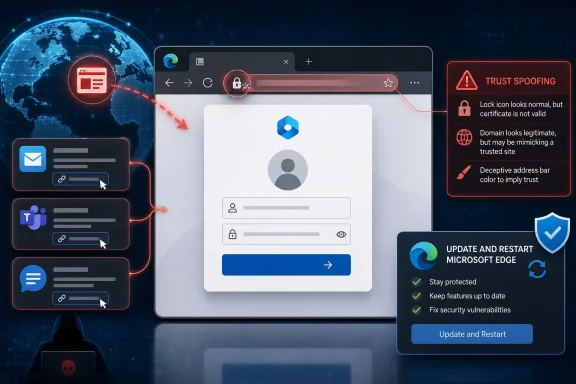 Microsoft’s Network Vector Is Really a Social Vector
Microsoft classifies the attack vector as Network because the malicious content can be delivered remotely through ordinary web infrastructure. The attacker does not need local access to the device, physical access to the machine, or a foothold inside the victim’s network. A web server under the attacker’s control is enough to stage the exploit.But the advisory’s most important sentence is the one that limits the attacker’s power: the attacker cannot force the user to view the attacker-controlled content. That makes CVE-2026-57993 a network-reachable vulnerability with a human gate in front of it. The exploit begins on the internet, but it succeeds only when the user is induced to browse to the trap.
That user action can be engineered in familiar ways. A phishing email can point to the crafted site. A Teams or instant-message lure can make the link appear to come from a colleague. A document or attachment can contain the embedded URL. A compromised legitimate website could also be used as a staging point, though Microsoft’s description centers on attacker-hosted content.
This is why the vulnerability should not be read as “just visit any page and you are owned.” Microsoft’s language does not say that the flaw gives an attacker code execution, automatic credential theft, or silent malware installation. It says the attacker can exploit a spoofing weakness through Microsoft Edge after convincing the user to view malicious content.
Spoofing Bugs Attack the Browser’s Contract With the User
A browser is not merely a rendering engine. It is a trust interface. The address bar, lock icon, permission prompts, download warnings, tab titles, sign-in surfaces, profile indicators, and embedded authentication flows all tell the user what kind of decision they are making.A spoofing vulnerability undermines that contract. The technical details of CVE-2026-57993 are not public in Microsoft’s brief advisory, but the category tells us the shape of the risk: Edge may present, hide, or misrepresent information in a way that lets malicious content appear more trustworthy than it should. That can turn a normal anti-phishing cue into a liability.
The attacker’s goal is not necessarily to break cryptography or bypass every browser sandbox. It may be enough to make a fake sign-in page look like a real one, make a malicious prompt look like a browser prompt, disguise the origin of a page, or create a misleading interaction that causes the user to approve something they would otherwise reject. In modern attacks, that is often the whole game.
The strongest phishing campaigns already depend on timing, context, and visual credibility. A browser spoofing flaw gives those campaigns better stagecraft. It narrows the gap between “this looks suspicious” and “this looks like the browser is asking me to continue.”
Edge’s Chromium Base Cuts Both Ways
Microsoft Edge’s Chromium foundation gives it enormous compatibility benefits and a rapid security-update pipeline. It also means Edge inherits the realities of the Chromium ecosystem: frequent security fixes, a large attack surface, and a browser cadence that is much faster than traditional Windows patching. Microsoft’s Edge security release notes routinely distinguish between Chromium project fixes and Edge-specific fixes, a reminder that the product is both part of a shared browser platform and a Microsoft-managed enterprise endpoint.That split matters for administrators. Some Edge vulnerabilities are effectively part of the wider Chromium stream. Others are specific to Microsoft’s implementation, integrations, policies, UI, account surfaces, or platform behavior. CVE-2026-57993 is described by Microsoft as a Microsoft Edge Chromium-based spoofing vulnerability, which puts the remediation burden squarely on Edge update hygiene.
In practical terms, this means the fix is not something most organizations should wait to receive through the next comfortable desktop image cycle. Edge updates independently and frequently for a reason. If the browser is the attack surface, the browser update channel is the control plane.
For consumers, the advice is simpler but no less important: restart Edge and let it update. Chromium-based browsers can download updates in the background, but the protection often does not fully land until the browser restarts. The same stale session that keeps forty tabs alive can also keep a vulnerable build in use.
The Exploit Chain Starts With a Page, Not a Packet Storm
The word “Network” can mislead non-specialists into imagining a vulnerability that spreads across ports, scans internal ranges, or compromises machines without user interaction. That is not what Microsoft describes here. CVE-2026-57993 is network-exploitable because the malicious content is remote, not because the attacker can simply throw packets at Edge from across the internet and seize control.A realistic attack chain would look mundane. The attacker registers or compromises a domain, builds a web page designed to trigger the spoofing behavior, and wraps it in a lure that matches the victim’s environment. The user clicks. Edge renders the content. The spoofing flaw lets the page misrepresent something security-relevant. The user then enters credentials, approves a prompt, downloads a file, scans a code, or otherwise makes a decision based on false visual information.
That last step is the attacker’s payoff. Spoofing is often a bridge vulnerability. It may not be the final payload, but it can move the victim across a trust boundary. Once the user believes the wrong site, prompt, or origin, the attacker can harvest credentials, steal session tokens through follow-on techniques, push malware, or redirect the user into a broader fraud flow.
This is why user interaction should reduce panic but not create complacency. Many of the most damaging intrusions begin with user interaction. The security industry has spent decades proving that “requires a click” is not the same as “unlikely.”
The Enterprise Risk Is Concentrated Around Identity
For WindowsForum’s sysadmin readership, the most important question is not whether this is an elegant browser bug. It is whether the vulnerability improves an attacker’s odds of compromising identity. In 2026, that is where the blast radius usually begins.Edge is deeply entangled with Microsoft Entra ID, Microsoft 365, Defender, Windows Hello, passkeys, profile sync, conditional access, and managed browser policies. That integration is useful because it gives administrators leverage. It is also why a spoofing flaw in the browser deserves attention even when it is not described as remote code execution.
If a crafted page can make a user trust the wrong identity prompt, the attacker may not need malware at all. A stolen password, session cookie, OAuth grant, or MFA approval can be more valuable than code running on one endpoint. The modern enterprise perimeter is a sign-in screen, and Edge is one of the main places users encounter it.
This is also where training reaches its limit. Users can be told to check the address bar, distrust unexpected prompts, and avoid links from unknown senders. Those instructions assume the browser is faithfully presenting the cues users are trained to inspect. A spoofing vulnerability is dangerous precisely because it can corrupt those cues.
The Advisory’s Restraint Is Part of the Signal
Microsoft’s description does not claim active exploitation in the text provided by the user. It does not describe privilege escalation, sandbox escape, or arbitrary code execution. It says an attacker could host a specially crafted website and convince the user to view it. That is a measured advisory, and the measured reading is the right one.Still, restraint should not be mistaken for irrelevance. Browser spoofing bugs often sit below the drama line because they do not produce the clean severity narrative of “remote attacker executes code.” Yet attackers do not grade vulnerabilities the same way defenders do. They ask whether a bug makes an operation cheaper, more convincing, or more repeatable.
A spoofing bug in a major browser can do exactly that. It can improve phishing yield. It can make a malicious workflow look native. It can reduce the number of suspicious seams a victim might notice. In a targeted campaign, that improvement may be worth more than a noisy exploit that crashes half the time.
The absence of public technical detail is also normal. Vendors often keep browser vulnerability mechanics sparse until patches have had time to propagate. That protects users, but it leaves defenders working from the category and exploit prerequisites rather than a full proof of concept.
The Right Response Is Fast Browser Hygiene, Not Theater
The most effective mitigation is to update Edge to a fixed version as soon as Microsoft provides it through the stable channel. For managed environments, that means confirming the update actually reached endpoints, not merely assuming the update service did its job. Edge’s rapid release model is valuable only if restart behavior, update policies, and device compliance reporting are aligned.Administrators should verify Edge version distribution across their fleet. They should pay special attention to kiosk systems, shared workstations, VDI images, offline laptops, and machines where browser updates are delayed by policy. These are the places where “automatic updates” often become an aspiration rather than a fact.
Security teams should also treat the advisory as a phishing-control event. That does not mean sending a panic email to every employee. It means tightening the controls that reduce the value of a successful spoof: phishing-resistant MFA where possible, conditional access that evaluates device health, safe links or URL detonation, attachment sandboxing, browser isolation for high-risk users, and telemetry on suspicious sign-in flows.
For home users, the practical advice is blunt. Update Edge, restart it, and be skeptical of links that ask you to sign in, approve a browser permission, install something, or reauthenticate after arriving from email or chat. If the site is important, navigate there manually rather than trusting the link.
The Patch Is Only Half the Defense
Browser vulnerabilities expose an uncomfortable truth about endpoint security: patching closes known holes, but it does not eliminate the behavior attackers are exploiting. CVE-2026-57993 depends on crafted web content and user persuasion. Even after the specific flaw is fixed, the same attacker playbook will continue with a different visual trick, domain, prompt, or attachment.That is why organizations should use incidents like this to test operational basics. Are users running current Edge builds? Are browser restarts enforced after security updates? Are unmanaged browsers allowed to access corporate resources? Are identity prompts protected by phishing-resistant authentication? Are risky sign-ins visible quickly enough to matter?
Microsoft’s browser policies give enterprises a useful set of levers, but they need to be used deliberately. Edge can be managed, updated, constrained, and monitored. Leaving it as a default application while treating it like a passive accessory is the mistake.
The browser is now a privileged workplace shell. It mediates SaaS, identity, documents, admin consoles, code repositories, ticketing systems, and remote management tools. A vulnerability that changes what the user believes inside that shell deserves the same seriousness as a vulnerability in the operating system UI.
The Practical Reading of CVE-2026-57993 Is Narrow but Serious
The immediate lesson from Microsoft’s advisory is not that Edge users should avoid the web. It is that attackers can exploit CVE-2026-57993 remotely by combining a crafted website with social engineering, and defenders should close the browser update gap before that combination is tested against their users.- The vulnerability is exploitable over the network because the malicious content can be delivered from a remote website.
- The attacker still needs user interaction, typically a click or file-open action triggered through email, instant messaging, or another lure.
- The impact is spoofing, which means the attacker’s advantage lies in misleading the user rather than automatically taking control of the machine.
- The most important mitigation is installing the Microsoft Edge security update and restarting the browser so the fixed build is actually in use.
- Enterprise defenders should treat the issue as both a patch-management task and an identity-protection task.
- Users should avoid signing in, approving prompts, or downloading files from pages reached through unexpected messages.
References
- Primary source: MSRC
Published: 2026-07-03T07:00:00-07:00
Security Update Guide - Microsoft Security Response Center
 msrc.microsoft.com
- Related coverage: threats.kaspersky.com
Kaspersky Threats — KLA85378
threats.kaspersky.com
- Related coverage: sentinelone.com
CVE-2026-42891: Microsoft Edge Chromium Auth Bypass Flaw
CVE-2026-42891 is an authentication bypass vulnerability in Microsoft Edge Chromium. Learn about its impact, affected versions, and mitigation methods.www.sentinelone.com
- Related coverage: www2.gov.bc.ca
- Related coverage: datacomm.com
- Related coverage: thehackerwire.com
CVE-2026-45494 - Medium Vulnerability - TheHackerWire
TheHackerWire - Your daily source for cybersecurity news, CVE alerts, hacking tutorials, and security tool reviews. Stay ahead of cyber threats.www.thehackerwire.com
- Related coverage: manuals.supernaeyeglass.com
- Related coverage: hivepro.com
- Official source: learn.microsoft.com
Microsoft Edge release notes for Stable Channel | Microsoft Learn
Microsoft Edge release note for the Stable Channellearn.microsoft.com - Related coverage: hkcert.org
Microsoft Edge Multiple Vulnerabilities
Multiple vulnerabilities were identified in Microsoft Edge. A remote attacker could exploit some of these vulnerabilities to trigger remote code execution, denial of service condition, elevation of privilege, security restriction bypass and sensitive infowww.hkcert.org - Related coverage: stack.watch
- Related coverage: cve.circl.lu
Vulnerability-Lookup
Vulnerability-Lookup - Fast vulnerability lookup correlation from different sources.cve.circl.lu - Related coverage: cert.gov.vu
Advisory 118 CVE 2026 21509 Microsoft Office Security Feature Bypass Vulnerability
PDF documentcert.gov.vu
- Related coverage: aha.org
h isac tlp white microsoft edge addresses exploited zero day vulnerability cve 2024 7971 8 23 2024
PDF documentwww.aha.org