

Google’s CVE-2026-14122 entry, published by NVD on June 30, 2026 and modified on July 1, describes a Windows-only Chrome flaw in WebAppInstalls fixed before version 150.0.7871.47, with NVD adding a CPE configuration that combines Google Chrome and Microsoft Windows. The short answer is that the missing CPE probably is not missing at all: NVD has modeled this as an application vulnerability constrained by operating system, not as a standalone Windows vulnerability. The more interesting story is why a Chromium bug rated “Low” by Google can appear in downstream tooling as a high-impact enterprise patching item. That mismatch is exactly where vulnerability management becomes less about reading a CVE page and more about understanding how product, platform, and scoring metadata collide.
The CPE configuration shown in NVD’s change history is an AND relationship: Google Chrome versions before 150.0.7871.47, plus Microsoft Windows. That is the right shape for a Chrome-on-Windows issue. It does not mean Windows itself is vulnerable in isolation, and it does not require a separate Microsoft product advisory to make the entry meaningful.
This matters because CPEs are often read too literally by scanners and dashboards. A Chrome CPE by itself says “this version of Chrome is affected.” A Windows CPE by itself would imply an operating system vulnerability. An AND block says something narrower: the vulnerable condition exists when the affected application is present on the specified platform.
For administrators, that distinction is not academic. If the same Chrome version is deployed across Windows, macOS, and Linux, a platform-scoped CPE tells asset inventory systems not to panic equally across every endpoint. In this case, the public description repeatedly narrows the issue to “Google Chrome on Windows,” which makes the Windows CPE a qualifier rather than a second vulnerable product.
The user-visible confusion comes from how NVD pages render this data. “Known Affected Software Configurations” can look like a shopping list of vulnerable products, when the logic underneath may be conjunctive. The word “AND” is the whole story here, and it is easy to miss.
Yet the severity signals do not line up cleanly. The CVE text says Chromium security severity is Low. NVD had not yet provided its own CVSS score at the time reflected in the entry. CISA-ADP, however, supplied a CVSS 3.1 score of 8.1, with network attack vector, low complexity, no privileges required, user interaction required, and high confidentiality and integrity impact.
That does not necessarily mean one party is wrong. Browser vendors often score bugs against internal exploitability assumptions, sandbox boundaries, mitigations, and component-specific context. CVSS, by design, can produce a higher-looking number when a remote attacker can trigger a user-assisted path that allows meaningful read/write impact.
The phrase “arbitrary read/write” is doing a lot of work. In vulnerability databases, it sounds dramatic because it is dramatic in the abstract. In a hardened browser, the practical impact depends on where the read/write happens, what process or sandbox boundary contains it, and whether it chains with another flaw. Google’s lower severity suggests the Chrome team did not view this as a straightforward remote code execution path by itself.
A crafted HTML page exploiting insufficient validation in that path is not the same as a drive-by kernel compromise. The public description still requires user interaction. But user interaction is a weak comfort in browsers, because browser interaction is the whole job. Clicking, installing, approving, and launching are normal behaviors, not suspicious edge cases.
Windows adds its own context. Chrome’s app installation experience on Windows touches shortcuts, manifests, icons, launch behavior, and shell integration. A validation failure in that zone can become more consequential than a bug limited to rendering a web page, because the browser is translating untrusted web-provided material into local, durable application artifacts.
That is why the Windows-only scoping is credible. Platform integration code differs by OS, and bugs in install flows often live exactly where cross-platform browser logic meets platform-specific shell behavior. The CPE is not accusing Windows; it is identifying the platform where Chrome’s integration path is vulnerable.
This kind of mismatch is common in CVE plumbing. CNA-submitted affected-version ranges, NVD enrichment, CPE matching, and downstream scanner logic are related but not identical layers. The prose description and NVD CPE range both point to versions up to, but excluding, 150.0.7871.47. That is the interpretation administrators should operationalize.
The danger is that tools may ingest one layer and ignore another. A scanner that keys off the malformed-looking affected JSON might produce odd results; a scanner that keys off NVD’s CPE range should mark Chrome before 150.0.7871.47 on Windows as vulnerable. A mature vulnerability program checks both when a record looks internally inconsistent.
This is also why “Are we missing a CPE?” is the right question to ask, but not the only one. The better enterprise question is whether the CPE logic, version range, platform qualifier, and scanner detection logic all agree. In this case, the CPE appears present; the version metadata deserves a raised eyebrow.
The Chrome 150 desktop update illustrates the bind. Malwarebytes reported that the release included 382 security fixes, a huge number even by modern browser standards. That creates obvious pressure to deploy quickly. At the same time, a release of that size is not a surgical patch; it is a broad platform update that can affect extensions, media behavior, enterprise policies, app compatibility, and web workflows.
CVE-2026-14122 is not necessarily the scariest item in that bundle. Other Chrome 150 fixes may carry critical ratings or sandbox-escape implications. But CVE-2026-14122 is a useful case study because it shows how a low-severity vendor label can still intersect with Windows endpoint management, user-driven attack paths, and high CVSS-derived risk.
For WindowsForum readers, the practical conclusion is simple: do not triage this CVE as a Windows patch, but do not dismiss it because Chrome called it Low. It is a Chrome update problem on Windows endpoints, and the fix is to get Chrome to 150.0.7871.47 or later.
In older workflows, teams often waited for the NVD base score and treated that number as the canonical answer. That was never ideal, but it was simple. Now a CVE page may show vendor severity, CNA metadata, CISA-ADP scoring, SSVC options, pending NVD assessment, affected product data, and CPE configurations that arrive in separate change records.
CVE-2026-14122 is a tidy example of the new mess. Google says Low. CISA-ADP says High by CVSS. NVD has no NIST score yet. The SSVC data says no known exploitation, not automatable, and total technical impact. Each signal is useful, but none is the whole truth.
This is where security teams need to stop treating CVE pages as verdicts. They are evidence files. The right response is not “Low” or “High” in isolation; it is “remote, user-assisted, Windows-only Chrome flaw, fixed in a broad Chrome 150 security update, no public exploitation indicated in the provided SSVC data.”
Administrators should also remember that Chrome’s visible version can lag update availability depending on rollout timing, policy, and restart behavior. A machine that has downloaded the update but not relaunched the browser may still be exposed. In high-risk environments, forcing or scheduling browser restarts is often the difference between “patched in theory” and “patched in production.”
Microsoft Edge administrators should watch the Chromium base but should not blindly transfer this CVE to Edge unless Microsoft or Edge release metadata says the same component and platform path are affected. Chromium ancestry matters, but product integration matters too. Web app installation behavior is exactly the sort of area where downstream browsers can diverge.
For unmanaged users, the guidance is less nuanced: update Chrome, relaunch it, and avoid installing web apps from unfamiliar prompts or pages. The latter advice will not save an unpatched browser from every exploit, but it reduces exposure to the interaction path described in the CVE.
There are still a few checks worth making before closing the ticket:
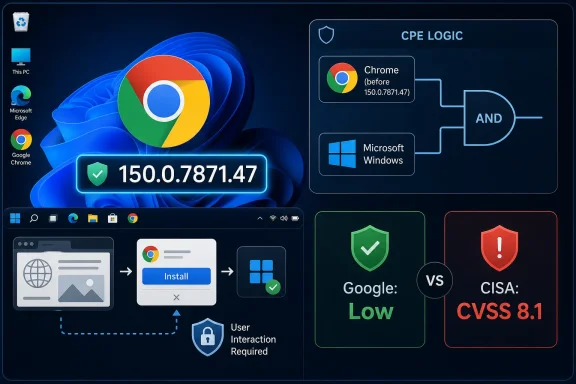 The CPE Is Doing Platform Scoping, Not Blame Assignment
The CPE configuration shown in NVD’s change history is an AND relationship: Google Chrome versions before 150.0.7871.47, plus Microsoft Windows. That is the right shape for a Chrome-on-Windows issue. It does not mean Windows itself is vulnerable in isolation, and it does not require a separate Microsoft product advisory to make the entry meaningful.This matters because CPEs are often read too literally by scanners and dashboards. A Chrome CPE by itself says “this version of Chrome is affected.” A Windows CPE by itself would imply an operating system vulnerability. An AND block says something narrower: the vulnerable condition exists when the affected application is present on the specified platform.
For administrators, that distinction is not academic. If the same Chrome version is deployed across Windows, macOS, and Linux, a platform-scoped CPE tells asset inventory systems not to panic equally across every endpoint. In this case, the public description repeatedly narrows the issue to “Google Chrome on Windows,” which makes the Windows CPE a qualifier rather than a second vulnerable product.
The user-visible confusion comes from how NVD pages render this data. “Known Affected Software Configurations” can look like a shopping list of vulnerable products, when the logic underneath may be conjunctive. The word “AND” is the whole story here, and it is easy to miss.
Google Calls It Low, CISA’s Metadata Makes It Look Like a Fire Drill
Google’s Chrome Releases blog shipped the fix as part of the Stable Channel update for desktop on June 30, 2026, moving Windows and macOS to 150.0.7871.46/.47 and Linux to 150.0.7871.46, according to Google’s release post and reporting from Malwarebytes. The same update was unusually large, with hundreds of security fixes bundled into Chrome 150. CVE-2026-14122 is one item in that larger release train, not a standalone emergency bulletin.Yet the severity signals do not line up cleanly. The CVE text says Chromium security severity is Low. NVD had not yet provided its own CVSS score at the time reflected in the entry. CISA-ADP, however, supplied a CVSS 3.1 score of 8.1, with network attack vector, low complexity, no privileges required, user interaction required, and high confidentiality and integrity impact.
That does not necessarily mean one party is wrong. Browser vendors often score bugs against internal exploitability assumptions, sandbox boundaries, mitigations, and component-specific context. CVSS, by design, can produce a higher-looking number when a remote attacker can trigger a user-assisted path that allows meaningful read/write impact.
The phrase “arbitrary read/write” is doing a lot of work. In vulnerability databases, it sounds dramatic because it is dramatic in the abstract. In a hardened browser, the practical impact depends on where the read/write happens, what process or sandbox boundary contains it, and whether it chains with another flaw. Google’s lower severity suggests the Chrome team did not view this as a straightforward remote code execution path by itself.
Web App Installation Is a Bigger Attack Surface Than It Looks
The WebAppInstalls component sits in one of Chrome’s most user-friendly and security-sensitive gray zones. Progressive web apps blur the line between web content and local application behavior: they can be launched from the Start menu, appear as app-like windows, and integrate with operating system surfaces in ways ordinary tabs do not. That makes installation flows a natural place for trust boundaries to get complicated.A crafted HTML page exploiting insufficient validation in that path is not the same as a drive-by kernel compromise. The public description still requires user interaction. But user interaction is a weak comfort in browsers, because browser interaction is the whole job. Clicking, installing, approving, and launching are normal behaviors, not suspicious edge cases.
Windows adds its own context. Chrome’s app installation experience on Windows touches shortcuts, manifests, icons, launch behavior, and shell integration. A validation failure in that zone can become more consequential than a bug limited to rendering a web page, because the browser is translating untrusted web-provided material into local, durable application artifacts.
That is why the Windows-only scoping is credible. Platform integration code differs by OS, and bugs in install flows often live exactly where cross-platform browser logic meets platform-specific shell behavior. The CPE is not accusing Windows; it is identifying the platform where Chrome’s integration path is vulnerable.
The “Affected” Version Field Is the Messier Part
If there is a genuine metadata oddity in the pasted record, it is not the Windows CPE. It is the affected-version JSON that appears to show version “150.0.7871.47” with “lessThan” also set to “150.0.7871.47” and status “affected.” That is an awkward representation, because the prose says Chrome prior to 150.0.7871.47 is affected, meaning 150.0.7871.47 is the fixed threshold.This kind of mismatch is common in CVE plumbing. CNA-submitted affected-version ranges, NVD enrichment, CPE matching, and downstream scanner logic are related but not identical layers. The prose description and NVD CPE range both point to versions up to, but excluding, 150.0.7871.47. That is the interpretation administrators should operationalize.
The danger is that tools may ingest one layer and ignore another. A scanner that keys off the malformed-looking affected JSON might produce odd results; a scanner that keys off NVD’s CPE range should mark Chrome before 150.0.7871.47 on Windows as vulnerable. A mature vulnerability program checks both when a record looks internally inconsistent.
This is also why “Are we missing a CPE?” is the right question to ask, but not the only one. The better enterprise question is whether the CPE logic, version range, platform qualifier, and scanner detection logic all agree. In this case, the CPE appears present; the version metadata deserves a raised eyebrow.
Chrome 150 Turns Routine Updating Into Risk Triage
Chrome’s update model encourages users to treat patches as background weather: the browser updates, restarts eventually, and the world moves on. Enterprise IT does not get to be that casual. Chrome is now one of the most important managed applications in a Windows fleet, and every major update carries both security urgency and compatibility risk.The Chrome 150 desktop update illustrates the bind. Malwarebytes reported that the release included 382 security fixes, a huge number even by modern browser standards. That creates obvious pressure to deploy quickly. At the same time, a release of that size is not a surgical patch; it is a broad platform update that can affect extensions, media behavior, enterprise policies, app compatibility, and web workflows.
CVE-2026-14122 is not necessarily the scariest item in that bundle. Other Chrome 150 fixes may carry critical ratings or sandbox-escape implications. But CVE-2026-14122 is a useful case study because it shows how a low-severity vendor label can still intersect with Windows endpoint management, user-driven attack paths, and high CVSS-derived risk.
For WindowsForum readers, the practical conclusion is simple: do not triage this CVE as a Windows patch, but do not dismiss it because Chrome called it Low. It is a Chrome update problem on Windows endpoints, and the fix is to get Chrome to 150.0.7871.47 or later.
Vulnerability Databases Are Becoming Less Like Scoreboards
NVD’s handling of this entry also reflects a broader shift in vulnerability data. NIST has been expanding NVD enrichment fields and exposing more third-party and coordinator-provided data, including SSVC-style decision support. That makes the page richer, but also noisier.In older workflows, teams often waited for the NVD base score and treated that number as the canonical answer. That was never ideal, but it was simple. Now a CVE page may show vendor severity, CNA metadata, CISA-ADP scoring, SSVC options, pending NVD assessment, affected product data, and CPE configurations that arrive in separate change records.
CVE-2026-14122 is a tidy example of the new mess. Google says Low. CISA-ADP says High by CVSS. NVD has no NIST score yet. The SSVC data says no known exploitation, not automatable, and total technical impact. Each signal is useful, but none is the whole truth.
This is where security teams need to stop treating CVE pages as verdicts. They are evidence files. The right response is not “Low” or “High” in isolation; it is “remote, user-assisted, Windows-only Chrome flaw, fixed in a broad Chrome 150 security update, no public exploitation indicated in the provided SSVC data.”
The Windows Fleet Answer Is Boring, Which Is Good
The remediation path is mercifully straightforward. Update Chrome on Windows to 150.0.7871.47 or later. Users can verify from Chrome’s About page, while managed environments should validate via their normal browser management stack, endpoint inventory, or software deployment telemetry.Administrators should also remember that Chrome’s visible version can lag update availability depending on rollout timing, policy, and restart behavior. A machine that has downloaded the update but not relaunched the browser may still be exposed. In high-risk environments, forcing or scheduling browser restarts is often the difference between “patched in theory” and “patched in production.”
Microsoft Edge administrators should watch the Chromium base but should not blindly transfer this CVE to Edge unless Microsoft or Edge release metadata says the same component and platform path are affected. Chromium ancestry matters, but product integration matters too. Web app installation behavior is exactly the sort of area where downstream browsers can diverge.
For unmanaged users, the guidance is less nuanced: update Chrome, relaunch it, and avoid installing web apps from unfamiliar prompts or pages. The latter advice will not save an unpatched browser from every exploit, but it reduces exposure to the interaction path described in the CVE.
The CPE Question Has a Practical Answer
The entry appears to have the CPE that matters: Chrome before 150.0.7871.47, constrained to Windows. If a scanner is asking for a separate Microsoft Windows vulnerability match, it is probably reading the configuration incorrectly. The vulnerable product is Chrome; Windows is the platform condition.There are still a few checks worth making before closing the ticket:
- Confirm that your vulnerability scanner understands the NVD configuration as an AND relationship between Chrome and Windows, not as two independent affected products.
- Confirm that Windows Chrome endpoints report version 150.0.7871.47 or later after a browser relaunch.
- Treat the “prior to 150.0.7871.47” wording and the NVD CPE range as authoritative over the confusing affected-version JSON shape.
- Do not apply the Windows CPE to macOS or Linux Chrome deployments unless later vendor data expands the affected platforms.
- Track the Chrome 150 release as a whole, because CVE-2026-14122 is only one vulnerability in a much larger security update.
References
- Primary source: NVD / Chromium
Published: 2026-07-03T07:00:52-07:00
Loading…
nvd.nist.gov - Security advisory: MSRC
Published: 2026-07-03T07:00:52-07:00
Original feed URL
Loading…
msrc.microsoft.com - Related coverage: cvefeed.io
Loading…
cvefeed.io - Official source: nist.gov
National Vulnerability Database
NIST maintains the National Vulnerability Database (NVD), a repository of information on software and hardware flaws that can compromise computer security. This is a key piece of the nation’s cybersecurity infrastructure.www.nist.gov - Related coverage: labs.cloudsecurityalliance.org
NVD Enrichment Triage: Guidance for AI Security Programs
PDF documentlabs.cloudsecurityalliance.org