

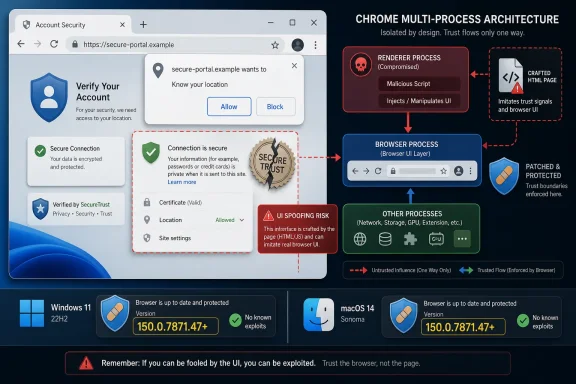
Google fixed CVE-2026-14002 in Chrome 150.0.7871.47 for Windows and Mac on June 30, 2026, closing a medium-severity Geolocation implementation flaw that could let an attacker who had already compromised Chrome’s renderer process spoof browser UI with a crafted HTML page. The uncomfortable part is not that this is the loudest bug in the release; it is that it sits in the seam where users are trained to trust the browser more than the page. For Windows administrators, that makes the patch less a routine browser bump than a reminder that permission prompts, location controls, and site identity signals are now part of the attack surface.
As described in Google’s Chrome Releases post and the National Vulnerability Database entry, CVE-2026-14002 affects Chrome before version 150.0.7871.47 and is categorized by Chromium as medium severity. CISA’s ADP enrichment assigned it a CVSS 3.1 score of 6.5, with high integrity impact, no confidentiality impact, and user interaction required. That is a very browser-shaped risk profile: not a smash-the-door-down remote code execution by itself, but a bug that becomes meaningful when paired with a renderer compromise and a convincing web page.
Geolocation sounds like a narrow subsystem until you remember what it represents in a modern browser. It is not merely a JavaScript API that returns latitude and longitude. It is a permission boundary, a user-consent ceremony, and a piece of privileged browser chrome that tells the user which site is asking for something sensitive.
That is why “inappropriate implementation in Geolocation” deserves more attention than its bland phrasing invites. The CVE text says an attacker who had already compromised the renderer process could perform UI spoofing through a crafted HTML page. In practical terms, the risk is that the page and the browser’s trusted interface become harder for a user to distinguish at exactly the moment when distinction matters.
This does not mean every malicious website suddenly gets your location. The prerequisite matters: the attacker must already have compromised the renderer process. But browser exploitation is often a chain, not a single magic bullet, and a renderer foothold becomes more valuable if it can be used to manipulate what the user believes Chrome itself is saying.
The CWE assigned by CISA, CWE-451, captures the issue better than the component name does: user interface misrepresentation of critical information. That is the story here. The bug is not just about location; it is about the credibility of browser UI.
That should lower panic, not lower discipline. A medium-severity UI spoofing bug can still be useful in a campaign when it helps an attacker turn technical access into user action. If the attacker can make a permission request, page state, or browser signal look more trustworthy than it is, the user becomes part of the exploit chain.
The CVSS vector attributed by CISA is telling: network attack vector, low attack complexity, no privileges required, user interaction required, unchanged scope, no confidentiality impact, high integrity impact, and no availability impact. That is not a server-side worm. It is a deception primitive.
For home users, the answer is boring and simple: update Chrome and relaunch. For enterprises, the answer is less glamorous but more important: verify that Chrome actually reached the fixed build across managed Windows and macOS fleets, and do not assume auto-update success until telemetry says so.
That architecture is why UI bugs at the boundary matter. If a compromised renderer can influence or mimic trusted browser UI, the attacker may not need to fully escape the sandbox to cause harm. They can try to trick the user into making a choice that grants permission, trusts a malicious state, or ignores a warning.
This is where the “medium” label can be misleading for non-specialists. The severity score reflects the bug as documented, not every exploit chain in which it might appear. A renderer compromise from one vulnerability combined with a UI spoofing issue from another can produce a risk greater than either item looks in isolation.
Google’s release note does not publish the bug details, which is normal for Chrome security fixes while updates are rolling out. The company explicitly says access to bug details and links may remain restricted until a majority of users have received the fix. That restraint protects users, but it also means administrators must patch from the advisory, not from a fully public proof-of-concept analysis.
That number is the context. CVE-2026-14002 is one entry in a sprawling security clean-up that includes critical, high, medium, and low severity issues across browser subsystems. The list contains the usual memory-safety suspects, but also a conspicuous cluster of UI, permissions, PageInfo, extensions, media, network, and WebApp-related fixes.
For WindowsForum readers, the practical point is that Chrome patching has become less about one spectacular CVE and more about release-train hygiene. Waiting for a zero-day headline is an increasingly bad patch strategy when routine stable updates may quietly fix hundreds of issues. The browser is too large, too privileged, and too constantly exposed for “medium” to mean “optional.”
The Chrome 150 rollout also demonstrates the small version-number trap. Windows and Mac are listed as 150.0.7871.46/.47, while the NVD entry for this specific CVE points to Chrome prior to 150.0.7871.47. In mixed environments, that distinction matters; asset reports should capture the full version string, not merely “Chrome 150.”
That chronology matters because many vulnerability tools ingest NVD, CISA, vendor advisories, and third-party enrichment at different speeds. One dashboard may show the CVE with a score, another may show it without one, and a third may briefly miss the product mapping if it depends on enrichment lag. This is not necessarily a contradiction; it is the messy reality of modern vulnerability metadata.
The “Are we missing a CPE here?” prompt in NVD is boilerplate, but it points to a real operational concern. For this CVE, the change history says NIST added the Chrome CPE configuration: Google Chrome versions up to, but not including, 150.0.7871.47. If your scanner does not map the CVE to Chrome, the likely problem is not that no CPE exists in the record; it is that your tool has not ingested or normalized the updated data yet.
There is a second wrinkle. The CNA affected-data snippet in the record appears to use a custom version scheme and says version 150.0.7871.47 with “lessThan” 150.0.7871.47. That kind of vendor JSON can look odd when displayed outside its native context. Administrators should rely on the plain-language affected range: Chrome prior to 150.0.7871.47 is vulnerable, and Chrome 150.0.7871.47 or later is the target for this specific Windows/Mac fix.
A permission prompt is only as strong as the user’s ability to understand its origin. If a page can imitate trusted UI, obscure important context, or make a browser-controlled decision surface appear different from reality, then the permission system can be bent without being cryptographically broken. That is why browser makers treat “incorrect security UI” and “inappropriate implementation” bugs as CVE-worthy even when they do not immediately expose memory corruption.
Geolocation is especially sensitive because location permission has become normalized. Weather sites, maps, delivery services, travel pages, “find a store” widgets, and local search prompts all train users to click through location requests quickly. Attackers do not need every user to be careless; they need enough users to recognize the shape of a normal prompt and stop reading.
The lesson is not that geolocation should be disabled everywhere. In managed environments, it is that permission prompts deserve policy attention. If location access is unnecessary for a class of corporate devices, administrators should consider limiting it through browser policy rather than relying on users to make good decisions at speed.
That is why this class of bug matters beyond consumer privacy. A spoofed browser interface can intersect with sign-in flows, device trust prompts, identity provider pages, and internal web applications. Even if CVE-2026-14002 is specifically Geolocation-related, the broader family of UI-integrity bugs should make administrators think about what users are asked to trust in the browser.
In a Windows fleet, the response should be measurable. Chrome’s built-in updater generally does the right thing for unmanaged users, but enterprise reality includes sleeping laptops, nonpersistent virtual desktops, blocked update services, golden images, app-control policies, and users who delay restarts. “Chrome auto-updates” is a statement of intent, not proof of compliance.
The fixed build is the anchor. For this CVE, Chrome before 150.0.7871.47 is the affected range in the NVD record, and Google’s desktop stable post places the relevant Windows and Mac release in the 150.0.7871.46/.47 channel. If your vulnerability platform flags Windows endpoints still below 150.0.7871.47, treat that as actionable, even if the CVE is medium severity.
For Windows shops, this distinction is more than pedantic. Many organizations run both Chrome and Edge, sometimes with different update channels and different policy controls. A Chrome fix does not patch Edge, and an Edge fix does not patch Chrome. Inventory must distinguish browsers, channels, architectures, and user profiles.
The deeper point is that Chromium is now a shared substrate. A vulnerability in a Chromium component can ripple into multiple browsers, but the timing and packaging of fixes vary by vendor. That means browser vulnerability management cannot be reduced to “patch Chrome” if Edge, Brave, Vivaldi, or embedded Chromium runtimes are part of the environment.
This CVE’s public record names Google Chrome as the affected product. Administrators should not invent affected products beyond the published data. But they should use the event as a trigger to check Chromium-family browser update status, because the operational failure mode is not only missing this one CVE; it is discovering too late that unmanaged Chromium builds are everywhere.
That pipeline is faster than it used to be in some places and still uneven in others. A CVE can appear before every downstream field is populated. It can have a vendor description before an NVD score. It can have CISA enrichment before a scanner has updated its detection logic. In fast-moving browser releases, this is normal.
The practical consequence is that organizations should not wait for every database field to settle before patching a browser. Google’s stable channel post is authoritative for the existence of the update. The NVD entry is useful for tracking, scoring, and asset matching. CISA’s enrichment is useful for prioritization. None of those should override the basic fact that Chrome is exposed to untrusted web content all day.
In other words, metadata should help you patch intelligently, not give you a reason to postpone patching. If the vendor says a fixed build is available and the affected range includes what you run, the correct first move is deployment. Tuning dashboards can come after.
But attackers do not read CVE entries like procurement forms. They look for combinations. A renderer bug, a UI spoofing flaw, a convincing page, a user trained to accept prompts, and a target environment that is slow to update can become a workable campaign path even if no single entry looks catastrophic.
The browser’s permission model also creates a peculiar asymmetry. Defenders see a medium CVE. Users see a familiar prompt. Attackers see an opportunity to make the familiar prompt lie. That is why UI integrity bugs occupy a category that security scoring systems struggle to communicate.
The best defense is not user education alone. Users cannot be expected to distinguish every subtle browser UI state under adversarial conditions. The browser must be patched, policy must reduce unnecessary prompts, and security teams must treat prompt fatigue as a real design problem rather than a training failure.
For managed environments, the work is verification. Confirm update policy, collect version telemetry, and identify machines that are stuck below the target. Pay special attention to kiosk systems, VDI images, lab machines, shared workstations, and devices that rarely reboot. These are the places where “automatic” updates become theoretical.
Security teams should also verify that vulnerability scanners understand the CPE mapping. The NVD change history indicates that the Chrome CPE for vulnerable versions up to but excluding 150.0.7871.47 was added during NIST analysis. If tools still show incomplete product matching, cross-check with browser inventory rather than waiting for scanner perfection.
There is no reason to treat CVE-2026-14002 as a standalone emergency if your fleet is already current. There is also no good reason to let it linger. Browser patch windows should be measured in days, not quarters, because the exploit surface is continuous and user exposure is constant.
That matters because browser rollouts are staggered. Google said the Chrome 150 stable update would roll out over the coming days and weeks. During that interval, two users can both be on “Chrome 150” in casual conversation while only one has the build that closes a specific CVE.
Windows administrators should therefore treat full browser versioning as a security control. It belongs in endpoint inventory, vulnerability dashboards, help desk scripts, and incident response triage. If a phishing or web-delivered attack is under investigation, “Chrome was installed” is useless; the exact build matters.
The same version discipline applies to exceptions. If a business app breaks on a new Chrome release and a group asks to pause updates, that exception should have an owner, an expiration date, and a compensating-control discussion. Browser pinning is sometimes necessary, but it is never free.
As described in Google’s Chrome Releases post and the National Vulnerability Database entry, CVE-2026-14002 affects Chrome before version 150.0.7871.47 and is categorized by Chromium as medium severity. CISA’s ADP enrichment assigned it a CVSS 3.1 score of 6.5, with high integrity impact, no confidentiality impact, and user interaction required. That is a very browser-shaped risk profile: not a smash-the-door-down remote code execution by itself, but a bug that becomes meaningful when paired with a renderer compromise and a convincing web page.
 Chrome’s Geolocation Bug Is Really a Trust Bug
Geolocation sounds like a narrow subsystem until you remember what it represents in a modern browser. It is not merely a JavaScript API that returns latitude and longitude. It is a permission boundary, a user-consent ceremony, and a piece of privileged browser chrome that tells the user which site is asking for something sensitive.That is why “inappropriate implementation in Geolocation” deserves more attention than its bland phrasing invites. The CVE text says an attacker who had already compromised the renderer process could perform UI spoofing through a crafted HTML page. In practical terms, the risk is that the page and the browser’s trusted interface become harder for a user to distinguish at exactly the moment when distinction matters.
This does not mean every malicious website suddenly gets your location. The prerequisite matters: the attacker must already have compromised the renderer process. But browser exploitation is often a chain, not a single magic bullet, and a renderer foothold becomes more valuable if it can be used to manipulate what the user believes Chrome itself is saying.
The CWE assigned by CISA, CWE-451, captures the issue better than the component name does: user interface misrepresentation of critical information. That is the story here. The bug is not just about location; it is about the credibility of browser UI.
Medium Severity Can Still Be Operationally Awkward
Security teams have learned to triage Chrome bugs by headline words: “critical,” “zero-day,” “use-after-free,” “V8,” “sandbox escape.” CVE-2026-14002 does not check those boxes. It is medium severity, and Google has not said it is being exploited in the wild.That should lower panic, not lower discipline. A medium-severity UI spoofing bug can still be useful in a campaign when it helps an attacker turn technical access into user action. If the attacker can make a permission request, page state, or browser signal look more trustworthy than it is, the user becomes part of the exploit chain.
The CVSS vector attributed by CISA is telling: network attack vector, low attack complexity, no privileges required, user interaction required, unchanged scope, no confidentiality impact, high integrity impact, and no availability impact. That is not a server-side worm. It is a deception primitive.
For home users, the answer is boring and simple: update Chrome and relaunch. For enterprises, the answer is less glamorous but more important: verify that Chrome actually reached the fixed build across managed Windows and macOS fleets, and do not assume auto-update success until telemetry says so.
The Renderer Prerequisite Is a Guardrail, Not a Get-Out-of-Patch-Free Card
The phrase “had compromised the renderer process” is doing a lot of work. Chrome’s multi-process architecture is designed so that web content runs in a less privileged renderer process, separated from the browser process and operating system by sandboxing and policy boundaries. A renderer compromise is serious, but it is not supposed to equal total browser control.That architecture is why UI bugs at the boundary matter. If a compromised renderer can influence or mimic trusted browser UI, the attacker may not need to fully escape the sandbox to cause harm. They can try to trick the user into making a choice that grants permission, trusts a malicious state, or ignores a warning.
This is where the “medium” label can be misleading for non-specialists. The severity score reflects the bug as documented, not every exploit chain in which it might appear. A renderer compromise from one vulnerability combined with a UI spoofing issue from another can produce a risk greater than either item looks in isolation.
Google’s release note does not publish the bug details, which is normal for Chrome security fixes while updates are rolling out. The company explicitly says access to bug details and links may remain restricted until a majority of users have received the fix. That restraint protects users, but it also means administrators must patch from the advisory, not from a fully public proof-of-concept analysis.
Chrome 150 Was Not a One-Bug Release
CVE-2026-14002 shipped inside a much larger Chrome 150 stable update. Google’s Chrome Releases blog says the June 30 desktop update promoted Chrome 150 to stable for Windows, Mac, and Linux, with Windows and Mac on 150.0.7871.46/.47 and Linux on 150.0.7871.46. The same post says the release includes 433 security fixes.That number is the context. CVE-2026-14002 is one entry in a sprawling security clean-up that includes critical, high, medium, and low severity issues across browser subsystems. The list contains the usual memory-safety suspects, but also a conspicuous cluster of UI, permissions, PageInfo, extensions, media, network, and WebApp-related fixes.
For WindowsForum readers, the practical point is that Chrome patching has become less about one spectacular CVE and more about release-train hygiene. Waiting for a zero-day headline is an increasingly bad patch strategy when routine stable updates may quietly fix hundreds of issues. The browser is too large, too privileged, and too constantly exposed for “medium” to mean “optional.”
The Chrome 150 rollout also demonstrates the small version-number trap. Windows and Mac are listed as 150.0.7871.46/.47, while the NVD entry for this specific CVE points to Chrome prior to 150.0.7871.47. In mixed environments, that distinction matters; asset reports should capture the full version string, not merely “Chrome 150.”
NVD’s Record Answers One Question and Raises Another
The user-facing NVD entry is unusually useful here because it shows the data flow. The CVE was received from Chrome on June 30, 2026, CISA-ADP modified it on July 1, and NIST’s initial analysis added a Chrome CPE configuration for versions up to but excluding 150.0.7871.47. The NVD page also notes that NVD had not yet provided its own CVSS assessment at the time captured in the provided record, while CISA-ADP had supplied a CVSS 3.1 score.That chronology matters because many vulnerability tools ingest NVD, CISA, vendor advisories, and third-party enrichment at different speeds. One dashboard may show the CVE with a score, another may show it without one, and a third may briefly miss the product mapping if it depends on enrichment lag. This is not necessarily a contradiction; it is the messy reality of modern vulnerability metadata.
The “Are we missing a CPE here?” prompt in NVD is boilerplate, but it points to a real operational concern. For this CVE, the change history says NIST added the Chrome CPE configuration: Google Chrome versions up to, but not including, 150.0.7871.47. If your scanner does not map the CVE to Chrome, the likely problem is not that no CPE exists in the record; it is that your tool has not ingested or normalized the updated data yet.
There is a second wrinkle. The CNA affected-data snippet in the record appears to use a custom version scheme and says version 150.0.7871.47 with “lessThan” 150.0.7871.47. That kind of vendor JSON can look odd when displayed outside its native context. Administrators should rely on the plain-language affected range: Chrome prior to 150.0.7871.47 is vulnerable, and Chrome 150.0.7871.47 or later is the target for this specific Windows/Mac fix.
UI Spoofing Is a Browser Security Problem Hiding in Plain Sight
Browser security used to be easy to explain in layers: the page runs code, the sandbox contains it, the browser process owns powerful decisions, and the operating system stands behind it all. UI spoofing attacks blur that neat picture. They target the human interface to the security model rather than only the memory model underneath it.A permission prompt is only as strong as the user’s ability to understand its origin. If a page can imitate trusted UI, obscure important context, or make a browser-controlled decision surface appear different from reality, then the permission system can be bent without being cryptographically broken. That is why browser makers treat “incorrect security UI” and “inappropriate implementation” bugs as CVE-worthy even when they do not immediately expose memory corruption.
Geolocation is especially sensitive because location permission has become normalized. Weather sites, maps, delivery services, travel pages, “find a store” widgets, and local search prompts all train users to click through location requests quickly. Attackers do not need every user to be careless; they need enough users to recognize the shape of a normal prompt and stop reading.
The lesson is not that geolocation should be disabled everywhere. In managed environments, it is that permission prompts deserve policy attention. If location access is unnecessary for a class of corporate devices, administrators should consider limiting it through browser policy rather than relying on users to make good decisions at speed.
Windows Admins Should Treat Chrome Like Infrastructure
For many organizations, Chrome is the most-used application that is not thought of as infrastructure. It is the runtime for SaaS, identity workflows, admin consoles, password managers, SSO handoffs, help desk tools, intranet apps, and remote collaboration. When Chrome ships a security update, it is not just updating a consumer browser; it is patching part of the enterprise application platform.That is why this class of bug matters beyond consumer privacy. A spoofed browser interface can intersect with sign-in flows, device trust prompts, identity provider pages, and internal web applications. Even if CVE-2026-14002 is specifically Geolocation-related, the broader family of UI-integrity bugs should make administrators think about what users are asked to trust in the browser.
In a Windows fleet, the response should be measurable. Chrome’s built-in updater generally does the right thing for unmanaged users, but enterprise reality includes sleeping laptops, nonpersistent virtual desktops, blocked update services, golden images, app-control policies, and users who delay restarts. “Chrome auto-updates” is a statement of intent, not proof of compliance.
The fixed build is the anchor. For this CVE, Chrome before 150.0.7871.47 is the affected range in the NVD record, and Google’s desktop stable post places the relevant Windows and Mac release in the 150.0.7871.46/.47 channel. If your vulnerability platform flags Windows endpoints still below 150.0.7871.47, treat that as actionable, even if the CVE is medium severity.
The Edge Question Comes Next, Even When the CVE Says Chrome
Any Chromium security story naturally raises the Microsoft Edge question. Edge is Chromium-based, but Chrome CVEs do not automatically map one-to-one to Edge exposure until Microsoft ships and documents the corresponding update or advisory. The right enterprise posture is not to assume immunity or equivalence; it is to check Edge’s current stable version and Microsoft’s release notes.For Windows shops, this distinction is more than pedantic. Many organizations run both Chrome and Edge, sometimes with different update channels and different policy controls. A Chrome fix does not patch Edge, and an Edge fix does not patch Chrome. Inventory must distinguish browsers, channels, architectures, and user profiles.
The deeper point is that Chromium is now a shared substrate. A vulnerability in a Chromium component can ripple into multiple browsers, but the timing and packaging of fixes vary by vendor. That means browser vulnerability management cannot be reduced to “patch Chrome” if Edge, Brave, Vivaldi, or embedded Chromium runtimes are part of the environment.
This CVE’s public record names Google Chrome as the affected product. Administrators should not invent affected products beyond the published data. But they should use the event as a trigger to check Chromium-family browser update status, because the operational failure mode is not only missing this one CVE; it is discovering too late that unmanaged Chromium builds are everywhere.
NVD Lag Is No Longer an Excuse for Waiting
The provided NVD change history shows the modern vulnerability pipeline in miniature. Chrome publishes the CVE and release note. CISA-ADP enriches the entry with CVSS, CWE, and SSVC information. NIST adds CPE configuration. Security tools then race to ingest, correlate, and display the record.That pipeline is faster than it used to be in some places and still uneven in others. A CVE can appear before every downstream field is populated. It can have a vendor description before an NVD score. It can have CISA enrichment before a scanner has updated its detection logic. In fast-moving browser releases, this is normal.
The practical consequence is that organizations should not wait for every database field to settle before patching a browser. Google’s stable channel post is authoritative for the existence of the update. The NVD entry is useful for tracking, scoring, and asset matching. CISA’s enrichment is useful for prioritization. None of those should override the basic fact that Chrome is exposed to untrusted web content all day.
In other words, metadata should help you patch intelligently, not give you a reason to postpone patching. If the vendor says a fixed build is available and the affected range includes what you run, the correct first move is deployment. Tuning dashboards can come after.
The Real Risk Is the Chain You Do Not See
On its own, CVE-2026-14002 is constrained. It requires renderer compromise. It requires user interaction. It is not described as exploited in the wild. It does not claim confidentiality or availability impact in CISA’s CVSS vector.But attackers do not read CVE entries like procurement forms. They look for combinations. A renderer bug, a UI spoofing flaw, a convincing page, a user trained to accept prompts, and a target environment that is slow to update can become a workable campaign path even if no single entry looks catastrophic.
The browser’s permission model also creates a peculiar asymmetry. Defenders see a medium CVE. Users see a familiar prompt. Attackers see an opportunity to make the familiar prompt lie. That is why UI integrity bugs occupy a category that security scoring systems struggle to communicate.
The best defense is not user education alone. Users cannot be expected to distinguish every subtle browser UI state under adversarial conditions. The browser must be patched, policy must reduce unnecessary prompts, and security teams must treat prompt fatigue as a real design problem rather than a training failure.
The Patch Is Simple; Proving It Landed Is the Work
For an individual Windows user, the remediation path is straightforward: open Chrome’s About page, allow the update to install, and relaunch the browser. Chrome should report version 150.0.7871.47 or later for the affected Windows/Mac range described in the record. If the browser says it is up to date but remains below the fixed build, the update channel or enterprise policy deserves scrutiny.For managed environments, the work is verification. Confirm update policy, collect version telemetry, and identify machines that are stuck below the target. Pay special attention to kiosk systems, VDI images, lab machines, shared workstations, and devices that rarely reboot. These are the places where “automatic” updates become theoretical.
Security teams should also verify that vulnerability scanners understand the CPE mapping. The NVD change history indicates that the Chrome CPE for vulnerable versions up to but excluding 150.0.7871.47 was added during NIST analysis. If tools still show incomplete product matching, cross-check with browser inventory rather than waiting for scanner perfection.
There is no reason to treat CVE-2026-14002 as a standalone emergency if your fleet is already current. There is also no good reason to let it linger. Browser patch windows should be measured in days, not quarters, because the exploit surface is continuous and user exposure is constant.
The Chrome 150 Lesson Is Written in the Version String
The most concrete lesson from CVE-2026-14002 is that “Chrome 150” is not enough. The fix threshold in the NVD record is 150.0.7871.47. A compliance report that collapses versions to major release numbers can make a vulnerable browser look safe.That matters because browser rollouts are staggered. Google said the Chrome 150 stable update would roll out over the coming days and weeks. During that interval, two users can both be on “Chrome 150” in casual conversation while only one has the build that closes a specific CVE.
Windows administrators should therefore treat full browser versioning as a security control. It belongs in endpoint inventory, vulnerability dashboards, help desk scripts, and incident response triage. If a phishing or web-delivered attack is under investigation, “Chrome was installed” is useless; the exact build matters.
The same version discipline applies to exceptions. If a business app breaks on a new Chrome release and a group asks to pause updates, that exception should have an owner, an expiration date, and a compensating-control discussion. Browser pinning is sometimes necessary, but it is never free.
The Small Geolocation CVE Carries a Bigger Browser Lesson
This is the point where the story becomes less about one medium CVE and more about how Windows shops should think about browser risk in 2026. CVE-2026-14002 is not the scariest item in Chrome 150, but it is a clean example of why “not critical” cannot mean “not operationally relevant.” The user interface is part of the security boundary, and the browser is part of the enterprise platform.- Chrome users on Windows and Mac should be on 150.0.7871.47 or later to clear the affected range identified for CVE-2026-14002.
- The vulnerability requires a compromised renderer process, which lowers standalone exploitability but makes the bug more relevant as part of a chained browser attack.
- CISA-ADP scored the issue as medium severity with high integrity impact, reflecting the risk of UI spoofing rather than data theft or system downtime.
- NVD’s change history indicates that a Chrome CPE configuration was added for versions up to but excluding 150.0.7871.47, so scanners should eventually map the CVE to Google Chrome cleanly.
- Administrators should verify full browser build numbers across managed fleets instead of relying on major-version labels or assumptions about automatic updates.
- Permission prompts and browser UI should be treated as security surfaces, especially where location, identity, device trust, or enterprise web apps are involved.
References
- Primary source: NVD / Chromium
Published: 2026-07-03T07:00:38-07:00
NVD - CVE-2026-14002
 nvd.nist.gov
- Security advisory: MSRC
Published: 2026-07-03T07:00:38-07:00
Original feed URL
Security Update Guide - Microsoft Security Response Center
 msrc.microsoft.com
- Related coverage: cvefeed.io
CVE-2026-14002 - Google Chrome UI Spoofing
Inappropriate implementation in Geolocation in Google Chrome prior to 150.0.7871.47 allowed a remote attacker who had compromised the renderer process to perform UI spoofing via a crafted HTML page. (Chromium security severity: Medium)cvefeed.io - Official source: nist.gov
National Vulnerability Database
NIST maintains the National Vulnerability Database (NVD), a repository of information on software and hardware flaws that can compromise computer security. This is a key piece of the nation’s cybersecurity infrastructure.www.nist.gov - Related coverage: labs.cloudsecurityalliance.org
NVD Enrichment Triage: Enterprise Vulnerability Programs Must Adapt
PDF documentlabs.cloudsecurityalliance.org
