

Google and the Chromium project disclosed CVE-2026-13956 on June 30, 2026, fixing an incorrect PageInfo security interface in Chrome versions before 150.0.7871.47 that could let a crafted web page mislead users after specific gestures. The bug is rated Medium by Chromium, but its importance is larger than the label suggests. This is not another memory-corruption crash in a sea of browser CVEs; it is a flaw in the browser’s trust display.
That distinction matters for Windows users, enterprise administrators, and anyone who has trained people to “check the lock icon” before entering credentials. PageInfo is supposed to be the place where Chrome explains what a site is, what it can access, and whether the connection is protected. If that surface can be spoofed, even conditionally, the browser is not merely failing to block an attack; it is lending its authority to one.
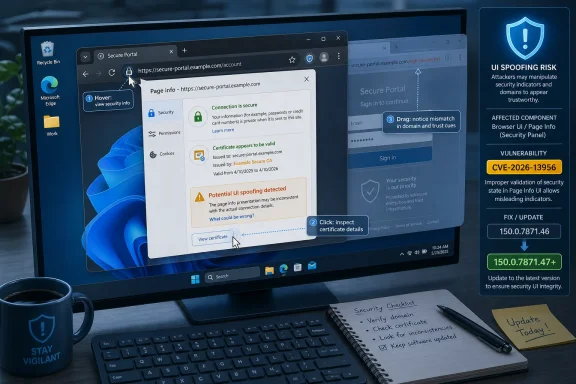
CVE-2026-13956 is described in the National Vulnerability Database entry as “Incorrect security UI in PageInfo,” affecting Google Chrome prior to 150.0.7871.47. The entry says a remote attacker could convince a user to perform specific UI gestures and then carry out UI spoofing through a crafted HTML page. CISA’s enrichment maps the issue to CWE-451, the weakness category for misrepresentation of critical information in a user interface.
That sounds abstract until you remember what PageInfo does. It is the small browser-controlled panel that appears when a user inspects the site identity and permissions area near the address bar. It is where Chrome exposes the status of HTTPS, site permissions, cookies, certificates, and related security cues.
Security professionals have spent years trying to move users away from blind trust in page content and toward browser-controlled signals. Do not trust the banner inside the page, we tell them. Trust the address bar. Trust the browser chrome. Trust the site information panel. CVE-2026-13956 cuts directly into that training model.
Google’s Chrome Releases post for the June 30 stable-channel update listed the fix as part of a much larger Chrome 150 security release. Malwarebytes, covering the same update, noted that the desktop release brought Chrome to 150.0.7871.46 or .47 on Windows and macOS and 150.0.7871.46 on Linux, with hundreds of security fixes included. In that crowd, a Medium UI bug can look minor. It is not.
But CVSS is often least satisfying when it scores attacks against human trust. A sandbox escape, a use-after-free, or an out-of-bounds write maps cleanly to technical impact. A spoofed browser security panel does not. It occupies the uncomfortable space between software vulnerability and social engineering, where the attacker’s payload is not code execution but credibility.
That credibility is valuable. Phishing campaigns already succeed with crude imitations of login portals, fake browser alerts, and copycat Microsoft 365 prompts. If an attacker can also influence the security UI that users are trained to regard as outside the page’s control, the deception becomes harder to explain and harder to detect.
This is why “user interaction required” should not lull administrators into indifference. Almost every successful phishing attack requires user interaction. The relevant question is not whether a user must do something; it is whether the interface nudges the user toward doing the wrong thing with confidence.
That makes it both useful and fragile. Users do not inspect certificate chains during a busy workday. They glance at the browser, look for familiar signals, and proceed. When the signal is wrong, the whole ritual becomes theater.
For enterprise IT, PageInfo also sits at the boundary between browser security and policy enforcement. Site permissions, clipboard access, camera and microphone prompts, location permissions, notification permissions, and identity cues all feed into the same user decision loop. A flaw in that loop is not just a consumer phishing concern; it can affect internal portals, SSO workflows, admin consoles, and help-desk-driven troubleshooting.
The vulnerability description does not say that CVE-2026-13956 enables credential theft directly. It does not need to. UI spoofing vulnerabilities are often enabling bugs: they make another attack more believable, another prompt more persuasive, or another malicious page feel safer than it is.
The broader release included far more severe classes of vulnerabilities, including memory-safety issues that security teams naturally prioritize. That is reasonable. Remote code execution, renderer compromise, and sandbox escape bugs are the kinds of issues that trigger emergency patching conversations.
Still, browser risk is cumulative. An attacker does not need every vulnerability in a release to be critical. A polished intrusion chain can combine a credibility bug, a permissions trick, a compromised site, a malicious extension lure, or a separate exploit in a way that makes each individual weakness look less dramatic than the final outcome.
Google’s usual restriction on bug details also shapes the early public understanding. The Chromium issue tracker entry referenced by NVD requires permission at the time of disclosure, which is normal for freshly patched browser vulnerabilities. That protects users while updates roll out, but it also means defenders must reason from sparse descriptions.
Microsoft Edge is the obvious first stop. Edge tracks Chromium but has its own versioning and release cadence. Microsoft’s Edge release notes and the Microsoft Update Catalog showed Edge version 150 updates landing around the same window in early July 2026, which means administrators should verify the installed Edge build rather than assuming Chromium fixes have arrived everywhere.
The same logic applies to managed browsers on virtual desktops, kiosk systems, point-of-sale workstations, and non-persistent images. Chrome’s auto-update mechanism is strong on consumer machines, but enterprise controls can delay updates intentionally or accidentally. A stale golden image can keep a fixed CVE alive long after the vendor has moved on.
WebView2 deserves special attention because many Windows applications embed web content without users thinking of them as browsers. If an app’s threat model includes untrusted or semi-trusted web content, the underlying runtime matters. Admins should inventory the runtime and update path, not merely the icon on the taskbar.
But the need for specific gestures also places the vulnerability squarely in the world of user manipulation. Attackers are good at gestures. They ask users to click, drag, allow, confirm, open, retry, refresh, sign in again, or “verify” something every day. Modern phishing pages are not static posters; they are interactive scripts.
That is the reason this CVE should be discussed in awareness training without overhyping it. The lesson is not “never trust PageInfo.” The lesson is that browser-controlled UI reduces risk but does not eliminate it, especially when attackers can choreograph the user’s path through a page.
For help desks, the best advice is to avoid instructing users to validate suspicious sites solely through a single browser cue. If a user reports a strange login flow, the response should involve checking the actual address, the expected application path, recent sign-in activity, and whether the browser is updated. A security panel is evidence, not a verdict.
So, are we missing a CPE here? Based on the NVD change history provided, the Chrome CPE was not absent after NIST’s July 2 analysis; it was added as
There is a separate question about downstream products. NVD’s CPE entry for Google Chrome does not automatically enumerate Microsoft Edge, Brave, Vivaldi, Opera, Electron, or every Chromium embedder. That omission is normal and often frustrating. CVE records for Chromium vulnerabilities frequently begin with Chrome as the source product, while downstream vendors publish their own advisories or silently incorporate the upstream fix.
That makes CPE data useful but incomplete. Vulnerability management tools that rely only on a Chrome CPE may miss Chromium-based exposure elsewhere. Conversely, tools that aggressively map every Chromium CVE to every Chromium-derived product can generate noisy findings unless they account for vendor patch status.
For individual users, the practical check remains Chrome’s About page. If Chrome reports that it is up to date and the version is at or beyond the fixed release, the browser has the relevant patch. For managed devices, administrators should verify reporting from Chrome Browser Cloud Management, endpoint management tools, software inventory, or whatever patch platform owns third-party application updates.
The harder part is restart compliance. Chrome can download an update and still run old code until the browser restarts. In enterprise environments where users keep sessions open for days, that gap is real. A policy that updates Chrome but never forces restarts is only half a patching program.
There is also a communication angle. Because CVE-2026-13956 involves UI spoofing rather than a crash or code execution primitive, users may not understand why a restart matters. The message should be simple: the update fixes a flaw in how Chrome displays security information, and the browser must restart before the fix is active.
Every one of those roles needs user interface that cannot be forged by the content it displays. That is a difficult engineering problem because the browser must render hostile pages inches away from trusted browser chrome. The attacker controls colors, layout, timing, focus, scroll behavior, animations, and user attention inside the page. The browser controls the frame, but the boundary is constantly being tested.
PageInfo is especially sensitive because it translates technical state into user confidence. If the HTTPS indicator is wrong, a permission state is visually confused, or the panel can be made to appear misleading in context, the user may make a security decision they would not otherwise make.
The industry has responded by simplifying security indicators, but simplification has trade-offs. Hide too much information and power users lose diagnostic tools. Show too much and ordinary users ignore it. Get the timing or placement wrong and attackers find ways to exploit the seam.
A good response starts with inventory. Which Chrome versions are installed? Which Edge versions are installed? Which systems are pinned to extended channels? Which VDI images, kiosks, lab machines, and shared workstations sit outside normal user-driven update flows? Those answers matter more than a generic “Chrome auto-updates” assumption.
The next step is policy review. Enterprises that defer browser updates for compatibility testing should ask whether the delay is measured in hours, days, or weeks. Browser compatibility issues are real, but the web-facing attack surface is too large for leisurely patch windows.
Finally, this CVE should prompt a check of user guidance. If internal security training still says “look for the lock icon” as a complete rule, it is overdue for revision. The better message is layered: verify the domain, use bookmarks or managed app portals for sensitive services, distrust unexpected login prompts, and keep the browser current.
That distinction matters for Windows users, enterprise administrators, and anyone who has trained people to “check the lock icon” before entering credentials. PageInfo is supposed to be the place where Chrome explains what a site is, what it can access, and whether the connection is protected. If that surface can be spoofed, even conditionally, the browser is not merely failing to block an attack; it is lending its authority to one.
 Chrome’s Lock Icon Problem Has Become a Security Problem
CVE-2026-13956 is described in the National Vulnerability Database entry as “Incorrect security UI in PageInfo,” affecting Google Chrome prior to 150.0.7871.47. The entry says a remote attacker could convince a user to perform specific UI gestures and then carry out UI spoofing through a crafted HTML page. CISA’s enrichment maps the issue to CWE-451, the weakness category for misrepresentation of critical information in a user interface.That sounds abstract until you remember what PageInfo does. It is the small browser-controlled panel that appears when a user inspects the site identity and permissions area near the address bar. It is where Chrome exposes the status of HTTPS, site permissions, cookies, certificates, and related security cues.
Security professionals have spent years trying to move users away from blind trust in page content and toward browser-controlled signals. Do not trust the banner inside the page, we tell them. Trust the address bar. Trust the browser chrome. Trust the site information panel. CVE-2026-13956 cuts directly into that training model.
Google’s Chrome Releases post for the June 30 stable-channel update listed the fix as part of a much larger Chrome 150 security release. Malwarebytes, covering the same update, noted that the desktop release brought Chrome to 150.0.7871.46 or .47 on Windows and macOS and 150.0.7871.46 on Linux, with hundreds of security fixes included. In that crowd, a Medium UI bug can look minor. It is not.
Medium Severity Does Not Mean Medium Trust Damage
The CISA-ADP CVSS 3.1 score for CVE-2026-13956 is 4.2, with attack complexity marked high and user interaction required. That explains the Medium rating. The attacker must get the user to a malicious or crafted page and then induce specific gestures, rather than simply firing a one-click exploit chain.But CVSS is often least satisfying when it scores attacks against human trust. A sandbox escape, a use-after-free, or an out-of-bounds write maps cleanly to technical impact. A spoofed browser security panel does not. It occupies the uncomfortable space between software vulnerability and social engineering, where the attacker’s payload is not code execution but credibility.
That credibility is valuable. Phishing campaigns already succeed with crude imitations of login portals, fake browser alerts, and copycat Microsoft 365 prompts. If an attacker can also influence the security UI that users are trained to regard as outside the page’s control, the deception becomes harder to explain and harder to detect.
This is why “user interaction required” should not lull administrators into indifference. Almost every successful phishing attack requires user interaction. The relevant question is not whether a user must do something; it is whether the interface nudges the user toward doing the wrong thing with confidence.
PageInfo Is a Small Panel Carrying an Oversized Burden
Browsers have slowly compressed the web’s trust model into smaller and smaller pieces of interface. The full certificate dialog is gone from the average user’s mental model. The lock icon itself has been de-emphasized because HTTPS is now the baseline rather than a special sign of legitimacy. PageInfo remains one of the few remaining places where the browser tries to explain security state in human terms.That makes it both useful and fragile. Users do not inspect certificate chains during a busy workday. They glance at the browser, look for familiar signals, and proceed. When the signal is wrong, the whole ritual becomes theater.
For enterprise IT, PageInfo also sits at the boundary between browser security and policy enforcement. Site permissions, clipboard access, camera and microphone prompts, location permissions, notification permissions, and identity cues all feed into the same user decision loop. A flaw in that loop is not just a consumer phishing concern; it can affect internal portals, SSO workflows, admin consoles, and help-desk-driven troubleshooting.
The vulnerability description does not say that CVE-2026-13956 enables credential theft directly. It does not need to. UI spoofing vulnerabilities are often enabling bugs: they make another attack more believable, another prompt more persuasive, or another malicious page feel safer than it is.
The June 30 Chrome Release Was Bigger Than One CVE
CVE-2026-13956 arrived inside an unusually large Chrome security update. Google’s stable-channel notice for desktop on June 30, 2026, pushed Chrome 150 to desktop users, and third-party coverage from Malwarebytes described the release as containing 382 security fixes. That volume makes individual CVEs easy to lose in the noise.The broader release included far more severe classes of vulnerabilities, including memory-safety issues that security teams naturally prioritize. That is reasonable. Remote code execution, renderer compromise, and sandbox escape bugs are the kinds of issues that trigger emergency patching conversations.
Still, browser risk is cumulative. An attacker does not need every vulnerability in a release to be critical. A polished intrusion chain can combine a credibility bug, a permissions trick, a compromised site, a malicious extension lure, or a separate exploit in a way that makes each individual weakness look less dramatic than the final outcome.
Google’s usual restriction on bug details also shapes the early public understanding. The Chromium issue tracker entry referenced by NVD requires permission at the time of disclosure, which is normal for freshly patched browser vulnerabilities. That protects users while updates roll out, but it also means defenders must reason from sparse descriptions.
Windows Shops Should Read “Chrome” as “Chromium Fleet”
For WindowsForum readers, the practical question is bigger than Google Chrome. Many Windows environments run a mix of Chrome, Microsoft Edge, Electron-based applications, WebView2-dependent business apps, and other Chromium-derived software. A Chrome CVE does not automatically mean every Chromium consumer is vulnerable in the same way, but it is a prompt to check the whole estate.Microsoft Edge is the obvious first stop. Edge tracks Chromium but has its own versioning and release cadence. Microsoft’s Edge release notes and the Microsoft Update Catalog showed Edge version 150 updates landing around the same window in early July 2026, which means administrators should verify the installed Edge build rather than assuming Chromium fixes have arrived everywhere.
The same logic applies to managed browsers on virtual desktops, kiosk systems, point-of-sale workstations, and non-persistent images. Chrome’s auto-update mechanism is strong on consumer machines, but enterprise controls can delay updates intentionally or accidentally. A stale golden image can keep a fixed CVE alive long after the vendor has moved on.
WebView2 deserves special attention because many Windows applications embed web content without users thinking of them as browsers. If an app’s threat model includes untrusted or semi-trusted web content, the underlying runtime matters. Admins should inventory the runtime and update path, not merely the icon on the taskbar.
The Attack Is Not Automatic, Which Is Exactly Why Training Matters
CISA’s SSVC enrichment reportedly marked exploitation as “none,” automatable as “no,” and technical impact as partial. That is reassuring in the narrow sense: this is not described as a wormable bug, and there is no public indication from the provided NVD data that exploitation is active in the wild.But the need for specific gestures also places the vulnerability squarely in the world of user manipulation. Attackers are good at gestures. They ask users to click, drag, allow, confirm, open, retry, refresh, sign in again, or “verify” something every day. Modern phishing pages are not static posters; they are interactive scripts.
That is the reason this CVE should be discussed in awareness training without overhyping it. The lesson is not “never trust PageInfo.” The lesson is that browser-controlled UI reduces risk but does not eliminate it, especially when attackers can choreograph the user’s path through a page.
For help desks, the best advice is to avoid instructing users to validate suspicious sites solely through a single browser cue. If a user reports a strange login flow, the response should involve checking the actual address, the expected application path, recent sign-in activity, and whether the browser is updated. A security panel is evidence, not a verdict.
NVD’s CPE Delay Is a Familiar but Annoying Part of the Process
The user-supplied NVD record shows exactly the kind of timing mismatch administrators see all the time. The CVE was received from Chrome on June 30, CISA-ADP enrichment followed later that day, and NIST initial analysis on July 2 added the affected CPE configuration for Google Chrome versions up to but excluding 150.0.7871.47.So, are we missing a CPE here? Based on the NVD change history provided, the Chrome CPE was not absent after NIST’s July 2 analysis; it was added as
cpe:2.3:a:google:chrome:*:*:*:*:*:*:*:* with versions up to but excluding 150.0.7871.47. If the NVD page still displayed a loading or placeholder message in the “Known Affected Software Configurations” section, that looks more like a presentation, caching, or page-loading issue than a confirmed absence of the CPE data.There is a separate question about downstream products. NVD’s CPE entry for Google Chrome does not automatically enumerate Microsoft Edge, Brave, Vivaldi, Opera, Electron, or every Chromium embedder. That omission is normal and often frustrating. CVE records for Chromium vulnerabilities frequently begin with Chrome as the source product, while downstream vendors publish their own advisories or silently incorporate the upstream fix.
That makes CPE data useful but incomplete. Vulnerability management tools that rely only on a Chrome CPE may miss Chromium-based exposure elsewhere. Conversely, tools that aggressively map every Chromium CVE to every Chromium-derived product can generate noisy findings unless they account for vendor patch status.
The Real Patch Policy Is Version Verification
The cleanest mitigation is boring: update Chrome to 150.0.7871.47 or later on platforms where that build applies. On Windows and macOS, the June 30 stable release moved users to 150.0.7871.46 or .47, with the CVE description setting 150.0.7871.47 as the fixed threshold. On Linux, Google’s release numbering may differ slightly, so administrators should follow the vendor channel and distribution packaging metadata rather than assuming Windows build numbers map perfectly.For individual users, the practical check remains Chrome’s About page. If Chrome reports that it is up to date and the version is at or beyond the fixed release, the browser has the relevant patch. For managed devices, administrators should verify reporting from Chrome Browser Cloud Management, endpoint management tools, software inventory, or whatever patch platform owns third-party application updates.
The harder part is restart compliance. Chrome can download an update and still run old code until the browser restarts. In enterprise environments where users keep sessions open for days, that gap is real. A policy that updates Chrome but never forces restarts is only half a patching program.
There is also a communication angle. Because CVE-2026-13956 involves UI spoofing rather than a crash or code execution primitive, users may not understand why a restart matters. The message should be simple: the update fixes a flaw in how Chrome displays security information, and the browser must restart before the fix is active.
Security UI Bugs Keep Reappearing Because Browsers Are Now Operating Systems
The recurring presence of “incorrect security UI” bugs in Chromium is not an indictment of one sloppy panel. It is a symptom of what browsers have become. Chrome is a permissions broker, identity surface, app runtime, password manager, notification hub, document viewer, video stack, WebUSB gatekeeper, and enterprise policy endpoint.Every one of those roles needs user interface that cannot be forged by the content it displays. That is a difficult engineering problem because the browser must render hostile pages inches away from trusted browser chrome. The attacker controls colors, layout, timing, focus, scroll behavior, animations, and user attention inside the page. The browser controls the frame, but the boundary is constantly being tested.
PageInfo is especially sensitive because it translates technical state into user confidence. If the HTTPS indicator is wrong, a permission state is visually confused, or the panel can be made to appear misleading in context, the user may make a security decision they would not otherwise make.
The industry has responded by simplifying security indicators, but simplification has trade-offs. Hide too much information and power users lose diagnostic tools. Show too much and ordinary users ignore it. Get the timing or placement wrong and attackers find ways to exploit the seam.
Administrators Should Treat This as a Browser Trust Drill
CVE-2026-13956 is a useful test of whether an organization can handle a medium-severity browser issue without either panic or neglect. It does not justify emergency theatrics on the level of an actively exploited zero-day. It does justify quick validation that Chrome and Chromium-derived browsers are actually updating across the fleet.A good response starts with inventory. Which Chrome versions are installed? Which Edge versions are installed? Which systems are pinned to extended channels? Which VDI images, kiosks, lab machines, and shared workstations sit outside normal user-driven update flows? Those answers matter more than a generic “Chrome auto-updates” assumption.
The next step is policy review. Enterprises that defer browser updates for compatibility testing should ask whether the delay is measured in hours, days, or weeks. Browser compatibility issues are real, but the web-facing attack surface is too large for leisurely patch windows.
Finally, this CVE should prompt a check of user guidance. If internal security training still says “look for the lock icon” as a complete rule, it is overdue for revision. The better message is layered: verify the domain, use bookmarks or managed app portals for sensitive services, distrust unexpected login prompts, and keep the browser current.
The Lesson Hiding in Chrome 150’s Fine Print
CVE-2026-13956 is not the biggest bug in Chrome 150, but it is one of the more revealing ones because it shows how much modern security depends on users believing the browser’s own interface.- Chrome versions before 150.0.7871.47 are listed as affected by CVE-2026-13956, an incorrect PageInfo security UI flaw.
- The vulnerability requires user interaction and specific gestures, which lowers exploitability but aligns naturally with phishing-style attack patterns.
- NIST added the Google Chrome CPE configuration on July 2, 2026, so a missing CPE display on the NVD page is likely a page or enrichment timing artifact rather than proof that the data does not exist.
- Windows administrators should verify Chrome, Edge, WebView2, and Chromium-based application update paths instead of treating “Chrome patched” as the end of the issue.
- The most practical mitigation is to update and restart the browser, then confirm the installed version through managed inventory or the browser’s About page.
- User training should stop treating any single browser indicator as a magic trust seal and instead reinforce domain verification, expected login paths, and prompt skepticism.
References
- Primary source: NVD / Chromium
Published: 2026-07-03T07:00:01-07:00
NVD - CVE-2026-13956
 nvd.nist.gov
- Security advisory: MSRC
Published: 2026-07-03T07:00:01-07:00
Original feed URL
Security Update Guide - Microsoft Security Response Center
 msrc.microsoft.com
- Related coverage: cvefeed.io
CVE-2026-13956 - Google Chrome: UI Spoofing via PageInfo Security UI Vulnerability
Incorrect security UI in PageInfo in Google Chrome prior to 150.0.7871.47 allowed a remote attacker who convinced a user to engage in specific UI gestures to perform UI spoofing via a crafted HTML page. (Chromium security severity: Medium)cvefeed.io - Related coverage: malwarebytes.com
Chrome needs another whopper update to fix 382 security bugs | Malwarebytes
Google released a huge update of 382 security fixes, 15 of which were rated as critical. So, it's time to update againwww.malwarebytes.com - Related coverage: vuldb.com
CVE-2026-13956 Google Chrome PageInfo escalationi di privilegi (ID 513515)
Una vulnerabilità è stata trovata in Google Chrome. Questo punto di criticità è identificato come CVE-2026-13956. Si raccomanda di procedere con l’aggiornamento del componente interessato.vuldb.com - Related coverage: radar.offseq.com
CVE-2026-14126: Incorrect security UI in Google Chrome - Live Threat Intelligence - Threat Radar | OffSeq.com
Detailed information about CVE-2026-14126: Incorrect security UI in Google Chrome affecting Google Chrome. Get real-time updates, technical details, and mitigatradar.offseq.com
- Related coverage: sqmagazine.co.uk
Chrome 150 Patches 382 Security Fixes, With 15 Critical Ones
Google's Chrome 150 stable release fixes 382 security bugs, including 15 Critical use-after-free flaws. Here's what changed and how to update now.sqmagazine.co.uk - Related coverage: techradar.com
Update Chrome now — Google patches new zero-day flaw already being exploited | TechRadar
A new bug could allow crooks to execute arbitrary code in Chromewww.techradar.com - Official source: learn.microsoft.com
Release notes for Microsoft Edge Security Updates | Microsoft Learn
Release notes for Microsoft Edge Security Updateslearn.microsoft.com - Related coverage: cyber.gc.ca
Microsoft Edge security advisory (AV26-622) - Canadian Centre for Cyber Security
Microsoft Edge security advisory (AV26-622)www.cyber.gc.ca
