

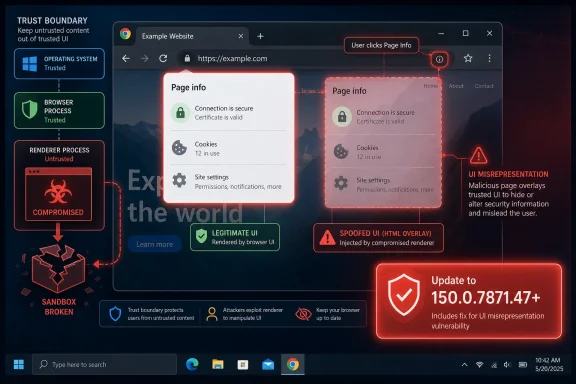
Google Chrome before 150.0.7871.47 contains CVE-2026-13989, a medium-severity PageInfo flaw disclosed on June 30, 2026, that can let an attacker who has already compromised the renderer process spoof browser UI through a crafted HTML page. That dry description hides the real story: this is not a “click this and get owned” bug, but a trust-boundary failure in the part of Chrome users are trained to believe. As documented by NVD, CISA-ADP, and Google’s Chrome Releases blog, the fix landed with Chrome 150.0.7871.46/.47 for desktop. For Windows users and admins, the practical answer is simple: if Chrome is below 150.0.7871.47, treat it as vulnerable and update.
PageInfo is not glamorous browser plumbing. It is the little identity-and-permissions surface users reach when they click the icon near the address bar to inspect connection security, site permissions, cookies, certificates, and related state. In a modern browser, that UI is supposed to sit on the user’s side of the glass, not the website’s.
CVE-2026-13989 matters because it lives precisely at that boundary. The vulnerability description says a remote attacker needed a compromised renderer process first, which means this was not a standalone browser escape. But once that condition existed, the attacker could use crafted HTML to perform UI spoofing against PageInfo — a weakness categorized by CISA-ADP as CWE-451, “User Interface Misrepresentation of Critical Information.”
That distinction is the key to understanding the risk. Chrome’s multiprocess architecture assumes that web content is hostile and sandboxes renderers accordingly. PageInfo belongs to the browser’s trusted interface, and when that interface can be misrepresented, the attacker is not merely tricking a page; the attacker is borrowing the browser’s credibility.
This is why “medium severity” should not be read as “irrelevant.” The score is lower because exploitation requires user interaction and a prior renderer compromise. The security significance is higher because the flaw touches the human part of the security model — the moment when a user or admin checks what the browser is telling them and decides whether to proceed.
That difference is not just bureaucratic noise. It reflects the hardest part of scoring browser UI flaws: how much weight should be assigned to the prerequisite condition? If the attacker must already compromise a renderer, NVD’s higher attack-complexity reading makes sense. If the scoring model focuses on what the crafted page can do once that condition exists, CISA’s lower-complexity view also has logic.
For defenders, the distinction is less important than the shared conclusion. Both scores land in the medium range, both identify user interaction as required, and both treat the integrity impact as the meaningful consequence. In plain English: this bug is about making the browser lie convincingly enough to change what the user does next.
The absence of known exploitation in CISA-ADP’s SSVC assessment is reassuring but not exculpatory. “No exploitation” is a snapshot, not a guarantee. Browser attackers chain bugs, and a UI spoofing issue becomes more interesting when paired with a renderer compromise, a malicious extension, a watering-hole page, or a targeted social-engineering campaign.
Users do not parse TLS handshakes, permission grants, certificate paths, and site storage in raw form. They rely on the browser to compress that complexity into an interface they can understand. If that interface can be spoofed after renderer compromise, the attacker gains a way to launder untrusted content through a trusted-looking surface.
The integrity impact in the CVSS vector captures this better than the severity label does. A successful attack would not necessarily steal data directly or crash the browser. Instead, it could manipulate the user’s perception of site identity, permission state, or security posture, which may then lead to credential entry, permission approval, or acceptance of a malicious workflow.
That is why UI vulnerabilities age badly in enterprise environments. A single spoofing primitive can become part of a larger playbook: compromise a renderer, present a convincing browser-controlled surface, nudge the user to approve a permission or trust a page, then pivot into account compromise or data exposure. The individual bug is medium; the chain can be much worse.
That scale matters for patch triage. CVE-2026-13989 is not the only reason to move to Chrome 150.0.7871.47, and in many environments it may not even be the most urgent reason. But it is a useful example of why Chrome point releases should be treated as security events, not merely feature churn.
The affected-version line is clean enough for administrators: Chrome versions before 150.0.7871.47 are vulnerable for this CVE. NVD’s configuration entry lists Google Chrome versions up to, but excluding, 150.0.7871.47. That is the CPE answer buried inside the page: the relevant vulnerable configuration is the standard Google Chrome application CPE with a version range below 150.0.7871.47.
The “Are we missing a CPE?” prompt on NVD pages is easy to misread. It does not necessarily mean a CPE is absent; it is a standard feedback invitation shown around affected configuration data. In this case, NVD’s change history says a CPE configuration was added on July 1, 2026, for Google Chrome versions up to but excluding 150.0.7871.47.
That does not mean every Chromium browser is automatically vulnerable in the same way at the same time. Vendor integration matters, and some code paths may differ. But PageInfo-like UI surfaces and renderer/browser trust boundaries are central to Chromium’s design, so admins should not stop at “Chrome is patched” if Edge or another Chromium browser is the default in their organization.
For WindowsForum readers, the practical inventory question is straightforward: which executable is actually handling web links, embedded authentication flows, SaaS admin consoles, and privileged portals? If users log into Microsoft 365, identity providers, remote management tools, or financial systems through a Chromium browser, that browser belongs in the patch window.
Microsoft Edge deserves special attention because many Windows environments standardize on it through Group Policy, Intune, or Microsoft 365 management. Even when Chrome is patched quickly by Google Update, Edge’s equivalent Chromium fixes arrive through Microsoft’s release pipeline. The right operational answer is not brand loyalty; it is version verification across the browsers users actually run.
But modern browser exploitation often works exactly that way. A renderer bug gives code execution or control inside the sandbox; a second bug helps escape, persist, mislead, or escalate. UI spoofing is not a classic sandbox escape, but it can serve a parallel purpose: it turns technical compromise into user-driven compromise.
This is particularly relevant in phishing-resistant environments. Passkeys, conditional access, device compliance checks, and browser security prompts all push attackers toward more elaborate interaction tricks. A flaw in a trusted browser UI component gives attackers a way to make those tricks feel native.
The “user interaction required” part of the vector also needs careful reading. Most browser attacks require some user interaction in the ordinary sense that the user visits a page. That does not mean the victim must perform an obviously reckless act. If a crafted page can manipulate trusted-looking UI after a renderer compromise, the interaction could be as mundane as clicking through what appears to be a legitimate browser control.
The more useful question is whether your tools are ingesting that CPE correctly. Vulnerability scanners, SBOM systems, endpoint management platforms, and patch dashboards do not always normalize browser versions cleanly. Chrome can be installed system-wide or per-user, can exist under stale profiles, and can be present alongside Edge or other Chromium browsers.
This is where a CVE page’s neat version range meets the mess of Windows endpoints. A device may report Chrome as updated while a dormant user profile still contains an older binary. A VDI image may be patched while nonpersistent clones lag. A server used for admin browsing may be excluded from ordinary desktop update rings.
CPE matching also does not solve Chromium derivatives. A scanner may flag only Google Chrome even though another installed Chromium browser includes the vulnerable code path until its vendor ships a corresponding fix. Conversely, it may overreport based on Chromium lineage without confirming whether the vulnerable component is present. Either failure mode is common enough that admins should validate with actual product version checks.
PageInfo sits near the workflows that govern site trust. Users check whether a connection is secure, whether a site has camera or microphone access, whether notifications are enabled, whether a certificate looks legitimate, or whether a permission was granted. In consumer browsing, that may be a privacy concern. In enterprise browsing, it can become an access-control concern.
The rise of browser-based administration makes this more acute. Cloud consoles, endpoint management portals, CI/CD dashboards, payroll systems, CRM platforms, and privileged identity tools all live in the browser. If the browser’s own interface can be made to misrepresent critical information, the blast radius extends beyond the tab.
Security teams should avoid overdramatizing this CVE, but they should also avoid reducing it to a score. Medium browser UI bugs are the connective tissue of attack chains. They rarely dominate incident reports, but they can make the difference between a blocked attack and a user doing exactly what the attacker needs.
The bigger behavioral lesson is not to treat browser chrome as magical. Attackers have spent years imitating address bars, permission prompts, login dialogs, file pickers, and “secure site” indicators. CVE-2026-13989 is notable because it involves PageInfo itself after renderer compromise, but the general tactic is older than Chrome.
Users should be skeptical when a website seems to steer them toward interpreting browser security state in a particular way. A site that tells you to click a lock icon, grant a permission, ignore a warning, install an extension, or re-enter credentials deserves scrutiny. Browser UI exists to inform the user, not to complete a website’s script.
The strongest user defense remains boring: update quickly, restart the browser, remove unused extensions, and avoid running multiple outdated Chromium browsers. Browser restarts are particularly important because many updates download silently but do not take effect until the process exits.
Google’s enterprise documentation has long distinguished Stable, Extended Stable, Beta, Dev, and Canary channels, with Stable intended for most workers and Extended Stable offering a slower feature cadence for organizations that need more predictability. That tradeoff is real. Faster channels reduce exposure to newly fixed vulnerabilities; slower channels reduce compatibility churn.
CVE-2026-13989 is a good case study because it was fixed inside a broad security release rather than as a standalone emergency patch. Organizations that defer browser updates for weeks may not think they are accepting a specific UI-spoofing risk. In practice, they are accumulating dozens or hundreds of browser fixes at once, many of which will never receive dramatic headlines.
The best enterprise posture is staged speed. Pilot the update quickly, watch for breakage in critical web apps, then push broadly. If a compatibility issue appears, isolate it rather than freezing the entire fleet. Browsers are too exposed, too central, and too frequently targeted to sit in the same patch lane as ordinary desktop utilities.
Security advisories often reveal only what defenders need immediately: affected versions, fixed versions, severity, component, and broad impact. Here, those details are enough to act. The vulnerable component is PageInfo, the impact is UI spoofing, the precondition is renderer compromise, and the fixed Chrome version threshold is 150.0.7871.47.
There is also no public indication from the NVD and CISA-ADP data provided that CVE-2026-13989 is being actively exploited. That is useful context, but it is not a reason to wait. Browser fixes are most valuable before exploit chains are commoditized, not after.
The opacity also makes responsible commentary harder. Without exploit mechanics, we should not invent scenarios that imply capabilities the bug may not have had. The sober reading is enough: a trusted browser UI component could be misrepresented after renderer compromise, and Google fixed it in Chrome 150.
The useful takeaways are concrete:
 The Browser’s Smallest Trust Signal Becomes the Story
PageInfo is not glamorous browser plumbing. It is the little identity-and-permissions surface users reach when they click the icon near the address bar to inspect connection security, site permissions, cookies, certificates, and related state. In a modern browser, that UI is supposed to sit on the user’s side of the glass, not the website’s.CVE-2026-13989 matters because it lives precisely at that boundary. The vulnerability description says a remote attacker needed a compromised renderer process first, which means this was not a standalone browser escape. But once that condition existed, the attacker could use crafted HTML to perform UI spoofing against PageInfo — a weakness categorized by CISA-ADP as CWE-451, “User Interface Misrepresentation of Critical Information.”
That distinction is the key to understanding the risk. Chrome’s multiprocess architecture assumes that web content is hostile and sandboxes renderers accordingly. PageInfo belongs to the browser’s trusted interface, and when that interface can be misrepresented, the attacker is not merely tricking a page; the attacker is borrowing the browser’s credibility.
This is why “medium severity” should not be read as “irrelevant.” The score is lower because exploitation requires user interaction and a prior renderer compromise. The security significance is higher because the flaw touches the human part of the security model — the moment when a user or admin checks what the browser is telling them and decides whether to proceed.
The CVSS Split Says More About Assumptions Than Impact
NVD gave CVE-2026-13989 a CVSS 3.1 base score of 5.3, rating attack complexity as high. CISA-ADP scored the same vulnerability at 6.5, rating attack complexity as low. Both describe a network-accessible issue requiring no privileges and user interaction, with no confidentiality or availability impact but high integrity impact.That difference is not just bureaucratic noise. It reflects the hardest part of scoring browser UI flaws: how much weight should be assigned to the prerequisite condition? If the attacker must already compromise a renderer, NVD’s higher attack-complexity reading makes sense. If the scoring model focuses on what the crafted page can do once that condition exists, CISA’s lower-complexity view also has logic.
For defenders, the distinction is less important than the shared conclusion. Both scores land in the medium range, both identify user interaction as required, and both treat the integrity impact as the meaningful consequence. In plain English: this bug is about making the browser lie convincingly enough to change what the user does next.
The absence of known exploitation in CISA-ADP’s SSVC assessment is reassuring but not exculpatory. “No exploitation” is a snapshot, not a guarantee. Browser attackers chain bugs, and a UI spoofing issue becomes more interesting when paired with a renderer compromise, a malicious extension, a watering-hole page, or a targeted social-engineering campaign.
PageInfo Is a Security Boundary Even When Vendors Avoid That Phrase
Browser vendors are often careful about what they call a formal security boundary. That caution is understandable: not every confusing UI state is a vulnerability, and not every spoofed prompt is a sandbox escape. But PageInfo occupies a practical trust boundary whether or not the phrase appears in the advisory.Users do not parse TLS handshakes, permission grants, certificate paths, and site storage in raw form. They rely on the browser to compress that complexity into an interface they can understand. If that interface can be spoofed after renderer compromise, the attacker gains a way to launder untrusted content through a trusted-looking surface.
The integrity impact in the CVSS vector captures this better than the severity label does. A successful attack would not necessarily steal data directly or crash the browser. Instead, it could manipulate the user’s perception of site identity, permission state, or security posture, which may then lead to credential entry, permission approval, or acceptance of a malicious workflow.
That is why UI vulnerabilities age badly in enterprise environments. A single spoofing primitive can become part of a larger playbook: compromise a renderer, present a convincing browser-controlled surface, nudge the user to approve a permission or trust a page, then pivot into account compromise or data exposure. The individual bug is medium; the chain can be much worse.
The Patch Landed Inside a Much Larger Chrome 150 Security Drop
Google’s Chrome Releases blog announced the Stable Channel update for desktop on June 30, 2026, moving Windows and macOS to 150.0.7871.46/.47 and Linux to 150.0.7871.46. Third-party reporting from PCWorld and Born’s IT and Windows Blog characterized the release as unusually large, with hundreds of security fixes across the Chrome 150 update.That scale matters for patch triage. CVE-2026-13989 is not the only reason to move to Chrome 150.0.7871.47, and in many environments it may not even be the most urgent reason. But it is a useful example of why Chrome point releases should be treated as security events, not merely feature churn.
The affected-version line is clean enough for administrators: Chrome versions before 150.0.7871.47 are vulnerable for this CVE. NVD’s configuration entry lists Google Chrome versions up to, but excluding, 150.0.7871.47. That is the CPE answer buried inside the page: the relevant vulnerable configuration is the standard Google Chrome application CPE with a version range below 150.0.7871.47.
The “Are we missing a CPE?” prompt on NVD pages is easy to misread. It does not necessarily mean a CPE is absent; it is a standard feedback invitation shown around affected configuration data. In this case, NVD’s change history says a CPE configuration was added on July 1, 2026, for Google Chrome versions up to but excluding 150.0.7871.47.
The Windows Angle Is Broader Than Google Chrome
Windows users often experience Chromium security through Chrome first, but Chrome is not the whole Chromium ecosystem. Microsoft Edge, Brave, Vivaldi, Opera, and other Chromium-derived browsers consume Chromium fixes on their own schedules and package them with their own versioning, policy, and release channels. A Chrome CVE is therefore both a Google patch note and a signal to check every Chromium-based browser in the fleet.That does not mean every Chromium browser is automatically vulnerable in the same way at the same time. Vendor integration matters, and some code paths may differ. But PageInfo-like UI surfaces and renderer/browser trust boundaries are central to Chromium’s design, so admins should not stop at “Chrome is patched” if Edge or another Chromium browser is the default in their organization.
For WindowsForum readers, the practical inventory question is straightforward: which executable is actually handling web links, embedded authentication flows, SaaS admin consoles, and privileged portals? If users log into Microsoft 365, identity providers, remote management tools, or financial systems through a Chromium browser, that browser belongs in the patch window.
Microsoft Edge deserves special attention because many Windows environments standardize on it through Group Policy, Intune, or Microsoft 365 management. Even when Chrome is patched quickly by Google Update, Edge’s equivalent Chromium fixes arrive through Microsoft’s release pipeline. The right operational answer is not brand loyalty; it is version verification across the browsers users actually run.
“Renderer Compromise Required” Is a Condition, Not a Comfort Blanket
The most tempting phrase in the advisory is “who had compromised the renderer process.” It makes the vulnerability sound like a second-stage issue, and in a narrow technical sense, that is correct. An attacker needs another foothold before CVE-2026-13989 becomes useful.But modern browser exploitation often works exactly that way. A renderer bug gives code execution or control inside the sandbox; a second bug helps escape, persist, mislead, or escalate. UI spoofing is not a classic sandbox escape, but it can serve a parallel purpose: it turns technical compromise into user-driven compromise.
This is particularly relevant in phishing-resistant environments. Passkeys, conditional access, device compliance checks, and browser security prompts all push attackers toward more elaborate interaction tricks. A flaw in a trusted browser UI component gives attackers a way to make those tricks feel native.
The “user interaction required” part of the vector also needs careful reading. Most browser attacks require some user interaction in the ordinary sense that the user visits a page. That does not mean the victim must perform an obviously reckless act. If a crafted page can manipulate trusted-looking UI after a renderer compromise, the interaction could be as mundane as clicking through what appears to be a legitimate browser control.
The CPE Question Is Really an Asset-Management Question
The user-facing CVE entry now contains the expected vulnerable software configuration for Google Chrome below 150.0.7871.47. If you are asking whether the entry is “missing a CPE,” the answer appears to be no for mainstream Google Chrome: NVD added the Chrome CPE range during its initial analysis on July 1, 2026.The more useful question is whether your tools are ingesting that CPE correctly. Vulnerability scanners, SBOM systems, endpoint management platforms, and patch dashboards do not always normalize browser versions cleanly. Chrome can be installed system-wide or per-user, can exist under stale profiles, and can be present alongside Edge or other Chromium browsers.
This is where a CVE page’s neat version range meets the mess of Windows endpoints. A device may report Chrome as updated while a dormant user profile still contains an older binary. A VDI image may be patched while nonpersistent clones lag. A server used for admin browsing may be excluded from ordinary desktop update rings.
CPE matching also does not solve Chromium derivatives. A scanner may flag only Google Chrome even though another installed Chromium browser includes the vulnerable code path until its vendor ships a corresponding fix. Conversely, it may overreport based on Chromium lineage without confirming whether the vulnerable component is present. Either failure mode is common enough that admins should validate with actual product version checks.
Enterprises Should Treat Browser UI Bugs as Identity-Risk Bugs
The enterprise impact of CVE-2026-13989 is not measured by whether it drops ransomware by itself. It is measured by whether it can help an attacker manipulate a user at the exact point where browser trust decisions intersect with identity, permissions, and sensitive applications.PageInfo sits near the workflows that govern site trust. Users check whether a connection is secure, whether a site has camera or microphone access, whether notifications are enabled, whether a certificate looks legitimate, or whether a permission was granted. In consumer browsing, that may be a privacy concern. In enterprise browsing, it can become an access-control concern.
The rise of browser-based administration makes this more acute. Cloud consoles, endpoint management portals, CI/CD dashboards, payroll systems, CRM platforms, and privileged identity tools all live in the browser. If the browser’s own interface can be made to misrepresent critical information, the blast radius extends beyond the tab.
Security teams should avoid overdramatizing this CVE, but they should also avoid reducing it to a score. Medium browser UI bugs are the connective tissue of attack chains. They rarely dominate incident reports, but they can make the difference between a blocked attack and a user doing exactly what the attacker needs.
Home Users Get the Same Advice, With Less Ceremony
For individual Windows users, the fix is refreshingly uncomplicated. Open Chrome’s menu, go to Help, choose About Google Chrome, and let the browser update. Relaunch when prompted. If the version is 150.0.7871.47 or later on Windows or macOS, this specific CVE is addressed according to the published affected-version range.The bigger behavioral lesson is not to treat browser chrome as magical. Attackers have spent years imitating address bars, permission prompts, login dialogs, file pickers, and “secure site” indicators. CVE-2026-13989 is notable because it involves PageInfo itself after renderer compromise, but the general tactic is older than Chrome.
Users should be skeptical when a website seems to steer them toward interpreting browser security state in a particular way. A site that tells you to click a lock icon, grant a permission, ignore a warning, install an extension, or re-enter credentials deserves scrutiny. Browser UI exists to inform the user, not to complete a website’s script.
The strongest user defense remains boring: update quickly, restart the browser, remove unused extensions, and avoid running multiple outdated Chromium browsers. Browser restarts are particularly important because many updates download silently but do not take effect until the process exits.
Patch Cadence Is Now Part of Browser Security, Not IT Housekeeping
Chrome’s rapid release model has trained many users to ignore version numbers. That is understandable; browser updates arrive constantly, and most are uneventful from the user’s perspective. But for administrators, the cadence is now a security control in its own right.Google’s enterprise documentation has long distinguished Stable, Extended Stable, Beta, Dev, and Canary channels, with Stable intended for most workers and Extended Stable offering a slower feature cadence for organizations that need more predictability. That tradeoff is real. Faster channels reduce exposure to newly fixed vulnerabilities; slower channels reduce compatibility churn.
CVE-2026-13989 is a good case study because it was fixed inside a broad security release rather than as a standalone emergency patch. Organizations that defer browser updates for weeks may not think they are accepting a specific UI-spoofing risk. In practice, they are accumulating dozens or hundreds of browser fixes at once, many of which will never receive dramatic headlines.
The best enterprise posture is staged speed. Pilot the update quickly, watch for breakage in critical web apps, then push broadly. If a compatibility issue appears, isolate it rather than freezing the entire fleet. Browsers are too exposed, too central, and too frequently targeted to sit in the same patch lane as ordinary desktop utilities.
The June 30 Advisory Leaves Some Details Intentionally Opaque
Google’s public bug entry for CVE-2026-13989 is permission-restricted, which is typical for vulnerabilities where exploit details are withheld to protect users during the update window. That means the public record does not yet provide a proof-of-concept, affected code diff, or precise UI behavior. The lack of detail should not be mistaken for lack of substance.Security advisories often reveal only what defenders need immediately: affected versions, fixed versions, severity, component, and broad impact. Here, those details are enough to act. The vulnerable component is PageInfo, the impact is UI spoofing, the precondition is renderer compromise, and the fixed Chrome version threshold is 150.0.7871.47.
There is also no public indication from the NVD and CISA-ADP data provided that CVE-2026-13989 is being actively exploited. That is useful context, but it is not a reason to wait. Browser fixes are most valuable before exploit chains are commoditized, not after.
The opacity also makes responsible commentary harder. Without exploit mechanics, we should not invent scenarios that imply capabilities the bug may not have had. The sober reading is enough: a trusted browser UI component could be misrepresented after renderer compromise, and Google fixed it in Chrome 150.
The Real Fix Is Version Discipline, Not Vulnerability Theater
This CVE is easy to overstate and easy to understate. It is not a self-contained remote code execution bug, and there is no public evidence in the available advisory data that it is being exploited in the wild. It is also not just a cosmetic glitch, because browser UI spoofing targets the decision layer that security tools often assume belongs to the user.The useful takeaways are concrete:
- Chrome users on Windows and macOS should be on 150.0.7871.47 or later to address CVE-2026-13989.
- NVD’s change history indicates the Google Chrome CPE range was added for versions up to, but excluding, 150.0.7871.47.
- The vulnerability requires a compromised renderer process, so it is best understood as a chainable browser-security weakness rather than a standalone drive-by exploit.
- CISA-ADP mapped the issue to CWE-451, which underscores that the core problem is misrepresentation of critical UI information.
- Administrators should verify all Chromium-based browsers in their environment, not just Google Chrome, because Chromium fixes move through vendor-specific release pipelines.
- Patch dashboards should be checked against actual installed browser versions, including per-user installs and dormant endpoint images.
References
- Primary source: NVD / Chromium
Published: 2026-07-03T07:00:43-07:00
NVD - CVE-2026-13989
 nvd.nist.gov
- Security advisory: MSRC
Published: 2026-07-03T07:00:43-07:00
Original feed URL
Security Update Guide - Microsoft Security Response Center
 msrc.microsoft.com
- Related coverage: cvefeed.io
CVE-2026-13989 - Google Chrome UI Spoofing Vulnerability
Inappropriate implementation in PageInfo in Google Chrome prior to 150.0.7871.47 allowed a remote attacker who had compromised the renderer process to perform UI spoofing via a crafted HTML page. (Chromium security severity: Medium)cvefeed.io