

Google Chrome before version 150.0.7871.47 contains CVE-2026-13978, a medium-severity PageInfo policy-enforcement flaw disclosed on June 30, 2026, that can let a remote attacker spoof browser UI through a crafted HTML page when user interaction is involved. The bug is not a memory-corruption barn burner, and CISA’s enrichment says exploitation is not currently observed. But it lands in one of the browser’s most trust-sensitive surfaces: the place users consult when deciding whether a page, permission, certificate, or origin is what it claims to be. That makes this a small Chrome patch with a larger lesson for Windows users and administrators: browser security is increasingly about defending perception, not just preventing code execution.
The basic facts are straightforward. The National Vulnerability Database lists CVE-2026-13978 as “insufficient policy enforcement in PageInfo” in Google Chrome prior to 150.0.7871.47, allowing UI spoofing via a crafted HTML page. Google’s Chrome Releases blog tied the fix to the late-June Stable Channel update for desktop, while the Chromium issue tracker entry remains permission-gated, as is common for recently fixed browser bugs.
That lack of public technical detail should not be mistaken for lack of importance. Chrome’s PageInfo surface is the user-facing trust panel reached from the browser’s address bar area, the interface that tells users about site identity, connection state, cookies, permissions, and related security context. If a web page can manipulate or confuse what a user believes that surface is saying, the attack is not aimed at the CPU first. It is aimed at the human.
CISA’s ADP enrichment gives the vulnerability a CVSS 3.1 score of 4.3, with network attack vector, low attack complexity, no privileges required, and required user interaction. The impact is limited to integrity, not confidentiality or availability, which is why this is not being treated as a critical emergency. But “integrity” is exactly the right word: the risk is that the user’s interpretation of browser truth can be bent.
That is why this CVE deserves attention despite the medium label. A spoofed security surface does not need to dump memory, escape a sandbox, or install malware to matter. It only needs to make a user click, approve, trust, or ignore something they otherwise would not.
PageInfo matters because it is one of the few places where that bargain becomes visible. Users are told to check whether a connection is secure, whether a permission was granted, whether a site is allowed to access the camera, and whether cookies or trackers are present. Enterprises build user training around those affordances, and help desks often tell users to inspect exactly those browser-level signals when something looks suspicious.
A PageInfo spoofing bug therefore does not attack an obscure corner of the UI. It attacks a ritual. The user notices something odd, checks the browser’s trusted indicator, and may receive a manipulated impression. That is a different class of failure from a normal phishing page because the attack leans on the user doing the supposedly safer thing.
This is where medium-severity UI bugs become uncomfortable. They rarely produce dramatic proof-of-concept videos unless chained with another flaw, and they often require a precise gesture or crafted page state. Yet they erode a boundary that security teams rely on every day: the boundary between content and browser.
That score is useful for triage. It tells patch teams not to treat this as equivalent to a zero-day renderer escape or a V8 arbitrary-code-execution bug. It also tells exploit analysts that this is not, based on public data, an automated wormable condition. CISA’s SSVC enrichment says exploitation is “none,” the attack is not automatable, and the technical impact is partial.
But CVSS has always struggled with trust-interface bugs because their impact depends heavily on the campaign around them. A UI spoofing flaw can be nearly irrelevant on its own and quite powerful when paired with a credential-harvesting site, a fake enterprise login flow, a malicious OAuth consent sequence, or a social-engineering script that walks the victim through “verifying” the page. The vulnerability may only move one pixel in the chain, but that pixel can be the one that converts suspicion into compliance.
Security teams should therefore read the score as a patching priority, not a dismissal. Medium means “schedule this,” not “ignore this.” In a browser fleet, especially one used for administrative consoles, identity providers, SaaS dashboards, and remote management portals, UI integrity is part of the control plane.
That chronology is typical of the modern Chrome security pipeline. Google ships the browser update, CVE metadata lands, CISA or another enrichment source supplies CVSS and CWE context, and NVD catches up with CPE mappings. For defenders, the practical order is almost always vendor advisory first, vulnerability database second, scanner normalization third.
This is particularly important here because Chrome versioning can be confusing. The NVD affected configuration says Google Chrome versions up to, but excluding, 150.0.7871.47 are vulnerable. The vendor advisory language around desktop builds may include slightly different terminal build numbers by platform. Administrators should not try to reason from memory; they should verify the installed build on each platform and rely on the fixed-channel version available for that operating system.
The issue also arrived alongside a broader wave of Chrome 150 security fixes. The exact relevance of each neighboring CVE varies, but the operational message is the same: do not cherry-pick this one bug out of the update. Chrome’s security posture is delivered as a train, and the train has already left the station.
The immediate check is simple: Chrome should be updated to 150.0.7871.47 or later where that version applies. Users can verify through Chrome’s About page, while managed environments should validate through Chrome Browser Cloud Management, endpoint inventory, MDM, vulnerability scanners, or whatever software asset pipeline already governs browser compliance. The important point is not merely that Chrome auto-updates. It is that administrators confirm the update completed and the browser restarted.
That restart is the eternal weak point. Chrome can download an update and still leave the vulnerable binary active until the user relaunches. In normal consumer use, that delay is often short. In enterprise use, long-lived sessions, kiosk workflows, shared workstations, VDI images, and “never close the browser” habits can stretch the exposure window.
For IT teams, this is also a reminder to audit Chromium-based browsers beyond Google Chrome. Microsoft Edge, Brave, Vivaldi, Opera, and others consume Chromium code on their own schedules, with their own build numbers and release notes. CVE-2026-13978 is published as a Chrome CVE with a Google Chrome affected CPE, but the underlying component lives in the Chromium ecosystem. Whether a downstream browser is affected depends on whether it inherited the vulnerable code path and whether its vendor has shipped the corresponding fix.
The cruel part is that a better-trained user may be the intended victim. Someone who never checks PageInfo cannot be misled by a spoofed PageInfo cue. Someone who has been trained to check it can be steered toward a false confirmation if the attack is convincing enough. That does not mean training is useless; it means training must assume the UI itself can occasionally be part of the contested terrain.
Organizations should adapt their guidance accordingly. Instead of telling users that one visual indicator settles the matter, security teams should teach layered verification: check the domain carefully, use bookmarks or managed app launchers for sensitive services, distrust unexpected permission prompts, and report pages that require unusual “verification” steps. Browser UI is valuable evidence, not a magic amulet.
This matters especially for identity workflows. If an attacker can pair a spoofed trust indicator with a fake login, a fake SSO prompt, or a fake permission explanation, the browser’s own legitimacy cues become part of the lure. That is why even a medium UI flaw belongs in the same conversation as phishing resistance, passkeys, conditional access, and managed browser policies.
CWE-451 is a category that fits an increasingly important class of browser and app vulnerabilities. As platforms harden memory safety, sandboxing, site isolation, and privilege boundaries, attackers keep looking for ways around the human boundary. If the user can be induced to grant access, accept a prompt, trust a page, or ignore a warning, the exploit does not need to defeat every technical mitigation.
That does not make UI bugs “just social engineering.” The distinction matters. Social engineering abuses human judgment in a correctly functioning system. UI misrepresentation abuses a system that fails to preserve the integrity of the information human judgment depends on. The user is not simply fooled by a fake page; the browser may have allowed the page to blur a line it was supposed to enforce.
This is also why vendor UI design decisions have security consequences. Minimal browser chrome, disappearing indicators, permission chips, compact origin displays, and increasingly dynamic site controls may be elegant, but they reduce the margin for error. When the trusted surface is small and transient, spoofing only needs to be good enough for a moment.
CPE data may look like database plumbing, but in enterprise vulnerability management it often determines whether a bug appears on a dashboard at all. Without a useful CPE, scanners may ingest the CVE description yet fail to match it cleanly to affected assets. With a broad or imprecise CPE, they may over-report, under-report, or require local overrides.
In this case, the NVD change history indicates that NIST added the Chrome CPE configuration after the CVE arrived from Chrome. That sequence is normal, and it is one reason teams should be careful with “day zero” vulnerability reports generated immediately after publication. The first version of a CVE record may not include all the structured fields downstream tools expect.
Still, the CPE is only as useful as the asset inventory behind it. If an organization cannot reliably distinguish Chrome stable builds, Chromium derivatives, portable browser installs, user-installed copies, and stale VDI images, no vulnerability database will save it. The CPE is the map key; the enterprise still has to know what is actually deployed.
The likely exploit shape, based on the public description, requires a crafted HTML page and user interaction. That means an attacker needs to get the user to a page and induce the relevant behavior. This is plausible in phishing, malvertising, tech-support scams, and targeted lures, but it is not the same as silent drive-by code execution.
The technical impact is also partial. The published metrics do not indicate data disclosure or service disruption, and they do not describe sandbox escape. A realistic risk assessment should say that this vulnerability can support deception rather than directly hand over the machine.
But “narrower than the anxiety cycle” is not “irrelevant.” Browser trust bugs age poorly once details become public, especially if researchers or attackers find reliable ways to demonstrate them. The responsible posture is to update promptly, confirm restarts, and move on without drama.
That means administrators should not assume either safety or exposure purely from the Chrome CVE text. They should check Microsoft’s Edge release notes and installed Edge versions across the fleet. If Microsoft has incorporated the relevant Chromium patch, the Edge version line will be the operational truth for that browser, not Chrome’s 150.0.7871.47 number.
The same logic applies to other Chromium browsers. Some vendors move quickly, some lag, and some alter UI surfaces enough that a Chrome-specific PageInfo flaw may not be exploitable in the same way. But from a defensive standpoint, “Chromium UI spoofing fixed upstream” is enough reason to ask whether downstream browsers have shipped matching updates.
This is where Windows environments get messy. A standard corporate image may include Edge, an approved Chrome install, and one or more user-installed Chromium variants. Developers may run Canary, Beta, Dev, or ungoogled Chromium builds. Security teams that report “Chrome patched” without auditing the broader browser footprint may miss the actual user path to sensitive apps.
Enterprises complicate it. Some organizations pin versions for compatibility, route updates through controlled deployment rings, or disable consumer update behavior in favor of managed packages. Those choices may be defensible, but they turn a browser security fix into an IT process with queues, exceptions, testing, and service owners.
CVE-2026-13978 is a useful test of whether that process is proportionate. A medium UI spoofing issue does not justify reckless emergency deployment into every regulated workflow without testing. But it also should not sit for weeks because “Chrome updates itself” when policy has actually taken over update responsibility.
The sweet spot is boring: fast validation, staged rollout, restart enforcement, and exception review. If an app breaks on Chrome 150, document the breakage and isolate it. Do not quietly leave a general browsing population on a vulnerable browser because one legacy workflow fears change.
CVE-2026-13978 fits that shift. It is not about making Chrome execute attacker code. It is about making Chrome’s trust communication less reliable under crafted conditions. That is the sort of bug that becomes more important as browsers absorb more operating-system responsibilities.
Consider what users now do in the browser. They approve passkey prompts, grant microphone and camera access, authorize OAuth scopes, handle payment flows, administer cloud infrastructure, open remote desktops, and manage security tools. The browser is no longer a viewer for documents. It is the cockpit for work.
A cockpit with a misleading indicator is dangerous even if the engine is intact. That is the right mental model for PageInfo spoofing. The machine may still be hardened, sandboxed, and memory-safe in the relevant path, but the operator’s instruments can be misread.
For administrators, the more durable response is to tighten the browser update loop. Confirm that managed Chrome deployments are not stalled. Check that vulnerability scanners now pick up the NVD CPE mapping. Watch for downstream Chromium browser advisories. Make sure users cannot indefinitely postpone relaunches after browser updates.
For security teams, the lesson is about trust surfaces. A UI spoofing CVE should trigger a review of user guidance around browser indicators and permission prompts. If training says “trust the browser UI,” it should also say “do not follow unexpected page instructions that tell you how to interpret or manipulate the browser UI.”
That distinction is subtle but important. Attackers love turning security advice into a script. The more predictable the script, the easier it is to weaponize.
CVE-2026-13978 will not be remembered as the Chrome bug that defined 2026, and that is precisely the point. The modern browser is too central to Windows work to reserve urgency only for spectacular exploits; its quiet trust surfaces deserve the same operational discipline as its JavaScript engine and sandbox. Google has shipped the fix, the databases have caught up, and the remaining question is whether organizations can close the loop before a crafted page turns a medium flaw into a very convincing lie.
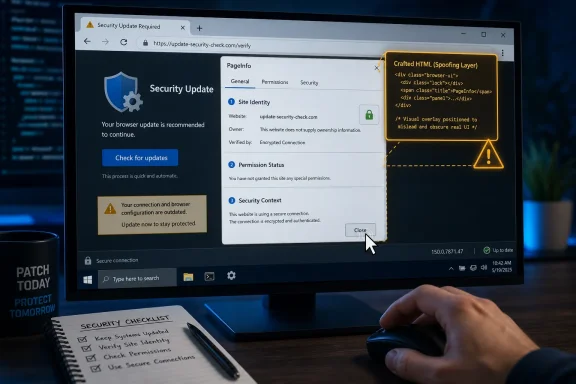 A Medium Bug in the Part of Chrome Users Are Supposed to Trust
The basic facts are straightforward. The National Vulnerability Database lists CVE-2026-13978 as “insufficient policy enforcement in PageInfo” in Google Chrome prior to 150.0.7871.47, allowing UI spoofing via a crafted HTML page. Google’s Chrome Releases blog tied the fix to the late-June Stable Channel update for desktop, while the Chromium issue tracker entry remains permission-gated, as is common for recently fixed browser bugs.That lack of public technical detail should not be mistaken for lack of importance. Chrome’s PageInfo surface is the user-facing trust panel reached from the browser’s address bar area, the interface that tells users about site identity, connection state, cookies, permissions, and related security context. If a web page can manipulate or confuse what a user believes that surface is saying, the attack is not aimed at the CPU first. It is aimed at the human.
CISA’s ADP enrichment gives the vulnerability a CVSS 3.1 score of 4.3, with network attack vector, low attack complexity, no privileges required, and required user interaction. The impact is limited to integrity, not confidentiality or availability, which is why this is not being treated as a critical emergency. But “integrity” is exactly the right word: the risk is that the user’s interpretation of browser truth can be bent.
That is why this CVE deserves attention despite the medium label. A spoofed security surface does not need to dump memory, escape a sandbox, or install malware to matter. It only needs to make a user click, approve, trust, or ignore something they otherwise would not.
PageInfo Is Not Just Chrome Furniture
Browser vendors have spent two decades teaching users that the web page is suspect but the browser chrome is authoritative. The lock icon, the origin display, the permission prompt, and the site information panel are supposed to sit outside the page’s control. That division is the whole bargain: the site may lie, animate, obscure, and persuade, but the browser frame tells the truth.PageInfo matters because it is one of the few places where that bargain becomes visible. Users are told to check whether a connection is secure, whether a permission was granted, whether a site is allowed to access the camera, and whether cookies or trackers are present. Enterprises build user training around those affordances, and help desks often tell users to inspect exactly those browser-level signals when something looks suspicious.
A PageInfo spoofing bug therefore does not attack an obscure corner of the UI. It attacks a ritual. The user notices something odd, checks the browser’s trusted indicator, and may receive a manipulated impression. That is a different class of failure from a normal phishing page because the attack leans on the user doing the supposedly safer thing.
This is where medium-severity UI bugs become uncomfortable. They rarely produce dramatic proof-of-concept videos unless chained with another flaw, and they often require a precise gesture or crafted page state. Yet they erode a boundary that security teams rely on every day: the boundary between content and browser.
The CVSS Score Is Accurate, but It Is Not the Whole Risk Model
CISA’s vector for CVE-2026-13978 is sober: AV:N/AC:L/PR:N/UI:R/S:U/C:N/I:L/A:N. In plain English, the attacker can be remote, the attack is not technically difficult, the attacker does not need an account, but the victim must interact with the page. The result is limited integrity impact, not data theft or system compromise by itself.That score is useful for triage. It tells patch teams not to treat this as equivalent to a zero-day renderer escape or a V8 arbitrary-code-execution bug. It also tells exploit analysts that this is not, based on public data, an automated wormable condition. CISA’s SSVC enrichment says exploitation is “none,” the attack is not automatable, and the technical impact is partial.
But CVSS has always struggled with trust-interface bugs because their impact depends heavily on the campaign around them. A UI spoofing flaw can be nearly irrelevant on its own and quite powerful when paired with a credential-harvesting site, a fake enterprise login flow, a malicious OAuth consent sequence, or a social-engineering script that walks the victim through “verifying” the page. The vulnerability may only move one pixel in the chain, but that pixel can be the one that converts suspicion into compliance.
Security teams should therefore read the score as a patching priority, not a dismissal. Medium means “schedule this,” not “ignore this.” In a browser fleet, especially one used for administrative consoles, identity providers, SaaS dashboards, and remote management portals, UI integrity is part of the control plane.
Google’s Fix Lands Inside a Crowded Chrome 150 Security Cycle
The fix version matters: Chrome prior to 150.0.7871.47 is affected, and the desktop Stable Channel update moved Windows and Mac builds to the 150.0.7871.46/.47 range, according to Google’s Chrome Releases announcement. The NVD record was published on June 30, then enriched by CISA on July 1 and updated by NIST on July 2 with the affected Chrome CPE configuration.That chronology is typical of the modern Chrome security pipeline. Google ships the browser update, CVE metadata lands, CISA or another enrichment source supplies CVSS and CWE context, and NVD catches up with CPE mappings. For defenders, the practical order is almost always vendor advisory first, vulnerability database second, scanner normalization third.
This is particularly important here because Chrome versioning can be confusing. The NVD affected configuration says Google Chrome versions up to, but excluding, 150.0.7871.47 are vulnerable. The vendor advisory language around desktop builds may include slightly different terminal build numbers by platform. Administrators should not try to reason from memory; they should verify the installed build on each platform and rely on the fixed-channel version available for that operating system.
The issue also arrived alongside a broader wave of Chrome 150 security fixes. The exact relevance of each neighboring CVE varies, but the operational message is the same: do not cherry-pick this one bug out of the update. Chrome’s security posture is delivered as a train, and the train has already left the station.
Windows Admins Should Treat Browser UI as Enterprise Security Surface
On Windows fleets, Chrome is often managed as both an application and an access gateway. It is the shell through which users reach Microsoft 365, Google Workspace, Salesforce, ServiceNow, Okta, Entra-connected apps, privileged access portals, and internal dashboards. A browser UI spoofing flaw may not compromise Windows directly, but it can interfere with the decisions that protect Windows environments.The immediate check is simple: Chrome should be updated to 150.0.7871.47 or later where that version applies. Users can verify through Chrome’s About page, while managed environments should validate through Chrome Browser Cloud Management, endpoint inventory, MDM, vulnerability scanners, or whatever software asset pipeline already governs browser compliance. The important point is not merely that Chrome auto-updates. It is that administrators confirm the update completed and the browser restarted.
That restart is the eternal weak point. Chrome can download an update and still leave the vulnerable binary active until the user relaunches. In normal consumer use, that delay is often short. In enterprise use, long-lived sessions, kiosk workflows, shared workstations, VDI images, and “never close the browser” habits can stretch the exposure window.
For IT teams, this is also a reminder to audit Chromium-based browsers beyond Google Chrome. Microsoft Edge, Brave, Vivaldi, Opera, and others consume Chromium code on their own schedules, with their own build numbers and release notes. CVE-2026-13978 is published as a Chrome CVE with a Google Chrome affected CPE, but the underlying component lives in the Chromium ecosystem. Whether a downstream browser is affected depends on whether it inherited the vulnerable code path and whether its vendor has shipped the corresponding fix.
Spoofing Bugs Thrive in the Gap Between Training and Reality
Security awareness programs often tell users to “look at the address bar” or “check the lock.” That advice is not wrong, but it is incomplete. The modern browser UI is more subtle than the old padlock era, and attackers have learned to mimic, frame, time, and visually confuse trusted surfaces. A PageInfo flaw potentially makes that job easier by giving the page more leverage over the user’s interpretation of a browser-controlled area.The cruel part is that a better-trained user may be the intended victim. Someone who never checks PageInfo cannot be misled by a spoofed PageInfo cue. Someone who has been trained to check it can be steered toward a false confirmation if the attack is convincing enough. That does not mean training is useless; it means training must assume the UI itself can occasionally be part of the contested terrain.
Organizations should adapt their guidance accordingly. Instead of telling users that one visual indicator settles the matter, security teams should teach layered verification: check the domain carefully, use bookmarks or managed app launchers for sensitive services, distrust unexpected permission prompts, and report pages that require unusual “verification” steps. Browser UI is valuable evidence, not a magic amulet.
This matters especially for identity workflows. If an attacker can pair a spoofed trust indicator with a fake login, a fake SSO prompt, or a fake permission explanation, the browser’s own legitimacy cues become part of the lure. That is why even a medium UI flaw belongs in the same conversation as phishing resistance, passkeys, conditional access, and managed browser policies.
The CWE Tells the Real Story: Misrepresenting Critical Information
CISA maps CVE-2026-13978 to CWE-451, “User Interface Misrepresentation of Critical Information.” That classification is more revealing than the score. It says the heart of the issue is not that Chrome crashes, leaks, or miscalculates. The issue is that critical information can be presented in a way that misleads the user.CWE-451 is a category that fits an increasingly important class of browser and app vulnerabilities. As platforms harden memory safety, sandboxing, site isolation, and privilege boundaries, attackers keep looking for ways around the human boundary. If the user can be induced to grant access, accept a prompt, trust a page, or ignore a warning, the exploit does not need to defeat every technical mitigation.
That does not make UI bugs “just social engineering.” The distinction matters. Social engineering abuses human judgment in a correctly functioning system. UI misrepresentation abuses a system that fails to preserve the integrity of the information human judgment depends on. The user is not simply fooled by a fake page; the browser may have allowed the page to blur a line it was supposed to enforce.
This is also why vendor UI design decisions have security consequences. Minimal browser chrome, disappearing indicators, permission chips, compact origin displays, and increasingly dynamic site controls may be elegant, but they reduce the margin for error. When the trusted surface is small and transient, spoofing only needs to be good enough for a moment.
NVD’s CPE Update Is Not Administrative Trivia
The user-visible question buried in the NVD record is whether a CPE is missing. As of the July 2 NIST update, the record includes a vulnerable software configuration for Google Chrome, with versions up to but excluding 150.0.7871.47. That is the mapping vulnerability scanners and asset tools need in order to connect the CVE to installed software.CPE data may look like database plumbing, but in enterprise vulnerability management it often determines whether a bug appears on a dashboard at all. Without a useful CPE, scanners may ingest the CVE description yet fail to match it cleanly to affected assets. With a broad or imprecise CPE, they may over-report, under-report, or require local overrides.
In this case, the NVD change history indicates that NIST added the Chrome CPE configuration after the CVE arrived from Chrome. That sequence is normal, and it is one reason teams should be careful with “day zero” vulnerability reports generated immediately after publication. The first version of a CVE record may not include all the structured fields downstream tools expect.
Still, the CPE is only as useful as the asset inventory behind it. If an organization cannot reliably distinguish Chrome stable builds, Chromium derivatives, portable browser installs, user-installed copies, and stale VDI images, no vulnerability database will save it. The CPE is the map key; the enterprise still has to know what is actually deployed.
The Practical Exposure Is Narrower Than the Anxiety Cycle
There is no public indication in the NVD or CISA enrichment that CVE-2026-13978 is being exploited in the wild. CISA’s SSVC data explicitly says exploitation is “none,” and the attack is not considered automatable. That should cool the instinct to treat every Chrome CVE as a five-alarm fire.The likely exploit shape, based on the public description, requires a crafted HTML page and user interaction. That means an attacker needs to get the user to a page and induce the relevant behavior. This is plausible in phishing, malvertising, tech-support scams, and targeted lures, but it is not the same as silent drive-by code execution.
The technical impact is also partial. The published metrics do not indicate data disclosure or service disruption, and they do not describe sandbox escape. A realistic risk assessment should say that this vulnerability can support deception rather than directly hand over the machine.
But “narrower than the anxiety cycle” is not “irrelevant.” Browser trust bugs age poorly once details become public, especially if researchers or attackers find reliable ways to demonstrate them. The responsible posture is to update promptly, confirm restarts, and move on without drama.
Microsoft Edge and the Chromium Shadow
For WindowsForum readers, the obvious adjacent question is Microsoft Edge. Edge is Chromium-based, but Chrome CVEs do not always translate one-to-one into Edge advisories on the same day. Microsoft ships its own Edge builds, applies Chromium fixes through its own channel process, and documents security updates separately.That means administrators should not assume either safety or exposure purely from the Chrome CVE text. They should check Microsoft’s Edge release notes and installed Edge versions across the fleet. If Microsoft has incorporated the relevant Chromium patch, the Edge version line will be the operational truth for that browser, not Chrome’s 150.0.7871.47 number.
The same logic applies to other Chromium browsers. Some vendors move quickly, some lag, and some alter UI surfaces enough that a Chrome-specific PageInfo flaw may not be exploitable in the same way. But from a defensive standpoint, “Chromium UI spoofing fixed upstream” is enough reason to ask whether downstream browsers have shipped matching updates.
This is where Windows environments get messy. A standard corporate image may include Edge, an approved Chrome install, and one or more user-installed Chromium variants. Developers may run Canary, Beta, Dev, or ungoogled Chromium builds. Security teams that report “Chrome patched” without auditing the broader browser footprint may miss the actual user path to sensitive apps.
The Chrome Auto-Update Model Still Needs Human Enforcement
Chrome’s auto-update system is one of the reasons the web is survivable at scale. Google can move hundreds of millions of users rapidly, and most consumers will receive fixes without reading a CVE. That machinery is a genuine security advantage.Enterprises complicate it. Some organizations pin versions for compatibility, route updates through controlled deployment rings, or disable consumer update behavior in favor of managed packages. Those choices may be defensible, but they turn a browser security fix into an IT process with queues, exceptions, testing, and service owners.
CVE-2026-13978 is a useful test of whether that process is proportionate. A medium UI spoofing issue does not justify reckless emergency deployment into every regulated workflow without testing. But it also should not sit for weeks because “Chrome updates itself” when policy has actually taken over update responsibility.
The sweet spot is boring: fast validation, staged rollout, restart enforcement, and exception review. If an app breaks on Chrome 150, document the breakage and isolate it. Do not quietly leave a general browsing population on a vulnerable browser because one legacy workflow fears change.
The Browser Security Story Is Moving Up the Stack
For years, the most attention-grabbing Chrome vulnerabilities were memory safety bugs: use-after-free, out-of-bounds read/write, type confusion, heap corruption. Those still matter, and they still drive emergency updates when exploitation is observed. But the browser is now a mature operating environment, and its security story increasingly includes identity UX, permission UX, origin presentation, privacy controls, and policy enforcement.CVE-2026-13978 fits that shift. It is not about making Chrome execute attacker code. It is about making Chrome’s trust communication less reliable under crafted conditions. That is the sort of bug that becomes more important as browsers absorb more operating-system responsibilities.
Consider what users now do in the browser. They approve passkey prompts, grant microphone and camera access, authorize OAuth scopes, handle payment flows, administer cloud infrastructure, open remote desktops, and manage security tools. The browser is no longer a viewer for documents. It is the cockpit for work.
A cockpit with a misleading indicator is dangerous even if the engine is intact. That is the right mental model for PageInfo spoofing. The machine may still be hardened, sandboxed, and memory-safe in the relevant path, but the operator’s instruments can be misread.
The Patch Is Simple; the Lesson Is Not
For individual users, the fix is uncomplicated. Update Chrome, relaunch it, and verify the version. If the browser reports 150.0.7871.47 or later on the applicable platform, the published Chrome exposure is addressed.For administrators, the more durable response is to tighten the browser update loop. Confirm that managed Chrome deployments are not stalled. Check that vulnerability scanners now pick up the NVD CPE mapping. Watch for downstream Chromium browser advisories. Make sure users cannot indefinitely postpone relaunches after browser updates.
For security teams, the lesson is about trust surfaces. A UI spoofing CVE should trigger a review of user guidance around browser indicators and permission prompts. If training says “trust the browser UI,” it should also say “do not follow unexpected page instructions that tell you how to interpret or manipulate the browser UI.”
That distinction is subtle but important. Attackers love turning security advice into a script. The more predictable the script, the easier it is to weaponize.
The Patch Window Is Where This Bug Becomes Boring
The most concrete response to CVE-2026-13978 is not panic, but closure. The vulnerability is public, the fixed Chrome build is identified, CISA has scored it, and NIST has added the Chrome CPE configuration. That gives administrators enough structure to move from awareness to verification.- Chrome installations older than 150.0.7871.47 should be treated as exposed to CVE-2026-13978 where the affected desktop build line applies.
- The vulnerability is a medium-severity PageInfo UI spoofing issue, not a publicly reported remote-code-execution or sandbox-escape flaw.
- CISA’s enrichment says exploitation is not currently observed, the attack is not automatable, and the technical impact is partial.
- The required user interaction makes phishing, fake support flows, and malicious landing pages the most plausible abuse paths.
- Managed Windows environments should verify browser restarts, not merely update download status.
- Chromium-based browsers outside Google Chrome deserve separate version checks because they inherit upstream code on vendor-specific schedules.
CVE-2026-13978 will not be remembered as the Chrome bug that defined 2026, and that is precisely the point. The modern browser is too central to Windows work to reserve urgency only for spectacular exploits; its quiet trust surfaces deserve the same operational discipline as its JavaScript engine and sandbox. Google has shipped the fix, the databases have caught up, and the remaining question is whether organizations can close the loop before a crafted page turns a medium flaw into a very convincing lie.
References
- Primary source: NVD / Chromium
Published: 2026-07-03T07:00:22-07:00
NVD - CVE-2026-13978
 nvd.nist.gov
- Security advisory: MSRC
Published: 2026-07-03T07:00:22-07:00
Original feed URL
Security Update Guide - Microsoft Security Response Center
 msrc.microsoft.com
- Related coverage: cvefeed.io
CVE-2026-13978 - Google Chrome PageInfo UI Spoofing
Insufficient policy enforcement in PageInfo in Google Chrome prior to 150.0.7871.47 allowed a remote attacker to perform UI spoofing via a crafted HTML page. (Chromium security severity: Medium)cvefeed.io - Official source: nist.gov
National Vulnerability Database
NIST maintains the National Vulnerability Database (NVD), a repository of information on software and hardware flaws that can compromise computer security. This is a key piece of the nation’s cybersecurity infrastructure.www.nist.gov - Related coverage: windowsforum.com
Chrome CVE-2026-13989 Fix: Update to 150.0.7871.47 to Stop PageInfo UI Spoofing | Windows Forum
Google Chrome before 150.0.7871.47 contains CVE-2026-13989, a medium-severity PageInfo flaw disclosed on June 30, 2026, that can let an attacker who has...windowsforum.com - Related coverage: labs.cloudsecurityalliance.org
NVD Enrichment Triage: Enterprise Vulnerability Programs Must Adapt
PDF documentlabs.cloudsecurityalliance.org
