

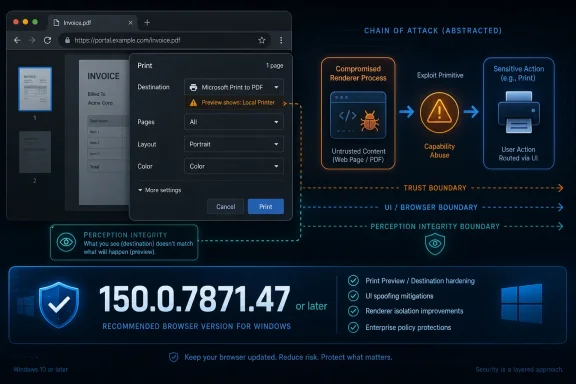
Google Chrome before version 150.0.7871.47 contains CVE-2026-14127, a printing-related UI spoofing flaw disclosed on June 30, 2026, that can be triggered by a crafted HTML page after an attacker has already compromised Chrome’s renderer process. That last condition is the whole story: this is not a fire-alarm Chrome zero-day, but it is a useful reminder that browser security is often won or lost in the dull interfaces users trust. As documented by NVD, CISA’s ADP enrichment, and Google’s Chrome Releases advisory, the bug sits in the awkward middle ground between “low severity” vendor language and “medium” operational scoring. For Windows users and admins, the correct response is neither panic nor indifference: update Chrome, verify Chromium-based browsers separately, and treat UI spoofing as part of a larger attack chain rather than a standalone apocalypse.
CVE-2026-14127 is classified by Chromium as a low-severity vulnerability in Chrome’s Printing component. NVD’s description says the flaw allowed a remote attacker, after compromising the renderer process, to perform UI spoofing through a crafted HTML page. CISA’s ADP analysis gives it the same CVSS 3.1 score as NVD: 4.3, with network attack vector, low complexity, no privileges required, user interaction required, unchanged scope, no confidentiality impact, low integrity impact, and no availability impact.
That score sounds modest because the bug does not, by itself, promise code execution, sandbox escape, credential theft, or system takeover. The attacker must first have a foothold in the renderer, the browser process that handles untrusted web content under Chrome’s multiprocess architecture. In other words, this is not the front door; it is a hallway trick after someone has already broken a window.
But UI spoofing deserves more respect than it often gets. Browsers are not just code execution containers; they are trust machines. Users decide whether to save a file, approve a prompt, print a document, sign into an account, or trust a destination based on visual cues. A flaw that lets compromised web content misrepresent critical interface information can turn a technical exploit into a social exploit with better aim.
That is why CISA’s mapping to CWE-451, “User Interface Misrepresentation of Critical Information,” is more revealing than the raw severity label. NVD also associates the bug with CWE-20, improper input validation, which is the broader engineering failure. Together, those classifications describe a familiar security pattern: the browser processed something it should have constrained, and the user may have seen something the browser should not have allowed an attacker to fake.
For enterprise defenders, that distinction changes the mental model. A standalone remote code execution bug demands emergency triage because a malicious page may be enough to get arbitrary execution. A post-renderer UI spoofing bug is more likely to appear as part of a chain: exploit the renderer, manipulate the browser interface, induce the user to trust the wrong action, and then move toward persistence, credential capture, fraud, or lateral access.
That is also why “low” can be a misleading word in a patch queue. Low severity in Chromium’s taxonomy does not mean irrelevant; it means the bug’s direct technical impact is bounded. In chained attacks, bounded bugs can become useful connective tissue.
CISA’s SSVC data, as reflected in the NVD record, marks exploitation as “none,” automatable as “no,” and technical impact as “partial.” That is a calming set of signals. It suggests that, at the time of the enrichment on July 1, 2026, there was no known active exploitation and no obvious path to mass automated exploitation on its own.
Still, those labels are not a reason to skip the update. They are a reason to avoid theatrics. The right security posture is boring: roll forward to Chrome 150.0.7871.47 or later, confirm that managed endpoints actually received the update, and avoid overstating the vulnerability as a browser-wide catastrophe.
That makes the Printing component an attractive place for subtle deception. The value of a spoof does not need to be spectacular. If an attacker can make one origin, document, destination, or prompt look like another, the exploit may influence a user’s decision at precisely the moment the browser is supposed to provide trusted context.
The NVD description does not disclose the precise mechanics, and Google’s Chromium issue tracker entry is permission-restricted, which is common while patches are still rolling out. That leaves defenders with the high-level facts rather than a proof-of-concept. We know the vulnerable component, the affected version range, the required attacker position, and the impact category. We do not know the exact UI surface or the step-by-step exploit behavior.
That uncertainty should not be filled with fantasy. There is no public basis, from the supplied NVD record or Google’s advisory, to claim that CVE-2026-14127 enables arbitrary printing, printer takeover, local file access, or direct Windows compromise. The narrower reading is the responsible one: a compromised renderer could spoof UI through crafted HTML in a way that affects integrity of user perception.
For WindowsForum readers, that matters because the Windows print stack has a long and painful security history of its own. But this Chrome bug should not be confused with a Windows Print Spooler vulnerability. It lives in Chrome’s implementation of printing-related behavior, and the affected software configuration listed by NVD is Google Chrome prior to 150.0.7871.47.
That context matters. If an admin evaluates this update solely through the lens of CVE-2026-14127, it may look deferrable. But browser point releases are cumulative security events. The operational question is not “Is this one low-severity printing bug terrifying?” It is “Do I want hundreds of known browser fixes sitting uninstalled on endpoints that process untrusted web content all day?”
The answer should usually be no. Chrome’s rapid update cadence exists because browsers sit at the collision point of hostile web content, enterprise identity, document workflows, extensions, password managers, cloud applications, and local operating system integration. Even when a single CVE looks modest, the aggregate release may close enough attack surface to justify prompt rollout.
For home users, Chrome’s built-in updater usually handles this with little drama. For managed Windows environments, the harder part is visibility. Chrome can be installed per-user or per-machine, updates can be blocked by policy or broken by network controls, and Chromium-based alternatives may lag behind upstream fixes. The version string matters more than the comfort of assuming “auto-update has it.”
The minimum bar is simple: Chrome should be at 150.0.7871.47 or newer on Windows systems where this CVE is in scope. If the system runs Edge, Brave, Vivaldi, Opera, or another Chromium-derived browser, administrators should check that vendor’s advisory and version mapping rather than assuming Google’s Chrome version number applies directly. Chromium lineage shares code, but patch timing and version labels are vendor decisions.
Could other products be affected? Possibly, in the broad engineering sense that Chromium-derived browsers may inherit bugs from upstream Chromium. But a CPE entry is not a philosophical statement about shared code ancestry. It is a structured product mapping, and NVD’s visible mapping for this CVE names Google Chrome.
That distinction matters for vulnerability management tooling. If a scanner keys only on NVD’s Chrome CPE, it may flag Chrome installations but not necessarily every Chromium-based browser. That does not mean those other browsers are safe; it means their vendors may need separate advisories, version data, and CPE mappings. Security teams should not outsource Chromium fork analysis entirely to one CPE row.
There is also a small oddity in the CVE record’s “affected” JSON as shown in the supplied detail: it lists version 150.0.7871.47 with a less-than 150.0.7871.47 condition and status “affected.” The practical interpretation remains clear from the prose and CPE: Chrome versions prior to 150.0.7871.47 are affected, and 150.0.7871.47 is the fixed threshold. Vulnerability records often contain awkward machine-readable phrasing during early enrichment, especially when versionType is custom.
For Windows admins, the CPE question should become an asset inventory question. Do you have Chrome? Which channel? Which version? Do you have unmanaged Chromium derivatives? Are browser updates being delayed by policy? The vulnerability record gives you the fixed line; your endpoint data tells you whether you are on the right side of it.
A spoofed interface can make the wrong action look safe. It can blur the distinction between browser chrome and page content. It can make a prompt appear to belong to a trusted origin or make a malicious workflow resemble a normal one. In a business setting, that can matter as much as a clean technical exploit, because identity systems and SaaS workflows increasingly rely on user consent moments.
Chrome’s architecture tries to enforce strong boundaries between web content and trusted browser interface. The address bar, permission prompts, download shelf, print UI, certificate warnings, and system dialogs all communicate context that a page should not be able to forge. When those cues become ambiguous, users are asked to make security decisions without reliable instrumentation.
That is the deeper lesson of CVE-2026-14127. The flaw is not terrifying because printing is glamorous. It is interesting because it touches the browser’s promise that untrusted content cannot convincingly impersonate trusted controls. A compromised renderer already means something went wrong; a UI spoofing bug can help turn that compromise into user-assisted escalation.
This is especially relevant in phishing-heavy environments. A crafted HTML page that manipulates expectations around document preview or printing could plausibly be paired with business-process lures: invoices, shipping labels, HR forms, legal documents, purchase orders. The public CVE record does not prove such a campaign exists. It does, however, explain why UI integrity remains a meaningful security property.
That does not mean every Chromium CVE instantly maps one-to-one to every fork in the same way. Vendors may carry different patches, disable features, alter UI surfaces, or ship on different schedules. Printing code and browser UI integration can also be modified in product-specific ways. The safe assumption is neither “all affected” nor “Chrome only,” but “verify the browser you actually deploy.”
Microsoft Edge deserves special attention in Windows environments because it is present by default and often managed through Microsoft tooling rather than Google’s. If an organization standardizes on Edge but allows Chrome for compatibility, it must track both. If it permits user-installed browsers, the problem gets messier quickly.
The Chromium ecosystem’s strength is shared engineering velocity. Its weakness is shared blast radius. When an upstream bug is fixed, the practical protection for users depends on how quickly each downstream product absorbs, tests, signs, and ships the patch. That lag is not always long, but it is operationally real.
This is where endpoint management maturity shows. Mature shops know which browsers are installed, which update channels are in use, and which policies can delay updates. Less mature shops discover their browser diversity only after a CVE lands. CVE-2026-14127 is not the worst possible wake-up call, but it is still a useful one.
Those are not necessarily disagreements. Chromium’s internal severity rating reflects the project’s view of the bug’s direct security impact within Chrome. CVSS expresses a standardized scoring model across products and vendors. SSVC tries to support decision-making by incorporating exploitation status and operational consequences. Each lens answers a different question.
For patch management, the mistake is to treat any one label as absolute. “Low” may understate business urgency if the update fixes many other issues or if the browser is exposed to high-risk users. “Medium” may overstate drama if there is no known exploitation and the bug requires a prior renderer compromise. “No known exploitation” is useful, but it is a snapshot, not a guarantee.
The better reading is layered. CVE-2026-14127 is a medium-scored, low-Chromium-severity UI spoofing bug requiring renderer compromise and user interaction, fixed in Chrome 150.0.7871.47. That sentence is less exciting than a headline about attackers “hijacking printers,” but it is far more useful.
It also aligns with CISA’s practical posture. The vulnerability is not listed, based on the supplied information, as known exploited. The SSVC fields do not imply emergency action across all environments. They do support normal browser update urgency, especially because browsers should not be left behind for long in any modern Windows fleet.
Patch drift is the quiet browser security problem. A subset of users postpone relaunches. A line-of-business app team asks for a hold. A VDI image is stale. A kiosk runs a pinned build. A developer workstation uses a portable browser. A remote laptop has not checked in. None of these failures are dramatic, but together they create the population attackers hope to find after public disclosure.
Chrome’s update model reduces the burden, but it does not eliminate accountability. Enterprises still need reporting, enforcement, and exception handling. They also need to understand when update policies are too conservative for software that processes hostile content by design. Browsers are not quarterly-patch assets; they are continuous-exposure assets.
The version threshold in this case is precise enough to operationalize. Anything before 150.0.7871.47 on Chrome for Windows should be considered vulnerable to CVE-2026-14127. If the organization uses extended stable channels or staged deployments, admins should verify the exact patched build for that channel rather than assuming the main stable number is the only relevant marker.
There is a human side, too. Users often treat browser relaunch prompts as optional background noise. IT departments should avoid training employees to ignore them. If an update requires relaunch, the message should be clear, routine, and time-bounded: save your work, restart the browser, and move on.
That does not make the bug meaningless. It makes it a hygiene test. Organizations that can quickly answer which Chrome versions are installed, whether updates succeeded, and which Chromium-derived browsers exist are in good shape. Organizations that cannot answer those questions have a broader browser governance problem.
Security awareness also has a role, but it should not be oversold. Telling users to “watch for spoofed UI” is not especially actionable, because good spoofing works by exploiting normal expectations. Better guidance is to keep browsers updated, avoid interacting with unexpected document workflows, and treat odd print or preview prompts from untrusted pages with suspicion.
The most reliable control is still patching. UI spoofing bugs attack perception; updates restore the browser’s guardrails before users have to make impossible judgment calls. That is the point of a browser security release: not to make every employee a forensic analyst, but to remove traps before they are encountered.
 The Bug Is Small, but the Trust Boundary Is Not
CVE-2026-14127 is classified by Chromium as a low-severity vulnerability in Chrome’s Printing component. NVD’s description says the flaw allowed a remote attacker, after compromising the renderer process, to perform UI spoofing through a crafted HTML page. CISA’s ADP analysis gives it the same CVSS 3.1 score as NVD: 4.3, with network attack vector, low complexity, no privileges required, user interaction required, unchanged scope, no confidentiality impact, low integrity impact, and no availability impact.That score sounds modest because the bug does not, by itself, promise code execution, sandbox escape, credential theft, or system takeover. The attacker must first have a foothold in the renderer, the browser process that handles untrusted web content under Chrome’s multiprocess architecture. In other words, this is not the front door; it is a hallway trick after someone has already broken a window.
But UI spoofing deserves more respect than it often gets. Browsers are not just code execution containers; they are trust machines. Users decide whether to save a file, approve a prompt, print a document, sign into an account, or trust a destination based on visual cues. A flaw that lets compromised web content misrepresent critical interface information can turn a technical exploit into a social exploit with better aim.
That is why CISA’s mapping to CWE-451, “User Interface Misrepresentation of Critical Information,” is more revealing than the raw severity label. NVD also associates the bug with CWE-20, improper input validation, which is the broader engineering failure. Together, those classifications describe a familiar security pattern: the browser processed something it should have constrained, and the user may have seen something the browser should not have allowed an attacker to fake.
Chrome’s Renderer Compromise Clause Changes the Risk, Not the Patch Priority
The phrase “who had compromised the renderer process” is doing a lot of work here. A renderer compromise normally implies another vulnerability or exploit path has already succeeded. That matters because CVE-2026-14127 is not the bug an attacker starts with; it is the bug an attacker may use to make the next step more persuasive.For enterprise defenders, that distinction changes the mental model. A standalone remote code execution bug demands emergency triage because a malicious page may be enough to get arbitrary execution. A post-renderer UI spoofing bug is more likely to appear as part of a chain: exploit the renderer, manipulate the browser interface, induce the user to trust the wrong action, and then move toward persistence, credential capture, fraud, or lateral access.
That is also why “low” can be a misleading word in a patch queue. Low severity in Chromium’s taxonomy does not mean irrelevant; it means the bug’s direct technical impact is bounded. In chained attacks, bounded bugs can become useful connective tissue.
CISA’s SSVC data, as reflected in the NVD record, marks exploitation as “none,” automatable as “no,” and technical impact as “partial.” That is a calming set of signals. It suggests that, at the time of the enrichment on July 1, 2026, there was no known active exploitation and no obvious path to mass automated exploitation on its own.
Still, those labels are not a reason to skip the update. They are a reason to avoid theatrics. The right security posture is boring: roll forward to Chrome 150.0.7871.47 or later, confirm that managed endpoints actually received the update, and avoid overstating the vulnerability as a browser-wide catastrophe.
Printing Remains One of the Browser’s Weirdest Interfaces
Printing is an odd corner of browser security because it crosses boundaries that users rarely think about. A web page becomes a document. A browser-controlled interface mediates content, destination, preview, layout, and sometimes system-level print dialogs. The user is asked to trust that what appears in the preview or dialog corresponds to what will happen next.That makes the Printing component an attractive place for subtle deception. The value of a spoof does not need to be spectacular. If an attacker can make one origin, document, destination, or prompt look like another, the exploit may influence a user’s decision at precisely the moment the browser is supposed to provide trusted context.
The NVD description does not disclose the precise mechanics, and Google’s Chromium issue tracker entry is permission-restricted, which is common while patches are still rolling out. That leaves defenders with the high-level facts rather than a proof-of-concept. We know the vulnerable component, the affected version range, the required attacker position, and the impact category. We do not know the exact UI surface or the step-by-step exploit behavior.
That uncertainty should not be filled with fantasy. There is no public basis, from the supplied NVD record or Google’s advisory, to claim that CVE-2026-14127 enables arbitrary printing, printer takeover, local file access, or direct Windows compromise. The narrower reading is the responsible one: a compromised renderer could spoof UI through crafted HTML in a way that affects integrity of user perception.
For WindowsForum readers, that matters because the Windows print stack has a long and painful security history of its own. But this Chrome bug should not be confused with a Windows Print Spooler vulnerability. It lives in Chrome’s implementation of printing-related behavior, and the affected software configuration listed by NVD is Google Chrome prior to 150.0.7871.47.
The 150.0.7871.47 Release Is Bigger Than This One CVE
Google’s Stable Channel update for desktop, published at the end of June, moved Chrome to 150.0.7871.46 or 150.0.7871.47 on Windows and Mac, and 150.0.7871.46 on Linux, according to Google’s Chrome Releases blog and subsequent security coverage from Malwarebytes. Malwarebytes characterized the release as unusually large, noting hundreds of security fixes in the update. CVE-2026-14127 is therefore one entry in a much broader Chrome maintenance wave.That context matters. If an admin evaluates this update solely through the lens of CVE-2026-14127, it may look deferrable. But browser point releases are cumulative security events. The operational question is not “Is this one low-severity printing bug terrifying?” It is “Do I want hundreds of known browser fixes sitting uninstalled on endpoints that process untrusted web content all day?”
The answer should usually be no. Chrome’s rapid update cadence exists because browsers sit at the collision point of hostile web content, enterprise identity, document workflows, extensions, password managers, cloud applications, and local operating system integration. Even when a single CVE looks modest, the aggregate release may close enough attack surface to justify prompt rollout.
For home users, Chrome’s built-in updater usually handles this with little drama. For managed Windows environments, the harder part is visibility. Chrome can be installed per-user or per-machine, updates can be blocked by policy or broken by network controls, and Chromium-based alternatives may lag behind upstream fixes. The version string matters more than the comfort of assuming “auto-update has it.”
The minimum bar is simple: Chrome should be at 150.0.7871.47 or newer on Windows systems where this CVE is in scope. If the system runs Edge, Brave, Vivaldi, Opera, or another Chromium-derived browser, administrators should check that vendor’s advisory and version mapping rather than assuming Google’s Chrome version number applies directly. Chromium lineage shares code, but patch timing and version labels are vendor decisions.
NVD’s CPE Entry Is Doing What It Should
The user-facing NVD record asks, “Are we missing a CPE here?” That prompt is easy to misread as evidence that the entry is incomplete. In this case, the change history shows that NIST added a CPE configuration for Google Chrome with versions up to, but excluding, 150.0.7871.47. That is the expected vulnerable software configuration for the information currently public.Could other products be affected? Possibly, in the broad engineering sense that Chromium-derived browsers may inherit bugs from upstream Chromium. But a CPE entry is not a philosophical statement about shared code ancestry. It is a structured product mapping, and NVD’s visible mapping for this CVE names Google Chrome.
That distinction matters for vulnerability management tooling. If a scanner keys only on NVD’s Chrome CPE, it may flag Chrome installations but not necessarily every Chromium-based browser. That does not mean those other browsers are safe; it means their vendors may need separate advisories, version data, and CPE mappings. Security teams should not outsource Chromium fork analysis entirely to one CPE row.
There is also a small oddity in the CVE record’s “affected” JSON as shown in the supplied detail: it lists version 150.0.7871.47 with a less-than 150.0.7871.47 condition and status “affected.” The practical interpretation remains clear from the prose and CPE: Chrome versions prior to 150.0.7871.47 are affected, and 150.0.7871.47 is the fixed threshold. Vulnerability records often contain awkward machine-readable phrasing during early enrichment, especially when versionType is custom.
For Windows admins, the CPE question should become an asset inventory question. Do you have Chrome? Which channel? Which version? Do you have unmanaged Chromium derivatives? Are browser updates being delayed by policy? The vulnerability record gives you the fixed line; your endpoint data tells you whether you are on the right side of it.
UI Spoofing Is a Security Problem Because Humans Are Part of the Browser
Security teams often rank vulnerabilities by whether they execute code. Attackers rank them by whether they help achieve an objective. UI spoofing sits in the gap between those two approaches, because it may not increase machine privilege while still increasing attacker leverage over the user.A spoofed interface can make the wrong action look safe. It can blur the distinction between browser chrome and page content. It can make a prompt appear to belong to a trusted origin or make a malicious workflow resemble a normal one. In a business setting, that can matter as much as a clean technical exploit, because identity systems and SaaS workflows increasingly rely on user consent moments.
Chrome’s architecture tries to enforce strong boundaries between web content and trusted browser interface. The address bar, permission prompts, download shelf, print UI, certificate warnings, and system dialogs all communicate context that a page should not be able to forge. When those cues become ambiguous, users are asked to make security decisions without reliable instrumentation.
That is the deeper lesson of CVE-2026-14127. The flaw is not terrifying because printing is glamorous. It is interesting because it touches the browser’s promise that untrusted content cannot convincingly impersonate trusted controls. A compromised renderer already means something went wrong; a UI spoofing bug can help turn that compromise into user-assisted escalation.
This is especially relevant in phishing-heavy environments. A crafted HTML page that manipulates expectations around document preview or printing could plausibly be paired with business-process lures: invoices, shipping labels, HR forms, legal documents, purchase orders. The public CVE record does not prove such a campaign exists. It does, however, explain why UI integrity remains a meaningful security property.
Microsoft Edge and Chromium Forks Need Their Own Verification
Windows users increasingly experience Chromium not as “Google Chrome” but as a family tree. Microsoft Edge is Chromium-based. So are several alternative browsers popular with privacy-minded users, power users, and organizations with specialized workflows. A Chromium bug can therefore become a vendor coordination exercise.That does not mean every Chromium CVE instantly maps one-to-one to every fork in the same way. Vendors may carry different patches, disable features, alter UI surfaces, or ship on different schedules. Printing code and browser UI integration can also be modified in product-specific ways. The safe assumption is neither “all affected” nor “Chrome only,” but “verify the browser you actually deploy.”
Microsoft Edge deserves special attention in Windows environments because it is present by default and often managed through Microsoft tooling rather than Google’s. If an organization standardizes on Edge but allows Chrome for compatibility, it must track both. If it permits user-installed browsers, the problem gets messier quickly.
The Chromium ecosystem’s strength is shared engineering velocity. Its weakness is shared blast radius. When an upstream bug is fixed, the practical protection for users depends on how quickly each downstream product absorbs, tests, signs, and ships the patch. That lag is not always long, but it is operationally real.
This is where endpoint management maturity shows. Mature shops know which browsers are installed, which update channels are in use, and which policies can delay updates. Less mature shops discover their browser diversity only after a CVE lands. CVE-2026-14127 is not the worst possible wake-up call, but it is still a useful one.
The Severity Labels Are Not Contradictory; They Are Speaking Different Languages
One reason CVE entries confuse readers is that the same vulnerability can wear several labels at once. Chromium calls CVE-2026-14127 low severity. NVD and CISA ADP assign a CVSS 3.1 base score of 4.3, which lands in the medium range. CISA’s SSVC enrichment says exploitation is not observed, automation is no, and technical impact is partial.Those are not necessarily disagreements. Chromium’s internal severity rating reflects the project’s view of the bug’s direct security impact within Chrome. CVSS expresses a standardized scoring model across products and vendors. SSVC tries to support decision-making by incorporating exploitation status and operational consequences. Each lens answers a different question.
For patch management, the mistake is to treat any one label as absolute. “Low” may understate business urgency if the update fixes many other issues or if the browser is exposed to high-risk users. “Medium” may overstate drama if there is no known exploitation and the bug requires a prior renderer compromise. “No known exploitation” is useful, but it is a snapshot, not a guarantee.
The better reading is layered. CVE-2026-14127 is a medium-scored, low-Chromium-severity UI spoofing bug requiring renderer compromise and user interaction, fixed in Chrome 150.0.7871.47. That sentence is less exciting than a headline about attackers “hijacking printers,” but it is far more useful.
It also aligns with CISA’s practical posture. The vulnerability is not listed, based on the supplied information, as known exploited. The SSVC fields do not imply emergency action across all environments. They do support normal browser update urgency, especially because browsers should not be left behind for long in any modern Windows fleet.
The Real Enterprise Risk Is Patch Drift
For a single Windows PC, the fix is almost insultingly simple: open Chrome, let it update, relaunch, and confirm the version. For a fleet, the challenge is not knowing what to do; it is proving that it happened everywhere.Patch drift is the quiet browser security problem. A subset of users postpone relaunches. A line-of-business app team asks for a hold. A VDI image is stale. A kiosk runs a pinned build. A developer workstation uses a portable browser. A remote laptop has not checked in. None of these failures are dramatic, but together they create the population attackers hope to find after public disclosure.
Chrome’s update model reduces the burden, but it does not eliminate accountability. Enterprises still need reporting, enforcement, and exception handling. They also need to understand when update policies are too conservative for software that processes hostile content by design. Browsers are not quarterly-patch assets; they are continuous-exposure assets.
The version threshold in this case is precise enough to operationalize. Anything before 150.0.7871.47 on Chrome for Windows should be considered vulnerable to CVE-2026-14127. If the organization uses extended stable channels or staged deployments, admins should verify the exact patched build for that channel rather than assuming the main stable number is the only relevant marker.
There is a human side, too. Users often treat browser relaunch prompts as optional background noise. IT departments should avoid training employees to ignore them. If an update requires relaunch, the message should be clear, routine, and time-bounded: save your work, restart the browser, and move on.
This Is the Kind of Bug That Rewards Boring Security Hygiene
The practical response to CVE-2026-14127 is not exotic. There is no evidence in the public record that defenders need special detection logic, emergency print subsystem shutdowns, or risky configuration changes. The fix is to update Chrome and keep the browser update pipeline healthy.That does not make the bug meaningless. It makes it a hygiene test. Organizations that can quickly answer which Chrome versions are installed, whether updates succeeded, and which Chromium-derived browsers exist are in good shape. Organizations that cannot answer those questions have a broader browser governance problem.
Security awareness also has a role, but it should not be oversold. Telling users to “watch for spoofed UI” is not especially actionable, because good spoofing works by exploiting normal expectations. Better guidance is to keep browsers updated, avoid interacting with unexpected document workflows, and treat odd print or preview prompts from untrusted pages with suspicion.
The most reliable control is still patching. UI spoofing bugs attack perception; updates restore the browser’s guardrails before users have to make impossible judgment calls. That is the point of a browser security release: not to make every employee a forensic analyst, but to remove traps before they are encountered.
The Printing Flaw Leaves a Short but Useful Checklist
CVE-2026-14127 is not the vulnerability that should dominate a security program, but it is exactly the kind of disclosure that separates reactive patching from disciplined endpoint management. The narrow facts are concrete enough to act on, and the broader lesson is familiar enough to apply beyond Chrome.- Chrome installations on Windows should be updated to 150.0.7871.47 or later to clear the vulnerable range identified by NVD.
- The flaw requires a compromised renderer process and user interaction, so it should be understood as a chain-enabling UI spoofing issue rather than a standalone remote takeover.
- CISA’s enrichment reports no known exploitation and no automation at the time of analysis, which argues against panic but not against prompt updating.
- NVD’s current CPE mapping names Google Chrome, but administrators should separately verify Microsoft Edge and other Chromium-based browsers in their environments.
- The affected component is Chrome’s Printing implementation, not the Windows Print Spooler, so mitigations should focus on browser updates rather than Windows print service workarounds.
- The larger Chrome 150 stable update reportedly addressed hundreds of security issues, making the release more important than this single CVE’s severity label suggests.
References
- Primary source: NVD / Chromium
Published: 2026-07-03T07:00:55-07:00
NVD - CVE-2026-14127
 nvd.nist.gov
- Security advisory: MSRC
Published: 2026-07-03T07:00:55-07:00
Original feed URL
Security Update Guide - Microsoft Security Response Center
 msrc.microsoft.com
