

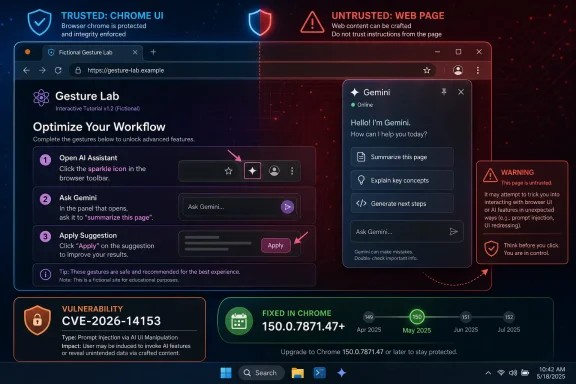
On June 30, 2026, Google disclosed CVE-2026-14153, a Chrome vulnerability in the browser’s Glic component that allowed UI spoofing before version 150.0.7871.47 when a remote attacker persuaded a user to perform specific interface gestures on a crafted web page. The bug is not a blockbuster memory-corruption zero-day, and Chromium rates it as Low severity. But its location inside Chrome’s Gemini-era interface layer makes it more interesting than its score suggests. This is the kind of flaw that shows how AI features are turning browser chrome itself into a new security boundary.
Google’s Chrome Releases blog tied the fix to the Stable Channel update for desktop, while the National Vulnerability Database entry identifies the affected versions as Chrome before 150.0.7871.47. CISA’s ADP enrichment gives the vulnerability a CVSS 3.1 score of 5.3, or Medium, with user interaction required, high attack complexity, and confidentiality impact but no integrity or availability impact.
That split between Chromium’s Low severity and CISA’s Medium score is not a contradiction so much as a useful warning. Chrome’s internal severity reflects how exploitable and dangerous the bug appears within Google’s own security model. CVSS, meanwhile, tries to express how the weakness could matter in a general enterprise risk register.
The important phrase is “UI spoofing.” This is not remote code execution, sandbox escape, or arbitrary file read. It is a misrepresentation problem: an attacker-controlled page could, under the right conditions, make the browser interface communicate something misleading to the user.
For ordinary users, that may sound almost quaint. For administrators who have spent years training people to trust browser permission prompts, address bars, sign-in surfaces, and extension indicators, it is anything but quaint.
That matters because Glic is not just another rendering subsystem. It sits at the boundary between a webpage, the browser’s privileged user interface, and Google’s AI assistant experience. The more Chrome asks users to rely on AI panels, contextual prompts, tab sharing, page summaries, and browser-native assistant controls, the more dangerous a convincing fake of those controls becomes.
Browsers have always had a sacred distinction between content and chrome. The page can say anything; the browser UI is supposed to be the trusted frame around it. Phishing succeeds when users stop noticing the difference. UI spoofing vulnerabilities are the technical equivalent of pushing that boundary until the browser’s trust signals become less trustworthy.
This is why CVE-2026-14153 deserves more attention than a “Low” label normally earns. A browser AI panel is not merely decorative. It can mediate user intent, page context, account state, and potentially sensitive work information. Even if this specific bug required unusual gestures and has no known exploitation, the class of weakness points directly at where browser security is heading.
Attackers already build pages that instruct users to click, drag, approve, retry, expand, verify, or “complete one more step.” A flaw that depends on user choreography is harder to automate, but not necessarily hard to operationalize. The web has trained people to follow strange interface rituals in the name of authentication, anti-bot checks, document access, and meeting links.
CISA’s SSVC enrichment says there was no known exploitation, the issue was not automatable, and the technical impact was partial. That is reassuring. It also tells administrators how to prioritize: patch quickly as part of normal browser maintenance, but do not treat this like an actively exploited Chrome zero-day unless new evidence appears.
The confidentiality-heavy CVSS vector is the more intriguing signal. CISA’s vector lists confidentiality impact as High, while integrity and availability are None. In plain English, the concern is not that an attacker takes over the machine; it is that a user may be tricked into revealing or exposing something they should not.
That is exactly the kind of risk AI-in-browser features can magnify. A spoofed interface does not have to be technically powerful if it can persuade a user to share a tab, approve a prompt, disclose credentials, or trust a generated-looking response.
The safer operational interpretation is straightforward: Chrome 150.0.7871.47 or later is the fixed baseline for desktop. If a scanner, SBOM platform, or patch dashboard says otherwise, administrators should check whether the feed has ingested the latest NVD and vendor data rather than assume Chrome 150.0.7871.46 is sufficient.
This is not pedantry. Browser patching in enterprise environments is increasingly measured by exact build numbers, not just major versions. A one-dot release can be the difference between compliant and exposed.
The CPE configuration also matters because it lists Chrome across Windows, Linux, and macOS. For WindowsForum readers, the Windows angle is obvious, but mixed fleets should not treat this as a Windows-only browser issue. Chrome’s desktop channel is the common denominator.
This is not the first warning shot around browser-integrated AI. Earlier 2026 research from Palo Alto Networks’ Unit 42 discussed a separate high-severity Gemini Live in Chrome issue, CVE-2026-0628, involving the hijacking of the browser’s AI panel. That case was different from CVE-2026-14153, but the theme is the same: AI surfaces inside browsers are privileged, contextual, and attractive targets.
The old browser security bargain was relatively simple. Web content was untrusted, extensions were risky but permissioned, and the browser UI was the trusted mediator. AI assistants complicate that bargain by asking users to let browser-integrated systems read, summarize, compare, and act on content across tabs and accounts.
None of that means Gemini in Chrome is inherently unsafe. It does mean the line between “the page told me” and “the browser told me” must be brighter, not fuzzier. UI spoofing is dangerous precisely because it attacks that line.
For managed Windows environments, the question is less whether Chrome can update and more whether it has actually done so across all profiles, VDI images, kiosk devices, and secondary browsers. Chrome vulnerabilities often linger not because patches are unavailable, but because browser sprawl is real.
Edge administrators should watch this class of issue as well, even when a CVE is filed specifically against Google Chrome. Microsoft Edge is Chromium-based, but not every Chrome UI feature maps directly to Edge, and Glic is a Google-specific integration. The correct response is not to assume Edge is affected; it is to verify Microsoft’s release notes and security advisories when Chromium-adjacent bugs touch shared components or similar UI patterns.
The larger lesson for Windows shops is that browser AI settings now belong in endpoint governance. If Gemini-in-Chrome features are enabled for some users, disabled for others, or controlled through Google Workspace policy, that state should be visible to IT. Security teams cannot manage what product teams quietly roll out as a “helpful” toolbar button.
Security platforms will ingest the CVE at different speeds. Some will follow NVD’s configuration data. Others will key off the Chrome CNA record. Some third-party vulnerability databases may paraphrase the issue too aggressively, with at least one public listing describing it as an XSS vulnerability even though the official description centers on UI spoofing.
That distinction matters. Cross-site scripting implies script execution in a web origin. UI spoofing implies misrepresentation of interface state or critical information. They can overlap in user impact, but they are not the same thing, and sloppy labels can lead to sloppy remediation discussions.
Administrators should resist the urge to overclassify the bug just to make dashboards cleaner. The right language is boring but accurate: Chrome before 150.0.7871.47 contains a Glic UI spoofing vulnerability, triggered through crafted HTML and specific user gestures, with no known exploitation reported in the available enrichment.
Chrome’s AI push intensifies that centrality. Google has described Gemini in Chrome as a way to understand page context, assist with browsing, and integrate with services such as Docs and Calendar. That makes Chrome not just a renderer but a decision-support environment.
A spoofed browser UI in that context is not merely cosmetic. If users learn to treat the AI panel as a trusted interpreter of what is on screen, then fake AI-adjacent UI can become a new phishing primitive. The attacker does not need to break encryption if they can convincingly forge the thing the user believes is explaining the page.
This is the uncomfortable truth behind CVE-2026-14153: low-severity browser bugs can age into high-value attack patterns when they touch emerging interaction models. The exploitability of one CVE is less important than the direction of travel.
 A Low-Severity Bug Lands in a High-Stakes Part of the Browser
Google’s Chrome Releases blog tied the fix to the Stable Channel update for desktop, while the National Vulnerability Database entry identifies the affected versions as Chrome before 150.0.7871.47. CISA’s ADP enrichment gives the vulnerability a CVSS 3.1 score of 5.3, or Medium, with user interaction required, high attack complexity, and confidentiality impact but no integrity or availability impact.That split between Chromium’s Low severity and CISA’s Medium score is not a contradiction so much as a useful warning. Chrome’s internal severity reflects how exploitable and dangerous the bug appears within Google’s own security model. CVSS, meanwhile, tries to express how the weakness could matter in a general enterprise risk register.
The important phrase is “UI spoofing.” This is not remote code execution, sandbox escape, or arbitrary file read. It is a misrepresentation problem: an attacker-controlled page could, under the right conditions, make the browser interface communicate something misleading to the user.
For ordinary users, that may sound almost quaint. For administrators who have spent years training people to trust browser permission prompts, address bars, sign-in surfaces, and extension indicators, it is anything but quaint.
Glic Turns Chrome’s AI Ambition Into Attack Surface
Glic is widely understood in Chrome circles as the internal name behind Gemini Live in Chrome and related Gemini-in-Chrome interface work. Google’s own Chrome Help material describes Gemini in Chrome as an assistant built into the desktop browser that can help users summarize, clarify, and interact with pages, while Gemini Live adds voice-driven interaction inside Chrome.That matters because Glic is not just another rendering subsystem. It sits at the boundary between a webpage, the browser’s privileged user interface, and Google’s AI assistant experience. The more Chrome asks users to rely on AI panels, contextual prompts, tab sharing, page summaries, and browser-native assistant controls, the more dangerous a convincing fake of those controls becomes.
Browsers have always had a sacred distinction between content and chrome. The page can say anything; the browser UI is supposed to be the trusted frame around it. Phishing succeeds when users stop noticing the difference. UI spoofing vulnerabilities are the technical equivalent of pushing that boundary until the browser’s trust signals become less trustworthy.
This is why CVE-2026-14153 deserves more attention than a “Low” label normally earns. A browser AI panel is not merely decorative. It can mediate user intent, page context, account state, and potentially sensitive work information. Even if this specific bug required unusual gestures and has no known exploitation, the class of weakness points directly at where browser security is heading.
The Attack Needs a User, Which Is Not Much Comfort
The vulnerability description says an attacker would need to convince a user to engage in “specific UI gestures” on a crafted HTML page. That requirement lowers the risk. It also places the bug squarely in the modern phishing playbook.Attackers already build pages that instruct users to click, drag, approve, retry, expand, verify, or “complete one more step.” A flaw that depends on user choreography is harder to automate, but not necessarily hard to operationalize. The web has trained people to follow strange interface rituals in the name of authentication, anti-bot checks, document access, and meeting links.
CISA’s SSVC enrichment says there was no known exploitation, the issue was not automatable, and the technical impact was partial. That is reassuring. It also tells administrators how to prioritize: patch quickly as part of normal browser maintenance, but do not treat this like an actively exploited Chrome zero-day unless new evidence appears.
The confidentiality-heavy CVSS vector is the more intriguing signal. CISA’s vector lists confidentiality impact as High, while integrity and availability are None. In plain English, the concern is not that an attacker takes over the machine; it is that a user may be tricked into revealing or exposing something they should not.
That is exactly the kind of risk AI-in-browser features can magnify. A spoofed interface does not have to be technically powerful if it can persuade a user to share a tab, approve a prompt, disclose credentials, or trust a generated-looking response.
The Version Confusion Is the Part Admins Should Not Ignore
There is a small but meaningful wrinkle in the NVD change history: NIST’s configuration entry reportedly lists Chrome versions up to, but excluding, 150.0.7871.46, while the CVE description and affected-version language point to Chrome prior to 150.0.7871.47. That one-build difference is the kind of detail that can make vulnerability scanners look inconsistent for a few days.The safer operational interpretation is straightforward: Chrome 150.0.7871.47 or later is the fixed baseline for desktop. If a scanner, SBOM platform, or patch dashboard says otherwise, administrators should check whether the feed has ingested the latest NVD and vendor data rather than assume Chrome 150.0.7871.46 is sufficient.
This is not pedantry. Browser patching in enterprise environments is increasingly measured by exact build numbers, not just major versions. A one-dot release can be the difference between compliant and exposed.
The CPE configuration also matters because it lists Chrome across Windows, Linux, and macOS. For WindowsForum readers, the Windows angle is obvious, but mixed fleets should not treat this as a Windows-only browser issue. Chrome’s desktop channel is the common denominator.
AI Browser Features Are Repeating Old Security Lessons at Higher Speed
There is a temptation to treat AI browser integration as a product feature and browser security as a separate engineering discipline. CVE-2026-14153 argues against that separation. Once the assistant is built into the browser frame, its UI becomes part of the trust model.This is not the first warning shot around browser-integrated AI. Earlier 2026 research from Palo Alto Networks’ Unit 42 discussed a separate high-severity Gemini Live in Chrome issue, CVE-2026-0628, involving the hijacking of the browser’s AI panel. That case was different from CVE-2026-14153, but the theme is the same: AI surfaces inside browsers are privileged, contextual, and attractive targets.
The old browser security bargain was relatively simple. Web content was untrusted, extensions were risky but permissioned, and the browser UI was the trusted mediator. AI assistants complicate that bargain by asking users to let browser-integrated systems read, summarize, compare, and act on content across tabs and accounts.
None of that means Gemini in Chrome is inherently unsafe. It does mean the line between “the page told me” and “the browser told me” must be brighter, not fuzzier. UI spoofing is dangerous precisely because it attacks that line.
Windows Users Mostly Need to Patch, Not Panic
For home users on Windows, the practical answer is simple: open Chrome’s About page and make sure the browser updates to 150.0.7871.47 or later. Chrome’s automatic updater should handle most consumer systems, but browser restarts remain the eternal weak link. A downloaded update does not protect a session that never relaunches.For managed Windows environments, the question is less whether Chrome can update and more whether it has actually done so across all profiles, VDI images, kiosk devices, and secondary browsers. Chrome vulnerabilities often linger not because patches are unavailable, but because browser sprawl is real.
Edge administrators should watch this class of issue as well, even when a CVE is filed specifically against Google Chrome. Microsoft Edge is Chromium-based, but not every Chrome UI feature maps directly to Edge, and Glic is a Google-specific integration. The correct response is not to assume Edge is affected; it is to verify Microsoft’s release notes and security advisories when Chromium-adjacent bugs touch shared components or similar UI patterns.
The larger lesson for Windows shops is that browser AI settings now belong in endpoint governance. If Gemini-in-Chrome features are enabled for some users, disabled for others, or controlled through Google Workspace policy, that state should be visible to IT. Security teams cannot manage what product teams quietly roll out as a “helpful” toolbar button.
The Scanner Noise Will Be Louder Than the Exploit Noise
CVE-2026-14153 is unlikely to become the week’s most urgent vulnerability. It has no public exploitation signal in the data provided by CISA’s SSVC enrichment, requires user interaction, and carries a constrained technical impact. The more likely pain point is vulnerability-management noise.Security platforms will ingest the CVE at different speeds. Some will follow NVD’s configuration data. Others will key off the Chrome CNA record. Some third-party vulnerability databases may paraphrase the issue too aggressively, with at least one public listing describing it as an XSS vulnerability even though the official description centers on UI spoofing.
That distinction matters. Cross-site scripting implies script execution in a web origin. UI spoofing implies misrepresentation of interface state or critical information. They can overlap in user impact, but they are not the same thing, and sloppy labels can lead to sloppy remediation discussions.
Administrators should resist the urge to overclassify the bug just to make dashboards cleaner. The right language is boring but accurate: Chrome before 150.0.7871.47 contains a Glic UI spoofing vulnerability, triggered through crafted HTML and specific user gestures, with no known exploitation reported in the available enrichment.
The Browser Is Becoming the Operating System’s Most Persuasive App
For years, Windows security conversations revolved around the OS, Office macros, identity providers, and endpoint agents. The browser has now absorbed a large share of that risk. It is where users authenticate, approve device access, open files, run enterprise apps, and increasingly consult AI assistants.Chrome’s AI push intensifies that centrality. Google has described Gemini in Chrome as a way to understand page context, assist with browsing, and integrate with services such as Docs and Calendar. That makes Chrome not just a renderer but a decision-support environment.
A spoofed browser UI in that context is not merely cosmetic. If users learn to treat the AI panel as a trusted interpreter of what is on screen, then fake AI-adjacent UI can become a new phishing primitive. The attacker does not need to break encryption if they can convincingly forge the thing the user believes is explaining the page.
This is the uncomfortable truth behind CVE-2026-14153: low-severity browser bugs can age into high-value attack patterns when they touch emerging interaction models. The exploitability of one CVE is less important than the direction of travel.
The Patch Is Small, but the Lesson Is Not
The concrete response to CVE-2026-14153 is refreshingly mundane, even if the implications are not. Organizations should validate Chrome versions, watch for scanner-feed mismatches, and treat AI browser UI as a governed surface rather than a consumer convenience that happens to run on corporate endpoints.- Chrome desktop should be updated to version 150.0.7871.47 or later wherever Google Chrome is installed.
- Vulnerability teams should expect temporary discrepancies if tools interpret the affected range as excluding 150.0.7871.46 instead of 150.0.7871.47.
- The issue should be described as UI spoofing in Glic, not casually upgraded to remote code execution or reduced to generic phishing.
- Administrators should verify whether Gemini-in-Chrome features are enabled, disabled, or policy-controlled in their environments.
- Security awareness training should continue emphasizing the difference between webpage content and browser-controlled interface elements, especially as AI panels become more prominent.
References
- Primary source: NVD / Chromium
Published: 2026-07-03T07:00:00-07:00
NVD - CVE-2026-14153
 nvd.nist.gov
- Security advisory: MSRC
Published: 2026-07-03T07:00:00-07:00
Original feed URL
Security Update Guide - Microsoft Security Response Center
 msrc.microsoft.com
- Related coverage: cvefeed.io
CVE-2026-14153 - Google Chrome UI Spoofing Vulnerability
Inappropriate implementation in Glic in Google Chrome prior to 150.0.7871.47 allowed a remote attacker who convinced a user to engage in specific UI gestures to perform UI spoofing via a crafted HTML page. (Chromium security severity: Low)cvefeed.io
