

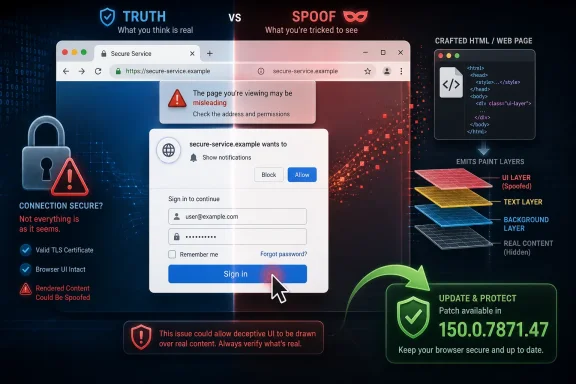
Google disclosed CVE-2026-14014 on June 30, 2026, as a medium-severity Chrome vulnerability fixed in desktop Chrome 150.0.7871.47, where an inappropriate implementation in the browser’s Paint component could let a remote attacker spoof user-interface content through a crafted HTML page. The National Vulnerability Database picked it up the same day and CISA’s ADP enrichment later mapped it to CWE-451, the weakness class for misrepresenting critical UI information. That dry wording undersells the real story: this is not a “take over your PC” bug, but it strikes at the fragile trust model that keeps users from typing secrets into the wrong box.
The practical advice is simple — update Chrome, and make sure Chromium-based browsers follow — but the more interesting lesson is about browser security in 2026. The web platform is now so visually powerful that a rendering bug can become a phishing primitive, and the line between “just pixels” and “security boundary” is thinner than most users realize.
Google’s Chrome Releases blog announced Chrome 150’s promotion to the stable channel on Tuesday, June 30, 2026, for Windows, macOS, and Linux, with rollout over the following days and weeks. The same release notes say the update includes 433 security fixes, an eye-watering number even by modern browser standards. CVE-2026-14014 is one entry in that long train, and that is exactly why it deserves attention.
Large Chrome security drops are easy to flatten into a familiar headline: update your browser, many bugs fixed, details restricted until users patch. That framing is useful, but it can make every vulnerability sound either catastrophic or irrelevant. CVE-2026-14014 sits in the uncomfortable middle, where the exploit does not promise memory corruption fireworks but could still help an attacker win the human part of an attack chain.
NVD’s record describes the flaw as an “inappropriate implementation in Paint” in Google Chrome before 150.0.7871.47. It says a remote attacker could perform UI spoofing via a crafted HTML page. CISA’s enrichment assigns a CVSS 3.1 score of 6.5, with network attack vector, low attack complexity, no privileges required, user interaction required, no confidentiality impact, high integrity impact, and no availability impact.
That vector tells a story. The attacker does not need an account, a local foothold, or admin rights. The user does need to visit or interact with attacker-controlled content. If the exploit works as advertised, the prize is not raw data exfiltration by itself but the ability to make the browser lie convincingly enough that the user completes the attacker’s objective.
That makes it more relevant, not less, to the attacks most organizations actually fight. Phishing, fake login prompts, malicious OAuth flows, fraudulent payment screens, and bogus update pages all depend on visual trust. If a browser rendering flaw lets web content misrepresent where a user is, what control they are clicking, or whether a prompt belongs to the browser rather than the page, the attacker has not bypassed cryptography. They have bypassed the person using it.
CISA’s CWE-451 mapping is the important clue. “User Interface Misrepresentation of Critical Information” is not about pretty rendering glitches. It is about cases where the interface fails to communicate security-relevant truth. In browsers, that can mean origin, permission state, login context, payment flow, download status, or whether an element is controlled by the website or by the browser itself.
The word Paint in the Chrome component name may tempt readers to think this is cosmetic. In Chromium architecture, painting is part of the process that turns layout, style, composited layers, and rendering decisions into what the user actually sees. A mistake there can become a security problem because the browser’s visual output is the user’s final source of truth.
Attackers exploit that ambiguity even without browser vulnerabilities. A well-made phishing page can mimic Microsoft 365, Google sign-in, Okta, Duo, a corporate VPN portal, or a bank. What a UI spoofing vulnerability adds is the possibility that some part of the browser’s own rendering behavior can help the deception, making the fake interface harder to distinguish from legitimate browser or site state.
The NVD description does not say CVE-2026-14014 spoofs the address bar, permission prompts, PageInfo, or any particular Chrome surface. Google’s public bug details are restricted, as is standard until enough users have updated. That means responsible analysis has to stop short of inventing a proof of concept. We know the class, the affected versions, the fixed version, and the high-level attack shape: crafted HTML leads to UI spoofing.
That restraint matters. Overstating a medium Chrome bug into a full browser takeover helps nobody. Understating it as a mere display quirk is equally wrong. The honest position is that CVE-2026-14014 is a user-trust bug whose operational value depends on how convincingly it can be embedded in a broader social-engineering flow.
Chrome 150.0.7871.47 is not a boutique security hotfix. It is part of a major stable-channel promotion with hundreds of security fixes and feature work arriving in the same package. That is efficient for Google and often painless for consumers, but it complicates risk communication inside organizations. A security team may say “update for CVE-2026-14014,” while desktop engineering sees a full browser version transition.
For Windows environments, this is where managed browser policy matters. Chrome’s automatic updater, enterprise MSI deployment, Intune, Group Policy, third-party patch tools, and browser reporting all become part of the security boundary. If endpoints drift behind current stable, the organization is not merely missing a rendering fix; it is carrying a growing bundle of browser exposure.
The same logic applies to Microsoft Edge and other Chromium-based browsers, with one caveat: a Chrome CVE does not automatically mean every Chromium downstream is exposed in exactly the same way at exactly the same time. But when a flaw is in a shared Chromium component such as rendering or paint behavior, administrators should watch downstream vendor advisories closely. The Chromium monoculture gives users consistent compatibility, but it also means many browsers can inherit the same class of bug.
That is a good technical model, but CVSS has always struggled with the messy economics of phishing-assisted compromise. If a UI spoofing bug helps an attacker steal a password, approve an MFA prompt, authorize a payment, or install a malicious extension, the downstream impact can be much greater than the vulnerability record alone suggests. CVSS scores the vulnerability, not the campaign.
CISA’s SSVC entry is equally telling: exploitation “none,” automatable “no,” technical impact “partial.” In plain English, there is no public indication in that enrichment that attackers are exploiting CVE-2026-14014 in the wild, and it does not look like a fully automated wormable condition. That should calm panic. It should not justify delay.
The right operational read is “patch promptly, not theatrically.” This is not the sort of alert that should send a weekend incident bridge into crisis on its own. But if an organization already has a defined browser-update service-level agreement, CVE-2026-14014 belongs inside it, and Chrome versions below 150.0.7871.47 should age out quickly.
That is why rendering and UI bugs keep resurfacing as meaningful security issues. The browser can be technically correct underneath and still fail the user if the final screen miscommunicates state. A permission might be denied, but if the page can imitate a permission grant, the user may behave as if it succeeded. A login might be on the wrong origin, but if the surrounding interface obscures that fact, the security property becomes academic.
This is also why “train users better” remains a weak answer. Users cannot inspect compositor state. They cannot reason about paint invalidation, clipping, layer ordering, or browser-controlled surfaces while trying to approve a payroll request. Browser vendors have to treat misleading pixels as security defects because ordinary people cannot compensate for rendering ambiguity with vigilance.
Google’s decision to classify CVE-2026-14014 as Chromium medium severity reflects that balance. It is not being presented as a critical memory-safety failure. But it is serious enough to receive a CVE, a stable-channel fix, and NVD/CISA enrichment. In the modern browser, truthful rendering is a security feature.
For CVE-2026-14014, that means we do not have a public exploit recipe, screenshots, affected UI surfaces, or a detailed root-cause analysis from the Chromium issue tracker. NVD gives the concise description. CISA adds scoring and weakness classification. Google provides the fixed release and the umbrella security advisory.
That is enough to act, but not enough to speculate wildly. A crafted HTML page is the trigger. UI spoofing is the outcome. Versions before Chrome 150.0.7871.47 are affected. The bug is in Paint. Anything more specific should be treated as unconfirmed unless Google, Chromium, or a credible researcher publishes additional details.
This is a familiar tradeoff for sysadmins. Patch decisions often have to be made before the most interesting technical writeups arrive. Waiting for exploit details can feel intellectually satisfying, but it reverses the purpose of coordinated disclosure. By the time the proof of concept is public, the window for quiet remediation may already be closing.
That makes browser version drift a security finding, not a housekeeping note. If a fleet still has Chrome 149 or early Chrome 150 builds after the stable update has reached general availability, the problem is not merely missing CVE-2026-14014. It is evidence that the organization’s browser update pipeline is slow, blocked, or poorly observed.
For unmanaged home users, the fix is mundane: open Chrome’s About page and let the updater complete, then relaunch. For managed environments, the real work is confirming telemetry. Security teams should know which endpoints are below 150.0.7871.47, which are pinned intentionally, which are stuck because the browser is open indefinitely, and which are outside management entirely.
This is also an opportunity to check whether browser restart prompts are working. Chrome can download an update and wait in a half-patched state until restart. In enterprises where users leave browsers open for weeks, the gap between “update available” and “update active” can become the attacker’s window.
Microsoft Edge, Brave, Vivaldi, Opera, Electron-based applications, embedded Chromium runtimes, and other downstream projects do not all ship Chrome’s exact version number on Chrome’s exact calendar. Some pull fixes quickly. Some lag. Some carry patches without advertising every inherited CVE in the same way. Some products use Chromium components in ways that may or may not expose the vulnerable path.
That is why “Are we missing a CPE?” is not just a database hygiene question. It is a reflection of how modern software supply chains obscure where browser engine code actually lives. The clean vulnerability-management answer is to track the vendor advisory for each deployed Chromium-based product, not to assume that the Chrome CPE tells the whole story.
For WindowsForum readers, Edge is the obvious watch item. Microsoft generally ships Edge security updates on its own channel and publishes release notes for Chromium fixes. Administrators should verify that Edge’s stable version includes the relevant Chromium security fixes rather than relying on the Chrome version number alone. The same principle applies to any Chromium browser installed outside standard IT control.
That could mean trusting a fake login flow. It could mean ignoring a warning. It could mean approving a permission. It could mean believing a download came from a legitimate source. The exact scenario for CVE-2026-14014 remains undisclosed, but the class of risk is familiar.
The strongest phishing campaigns already combine branding, timing, context, and urgency. A browser UI spoofing primitive can make that social engineering more convincing by reducing friction at the moment of doubt. The attacker does not need every user to fall for it. They need enough users to convert.
This is why organizations should not dismiss the issue because user interaction is required. User interaction is required for most credential theft. It is required for many OAuth consent attacks. It is required for invoice fraud, help-desk impersonation, and malicious download execution. “UI:R” in a CVSS vector is not a comfort blanket; it is a description of the battlefield.
Users should also be wary of treating Chrome’s update rollout language as permission to wait. Google often stages releases over days or weeks, but users can usually trigger an update check manually. In enterprise environments, staged rollout may be deliberate, but it should be a managed risk, not inertia.
The hidden complication is compatibility fear. Organizations sometimes delay major browser updates because web apps break, extensions misbehave, or automation tools depend on brittle browser behavior. Those concerns are real. But if every browser release carries hundreds of security fixes, the cost of standing still compounds quickly.
A better model is fast validation, ring-based deployment, and clear exception handling. Pilot a small group. Expand quickly. Track failures. Force relaunch where policy allows. Document the rare systems that must lag, and isolate them accordingly. The browser is too exposed to be patched on vibes.
The concrete takeaways are narrow, but they point to a broader discipline:
The practical advice is simple — update Chrome, and make sure Chromium-based browsers follow — but the more interesting lesson is about browser security in 2026. The web platform is now so visually powerful that a rendering bug can become a phishing primitive, and the line between “just pixels” and “security boundary” is thinner than most users realize.
 A Medium Bug Lands in a Very Crowded Chrome 150 Patch Train
Google’s Chrome Releases blog announced Chrome 150’s promotion to the stable channel on Tuesday, June 30, 2026, for Windows, macOS, and Linux, with rollout over the following days and weeks. The same release notes say the update includes 433 security fixes, an eye-watering number even by modern browser standards. CVE-2026-14014 is one entry in that long train, and that is exactly why it deserves attention.Large Chrome security drops are easy to flatten into a familiar headline: update your browser, many bugs fixed, details restricted until users patch. That framing is useful, but it can make every vulnerability sound either catastrophic or irrelevant. CVE-2026-14014 sits in the uncomfortable middle, where the exploit does not promise memory corruption fireworks but could still help an attacker win the human part of an attack chain.
NVD’s record describes the flaw as an “inappropriate implementation in Paint” in Google Chrome before 150.0.7871.47. It says a remote attacker could perform UI spoofing via a crafted HTML page. CISA’s enrichment assigns a CVSS 3.1 score of 6.5, with network attack vector, low attack complexity, no privileges required, user interaction required, no confidentiality impact, high integrity impact, and no availability impact.
That vector tells a story. The attacker does not need an account, a local foothold, or admin rights. The user does need to visit or interact with attacker-controlled content. If the exploit works as advertised, the prize is not raw data exfiltration by itself but the ability to make the browser lie convincingly enough that the user completes the attacker’s objective.
UI Spoofing Is the Browser Bug That Pretends Not to Be One
Security teams often triage browser bugs according to whether they lead to code execution, sandbox escape, or cross-origin data theft. By that scale, UI spoofing can seem pedestrian. It does not necessarily read memory, escape a sandbox, or drop malware. It manipulates perception.That makes it more relevant, not less, to the attacks most organizations actually fight. Phishing, fake login prompts, malicious OAuth flows, fraudulent payment screens, and bogus update pages all depend on visual trust. If a browser rendering flaw lets web content misrepresent where a user is, what control they are clicking, or whether a prompt belongs to the browser rather than the page, the attacker has not bypassed cryptography. They have bypassed the person using it.
CISA’s CWE-451 mapping is the important clue. “User Interface Misrepresentation of Critical Information” is not about pretty rendering glitches. It is about cases where the interface fails to communicate security-relevant truth. In browsers, that can mean origin, permission state, login context, payment flow, download status, or whether an element is controlled by the website or by the browser itself.
The word Paint in the Chrome component name may tempt readers to think this is cosmetic. In Chromium architecture, painting is part of the process that turns layout, style, composited layers, and rendering decisions into what the user actually sees. A mistake there can become a security problem because the browser’s visual output is the user’s final source of truth.
The Address Bar Is Not the Only Thing Users Trust
The old browser-security mantra was simple: check the lock icon, check the address bar, don’t trust pop-ups. That advice was always incomplete, but it has become especially strained as web apps have absorbed more of the operating system’s visual language. A modern SaaS application can look like a desktop app, an identity provider, a device management portal, or a payment terminal, all inside a tab.Attackers exploit that ambiguity even without browser vulnerabilities. A well-made phishing page can mimic Microsoft 365, Google sign-in, Okta, Duo, a corporate VPN portal, or a bank. What a UI spoofing vulnerability adds is the possibility that some part of the browser’s own rendering behavior can help the deception, making the fake interface harder to distinguish from legitimate browser or site state.
The NVD description does not say CVE-2026-14014 spoofs the address bar, permission prompts, PageInfo, or any particular Chrome surface. Google’s public bug details are restricted, as is standard until enough users have updated. That means responsible analysis has to stop short of inventing a proof of concept. We know the class, the affected versions, the fixed version, and the high-level attack shape: crafted HTML leads to UI spoofing.
That restraint matters. Overstating a medium Chrome bug into a full browser takeover helps nobody. Understating it as a mere display quirk is equally wrong. The honest position is that CVE-2026-14014 is a user-trust bug whose operational value depends on how convincingly it can be embedded in a broader social-engineering flow.
Chrome’s Patch Cadence Is Doing Two Jobs at Once
Chrome’s update machine is both a security success and a source of administrative fatigue. Google can push fixes to hundreds of millions of users quickly, and the browser’s automatic update model means many consumers will be protected before they ever read a CVE. At the same time, enterprise IT has to validate browser updates against extensions, line-of-business apps, kiosk workflows, VDI images, and endpoint controls.Chrome 150.0.7871.47 is not a boutique security hotfix. It is part of a major stable-channel promotion with hundreds of security fixes and feature work arriving in the same package. That is efficient for Google and often painless for consumers, but it complicates risk communication inside organizations. A security team may say “update for CVE-2026-14014,” while desktop engineering sees a full browser version transition.
For Windows environments, this is where managed browser policy matters. Chrome’s automatic updater, enterprise MSI deployment, Intune, Group Policy, third-party patch tools, and browser reporting all become part of the security boundary. If endpoints drift behind current stable, the organization is not merely missing a rendering fix; it is carrying a growing bundle of browser exposure.
The same logic applies to Microsoft Edge and other Chromium-based browsers, with one caveat: a Chrome CVE does not automatically mean every Chromium downstream is exposed in exactly the same way at exactly the same time. But when a flaw is in a shared Chromium component such as rendering or paint behavior, administrators should watch downstream vendor advisories closely. The Chromium monoculture gives users consistent compatibility, but it also means many browsers can inherit the same class of bug.
The CVSS Score Gets the Shape Right but Not the Anxiety
CISA’s 6.5 medium score is defensible. The attack is remote and low complexity, but it requires user interaction. It does not directly compromise confidentiality or availability according to the enrichment data. Its integrity impact is high because the attacker can alter what the user believes the interface is telling them.That is a good technical model, but CVSS has always struggled with the messy economics of phishing-assisted compromise. If a UI spoofing bug helps an attacker steal a password, approve an MFA prompt, authorize a payment, or install a malicious extension, the downstream impact can be much greater than the vulnerability record alone suggests. CVSS scores the vulnerability, not the campaign.
CISA’s SSVC entry is equally telling: exploitation “none,” automatable “no,” technical impact “partial.” In plain English, there is no public indication in that enrichment that attackers are exploiting CVE-2026-14014 in the wild, and it does not look like a fully automated wormable condition. That should calm panic. It should not justify delay.
The right operational read is “patch promptly, not theatrically.” This is not the sort of alert that should send a weekend incident bridge into crisis on its own. But if an organization already has a defined browser-update service-level agreement, CVE-2026-14014 belongs inside it, and Chrome versions below 150.0.7871.47 should age out quickly.
Paint Bugs Remind Us That Pixels Are Policy
Browsers enforce security with process isolation, site isolation, same-origin policy, permission prompts, certificate validation, and sandboxing. Users experience all of that as pixels. A lock icon, a hostname, a permission chip, a file warning, a passkey dialog, a sign-in iframe boundary — these are not decorative. They are the visible edge of the trust model.That is why rendering and UI bugs keep resurfacing as meaningful security issues. The browser can be technically correct underneath and still fail the user if the final screen miscommunicates state. A permission might be denied, but if the page can imitate a permission grant, the user may behave as if it succeeded. A login might be on the wrong origin, but if the surrounding interface obscures that fact, the security property becomes academic.
This is also why “train users better” remains a weak answer. Users cannot inspect compositor state. They cannot reason about paint invalidation, clipping, layer ordering, or browser-controlled surfaces while trying to approve a payroll request. Browser vendors have to treat misleading pixels as security defects because ordinary people cannot compensate for rendering ambiguity with vigilance.
Google’s decision to classify CVE-2026-14014 as Chromium medium severity reflects that balance. It is not being presented as a critical memory-safety failure. But it is serious enough to receive a CVE, a stable-channel fix, and NVD/CISA enrichment. In the modern browser, truthful rendering is a security feature.
The Public Details Are Thin by Design
One frustrating aspect of Chrome security advisories is also one of their more responsible habits: bug details are often restricted until a majority of users have received the fix. Google says this explicitly in the Chrome 150 release notes. The policy slows down copycat exploitation while the update rolls out, but it leaves administrators with sparse descriptions.For CVE-2026-14014, that means we do not have a public exploit recipe, screenshots, affected UI surfaces, or a detailed root-cause analysis from the Chromium issue tracker. NVD gives the concise description. CISA adds scoring and weakness classification. Google provides the fixed release and the umbrella security advisory.
That is enough to act, but not enough to speculate wildly. A crafted HTML page is the trigger. UI spoofing is the outcome. Versions before Chrome 150.0.7871.47 are affected. The bug is in Paint. Anything more specific should be treated as unconfirmed unless Google, Chromium, or a credible researcher publishes additional details.
This is a familiar tradeoff for sysadmins. Patch decisions often have to be made before the most interesting technical writeups arrive. Waiting for exploit details can feel intellectually satisfying, but it reverses the purpose of coordinated disclosure. By the time the proof of concept is public, the window for quiet remediation may already be closing.
Windows Admins Should Treat Browser Version Drift as Endpoint Drift
On Windows, Chrome is often treated as an application, while Edge is treated as part of the platform. In practice, both are high-value endpoint components. They parse hostile input all day, broker identity sessions, touch password managers, handle downloads, execute JavaScript, and mediate access to SaaS control planes.That makes browser version drift a security finding, not a housekeeping note. If a fleet still has Chrome 149 or early Chrome 150 builds after the stable update has reached general availability, the problem is not merely missing CVE-2026-14014. It is evidence that the organization’s browser update pipeline is slow, blocked, or poorly observed.
For unmanaged home users, the fix is mundane: open Chrome’s About page and let the updater complete, then relaunch. For managed environments, the real work is confirming telemetry. Security teams should know which endpoints are below 150.0.7871.47, which are pinned intentionally, which are stuck because the browser is open indefinitely, and which are outside management entirely.
This is also an opportunity to check whether browser restart prompts are working. Chrome can download an update and wait in a half-patched state until restart. In enterprises where users leave browsers open for weeks, the gap between “update available” and “update active” can become the attacker’s window.
Chromium’s Shared Core Turns One Fix into Many Vendor Questions
The submitted NVD record lists the vulnerable CPE as Google Chrome versions up to, but excluding, 150.0.7871.47. That is expected for the CVE entry as enriched by NIST. But Chromium’s ecosystem means the practical exposure question is broader than a single CPE line.Microsoft Edge, Brave, Vivaldi, Opera, Electron-based applications, embedded Chromium runtimes, and other downstream projects do not all ship Chrome’s exact version number on Chrome’s exact calendar. Some pull fixes quickly. Some lag. Some carry patches without advertising every inherited CVE in the same way. Some products use Chromium components in ways that may or may not expose the vulnerable path.
That is why “Are we missing a CPE?” is not just a database hygiene question. It is a reflection of how modern software supply chains obscure where browser engine code actually lives. The clean vulnerability-management answer is to track the vendor advisory for each deployed Chromium-based product, not to assume that the Chrome CPE tells the whole story.
For WindowsForum readers, Edge is the obvious watch item. Microsoft generally ships Edge security updates on its own channel and publishes release notes for Chromium fixes. Administrators should verify that Edge’s stable version includes the relevant Chromium security fixes rather than relying on the Chrome version number alone. The same principle applies to any Chromium browser installed outside standard IT control.
The Attack Chain Is More Plausible Than the Bug Sounds
A medium UI spoofing bug rarely stands alone in an attacker’s plan. It is more likely to be a supporting actor in a chain that begins with a lure and ends with user action. The victim clicks a link, lands on a crafted page, sees misleading UI, and makes a decision they would not have made if the browser had represented state accurately.That could mean trusting a fake login flow. It could mean ignoring a warning. It could mean approving a permission. It could mean believing a download came from a legitimate source. The exact scenario for CVE-2026-14014 remains undisclosed, but the class of risk is familiar.
The strongest phishing campaigns already combine branding, timing, context, and urgency. A browser UI spoofing primitive can make that social engineering more convincing by reducing friction at the moment of doubt. The attacker does not need every user to fall for it. They need enough users to convert.
This is why organizations should not dismiss the issue because user interaction is required. User interaction is required for most credential theft. It is required for many OAuth consent attacks. It is required for invoice fraud, help-desk impersonation, and malicious download execution. “UI:R” in a CVSS vector is not a comfort blanket; it is a description of the battlefield.
The Fix Is Boring, Which Is Exactly the Point
There is no exotic mitigation for CVE-2026-14014 that beats updating. Content filtering, DNS protection, safe browsing, endpoint detection, and phishing-resistant authentication all help reduce related risk, but they do not correct the browser’s rendering behavior. The fix is Chrome 150.0.7871.47 or later on affected desktop platforms.Users should also be wary of treating Chrome’s update rollout language as permission to wait. Google often stages releases over days or weeks, but users can usually trigger an update check manually. In enterprise environments, staged rollout may be deliberate, but it should be a managed risk, not inertia.
The hidden complication is compatibility fear. Organizations sometimes delay major browser updates because web apps break, extensions misbehave, or automation tools depend on brittle browser behavior. Those concerns are real. But if every browser release carries hundreds of security fixes, the cost of standing still compounds quickly.
A better model is fast validation, ring-based deployment, and clear exception handling. Pilot a small group. Expand quickly. Track failures. Force relaunch where policy allows. Document the rare systems that must lag, and isolate them accordingly. The browser is too exposed to be patched on vibes.
The Small Chrome CVE That Says the Quiet Part Out Loud
CVE-2026-14014 is not the loudest Chrome bug in the 150 release, and that is part of its value as a signal. It shows how much of browser security now lives in the user’s interpretation of visual state, not only in the engine’s ability to resist memory corruption. If the browser paints the wrong truth, the attacker may not need a shell.The concrete takeaways are narrow, but they point to a broader discipline:
- Chrome users should update to 150.0.7871.47 or later and relaunch the browser so the fix is actually running.
- Administrators should inventory Chrome versions across Windows, macOS, and Linux fleets instead of assuming automatic updates have completed.
- Security teams should monitor Edge and other Chromium-based browser advisories for inherited fixes rather than relying only on Google Chrome CPE data.
- CVE-2026-14014 should be treated as a phishing-enablement risk, not as a remote-code-execution emergency.
- The absence of known exploitation in CISA’s enrichment lowers urgency, but it does not remove the need for prompt patching.
- Browser UI integrity belongs in the same risk conversation as sandboxing, memory safety, and identity protection.
References
- Primary source: NVD / Chromium
Published: 2026-07-03T07:00:52-07:00
NVD - CVE-2026-14014
 nvd.nist.gov
- Security advisory: MSRC
Published: 2026-07-03T07:00:52-07:00
Original feed URL
Security Update Guide - Microsoft Security Response Center
 msrc.microsoft.com
- Related coverage: radar.offseq.com
CVE-2026-13988: Inappropriate implementation in Google Chrome - Live Threat Intelligence - Threat Radar | OffSeq.com
Detailed information about CVE-2026-13988: Inappropriate implementation in Google Chrome affecting Google Chrome. Get real-time updates, technical details, andradar.offseq.com
