
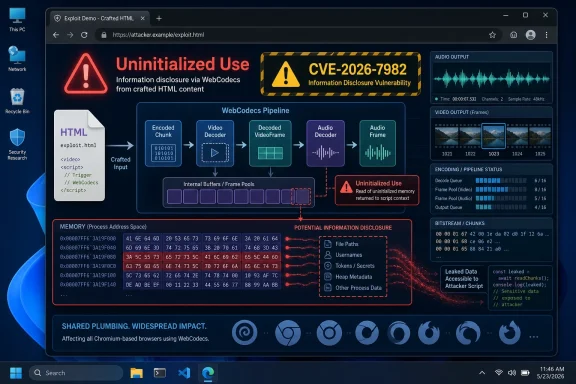
 The Browser’s Media Engine Is Now Part of the Attack Surface
CVE-2026-7982 is an uninitialized use vulnerability in WebCodecs, the browser API that gives web applications lower-level access to audio and video encoding and decoding primitives. WebCodecs exists because the web has become a real-time media platform: video editors, conferencing apps, streaming tools, game capture, AI-enhanced media processing, and browser-based creative suites all need faster access than the older abstractions comfortably provide.
That performance bargain has a cost. The closer web content gets to the machinery of codecs, buffers, frames, and GPU-adjacent media pipelines, the more the browser must enforce hard boundaries around memory that was never supposed to be visible to JavaScript. CVE-2026-7982 is a reminder that the web’s new capabilities do not merely add features; they add fresh edges where old classes of bugs can reappear.
The phrase “uninitialized use” sounds sleepy, almost bureaucratic. In practice, it means software may read from memory before it has been set to a predictable value. If that memory previously held data from another operation, a carefully built page may be able to tease out information that should have been erased, overwritten, or never exposed in the first place.
That makes this a confidentiality bug, not an integrity or availability bug. The CISA-ADP CVSS 3.1 vector assigns it a 6.5 medium score, with network attack vector, low complexity, no privileges required, user interaction required, unchanged scope, high confidentiality impact, and no integrity or availability impact. The user still has to be lured to a malicious page, but in browser security that is not much of a hurdle; the web is the delivery mechanism.
Medium Severity Is Not the Same as Low Risk
Security teams have learned to treat “medium” with a certain weary skepticism. Some medium bugs are obscure edge cases that almost nobody can reach. Others are quietly useful primitives that become much more interesting when chained with a second flaw.
CVE-2026-7982 belongs in the second mental bucket. On its own, the public description says it can disclose potentially sensitive information from process memory through crafted HTML. That is not the same as remote code execution, sandbox escape, or full browser compromise. But memory disclosure can be the reconnaissance stage of exploitation: it can reveal pointers, tokens, heap layout, partial user data, or other fragments that help defeat mitigations such as address-space layout randomization.
Modern browser exploitation is rarely a single cinematic crash-to-shell moment. It is more often a chain: one bug leaks memory, another corrupts memory, a third escapes a process boundary, and a fourth reaches the operating system. Information-disclosure flaws are the quiet accomplices in that sequence, because they can turn a brittle exploit into a reliable one.
That is why the “medium” label needs translation for administrators. It means “not presently scored as catastrophic in isolation,” not “safe to leave for the next quarterly patch window.” A browser bug that can be triggered by a crafted page has a different operational profile than a local-only bug in a rarely used utility. Exposure is constant because the browser is where users spend the day.
There is also no public indication in the supplied advisory text that CVE-2026-7982 is being exploited in the wild. That matters. It puts this below the emergency tier occupied by actively exploited Chrome zero-days. But the absence of reported exploitation should not become an excuse for drift, especially when Chrome 148 also arrived with a very large pile of other security fixes.
Chrome 148 Was Not a Small Maintenance Release
The fix for CVE-2026-7982 arrived as part of Chrome 148’s stable-channel promotion for desktop platforms. Google’s release listed Chrome 148.0.7778.96 for Linux and 148.0.7778.96 or 148.0.7778.97 for Windows and macOS, with rollout staged over days or weeks. The stable channel update was not framed as a narrow hotfix; outside reporting tallied more than 100 vulnerabilities patched in the release, including several critical issues elsewhere in Chromium.
That context changes how CVE-2026-7982 should be handled. If an organization looks only at this single CVE, it may see a medium-severity information disclosure issue and decide to wait. If it looks at the release train, it sees a major Chromium security update that also closes critical and high-severity flaws in components such as Blink, V8-adjacent areas, ANGLE, Mobile, and Chromoting.
The practical answer is therefore boring but important: update the browser. Chrome users should be on 148.0.7778.96 or later on Linux and 148.0.7778.96/97 or later on Windows and macOS. Extended Stable users should confirm the corresponding 148 build, not assume that “Chrome is managed” means “Chrome is current.”
The CPE entry in NVD’s change history is also notable. NIST’s initial analysis added a vulnerable Chrome configuration up to, but excluding, 148.0.7778.96, combined with Windows, Linux kernel, and macOS operating-system CPEs. That is a conventional way to express desktop Chrome exposure, but it is not the end of the software inventory story. Chromium-derived browsers may ingest the patch on their own schedules, and enterprise scanners often lag behind vendor release reality.
Microsoft’s CVE Page Is a Signal, Not the Whole Patch Story
The user-supplied source points to Microsoft’s Security Update Guide entry for CVE-2026-7982. That is unsurprising: Microsoft tracks Chromium vulnerabilities that affect Microsoft Edge, and Edge’s security posture depends heavily on how quickly Chromium fixes are absorbed into Microsoft’s stable and extended stable channels.
This is where administrators sometimes trip over naming. The CVE description names Google Chrome prior to 148.0.7778.96 because Chrome’s CNA entry and Chromium’s upstream advisory are the source of the vulnerability record. But the vulnerable code lives in Chromium’s WebCodecs implementation, not in a Google-branded toolbar. If Edge ships the affected Chromium code, Edge is in the blast radius until Microsoft’s corresponding Edge build carries the fix.
Microsoft’s Security Update Guide is therefore useful as a tracking surface, but it should not be read as proof that Windows Update alone has solved the problem. Edge updates are usually serviced through Edge’s own update mechanism, enterprise deployment tools, or managed browser update policies. On unmanaged systems, users can often force the check from the browser’s About page; on managed systems, IT has to verify policy, rings, and actual installed versions.
The WindowsForum audience knows the painful part: inventory often lies by omission. A device may report Windows fully patched while Chrome is stale. A VDI image may be updated while persistent user profiles continue to run old browser binaries. A packaged enterprise app may embed a Chromium runtime that does not follow Chrome or Edge update cadence at all.
For CVE-2026-7982, the immediate Microsoft-facing question is not “did Patch Tuesday happen?” It is “which Chromium engine versions are present across the fleet, and which of them have moved past the affected build line?”
WebCodecs Shows How the Web Keeps Moving Down the Stack
WebCodecs is part of a broader architectural shift in browsers. For years, the web platform exposed high-level media features: play this video, capture this stream, draw this frame to a canvas. Newer APIs increasingly expose lower-level building blocks so sophisticated apps can build their own pipelines.
That shift is not a mistake. Browser-based video editors need frame-by-frame access. Conferencing apps need efficient encoding paths. Streaming tools need precise control over latency and quality. Developers want the browser to behave less like a document viewer and more like a portable application runtime.
But each step down the stack makes the browser more like an operating system, and operating systems have always been judged by how well they isolate one process, user, buffer, and privilege boundary from another. When a web page can trigger codec operations at high speed, across multiple formats, with complex timing and memory behavior, the implementation has to be nearly perfect under adversarial input. That is a tall order.
Uninitialized memory bugs are especially uncomfortable in this environment because they do not always crash loudly. A use-after-free or buffer overflow may produce obvious instability in testing. A memory disclosure bug can be more subtle: the program keeps running, the page renders, the user sees nothing suspicious, and the attacker quietly receives bytes that should not have crossed a boundary.
This is why browser security has become less about the old advice of “don’t download suspicious files” and more about the less satisfying reality of don’t run a stale renderer. The dangerous file may now be a page. The exploit path may be a media API. The user’s visible action may be nothing more than opening a tab.
Crafted HTML Is the Oldest Browser Threat in New Clothes
The advisory language says a remote attacker could exploit the issue via a crafted HTML page. That phrase has appeared in browser advisories for decades, but it is still easy to underestimate. “Crafted HTML” does not mean a visible page full of obvious malware warnings; it can mean hidden media elements, scripted API calls, timing loops, and input sequences designed to drive the browser into a vulnerable state.
User interaction is required under the CVSS vector, but in this context interaction usually means the victim must visit or open content. That is not the same as installing software or approving a permission prompt. Phishing, malvertising, compromised legitimate sites, injected content, and links in collaboration tools can all satisfy that requirement.
For consumer users, the defense is straightforward: update Chrome and any Chromium-based browser, then restart it. For enterprise users, the problem is less individual behavior than update latency. Browser vendors can ship fixes quickly, but organizations often slow them down with ring testing, maintenance windows, compatibility fears, and brittle line-of-business web apps.
Those controls exist for reasons. A bad browser update can break authentication flows, kiosk deployments, legacy intranet applications, printing workflows, and web apps that were written against yesterday’s quirks. But the price of delaying security fixes has gone up because the browser is now the endpoint’s most exposed application.
The right operational posture is not reckless auto-update everywhere with no testing. It is a fast, tiered rollout that treats browser security updates as a separate class from ordinary feature churn. If your organization can deploy emergency EDR rules in hours but takes weeks to move Chrome or Edge, the browser has become the soft underbelly of your patch program.
The Memory-Safety Problem Keeps Reappearing
CVE-2026-7982 maps to CWE-457, use of an uninitialized variable. That category is not glamorous, but it is one of the reasons browser teams have spent years investing in fuzzing, sandboxing, memory allocators, exploit mitigations, and, increasingly, memory-safe languages where practical. C and C++ remain deeply embedded in high-performance browser code, especially where media, graphics, and platform integration are involved.
The security industry often talks about memory safety as if it were a migration project with a clean finish line. Browser reality is messier. You can rewrite some components, isolate others, harden allocators, add sanitizers, fuzz continuously, and still end up with a fresh CVE in a complex subsystem because the code base is enormous and the inputs are hostile.
Uninitialized-use bugs are particularly annoying because they can slip between correctness and security. A developer may assume a structure is populated by a prior step. A rare branch may skip initialization. A platform-specific path may behave differently under one codec, acceleration mode, or build configuration. Attackers live in those rare branches.
This is also where the public advisory necessarily tells us less than defenders would like. The Chromium issue tracker entry is permission-restricted, which is normal while users are still updating. That means we do not yet have exploit details, proof-of-concept behavior, affected call paths, or a clean explanation of what memory could leak. Responsible disclosure protects users, but it leaves administrators making decisions from sparse metadata.
Sparse metadata is still enough here. The component is reachable through web content, the impact is memory disclosure, the fixed version is known, and the patch is already shipping. That is enough to prioritize verification and rollout without waiting for a researcher’s blog post to make the bug more fashionable.
Windows Shops Need to Think Beyond Chrome.exe
On Windows, Chromium is no longer just a browser choice. It is a runtime assumption. Chrome may be installed for users, Edge is built into the platform experience, Electron apps bundle Chromium-derived components, WebView2 powers desktop applications, and third-party browsers ride the same upstream project with their own release policies.
CVE-2026-7982’s public record is about Google Chrome, but the security lesson is broader: organizations need a Chromium inventory, not merely a Chrome inventory. If your asset database has a single “browser” field and calls the job done, it is probably missing embedded runtimes and alternate channels. Canary, Beta, Dev, Stable, Extended Stable, system-level installs, user-level installs, and portable builds all complicate the picture.
Edge deserves special attention in Windows environments because it is both a user browser and an enterprise dependency. Microsoft’s Chromium-based Edge generally absorbs upstream security fixes quickly, but “quickly” is not the same as “already installed everywhere.” Group Policy, Intune, Configuration Manager, third-party patch tools, and user restart behavior all determine whether the fixed bits are actually running.
There is also the restart problem. Browsers can download an update and still keep vulnerable code alive until the process restarts. Users with 200 tabs and a deep emotional commitment to session continuity may defer that restart for days. In managed environments, IT needs a policy for update relaunch notifications and forced restarts that is firm enough to matter without becoming a helpdesk-generating machine.
The most reliable check is version-based. For Chrome, the line is clear: versions before 148.0.7778.96 are in scope for CVE-2026-7982. For Edge and other Chromium browsers, administrators should consult the vendor’s current release notes and confirm that their deployed build incorporates the Chromium security updates corresponding to Chrome 148. The upstream number and the downstream product number will not always match, which is precisely why blind string comparisons can mislead.
The NVD Entry Is Still Catching Up, and That Is Normal
The NVD record, as supplied, had not yet provided its own CVSS assessment. That is not unusual in the first day or two of a CVE’s public life. NVD enrichment often trails vendor disclosure, and the early record can be a patchwork of CNA-provided descriptions, CISA-ADP scoring, CWE mappings, references, and preliminary CPE configurations.
This timing matters because many vulnerability management systems depend on NVD data. If NVD scoring is incomplete or CPE matching is still being refined, scanners may under-report, mis-prioritize, or produce inconsistent findings across products. A vulnerability can be real and patched before every dashboard knows how to describe it cleanly.
The supplied change history shows the sequence: Chrome provided the CVE description, CWE, and references; CISA-ADP added the CVSS 3.1 vector and 6.5 medium score; NIST later added the CPE configuration and classified the Chrome release advisory and restricted Chromium issue as references. That is the vulnerability-intelligence pipeline in miniature.
For admins, the lesson is to avoid treating scanner silence as safety. If a browser version is below the fixed line, it is vulnerable regardless of whether a dashboard has caught up. Conversely, if a dashboard flags a product based on broad CPE logic, confirm the actual installed browser version before assuming exposure.
The “Are we missing a CPE?” note in the NVD interface is also telling. CPEs are blunt instruments for a software ecosystem that now includes branded browsers, embedded runtimes, snap packages, enterprise channels, and platform-specific builds. They are useful for correlation, not perfect mirrors of reality.
Linux and Snap Packaging Add Their Own Wrinkle
Ubuntu’s CVE page lists chromium-browser packages for supported Ubuntu releases as not affected, with notes explaining the historical packaging change: the Debian Chromium source package naming and Ubuntu’s shift, since 19.10, to a chromium-browser package that effectively installs the Chromium snap. That does not mean Linux users can ignore Chromium security; it means the vulnerable-versus-fixed answer depends on the actual packaging path.
Linux desktop environments are fragmented by design. Some users run Google’s Chrome repository, some use distribution Chromium builds, some use snaps, some use Flatpaks, and some run downstream browsers. Each path has its own update cadence and trust chain.
For enterprise Linux fleets, that creates a familiar management headache. Package managers may report the OS current while a browser installed from a vendor repository follows a different schedule. Containerized or sandboxed app formats may update independently. A user may have both Chrome and Chromium installed, with one patched and one stale.
The fixed version number remains the anchor for Chrome proper. But for distribution Chromium, administrators should rely on the distribution’s security tracker and package metadata. The absence of a vulnerable package in one distro does not automatically settle the question for another.
This is why browser vulnerability response has become a cross-platform discipline. Windows admins cannot assume Windows Update solves it; Linux admins cannot assume the base OS repository solves it; macOS admins cannot assume Chrome’s staged rollout has already hit every user. The browser’s update channel is its own security boundary.
The Enterprise Patch Window Has Become Too Slow for Browsers
The conventional enterprise patch model was built around monthly operating-system updates, application compatibility testing, and controlled deployment rings. That model still has value, especially for core infrastructure. But browsers operate on a faster threat cycle and a faster vendor release cycle.
Chrome’s stable updates now routinely carry fixes for dozens of vulnerabilities. Some releases are quiet maintenance drops; others, like Chrome 148, close an unusually large set of issues. The browser is not just another desktop app; it is the parser, renderer, script engine, media stack, identity front-end, password manager, extension host, and cloud-app terminal for most users.
That role should change patch policy. A browser security update should not wait behind the same gate as a noncritical line-of-business app update. Enterprises need explicit service-level objectives for browser patching: how quickly can stable-channel security releases reach pilot users, broad users, high-risk groups, and unmanaged exceptions?
The answer should be measured in days, not weeks. For actively exploited zero-days, it should be measured in hours. CVE-2026-7982 does not currently demand a red-alert response by itself, but it is included in a major security release that deserves acceleration.
There is a cultural problem here, too. Users complain when browsers restart. Developers complain when browser behavior changes. Security teams complain when endpoints remain exposed. The organization that has not already decided which complaint wins will decide during an incident, and that is the worst possible time.
The Security Message Is Simple, but the Operations Message Is Not
For individual WindowsForum readers, the recommendation is almost insultingly simple: open Chrome’s About page, let it update, and relaunch. Do the same for Edge and any other Chromium-based browser you actually use. If the version is below the fixed Chrome line, assume the window is open.
For IT pros, the operational message is more layered. Confirm Chrome stable and extended stable versions. Check Edge stable and extended stable release notes. Validate that managed update policies are not pinning stale builds. Look for nonstandard browser installs outside Program Files. Audit Electron-heavy application estates where feasible, especially for apps that expose untrusted web content.
Extensions also deserve a mention, though CVE-2026-7982 is not described as an extension vulnerability. Extensions can increase exposure by injecting content, modifying pages, or encouraging users into risky browsing patterns. A memory-disclosure bug in the browser core is bad enough without a chaotic extension environment widening the set of pages and scripts users encounter.
Security teams should also watch for follow-up research. Once a patch ships, attackers can diff the fix, study the changed code path, and develop exploits for unpatched systems. That patch-diffing window is one reason “we have not seen exploitation yet” decays quickly as a comfort phrase.
The strongest mitigation remains boring hygiene: current browsers, enforced restarts, reduced extension sprawl, site isolation and sandboxing left intact, and rapid deployment rings that treat the browser as high-priority infrastructure.
The Practical Readout for CVE-2026-7982
This is not the most dramatic Chromium vulnerability of 2026, and that is exactly why it is worth paying attention to. The bugs that do not make front-page security panic are the ones most likely to linger in unmanaged corners of a fleet. CVE-2026-7982 is a clean test of whether an organization can patch the browser because the facts say to, not because a headline says attackers are already burning it down.
- CVE-2026-7982 is a medium-severity Chromium WebCodecs information-disclosure flaw that can be triggered by a crafted HTML page.
- Google fixed the issue in Chrome 148, with the key desktop fixed line beginning at 148.0.7778.96.
- The public scoring emphasizes confidentiality impact, not code execution, but memory disclosure can still support exploit chains.
- Windows environments should verify Chrome, Edge, and other Chromium-based browsers rather than assuming operating-system patch status is enough.
- Scanner results may lag because NVD enrichment and CPE mapping were still developing shortly after publication.
- Browser updates should move on a faster operational clock than traditional monthly desktop patch cycles.
CVE-2026-7982 will probably disappear into the long ledger of Chromium memory bugs, but the pattern behind it will not: the browser keeps absorbing more of the operating system’s job, and attackers keep following that complexity toward the memory boundary. The forward-looking move is not to treat this one WebCodecs flaw as an isolated medium-risk nuisance, but to make browser currency a first-class security metric before the next crafted page has a more ambitious payload.
