

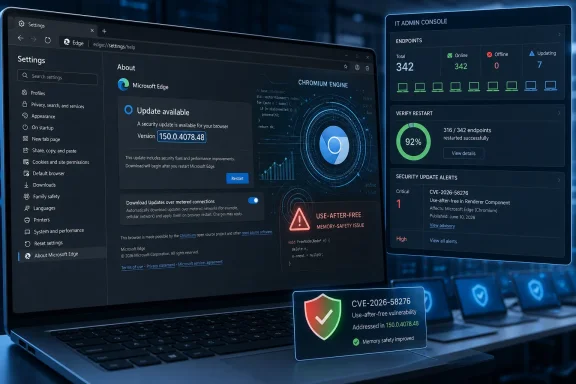
Microsoft disclosed CVE-2026-58276 on July 3, 2026, as a high-severity remote code execution vulnerability in Chromium-based Microsoft Edge affecting versions before 150.0.4078.48, with exploitation requiring user interaction and the fix landing in the July 2 Stable Channel update. The vulnerability is not just another browser CVE in a long feed of them; it is a reminder that Edge’s security story is now inseparable from Chromium’s velocity, Microsoft’s enterprise update plumbing, and the judgment calls administrators make when a browser becomes an application platform. Microsoft’s Security Update Guide and Edge release notes establish the baseline facts, while third-party vulnerability trackers have filled in the public-facing shorthand: a use-after-free flaw, network attack vector, high impact, and a patch boundary at version 150.0.4078.48.
The headline phrase “remote code execution” still does what it is supposed to do: it gets attention. But CVE-2026-58276 is not the cartoon version of RCE where a server is exposed to the internet and immediately falls over without a click, a login, or a mistake. Microsoft’s scoring indicates a network-reachable attack path, no privileges required, and user interaction required, with high impact to confidentiality, integrity, and availability.
That combination matters. It tells administrators that the browser is the boundary, the user is part of the exploit chain, and the patch is the control that matters most. In practical terms, the exposure is the familiar one: a user lands on attacker-controlled or compromised web content, Edge mishandles memory, and code execution becomes possible inside the constraints and mitigations of the browser environment.
Securityvulnerability.io, summarizing Microsoft’s advisory data, describes CVE-2026-58276 as a use-after-free vulnerability in Microsoft Edge that could allow an unauthorized attacker to execute arbitrary code over a network. That description fits a long-running class of browser bugs where memory once owned by one object is incorrectly reused after it should no longer be trusted. The result is the sort of vulnerability class browser sandboxes, site isolation, memory allocators, and exploit mitigations have spent years trying to make harder to turn into a practical compromise.
The affected range is blunt: Chromium-based Edge before 150.0.4078.48. Microsoft’s Edge security release notes say the July 2, 2026 Stable Channel update to version 150.0.4078.48 incorporates the latest Chromium project security updates. The timing is slightly awkward but normal for Microsoft’s security ecosystem: the browser package shipped on July 2, while the CVE record appeared publicly on July 3.
That is where the “confidence” metric in the prompt becomes important. Vulnerability scoring systems do not merely ask how bad a bug would be if exploited; they also ask how much the public knows and how certain the ecosystem is that the bug exists as described. In this case, confidence in the existence of the vulnerability is high because Microsoft has acknowledged it through MSRC and shipped an Edge update that supersedes affected builds.
The available technical detail, however, is more limited than the certainty of the bug’s existence. We know the product, the impact category, the affected version boundary, the CVSS shape, and the broad memory-safety class as reflected by vulnerability trackers summarizing Microsoft data. We do not have public exploit code, public root-cause analysis from the researcher, or a Chromium bug thread with enough implementation detail to reconstruct the flaw.
That distinction is not academic. A confirmed but technically under-described RCE should move patching, but it should not automatically trigger the same incident posture as a known exploited zero-day. Microsoft’s public Edge security notes explicitly call out exploit-in-the-wild status for some past Chromium-related vulnerabilities when that is known; for CVE-2026-58276, the public material available at disclosure does not show that same exploitation warning.
Chromium time is fast, and it does not care much for quarterly change windows. Browser security updates arrive when they need to arrive, sometimes multiple times in a month, sometimes with a CVE list that is incomplete at initial release and filled in later as advisories are published. Microsoft’s own Edge security release notes for July 2 say CVEs would be added as available, which is a small but telling example of how the browser patch pipeline works in real life.
For consumers, this is mostly invisible. Edge updates in the background, the browser restarts when it restarts, and the user sees a new version number only if they go looking for it. For enterprises, the invisible pipeline becomes a governance problem: update rings, browser restarts, change freezes, help-desk noise, compatibility testing, and security exceptions all collide with a product that is now one of the most exposed pieces of software on every endpoint.
CVE-2026-58276 therefore lands in the category of vulnerabilities that should make IT teams audit their Edge update assumptions. If the organization relies on automatic updates, it should verify that endpoints actually crossed the 150.0.4078.48 boundary. If it uses staged deployment, it should know which ring is still exposed. If it pins or delays Edge for compatibility reasons, it should treat that delay as a conscious risk decision rather than administrative background noise.
That is not a high bar. Phishing, malvertising, poisoned search results, compromised small-business sites, and injected content are all ways attackers bridge the gap between vulnerability theory and endpoint compromise. In a browser RCE, the exploit path may begin with something mundane: a link in email, a Teams message, a fake invoice portal, a drive-by page, or a web app dependency that quietly turned hostile.
The CVSS score of 7.5 captures a high-severity issue, but CVSS can flatten operational reality. A browser RCE on a heavily locked-down kiosk may be less urgent than the same CVE on a privileged administrator’s workstation used to access cloud consoles, identity portals, remote management tools, and source repositories. The browser is not merely another app on those machines; it is the front door to the control plane.
The right lesson is not panic. It is prioritization. Patch the systems where browser compromise gives an attacker the shortest path to secrets, administrative sessions, internal apps, or privileged workflows. Then patch everything else, because the modern browser is too central to leave knowingly behind.
The complication is that Edge is not just Edge. There is the browser installed on Windows endpoints, the Edge Update service, policy-controlled update behavior, Extended Stable deployments, and the Evergreen WebView2 Runtime used by desktop applications that embed web content. Microsoft’s July 2 Stable release notes are especially notable because Edge 150 also introduced enterprise WebView2 runtime downgrade controls, allowing managed devices to roll back specific WebView2 applications to previous runtime versions for regression mitigation.
That new downgrade capability is useful, but it also illustrates the tension. Enterprises want rollback controls because browser and WebView2 regressions can break business applications. Security teams want rapid forward motion because older browser runtimes accumulate risk quickly. Microsoft is trying to give organizations a pressure valve without turning browser version pinning into a permanent security liability.
The key phrase in Microsoft’s release notes is that downgrades automatically expire with each new WebView2 release. That design choice matters. It frames downgrade as a short-term compatibility bridge, not an indefinite escape hatch from the security update train. For CVE-2026-58276, administrators should be wary of any policy, packaging process, or application exception that leaves embedded web runtimes behind the fixed branch.
That does not mean every browser RCE automatically steals the tenant. Sandboxing, process isolation, credential protections, conditional access, hardware-backed authentication, and endpoint detection all complicate the path. But the direction of travel is obvious: attackers do not need to own the operating system first if the user’s browser session already touches the systems they want.
This is why Edge security updates deserve a different urgency from many ordinary application updates. A vulnerable PDF reader or media player may require a user to open a hostile file. A vulnerable browser requires users to do what they do all day. The exposure window is measured not in exotic behavior but in routine work.
Microsoft appears to understand this in its management tooling. The Edge 150 release notes describe Security Update Alerts in the Edge management service, allowing administrators to choose severity thresholds and receive alerts when updates include security fixes meeting or exceeding that level, including zero-day fixes. That is not a flashy feature, but it is the sort of plumbing that determines whether a CVE becomes a dashboard event or a forgotten line item.
CVE-2026-58276 sits in an interesting middle. The vulnerability is vendor-confirmed, the affected version boundary is public, and the security impact is formally scored. That gives defenders enough confidence to act. But the public technical detail is constrained, and there is no publicly verified exploitation-in-the-wild signal in the sources reviewed for this article.
That should produce disciplined urgency, not theatrical urgency. In other words: patch promptly, verify coverage, watch telemetry, but do not claim the internet is already on fire unless Microsoft, CISA, Google’s Chromium team, or credible incident responders say so. Security teams lose credibility when every high-severity browser bug is messaged internally as an active breach precursor.
The better internal message is sharper: this is a confirmed Microsoft Edge RCE fixed in 150.0.4078.48, exploitation requires user interaction, public technical detail is limited, and the correct response is accelerated browser update verification. That is enough to move.
This is not a Microsoft-only issue. It is a consequence of the browser’s role as a universal runtime for untrusted code. JavaScript engines, rendering engines, GPU paths, media parsers, WebAssembly, extensions, WebRTC, WebGPU, and document handling all expand the attack surface. The browser must move fast because the adversary does.
Edge complicates that reality by being both a consumer browser and an enterprise dependency. It is installed by default on Windows, used by Microsoft 365 workflows, embedded through WebView2, and managed through Group Policy, Intune, Configuration Manager, and the Edge management service. A security update is therefore not just a user app update; it is a platform maintenance event.
CVE-2026-58276 is a good test case for whether an organization’s browser patch process is alive or ceremonial. If security can name the vulnerable versions, identify exposed machines, force or encourage browser restarts, and verify remediation within a defined window, the process works. If the answer is “Edge updates itself eventually,” the process is hope wearing a policy badge.
Microsoft’s Edge 150 release notes are revealing because they pair security-update alerting with WebView2 downgrade controls and additional validation around SharePoint’s “View in File Explorer” feature. That is Microsoft acknowledging the enterprise truth: security updates land inside a messy compatibility ecosystem. Administrators need tools not only to update, but to survive the update.
Still, compatibility cannot become a permanent veto. A machine held back from 150.0.4078.48 because of a fragile workflow is not merely “on an older browser.” It is carrying a known, vendor-confirmed RCE exposure. If the business requires that exception, it should come with compensating controls: isolation, reduced privileges, network restrictions, dedicated profiles, enhanced monitoring, and an expiration date.
The WebView2 angle deserves special attention. Many users do not know which desktop applications rely on Edge’s web runtime, and many administrators discover the dependency only during troubleshooting. A browser CVE may therefore intersect with applications that do not look like browsers at all. That is why version inventory should include both Edge and WebView2 runtime state where applicable.
For individual Windows users, the practical path is to open Edge’s About page and let the browser check for updates, then restart it. For managed fleets, the path runs through existing tooling: Intune, Configuration Manager, Windows Update for Business where applicable, Edge Update policy, enterprise software deployment, and reporting dashboards. The important part is not the tool; it is proving the fixed version is actually present.
Administrators should also remember that “installed” is not always “effective.” Browsers often need a restart to move from downloaded update to running patched code. Users who keep sessions alive for days can remain exposed longer than patch compliance dashboards imply. A mature Edge update process accounts for browser relaunch behavior, not just package availability.
There is also a messaging opportunity here. Telling users “restart your browser for security” is more concrete than vague warnings about cyber risk. If an organization has to interrupt users, it should explain that a high-severity Edge code execution flaw has been fixed and that restarting completes the protection. Specificity earns more cooperation than ritualized IT nagging.
That is the right direction. Security teams are drowning in CVEs, and browser CVEs are especially easy to under-triage because they arrive frequently. A severity-threshold alerting model lets organizations distinguish routine maintenance from updates that deserve accelerated deployment. The danger, of course, is that alerting becomes another dashboard nobody owns.
Ownership is the harder problem. In some organizations, desktop engineering owns Edge. In others, security owns vulnerability prioritization but not deployment. Application teams own WebView2 dependencies. Identity teams own the accounts most at risk if browser sessions are compromised. CVE-2026-58276 crosses all of those boundaries without asking permission.
The fix is governance, not a new acronym. Someone must be accountable for browser security posture across the fleet, including version compliance, restart enforcement, policy exceptions, and embedded runtimes. Edge has become too important to be managed as a side effect of Windows maintenance.
 Microsoft’s Browser Patch Is Really an Enterprise Deadline
The headline phrase “remote code execution” still does what it is supposed to do: it gets attention. But CVE-2026-58276 is not the cartoon version of RCE where a server is exposed to the internet and immediately falls over without a click, a login, or a mistake. Microsoft’s scoring indicates a network-reachable attack path, no privileges required, and user interaction required, with high impact to confidentiality, integrity, and availability.That combination matters. It tells administrators that the browser is the boundary, the user is part of the exploit chain, and the patch is the control that matters most. In practical terms, the exposure is the familiar one: a user lands on attacker-controlled or compromised web content, Edge mishandles memory, and code execution becomes possible inside the constraints and mitigations of the browser environment.
Securityvulnerability.io, summarizing Microsoft’s advisory data, describes CVE-2026-58276 as a use-after-free vulnerability in Microsoft Edge that could allow an unauthorized attacker to execute arbitrary code over a network. That description fits a long-running class of browser bugs where memory once owned by one object is incorrectly reused after it should no longer be trusted. The result is the sort of vulnerability class browser sandboxes, site isolation, memory allocators, and exploit mitigations have spent years trying to make harder to turn into a practical compromise.
The affected range is blunt: Chromium-based Edge before 150.0.4078.48. Microsoft’s Edge security release notes say the July 2, 2026 Stable Channel update to version 150.0.4078.48 incorporates the latest Chromium project security updates. The timing is slightly awkward but normal for Microsoft’s security ecosystem: the browser package shipped on July 2, while the CVE record appeared publicly on July 3.
The Most Important Detail Is the One Microsoft Does Not Fully Spell Out
The user-facing advisory language around CVE-2026-58276 is sparse, and that is not unusual. Modern browser vulnerabilities often arrive with enough information for defenders to prioritize and verify patching, but not enough for exploit writers to get a free implementation guide. The public record gives defenders the CVSS shape, affected versions, update floor, and broad bug class; it does not publish a vulnerable function name, proof-of-concept, or exploit chain.That is where the “confidence” metric in the prompt becomes important. Vulnerability scoring systems do not merely ask how bad a bug would be if exploited; they also ask how much the public knows and how certain the ecosystem is that the bug exists as described. In this case, confidence in the existence of the vulnerability is high because Microsoft has acknowledged it through MSRC and shipped an Edge update that supersedes affected builds.
The available technical detail, however, is more limited than the certainty of the bug’s existence. We know the product, the impact category, the affected version boundary, the CVSS shape, and the broad memory-safety class as reflected by vulnerability trackers summarizing Microsoft data. We do not have public exploit code, public root-cause analysis from the researcher, or a Chromium bug thread with enough implementation detail to reconstruct the flaw.
That distinction is not academic. A confirmed but technically under-described RCE should move patching, but it should not automatically trigger the same incident posture as a known exploited zero-day. Microsoft’s public Edge security notes explicitly call out exploit-in-the-wild status for some past Chromium-related vulnerabilities when that is known; for CVE-2026-58276, the public material available at disclosure does not show that same exploitation warning.
Edge Inherits Chromium’s Strengths and Its Patch Rhythm
Microsoft Edge is no longer an island. Since the Chromium-based Edge became the mainstream browser, Microsoft has benefited from the security engineering, fuzzing, and release cadence of the Chromium project, while layering on its own enterprise controls, Windows integration, identity features, management service, and WebView2 runtime model. That arrangement is a net win for security, but it also means Edge administrators live on Chromium time.Chromium time is fast, and it does not care much for quarterly change windows. Browser security updates arrive when they need to arrive, sometimes multiple times in a month, sometimes with a CVE list that is incomplete at initial release and filled in later as advisories are published. Microsoft’s own Edge security release notes for July 2 say CVEs would be added as available, which is a small but telling example of how the browser patch pipeline works in real life.
For consumers, this is mostly invisible. Edge updates in the background, the browser restarts when it restarts, and the user sees a new version number only if they go looking for it. For enterprises, the invisible pipeline becomes a governance problem: update rings, browser restarts, change freezes, help-desk noise, compatibility testing, and security exceptions all collide with a product that is now one of the most exposed pieces of software on every endpoint.
CVE-2026-58276 therefore lands in the category of vulnerabilities that should make IT teams audit their Edge update assumptions. If the organization relies on automatic updates, it should verify that endpoints actually crossed the 150.0.4078.48 boundary. If it uses staged deployment, it should know which ring is still exposed. If it pins or delays Edge for compatibility reasons, it should treat that delay as a conscious risk decision rather than administrative background noise.
User Interaction Is Not a Comfort Blanket
A vulnerability that requires user interaction is less severe than one that does not, but browser security has always lived in the gap between “requires a click” and “users click things.” The web is the most hostile document format ever successfully normalized as a work tool. A user interaction requirement often means the attacker must lure the victim to malicious content, convince them to open a page, or abuse a compromised legitimate site.That is not a high bar. Phishing, malvertising, poisoned search results, compromised small-business sites, and injected content are all ways attackers bridge the gap between vulnerability theory and endpoint compromise. In a browser RCE, the exploit path may begin with something mundane: a link in email, a Teams message, a fake invoice portal, a drive-by page, or a web app dependency that quietly turned hostile.
The CVSS score of 7.5 captures a high-severity issue, but CVSS can flatten operational reality. A browser RCE on a heavily locked-down kiosk may be less urgent than the same CVE on a privileged administrator’s workstation used to access cloud consoles, identity portals, remote management tools, and source repositories. The browser is not merely another app on those machines; it is the front door to the control plane.
The right lesson is not panic. It is prioritization. Patch the systems where browser compromise gives an attacker the shortest path to secrets, administrative sessions, internal apps, or privileged workflows. Then patch everything else, because the modern browser is too central to leave knowingly behind.
Version 150.0.4078.48 Is the Line Administrators Must Prove They Crossed
For CVE-2026-58276, the operational test is simple: Edge must be at 150.0.4078.48 or later on affected desktop channels. Microsoft’s Edge WebDriver download page, as of the current public release state, also reflects the 150.0.4078.x branch across Stable artifacts, reinforcing that this is not a theoretical update stranded in advisory land. The fix is in the channel administrators already know how to deploy.The complication is that Edge is not just Edge. There is the browser installed on Windows endpoints, the Edge Update service, policy-controlled update behavior, Extended Stable deployments, and the Evergreen WebView2 Runtime used by desktop applications that embed web content. Microsoft’s July 2 Stable release notes are especially notable because Edge 150 also introduced enterprise WebView2 runtime downgrade controls, allowing managed devices to roll back specific WebView2 applications to previous runtime versions for regression mitigation.
That new downgrade capability is useful, but it also illustrates the tension. Enterprises want rollback controls because browser and WebView2 regressions can break business applications. Security teams want rapid forward motion because older browser runtimes accumulate risk quickly. Microsoft is trying to give organizations a pressure valve without turning browser version pinning into a permanent security liability.
The key phrase in Microsoft’s release notes is that downgrades automatically expire with each new WebView2 release. That design choice matters. It frames downgrade as a short-term compatibility bridge, not an indefinite escape hatch from the security update train. For CVE-2026-58276, administrators should be wary of any policy, packaging process, or application exception that leaves embedded web runtimes behind the fixed branch.
The Browser Is Now Part of the Identity Perimeter
A decade ago, administrators could sometimes treat browser patching as a desktop hygiene issue. That framing is obsolete. Edge is now a privileged interface to Microsoft 365, Entra ID, SharePoint, Azure, SaaS consoles, password managers, device management portals, remote desktop gateways, CI/CD dashboards, and internal line-of-business apps. A browser compromise can become an identity compromise very quickly if session tokens, cached credentials, extensions, or privileged web sessions are exposed.That does not mean every browser RCE automatically steals the tenant. Sandboxing, process isolation, credential protections, conditional access, hardware-backed authentication, and endpoint detection all complicate the path. But the direction of travel is obvious: attackers do not need to own the operating system first if the user’s browser session already touches the systems they want.
This is why Edge security updates deserve a different urgency from many ordinary application updates. A vulnerable PDF reader or media player may require a user to open a hostile file. A vulnerable browser requires users to do what they do all day. The exposure window is measured not in exotic behavior but in routine work.
Microsoft appears to understand this in its management tooling. The Edge 150 release notes describe Security Update Alerts in the Edge management service, allowing administrators to choose severity thresholds and receive alerts when updates include security fixes meeting or exceeding that level, including zero-day fixes. That is not a flashy feature, but it is the sort of plumbing that determines whether a CVE becomes a dashboard event or a forgotten line item.
The Confidence Metric Cuts Both Ways
The prompt’s discussion of confidence is aimed at a subtle but important part of vulnerability management. A vulnerability can be rumored, partially described, independently researched, vendor-confirmed, exploited, or fully weaponized in public. Those states are not equivalent. The urgency rises as the existence, technical understanding, and exploitability of the issue become more certain.CVE-2026-58276 sits in an interesting middle. The vulnerability is vendor-confirmed, the affected version boundary is public, and the security impact is formally scored. That gives defenders enough confidence to act. But the public technical detail is constrained, and there is no publicly verified exploitation-in-the-wild signal in the sources reviewed for this article.
That should produce disciplined urgency, not theatrical urgency. In other words: patch promptly, verify coverage, watch telemetry, but do not claim the internet is already on fire unless Microsoft, CISA, Google’s Chromium team, or credible incident responders say so. Security teams lose credibility when every high-severity browser bug is messaged internally as an active breach precursor.
The better internal message is sharper: this is a confirmed Microsoft Edge RCE fixed in 150.0.4078.48, exploitation requires user interaction, public technical detail is limited, and the correct response is accelerated browser update verification. That is enough to move.
Patch Tuesday Thinking Does Not Fit Browser Reality
The old Windows mental model still shapes too many organizations: collect the patches, test the patches, deploy the patches, report the patches, repeat next month. Browser security does not fit cleanly into that calendar. Edge, Chrome, and other Chromium-based browsers ship security fixes on a rhythm that is more continuous than monthly.This is not a Microsoft-only issue. It is a consequence of the browser’s role as a universal runtime for untrusted code. JavaScript engines, rendering engines, GPU paths, media parsers, WebAssembly, extensions, WebRTC, WebGPU, and document handling all expand the attack surface. The browser must move fast because the adversary does.
Edge complicates that reality by being both a consumer browser and an enterprise dependency. It is installed by default on Windows, used by Microsoft 365 workflows, embedded through WebView2, and managed through Group Policy, Intune, Configuration Manager, and the Edge management service. A security update is therefore not just a user app update; it is a platform maintenance event.
CVE-2026-58276 is a good test case for whether an organization’s browser patch process is alive or ceremonial. If security can name the vulnerable versions, identify exposed machines, force or encourage browser restarts, and verify remediation within a defined window, the process works. If the answer is “Edge updates itself eventually,” the process is hope wearing a policy badge.
Compatibility Exceptions Are Where Browser Risk Hides
The hardest Edge patching conversations rarely involve ordinary users. They involve legacy web apps, regulated workflows, brittle vendor portals, internal sites that only work under specific browser behavior, and business units that remember the last update that broke something important. These pressures are real, and dismissing them does not make the risk disappear.Microsoft’s Edge 150 release notes are revealing because they pair security-update alerting with WebView2 downgrade controls and additional validation around SharePoint’s “View in File Explorer” feature. That is Microsoft acknowledging the enterprise truth: security updates land inside a messy compatibility ecosystem. Administrators need tools not only to update, but to survive the update.
Still, compatibility cannot become a permanent veto. A machine held back from 150.0.4078.48 because of a fragile workflow is not merely “on an older browser.” It is carrying a known, vendor-confirmed RCE exposure. If the business requires that exception, it should come with compensating controls: isolation, reduced privileges, network restrictions, dedicated profiles, enhanced monitoring, and an expiration date.
The WebView2 angle deserves special attention. Many users do not know which desktop applications rely on Edge’s web runtime, and many administrators discover the dependency only during troubleshooting. A browser CVE may therefore intersect with applications that do not look like browsers at all. That is why version inventory should include both Edge and WebView2 runtime state where applicable.
The Right Response Is Boring, Which Is Why It Works
The defense for CVE-2026-58276 is not clever. Update Edge. Restart the browser. Verify the version. Check managed devices. Watch for failed updates. Review exceptions. Repeat for WebView2 where policy or application behavior makes that relevant. This is unglamorous work, but browser security is mostly won or lost in unglamorous work.For individual Windows users, the practical path is to open Edge’s About page and let the browser check for updates, then restart it. For managed fleets, the path runs through existing tooling: Intune, Configuration Manager, Windows Update for Business where applicable, Edge Update policy, enterprise software deployment, and reporting dashboards. The important part is not the tool; it is proving the fixed version is actually present.
Administrators should also remember that “installed” is not always “effective.” Browsers often need a restart to move from downloaded update to running patched code. Users who keep sessions alive for days can remain exposed longer than patch compliance dashboards imply. A mature Edge update process accounts for browser relaunch behavior, not just package availability.
There is also a messaging opportunity here. Telling users “restart your browser for security” is more concrete than vague warnings about cyber risk. If an organization has to interrupt users, it should explain that a high-severity Edge code execution flaw has been fixed and that restarting completes the protection. Specificity earns more cooperation than ritualized IT nagging.
The July Edge Fix Shows Where Microsoft Is Steering Admins
The most interesting thing about this Edge update may be the surrounding management story. Microsoft is not simply shipping a patched browser; it is building more administrative structure around browser security events. Security Update Alerts in the Edge management service are a tacit admission that Edge updates now need the same operational visibility as operating system vulnerabilities.That is the right direction. Security teams are drowning in CVEs, and browser CVEs are especially easy to under-triage because they arrive frequently. A severity-threshold alerting model lets organizations distinguish routine maintenance from updates that deserve accelerated deployment. The danger, of course, is that alerting becomes another dashboard nobody owns.
Ownership is the harder problem. In some organizations, desktop engineering owns Edge. In others, security owns vulnerability prioritization but not deployment. Application teams own WebView2 dependencies. Identity teams own the accounts most at risk if browser sessions are compromised. CVE-2026-58276 crosses all of those boundaries without asking permission.
The fix is governance, not a new acronym. Someone must be accountable for browser security posture across the fleet, including version compliance, restart enforcement, policy exceptions, and embedded runtimes. Edge has become too important to be managed as a side effect of Windows maintenance.
The Edge 150 Checklist That Actually Matters
CVE-2026-58276 is a focused vulnerability with a focused remediation, but the operational lesson is broader than one CVE. The organizations that handle this well will be the ones that already treat browsers as high-risk, high-change infrastructure.- Microsoft Edge installations should be updated to version 150.0.4078.48 or later wherever Chromium-based Edge is in use.
- Security teams should treat the vulnerability as confirmed by Microsoft, while recognizing that public root-cause and exploit details remain limited.
- Administrators should verify browser restarts, because a downloaded Edge update is not the same as patched code running in every user session.
- Managed environments should review update deferrals, Extended Stable policies, and WebView2 runtime behavior for anything that could preserve exposure.
- Compatibility exceptions should be documented with compensating controls and expiration dates, not allowed to become quiet permanent downgrades.
- Edge security alerting should have an owner, because a dashboard without accountability is just another place for risk to hide.
References
- Primary source: MSRC
Published: 2026-07-03T07:00:00-07:00
Security Update Guide - Microsoft Security Response Center
 msrc.microsoft.com
- Related coverage: securityvulnerability.io
CVE-2026-58276 : Remote Code Execution Vulnerability in Microsoft Edge from Microsoft
Learn about a remote code execution vulnerability in Microsoft Edge (Chromium-based) and how it can be exploited. CVE-2026-58276.securityvulnerability.io - Related coverage: www2.gov.bc.ca
- Related coverage: aha.org
h isac tlp white microsoft edge addresses exploited zero day vulnerability cve 2024 7971 8 23 2024
PDF documentwww.aha.org
- Related coverage: mphasis.com
- Related coverage: hivepro.com
- Official source: learn.microsoft.com
Microsoft Edge release notes for Stable Channel | Microsoft Learn
Microsoft Edge release note for the Stable Channellearn.microsoft.com - Official source: developer.microsoft.com

Microsoft Edge WebDriver | Microsoft Edge Developer
developer.microsoft.com
- Related coverage: techspot.com
Microsoft Edge Download Free - 150.0.4078.48 | TechSpot
Download Microsoft Edge - Edge browser lets you enjoy extended battery life and get to what you are looking for quickly.www.techspot.com - Official source: catalog.update.microsoft.com
- Related coverage: cirt.gy