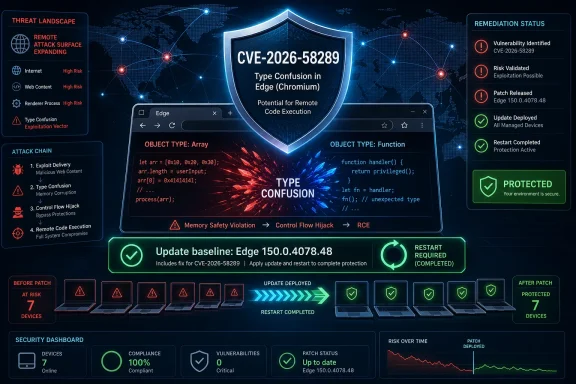
Microsoft disclosed CVE-2026-58289 on July 3, 2026, as a critical Microsoft Edge Chromium-based remote code execution vulnerability caused by type confusion, affecting Edge versions before 150.0.4078.48 and requiring administrators to treat the July 2 Stable Channel update as the practical fix. The sparse public advisory is the story as much as the bug itself: Microsoft has confirmed enough to make the risk real, but not enough to let defenders understand the exploit path in detail. That puts enterprise IT in a familiar browser-security squeeze, where the rational move is fast patching, not elaborate debate over whether the vulnerability is “interesting.” As reflected in Microsoft’s Security Update Guide and Edge release notes, this is another reminder that Chromium’s security tempo is now part of Windows operations whether administrators like it or not.
CVE-2026-58289 is not a rumor, a researcher teaser, or a vague third-party warning. Microsoft’s own Security Update Guide assigns it to Microsoft Edge, describes it as a Chromium-based remote code execution issue, and ties it to “access of resource using incompatible type,” the Common Weakness Enumeration language normally associated with type confusion.
That matters because the user-supplied metric — confidence in the existence of the vulnerability and credibility of known technical details — lands on a fairly clear answer here. The vulnerability’s existence is highly credible because the vendor has acknowledged it, assigned a CVE, published an affected product entry, and released an Edge build that security release notes say incorporates Chromium security updates. The technical details, however, remain deliberately thin.
The public record says enough to establish the broad class of flaw: a type confusion condition in Edge that can allow an unauthorized attacker to execute code over a network. It does not, at least publicly, describe the vulnerable component, required browser state, sandbox implications, exploit primitives, proof-of-concept availability, or whether the flaw is Edge-specific versus inherited from upstream Chromium.
That split is important. Vulnerability confidence is not the same thing as exploit clarity. Defenders can be certain that Microsoft considers this a real security issue while still knowing relatively little about how an attacker would weaponize it.
A 9.0 score is not background noise. In practical terms, it signals a bug with high impact across confidentiality, integrity, and availability, with network reachability and no privileges required. In a browser, that combination usually collapses into a familiar operational instruction: update first, ask subtle questions later.
Yet the score does not mean every unpatched endpoint is already compromised, nor does it prove that a working exploit is circulating. CVEFeed’s own entry marks the vulnerability as “Remotely Exploit: No,” while still describing network-based code execution in the advisory text. That apparent tension is a useful example of why security teams should not over-read a single database field when the vendor advisory and version remediation tell the larger story.
The likely interpretation is less dramatic: the database field may reflect whether public remote exploit code is known, while the vulnerability class and attack vector describe what the flaw enables under the CVSS model. For IT operations, the distinction is academic only up to a point. Whether an exploit is already public or merely plausible, a browser RCE with a vendor fix available belongs in the urgent patch queue.
That collapse is why type confusion is not merely a correctness bug. In the right context, it can let an attacker read, write, or corrupt memory in ways the program never intended. From there, the route to arbitrary code execution depends on mitigations, sandboxing, exploit reliability, and the attacker’s sophistication.
The phrase “remote code execution” also deserves careful handling in a browser context. It does not necessarily mean an attacker can directly take over a machine from the open Internet in the way an exposed server-side RCE might work. Browser RCE often starts with user interaction, such as visiting a malicious page, loading crafted content, clicking a link, opening embedded web content, or encountering attacker-controlled advertising.
That is still remote exploitation in the sense that the malicious input arrives over the network. It is also exactly why browsers remain high-value targets: the attack surface is huge, user behavior is hard to control, and the browser is usually allowed to touch both the public web and sensitive internal workflows.
Microsoft’s Edge security release notes for July 2, 2026, say Edge Stable version 150.0.4078.48 incorporates the latest security updates from the Chromium project, with CVEs to be added as soon as available. That sequencing is not unusual in browser land. Security builds can ship before every public CVE entry is richly populated, because waiting for documentation polish is the wrong tradeoff when memory-safety fixes are ready.
This creates a documentation gap that frustrates administrators and vulnerability managers. A scanner may flag a CVE before Microsoft’s release note has fully enumerated the issue. A release note may point to the Security Update Guide while the Security Update Guide supplies only a terse weakness description. A third-party vulnerability database may fill in version ranges before Microsoft’s JavaScript-heavy advisory page is easy to scrape or archive.
That is not ideal, but it is the reality of fast browser patching. Edge is no longer a Windows component that waits neatly for Patch Tuesday in the old sense. It is a continuously updated application platform that happens to be deeply integrated into Windows, Microsoft 365 workflows, WebView2 applications, and enterprise identity patterns.
That gives administrators a simple test: anything below 150.0.4078.48 should be treated as exposed to this CVE unless Microsoft later narrows the affected range. For consumers, the answer is similarly direct: open Edge’s About page and let the browser update. For managed environments, the answer is less glamorous but more important: verify update rings, deployment telemetry, restart behavior, and WebView2 runtime state.
The restart problem is easy to underestimate. Edge can download an update but not fully apply it until the browser restarts. Users who keep dozens of tabs open for weeks can sit on a vulnerable running process even after the updater has staged the newer build. Endpoint dashboards that report installed version may not always tell the whole story about active browser processes.
This is where mature organizations separate patch availability from patch completion. The goal is not merely to approve the Edge update. The goal is to ensure users are actually running the corrected binary, that stale processes are closed, and that vulnerability scanners see the new version consistently after deployment.
Microsoft’s Edge 150 release notes include a notable enterprise WebView2 change: administrators can use a DowngradeVersion policy to temporarily roll back specific WebView2 applications to previous Evergreen Runtime versions when critical regressions occur. That is a useful reliability tool, but it also underscores the tension between compatibility and security.
A downgrade policy can help rescue a business-critical app broken by a new runtime. It can also leave a targeted application on older Chromium code if governance is sloppy. Microsoft says downgrades expire with new WebView2 releases, but administrators still need to know where they have allowed exceptions and why.
For CVE-2026-58289, the immediate operational question is whether WebView2 runtime deployments have reached the fixed line as well as the browser. In environments where Edge and WebView2 update channels are tightly managed, the answer may be straightforward. In environments with packaging drift, disconnected networks, legacy line-of-business apps, or aggressive rollback policies, it may not be.
This is a recurring problem in vulnerability communication. Different databases use similar-sounding fields to mean different things: exploit availability, exploitability assessment, CVSS attack vector, known exploitation, or remote reachability. Security teams that collapse all of these into a single yes-or-no judgment are likely to make bad decisions.
The right reading is conservative. Microsoft has classified the issue as remote code execution in Edge. Third-party aggregators identify type confusion and a critical CVSS score. There is no reliable public evidence, from the material available at publication time, that the bug is being exploited in the wild or that public proof-of-concept code exists.
That distinction should shape response, not weaken it. If exploitation is not known, defenders may have a window to patch before commodity tooling catches up. The useful conclusion is not “relax.” It is “move while the information asymmetry still favors defenders.”
On technical detail, the confidence is narrower. We can credibly say it involves type confusion, Edge Chromium, remote code execution, network-delivered attack surface, and affected builds before 150.0.4078.48. We cannot responsibly say which internal Edge or Chromium component is vulnerable unless Microsoft or Chromium publishes that detail.
That is a useful difference for defenders. A high-confidence, low-detail vulnerability calls for patch validation and exposure reduction, not speculative reverse engineering by every enterprise security team. Unless your organization does browser exploit research or manages unusually exposed kiosk, VDI, or high-risk browsing environments, your time is better spent confirming remediation than theorizing about exploit chains.
For attackers, low public detail may slow broad exploitation, but it does not prevent it. Sophisticated actors can diff patched and unpatched binaries, monitor Chromium commits, and infer vulnerable code paths from changes. The publication of a fixed build starts a race, even when the advisory is terse.
This is not a side channel anymore. Edge is a default browser, a PDF handler in many workflows, a Microsoft 365 access point, an identity surface, and the foundation for WebView2. If an organization treats Edge updates as “desktop app maintenance” rather than core security hygiene, it is underestimating the platform.
The July 2 Edge release also arrives with enterprise-facing changes that are not strictly security fixes, including policy updates, Google account sign-in controls, Workspaces migration details, sidebar retirement, and new Edge management security update alerts in public preview. That mixture is typical of browser releases now: security patches ride alongside product changes, policy changes, and user-visible feature adjustments.
This complicates change management. A security team may want the build immediately, while a desktop engineering team wants to test policy behavior and user experience changes. CVE-2026-58289 is a case study in why enterprises need prebuilt browser update governance rather than ad hoc meetings every time a critical CVE appears.
A successful browser RCE may still face sandboxing and operating-system mitigations. That is good news, but it is not a reason to delay patching. Modern exploitation often chains bugs: renderer compromise, sandbox escape, token theft, credential phishing, malicious extension abuse, or persistence through user-level mechanisms.
Even without a full device takeover, browser compromise can be operationally ugly. Session cookies, federated identity tokens, cloud admin portals, source repositories, ticketing systems, and remote management consoles all live in the browsing session. For many workers, the browser is effectively the workstation.
This is why security teams should rank browser RCEs by business exposure, not just CVSS. A kiosk locked to a single internal site, a developer workstation with privileged cloud access, and a general office laptop may all run Edge, but the blast radius differs. Patch them all, but verify the most privileged populations first.
For enterprises, the instruction is less about clicking update and more about evidence. Administrators should confirm Edge Stable deployment status through their endpoint management platform, validate that update policies are not pinning older builds, and check for devices that have not restarted the browser. Vulnerability scanners should be re-run after update completion, not merely after approval.
Special attention belongs to shared machines, VDI pools, lab systems, point-of-sale-adjacent devices, kiosks, jump boxes, and administrator workstations. These are the systems where users may not behave like normal users, update services may be constrained, or the consequence of browser compromise may be unusually high.
There is also a communication angle. If users are trained to ignore browser restart prompts because “IT handles updates,” then IT should not be surprised when patched builds are staged but not active. A short forced-restart window may be unpopular, but it is often cleaner than quietly accepting stale browser processes during a critical RCE cycle.
That secrecy helps only if defenders patch quickly. If organizations delay while waiting for a blog post, proof of concept, or scanner plugin, the benefit evaporates. Worse, attackers may be doing the same diffing work during the delay, with far more focused incentives.
The frustration is legitimate, though. Security teams need enough information to prioritize, explain risk to leadership, and decide whether emergency change windows are justified. A CVSS 9.0 browser RCE with a short weakness description gives them the severity but not the narrative.
That is why prose attribution and careful language matter. Microsoft has confirmed the vulnerability and shipped the update. Third-party databases add a version boundary and repeat the type-confusion classification. Beyond that, any claim about exploit mechanics should be treated as speculation until more authoritative details emerge.
That matters because some organizations slow down browser updates when they see product changes bundled with security fixes. In normal circumstances, that caution can be reasonable. In the context of a critical RCE, it becomes a governance test.
The macOS 12 note is especially relevant for mixed fleets. Edge 150 is listed as the last Edge release supporting Monterey, with Edge 151 and later requiring macOS 13 Ventura or later. Organizations still running Monterey have a near-term browser lifecycle problem that is separate from CVE-2026-58289 but exposed by the same release train.
The new security update alerts in the Edge management service are also worth watching. Microsoft says administrators can set severity thresholds and receive alerts when Edge updates include security fixes meeting or exceeding that level, including zero-day fixes. If that preview matures, it could help close the gap between browser release velocity and enterprise awareness.
The practical sequence is straightforward. Identify devices below 150.0.4078.48. Push the update. Force or strongly prompt Edge restarts where necessary. Check WebView2 runtime exposure. Re-scan. Investigate stragglers. Document exceptions.
None of that requires waiting for exploit code. In fact, waiting for exploit code is the wrong threshold for a browser RCE. By the time public proof of concept exists, the vulnerability has often moved from patch-management problem to incident-response problem.
There is still room for risk-based nuance. Air-gapped systems, tightly controlled application servers that do not run Edge interactively, and lab machines may sit lower in the queue than internet-heavy user endpoints. But the default should be movement, not debate.
 Microsoft Confirms the Bug, but Not the Full Shape of the Attack
CVE-2026-58289 is not a rumor, a researcher teaser, or a vague third-party warning. Microsoft’s own Security Update Guide assigns it to Microsoft Edge, describes it as a Chromium-based remote code execution issue, and ties it to “access of resource using incompatible type,” the Common Weakness Enumeration language normally associated with type confusion.That matters because the user-supplied metric — confidence in the existence of the vulnerability and credibility of known technical details — lands on a fairly clear answer here. The vulnerability’s existence is highly credible because the vendor has acknowledged it, assigned a CVE, published an affected product entry, and released an Edge build that security release notes say incorporates Chromium security updates. The technical details, however, remain deliberately thin.
The public record says enough to establish the broad class of flaw: a type confusion condition in Edge that can allow an unauthorized attacker to execute code over a network. It does not, at least publicly, describe the vulnerable component, required browser state, sandbox implications, exploit primitives, proof-of-concept availability, or whether the flaw is Edge-specific versus inherited from upstream Chromium.
That split is important. Vulnerability confidence is not the same thing as exploit clarity. Defenders can be certain that Microsoft considers this a real security issue while still knowing relatively little about how an attacker would weaponize it.
The CVSS 9.0 Rating Says “Critical,” but the Fine Print Still Matters
Public vulnerability trackers such as CVEFeed and Vulners mirror the central facts: CVE-2026-58289 is listed as a critical issue with a CVSS 3.1 base score of 9.0, affecting Microsoft Edge and associated with type confusion. CVEFeed’s entry describes the issue as allowing an unauthorized attacker to execute code over a network, while Vulners shows affected Edge Chromium versions below 150.0.4078.48.A 9.0 score is not background noise. In practical terms, it signals a bug with high impact across confidentiality, integrity, and availability, with network reachability and no privileges required. In a browser, that combination usually collapses into a familiar operational instruction: update first, ask subtle questions later.
Yet the score does not mean every unpatched endpoint is already compromised, nor does it prove that a working exploit is circulating. CVEFeed’s own entry marks the vulnerability as “Remotely Exploit: No,” while still describing network-based code execution in the advisory text. That apparent tension is a useful example of why security teams should not over-read a single database field when the vendor advisory and version remediation tell the larger story.
The likely interpretation is less dramatic: the database field may reflect whether public remote exploit code is known, while the vulnerability class and attack vector describe what the flaw enables under the CVSS model. For IT operations, the distinction is academic only up to a point. Whether an exploit is already public or merely plausible, a browser RCE with a vendor fix available belongs in the urgent patch queue.
Type Confusion Is the Kind of Browser Bug Attackers Like
Type confusion sounds like compiler-room jargon, but in browser security it has a long and uncomfortable history. Modern browsers are sprawling runtimes that constantly move objects through JavaScript engines, rendering pipelines, graphics layers, media stacks, PDF handlers, and extension surfaces. If one part of the program treats a resource as one kind of object while another part treats it as something else, memory safety can collapse.That collapse is why type confusion is not merely a correctness bug. In the right context, it can let an attacker read, write, or corrupt memory in ways the program never intended. From there, the route to arbitrary code execution depends on mitigations, sandboxing, exploit reliability, and the attacker’s sophistication.
The phrase “remote code execution” also deserves careful handling in a browser context. It does not necessarily mean an attacker can directly take over a machine from the open Internet in the way an exposed server-side RCE might work. Browser RCE often starts with user interaction, such as visiting a malicious page, loading crafted content, clicking a link, opening embedded web content, or encountering attacker-controlled advertising.
That is still remote exploitation in the sense that the malicious input arrives over the network. It is also exactly why browsers remain high-value targets: the attack surface is huge, user behavior is hard to control, and the browser is usually allowed to touch both the public web and sensitive internal workflows.
Edge’s Chromium Base Cuts Both Ways
Microsoft Edge’s Chromium foundation is both a security advantage and an operational dependency. On the plus side, Edge benefits from the enormous attention paid to Chromium’s security architecture, fuzzing, hardening, and rapid patch cadence. On the minus side, when Chromium-class bugs land, Edge inherits much of the urgency that Chrome administrators already understand.Microsoft’s Edge security release notes for July 2, 2026, say Edge Stable version 150.0.4078.48 incorporates the latest security updates from the Chromium project, with CVEs to be added as soon as available. That sequencing is not unusual in browser land. Security builds can ship before every public CVE entry is richly populated, because waiting for documentation polish is the wrong tradeoff when memory-safety fixes are ready.
This creates a documentation gap that frustrates administrators and vulnerability managers. A scanner may flag a CVE before Microsoft’s release note has fully enumerated the issue. A release note may point to the Security Update Guide while the Security Update Guide supplies only a terse weakness description. A third-party vulnerability database may fill in version ranges before Microsoft’s JavaScript-heavy advisory page is easy to scrape or archive.
That is not ideal, but it is the reality of fast browser patching. Edge is no longer a Windows component that waits neatly for Patch Tuesday in the old sense. It is a continuously updated application platform that happens to be deeply integrated into Windows, Microsoft 365 workflows, WebView2 applications, and enterprise identity patterns.
The Fix Is Clearer Than the Advisory
The most actionable fact is the version number. Microsoft’s official Edge release notes identify version 150.0.4078.48 as the July 2, 2026 Stable Channel release, and the security release notes say that build incorporates the latest Chromium security updates. Vulners’ record for CVE-2026-58289 lists Edge Chromium versions below 150.0.4078.48 as affected.That gives administrators a simple test: anything below 150.0.4078.48 should be treated as exposed to this CVE unless Microsoft later narrows the affected range. For consumers, the answer is similarly direct: open Edge’s About page and let the browser update. For managed environments, the answer is less glamorous but more important: verify update rings, deployment telemetry, restart behavior, and WebView2 runtime state.
The restart problem is easy to underestimate. Edge can download an update but not fully apply it until the browser restarts. Users who keep dozens of tabs open for weeks can sit on a vulnerable running process even after the updater has staged the newer build. Endpoint dashboards that report installed version may not always tell the whole story about active browser processes.
This is where mature organizations separate patch availability from patch completion. The goal is not merely to approve the Edge update. The goal is to ensure users are actually running the corrected binary, that stale processes are closed, and that vulnerability scanners see the new version consistently after deployment.
WebView2 Makes Browser Bugs an Application Platform Problem
Edge is not just a browser icon on the taskbar. Microsoft’s WebView2 runtime lets Windows applications embed Chromium-based web content, and many enterprise applications now depend on it for login flows, dashboards, help systems, admin consoles, and hybrid app interfaces. That means a Chromium-class vulnerability can have reach beyond users consciously browsing the web.Microsoft’s Edge 150 release notes include a notable enterprise WebView2 change: administrators can use a DowngradeVersion policy to temporarily roll back specific WebView2 applications to previous Evergreen Runtime versions when critical regressions occur. That is a useful reliability tool, but it also underscores the tension between compatibility and security.
A downgrade policy can help rescue a business-critical app broken by a new runtime. It can also leave a targeted application on older Chromium code if governance is sloppy. Microsoft says downgrades expire with new WebView2 releases, but administrators still need to know where they have allowed exceptions and why.
For CVE-2026-58289, the immediate operational question is whether WebView2 runtime deployments have reached the fixed line as well as the browser. In environments where Edge and WebView2 update channels are tightly managed, the answer may be straightforward. In environments with packaging drift, disconnected networks, legacy line-of-business apps, or aggressive rollback policies, it may not be.
The “Remotely Exploit: No” Field Should Not Become a Comfort Blanket
One of the more confusing public details is CVEFeed’s “Remotely Exploit: No” line. Read carelessly, that could sound as if the vulnerability cannot be exploited remotely. But the same entry says the flaw allows code execution over a network, and the CVSS-style breakdown points to a network attack vector.This is a recurring problem in vulnerability communication. Different databases use similar-sounding fields to mean different things: exploit availability, exploitability assessment, CVSS attack vector, known exploitation, or remote reachability. Security teams that collapse all of these into a single yes-or-no judgment are likely to make bad decisions.
The right reading is conservative. Microsoft has classified the issue as remote code execution in Edge. Third-party aggregators identify type confusion and a critical CVSS score. There is no reliable public evidence, from the material available at publication time, that the bug is being exploited in the wild or that public proof-of-concept code exists.
That distinction should shape response, not weaken it. If exploitation is not known, defenders may have a window to patch before commodity tooling catches up. The useful conclusion is not “relax.” It is “move while the information asymmetry still favors defenders.”
The Confidence Metric Points to a High-Certainty Vulnerability With Low Public Exploit Detail
The user-provided metric asks how confident we should be in the vulnerability’s existence and in the credibility of the technical details. On existence, CVE-2026-58289 scores high. Microsoft is the assigning and affected vendor, the CVE is live in Microsoft’s ecosystem, and the issue is mirrored by several vulnerability databases.On technical detail, the confidence is narrower. We can credibly say it involves type confusion, Edge Chromium, remote code execution, network-delivered attack surface, and affected builds before 150.0.4078.48. We cannot responsibly say which internal Edge or Chromium component is vulnerable unless Microsoft or Chromium publishes that detail.
That is a useful difference for defenders. A high-confidence, low-detail vulnerability calls for patch validation and exposure reduction, not speculative reverse engineering by every enterprise security team. Unless your organization does browser exploit research or manages unusually exposed kiosk, VDI, or high-risk browsing environments, your time is better spent confirming remediation than theorizing about exploit chains.
For attackers, low public detail may slow broad exploitation, but it does not prevent it. Sophisticated actors can diff patched and unpatched binaries, monitor Chromium commits, and infer vulnerable code paths from changes. The publication of a fixed build starts a race, even when the advisory is terse.
Microsoft’s Browser Patch Cadence Is Now Part of Windows Hygiene
Windows administrators used to think in monthly bundles. Browsers broke that rhythm. Edge can ship several Stable updates in a month, and Microsoft’s June 2026 security release notes show exactly that pattern, with multiple Stable and mobile updates incorporating Chromium security fixes across the month.This is not a side channel anymore. Edge is a default browser, a PDF handler in many workflows, a Microsoft 365 access point, an identity surface, and the foundation for WebView2. If an organization treats Edge updates as “desktop app maintenance” rather than core security hygiene, it is underestimating the platform.
The July 2 Edge release also arrives with enterprise-facing changes that are not strictly security fixes, including policy updates, Google account sign-in controls, Workspaces migration details, sidebar retirement, and new Edge management security update alerts in public preview. That mixture is typical of browser releases now: security patches ride alongside product changes, policy changes, and user-visible feature adjustments.
This complicates change management. A security team may want the build immediately, while a desktop engineering team wants to test policy behavior and user experience changes. CVE-2026-58289 is a case study in why enterprises need prebuilt browser update governance rather than ad hoc meetings every time a critical CVE appears.
The Enterprise Risk Is Not Just Unpatched Browsers
The obvious risk is a user running a vulnerable Edge build and visiting malicious content. But the enterprise risk model is broader. Browsers sit at the junction of identity, SaaS, internal portals, file downloads, password managers, device compliance flows, and copy-paste access to sensitive data.A successful browser RCE may still face sandboxing and operating-system mitigations. That is good news, but it is not a reason to delay patching. Modern exploitation often chains bugs: renderer compromise, sandbox escape, token theft, credential phishing, malicious extension abuse, or persistence through user-level mechanisms.
Even without a full device takeover, browser compromise can be operationally ugly. Session cookies, federated identity tokens, cloud admin portals, source repositories, ticketing systems, and remote management consoles all live in the browsing session. For many workers, the browser is effectively the workstation.
This is why security teams should rank browser RCEs by business exposure, not just CVSS. A kiosk locked to a single internal site, a developer workstation with privileged cloud access, and a general office laptop may all run Edge, but the blast radius differs. Patch them all, but verify the most privileged populations first.
Consumers Get the Easy Button, Enterprises Get the Audit Trail
For home users, the instruction is simple. Edge normally updates itself, but users should still check the browser version manually after a critical advisory, especially if the browser has been open for days. Version 150.0.4078.48 or later is the line suggested by the public data currently available.For enterprises, the instruction is less about clicking update and more about evidence. Administrators should confirm Edge Stable deployment status through their endpoint management platform, validate that update policies are not pinning older builds, and check for devices that have not restarted the browser. Vulnerability scanners should be re-run after update completion, not merely after approval.
Special attention belongs to shared machines, VDI pools, lab systems, point-of-sale-adjacent devices, kiosks, jump boxes, and administrator workstations. These are the systems where users may not behave like normal users, update services may be constrained, or the consequence of browser compromise may be unusually high.
There is also a communication angle. If users are trained to ignore browser restart prompts because “IT handles updates,” then IT should not be surprised when patched builds are staged but not active. A short forced-restart window may be unpopular, but it is often cleaner than quietly accepting stale browser processes during a critical RCE cycle.
The Sparse Advisory Is a Feature and a Frustration
Microsoft’s terse disclosure is not unique. Vendors routinely limit details for memory-corruption and browser bugs until patches have propagated. The less public exploit guidance available on day one, the harder it may be for opportunistic attackers to turn the advisory into working exploit code.That secrecy helps only if defenders patch quickly. If organizations delay while waiting for a blog post, proof of concept, or scanner plugin, the benefit evaporates. Worse, attackers may be doing the same diffing work during the delay, with far more focused incentives.
The frustration is legitimate, though. Security teams need enough information to prioritize, explain risk to leadership, and decide whether emergency change windows are justified. A CVSS 9.0 browser RCE with a short weakness description gives them the severity but not the narrative.
That is why prose attribution and careful language matter. Microsoft has confirmed the vulnerability and shipped the update. Third-party databases add a version boundary and repeat the type-confusion classification. Beyond that, any claim about exploit mechanics should be treated as speculation until more authoritative details emerge.
Edge 150 Carries More Than a Security Fix
Edge version 150.0.4078.48 is not a single-purpose security hotfix. Microsoft’s release notes describe broader product changes, including the final Edge release for macOS 12 Monterey, Workspaces migration to a new architecture, retirement of the sidebar app list, updated third-party cookie language, Intune MAM protected-download behavior, and policy additions.That matters because some organizations slow down browser updates when they see product changes bundled with security fixes. In normal circumstances, that caution can be reasonable. In the context of a critical RCE, it becomes a governance test.
The macOS 12 note is especially relevant for mixed fleets. Edge 150 is listed as the last Edge release supporting Monterey, with Edge 151 and later requiring macOS 13 Ventura or later. Organizations still running Monterey have a near-term browser lifecycle problem that is separate from CVE-2026-58289 but exposed by the same release train.
The new security update alerts in the Edge management service are also worth watching. Microsoft says administrators can set severity thresholds and receive alerts when Edge updates include security fixes meeting or exceeding that level, including zero-day fixes. If that preview matures, it could help close the gap between browser release velocity and enterprise awareness.
Patch Strategy Beats Vulnerability Theater
The most common failure after a critical browser CVE is performative urgency. Dashboards turn red, emails fly, meetings happen, and nobody checks whether the browser process actually restarted. CVE-2026-58289 rewards boring competence more than dramatic analysis.The practical sequence is straightforward. Identify devices below 150.0.4078.48. Push the update. Force or strongly prompt Edge restarts where necessary. Check WebView2 runtime exposure. Re-scan. Investigate stragglers. Document exceptions.
None of that requires waiting for exploit code. In fact, waiting for exploit code is the wrong threshold for a browser RCE. By the time public proof of concept exists, the vulnerability has often moved from patch-management problem to incident-response problem.
There is still room for risk-based nuance. Air-gapped systems, tightly controlled application servers that do not run Edge interactively, and lab machines may sit lower in the queue than internet-heavy user endpoints. But the default should be movement, not debate.
The Edge CVE That Turns Documentation Gaps Into Operational Tests
CVE-2026-58289 is a compact lesson in how modern browser risk works. The advisory is short, the score is high, the fix is available, and the operational burden is distributed across browsers, runtimes, user sessions, scanners, and management policy.- Microsoft has confirmed CVE-2026-58289 as a Microsoft Edge Chromium-based remote code execution vulnerability involving type confusion.
- Public vulnerability data points to Edge versions before 150.0.4078.48 as affected, making that build the practical remediation baseline.
- There is no solid public evidence in the currently available material that the vulnerability is being exploited in the wild, but the critical rating means defenders should not wait for that evidence.
- Administrators should verify active browser versions, not merely update approval status, because staged browser updates may still require restart.
- WebView2 deserves separate attention because Chromium-based runtime exposure can exist inside enterprise applications, not just inside the Edge browser window.
- Microsoft’s sparse disclosure gives attackers fewer public clues, but it also puts more pressure on organizations to trust the vendor signal and patch quickly.
References
- Primary source: MSRC
Published: 2026-07-03T07:00:00-07:00
Loading…
msrc.microsoft.com - Related coverage: hkcert.org
Microsoft Edge Multiple Vulnerabilities
Multiple vulnerabilities were identified in Microsoft Edge. A remote attacker could exploit some of these vulnerabilities to trigger remote code execution, denial of service condition, security restriction bypass, data manipulation, sensitive informationwww.hkcert.org - Related coverage: cve.circl.lu
Vulnerability-Lookup
Vulnerability-Lookup - Fast vulnerability lookup correlation from different sources.cve.circl.lu - Related coverage: threats.kaspersky.com
Kaspersky Threats — KLA91012
threats.kaspersky.com
- Related coverage: sentinelone.com
CVE-2026-45495: Microsoft Edge Chromium RCE Vulnerability
CVE-2026-45495 is a remote code execution vulnerability in Microsoft Edge Chromium. Learn about its impact, affected versions, and mitigation methods.www.sentinelone.com
- Related coverage: securityvulnerability.io
CVE-2026-58294 : Remote Code Execution Vulnerability in Microsoft Edge by Microsoft
Learn about the remote code execution vulnerability affecting Microsoft Edge. Stay informed about CVE-2026-58294 and enhance your cybersecurity measures.securityvulnerability.io
- Related coverage: stack.watch
- Related coverage: www2.gov.bc.ca
- Related coverage: aha.org
h isac tlp white microsoft edge addresses exploited zero day vulnerability cve 2024 7971 8 23 2024
PDF documentwww.aha.org
- Related coverage: mphasis.com
- Related coverage: ws.buildingsbt.stage.honeywell.com
Loading…
ws.buildingsbt.stage.honeywell.com - Official source: learn.microsoft.com
Microsoft Edge release notes for Stable Channel | Microsoft Learn
Microsoft Edge release note for the Stable Channellearn.microsoft.com - Official source: developer.microsoft.com
Microsoft Edge WebDriver | Microsoft Edge Developer
 developer.microsoft.com
- Related coverage: techspot.com
Microsoft Edge Download Free - 150.0.4078.48 | TechSpot
Download Microsoft Edge - Edge browser lets you enjoy extended battery life and get to what you are looking for quickly.www.techspot.com - Official source: catalog.update.microsoft.com
Microsoft Update Catalog
www.catalog.update.microsoft.com - Related coverage: softexia.com
Microsoft Edge 150.0.4078.48 | Download Free
Discover the browsing experience across all your devices with Microsoft Edge - the advanced AI web browser for Windows, macOS, Android, iOS.www.softexia.com
- Related coverage: windowsforum.com
CVE-2026-57992: Edge Stable 150.0.4078.48 RCE Patch Gap for Windows | Windows Forum
Microsoft has listed CVE-2026-57992 as a Microsoft Edge Chromium-based remote code execution vulnerability in the Security Update Guide, with Edge Stable...windowsforum.com