

CVE-2026-58298 is a Microsoft Edge Chromium-based spoofing vulnerability that can be exploited over the network when an attacker hosts a specially crafted website and persuades a user, through email, messaging, or an attachment-driven lure, to open that content in Edge. The important part is not that the attacker can reach the browser from across the internet; it is that the browser still needs the user to cross the threshold. Microsoft’s Security Response Center describes the attack as network-based, but also makes clear that user interaction is required. That distinction is where the real risk lives: this is not a wormable Edge bug, but it is exactly the kind of web-and-social-engineering weakness that modern phishing operations know how to operationalize.
“Network” can sound more dramatic than it is. In Microsoft vulnerability language, a network attack vector generally means the attacker does not need local access to the victim’s machine; the exploit path can be delivered remotely over a network connection. For CVE-2026-58298, that remote path is the web: a malicious page, an attacker-controlled site, or content routed through a lure that causes Edge to process crafted input.
That does not mean an attacker can simply scan the internet and compromise Edge installations at will. Microsoft’s own exploitability language says the attacker would have to convince a user to view the specially crafted content. In practice, that means the exploit chain begins less like a classic network intrusion and more like a phishing campaign.
The difference matters for defenders. A vulnerability requiring user interaction can still be serious, especially in a browser, because browsers are designed to process untrusted content all day long. But it changes the first line of defense from “block inbound exploitation” to “reduce exposure to hostile content, patch quickly, and blunt the lure.”
Microsoft’s advisory language points to the familiar delivery methods: email, instant message, or an attachment that nudges the user into opening attacker-controlled content. The attachment does not necessarily have to exploit Edge itself; it may simply be the prop that gets the user to click. In modern attacks, the lure is often more important than the vulnerability.
Because this is a spoofing vulnerability, the attacker’s goal is likely to make something in the browsing experience appear more trustworthy than it is. Spoofing flaws can be used to misrepresent origin, interface state, identity, or content context. Without more public technical detail from Microsoft, defenders should avoid assuming the exact UI element involved, but the broad risk is clear: the user may be tricked into believing malicious content is legitimate.
The practical question is not whether the user must click. The practical question is whether the attacker can make the click feel normal. For a targeted organization, that bar may be low: a fake SharePoint link, a Teams-style notification, a DocuSign imitation, a payroll portal, or a vendor invoice can all be enough to move a victim into the attacker’s page.
That is why CVE-2026-58298 belongs in the same operational bucket as many browser spoofing and phishing-enablement bugs. It may not give an attacker code execution by itself, but it can improve the credibility of a deception. In security terms, anything that helps a malicious page look safer, more official, or more familiar can raise the success rate of the rest of the attack.
The advisory references improper handling of input during web page generation, a phrase commonly associated with cross-site scripting-style weaknesses. In plain English, that points toward a failure to neutralize content in a way that prevents attacker-controlled input from influencing what the browser displays or trusts. When the security impact is “spoofing,” the danger is not merely that content appears; it is that content appears in a misleading context.
For users, that means the browser may be doing exactly what it was asked to do: load a page. The malicious part is buried in how the page is crafted and how Edge handles it. That makes patching especially important, because the exploit path does not require the victim to install malware first.
The attacker’s biggest obstacle is not network reachability. It is attention. They need the user to open the content, and they need the surrounding story to survive the few seconds in which the user decides whether something feels legitimate.
That is also why browser spoofing bugs are frustrating for defenders. They live in the gray space between software vulnerability and human deception. Patch management can close the software hole, but it cannot erase the fact that users are constantly invited to open network-hosted content as part of their jobs.
The second response is detection and user-risk reduction. A malicious site used for this vulnerability may arrive through the same telemetry channels as other phishing infrastructure: suspicious links in mail, newly registered domains, abnormal redirects, credential-harvesting patterns, or user reports. Security teams should not wait for an exploit proof-of-concept before tightening those controls.
This is also a reminder that browser security is now identity security. If a spoofing flaw helps a user trust the wrong page, the likely prize is not the browser process itself but the session, credential, token, or business action behind it. Conditional access, phishing-resistant MFA, safe links, browser isolation for high-risk users, and least-privilege administrative workflows all matter here.
The broader lesson is that “network” and “user interaction” are not opposites. A vulnerability can be remotely reachable and still require a click. For browser flaws, that is often the normal shape of risk, not an edge case.
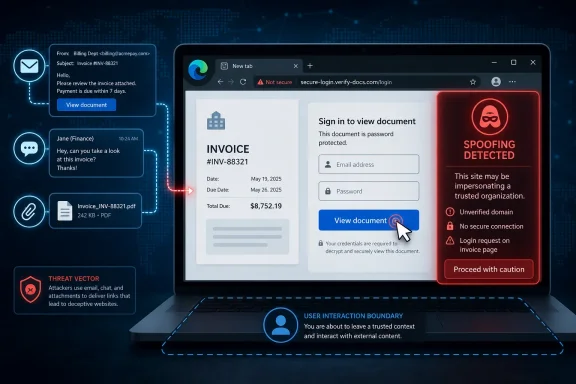 The Network Vector Does Not Mean the Browser Falls Over by Itself
“Network” can sound more dramatic than it is. In Microsoft vulnerability language, a network attack vector generally means the attacker does not need local access to the victim’s machine; the exploit path can be delivered remotely over a network connection. For CVE-2026-58298, that remote path is the web: a malicious page, an attacker-controlled site, or content routed through a lure that causes Edge to process crafted input.That does not mean an attacker can simply scan the internet and compromise Edge installations at will. Microsoft’s own exploitability language says the attacker would have to convince a user to view the specially crafted content. In practice, that means the exploit chain begins less like a classic network intrusion and more like a phishing campaign.
The difference matters for defenders. A vulnerability requiring user interaction can still be serious, especially in a browser, because browsers are designed to process untrusted content all day long. But it changes the first line of defense from “block inbound exploitation” to “reduce exposure to hostile content, patch quickly, and blunt the lure.”
The Exploit Starts With a Website, but the Weapon Is Persuasion
The attacker’s most plausible move is simple: build a website designed to trigger the spoofing flaw in Edge, then get the intended victim to visit it. That site could be sent directly in a message, hidden behind a shortened link, embedded in a fake document workflow, or presented as a login, invoice, shipment notice, software update, HR notice, or collaboration request.Microsoft’s advisory language points to the familiar delivery methods: email, instant message, or an attachment that nudges the user into opening attacker-controlled content. The attachment does not necessarily have to exploit Edge itself; it may simply be the prop that gets the user to click. In modern attacks, the lure is often more important than the vulnerability.
Because this is a spoofing vulnerability, the attacker’s goal is likely to make something in the browsing experience appear more trustworthy than it is. Spoofing flaws can be used to misrepresent origin, interface state, identity, or content context. Without more public technical detail from Microsoft, defenders should avoid assuming the exact UI element involved, but the broad risk is clear: the user may be tricked into believing malicious content is legitimate.
User Interaction Is a Limitation, Not a Comfort Blanket
Security teams sometimes downgrade their concern when they see “user interaction required.” That is understandable, but it can be misleading. Most successful browser-adjacent attacks already involve user interaction because users browse, click, authenticate, download, and approve prompts as part of ordinary work.The practical question is not whether the user must click. The practical question is whether the attacker can make the click feel normal. For a targeted organization, that bar may be low: a fake SharePoint link, a Teams-style notification, a DocuSign imitation, a payroll portal, or a vendor invoice can all be enough to move a victim into the attacker’s page.
That is why CVE-2026-58298 belongs in the same operational bucket as many browser spoofing and phishing-enablement bugs. It may not give an attacker code execution by itself, but it can improve the credibility of a deception. In security terms, anything that helps a malicious page look safer, more official, or more familiar can raise the success rate of the rest of the attack.
Edge’s Chromium Base Cuts Both Ways
Microsoft Edge’s Chromium foundation gives it the benefits of a mature browser engine and a fast-moving security ecosystem. It also means Edge sits in the same hostile web environment as Chrome and other Chromium-derived browsers. A bug in the way web content is generated, interpreted, or presented can become a remote attack surface as soon as a victim visits the wrong page.The advisory references improper handling of input during web page generation, a phrase commonly associated with cross-site scripting-style weaknesses. In plain English, that points toward a failure to neutralize content in a way that prevents attacker-controlled input from influencing what the browser displays or trusts. When the security impact is “spoofing,” the danger is not merely that content appears; it is that content appears in a misleading context.
For users, that means the browser may be doing exactly what it was asked to do: load a page. The malicious part is buried in how the page is crafted and how Edge handles it. That makes patching especially important, because the exploit path does not require the victim to install malware first.
The Attack Path Is Short, Familiar, and Hard to Eliminate
A realistic exploitation chain for CVE-2026-58298 would not need to be exotic. The attacker prepares a malicious webpage, sends a convincing lure, waits for the victim to open it in Edge, and then uses the spoofing behavior to support whatever deception comes next. That could be credential theft, fraudulent approval, misdirected trust, or another stage of an attack.The attacker’s biggest obstacle is not network reachability. It is attention. They need the user to open the content, and they need the surrounding story to survive the few seconds in which the user decides whether something feels legitimate.
That is also why browser spoofing bugs are frustrating for defenders. They live in the gray space between software vulnerability and human deception. Patch management can close the software hole, but it cannot erase the fact that users are constantly invited to open network-hosted content as part of their jobs.
Administrators Should Treat This as a Browser Patch and a Phishing Signal
For enterprise IT, the response should start with Edge update compliance. Edge’s rapid update model is a strength only if devices are actually receiving and applying updates. Managed environments should verify Stable Channel versions, update policies, restart behavior, and any controls that delay browser patch adoption.The second response is detection and user-risk reduction. A malicious site used for this vulnerability may arrive through the same telemetry channels as other phishing infrastructure: suspicious links in mail, newly registered domains, abnormal redirects, credential-harvesting patterns, or user reports. Security teams should not wait for an exploit proof-of-concept before tightening those controls.
This is also a reminder that browser security is now identity security. If a spoofing flaw helps a user trust the wrong page, the likely prize is not the browser process itself but the session, credential, token, or business action behind it. Conditional access, phishing-resistant MFA, safe links, browser isolation for high-risk users, and least-privilege administrative workflows all matter here.
The Practical Reading Is Narrow, but the Defensive Lesson Is Broad
The concrete answer is straightforward: an attacker exploits CVE-2026-58298 over the network by hosting crafted web content and persuading a user to open it in Microsoft Edge. The attacker cannot force the user to view the content under Microsoft’s stated scenario. The exploit therefore depends on a lure, commonly email, instant messaging, or an attachment that leads the victim toward the attacker-controlled page.The broader lesson is that “network” and “user interaction” are not opposites. A vulnerability can be remotely reachable and still require a click. For browser flaws, that is often the normal shape of risk, not an edge case.
The Click Is the Boundary Microsoft Cannot Patch for You
CVE-2026-58298 is best understood as a remote web-content risk whose success depends on user action and browser trust. The immediate defensive priorities are concrete:- Organizations should ensure Microsoft Edge is updated as soon as the relevant security update is available across managed and unmanaged endpoints.
- Users should be warned that attacker-controlled websites may arrive through ordinary-looking email, chat, or attachment lures.
- Security teams should treat suspicious links and newly observed phishing pages as possible exploit delivery infrastructure, not merely credential-theft nuisances.
- Administrators should verify that Edge update policies, restart prompts, and browser version reporting are working in practice.
- High-risk users should rely on phishing-resistant MFA and conditional access controls so that a successful spoof does not automatically become an account compromise.
References
- Primary source: MSRC
Published: 2026-07-03T07:00:00-07:00
Loading…
msrc.microsoft.com - Related coverage: securityvulnerability.io
Loading…
securityvulnerability.io - Related coverage: threats.kaspersky.com
Kaspersky Threats — KLA83531
threats.kaspersky.com
- Official source: learn.microsoft.com
Release notes for Microsoft Edge Security Updates | Microsoft Learn
Release notes for Microsoft Edge Security Updateslearn.microsoft.com - Related coverage: datacomm.com
Loading…
datacomm.com - Related coverage: sentinelone.com
CVE-2026-33118: Microsoft Edge Chromium Spoofing Vulnerability
CVE-2026-33118 is a spoofing vulnerability in Microsoft Edge Chromium. Learn about its impact, affected versions, and mitigation methods.www.sentinelone.com
- Related coverage: www2.gov.bc.ca
- Official source: microsoft.com
MSRC - Microsoft Security Response Center
The Microsoft Security Response Center is part of the defender community and on the front line of security response evolution. For over twenty years, we have been engaged with security researchers working to protect customers and the broader ecosystem.www.microsoft.com
- Related coverage: buildings.honeywell.com
The purpose of this document is to identify the patches that have been delivered by Microsoft® which have been tested against Pro-Watch
PDF documentbuildings.honeywell.com
- Related coverage: hivepro.com
Loading…
www.hivepro.com