

Google disclosed CVE-2026-14111 on June 30, 2026, as a low-severity use-after-free flaw in Chrome’s WebProtect component before version 150.0.7871.47, exploitable only after an attacker persuaded a user to install a malicious Chrome extension. The bug is not the scariest item in Chrome 150’s unusually large security haul, but it is a useful reminder that extension security is still browser security. NVD’s entry, CISA’s enrichment, and Google’s Chrome Releases advisory also expose a familiar problem for defenders: the metadata around a vulnerability can be messier than the patch story itself.
CVE-2026-14111 is easy to dismiss at first glance because Chromium rated it “Low.” That rating matters: Google is saying this flaw does not look like a drive-by, no-click, remote-code-execution emergency in the way a renderer escape or V8 zero-day might. The attacker’s path runs through a malicious extension, which means social engineering, extension installation, and Chrome’s permission model all sit between the victim and exploitation.
But that does not make the bug irrelevant. A use-after-free issue is a memory-safety failure, and memory-safety failures are the class of bug attackers keep turning into more serious primitives when the right conditions line up. In this case, the component name — WebProtect — is especially uncomfortable because it suggests a security-adjacent surface involved in guarding web or extension behavior.
Google’s advisory, as reflected in the NVD entry, says the flaw could allow arbitrary code execution via a crafted Chrome extension. That phrase should get attention in enterprise environments where extensions are treated as productivity accessories rather than executable software. A Chrome extension is not a bookmark with buttons; it is code running inside one of the most privileged user-facing applications on the endpoint.
The practical lesson is not that CVE-2026-14111 is secretly catastrophic. It is that “Low” in Chromium’s internal severity taxonomy does not always map cleanly to how an enterprise should think about exposure. If a company allows unmanaged extensions, the weakness lives in a much more permissive ecosystem than Google’s one-word severity label implies.
The NVD entry, however, shows why vulnerability management teams should read past the headline version number. The CVE description says Chrome prior to 150.0.7871.47 is affected. The affected-version record says less than 150.0.7871.47. But NIST’s initial CPE configuration, according to the change history supplied in the NVD record, used versions up to but excluding 150.0.7871.46.
That looks like an off-by-one-version problem in the CPE enrichment, or at least an inconsistency between the CVE description and the generated affected-software configuration. For scanners and dashboards, that distinction is not academic. A machine reporting Chrome 150.0.7871.46 could be treated as remediated by one interpretation and still vulnerable by another.
The safer reading is to trust the vendor-fixed version in the CVE description and Google advisory path: 150.0.7871.47 is the meaningful floor for this CVE where Chrome desktop builds use that branch. If an asset inventory flags 150.0.7871.46 as patched solely because of the CPE line, administrators should not assume that is enough without checking the vendor release channel and platform-specific build notes.
This is also a reminder that CPE data is not the vulnerability. CPE is an attempt to model software applicability for machines, scanners, and databases. It is immensely useful, but it is a translation layer — and translation layers sometimes introduce errors that the original advisory did not contain.
There are two ways to read that gap. The charitable interpretation is that CISA is modeling the consequence of successful exploitation — arbitrary code execution — rather than the likelihood of getting there. If exploitation succeeds, code execution inside a browser context can be serious, especially if chained with other bugs or paired with broad extension permissions.
The less comfortable interpretation is that automated or semi-automated scoring systems struggle with browser-extension threat models. If an exploit path requires a malicious extension, then user action is not some incidental detail; it is the core precondition. The NVD text says the attacker must convince the user to install the extension, while the CISA vector shown in the entry says user interaction is not required. Those two statements do not naturally coexist.
Security teams should not spend their day adjudicating whose adjective is more correct. They should note the discrepancy, patch Chrome, and then turn to the more durable control: extension governance. CVSS can help prioritize patch queues, but it cannot tell you whether your organization has allowed a thousand unmanaged extensions to bloom across sales laptops and developer workstations.
CVE-2026-14111 lives in that world. The attacker does not merely send a crafted web page and hope Chrome falls over. The attacker needs a crafted Chrome extension installed, which means the exploit begins with trust: a user trusts a store listing, a side-loaded package, a phishing lure, a developer tool, or an internal distribution channel.
That is precisely why enterprises should resist treating this as a consumer-only issue. Many businesses still make extension decisions through a loose mixture of user convenience and ad hoc helpdesk exceptions. A team wants a screen-capture tool, a recruiter wants a sourcing helper, a sales group wants a CRM enhancer, and before long the browser becomes a lightly governed application platform.
The irony is that Chrome’s broader security architecture has improved dramatically over the years, while the extension layer remains socially porous. Sandboxing, site isolation, memory mitigations, and Safe Browsing all raise the cost of exploitation. A user-authorized extension can start from a far more privileged position than an ordinary web page.
This does not mean all extensions are suspect. It means extension approval should look more like software approval than stationery procurement. CVE-2026-14111 is the kind of vulnerability that punishes organizations that never made that mental shift.
That matters because administrators rarely patch a single Chrome CVE in isolation. They approve or accelerate a browser release train. A low-severity extension bug can ride alongside critical renderer, GPU, side-channel, or sandbox-related issues that have a far more direct exploit path.
For users, the advice is still banal and correct: relaunch the browser. Chrome often downloads updates quietly, but the old vulnerable process can remain in memory until the browser restarts. The difference between “updated” and “protected” is sometimes one stubborn window full of tabs.
For IT, the release is another argument for treating browsers as core infrastructure. Chrome, Edge, and other Chromium-based browsers are now operating environments for SaaS, identity, privileged admin consoles, collaboration, and development tooling. A delayed browser patch is no longer like leaving a media player out of date; it is closer to leaving a remote-work shell exposed.
Microsoft Edge users should watch this class of issue closely even when the advisory says Google Chrome. Edge is Chromium-based, but Microsoft ships its own builds, versioning, and advisories. The right question for Edge estates is not “does Chrome have the bug?” but “which Chromium base is my Edge channel carrying, and has Microsoft shipped the corresponding fix?”
That mismatch can produce three kinds of operational pain. First, scanners may underreport systems on 150.0.7871.46 if they rely heavily on the CPE range. Second, dashboards may generate confusing exceptions when one feed says a device is clean and another says it is exposed. Third, compliance teams may waste time debating a feed discrepancy instead of enforcing the obvious fix: move to the latest stable build.
There may also be platform nuance. Google’s Stable Channel post used paired Windows and macOS versions, and some reporting identified Linux at 150.0.7871.46 for the same release family. Browser vendors sometimes publish staggered or platform-specific builds that make simple “less than version X” logic brittle. That does not excuse bad metadata, but it explains why vulnerability databases can struggle with real-world release trains.
For WindowsForum readers, the practical answer is conservative. If you are managing Chrome on Windows and the CVE says fixed before 150.0.7871.47, target 150.0.7871.47 or later. If you manage mixed fleets, verify the vendor build for each platform rather than assuming one CPE range tells the whole story.
Security tooling is supposed to reduce ambiguity, not create it. But when the feed and the advisory disagree, the original vendor release and the CVE prose should carry more weight than a generated CPE expression.
Chrome already gives enterprise administrators policy controls for extension allowlists, blocklists, installation sources, and permission management. The problem is rarely that the knobs do not exist. The problem is that many organizations discover them only after an incident, when every installed extension becomes a forensic question.
A mature extension policy starts with inventory. Administrators need to know what extensions are installed, which users have them, which permissions they request, and whether they come from trusted sources. Without that baseline, a vulnerability like CVE-2026-14111 becomes impossible to contextualize: you know the browser version, but not whether the exploit precondition is common in your environment.
The next step is reducing default trust. Allowlisting approved extensions may feel heavy-handed, but it is increasingly reasonable in managed environments where the browser is the front door to sensitive data. At minimum, organizations should block sideloading where it is not needed, restrict developer-mode extensions, and review extensions requesting broad host permissions.
The last step is cultural. Users have been trained for years to install mobile apps with some caution, but browser extensions still benefit from a strange aura of harmlessness. That aura is obsolete. Extensions can observe, alter, and exfiltrate the very workflows companies moved into the browser.
Chrome’s security architecture is built around the assumption that bugs will happen. Sandboxes, process separation, site isolation, and exploit mitigations are designed to keep one memory bug from becoming total compromise. But extension-related paths complicate that model because extensions can legitimately interact with browser internals and web content in ways ordinary pages cannot.
That is why “crafted Chrome Extension” is doing so much work in the CVE description. The exploit vehicle is not just an HTML page or a malicious file. It is an installable unit of browser functionality that may have declared permissions, update mechanisms, background scripts, content scripts, and persistent access to user activity.
The industry’s broader answer to memory-safety problems is slowly shifting toward safer languages and hardened components, but browsers are too large and too performance-sensitive for overnight transformation. Chromium continues to carry a vast amount of C++ code, and C++ continues to reward tiny lifetime mistakes with security advisories.
This is not a Chrome-only indictment. Every major browser has spent years fighting memory corruption. The difference is that Chrome’s extension ecosystem gives attackers an additional social and technical pathway that defenders must govern separately from ordinary web browsing.
Managed Chrome deployments can use enterprise policies, software deployment tools, and endpoint management platforms to enforce update cadence. Where Chrome is installed outside a managed baseline, the browser can quietly drift. Those unmanaged installs are often the same ones with the least controlled extension sets.
The Windows angle also includes Microsoft Edge. Edge’s Chromium foundation means many Chromium security fixes eventually matter to Edge users, but the timing and version strings are Microsoft’s responsibility. Administrators should track Microsoft’s Edge release notes and security baselines rather than assuming Google’s Chrome build number maps one-to-one onto their Edge estate.
Consumer Windows users have a simpler path. Open Chrome’s About page, let the update complete, and restart the browser. Then check extensions and remove anything unused, unknown, or suspicious. That advice sounds mundane because browser security often is mundane until the day it is not.
Developers and power users should be especially cautious with unpacked extensions and developer mode. Those workflows are legitimate, but they bypass some of the trust signals ordinary users rely on. A malicious proof-of-concept disguised as a tool, theme, helper, or test extension can be enough to satisfy the precondition described in this CVE.
That bargain has paid off in many ways. Password managers, accessibility tools, content blockers, developer utilities, and enterprise workflow extensions all make the web more usable. But each extension also becomes part of the browser’s effective attack surface, and each permission prompt is a small delegation of trust.
Google’s Manifest V3 transition has been controversial, especially among users of powerful content blockers and older extensions. The extension ecosystem is already in flux, and Chrome 150-related chatter on Reddit shows users still wrestling with extension compatibility and Manifest V2 behavior. CVE-2026-14111 does not settle that debate, but it underscores why browser vendors keep tightening extension rules even when users hate the friction.
Security hardening often looks like product hostility from the user’s chair. A beloved extension stops working, a developer workflow needs adjustment, or a policy blocks a tool someone has used for years. But from the defender’s chair, those restrictions are a response to a simple reality: if extensions can do powerful things for users, malicious extensions can do powerful things to users.
The right balance is not blind lockdown. It is intentional trust. Organizations should know which extensions they depend on, why they are approved, how they are updated, and what permissions they hold.
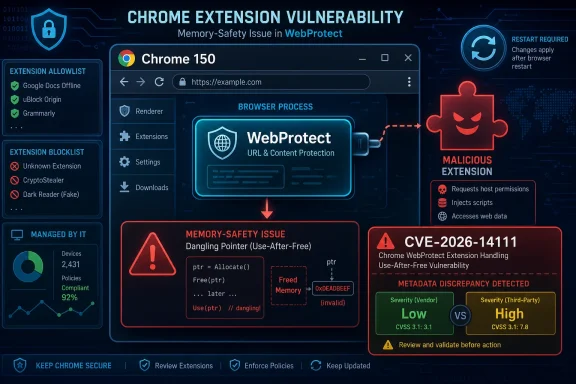 A Low-Severity Chrome Bug Still Lands in a High-Stakes Part of the Browser
CVE-2026-14111 is easy to dismiss at first glance because Chromium rated it “Low.” That rating matters: Google is saying this flaw does not look like a drive-by, no-click, remote-code-execution emergency in the way a renderer escape or V8 zero-day might. The attacker’s path runs through a malicious extension, which means social engineering, extension installation, and Chrome’s permission model all sit between the victim and exploitation.But that does not make the bug irrelevant. A use-after-free issue is a memory-safety failure, and memory-safety failures are the class of bug attackers keep turning into more serious primitives when the right conditions line up. In this case, the component name — WebProtect — is especially uncomfortable because it suggests a security-adjacent surface involved in guarding web or extension behavior.
Google’s advisory, as reflected in the NVD entry, says the flaw could allow arbitrary code execution via a crafted Chrome extension. That phrase should get attention in enterprise environments where extensions are treated as productivity accessories rather than executable software. A Chrome extension is not a bookmark with buttons; it is code running inside one of the most privileged user-facing applications on the endpoint.
The practical lesson is not that CVE-2026-14111 is secretly catastrophic. It is that “Low” in Chromium’s internal severity taxonomy does not always map cleanly to how an enterprise should think about exposure. If a company allows unmanaged extensions, the weakness lives in a much more permissive ecosystem than Google’s one-word severity label implies.
The Patch Is Straightforward; the Metadata Is Not
The operational answer is simple: Chrome should be at 150.0.7871.47 or later where that build is applicable. Google’s June 30 Stable Channel update moved Windows and macOS to 150.0.7871.46/.47, with Linux listed separately at 150.0.7871.46 in related reporting on the release. Malwarebytes and Born’s IT and Windows Blog both described the update as part of a very large Chrome 150 security drop, with hundreds of fixes landing at once.The NVD entry, however, shows why vulnerability management teams should read past the headline version number. The CVE description says Chrome prior to 150.0.7871.47 is affected. The affected-version record says less than 150.0.7871.47. But NIST’s initial CPE configuration, according to the change history supplied in the NVD record, used versions up to but excluding 150.0.7871.46.
That looks like an off-by-one-version problem in the CPE enrichment, or at least an inconsistency between the CVE description and the generated affected-software configuration. For scanners and dashboards, that distinction is not academic. A machine reporting Chrome 150.0.7871.46 could be treated as remediated by one interpretation and still vulnerable by another.
The safer reading is to trust the vendor-fixed version in the CVE description and Google advisory path: 150.0.7871.47 is the meaningful floor for this CVE where Chrome desktop builds use that branch. If an asset inventory flags 150.0.7871.46 as patched solely because of the CPE line, administrators should not assume that is enough without checking the vendor release channel and platform-specific build notes.
This is also a reminder that CPE data is not the vulnerability. CPE is an attempt to model software applicability for machines, scanners, and databases. It is immensely useful, but it is a translation layer — and translation layers sometimes introduce errors that the original advisory did not contain.
CISA’s Score Tells a Different Story Than Chromium’s Severity
The tension deepens with CISA’s ADP enrichment. The NVD page shows CISA assigning a CVSS 3.1 base score of 8.1, categorized as High, with network attack vector, high attack complexity, no privileges required, no user interaction, unchanged scope, and high confidentiality, integrity, and availability impact. That sits awkwardly beside Chromium’s “Low” severity and the prose requirement that an attacker convince a user to install a malicious extension.There are two ways to read that gap. The charitable interpretation is that CISA is modeling the consequence of successful exploitation — arbitrary code execution — rather than the likelihood of getting there. If exploitation succeeds, code execution inside a browser context can be serious, especially if chained with other bugs or paired with broad extension permissions.
The less comfortable interpretation is that automated or semi-automated scoring systems struggle with browser-extension threat models. If an exploit path requires a malicious extension, then user action is not some incidental detail; it is the core precondition. The NVD text says the attacker must convince the user to install the extension, while the CISA vector shown in the entry says user interaction is not required. Those two statements do not naturally coexist.
Security teams should not spend their day adjudicating whose adjective is more correct. They should note the discrepancy, patch Chrome, and then turn to the more durable control: extension governance. CVSS can help prioritize patch queues, but it cannot tell you whether your organization has allowed a thousand unmanaged extensions to bloom across sales laptops and developer workstations.
WebProtect Puts the Extension Model Back Under the Microscope
Chrome’s extension model has always been a compromise between power and safety. Extensions can block content, rewrite pages, manage tabs, observe navigation, integrate with password managers, and automate workflows users now depend on. That power is also why malicious or compromised extensions remain a persistent path into browser sessions.CVE-2026-14111 lives in that world. The attacker does not merely send a crafted web page and hope Chrome falls over. The attacker needs a crafted Chrome extension installed, which means the exploit begins with trust: a user trusts a store listing, a side-loaded package, a phishing lure, a developer tool, or an internal distribution channel.
That is precisely why enterprises should resist treating this as a consumer-only issue. Many businesses still make extension decisions through a loose mixture of user convenience and ad hoc helpdesk exceptions. A team wants a screen-capture tool, a recruiter wants a sourcing helper, a sales group wants a CRM enhancer, and before long the browser becomes a lightly governed application platform.
The irony is that Chrome’s broader security architecture has improved dramatically over the years, while the extension layer remains socially porous. Sandboxing, site isolation, memory mitigations, and Safe Browsing all raise the cost of exploitation. A user-authorized extension can start from a far more privileged position than an ordinary web page.
This does not mean all extensions are suspect. It means extension approval should look more like software approval than stationery procurement. CVE-2026-14111 is the kind of vulnerability that punishes organizations that never made that mental shift.
The Chrome 150 Release Was Bigger Than This One CVE
CVE-2026-14111 arrived inside a sprawling Chrome 150 update, not as a lonely emergency patch. Malwarebytes described the release as a “whopper” update with hundreds of security fixes, while German outlet Born’s IT and Windows Blog similarly noted the unusually large count in the 150.0.7871.46/.47 desktop update. PC-WELT also reported that Chrome 150 closed nearly 400 vulnerabilities and that Extended Stable for Windows and macOS included the Chromium 150.0.7871.47 base.That matters because administrators rarely patch a single Chrome CVE in isolation. They approve or accelerate a browser release train. A low-severity extension bug can ride alongside critical renderer, GPU, side-channel, or sandbox-related issues that have a far more direct exploit path.
For users, the advice is still banal and correct: relaunch the browser. Chrome often downloads updates quietly, but the old vulnerable process can remain in memory until the browser restarts. The difference between “updated” and “protected” is sometimes one stubborn window full of tabs.
For IT, the release is another argument for treating browsers as core infrastructure. Chrome, Edge, and other Chromium-based browsers are now operating environments for SaaS, identity, privileged admin consoles, collaboration, and development tooling. A delayed browser patch is no longer like leaving a media player out of date; it is closer to leaving a remote-work shell exposed.
Microsoft Edge users should watch this class of issue closely even when the advisory says Google Chrome. Edge is Chromium-based, but Microsoft ships its own builds, versioning, and advisories. The right question for Edge estates is not “does Chrome have the bug?” but “which Chromium base is my Edge channel carrying, and has Microsoft shipped the corresponding fix?”
The CPE Question Is the Canary in the Scanner
The user-facing NVD text asks, “Are we missing a CPE here?” In this case, the better question may be whether the CPE that exists fully matches the vulnerability statement. The supplied NVD change history says NIST added a Chrome CPE for versions up to, but excluding, 150.0.7871.46; the CVE description says prior to 150.0.7871.47.That mismatch can produce three kinds of operational pain. First, scanners may underreport systems on 150.0.7871.46 if they rely heavily on the CPE range. Second, dashboards may generate confusing exceptions when one feed says a device is clean and another says it is exposed. Third, compliance teams may waste time debating a feed discrepancy instead of enforcing the obvious fix: move to the latest stable build.
There may also be platform nuance. Google’s Stable Channel post used paired Windows and macOS versions, and some reporting identified Linux at 150.0.7871.46 for the same release family. Browser vendors sometimes publish staggered or platform-specific builds that make simple “less than version X” logic brittle. That does not excuse bad metadata, but it explains why vulnerability databases can struggle with real-world release trains.
For WindowsForum readers, the practical answer is conservative. If you are managing Chrome on Windows and the CVE says fixed before 150.0.7871.47, target 150.0.7871.47 or later. If you manage mixed fleets, verify the vendor build for each platform rather than assuming one CPE range tells the whole story.
Security tooling is supposed to reduce ambiguity, not create it. But when the feed and the advisory disagree, the original vendor release and the CVE prose should carry more weight than a generated CPE expression.
Extension Governance Is the Control That Survives the Next CVE
The attacker in CVE-2026-14111 needs a malicious extension. That makes extension policy the control with the highest long-term return. Patching fixes this bug; governance reduces the blast radius of the next one.Chrome already gives enterprise administrators policy controls for extension allowlists, blocklists, installation sources, and permission management. The problem is rarely that the knobs do not exist. The problem is that many organizations discover them only after an incident, when every installed extension becomes a forensic question.
A mature extension policy starts with inventory. Administrators need to know what extensions are installed, which users have them, which permissions they request, and whether they come from trusted sources. Without that baseline, a vulnerability like CVE-2026-14111 becomes impossible to contextualize: you know the browser version, but not whether the exploit precondition is common in your environment.
The next step is reducing default trust. Allowlisting approved extensions may feel heavy-handed, but it is increasingly reasonable in managed environments where the browser is the front door to sensitive data. At minimum, organizations should block sideloading where it is not needed, restrict developer-mode extensions, and review extensions requesting broad host permissions.
The last step is cultural. Users have been trained for years to install mobile apps with some caution, but browser extensions still benefit from a strange aura of harmlessness. That aura is obsolete. Extensions can observe, alter, and exfiltrate the very workflows companies moved into the browser.
Memory Safety Keeps Writing the Same Browser Story
Use-after-free vulnerabilities are old news in the worst possible way: familiar, persistent, and still dangerous. They occur when software continues to use memory after it has been freed, creating opportunities for crashes, corruption, or attacker-controlled execution under the right conditions. In a browser, where untrusted content and complex object lifetimes collide constantly, these bugs have a long history.Chrome’s security architecture is built around the assumption that bugs will happen. Sandboxes, process separation, site isolation, and exploit mitigations are designed to keep one memory bug from becoming total compromise. But extension-related paths complicate that model because extensions can legitimately interact with browser internals and web content in ways ordinary pages cannot.
That is why “crafted Chrome Extension” is doing so much work in the CVE description. The exploit vehicle is not just an HTML page or a malicious file. It is an installable unit of browser functionality that may have declared permissions, update mechanisms, background scripts, content scripts, and persistent access to user activity.
The industry’s broader answer to memory-safety problems is slowly shifting toward safer languages and hardened components, but browsers are too large and too performance-sensitive for overnight transformation. Chromium continues to carry a vast amount of C++ code, and C++ continues to reward tiny lifetime mistakes with security advisories.
This is not a Chrome-only indictment. Every major browser has spent years fighting memory corruption. The difference is that Chrome’s extension ecosystem gives attackers an additional social and technical pathway that defenders must govern separately from ordinary web browsing.
Windows Shops Should Treat Chrome Like a Managed Runtime
For Windows administrators, the actionable part of CVE-2026-14111 is not exotic. Confirm Chrome’s version, force update where necessary, require relaunch, and review extension policy. The challenge is doing that at fleet scale without relying on users to click “About Chrome” when they feel like it.Managed Chrome deployments can use enterprise policies, software deployment tools, and endpoint management platforms to enforce update cadence. Where Chrome is installed outside a managed baseline, the browser can quietly drift. Those unmanaged installs are often the same ones with the least controlled extension sets.
The Windows angle also includes Microsoft Edge. Edge’s Chromium foundation means many Chromium security fixes eventually matter to Edge users, but the timing and version strings are Microsoft’s responsibility. Administrators should track Microsoft’s Edge release notes and security baselines rather than assuming Google’s Chrome build number maps one-to-one onto their Edge estate.
Consumer Windows users have a simpler path. Open Chrome’s About page, let the update complete, and restart the browser. Then check extensions and remove anything unused, unknown, or suspicious. That advice sounds mundane because browser security often is mundane until the day it is not.
Developers and power users should be especially cautious with unpacked extensions and developer mode. Those workflows are legitimate, but they bypass some of the trust signals ordinary users rely on. A malicious proof-of-concept disguised as a tool, theme, helper, or test extension can be enough to satisfy the precondition described in this CVE.
The Risk Is Not the Single Bug; It Is the Habit of Underestimating Extensions
The most interesting thing about CVE-2026-14111 is not that it is a use-after-free flaw. It is that the vulnerability forces a conversation about where browser trust actually lives. We tend to think of the browser as a hardened boundary between the user and the web, but extensions are deliberate holes punched through that boundary for convenience.That bargain has paid off in many ways. Password managers, accessibility tools, content blockers, developer utilities, and enterprise workflow extensions all make the web more usable. But each extension also becomes part of the browser’s effective attack surface, and each permission prompt is a small delegation of trust.
Google’s Manifest V3 transition has been controversial, especially among users of powerful content blockers and older extensions. The extension ecosystem is already in flux, and Chrome 150-related chatter on Reddit shows users still wrestling with extension compatibility and Manifest V2 behavior. CVE-2026-14111 does not settle that debate, but it underscores why browser vendors keep tightening extension rules even when users hate the friction.
Security hardening often looks like product hostility from the user’s chair. A beloved extension stops working, a developer workflow needs adjustment, or a policy blocks a tool someone has used for years. But from the defender’s chair, those restrictions are a response to a simple reality: if extensions can do powerful things for users, malicious extensions can do powerful things to users.
The right balance is not blind lockdown. It is intentional trust. Organizations should know which extensions they depend on, why they are approved, how they are updated, and what permissions they hold.
The Chrome 150 Lesson Is Written in the Version Number
CVE-2026-14111 is not a panic button, but it is a useful patch-management test. It asks whether your organization can distinguish vendor guidance from database noise, whether it can move a browser fleet quickly, and whether it knows what extension code it has allowed into the browser.- Chrome users on Windows and macOS should treat 150.0.7871.47 or later as the relevant safe target for CVE-2026-14111 unless their vendor channel says otherwise.
- The NVD CPE range shown in the change history appears inconsistent with the CVE description, so scanners may need validation against Google’s advisory and actual installed build numbers.
- Chromium rated the flaw Low, but CISA’s enrichment scored it High, which makes this a case where defenders should read the exploit conditions rather than trust a single severity word.
- The exploit path depends on convincing a user to install a malicious extension, making extension allowlisting and permission review more important than emergency theatrics.
- Edge and other Chromium-based browser estates should track their own vendor advisories, because Chromium fixes do not always appear under the same version number or on the same schedule.
- A browser restart remains part of remediation, because downloaded updates do not fully protect users while vulnerable browser processes continue running.
References
- Primary source: NVD / Chromium
Published: 2026-07-03T07:00:39-07:00
NVD - CVE-2026-14111
 nvd.nist.gov
- Security advisory: MSRC
Published: 2026-07-03T07:00:39-07:00
Original feed URL
Security Update Guide - Microsoft Security Response Center
 msrc.microsoft.com
