

CVE-2026-8711 affects NGINX JavaScript njs, not every NGINX deployment. The vulnerable range is njs 0.9.4 through 0.9.8, and the fixed version is njs 0.9.9 or later. Treat it as urgent when all of these are true: NGINX imports njs code with
The core action list is short:
CVE-2026-8711 is best understood as a configuration-dependent njs problem. The affected component is NGINX JavaScript, commonly called njs. The vulnerable versions are 0.9.4 through 0.9.8. The fixed threshold is 0.9.9 or later.
The issue requires more than old software. The risky pattern is:
The practical impact is also specific. The primary risk is denial of service: crafted unauthenticated requests may crash NGINX worker processes, causing restarts and service instability. The more severe but narrower concern is conditional remote code execution, where exploitation depends on memory-protection circumstances such as ASLR being disabled or bypassed. Administrators should not describe every exposed instance as trivially RCE, but they also should not minimize unauthenticated memory corruption in an edge-facing worker process.
On a common native Windows install, NGINX is often placed under:
But production systems frequently differ. NGINX may run as a Windows service, as a scheduled process, inside a container, inside WSL, or as part of a vendor appliance bundle. The correct check path depends on how it is launched.
Read the
or:
Interpret it this way:
Again, look for
Look for bind mounts or volumes that map configuration into the container, such as:
Then search the mounted host path and, if needed, run a search inside the container:
For container images, also verify the njs package from inside the running image, because an image tag or deployment manifest may not reflect the actual runtime contents.
Then inspect the NGINX configuration from the relevant distribution:
Do not assume the Windows filesystem copy is authoritative. The active NGINX path in WSL is usually under Linux paths such as
For these, the Windows service path is the best starting point. If the service launches a vendor supervisor instead of
For a native install under
For a vendor bundle, change only
This avoids ambiguity about
A useful follow-up is to print the active NGINX configuration as NGINX sees it:
If your service uses a custom prefix or config path, include those same arguments:
The
That distinction matters because vulnerability scanners often flatten context. A scanner may identify NGINX or njs and create a high-priority ticket, while the actual exploit path may be impossible because there is no
The better response is evidence-based triage:
The danger appears when
Those variables are powerful because they make configuration responsive to request details. They are risky because request details are attacker-controlled unless the server strictly validates or constrains them.
A simplified example of what should trigger review is a proxy decision influenced by a request header, query parameter, or cookie, followed by JavaScript that performs a fetch during the request path. The exact exploitability depends on the deployed version and configuration, but the security smell is clear: untrusted client input is being allowed to influence proxy behavior inside an edge component.
That is why the post-patch review matters. Upgrading to njs 0.9.9 or later addresses this known vulnerability, but configurations that let arbitrary request data steer proxy logic remain fragile. Where possible, replace open-ended client-controlled values with explicit allowlists. If a header chooses behavior, validate it. If a cookie affects routing, ensure the values are server-issued and narrow. If an argument selects a target, do not pass it through unchecked.
That is enough to justify urgent remediation on exposed systems. A reverse proxy that repeatedly restarts under unauthenticated traffic can take down access to otherwise healthy applications. The applications behind it may be IIS, .NET services, internal dashboards, APIs, remote-access portals, or identity-integrated services; the user sees the edge failure first.
The conditional code-execution concern should be described carefully. Code execution is not the default outcome administrators should assume for every affected instance. It depends on hardening conditions such as ASLR being disabled or bypassed. But memory corruption in an unauthenticated edge-facing worker process is still serious, and patching is cleaner than debating exploit reliability.
The severity conversation should start with role:
The inventory should include:
The remediation owner is whoever can safely change the deployed njs version and NGINX configuration. The accountability owner is whoever owns the service exposed through that proxy. Those may be different teams, so the ticket needs to be explicit.
After patching, review the design. Client-controlled variables in proxy control paths are sharp tools. They may be necessary in some advanced deployments, but they should be constrained. Prefer explicit maps, allowlists, server-issued values, and deterministic routing rules over direct use of arbitrary headers, arguments, or cookies.
Examples of safer review questions include:
That creates two common failure modes.
The first is over-ticketing. Every system with NGINX, or every image containing njs, gets marked urgent even when the active configuration has no
The second is under-response. Teams close the issue because the host is “only a proxy” or because the NGINX instance is not part of the main Windows patch workflow, even though it exposes internal services to unauthenticated traffic.
A good ticket should include evidence, not just a CVE label. For example:
Or:
That kind of record is far stronger than “scanner says no finding.” It also prevents unnecessary emergency changes on systems where the vulnerable JavaScript path is absent.
A minimal gate should verify:
The key is to avoid a brittle control that only asks, “Does the scanner mention CVE-2026-8711?” This issue is contextual. The control should be contextual too.
For rollback, avoid returning to a vulnerable version while the risky pattern remains reachable. If rollback is unavoidable, remove or constrain the client-controlled
Application teams may not review it because it is “NGINX configuration.” Infrastructure teams may not review it deeply because it is “JavaScript.” Security teams may see only the resulting deployment after the proxy is already in production.
CVE-2026-8711 is a reminder that this split is risky. If njs is part of a production edge path, it should have:
Patching to njs 0.9.9 or later closes this known issue. Treating njs as infrastructure code reduces the chance that the next configuration-sensitive issue turns into an emergency.
Those strings help identify whether njs is imported, whether the risky directive is present, whether JavaScript fetch behavior exists, and whether client-controlled variable families are involved.
js_import, the deployment uses js_fetch_proxy, that directive uses at least one client-controlled variable such as $http_*, $arg_*, or $cookie_*, and a location invokes ngx.fetch(). If there is no js_import in the active NGINX configuration, the JS-specific issue is generally out of scope.The core action list is short:
- Find the active NGINX configuration, not just a random copy of
nginx.conf. - Check whether njs is present and whether the deployed version is 0.9.4–0.9.8 or 0.9.9+.
- Search the active configuration for
js_importandjs_fetch_proxy. - Search imported njs files for
ngx.fetch(). - If the vulnerable version and risky configuration pattern exist, upgrade njs to 0.9.9 or later and regression-test the reverse-proxy path.
- If there is no
js_import, document that finding and move the instance out of scope for this njs-specific CVE.
js_fetch_proxy is used with unsafe request-controlled input, with code execution described as possible only under narrower conditions such as disabled or bypassed ASLR. That is concrete enough to demand action, but narrow enough that administrators should avoid treating every NGINX server as automatically exploitable.
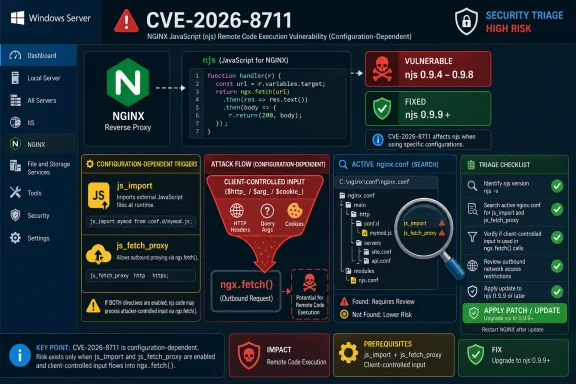 Start With the Exact Exposure Pattern
CVE-2026-8711 is best understood as a configuration-dependent njs problem. The affected component is NGINX JavaScript, commonly called njs. The vulnerable versions are 0.9.4 through 0.9.8. The fixed threshold is 0.9.9 or later.The issue requires more than old software. The risky pattern is:
- NGINX imports JavaScript with
js_import. - njs is in the vulnerable range, 0.9.4–0.9.8.
js_fetch_proxyis configured.js_fetch_proxyuses at least one client-controlled NGINX variable, such as request headers, query arguments, or cookies.- A location invokes njs code that uses
ngx.fetch().
The practical impact is also specific. The primary risk is denial of service: crafted unauthenticated requests may crash NGINX worker processes, causing restarts and service instability. The more severe but narrower concern is conditional remote code execution, where exploitation depends on memory-protection circumstances such as ASLR being disabled or bypassed. Administrators should not describe every exposed instance as trivially RCE, but they also should not minimize unauthenticated memory corruption in an edge-facing worker process.
Find the Active NGINX Configuration on Windows
Do not begin by searching the whole drive and hoping the result is meaningful. First identify the NGINX instance that actually serves traffic and the configuration tree it loads.On a common native Windows install, NGINX is often placed under:
Code:
C:\nginx\
C:\nginx\conf\nginx.conf
C:\nginx\conf\conf.d\
C:\nginx\html\1. If NGINX runs as a Windows service
List services that look like NGINX:
Code:
Get-CimInstance Win32_Service |
  Where-Object { $_.Name -match "nginx" -or $_.DisplayName -match "nginx" } |
Select-Object Name, DisplayName, State, PathNamePathName. It may show something like:C:\nginx\nginx.exe -p C:\nginx -c conf\nginx.confor:
"C:\Program Files\Vendor\App\nginx\nginx.exe" -p "C:\Program Files\Vendor\App\nginx" -c conf\nginx.confInterpret it this way:
-psets the NGINX prefix path.-csets the configuration file path.- If
-cis relative, resolve it relative to the prefix. - If neither is obvious, the default is usually
conf\nginx.confunder the NGINX prefix directory.
2. If NGINX runs as a foreground process
Find the running command line:
Code:
Get-CimInstance Win32_Process |
  Where-Object { $_.Name -ieq "nginx.exe" } |
Select-Object ProcessId, CommandLine-p and -c. If the process was started from C:\nginx\nginx.exe without explicit flags, start with C:\nginx\conf\nginx.conf and the included files referenced from there.3. If NGINX is inside a Windows-managed container
Find the container and inspect mounts:
Code:
docker ps --format "table {{.ID}}\t{{.Image}}\t{{.Names}}\t{{.Ports}}"
docker inspect <container_name_or_id>
Code:
C:\deploy\nginx\conf  ->  /etc/nginx
C:\deploy\app\njs     ->  /etc/nginx/njs
Code:
docker exec <container_name_or_id> nginx -T
docker exec <container_name_or_id> sh -c 'grep -RInE "js_import|js_fetch_proxy|ngx\.fetch|\$http_|\$arg_|\$cookie_" /etc/nginx 2>/dev/null'4. If NGINX is inside WSL
List WSL distributions:wsl -l -vThen inspect the NGINX configuration from the relevant distribution:
Code:
wsl -d <DistroName> -- nginx -T
wsl -d <DistroName> -- sh -c 'grep -RInE "js_import|js_fetch_proxy|ngx\.fetch|\$http_|\$arg_|\$cookie_" /etc/nginx 2>/dev/null'/etc/nginx, while project files may be mounted from /mnt/c/....5. If NGINX is bundled by a vendor product
Some Windows applications ship private NGINX builds under paths such as:
Code:
C:\Program Files\<Vendor>\<Product>\nginx\
C:\ProgramData\<Vendor>\<Product>\nginx\
C:\Program Files\<Vendor>\<Product>\embedded\nginx\nginx.exe, inspect that product’s process tree and installation directory. Search only after you have identified the active bundle, because vendor packages often contain sample configs, default templates, and stale upgrade remnants that are not loaded.Use One Reliable PowerShell Search Pattern
PowerShell examples are easy to misread when they mix wildcard paths, recursion, and file assumptions. Use a two-step pattern: define the root you actually identified, then recursively search files under that root.For a native install under
C:\nginx:
Code:
$Root = "C:\nginx"

Get-ChildItem -Path $Root -Recurse -File -ErrorAction SilentlyContinue |
  Select-String -Pattern 'js_import','js_fetch_proxy','ngx\.fetch','\$http_','\$arg_','\$cookie_' |
Select-Object Path, LineNumber, Line$Root:
Code:
$Root = "C:\Program Files\Vendor\Product\nginx"

Get-ChildItem -Path $Root -Recurse -File -ErrorAction SilentlyContinue |
  Select-String -Pattern 'js_import','js_fetch_proxy','ngx\.fetch','\$http_','\$arg_','\$cookie_' |
Select-Object Path, LineNumber, LineSelect-String -Recurse behavior and makes the file-tree assumption explicit: you are searching all files beneath the active NGINX root. If your nginx.conf includes files outside that root, add those include paths to the search as additional roots.A useful follow-up is to print the active NGINX configuration as NGINX sees it:
& "C:\nginx\nginx.exe" -TIf your service uses a custom prefix or config path, include those same arguments:
& "C:\nginx\nginx.exe" -p "C:\nginx" -c "conf\nginx.conf" -TThe
-T output helps reveal included files and can prevent a false sense of safety from searching only the top-level configuration file.This Is Not a Universal NGINX Emergency
The most important operational distinction is simple: CVE-2026-8711 is not triggered merely by running NGINX. It is tied to NGINX JavaScript, a vulnerable njs version range,js_fetch_proxy, request-controlled variables, and ngx.fetch().That distinction matters because vulnerability scanners often flatten context. A scanner may identify NGINX or njs and create a high-priority ticket, while the actual exploit path may be impossible because there is no
js_import. The opposite mistake is also common: a team may ignore the finding because the server is “just a proxy,” even though that proxy is internet-facing and sits in front of critical applications.The better response is evidence-based triage:
- Out of scope: no
js_importin the active NGINX configuration. - Needs validation: njs or njs-related files are present, but the active config path is not yet proven.
- In scope: vulnerable njs version plus
js_import,js_fetch_proxy, client-controlled variables, andngx.fetch(). - Fixed: njs upgraded to 0.9.9 or later, with configuration reviewed and regression-tested.
The Dangerous Pattern Is Client Input Steering Proxy Behavior
ngx.fetch() is not inherently suspicious. It lets njs code make outbound fetch requests during request handling, which can support legitimate routing, authentication, enrichment, and service-composition designs.The danger appears when
js_fetch_proxy depends on values the client can influence. Common NGINX variable families include:
Code:
$http_*    request headers
$arg_*     query-string arguments
$cookie_* cookiesA simplified example of what should trigger review is a proxy decision influenced by a request header, query parameter, or cookie, followed by JavaScript that performs a fetch during the request path. The exact exploitability depends on the deployed version and configuration, but the security smell is clear: untrusted client input is being allowed to influence proxy behavior inside an edge component.
That is why the post-patch review matters. Upgrading to njs 0.9.9 or later addresses this known vulnerability, but configurations that let arbitrary request data steer proxy logic remain fragile. Where possible, replace open-ended client-controlled values with explicit allowlists. If a header chooses behavior, validate it. If a cookie affects routing, ensure the values are server-issued and narrow. If an argument selects a target, do not pass it through unchecked.
Denial of Service Is the Expected Operational Pain
The concrete near-term impact is denial of service. An unauthenticated attacker may be able to send crafted HTTP requests that crash NGINX worker processes when the vulnerable njs pattern is present. Depending on process supervision and traffic volume, the service may appear to recover and then fail again, producing intermittent 5xx errors, broken API calls, failed sign-ins, or unstable upstream routing.That is enough to justify urgent remediation on exposed systems. A reverse proxy that repeatedly restarts under unauthenticated traffic can take down access to otherwise healthy applications. The applications behind it may be IIS, .NET services, internal dashboards, APIs, remote-access portals, or identity-integrated services; the user sees the edge failure first.
The conditional code-execution concern should be described carefully. Code execution is not the default outcome administrators should assume for every affected instance. It depends on hardening conditions such as ASLR being disabled or bypassed. But memory corruption in an unauthenticated edge-facing worker process is still serious, and patching is cleaner than debating exploit reliability.
The severity conversation should start with role:
- Is the NGINX instance internet-facing?
- Does it terminate TLS?
- Does it forward authentication headers?
- Does it route to internal applications?
- Does it sit in front of management, identity, payment, or remote-access services?
- Can an attacker reach the vulnerable location without authentication?
Inventory Should Include More Than Obvious Web Servers
Many Windows administrators first think of IIS, ARR, Azure Application Gateway, or commercial load balancers when they think about web exposure. NGINX may sit beside or behind those systems. It may front a Linux-hosted API consumed by Windows applications, route traffic inside Kubernetes, support a developer portal, or ship inside a vendor application installed on Windows Server.The inventory should include:
- Native Windows NGINX installs.
- NGINX instances running as Windows services.
- NGINX packaged inside vendor products.
- NGINX containers deployed from Windows-managed pipelines.
- WSL-hosted NGINX instances used for development or internal tooling.
- Linux VMs or appliances managed by a Windows operations team.
- Kubernetes ingress components that serve Windows-owned applications.
- Lab, staging, and developer reverse proxies that may be reachable from broader networks.
The remediation owner is whoever can safely change the deployed njs version and NGINX configuration. The accountability owner is whoever owns the service exposed through that proxy. Those may be different teams, so the ticket needs to be explicit.
Patch First, Then Refactor Risky Configuration
If the vulnerable condition exists, the clean fix is to upgrade njs to 0.9.9 or later. For production systems, treat that like any other reverse-proxy component change. Test:- Route matching.
- Upstream selection.
- Header forwarding.
- TLS behavior.
- Authentication handoff.
- Logging.
- Health checks.
- Error handling.
- njs-driven fetch behavior.
- Worker stability under normal traffic.
After patching, review the design. Client-controlled variables in proxy control paths are sharp tools. They may be necessary in some advanced deployments, but they should be constrained. Prefer explicit maps, allowlists, server-issued values, and deterministic routing rules over direct use of arbitrary headers, arguments, or cookies.
Examples of safer review questions include:
- Does a request header choose a proxy target?
- Can a query parameter influence an outbound fetch?
- Can a cookie change routing behavior?
- Are accepted values explicitly enumerated?
- Are defaults safe?
- Is unexpected input rejected or normalized?
- Are imported njs files reviewed like infrastructure code?
Why Scanners May Misclassify This CVE
CVE-2026-8711 is easy for automated workflows to mishandle. The affected component has a clear version range, but the exploit path depends on active configuration and imported JavaScript behavior.That creates two common failure modes.
The first is over-ticketing. Every system with NGINX, or every image containing njs, gets marked urgent even when the active configuration has no
js_import.The second is under-response. Teams close the issue because the host is “only a proxy” or because the NGINX instance is not part of the main Windows patch workflow, even though it exposes internal services to unauthenticated traffic.
A good ticket should include evidence, not just a CVE label. For example:
Code:
Instance: edge-proxy-01
Active config: C:\nginx\conf\nginx.conf
njs version: 0.9.8
js_import: present
js_fetch_proxy: present
Client-controlled variables: $http_*, $arg_target
ngx.fetch(): present in imported njs file
Status: in scope; upgrade required to njs 0.9.9+
Code:
Instance: app-proxy-02
Active config: C:\Program Files\Vendor\Product\nginx\conf\nginx.conf
js_import: not present
Status: out of scope for CVE-2026-8711 njs JavaScript pathPut a Small Gate in the Rollout Pipeline
The best long-term response is to turn the triage into a deployment gate. Before promoting an NGINX image, vendor bundle, reverse-proxy configuration, or infrastructure release, check for the risky combination.A minimal gate should verify:
- The njs version from the actual runtime or image.
- Whether
js_importappears in the active NGINX configuration. - Whether
js_fetch_proxyappears in active configuration files. - Whether imported JavaScript files contain
ngx.fetch(). - Whether
js_fetch_proxyreferences client-controlled variables such as$http_*,$arg_*, or$cookie_*.
The key is to avoid a brittle control that only asks, “Does the scanner mention CVE-2026-8711?” This issue is contextual. The control should be contextual too.
What to Put in the Change Ticket
A useful remediation ticket should be specific enough for handoff. It should say:- The affected component is NGINX JavaScript njs, not generic NGINX.
- Vulnerable versions are 0.9.4 through 0.9.8.
- The fixed version is 0.9.9 or later.
- The issue is generally out of scope when no active
js_importexists. - The risky pattern involves
js_fetch_proxy, client-controlled variables, andngx.fetch().
Code:
Action: Upgrade njs to 0.9.9 or later.

Validation:
- Confirm active NGINX config path.
- Confirm njs runtime version.
- Confirm whether js_import is present.
- Confirm whether js_fetch_proxy references $http_*, $arg_*, or $cookie_*.
- Confirm whether imported njs files use ngx.fetch().
- Regression-test routing, headers, authentication handoff, logging, health checks, and worker stability.js_fetch_proxy input during the rollback window. A compensating configuration change is safer than hoping the exposed path is not discovered.Treat Edge JavaScript as Infrastructure Code
njs sits in an awkward category. It looks like application code because it is JavaScript. It behaves like infrastructure because it runs inside the request path of the web server. That makes ownership easy to blur.Application teams may not review it because it is “NGINX configuration.” Infrastructure teams may not review it deeply because it is “JavaScript.” Security teams may see only the resulting deployment after the proxy is already in production.
CVE-2026-8711 is a reminder that this split is risky. If njs is part of a production edge path, it should have:
- A known repository or source of record.
- Reviewers.
- Change history.
- Tests for supported routing and fetch behavior.
- Validation for client-controlled input.
- A deployment trail.
- Ownership that is clear before an incident.
Patching to njs 0.9.9 or later closes this known issue. Treating njs as infrastructure code reduces the chance that the next configuration-sensitive issue turns into an emergency.
Practical Read Before the Next NGINX Rollout
Before the next NGINX rollout, use this condensed checklist:- Identify the active NGINX instance and configuration path.
- If NGINX runs as a Windows service, read the service
PathName. - If NGINX runs in a container, inspect mounts and search inside the container if needed.
- If NGINX runs in WSL, inspect the Linux-side
/etc/nginxconfiguration. - If NGINX is vendor-bundled, start from the service path or product supervisor path.
- Search the active configuration tree for
js_import. - If there is no
js_import, document that the JS-specific issue is generally out of scope. - If
js_importexists, confirm the deployed njs version. - Treat njs 0.9.4–0.9.8 as vulnerable.
- Treat njs 0.9.9 or later as the fixed threshold.
- Search for
js_fetch_proxy. - Check whether it uses
$http_*,$arg_*,$cookie_*, or other client-influenced values. - Search imported JavaScript for
ngx.fetch(). - If the full risky pattern exists, upgrade njs and regression-test the edge path.
- After patching, refactor configurations that let untrusted request data steer proxy behavior without strict validation.
js_fetch_proxy, and know whether ngx.fetch() is in the request path.Frequently Asked Questions
Does CVE-2026-8711 affect all NGINX servers?
No. It affects NGINX JavaScript njs under a specific vulnerable version and configuration pattern. A basic NGINX reverse proxy with no activejs_import is generally outside this JS-specific issue.What versions are vulnerable?
The vulnerable njs versions are 0.9.4 through 0.9.8. The fixed threshold is 0.9.9 or later.What is the fastest way to decide whether a Windows-hosted NGINX instance is in scope?
Find the active NGINX configuration path, then search that active tree forjs_import. If there is no js_import, document that the instance is generally out of scope for this njs JavaScript issue. If js_import exists, check the njs version and search for js_fetch_proxy and ngx.fetch().What exact strings should administrators search for?
Search active NGINX configuration and imported JavaScript for:
Code:
js_import
js_fetch_proxy
ngx.fetch
$http_
$arg_
$cookie_Is the main risk denial of service or remote code execution?
The primary operational risk is denial of service through NGINX worker crashes. Remote code execution is the more severe but narrower concern and depends on conditions such as ASLR being disabled or bypassed. Exposed systems should still be patched because unauthenticated worker crashes at the edge are already a serious availability problem.What should a closed ticket say?
A useful closure should include evidence. For example: “Active NGINX configuration checked; nojs_import present; instance out of scope for CVE-2026-8711 njs JavaScript path.” If njs is present, include the runtime version and whether js_fetch_proxy and ngx.fetch() were found.What should an affected ticket say?
An affected ticket should state that the component is NGINX JavaScript njs, the deployed version is in the vulnerable 0.9.4–0.9.8 range,js_import is active, js_fetch_proxy is present, client-controlled variables are involved, and imported code uses ngx.fetch(). The remediation should be upgrade to njs 0.9.9 or later, followed by regression testing.Should administrators remove njs entirely?
Not necessarily. njs supports legitimate programmable edge behavior. The safer approach is to upgrade to a fixed version, review how client input affects proxy behavior, and treat imported JavaScript as infrastructure code with ownership, review, and testing.Are containers and WSL deployments part of the Windows check?
Yes. If a Windows team operates the service, owns the deployment pipeline, manages the host, or is accountable for the application behind NGINX, then containerized and WSL-hosted NGINX instances should be included in triage.What is the main takeaway?
CVE-2026-8711 is narrow but serious. If there is no activejs_import, the njs-specific issue is generally out of scope. If vulnerable njs versions 0.9.4–0.9.8 are deployed with js_fetch_proxy, client-controlled variables, and ngx.fetch(), upgrade to 0.9.9 or later and review the proxy logic before the next rollout.References
- Primary source: nginx.org
- Independent coverage: sentinelone.com
CVE-2026-8711: NGINX JavaScript Buffer Overflow Flaw
CVE-2026-8711 is a heap buffer overflow vulnerability in NGINX JavaScript. Learn about its impact, affected versions, and mitigation methods.www.sentinelone.com
- Independent coverage: nvd.nist.gov
NVD - CVE-2026-8711
 nvd.nist.gov
- Independent coverage: mallory.ai
Heap-based Buffer Overflow in NGINX JavaScript js_fetch_proxy/ngx.fetch (CVE-2026-8711) | Mallory
CVE-2026-8711 is a heap-based buffer overflow in NGINX JavaScript (njs), affecting the ngx_http_js_module when the js_fetch_proxy directive is configured…www.mallory.ai
- Independent coverage: thecyberedition.com
CVE-2026-8711: NGINX JavaScript Flaw Allows RCE on Servers
A high-severity heap buffer overflow vulnerability in NGINX's JavaScript (njs) module has been disclosed by F5, exposing web servers running affected configurations to denial-of-service attacks and — under specific conditions — full remote code execution (RCE).thecyberedition.com - Independent coverage: sherlockforensics.com
CVE-2026-8711: NGINX njs Buffer Overflow | Sherlock Forensics
CVE-2026-8711 explained: severity, affected versions, exploit timeline and patch guidance from 20-year forensic examiners. See the analysis.www.sherlockforensics.com
- Independent coverage: linuxmaster.jp
nginx 1.30.1/1.31.0 公開とnjs CVE-2026-8711|js_fetch_proxyヒープオーバーフローのstable系影響範囲とアップグレード手順
2026年5月13日に nginx 1.30.1 stable と 1.31.0 mainline が公開され、続く5月19日に njs 0.9.9 がリリースされました。njs 側で塞がれたのが CVE-2026-8711 。www.linuxmaster.jp
- Independent coverage: dbugs.ptsecurity.com
CVE-2026-8711 — DoS in Nginx+1 Nginx Javascript+1 | dbugs
Details on CVE-2026-8711: DoS in Nginx+1 Nginx Javascript+1. Includes CVSS score, affected versions, and references.dbugs.ptsecurity.com - Independent coverage: csirt.telconet.net
- Independent coverage: rocket-boys.co.jp
nginxの「njs」モジュールにCVSS 9.2の深刻なヒープバッファオーバーフロー 脆弱性 CVE-2026-8711|セキュリティニュースのセキュリティ対策Lab
F5がnginxJavascriptモジュール(njs)のCVE-2026-8711(CVSS v4.0: 9.2/v3.1: 8.1)を公表。js_fetch_proxyディレクティブにクライアント制御変数が使われているとき未認証でヒープバッファオーバーフローが発生しDoSまたはRCEが可能。修正済みバージョン:njs 0.9.9。CVE-2026-42945(NGINX Rift・実攻撃確認済み)も同時期に公開。rocket-boys.co.jp
- Independent coverage: cybersafe.vnu.edu.vn
Lỗ hổng CVE-2026-8711 nguy hiểm trong NGINX njs - VNU CyberSafe
Lỗ hổng CVE-2026-8711 trong NGINX njs cho phép thực thi mã từ xa.cybersafe.vnu.edu.vn - Independent coverage: iototsecnews.jp
NGINX njs の CVE-2026-8711 が FIX:ヒープバッファ・オーバーフローによる DoS 攻撃の可能性 – IoT OT Security News
New NGINX Vulnerability Allow Remote Attackers to Trigger Malicious Code 2026/05/20 CyberSecurityNews — NGINX JavaScript (njs) で新たに発見された脆弱性 CVE-2026-8711 により、未認証のリモート攻撃者がヒープバッファ・オーバーフローを引き起こし…iototsecnews.jp
