

Paul Thurrott said on July 6, 2026, that his Windows 11 Field Guide 2026 Edition has been cut to 839 PDF pages and 73.9 MB after a major rewrite that removed outdated Edge material and consolidated many chapters. The news, posted at Thurrott.com, is not just a book-production update. It is a useful x-ray of the Windows 11 problem Microsoft has created for every writer, admin, trainer, and power user trying to explain the operating system. Windows 11 is no longer a product you document once; it is a moving target that demands a maintenance model of its own.
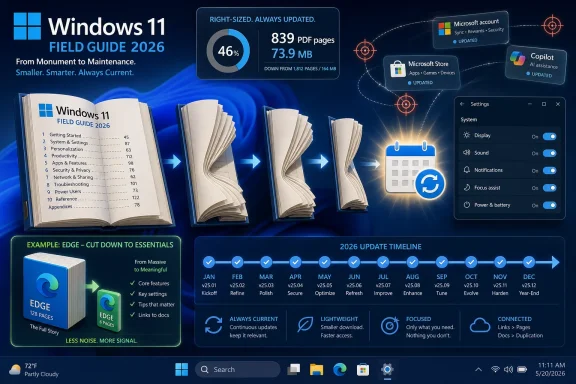
Thurrott framed the change as “the great shrinkening of 2026,” and the numbers are dramatic. The PDF was 103 MB and 990 pages at his previous check-in; it is now 73.9 MB and 839 pages. At its peak, according to Thurrott, the book had grown beyond 300 MB and 1,150 pages.
That is a remarkable contraction for a Windows manual in an era when the product itself rarely feels smaller. Microsoft has spent the Windows 11 cycle pushing features through annual releases, cumulative updates, controlled feature rollouts, inbox app updates, Microsoft Store revisions, Edge updates, Copilot experiments, and cloud-side switches. The result is that the operating system is now less a stable artifact than a subscription-adjacent service wearing a desktop shell.
The Field Guide’s bloat was therefore not merely an authorial problem. It was a symptom. When a book about Windows 11 balloons past 1,000 pages and hundreds of megabytes, it is telling us something about the platform: not that every feature is essential, but that the boundaries of the product have become porous.
The shrink, then, is editorial judgment catching up with software entropy. Thurrott is not documenting less Windows because Windows has become simpler. He is documenting less because much of what accumulated around Windows 11 has become disposable, duplicated, obsolete, or better handled as a living update than as a monolithic guide.
Edge is technically part of the Windows experience, commercially central to Microsoft’s consumer strategy, and operationally unavoidable for many users. But it is also a browser on its own release cadence, layered with Microsoft account hooks, shopping features, Copilot integrations, enterprise policies, sidebar experiments, PDF behavior, security changes, and web-platform churn. Treating it as a static book-length Windows component is a losing battle.
This is where Windows documentation gets philosophically messy. If a Windows feature depends on cloud services, account state, region, edition, hardware, rollout cohort, and the latest app version, is it still a Windows feature in the old sense? For readers, the distinction barely matters; they just want to know what button to press. For anyone writing durable guidance, it matters enormously.
Thurrott’s Edge cut is an implicit admission that not all Windows-adjacent complexity deserves equal permanence. A lean chapter can explain Edge’s role, defaults, sync model, security posture, and annoyances without pretending that every sidebar toggle deserves archival treatment. In 2026, a good Windows book has to know when not to chase the browser.
That is the correct editorial move because Windows 11’s problem is no longer the absence of features. It is the dispersal of features across too many surfaces. Settings, Control Panel remnants, inbox apps, context menus, Start, File Explorer, Microsoft account pages, Windows Security, Store-delivered components, and web dashboards all overlap in ways that defeat a tidy chapter-per-feature model.
Microsoft’s own servicing language reinforces this. The company has described Windows 11 as receiving “continuous innovation,” with features arriving through regular feature updates and monthly security updates. Microsoft’s Windows 11 version 25H2 materials also emphasize that features delivered during the prior year’s continuous updates carry forward into the annual release. That means the annual version number is increasingly less a clean feature boundary than a support and servicing marker.
For administrators, this matters because training material ages in stranger ways than it used to. A Windows 10-era guide could be wrong because a new release changed something. A Windows 11-era guide can be wrong because a feature is present on one 25H2 machine, absent on another, disabled for enterprise policy reasons, hidden behind a staged rollout, or revised by an app update after the OS image was deployed.
Consolidated chapters are not just shorter. They are more honest. They teach concepts and operating patterns rather than pretending Windows still evolves in clean textbook editions.
A screenshot in a Windows book is a promise. It tells the reader, “Your PC should look roughly like this.” When Microsoft changes a Settings page, moves a toggle, adjusts a Start menu layout, adds a Copilot affordance, or reworks a File Explorer command, that promise weakens. Enough weak promises turn a guide from helpful to irritating.
This is especially true for Windows 11 because its UI evolution has often been incremental rather than architectural. Microsoft may not be replacing the shell every six months, but it is constantly sanding, moving, renaming, and adding. Those changes are small enough to avoid being remembered as major releases, but visible enough to break instructions.
The smaller screenshot style is therefore not just about megabytes. It is about lowering the cost of revision. If a guide is going to be updated monthly, as Thurrott says he wants to do, the visual system has to be maintainable. Otherwise the screenshots become technical debt with drop shadows.
This is a profound shift for the Windows ecosystem. Books, training courses, internal IT runbooks, help desk scripts, and migration guides used to orbit around major releases. Windows 7, Windows 8.1, Windows 10 1607, Windows 10 21H2: these were imperfect but recognizable anchors. Windows 11 has anchors too, but Microsoft’s current model makes them less definitive.
The 25H2 release illustrated the point. Microsoft positioned it as the Windows 11 2025 Update, but the practical story was servicing continuity: much of what mattered had already arrived through monthly updates, while the feature update itself reset support timelines and carried forward accumulated changes. The version number mattered, but not always in the way ordinary users expect.
That model may be efficient for Microsoft. It can reduce upgrade friction, spread risk, and avoid the old drama of massive feature drops. But for documentation, it creates a permanent delta. The guide is never done; it is merely current enough.
That detail would be mundane if the book were a one-time product. It is not. A Windows 11 book with monthly updates behaves less like a finished manual and more like maintained software. Subscribers are not simply buying pages; they are buying someone’s continued attention to a platform that refuses to sit still.
This is one reason independent Windows publishing still matters. Microsoft publishes documentation, release notes, admin guidance, support pages, and Windows Insider posts. Those are necessary, but they are vendor documents. They explain what Microsoft intends, what Microsoft supports, and what Microsoft wants emphasized.
A third-party field guide can do something different. It can decide that a 100-page Edge section is not worth preserving. It can explain which Microsoft features are useful, which are duplicative, and which are there because Microsoft has business priorities that do not map neatly to user needs. It can tell readers how Windows actually feels after the marketing layer has been scraped away.
That is why the “De-Enshittify Windows 11” project sitting elsewhere on Thurrott.com is contextually important, even though this update is about the Field Guide. The modern Windows beat is no longer just “what changed?” It is also “what should users disable, ignore, replace, or defend against?”
If Edge gets one chapter instead of 100 pages, that is an argument. If Xbox and video games sit beside virtualization and command-line interfaces, that is an argument about Windows as both consumer platform and professional workstation. If accounts, files, multitasking, security, apps, and recovery are consolidated, that is an argument that users need coherent mental models more than feature inventories.
Microsoft’s own product design has blurred those models. A Microsoft account is identity, sync, Store access, OneDrive integration, BitLocker recovery key storage, app licensing, passkey plumbing, and Copilot personalization. File Explorer is no longer simply a file manager; it is a OneDrive client surface, shell extension host, archive tool, sharing endpoint, gallery viewer, and, on some systems, an AI action launcher. Security spans Windows Security, Defender services, Smart App Control, BitLocker, Secure Boot, TPM requirements, browser protection, passkeys, and enterprise policy.
No sane guide can treat all of this as equal-weight feature matter. The value is in hierarchy. The writer’s job is to tell readers which parts form the skeleton and which are barnacles.
This is where Microsoft’s “continuous innovation” messaging meets its limit. Continuous innovation may sound good in a keynote or support article, but continuous explanation is harder. If the product’s conceptual map changes too often, users do not experience innovation. They experience drift.
In enterprise environments, the issue is not simply whether a feature exists. It is whether it is controllable, supportable, documented, and safe to train against. Microsoft has improved some of this through policy controls and release health pages, but the everyday experience of Windows administration still involves reconciling consumer-facing feature velocity with organizational caution.
That tension shows up in areas like inbox apps, Copilot surfaces, Start menu behavior, Edge integration, and account nudges. Microsoft may see these as engagement opportunities or productivity enhancements. Administrators often see them as variance. Variance is expensive.
A guide that consolidates and revises monthly can help by separating core Windows knowledge from feature weather. The core includes deployment, identity, security posture, update channels, storage, recovery, virtualization, app management, and troubleshooting. The weather includes whichever new button, recommendation, assistant, promotional surface, or layout experiment is passing through this month’s build.
The trick is not to ignore the weather. It is to stop building the house around it.
Windows 11 itself is messy in a way that is difficult to summarize. It is more secure than older Windows releases in important respects, especially on modern hardware. It is also more promotional, more account-driven, more cloud-tethered, and more changeable. It contains genuinely useful improvements and baffling regressions in the same monthly stream.
That combination makes it hard to write about without sounding either unfairly hostile or naively promotional. The right stance is skeptical maintenance. Document what works, flag what changes, and assume that any claim about the interface has a half-life.
This is why a monthly Field Guide cadence would be meaningful. It would acknowledge that Windows 11 is not going to settle down just because users want it to. Microsoft’s commercial incentives point toward more service integration, more AI surfaces, and more hardware-differentiated experiences, especially on Copilot+ PCs. The documentation has to match that reality without surrendering to it.
A good 2026 Windows guide should do several things at once:
Thurrott’s July 2026 update is therefore more than a progress note for subscribers. It is a small but telling marker of where Windows expertise is headed: away from encyclopedic capture and toward curated, recurring interpretation. Microsoft will keep shipping Windows as a continuously changing service; the people who explain Windows will have to become maintainers, not monument builders.
 The Field Guide Shrinks Because Windows 11 Keeps Sprawling
Thurrott framed the change as “the great shrinkening of 2026,” and the numbers are dramatic. The PDF was 103 MB and 990 pages at his previous check-in; it is now 73.9 MB and 839 pages. At its peak, according to Thurrott, the book had grown beyond 300 MB and 1,150 pages.That is a remarkable contraction for a Windows manual in an era when the product itself rarely feels smaller. Microsoft has spent the Windows 11 cycle pushing features through annual releases, cumulative updates, controlled feature rollouts, inbox app updates, Microsoft Store revisions, Edge updates, Copilot experiments, and cloud-side switches. The result is that the operating system is now less a stable artifact than a subscription-adjacent service wearing a desktop shell.
The Field Guide’s bloat was therefore not merely an authorial problem. It was a symptom. When a book about Windows 11 balloons past 1,000 pages and hundreds of megabytes, it is telling us something about the platform: not that every feature is essential, but that the boundaries of the product have become porous.
The shrink, then, is editorial judgment catching up with software entropy. Thurrott is not documenting less Windows because Windows has become simpler. He is documenting less because much of what accumulated around Windows 11 has become disposable, duplicated, obsolete, or better handled as a living update than as a monolithic guide.
Edge Was the Canary in the Documentation Mine
The most revealing cut is Microsoft Edge. Thurrott says the old Edge section was roughly 100 pages, much of it outdated, and that it has been replaced by a single, much smaller chapter. That decision says more about Microsoft’s browser strategy than a hundred product pages could.Edge is technically part of the Windows experience, commercially central to Microsoft’s consumer strategy, and operationally unavoidable for many users. But it is also a browser on its own release cadence, layered with Microsoft account hooks, shopping features, Copilot integrations, enterprise policies, sidebar experiments, PDF behavior, security changes, and web-platform churn. Treating it as a static book-length Windows component is a losing battle.
This is where Windows documentation gets philosophically messy. If a Windows feature depends on cloud services, account state, region, edition, hardware, rollout cohort, and the latest app version, is it still a Windows feature in the old sense? For readers, the distinction barely matters; they just want to know what button to press. For anyone writing durable guidance, it matters enormously.
Thurrott’s Edge cut is an implicit admission that not all Windows-adjacent complexity deserves equal permanence. A lean chapter can explain Edge’s role, defaults, sync model, security posture, and annoyances without pretending that every sidebar toggle deserves archival treatment. In 2026, a good Windows book has to know when not to chase the browser.
Consolidation Is the Only Sensible Answer to Feature Drip
The update also describes a broader restructuring of the table of contents, with new or consolidated chapters covering hardware, security, apps, command-line interfaces, virtualization, Xbox and video games, and help and recovery. Each of those replaces multiple older chapters. More consolidation is planned for areas such as multitasking, files, and accounts.That is the correct editorial move because Windows 11’s problem is no longer the absence of features. It is the dispersal of features across too many surfaces. Settings, Control Panel remnants, inbox apps, context menus, Start, File Explorer, Microsoft account pages, Windows Security, Store-delivered components, and web dashboards all overlap in ways that defeat a tidy chapter-per-feature model.
Microsoft’s own servicing language reinforces this. The company has described Windows 11 as receiving “continuous innovation,” with features arriving through regular feature updates and monthly security updates. Microsoft’s Windows 11 version 25H2 materials also emphasize that features delivered during the prior year’s continuous updates carry forward into the annual release. That means the annual version number is increasingly less a clean feature boundary than a support and servicing marker.
For administrators, this matters because training material ages in stranger ways than it used to. A Windows 10-era guide could be wrong because a new release changed something. A Windows 11-era guide can be wrong because a feature is present on one 25H2 machine, absent on another, disabled for enterprise policy reasons, hidden behind a staged rollout, or revised by an app update after the OS image was deployed.
Consolidated chapters are not just shorter. They are more honest. They teach concepts and operating patterns rather than pretending Windows still evolves in clean textbook editions.
The Screenshot Problem Is Really a Trust Problem
Thurrott also points to a new, smaller screenshot style as part of the size reduction. On the surface, that is a production detail: smaller images make smaller PDFs. But screenshots are one of the hardest parts of documenting modern Windows because they are the first thing that goes stale.A screenshot in a Windows book is a promise. It tells the reader, “Your PC should look roughly like this.” When Microsoft changes a Settings page, moves a toggle, adjusts a Start menu layout, adds a Copilot affordance, or reworks a File Explorer command, that promise weakens. Enough weak promises turn a guide from helpful to irritating.
This is especially true for Windows 11 because its UI evolution has often been incremental rather than architectural. Microsoft may not be replacing the shell every six months, but it is constantly sanding, moving, renaming, and adding. Those changes are small enough to avoid being remembered as major releases, but visible enough to break instructions.
The smaller screenshot style is therefore not just about megabytes. It is about lowering the cost of revision. If a guide is going to be updated monthly, as Thurrott says he wants to do, the visual system has to be maintainable. Otherwise the screenshots become technical debt with drop shadows.
Monthly Windows Requires Monthly Publishing Discipline
The most important sentence in Thurrott’s update may be his note that he needs to establish a monthly schedule for updating the book so it includes whatever new features Microsoft keeps adding. That is the real story. A Windows guide now needs a release cadence that resembles Windows itself.This is a profound shift for the Windows ecosystem. Books, training courses, internal IT runbooks, help desk scripts, and migration guides used to orbit around major releases. Windows 7, Windows 8.1, Windows 10 1607, Windows 10 21H2: these were imperfect but recognizable anchors. Windows 11 has anchors too, but Microsoft’s current model makes them less definitive.
The 25H2 release illustrated the point. Microsoft positioned it as the Windows 11 2025 Update, but the practical story was servicing continuity: much of what mattered had already arrived through monthly updates, while the feature update itself reset support timelines and carried forward accumulated changes. The version number mattered, but not always in the way ordinary users expect.
That model may be efficient for Microsoft. It can reduce upgrade friction, spread risk, and avoid the old drama of massive feature drops. But for documentation, it creates a permanent delta. The guide is never done; it is merely current enough.
The Premium Book Model Starts Looking Like Software Maintenance
There is also a business angle here. Thurrott reminds Premium members that they receive his technology books in PDF and ePUB form as part of their subscription, while noting that the Windows 11 Field Guide’s size forced him to host the files on Google Drive temporarily. As file sizes come down, he expects to move toward direct downloads.That detail would be mundane if the book were a one-time product. It is not. A Windows 11 book with monthly updates behaves less like a finished manual and more like maintained software. Subscribers are not simply buying pages; they are buying someone’s continued attention to a platform that refuses to sit still.
This is one reason independent Windows publishing still matters. Microsoft publishes documentation, release notes, admin guidance, support pages, and Windows Insider posts. Those are necessary, but they are vendor documents. They explain what Microsoft intends, what Microsoft supports, and what Microsoft wants emphasized.
A third-party field guide can do something different. It can decide that a 100-page Edge section is not worth preserving. It can explain which Microsoft features are useful, which are duplicative, and which are there because Microsoft has business priorities that do not map neatly to user needs. It can tell readers how Windows actually feels after the marketing layer has been scraped away.
That is why the “De-Enshittify Windows 11” project sitting elsewhere on Thurrott.com is contextually important, even though this update is about the Field Guide. The modern Windows beat is no longer just “what changed?” It is also “what should users disable, ignore, replace, or defend against?”
Windows 11 Has Made the Table of Contents Political
A table of contents sounds neutral. It is not. In a mature platform with too much surface area, the TOC is an argument about what matters.If Edge gets one chapter instead of 100 pages, that is an argument. If Xbox and video games sit beside virtualization and command-line interfaces, that is an argument about Windows as both consumer platform and professional workstation. If accounts, files, multitasking, security, apps, and recovery are consolidated, that is an argument that users need coherent mental models more than feature inventories.
Microsoft’s own product design has blurred those models. A Microsoft account is identity, sync, Store access, OneDrive integration, BitLocker recovery key storage, app licensing, passkey plumbing, and Copilot personalization. File Explorer is no longer simply a file manager; it is a OneDrive client surface, shell extension host, archive tool, sharing endpoint, gallery viewer, and, on some systems, an AI action launcher. Security spans Windows Security, Defender services, Smart App Control, BitLocker, Secure Boot, TPM requirements, browser protection, passkeys, and enterprise policy.
No sane guide can treat all of this as equal-weight feature matter. The value is in hierarchy. The writer’s job is to tell readers which parts form the skeleton and which are barnacles.
This is where Microsoft’s “continuous innovation” messaging meets its limit. Continuous innovation may sound good in a keynote or support article, but continuous explanation is harder. If the product’s conceptual map changes too often, users do not experience innovation. They experience drift.
IT Pros Need Fewer Pages and Better Boundaries
For WindowsForum.com readers, the practical consequence is obvious: the smaller Field Guide may be more useful precisely because it is smaller. IT pros do not need 1,150 pages of exhaustively captured UI history. They need the current shape of the platform, the stable administrative concepts, and a clear indication of which parts are volatile.In enterprise environments, the issue is not simply whether a feature exists. It is whether it is controllable, supportable, documented, and safe to train against. Microsoft has improved some of this through policy controls and release health pages, but the everyday experience of Windows administration still involves reconciling consumer-facing feature velocity with organizational caution.
That tension shows up in areas like inbox apps, Copilot surfaces, Start menu behavior, Edge integration, and account nudges. Microsoft may see these as engagement opportunities or productivity enhancements. Administrators often see them as variance. Variance is expensive.
A guide that consolidates and revises monthly can help by separating core Windows knowledge from feature weather. The core includes deployment, identity, security posture, update channels, storage, recovery, virtualization, app management, and troubleshooting. The weather includes whichever new button, recommendation, assistant, promotional surface, or layout experiment is passing through this month’s build.
The trick is not to ignore the weather. It is to stop building the house around it.
The Messiness Is the Point, Not a Temporary Phase
Thurrott is candid that the process remains messy. He mentions thousands of reference links, consistency issues, unresolved style decisions, and the possibility of more table-of-contents changes. That candor is refreshing because it mirrors the condition of the product.Windows 11 itself is messy in a way that is difficult to summarize. It is more secure than older Windows releases in important respects, especially on modern hardware. It is also more promotional, more account-driven, more cloud-tethered, and more changeable. It contains genuinely useful improvements and baffling regressions in the same monthly stream.
That combination makes it hard to write about without sounding either unfairly hostile or naively promotional. The right stance is skeptical maintenance. Document what works, flag what changes, and assume that any claim about the interface has a half-life.
This is why a monthly Field Guide cadence would be meaningful. It would acknowledge that Windows 11 is not going to settle down just because users want it to. Microsoft’s commercial incentives point toward more service integration, more AI surfaces, and more hardware-differentiated experiences, especially on Copilot+ PCs. The documentation has to match that reality without surrendering to it.
The Smaller Book Tells Users Where Windows Is Really Going
The concrete lesson from Thurrott’s update is that the Windows 11 Field Guide is getting leaner, more consolidated, and more maintainable. The larger lesson is that Windows itself has outgrown the old idea of the definitive Windows book. That is not necessarily a tragedy, but it is a change in the contract between platform vendor, expert, and user.A good 2026 Windows guide should do several things at once:
- It should explain the stable parts of Windows 11 in a way that survives monthly UI churn.
- It should identify volatile areas, especially Edge, Copilot, Store apps, Start, File Explorer, and Microsoft account integration.
- It should distinguish Microsoft’s preferred workflow from the workflow a user or administrator may reasonably choose instead.
- It should treat screenshots as disposable evidence, not permanent architecture.
- It should update on a cadence that reflects Windows as serviced software rather than boxed software.
- It should be willing to remove obsolete material as aggressively as it adds new chapters.
Thurrott’s July 2026 update is therefore more than a progress note for subscribers. It is a small but telling marker of where Windows expertise is headed: away from encyclopedic capture and toward curated, recurring interpretation. Microsoft will keep shipping Windows as a continuously changing service; the people who explain Windows will have to become maintainers, not monument builders.
References
- Primary source: thurrott.com
Published: Mon, 06 Jul 2026 21:06:34 GMT
Loading…
www.thurrott.com - Related coverage: windowscentral.com
Microsoft warns Windows 11 version 24H2 support is coming to an end for some devices soon: Here's what that means and how you can stay secure | Windows Central
If you're running Windows 11 Home or Pro on version 24H2 in 2026, you'll soon need to upgrade to remain supported.www.windowscentral.com - Official source: learn.microsoft.com
What's new in Windows 11, version 25H2 for IT pros | Microsoft Learn
Learn more about what's new in Windows 11 version 25H2, including servicing updates.learn.microsoft.com - Official source: support.microsoft.com
Delivering continuous innovation in Windows 11 - Microsoft Support
Windows 11 delivers new features as part of an annual feature update and through periodic updates using servicing technology to ensure quality and reliability. support.microsoft.com
- Related coverage: windowslatest.com
Loading…
www.windowslatest.com - Official source: blogs.windows.com
How to get the Windows 11 2025 Update
Windows is essential for more than a billion people to connect, learn, play and work, and today we are announcing the availability of the Windows 11 2025 Update (also known as Windows 11, version 25H2). This year’s annual feature ublogs.windows.com
- Related coverage: tomshardware.com
Microsoft to force updates to Windows 11 25H2 for PCs with older Windows 11 OS versions — 'intelligent' update system uses machine learning to determine when a device is ready | Tom's Hardware
Microsoft forces 25H2 rollout ahead of 24H2 end-of-supportwww.tomshardware.com - Related coverage: techradar.com
Windows 11 25H2 update is now available for all PCs – here's how to get it | TechRadar
You can get version 25H2 now if you're keenwww.techradar.com - Official source: techcommunity.microsoft.com
- Related coverage: techrounder.com
windows 11 24h2 kb5058411 build 26100 4061 everything you need to know
PDF documentwww.techrounder.com