

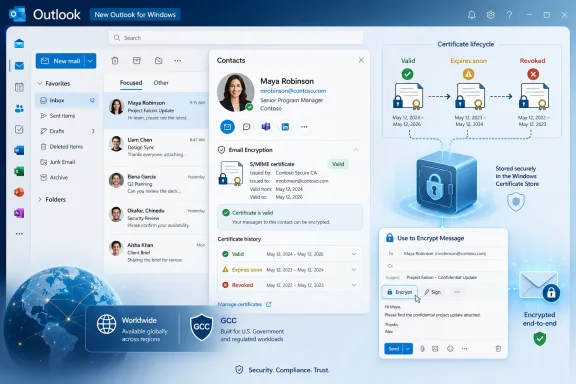
Microsoft marked Microsoft 365 Roadmap ID 518288 as launched on July 6, 2026, confirming that the new Outlook for Windows can now store S/MIME encryption certificates inside Contacts for desktop users in Worldwide and GCC tenants. The feature reached General Availability in May 2026, but its roadmap record was last updated this week, giving administrators a clear signal that one of classic Outlook’s quieter security-era conveniences has finally crossed into Microsoft’s web-backed Windows client. This is not the flashiest new Outlook milestone, but for organizations that still rely on certificate-based mail encryption, it matters more than another ribbon tweak. Microsoft is trying to close the trust gap one legacy dependency at a time.
The change sounds almost quaint: save a recipient’s public S/MIME certificate in their contact card, then use it later to send encrypted mail. But S/MIME has always lived or died on certificate discovery. If Outlook cannot find the recipient’s public certificate, encryption becomes an IT ticket, a workaround, or a policy exception.
That is why this roadmap item deserves more attention than its modest wording suggests. New Outlook has been judged for years not only by what it could do, but by what it could not yet replace. Certificate storage in Contacts is one of those features that sits below the consumer marketing layer but above the hard floor of enterprise acceptability.
The old Outlook for Windows was never loved for its elegance, but it was trusted because it accumulated decades of institutional plumbing. It knew how to deal with mailboxes that were too large, users who lived in PST files, add-ins that should have been retired in 2014, and compliance workflows that no one wanted to re-document. It was a heavy client because enterprises are heavy places.
The new Outlook for Windows, by contrast, has been Microsoft’s bet that Outlook can be rebuilt around the web-era service model without losing the administrative credibility of the Win32 application. That is a difficult pitch to make to security teams. They do not care that the interface is cleaner if the controls they depend on are missing.
Microsoft’s roadmap entry for storing S/MIME certificates in Contacts is a narrow feature, but it attacks a broad objection. It says that the new Outlook is no longer merely catching up on visible productivity features; it is absorbing the trust mechanics that make Outlook deployable in regulated environments.
Microsoft Support’s own feature comparison pages have gradually shown new Outlook gaining parity in areas that were once obvious blockers. The company has also documented S/MIME support as part of new Outlook’s security and compliance story, though older Microsoft Learn material described parts of that journey as “coming soon.” The roadmap now moves one more item from aspiration to availability.
That distinction matters because new Outlook’s biggest problem has never been a single missing feature. It has been the accumulation of small absences that made IT pros doubt the entire migration strategy. When Microsoft closes one of those gaps, it is also trying to change the emotional temperature around the client.
But S/MIME persists because it solves a specific problem with a specific trust model. A sender encrypts mail using the recipient’s public certificate, and the recipient decrypts it using the corresponding private key. The mail system may transport the message, but the cryptographic trust does not depend solely on the transport provider.
That architecture remains important in government, legal, healthcare, finance, and cross-organization environments where message-level encryption is not just a checkbox but part of a documented compliance posture. Microsoft Purview Message Encryption may be easier for many Microsoft 365 shops, but it is not a universal replacement for S/MIME. Some organizations have certificate authorities, smart cards, hardware-backed identities, and long-running procedures built around S/MIME.
The catch is that S/MIME only feels seamless when certificate handling is seamless. Users need their own signing and encryption certificates configured, but they also need access to the public certificates of the people they intend to mail. If those recipient certificates are not available through a directory, a prior signed message, or a contact entry, the encryption workflow breaks down.
That is where contact-based certificate storage fits. It gives users and administrators another place to persist a recipient’s public encryption certificate as part of normal address-book data. It is not glamorous, but it reduces the distance between “we have an encryption policy” and “a user can actually send the encrypted message.”
That does not mean a contact card suddenly becomes a private-key vault. The sensitive private key still belongs to the certificate owner and must be protected according to the organization’s certificate lifecycle policies. But storing a recipient’s public certificate in a contact record gives Outlook a durable reference point for future encrypted messages.
The practical impact is easy to miss. A user receives a signed message from an external partner, saves the partner’s certificate into the contact, and can later send encrypted mail without repeating the discovery step. In environments where contacts roam with the mailbox or account, that certificate data can become part of the user’s working identity graph rather than a one-off local artifact.
That is also why administrators will want to test behavior carefully. Microsoft’s Message Center archive entry for MC1302908 states that S/MIME public certificates can be stored in Outlook Contacts and persist as part of contact data. Persistence is useful, but in compliance environments it invites questions about synchronization, lifecycle, stale certificates, revoked certificates, and contact governance.
Encryption features often fail at the edges rather than the center. The happy path is simple: correct certificate, valid chain, current recipient address, encrypted mail sent. The enterprise path includes expired certificates, users with multiple addresses, mergers, aliases, personal contacts, shared mailboxes, mobile clients, and external recipients whose certificate practices are outside your control.
That case was not frivolous. New Outlook’s early limitations around offline behavior, PST workflows, COM add-ins, account types, and certain enterprise features made it a hard sell outside simple Microsoft 365 cloud mail scenarios. For power users and sysadmins, “new” often translated into “not yet.”
Security features have been especially important because they are not optional decorations. If an organization requires S/MIME, the absence of a smooth S/MIME workflow is not a preference gap; it is a deployment blocker. If a legal department depends on certificate-based encrypted exchanges with outside counsel, a client that cannot preserve recipient certificates in Contacts is not ready for that department.
Microsoft appears to understand this, even if the company’s public messaging often emphasizes the user-facing modernization story. The real migration work is less about selling a cleaner interface and more about rebuilding the ugly contractual surface area that classic Outlook had with enterprise reality. Contact-stored S/MIME certificates are one small but telling part of that reconstruction.
The irony is that Microsoft’s web-backed new Outlook architecture is supposed to simplify life over the long run. A more consistent client across Windows and web should reduce servicing complexity, accelerate feature delivery, and align Outlook more closely with Microsoft 365 policy services. But IT departments judge the future by whether it can survive the present.
Inside a well-managed tenant, administrators may use directory publishing, certificate authorities, Intune configuration, and established enrollment flows. In cross-organizational scenarios, things get messier. A recipient’s certificate might arrive through a signed email, be manually exchanged, or be stored after a one-time interaction. If that certificate expires or is replaced, the sender needs a way to avoid encrypting future mail to a dead key.
This is where user convenience and cryptographic correctness can collide. Users expect contacts to be stable. Certificates are intentionally not stable; they expire, rotate, and can be revoked. The more Outlook hides that complexity, the more responsibility the client has to make safe decisions when stored certificate data becomes questionable.
Microsoft’s roadmap wording does not fully answer those operational details. The feature lets users store S/MIME encryption certificates in Contacts and use them to send encrypted email. It does not, by itself, describe a complete certificate governance model for every enterprise scenario.
That is not a criticism so much as a warning against over-reading the launch. This is a useful capability, not the end of S/MIME administration. Organizations that already have certificate hygiene problems will not fix them by moving the recipient certificate into a prettier contact card.
S/MIME is also more likely to show up in precisely the environments where GCC is relevant. Government agencies, contractors, and regulated partners often operate with certificate-based identity and message protection requirements that cannot be waved away with “use a modern Microsoft 365 alternative.” If Microsoft wants new Outlook to be credible there, it has to support old-school trust patterns.
The GCC listing does not mean every government-adjacent organization should flip the switch tomorrow. It does mean Microsoft is positioning the feature as more than a consumer or commercial convenience. This is part of the enterprise-readiness argument.
There is a broader political economy to this rollout. Microsoft wants to retire the old Outlook experience eventually, but it cannot do so by telling high-regulation customers to abandon the workflows that got them through audits. Each security and compliance feature that lands in new Outlook reduces the number of defensible reasons to stay behind.
For administrators, that creates a different kind of pressure. The argument against migration becomes harder to make in blanket terms. Instead of saying “new Outlook lacks S/MIME,” IT teams will need to test and document the specific S/MIME behaviors that still matter to their environment.
For administrators, the story is less simple. The right question is not “does the feature exist?” The right question is “does it behave predictably across our certificate sources, contact stores, mailbox types, and compliance rules?”
That means testing imported contacts, manually saved certificates, certificates gathered from signed messages, and certificates from internal versus external recipients. It also means checking what happens when a certificate expires, when a contact has multiple email addresses, or when a recipient’s address changes but the old certificate remains attached to the old contact data.
The feature should also be examined alongside Microsoft’s broader encrypted mail guidance. Microsoft Support documentation distinguishes between S/MIME and Microsoft Purview encryption experiences, and many organizations use both for different cases. A user who sees multiple encryption options may not understand the trust model difference unless IT provides clear policy and training.
This is where new Outlook’s modernization story can either help or hurt. A cleaner interface can reduce friction, but it can also make complex security choices feel deceptively simple. S/MIME is not just “encrypt this message.” It is “encrypt this message to this recipient identity using this certificate under this trust chain.”
That precision is important because Microsoft 365 roadmap entries are often treated as migration ammunition. A feature turns “launched,” and suddenly someone in leadership asks why the old client is still installed. The problem is that roadmap availability is not the same thing as environmental readiness.
IT pros should read this as a green light to test, not a command to deploy. The feature’s General Availability date of May 2026 tells us Microsoft considers it production-ready for the listed platforms and cloud instances. The July 6 update tells us the public record is current. Neither fact substitutes for tenant-specific validation.
Still, Microsoft deserves credit for adding the capability in a way that acknowledges real enterprise use. Contact-based recipient certificate storage is not a flashy Copilot-era feature. It is the kind of mundane, standards-based plumbing that lets an organization move from “we cannot use this client” to “we can start a pilot.”
That matters because new Outlook’s fate will be determined by these edge cases. The average user may decide based on speed, layout, and search. The enterprise decides based on the corner of the product where a compliance officer, a partner agency, or a litigation hold meets a Monday morning deadline.
That is a harder opponent than it sounds. Classic Outlook’s strengths are often invisible until they are gone. The user who has relied on contact-stored certificates for years may not describe that as a feature; they describe it as “how Outlook works.” When new Outlook fails to behave the same way, it feels broken even if the new architecture is more rational on paper.
Microsoft’s challenge is therefore partly technical and partly cultural. Every parity feature must do more than ship. It must convince administrators that new Outlook will not strand them halfway between the old desktop model and the new service model.
The S/MIME Contacts feature helps because it restores a familiar pattern. It lets certificate handling live where many users expect recipient-specific data to live: the contact record. That familiarity is valuable in a migration that has already asked users and admins to accept plenty of unfamiliar tradeoffs.
But classic Outlook’s muscle memory will not disappear quickly. The old client remains a refuge for workflows that new Outlook has not fully matched, and for organizations that would rather carry technical debt than accept operational uncertainty. Microsoft can shrink that refuge only by continuing to close gaps like this one.
S/MIME certificate storage in Contacts sits at the intersection of user autonomy and administrative control. Users can save the certificate they need to communicate securely with a recipient. Administrators must still ensure that the client, certificate trust chain, and organizational policies produce the right security outcome.
This is also why Microsoft’s dual-track encryption story can be confusing. Purview-based encryption is integrated with Microsoft 365 policy and often easier to administer inside a Microsoft-centric environment. S/MIME is standards-based, certificate-driven, and often more appropriate when the security model must extend beyond Microsoft’s service boundary or satisfy specific regulatory expectations.
The new Outlook must support both without making users amateur cryptographers. That is a design problem as much as a feature checklist. If the client buries S/MIME too deeply, users will avoid it. If it presents encryption choices without context, users may choose the wrong one.
Microsoft’s advantage is that it controls the client, service, documentation, and roadmap. Its burden is that enterprise customers will hold it responsible for the whole experience, not just the shipped code.
For WindowsForum readers, the concrete reading is simple: if S/MIME recipient certificate storage was one of your reasons to keep users on classic Outlook, it is time to re-test new Outlook rather than rely on last year’s assumptions. The feature is now listed as launched for desktop users in General Availability, with Worldwide and GCC coverage. The operational question moves from “is Microsoft going to add it?” to “does Microsoft’s implementation satisfy our workflow?”
That shift is meaningful because many new Outlook debates are stale. Admins often remember the first version they rejected, not the current version Microsoft is shipping. Microsoft, for its part, sometimes acts as if roadmap momentum should erase those earlier impressions. Neither stance is good enough.
The right posture is adversarial testing. Treat the feature as real, then try to break it in the ways your users will. Test old contacts, new contacts, external recipients, certificate rollover, expired certificates, and mailbox moves. A launched roadmap item is the start of validation, not the end of governance.
The safest next step is to build a small pilot around real S/MIME users rather than synthetic lab accounts. Include people who exchange encrypted mail with external partners, not just internal recipients with tidy directory entries. Include help desk staff, because they will see the failure modes first.
Administrators should also update user guidance. If users can now store certificates in Contacts, they need to know when to do it, how to recognize the correct certificate, and what to do when encrypted mail fails. The worst security feature is one that appears self-explanatory but quietly depends on assumptions users do not understand.
This is particularly important in mixed-client environments. Some users may remain on classic Outlook, others on new Outlook, and others on Outlook on the web or mobile. If certificate storage and discovery behavior differ across clients, support teams need to know where those differences matter.
The change sounds almost quaint: save a recipient’s public S/MIME certificate in their contact card, then use it later to send encrypted mail. But S/MIME has always lived or died on certificate discovery. If Outlook cannot find the recipient’s public certificate, encryption becomes an IT ticket, a workaround, or a policy exception.
That is why this roadmap item deserves more attention than its modest wording suggests. New Outlook has been judged for years not only by what it could do, but by what it could not yet replace. Certificate storage in Contacts is one of those features that sits below the consumer marketing layer but above the hard floor of enterprise acceptability.
 Microsoft Moves a Classic Outlook Assumption Into the New Client
The old Outlook for Windows was never loved for its elegance, but it was trusted because it accumulated decades of institutional plumbing. It knew how to deal with mailboxes that were too large, users who lived in PST files, add-ins that should have been retired in 2014, and compliance workflows that no one wanted to re-document. It was a heavy client because enterprises are heavy places.The new Outlook for Windows, by contrast, has been Microsoft’s bet that Outlook can be rebuilt around the web-era service model without losing the administrative credibility of the Win32 application. That is a difficult pitch to make to security teams. They do not care that the interface is cleaner if the controls they depend on are missing.
Microsoft’s roadmap entry for storing S/MIME certificates in Contacts is a narrow feature, but it attacks a broad objection. It says that the new Outlook is no longer merely catching up on visible productivity features; it is absorbing the trust mechanics that make Outlook deployable in regulated environments.
Microsoft Support’s own feature comparison pages have gradually shown new Outlook gaining parity in areas that were once obvious blockers. The company has also documented S/MIME support as part of new Outlook’s security and compliance story, though older Microsoft Learn material described parts of that journey as “coming soon.” The roadmap now moves one more item from aspiration to availability.
That distinction matters because new Outlook’s biggest problem has never been a single missing feature. It has been the accumulation of small absences that made IT pros doubt the entire migration strategy. When Microsoft closes one of those gaps, it is also trying to change the emotional temperature around the client.
S/MIME Is Boring Until the Moment It Is Mandatory
S/MIME, or Secure/Multipurpose Internet Mail Extensions, is not fashionable security technology. It predates the current era of cloud-native identity, information protection labels, and zero-trust dashboards. It is certificate-based, procedural, and unforgiving in exactly the ways that make modern product teams prefer policy-driven encryption services.But S/MIME persists because it solves a specific problem with a specific trust model. A sender encrypts mail using the recipient’s public certificate, and the recipient decrypts it using the corresponding private key. The mail system may transport the message, but the cryptographic trust does not depend solely on the transport provider.
That architecture remains important in government, legal, healthcare, finance, and cross-organization environments where message-level encryption is not just a checkbox but part of a documented compliance posture. Microsoft Purview Message Encryption may be easier for many Microsoft 365 shops, but it is not a universal replacement for S/MIME. Some organizations have certificate authorities, smart cards, hardware-backed identities, and long-running procedures built around S/MIME.
The catch is that S/MIME only feels seamless when certificate handling is seamless. Users need their own signing and encryption certificates configured, but they also need access to the public certificates of the people they intend to mail. If those recipient certificates are not available through a directory, a prior signed message, or a contact entry, the encryption workflow breaks down.
That is where contact-based certificate storage fits. It gives users and administrators another place to persist a recipient’s public encryption certificate as part of normal address-book data. It is not glamorous, but it reduces the distance between “we have an encryption policy” and “a user can actually send the encrypted message.”
The Contact Card Becomes Part of the Security Boundary
A contact entry has traditionally been a convenience object: name, email address, phone number, maybe a job title and a photo. With S/MIME certificate storage, the contact becomes more consequential. It is no longer merely a shortcut to an address; it can carry the public key material that determines whether a message can be encrypted to that recipient.That does not mean a contact card suddenly becomes a private-key vault. The sensitive private key still belongs to the certificate owner and must be protected according to the organization’s certificate lifecycle policies. But storing a recipient’s public certificate in a contact record gives Outlook a durable reference point for future encrypted messages.
The practical impact is easy to miss. A user receives a signed message from an external partner, saves the partner’s certificate into the contact, and can later send encrypted mail without repeating the discovery step. In environments where contacts roam with the mailbox or account, that certificate data can become part of the user’s working identity graph rather than a one-off local artifact.
That is also why administrators will want to test behavior carefully. Microsoft’s Message Center archive entry for MC1302908 states that S/MIME public certificates can be stored in Outlook Contacts and persist as part of contact data. Persistence is useful, but in compliance environments it invites questions about synchronization, lifecycle, stale certificates, revoked certificates, and contact governance.
Encryption features often fail at the edges rather than the center. The happy path is simple: correct certificate, valid chain, current recipient address, encrypted mail sent. The enterprise path includes expired certificates, users with multiple addresses, mergers, aliases, personal contacts, shared mailboxes, mobile clients, and external recipients whose certificate practices are outside your control.
New Outlook’s Enterprise Credibility Is Being Rebuilt in Inches
The new Outlook for Windows has been controversial because Microsoft’s migration logic has sometimes appeared stronger than its feature readiness. Users saw a modern app; administrators saw a moving target. The more Microsoft pushed the new client as the future, the more every missing classic Outlook behavior became evidence in the prosecution’s case.That case was not frivolous. New Outlook’s early limitations around offline behavior, PST workflows, COM add-ins, account types, and certain enterprise features made it a hard sell outside simple Microsoft 365 cloud mail scenarios. For power users and sysadmins, “new” often translated into “not yet.”
Security features have been especially important because they are not optional decorations. If an organization requires S/MIME, the absence of a smooth S/MIME workflow is not a preference gap; it is a deployment blocker. If a legal department depends on certificate-based encrypted exchanges with outside counsel, a client that cannot preserve recipient certificates in Contacts is not ready for that department.
Microsoft appears to understand this, even if the company’s public messaging often emphasizes the user-facing modernization story. The real migration work is less about selling a cleaner interface and more about rebuilding the ugly contractual surface area that classic Outlook had with enterprise reality. Contact-stored S/MIME certificates are one small but telling part of that reconstruction.
The irony is that Microsoft’s web-backed new Outlook architecture is supposed to simplify life over the long run. A more consistent client across Windows and web should reduce servicing complexity, accelerate feature delivery, and align Outlook more closely with Microsoft 365 policy services. But IT departments judge the future by whether it can survive the present.
Certificate Discovery Remains the Hard Problem
Adding certificate storage to Contacts does not magically solve S/MIME at scale. It solves one important retrieval path. The bigger problem is still certificate discovery, certificate trust, and certificate lifecycle management across users and organizations.Inside a well-managed tenant, administrators may use directory publishing, certificate authorities, Intune configuration, and established enrollment flows. In cross-organizational scenarios, things get messier. A recipient’s certificate might arrive through a signed email, be manually exchanged, or be stored after a one-time interaction. If that certificate expires or is replaced, the sender needs a way to avoid encrypting future mail to a dead key.
This is where user convenience and cryptographic correctness can collide. Users expect contacts to be stable. Certificates are intentionally not stable; they expire, rotate, and can be revoked. The more Outlook hides that complexity, the more responsibility the client has to make safe decisions when stored certificate data becomes questionable.
Microsoft’s roadmap wording does not fully answer those operational details. The feature lets users store S/MIME encryption certificates in Contacts and use them to send encrypted email. It does not, by itself, describe a complete certificate governance model for every enterprise scenario.
That is not a criticism so much as a warning against over-reading the launch. This is a useful capability, not the end of S/MIME administration. Organizations that already have certificate hygiene problems will not fix them by moving the recipient certificate into a prettier contact card.
The GCC Signal Is Not Incidental
The roadmap entry lists availability for Worldwide Standard Multi-Tenant and GCC. That second cloud instance matters. Government Community Cloud customers are often more conservative about client migrations because they tend to have stronger compliance requirements, more formal change control, and a lower tolerance for half-finished parity stories.S/MIME is also more likely to show up in precisely the environments where GCC is relevant. Government agencies, contractors, and regulated partners often operate with certificate-based identity and message protection requirements that cannot be waved away with “use a modern Microsoft 365 alternative.” If Microsoft wants new Outlook to be credible there, it has to support old-school trust patterns.
The GCC listing does not mean every government-adjacent organization should flip the switch tomorrow. It does mean Microsoft is positioning the feature as more than a consumer or commercial convenience. This is part of the enterprise-readiness argument.
There is a broader political economy to this rollout. Microsoft wants to retire the old Outlook experience eventually, but it cannot do so by telling high-regulation customers to abandon the workflows that got them through audits. Each security and compliance feature that lands in new Outlook reduces the number of defensible reasons to stay behind.
For administrators, that creates a different kind of pressure. The argument against migration becomes harder to make in blanket terms. Instead of saying “new Outlook lacks S/MIME,” IT teams will need to test and document the specific S/MIME behaviors that still matter to their environment.
Users Get a Simpler Workflow, Admins Get a New Test Matrix
For end users, the promise is straightforward. If they have a contact with the right S/MIME encryption certificate, new Outlook can use that certificate when sending encrypted mail. A workflow that previously depended on missing parity, manual workarounds, or classic Outlook becomes more native in the new client.For administrators, the story is less simple. The right question is not “does the feature exist?” The right question is “does it behave predictably across our certificate sources, contact stores, mailbox types, and compliance rules?”
That means testing imported contacts, manually saved certificates, certificates gathered from signed messages, and certificates from internal versus external recipients. It also means checking what happens when a certificate expires, when a contact has multiple email addresses, or when a recipient’s address changes but the old certificate remains attached to the old contact data.
The feature should also be examined alongside Microsoft’s broader encrypted mail guidance. Microsoft Support documentation distinguishes between S/MIME and Microsoft Purview encryption experiences, and many organizations use both for different cases. A user who sees multiple encryption options may not understand the trust model difference unless IT provides clear policy and training.
This is where new Outlook’s modernization story can either help or hurt. A cleaner interface can reduce friction, but it can also make complex security choices feel deceptively simple. S/MIME is not just “encrypt this message.” It is “encrypt this message to this recipient identity using this certificate under this trust chain.”
Microsoft’s Roadmap Language Is Precise, and That Precision Matters
The roadmap item says the new Outlook will allow users to store S/MIME encryption certificates within Contacts. It does not claim full equivalence with every classic Outlook S/MIME behavior. It does not promise to solve global address list publishing, enterprise certificate provisioning, or all external recipient scenarios.That precision is important because Microsoft 365 roadmap entries are often treated as migration ammunition. A feature turns “launched,” and suddenly someone in leadership asks why the old client is still installed. The problem is that roadmap availability is not the same thing as environmental readiness.
IT pros should read this as a green light to test, not a command to deploy. The feature’s General Availability date of May 2026 tells us Microsoft considers it production-ready for the listed platforms and cloud instances. The July 6 update tells us the public record is current. Neither fact substitutes for tenant-specific validation.
Still, Microsoft deserves credit for adding the capability in a way that acknowledges real enterprise use. Contact-based recipient certificate storage is not a flashy Copilot-era feature. It is the kind of mundane, standards-based plumbing that lets an organization move from “we cannot use this client” to “we can start a pilot.”
That matters because new Outlook’s fate will be determined by these edge cases. The average user may decide based on speed, layout, and search. The enterprise decides based on the corner of the product where a compliance officer, a partner agency, or a litigation hold meets a Monday morning deadline.
The Real Competition Is Classic Outlook’s Muscle Memory
Microsoft is not competing only with Thunderbird, Apple Mail, or third-party secure mail products here. It is competing with its own installed base. Classic Outlook remains the mental model for what “real Outlook” can do.That is a harder opponent than it sounds. Classic Outlook’s strengths are often invisible until they are gone. The user who has relied on contact-stored certificates for years may not describe that as a feature; they describe it as “how Outlook works.” When new Outlook fails to behave the same way, it feels broken even if the new architecture is more rational on paper.
Microsoft’s challenge is therefore partly technical and partly cultural. Every parity feature must do more than ship. It must convince administrators that new Outlook will not strand them halfway between the old desktop model and the new service model.
The S/MIME Contacts feature helps because it restores a familiar pattern. It lets certificate handling live where many users expect recipient-specific data to live: the contact record. That familiarity is valuable in a migration that has already asked users and admins to accept plenty of unfamiliar tradeoffs.
But classic Outlook’s muscle memory will not disappear quickly. The old client remains a refuge for workflows that new Outlook has not fully matched, and for organizations that would rather carry technical debt than accept operational uncertainty. Microsoft can shrink that refuge only by continuing to close gaps like this one.
The Mail Client Is Becoming a Policy Surface
A modern Outlook client is no longer just a message reader. It is a policy enforcement surface for data loss prevention, sensitivity labels, encryption, identity, authentication, telemetry, add-ins, and increasingly AI-assisted productivity. That makes every feature decision more consequential than it appears.S/MIME certificate storage in Contacts sits at the intersection of user autonomy and administrative control. Users can save the certificate they need to communicate securely with a recipient. Administrators must still ensure that the client, certificate trust chain, and organizational policies produce the right security outcome.
This is also why Microsoft’s dual-track encryption story can be confusing. Purview-based encryption is integrated with Microsoft 365 policy and often easier to administer inside a Microsoft-centric environment. S/MIME is standards-based, certificate-driven, and often more appropriate when the security model must extend beyond Microsoft’s service boundary or satisfy specific regulatory expectations.
The new Outlook must support both without making users amateur cryptographers. That is a design problem as much as a feature checklist. If the client buries S/MIME too deeply, users will avoid it. If it presents encryption choices without context, users may choose the wrong one.
Microsoft’s advantage is that it controls the client, service, documentation, and roadmap. Its burden is that enterprise customers will hold it responsible for the whole experience, not just the shipped code.
The Certificate Feature That Quietly Changes the Migration Conversation
This launch does not make new Outlook universally ready. It does make one common objection narrower, and that is how migrations actually move. Big-bang readiness is rare; blockers are retired one by one until the remaining objections become local rather than universal.For WindowsForum readers, the concrete reading is simple: if S/MIME recipient certificate storage was one of your reasons to keep users on classic Outlook, it is time to re-test new Outlook rather than rely on last year’s assumptions. The feature is now listed as launched for desktop users in General Availability, with Worldwide and GCC coverage. The operational question moves from “is Microsoft going to add it?” to “does Microsoft’s implementation satisfy our workflow?”
That shift is meaningful because many new Outlook debates are stale. Admins often remember the first version they rejected, not the current version Microsoft is shipping. Microsoft, for its part, sometimes acts as if roadmap momentum should erase those earlier impressions. Neither stance is good enough.
The right posture is adversarial testing. Treat the feature as real, then try to break it in the ways your users will. Test old contacts, new contacts, external recipients, certificate rollover, expired certificates, and mailbox moves. A launched roadmap item is the start of validation, not the end of governance.
The Admin Notes Are Short, but the Implications Are Not
Microsoft’s roadmap entry gives administrators a compact set of facts: Outlook, desktop, General Availability, Worldwide and GCC, launched, May 2026, updated July 6, 2026. That is enough to place the feature on a deployment calendar. It is not enough to close the change-management ticket.The safest next step is to build a small pilot around real S/MIME users rather than synthetic lab accounts. Include people who exchange encrypted mail with external partners, not just internal recipients with tidy directory entries. Include help desk staff, because they will see the failure modes first.
Administrators should also update user guidance. If users can now store certificates in Contacts, they need to know when to do it, how to recognize the correct certificate, and what to do when encrypted mail fails. The worst security feature is one that appears self-explanatory but quietly depends on assumptions users do not understand.
This is particularly important in mixed-client environments. Some users may remain on classic Outlook, others on new Outlook, and others on Outlook on the web or mobile. If certificate storage and discovery behavior differ across clients, support teams need to know where those differences matter.
A Small Roadmap Item Carries a Big Migration Message
The practical lessons from this launch are narrow enough to act on and broad enough to change how administrators should talk about new Outlook. Microsoft has not finished the migration argument, but it has removed another serious piece of resistance.- Microsoft has marked Roadmap ID 518288 as launched, with General Availability listed for May 2026 and the roadmap record last updated on July 6, 2026.
- The feature allows new Outlook for Windows users to store S/MIME encryption certificates directly in Contacts and use those certificates when sending encrypted mail.
- The rollout applies to Outlook on desktop in Worldwide Standard Multi-Tenant and GCC cloud instances.
- The change is most important for organizations that rely on S/MIME for regulated, cross-organization, or certificate-based secure messaging workflows.
- Administrators should validate certificate lifecycle behavior, external recipient handling, expired certificates, and mixed-client scenarios before treating the feature as migration-complete.
- The launch narrows the classic Outlook parity gap, but it does not replace the need for certificate governance, user training, or tenant-specific testing.
References
- Primary source: Microsoft 365 Roadmap
Published: 2026-07-06T23:00:50.6928566Z
Loading…
www.microsoft.com - Official source: support.microsoft.com
What's new in new Outlook for Windows - Microsoft Support
 support.microsoft.com
- Official source: learn.microsoft.com
Configure S/MIME For Windows | Microsoft Learn
S/MIME lets users encrypt outgoing messages and attachments so that only intended recipients with a digital ID, also known as a certificate, can read them. Learn how to configure S/MIME for Windows.learn.microsoft.com - Related coverage: blog.apps4.pro
Loading…
blog.apps4.pro - Official source: mrmicrosoft.com
LDAP Support for S/MIME Certificate Lookup in New Outlook for Windows - Mezba Uddin
Introducing LDAP Support for S/MIME Certificate Lookup in New Outlook for Windowsmrmicrosoft.com - Related coverage: techradar.com
SVG images used in attacks will no longer display in Microsoft Outlook | TechRadar
User will just see blank spaces where these images would have beenwww.techradar.com
- Official source: cdn-dynmedia-1.microsoft.com
- Official source: techcommunity.microsoft.com