

Microsoft is preparing a broad Microsoft Teams update for 2026 that will add a more proactive AI Facilitator, AI-generated notes for in-person Teams Rooms meetings, dedicated Muted and Meeting chat sections, revised guest invitation emails, and a cleaner screen-sharing interface across the collaboration app. The immediate story, first reported by Windows Latest and amplified by Windows Report, is a bundle of features. The larger story is Microsoft trying to make Teams feel less like a dumping ground for workplace activity while asking users to accept that AI is now another participant in the room. That bargain will work only if the new controls are as visible and enforceable as the AI itself.
Teams was supposed to be Microsoft’s answer to Slack, then Zoom, then the distributed workplace, and now the AI assistant race. The result has often been an application with too many jobs: chat client, meeting room controller, phone system, file surface, webinar host, frontline-worker hub, and Microsoft 365 notification tray. This new wave of updates shows Microsoft quietly admitting that the old model is creaking.
The most important changes are not the flashiest ones. AI Facilitator will get the headlines because it can listen for confusion and offer answers in meeting chat, but the chat-list changes and screen-sharing cleanup point to a more basic problem. Teams has become dense enough that Microsoft now has to build new lanes inside it just to keep ordinary work discoverable.
That is why the Muted and Meeting chat sections matter. They are not revolutionary, and they will not sell Copilot licenses by themselves. But they are a recognition that the Teams chat column has become a workplace junk drawer, where meeting sidebars, project discussions, muted but not dead conversations, one-off pings, and corporate broadcasts all compete for the same narrow strip of attention.
Microsoft’s challenge is that it wants Teams to be both calmer and more intelligent at the same time. AI features tend to add activity; interface cleanup tries to reduce it. The success of this update will depend on whether Microsoft can make the AI feel like a useful layer rather than another source of Teams noise.
That sounds helpful in the abstract. Every Teams regular has sat through a meeting where one person did not know the acronym, another person had missed the earlier decision, and a third person was quietly searching old documents while pretending to listen. In that world, an assistant that can surface context without derailing the discussion has obvious appeal.
But the mechanism is what makes this feature sensitive. Facilitator is not merely a button you press after the meeting to summarize what happened. It is a live participant-like system that monitors the conversation closely enough to infer when people may be confused and then decides whether to intervene.
Microsoft appears to understand the optics. According to Windows Latest and TechRadar, the feature is not meant to be enabled by default, and Microsoft is adding an in-meeting Meeting AI toggle that can turn off Copilot, Facilitator, and recap features during a live meeting. That concession is not a minor setting; it is the difference between AI as a managed productivity tool and AI as an ambient workplace surveillance concern.
The phrase “knowledge gaps” also deserves scrutiny. In product language, it sounds benign: someone lacks context, and the software fills it. In a real workplace, a tool that detects uncertainty can touch hierarchy, performance anxiety, confidentiality, and meeting politics all at once. Employees may not want an AI system flagging confusion in a room that includes their manager, a client, or a legal team.
The distinction between organizers, participants, and guests matters. In many meetings, the people most exposed to the consequences of recording, transcription, AI notes, or live AI intervention are not necessarily the people with the most control over the meeting. A guest consultant, vendor, interview candidate, customer, or regulator may be present for the most sensitive discussion in the room while having the least authority over the tooling.
Microsoft’s likely answer is that tenant policy, licensing, and organizer controls already govern meeting features. That is true as far as enterprise administration goes. It is less satisfying as a human answer, because meeting consent is not just an admin-state problem.
The toggle also creates a new etiquette problem. If AI is available but off, who asks to turn it on? If AI is on and someone is uncomfortable, who has the social standing to ask that it be disabled? Microsoft can provide the switch, but organizations will have to provide the norms.
That is why the claim that the feature will not be enabled by default is essential. Default-on AI in meetings would be read by many users as Microsoft making the privacy decision for them. Default-off AI at least forces an affirmative choice, even if that choice is later standardized by company policy.
This feature addresses a real gap. Hybrid meetings are already inside Teams, so transcription and AI summaries have a natural software surface. Purely physical meetings, by contrast, often remain outside the digital record unless someone manually takes notes, starts an ad hoc meeting, records audio, or follows up with a summary email that may or may not reflect what was actually decided.
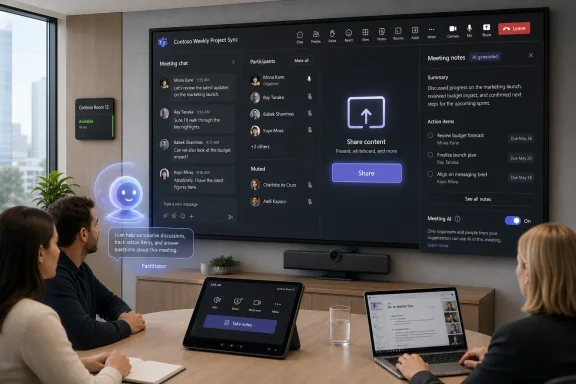
Microsoft’s plan is to let users in a physical Teams Room tap “Take notes” and have Teams generate real-time notes and action items, shown on the right side of the room display. The notes are expected to be shared through SharePoint and made available within the tenant. Microsoft also reportedly plans to bring the capability to Teams Rooms on Android later.
This is Microsoft extending the meeting record beyond the meeting link. The room itself becomes a capture device, and the boundary between “a Teams meeting” and “a meeting in a room with Teams hardware” becomes thinner. For organizations that already treat Teams as the system of record for collaboration, that is a logical next step.
It is also a licensing and governance step. The Message Center item reported by administrators indicates Teams Rooms Pro licensing and enabled Facilitator are part of the picture. In other words, this is not simply a convenience feature; it is part of Microsoft’s broader strategy to attach advanced AI and room intelligence to premium Microsoft 365 value.
That makes signage, room policy, and user education important. If “Take notes” is available on the console, organizations need to decide who can press it, whether attendees must be notified verbally, and whether certain rooms or meeting types should prohibit it. Legal, HR, finance, healthcare, education, and public-sector environments will not all answer those questions the same way.
The SharePoint storage model is sensible from Microsoft’s perspective. SharePoint is already the content substrate for Teams files, Loop components, meeting artifacts, and Microsoft 365 governance controls. Storing notes there can support retention, eDiscovery, access controls, and tenant ownership better than leaving them in some isolated meeting-room cache.
But “stored securely in SharePoint” does not automatically mean “shared appropriately.” AI notes can contain decisions, attributed action items, sensitive topics, or imperfect summaries of nuanced discussion. If the notes are wrong, over-broadly shared, or retained longer than the underlying meeting context deserves, the productivity gain becomes an information-governance problem.
That is the recurring trade-off in Microsoft’s Teams AI strategy. The more useful the AI becomes, the more deeply it must observe and persist workplace communication. The more deeply it observes and persists that communication, the more Microsoft has to prove that customers can control it.
This is the kind of update that sounds mundane until you remember how much business communication now depends on trust signals. A guest invite from a faceless no-reply address can look automated, impersonal, or suspicious, especially to recipients outside the sender’s organization. An invitation from the actual person who wants you in the tenant is more legible.
It also improves reply behavior. If a guest has a question, they can respond directly to the inviter rather than staring at an automated message that gives them no obvious human path. That is a usability change, but it is also a security-adjacent change, because clear provenance reduces the temptation to work around the system.
There is a counterpoint: sending from the inviter’s address may make spoof-awareness training more complicated if users are taught to distrust unexpected collaboration invites. But in most business contexts, identity clarity beats generic automation. Microsoft is making the invite feel less like system mail and more like correspondence.
For administrators, the practical work is likely to be less about the feature itself and more about messaging. Help desks should expect questions from users who notice the new sender behavior, and security teams may want to update internal guidance for guest invitations. Any change in how external collaboration mail appears can ripple through phishing education, allow lists, and user expectations.
This is a move from filtering to filing. Filters are temporary views; sections are persistent geography. Microsoft is betting that users will benefit more from known locations in the chat list than from filter controls that must be repeatedly applied.
The Meeting section is especially important because meeting chats are a strange species inside Teams. They can be highly relevant during a call, useful immediately afterward, and then mostly noise once the decision has moved elsewhere. Yet they continue to sit among direct messages and ongoing project discussions, often with names derived from calendar invites rather than human conversation.
A dedicated Meeting section gives those threads a proper home. It also nudges users to understand meeting chat as a different class of communication, not just another chat. That matters because meeting chats often contain follow-up links, side comments, attendance context, and decisions that may or may not be captured in formal notes.
The Muted section cuts in the other direction. Muting a chat is a signal that the user does not want constant interruption, not necessarily that the conversation is irrelevant forever. Moving muted chats into their own section can help reduce noise, but it can also make important low-priority threads easier to forget.
That is where Microsoft must be careful. Power users already use muting, pinning, hiding, favorites, custom sections, and notification rules to impose order on Teams. If Microsoft changes the location of muted and meeting chats without making the behavior clear, it may solve clutter for one group while creating “where did my chat go?” confusion for another.
Screen sharing is one of the few Teams actions where hesitation is costly. Users need to find the button quickly, understand whether they are sharing a screen, window, PowerPoint, or other content, and stop sharing without hunting through visual clutter. A meeting interface can tolerate some complexity, but not around the controls that expose a desktop to everyone on the call.
This is also an accessibility and training issue. Many organizations onboard employees to Teams with short guides, not deep interface training. If the share control moves into a clearer and more consistent section, support teams benefit from fewer “where is the share button?” interruptions and fewer accidental overshares.
Microsoft has spent years adding meeting capabilities: presenter modes, live reactions, captions, transcription, whiteboards, apps, polls, webinars, breakout rooms, Copilot, and room integration. Each feature may have been defensible on its own. Collectively, they turned the meeting bar into a crowded cockpit.
A cleaner sharing surface suggests Microsoft is beginning to sort the cockpit into zones. The question is whether the company can keep doing that as AI features demand their own controls, indicators, permissions, and explanations. If not, the cleanup will be temporary.
For administrators, the issue is not whether AI notes or Facilitator can be useful. Many organizations will want them. The issue is whether they can be deployed by policy, scoped by user group, explained to employees, reviewed by compliance teams, and audited after the fact.
Meeting AI is unusually sensitive because meetings contain the most fluid form of business communication. People speculate, revise, interrupt, joke, negotiate, and think aloud. Turning that into machine-readable notes, summaries, answers, and action items can create clarity, but it can also freeze ambiguity into an artifact that looks more official than it should.
That makes AI output labeling important. Users need to understand that AI-generated notes are not a transcript, not a legal record by default, and not guaranteed to capture intent. They are a generated artifact based on available signals, licensing, policy, and model behavior.
Organizations should also separate three questions that vendors often bundle together. Can the AI access the meeting? Can it generate output during or after the meeting? Can that output be stored, shared, retained, or searched later? Those are different risk decisions, and Teams administrators will need controls that treat them differently.
Microsoft’s advantage is that Teams sits inside a mature enterprise cloud with identity, compliance, retention, and administrative policy machinery. Its disadvantage is that customers now expect those controls to exist on day one. In 2026, “AI is helpful” is no longer enough of an answer.
Teams gives Microsoft a powerful distribution advantage. It already owns the calendar invite, the meeting join flow, the chat, the files, the directory, and often the room hardware. Adding AI to that stack is not a separate product motion; it is a deepening of an existing workflow.
That is why physical meeting notes matter strategically. Third-party AI note takers have often thrived by joining online meetings as bots. Microsoft can go deeper by integrating into Teams Rooms hardware and Microsoft 365 storage, turning the room itself into part of the AI workflow. That is harder for competitors to replicate in organizations already standardized on Teams Rooms.
But distribution cuts both ways. When a third-party AI tool feels intrusive, a company can block the bot or cancel the subscription. When Teams itself becomes more AI-active, the conversation becomes more political because it touches the default collaboration fabric. Microsoft is not just selling an assistant; it is changing the behavior of the workplace platform.
The chat organization updates are part of the same competitive story. If Teams feels cluttered and exhausting, users will route around it with side channels, personal notes, email, Slack, or ad hoc tools. Microsoft needs Teams to feel coherent enough that users accept it as the place where AI-assisted work happens.
That kind of boring reliability is what enterprise software is supposed to provide. The danger is that Microsoft markets the AI parts as transformational while users judge the whole experience by whether Teams becomes less annoying. The bar is not “Can Facilitator answer a question with web search?” The bar is “Did this meeting become easier to run without making people uneasy?”
There is also a difference between assistance and interruption. Facilitator jumping into chat may be welcome when it clarifies a term, links a relevant document, or answers a factual question that would otherwise derail the call. It may be unwelcome if it posts too often, misreads uncertainty, or creates a parallel conversation that competes with the humans.
Microsoft will need tuning, not just toggles. Frequency, context, meeting type, participant role, and organizational culture all shape whether proactive AI feels helpful or obnoxious. A sales call, an engineering stand-up, a classroom session, a legal review, and a medical administration meeting should not all invite the same kind of AI behavior.
The same applies to AI notes. Some meetings need detailed action items. Others need a lightweight summary. Some should not be summarized by AI at all. If Microsoft gives admins and organizers only blunt controls, users will respond with blunt resistance.
That sequencing gives administrators a short but useful planning window. July is the time to understand the toggle and guest email behavior. August is the time to test Facilitator and room-note scenarios with targeted users. October is when broader room deployment may become a production concern.
The most sensible organizations will not treat this as a single “Teams update.” They will split it into user-experience changes, meeting-AI policy changes, room-system changes, and external-collaboration changes. Each category has a different owner and a different risk profile.
Help desks should prepare for chat-list confusion as Muted and Meeting sections appear. Collaboration admins should review Teams policies, Copilot licensing, Facilitator availability, and meeting defaults. Security teams should look at guest invitation mail flows and external-recipient training. Records and compliance teams should examine where AI notes live, how long they remain available, and who can access them.
The hard part is that Microsoft 365 changes often arrive as rolling cloud updates rather than clean version upgrades. Two users in the same company may not see the same interface on the same day. That reality makes communication more important, not less.
For WindowsForum readers, the concrete points are straightforward:
 Microsoft Is Rebuilding Teams Around the Meeting, Not the Team
Teams was supposed to be Microsoft’s answer to Slack, then Zoom, then the distributed workplace, and now the AI assistant race. The result has often been an application with too many jobs: chat client, meeting room controller, phone system, file surface, webinar host, frontline-worker hub, and Microsoft 365 notification tray. This new wave of updates shows Microsoft quietly admitting that the old model is creaking.The most important changes are not the flashiest ones. AI Facilitator will get the headlines because it can listen for confusion and offer answers in meeting chat, but the chat-list changes and screen-sharing cleanup point to a more basic problem. Teams has become dense enough that Microsoft now has to build new lanes inside it just to keep ordinary work discoverable.
That is why the Muted and Meeting chat sections matter. They are not revolutionary, and they will not sell Copilot licenses by themselves. But they are a recognition that the Teams chat column has become a workplace junk drawer, where meeting sidebars, project discussions, muted but not dead conversations, one-off pings, and corporate broadcasts all compete for the same narrow strip of attention.
Microsoft’s challenge is that it wants Teams to be both calmer and more intelligent at the same time. AI features tend to add activity; interface cleanup tries to reduce it. The success of this update will depend on whether Microsoft can make the AI feel like a useful layer rather than another source of Teams noise.
Facilitator Turns the Meeting Chat Into an AI Intervention Channel
The updated Facilitator is the most consequential piece of the package because it changes the role of AI in Teams meetings. Microsoft’s support material already describes Facilitator as an AI agent that can help with notes and meeting flow, and Windows Latest reports that the next version can detect questions or uncertainty, search the web when needed, and post AI-generated answers into the meeting chat.That sounds helpful in the abstract. Every Teams regular has sat through a meeting where one person did not know the acronym, another person had missed the earlier decision, and a third person was quietly searching old documents while pretending to listen. In that world, an assistant that can surface context without derailing the discussion has obvious appeal.
But the mechanism is what makes this feature sensitive. Facilitator is not merely a button you press after the meeting to summarize what happened. It is a live participant-like system that monitors the conversation closely enough to infer when people may be confused and then decides whether to intervene.
Microsoft appears to understand the optics. According to Windows Latest and TechRadar, the feature is not meant to be enabled by default, and Microsoft is adding an in-meeting Meeting AI toggle that can turn off Copilot, Facilitator, and recap features during a live meeting. That concession is not a minor setting; it is the difference between AI as a managed productivity tool and AI as an ambient workplace surveillance concern.
The phrase “knowledge gaps” also deserves scrutiny. In product language, it sounds benign: someone lacks context, and the software fills it. In a real workplace, a tool that detects uncertainty can touch hierarchy, performance anxiety, confidentiality, and meeting politics all at once. Employees may not want an AI system flagging confusion in a room that includes their manager, a client, or a legal team.
The Toggle Is Microsoft’s Attempt to Preempt the Backlash
The Meeting AI toggle is Microsoft’s pressure valve. Windows Latest reported that Microsoft is preparing a single in-meeting control for licensed organizers and participants to turn off Meeting AI features, while guests will not have access to that control. TechRadar framed the move as a response to user discomfort around AI tools being pushed into Teams too aggressively.The distinction between organizers, participants, and guests matters. In many meetings, the people most exposed to the consequences of recording, transcription, AI notes, or live AI intervention are not necessarily the people with the most control over the meeting. A guest consultant, vendor, interview candidate, customer, or regulator may be present for the most sensitive discussion in the room while having the least authority over the tooling.
Microsoft’s likely answer is that tenant policy, licensing, and organizer controls already govern meeting features. That is true as far as enterprise administration goes. It is less satisfying as a human answer, because meeting consent is not just an admin-state problem.
The toggle also creates a new etiquette problem. If AI is available but off, who asks to turn it on? If AI is on and someone is uncomfortable, who has the social standing to ask that it be disabled? Microsoft can provide the switch, but organizations will have to provide the norms.
That is why the claim that the feature will not be enabled by default is essential. Default-on AI in meetings would be read by many users as Microsoft making the privacy decision for them. Default-off AI at least forces an affirmative choice, even if that choice is later standardized by company policy.
AI Notes for Physical Rooms Bring Copilot Into the Oldest Meeting Format
The Teams Rooms update is, in some ways, more interesting than the live Facilitator behavior. According to Windows Latest and Microsoft 365 Message Center reporting mirrored by independent administrators, Teams Rooms on Windows will gain AI-powered notes for in-person meetings, with rollout beginning in August 2026 and broader availability expected in October 2026.This feature addresses a real gap. Hybrid meetings are already inside Teams, so transcription and AI summaries have a natural software surface. Purely physical meetings, by contrast, often remain outside the digital record unless someone manually takes notes, starts an ad hoc meeting, records audio, or follows up with a summary email that may or may not reflect what was actually decided.
Microsoft’s plan is to let users in a physical Teams Room tap “Take notes” and have Teams generate real-time notes and action items, shown on the right side of the room display. The notes are expected to be shared through SharePoint and made available within the tenant. Microsoft also reportedly plans to bring the capability to Teams Rooms on Android later.
This is Microsoft extending the meeting record beyond the meeting link. The room itself becomes a capture device, and the boundary between “a Teams meeting” and “a meeting in a room with Teams hardware” becomes thinner. For organizations that already treat Teams as the system of record for collaboration, that is a logical next step.
It is also a licensing and governance step. The Message Center item reported by administrators indicates Teams Rooms Pro licensing and enabled Facilitator are part of the picture. In other words, this is not simply a convenience feature; it is part of Microsoft’s broader strategy to attach advanced AI and room intelligence to premium Microsoft 365 value.
The Room Is Where Consent Gets Messier
AI notes in a physical meeting sound less futuristic than a chat bot that interrupts with web answers, but they may create harder operational questions. In a scheduled online meeting, participants usually see meeting metadata, recording indicators, transcription notices, and chat artifacts in a familiar digital context. In a conference room, people may walk in, sit down, and talk before noticing what the room system is doing.That makes signage, room policy, and user education important. If “Take notes” is available on the console, organizations need to decide who can press it, whether attendees must be notified verbally, and whether certain rooms or meeting types should prohibit it. Legal, HR, finance, healthcare, education, and public-sector environments will not all answer those questions the same way.
The SharePoint storage model is sensible from Microsoft’s perspective. SharePoint is already the content substrate for Teams files, Loop components, meeting artifacts, and Microsoft 365 governance controls. Storing notes there can support retention, eDiscovery, access controls, and tenant ownership better than leaving them in some isolated meeting-room cache.
But “stored securely in SharePoint” does not automatically mean “shared appropriately.” AI notes can contain decisions, attributed action items, sensitive topics, or imperfect summaries of nuanced discussion. If the notes are wrong, over-broadly shared, or retained longer than the underlying meeting context deserves, the productivity gain becomes an information-governance problem.
That is the recurring trade-off in Microsoft’s Teams AI strategy. The more useful the AI becomes, the more deeply it must observe and persist workplace communication. The more deeply it observes and persists that communication, the more Microsoft has to prove that customers can control it.
Guest Invitations Finally Start Looking Like Human Mail
One of the smaller changes may produce one of the most immediately visible improvements. Teams guest invitation emails are moving away from a generic no-reply sender and toward the inviter’s own email address, with rollout reportedly already under way and expected to finish by the end of July 2026.This is the kind of update that sounds mundane until you remember how much business communication now depends on trust signals. A guest invite from a faceless no-reply address can look automated, impersonal, or suspicious, especially to recipients outside the sender’s organization. An invitation from the actual person who wants you in the tenant is more legible.
It also improves reply behavior. If a guest has a question, they can respond directly to the inviter rather than staring at an automated message that gives them no obvious human path. That is a usability change, but it is also a security-adjacent change, because clear provenance reduces the temptation to work around the system.
There is a counterpoint: sending from the inviter’s address may make spoof-awareness training more complicated if users are taught to distrust unexpected collaboration invites. But in most business contexts, identity clarity beats generic automation. Microsoft is making the invite feel less like system mail and more like correspondence.
For administrators, the practical work is likely to be less about the feature itself and more about messaging. Help desks should expect questions from users who notice the new sender behavior, and security teams may want to update internal guidance for guest invitations. Any change in how external collaboration mail appears can ripple through phishing education, allow lists, and user expectations.
Muted and Meeting Sections Admit the Chat List Has Become Unmanageable
The new Muted and Meeting chat sections are Microsoft’s clearest acknowledgment that Teams chat organization has not kept up with Teams usage. According to Windows Latest, muted conversations will move into a dedicated Muted section, and meeting-related conversations will appear in a Meeting section. Microsoft is also removing the existing Meeting chat filters as part of the shift.This is a move from filtering to filing. Filters are temporary views; sections are persistent geography. Microsoft is betting that users will benefit more from known locations in the chat list than from filter controls that must be repeatedly applied.
The Meeting section is especially important because meeting chats are a strange species inside Teams. They can be highly relevant during a call, useful immediately afterward, and then mostly noise once the decision has moved elsewhere. Yet they continue to sit among direct messages and ongoing project discussions, often with names derived from calendar invites rather than human conversation.
A dedicated Meeting section gives those threads a proper home. It also nudges users to understand meeting chat as a different class of communication, not just another chat. That matters because meeting chats often contain follow-up links, side comments, attendance context, and decisions that may or may not be captured in formal notes.
The Muted section cuts in the other direction. Muting a chat is a signal that the user does not want constant interruption, not necessarily that the conversation is irrelevant forever. Moving muted chats into their own section can help reduce noise, but it can also make important low-priority threads easier to forget.
That is where Microsoft must be careful. Power users already use muting, pinning, hiding, favorites, custom sections, and notification rules to impose order on Teams. If Microsoft changes the location of muted and meeting chats without making the behavior clear, it may solve clutter for one group while creating “where did my chat go?” confusion for another.
Screen Sharing Gets a Cleaner Home Because Meetings Still Need Muscle Memory
The screen-sharing change is less dramatic but arguably overdue. Microsoft is moving screen sharing into a dedicated section inside Teams, giving it a clearer place in the interface rather than leaving it mixed among other meeting controls. Windows Latest describes this as part of a cleaner meeting UI.Screen sharing is one of the few Teams actions where hesitation is costly. Users need to find the button quickly, understand whether they are sharing a screen, window, PowerPoint, or other content, and stop sharing without hunting through visual clutter. A meeting interface can tolerate some complexity, but not around the controls that expose a desktop to everyone on the call.
This is also an accessibility and training issue. Many organizations onboard employees to Teams with short guides, not deep interface training. If the share control moves into a clearer and more consistent section, support teams benefit from fewer “where is the share button?” interruptions and fewer accidental overshares.
Microsoft has spent years adding meeting capabilities: presenter modes, live reactions, captions, transcription, whiteboards, apps, polls, webinars, breakout rooms, Copilot, and room integration. Each feature may have been defensible on its own. Collectively, they turned the meeting bar into a crowded cockpit.
A cleaner sharing surface suggests Microsoft is beginning to sort the cockpit into zones. The question is whether the company can keep doing that as AI features demand their own controls, indicators, permissions, and explanations. If not, the cleanup will be temporary.
Microsoft’s AI Push Is Running Into the Admin Reality Layer
The Teams update fits a broader Microsoft 365 pattern: AI features arrive quickly, then management controls, user toggles, and governance clarifications follow close behind. That rhythm is understandable in a competitive AI market, but it can frustrate IT departments that have to explain the change before they have fully assessed it.For administrators, the issue is not whether AI notes or Facilitator can be useful. Many organizations will want them. The issue is whether they can be deployed by policy, scoped by user group, explained to employees, reviewed by compliance teams, and audited after the fact.
Meeting AI is unusually sensitive because meetings contain the most fluid form of business communication. People speculate, revise, interrupt, joke, negotiate, and think aloud. Turning that into machine-readable notes, summaries, answers, and action items can create clarity, but it can also freeze ambiguity into an artifact that looks more official than it should.
That makes AI output labeling important. Users need to understand that AI-generated notes are not a transcript, not a legal record by default, and not guaranteed to capture intent. They are a generated artifact based on available signals, licensing, policy, and model behavior.
Organizations should also separate three questions that vendors often bundle together. Can the AI access the meeting? Can it generate output during or after the meeting? Can that output be stored, shared, retained, or searched later? Those are different risk decisions, and Teams administrators will need controls that treat them differently.
Microsoft’s advantage is that Teams sits inside a mature enterprise cloud with identity, compliance, retention, and administrative policy machinery. Its disadvantage is that customers now expect those controls to exist on day one. In 2026, “AI is helpful” is no longer enough of an answer.
The Competitive Context Is the Real Reason Teams Is Moving This Fast
Microsoft is not adding AI to Teams in a vacuum. Zoom, Google Workspace, Slack, Notion, Salesforce, and a long tail of AI meeting assistants have all been trying to own the meeting memory layer. Whoever captures the notes, action items, summaries, and follow-up context gets closer to the center of daily work.Teams gives Microsoft a powerful distribution advantage. It already owns the calendar invite, the meeting join flow, the chat, the files, the directory, and often the room hardware. Adding AI to that stack is not a separate product motion; it is a deepening of an existing workflow.
That is why physical meeting notes matter strategically. Third-party AI note takers have often thrived by joining online meetings as bots. Microsoft can go deeper by integrating into Teams Rooms hardware and Microsoft 365 storage, turning the room itself into part of the AI workflow. That is harder for competitors to replicate in organizations already standardized on Teams Rooms.
But distribution cuts both ways. When a third-party AI tool feels intrusive, a company can block the bot or cancel the subscription. When Teams itself becomes more AI-active, the conversation becomes more political because it touches the default collaboration fabric. Microsoft is not just selling an assistant; it is changing the behavior of the workplace platform.
The chat organization updates are part of the same competitive story. If Teams feels cluttered and exhausting, users will route around it with side channels, personal notes, email, Slack, or ad hoc tools. Microsoft needs Teams to feel coherent enough that users accept it as the place where AI-assisted work happens.
The Useful Version of This Future Is Boring by Design
The best version of these updates will not feel magical. It will feel boring. A meeting starts, the organizer chooses whether AI is appropriate, everyone understands what is active, notes appear where expected, action items are editable, muted chats stay out of the way, meeting chats stop polluting the main list, and screen sharing is easy to find.That kind of boring reliability is what enterprise software is supposed to provide. The danger is that Microsoft markets the AI parts as transformational while users judge the whole experience by whether Teams becomes less annoying. The bar is not “Can Facilitator answer a question with web search?” The bar is “Did this meeting become easier to run without making people uneasy?”
There is also a difference between assistance and interruption. Facilitator jumping into chat may be welcome when it clarifies a term, links a relevant document, or answers a factual question that would otherwise derail the call. It may be unwelcome if it posts too often, misreads uncertainty, or creates a parallel conversation that competes with the humans.
Microsoft will need tuning, not just toggles. Frequency, context, meeting type, participant role, and organizational culture all shape whether proactive AI feels helpful or obnoxious. A sales call, an engineering stand-up, a classroom session, a legal review, and a medical administration meeting should not all invite the same kind of AI behavior.
The same applies to AI notes. Some meetings need detailed action items. Others need a lightweight summary. Some should not be summarized by AI at all. If Microsoft gives admins and organizers only blunt controls, users will respond with blunt resistance.
The July-to-October Rollout Window Gives IT a Narrow Planning Season
The reported timeline matters because these changes are not all arriving at once. The guest invitation change is already rolling out and should finish by the end of July 2026. The Meeting AI toggle is expected in July. The more proactive Facilitator capability is tied to August 2026 availability in reporting from Windows Latest, while Teams Rooms AI notes begin rolling out in August and are expected to reach general availability in October.That sequencing gives administrators a short but useful planning window. July is the time to understand the toggle and guest email behavior. August is the time to test Facilitator and room-note scenarios with targeted users. October is when broader room deployment may become a production concern.
The most sensible organizations will not treat this as a single “Teams update.” They will split it into user-experience changes, meeting-AI policy changes, room-system changes, and external-collaboration changes. Each category has a different owner and a different risk profile.
Help desks should prepare for chat-list confusion as Muted and Meeting sections appear. Collaboration admins should review Teams policies, Copilot licensing, Facilitator availability, and meeting defaults. Security teams should look at guest invitation mail flows and external-recipient training. Records and compliance teams should examine where AI notes live, how long they remain available, and who can access them.
The hard part is that Microsoft 365 changes often arrive as rolling cloud updates rather than clean version upgrades. Two users in the same company may not see the same interface on the same day. That reality makes communication more important, not less.
The Teams Update That Looks Small Until It Lands on Every Desk
Microsoft’s next Teams wave is best understood as a practical test of whether AI can be folded into everyday collaboration without turning every meeting into a consent debate and every chat list into a migration puzzle. The individual features are manageable; the combined direction is significant. Teams is becoming a place where AI listens, writes, answers, sorts, and files.For WindowsForum readers, the concrete points are straightforward:
- Microsoft is preparing a more proactive Teams Facilitator that can detect uncertainty in meetings, use web search, and post AI-generated answers in chat when enabled.
- Microsoft is adding Meeting AI controls so eligible users can turn off Copilot, Facilitator, and recap features during meetings, with guests excluded from that control.
- Teams Rooms on Windows is expected to receive AI notes for in-person meetings beginning in August 2026, with general availability expected in October 2026.
- Guest invitation emails are shifting from a no-reply sender to the inviter’s own email address, with rollout expected to complete by the end of July 2026.
- Teams chat is gaining dedicated Muted and Meeting sections, while existing Meeting chat filters are being removed as Microsoft reorganizes the chat list.
- Screen sharing is being moved into a dedicated section to reduce meeting-interface clutter and make a high-stakes control easier to find.
References
- Primary source: Windows Report
Published: 2026-07-07T10:42:06.993597
Loading…
windowsreport.com - Related coverage: techradar.com
Microsoft makes major AI U-turn following user revolt — will let Teams users turn off Copilot, Facilitator and Recap | TechRadar
Microsoft Teams AI backlash leads to major changeswww.techradar.com - Related coverage: windowscentral.com
Microsoft Teams just made it easier to shut down Copilot and other AI tools | Windows Central
Microsoft simplified the controls for Copilot, Facilitator, and Intelligent Recap, giving licensed meeting organizers a clear way to turn off meeting AI.www.windowscentral.com - Official source: support.microsoft.com
Facilitator in Microsoft Teams meetings | Microsoft Support
AI-generated notes automate note-taking during Teams meetings to capture the discussion in real-time with action items and follow-up tasks.support.microsoft.com - Related coverage: windowslatest.com
Loading…
www.windowslatest.com - Official source: microsoft.com
Microsoft 365 Roadmap | Microsoft 365
The Microsoft 365 Roadmap lists updates that are currently planned for applicable subscribers. Check here for more information on the status of new features and updates.www.microsoft.com
- Related coverage: gadgets360.com
Loading…
www.gadgets360.com - Related coverage: supersimple365.com
Loading…
supersimple365.com - Related coverage: blog-en.topedia.com
Loading…
blog-en.topedia.com - Official source: techcommunity.microsoft.com
Loading…
techcommunity.microsoft.com - Related coverage: publicdocumentcentre.education.tas.gov.au
Loading…
publicdocumentcentre.education.tas.gov.au - Related coverage: nystrs.org
Loading…
www.nystrs.org - Related coverage: its.uiowa.edu
Loading…
its.uiowa.edu