

Microsoft announced on July 7, 2026, that Dynamics 365 Field Service is getting new Schedule Board enhancements for moving multiple bookings, reassigning work in bulk, using a dedicated map view, showing week numbers, and partially cancelling long-running bookings. The update, described by Microsoft product manager Michael Kelleher on the Dynamics 365 blog, is not a moonshot feature in the way an AI scheduling agent is. It is more revealing than that. Microsoft is admitting, in product form, that the real bottleneck in field service software is often not prediction or automation, but the dispatcher’s ability to correct reality quickly when the plan falls apart.
That makes this a deceptively important release. Field service scheduling is where enterprise software meets trucks, weather, labor availability, customer cancellations, traffic, geography, regional calendar habits, and the peculiar cruelty of jobs that span multiple days. Microsoft’s new Schedule Board features are small enough to sound mundane, but they aim directly at the expensive middle of operations: the manual edits that happen after the “optimized” schedule stops matching the world.
For years, the enterprise software pitch has been that scheduling is a problem to be automated away. Dynamics 365 Field Service already sits on top of Universal Resource Scheduling, and Microsoft’s own documentation frames the schedule board, schedule assistant, and Resource Scheduling Optimization as a ladder from manual scheduling to semi-automation to automated optimization. That ladder still matters, but the July 7 enhancements are a reminder that the person holding the ladder steady is still the dispatcher.
Microsoft’s announcement explicitly nods to bigger investments such as the Scheduling Operations Agent, the sort of agentic AI feature that fits the company’s current platform narrative. But the features actually shipping here are not about replacing schedulers with an omniscient planner. They are about making the human recovery loop less painful.
That distinction matters because field service organizations rarely operate in pristine planning conditions. A customer asks to move three appointments. A technician calls in sick. A storm makes an entire service area unreachable. A project slips by a week, but only for one resource group. In those moments, the question is not whether the system can generate a beautiful first draft; it is whether a dispatcher can apply a messy correction without introducing five more errors.
Microsoft’s blog post describes the release as the result of user feedback from customer conversations, support channels, partners, surveys, and the Dynamics 365 Field Service Ideas Portal. That is standard vendor language, but in this case the feature list supports the claim. These are not marketing-led abstractions. They are workflow abrasions turned into buttons.
This sounds obvious until you imagine the old workflow under pressure. A dispatcher is staring at a dense Schedule Board, trying to preserve technician utilization, customer commitments, and travel sanity while moving a sequence of related jobs. Every individual edit is an opportunity to click the wrong booking, miss a dependent task, create a gap, or accidentally diverge from the intended offset.
Bulk movement is therefore less about speed alone than about maintaining intent. When several bookings are supposed to move together, the tool should preserve that grouping instead of forcing the dispatcher to recreate it through repetitive manual edits. Microsoft’s new action treats a schedule change as a unit of work rather than a series of isolated records.
That is also why the feature is more operationally significant than it appears in a release note. The cost of rescheduling is not just the time spent dragging items around. It is the cognitive load of remembering what belongs together and the downstream cleanup when one booking is missed. The new Move To action reduces both.
This is the part of the update that administrators and operations managers should watch closely. Reassignment is not just a cosmetic board operation; it affects capacity, skill matching, territory assumptions, customer expectations, and sometimes labor rules. The more friction there is in reassigning bookings, the more likely teams are to delay corrections or make informal changes outside the system.
The new bulk reassignment workflow helps close that gap. If a technician becomes unavailable across several days, the dispatcher can move the affected work to another resource without diving repeatedly into editing panels. That makes Dynamics 365 more likely to remain the system of record during disruption rather than becoming the thing everyone updates after the fact.
There is, however, an implementation caveat hiding in plain sight. Easier reassignment makes governance more important, not less. Organizations will want to confirm how these actions interact with their existing rules for skills, territories, work hours, travel time, entitlements, and downstream notifications. A faster button is a blessing when it accelerates correct work; it is a liability when it accelerates sloppy work.
That phrasing tells the story. In many schedule boards, the map has historically behaved like a supporting panel: useful, but constrained by whatever space remains after the grid has claimed the screen. For service organizations where geography is central, that is backwards. The map is not merely decoration; it is the operating surface.
A dedicated Map view gives dispatchers a clearer way to reason about location, routes, clusters of work, and resource placement. This is especially relevant for teams managing emergency calls, rural service territories, urban congestion, or route-sensitive appointments. A Gantt chart can tell you when someone is booked. A map helps show whether the plan makes physical sense.
Microsoft Learn’s documentation already emphasizes that the schedule assistant can consider criteria such as availability, skills, and location, and that Resource Scheduling Optimization can help minimize travel time. The new Map view fits that broader architecture, but it does so from the dispatcher’s perspective. It gives the person making the call more spatial context before the system’s assumptions become someone’s windshield time.
This also points to a larger truth about field service UX. Operational software often privileges the database view: rows, columns, records, panes. Dispatchers frequently need a situational view instead. The Map view is Microsoft acknowledging that location is not a field on a form; it is the shape of the workday.
Without week numbers visible in the scheduling experience, users have to translate between the calendar language used by the business and the date-based interface used by the software. That translation sounds trivial until it is repeated dozens of times a day, across teams, customers, and regions. It becomes one more place where ambiguity sneaks into operational planning.
Microsoft says the feature is controlled through existing Dynamics personalization settings, keeping the experience consistent across Dynamics applications. That is the right design choice. Week numbers are not universally useful, but for organizations that use them, they should appear as a native part of the interface rather than a local workaround.
There is a subtle internationalization lesson here as well. Enterprise software often treats regional workflows as edge cases until enough customers complain. Week-based planning is not an edge case for the people who run on it. By making the Schedule Board speak that calendar language, Microsoft is reducing a category of errors that never looks dramatic in demos but absolutely shows up in operations.
This is exactly the kind of scheduling complexity that exposes the limits of simplistic booking models. A short appointment is easy to cancel. A multi-day or multi-week booking is really a bundle of time, intent, dependencies, and resource commitments. Treating it as a single indivisible object may be clean for the database, but it is often wrong for the business.
Partial cancellation gives schedulers a way to modify the portion that actually changed. That matters because preserving the unaffected part of a booking protects context. The remaining work stays where it belongs, and the dispatcher does not have to rebuild the whole thing just to remove a segment.
The feature also reduces the risk of historical distortion. When teams cancel and recreate bookings to handle partial changes, records can become harder to interpret later. What really happened? Was the whole job cancelled, or only part of it? Did the customer reschedule, did the resource become unavailable, or did the project pause? Better midstream editing can mean cleaner operational history.
For administrators, the practical question will be how partial cancellation flows into reporting, invoicing, SLA calculations, integrations, and mobile technician experiences. The Schedule Board may be where the edit begins, but in a mature Dynamics deployment it is rarely where the consequences end.
But the more important story is that agentic scheduling still depends on good operational primitives. An AI planner is only as useful as the system’s ability to represent and adjust the actual work. If the underlying board makes it awkward to move grouped bookings, reassign several jobs, see geography clearly, speak the organization’s calendar language, or cancel part of a long booking, then the agent inherits those limitations.
This is where Microsoft’s release is strategically sound. The company is not only adding flashy automation. It is improving the edit surface that dispatchers use when automation needs correction. That matters because the likely future of field service scheduling is not fully manual or fully autonomous. It is a hybrid model in which optimization proposes, agents monitor, and humans intervene when the situation gets political, physical, or contractual.
The July 7 enhancements therefore look like plumbing, but plumbing is destiny in enterprise software. The workflows that are cheap to perform become the workflows organizations actually use. The workflows that are painful become shadow processes, spreadsheet exports, Teams messages, and “we’ll fix it later” exceptions.
That is probably the right call. Dispatchers do not merely assign jobs; they monitor the health of the day. They need to see what is booked, what is unassigned, where people are, which jobs are slipping, and which exceptions need judgment. A board that can absorb changes quickly is more valuable than a pristine planner that only works before the first disruption.
The new features also suggest Microsoft is trying to reduce mode switching. If a scheduler can move, reassign, view geography, understand week-based plans, and cancel booking segments from the board experience, there is less need to jump into dense forms or adjacent tools. That lowers the cost of keeping data current.
Still, the update will not eliminate the need for configuration discipline. Schedule Board tabs, map settings, resource views, booking rules, and optimization settings can vary widely between organizations. Microsoft can provide better controls, but customers and partners still have to decide which users can use them, how changes are audited, and how exceptions are communicated.
The first area to examine is permissions and training. Bulk move and bulk reassignment features are powerful because they compress many edits into one action. That compression should come with clear expectations about who can use the actions, under what circumstances, and how dispatchers verify the result.
The second area is integration. Field Service deployments often connect to finance systems, customer notification systems, technician mobile apps, inventory processes, and reporting pipelines. A partial cancellation on the board may need to be understood correctly everywhere else. If downstream systems assume cancellation means total cancellation, the new precision at the front end can turn into confusion at the back end.
The third area is reporting. Organizations should check how moved, reassigned, and partially cancelled bookings appear in utilization dashboards, SLA metrics, travel analysis, and exception reports. The better the Schedule Board becomes at representing nuance, the more important it is that analytics preserve that nuance instead of flattening it.
Finally, administrators should think about auditability. When a dispatcher moves ten bookings or reassigns several days of work, the organization may need to know who made the change, why it happened, and what customer or technician communications followed. A better edit action should not become an invisible edit action.
That makes this a deceptively important release. Field service scheduling is where enterprise software meets trucks, weather, labor availability, customer cancellations, traffic, geography, regional calendar habits, and the peculiar cruelty of jobs that span multiple days. Microsoft’s new Schedule Board features are small enough to sound mundane, but they aim directly at the expensive middle of operations: the manual edits that happen after the “optimized” schedule stops matching the world.
 Microsoft Puts the Dispatcher Back at the Center of Field Service
For years, the enterprise software pitch has been that scheduling is a problem to be automated away. Dynamics 365 Field Service already sits on top of Universal Resource Scheduling, and Microsoft’s own documentation frames the schedule board, schedule assistant, and Resource Scheduling Optimization as a ladder from manual scheduling to semi-automation to automated optimization. That ladder still matters, but the July 7 enhancements are a reminder that the person holding the ladder steady is still the dispatcher.Microsoft’s announcement explicitly nods to bigger investments such as the Scheduling Operations Agent, the sort of agentic AI feature that fits the company’s current platform narrative. But the features actually shipping here are not about replacing schedulers with an omniscient planner. They are about making the human recovery loop less painful.
That distinction matters because field service organizations rarely operate in pristine planning conditions. A customer asks to move three appointments. A technician calls in sick. A storm makes an entire service area unreachable. A project slips by a week, but only for one resource group. In those moments, the question is not whether the system can generate a beautiful first draft; it is whether a dispatcher can apply a messy correction without introducing five more errors.
Microsoft’s blog post describes the release as the result of user feedback from customer conversations, support channels, partners, surveys, and the Dynamics 365 Field Service Ideas Portal. That is standard vendor language, but in this case the feature list supports the claim. These are not marketing-led abstractions. They are workflow abrasions turned into buttons.
Bulk Movement Is the Feature Dispatchers Will Feel First
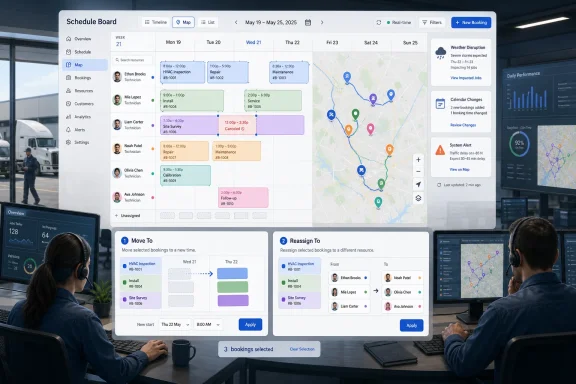
The most immediately useful change is “Move To,” which lets schedulers select multiple bookings with Ctrl-click on Windows or Command-click on macOS and move them together. Microsoft’s example is straightforward: if work needs to shift by a day, a week, or another consistent offset, the scheduler no longer has to update each booking one by one.This sounds obvious until you imagine the old workflow under pressure. A dispatcher is staring at a dense Schedule Board, trying to preserve technician utilization, customer commitments, and travel sanity while moving a sequence of related jobs. Every individual edit is an opportunity to click the wrong booking, miss a dependent task, create a gap, or accidentally diverge from the intended offset.
Bulk movement is therefore less about speed alone than about maintaining intent. When several bookings are supposed to move together, the tool should preserve that grouping instead of forcing the dispatcher to recreate it through repetitive manual edits. Microsoft’s new action treats a schedule change as a unit of work rather than a series of isolated records.
That is also why the feature is more operationally significant than it appears in a release note. The cost of rescheduling is not just the time spent dragging items around. It is the cognitive load of remembering what belongs together and the downstream cleanup when one booking is missed. The new Move To action reduces both.
Reassignment Turns Absence Into an Editable State
The companion feature, “Reassign To,” applies the same logic to resource changes. Schedulers can select multiple bookings and assign them to a new resource through the Schedule Board, instead of opening or editing bookings individually. Microsoft positions this around resource unavailability and workload consolidation, both common enough to be daily realities in field service teams.This is the part of the update that administrators and operations managers should watch closely. Reassignment is not just a cosmetic board operation; it affects capacity, skill matching, territory assumptions, customer expectations, and sometimes labor rules. The more friction there is in reassigning bookings, the more likely teams are to delay corrections or make informal changes outside the system.
The new bulk reassignment workflow helps close that gap. If a technician becomes unavailable across several days, the dispatcher can move the affected work to another resource without diving repeatedly into editing panels. That makes Dynamics 365 more likely to remain the system of record during disruption rather than becoming the thing everyone updates after the fact.
There is, however, an implementation caveat hiding in plain sight. Easier reassignment makes governance more important, not less. Organizations will want to confirm how these actions interact with their existing rules for skills, territories, work hours, travel time, entitlements, and downstream notifications. A faster button is a blessing when it accelerates correct work; it is a liability when it accelerates sloppy work.
The Map Graduates From Accessory to Workspace
Microsoft’s new Map view is the most visually obvious change, and probably the one dispatch-heavy organizations will appreciate most. The company says the map is now a primary view option for location-based scheduling, while the existing map panel remains available alongside List and Gantt views.That phrasing tells the story. In many schedule boards, the map has historically behaved like a supporting panel: useful, but constrained by whatever space remains after the grid has claimed the screen. For service organizations where geography is central, that is backwards. The map is not merely decoration; it is the operating surface.
A dedicated Map view gives dispatchers a clearer way to reason about location, routes, clusters of work, and resource placement. This is especially relevant for teams managing emergency calls, rural service territories, urban congestion, or route-sensitive appointments. A Gantt chart can tell you when someone is booked. A map helps show whether the plan makes physical sense.
Microsoft Learn’s documentation already emphasizes that the schedule assistant can consider criteria such as availability, skills, and location, and that Resource Scheduling Optimization can help minimize travel time. The new Map view fits that broader architecture, but it does so from the dispatcher’s perspective. It gives the person making the call more spatial context before the system’s assumptions become someone’s windshield time.
This also points to a larger truth about field service UX. Operational software often privileges the database view: rows, columns, records, panes. Dispatchers frequently need a situational view instead. The Map view is Microsoft acknowledging that location is not a field on a form; it is the shape of the workday.
Week Numbers Are a Small Feature With a Big Regional Footprint
The option to show week numbers on the Schedule Board may be the least glamorous item in the announcement, but it is one of the clearest examples of Microsoft smoothing real-world friction. Many organizations plan work by week number rather than by date range alone, especially in environments where production calendars, maintenance windows, logistics cycles, and regional business practices revolve around phrases like “Week 42.”Without week numbers visible in the scheduling experience, users have to translate between the calendar language used by the business and the date-based interface used by the software. That translation sounds trivial until it is repeated dozens of times a day, across teams, customers, and regions. It becomes one more place where ambiguity sneaks into operational planning.
Microsoft says the feature is controlled through existing Dynamics personalization settings, keeping the experience consistent across Dynamics applications. That is the right design choice. Week numbers are not universally useful, but for organizations that use them, they should appear as a native part of the interface rather than a local workaround.
There is a subtle internationalization lesson here as well. Enterprise software often treats regional workflows as edge cases until enough customers complain. Week-based planning is not an edge case for the people who run on it. By making the Schedule Board speak that calendar language, Microsoft is reducing a category of errors that never looks dramatic in demos but absolutely shows up in operations.
Partial Cancellation Fixes the Awkward Middle of Long Jobs
The most conceptually interesting addition is partial cancellation for long-running and multi-day bookings. Microsoft describes cases where a resource is unavailable for a specific week, a project is paused, or one segment of a booking needs to be cancelled while the rest remains intact. Previously, users could face workarounds, manual edits, or cancellation and rebooking.This is exactly the kind of scheduling complexity that exposes the limits of simplistic booking models. A short appointment is easy to cancel. A multi-day or multi-week booking is really a bundle of time, intent, dependencies, and resource commitments. Treating it as a single indivisible object may be clean for the database, but it is often wrong for the business.
Partial cancellation gives schedulers a way to modify the portion that actually changed. That matters because preserving the unaffected part of a booking protects context. The remaining work stays where it belongs, and the dispatcher does not have to rebuild the whole thing just to remove a segment.
The feature also reduces the risk of historical distortion. When teams cancel and recreate bookings to handle partial changes, records can become harder to interpret later. What really happened? Was the whole job cancelled, or only part of it? Did the customer reschedule, did the resource become unavailable, or did the project pause? Better midstream editing can mean cleaner operational history.
For administrators, the practical question will be how partial cancellation flows into reporting, invoicing, SLA calculations, integrations, and mobile technician experiences. The Schedule Board may be where the edit begins, but in a mature Dynamics deployment it is rarely where the consequences end.
The AI Story Is Less Interesting Than the Plumbing
Microsoft’s reference to the Scheduling Operations Agent is deliberate. The company wants customers to see these Schedule Board improvements as part of a broader investment arc that includes agentic automation. That is fair enough; Dynamics 365 is increasingly being framed alongside Copilot and AI-assisted business processes.But the more important story is that agentic scheduling still depends on good operational primitives. An AI planner is only as useful as the system’s ability to represent and adjust the actual work. If the underlying board makes it awkward to move grouped bookings, reassign several jobs, see geography clearly, speak the organization’s calendar language, or cancel part of a long booking, then the agent inherits those limitations.
This is where Microsoft’s release is strategically sound. The company is not only adding flashy automation. It is improving the edit surface that dispatchers use when automation needs correction. That matters because the likely future of field service scheduling is not fully manual or fully autonomous. It is a hybrid model in which optimization proposes, agents monitor, and humans intervene when the situation gets political, physical, or contractual.
The July 7 enhancements therefore look like plumbing, but plumbing is destiny in enterprise software. The workflows that are cheap to perform become the workflows organizations actually use. The workflows that are painful become shadow processes, spreadsheet exports, Teams messages, and “we’ll fix it later” exceptions.
The Schedule Board Remains the Control Tower
Microsoft Learn describes the Schedule Board as central across scheduling scenarios, from manual scheduling to schedule assistant workflows and optimization-backed recommendations. That framing is important because this update does not replace the board with a new paradigm. It doubles down on the board as the control tower for Field Service operations.That is probably the right call. Dispatchers do not merely assign jobs; they monitor the health of the day. They need to see what is booked, what is unassigned, where people are, which jobs are slipping, and which exceptions need judgment. A board that can absorb changes quickly is more valuable than a pristine planner that only works before the first disruption.
The new features also suggest Microsoft is trying to reduce mode switching. If a scheduler can move, reassign, view geography, understand week-based plans, and cancel booking segments from the board experience, there is less need to jump into dense forms or adjacent tools. That lowers the cost of keeping data current.
Still, the update will not eliminate the need for configuration discipline. Schedule Board tabs, map settings, resource views, booking rules, and optimization settings can vary widely between organizations. Microsoft can provide better controls, but customers and partners still have to decide which users can use them, how changes are audited, and how exceptions are communicated.
Where IT Pros Should Look Before Turning It Loose
For WindowsForum readers running or supporting Dynamics environments, the natural temptation is to treat these as usability enhancements and move on. That would be a mistake. Usability changes in scheduling systems can alter operational behavior as much as formal process changes do.The first area to examine is permissions and training. Bulk move and bulk reassignment features are powerful because they compress many edits into one action. That compression should come with clear expectations about who can use the actions, under what circumstances, and how dispatchers verify the result.
The second area is integration. Field Service deployments often connect to finance systems, customer notification systems, technician mobile apps, inventory processes, and reporting pipelines. A partial cancellation on the board may need to be understood correctly everywhere else. If downstream systems assume cancellation means total cancellation, the new precision at the front end can turn into confusion at the back end.
The third area is reporting. Organizations should check how moved, reassigned, and partially cancelled bookings appear in utilization dashboards, SLA metrics, travel analysis, and exception reports. The better the Schedule Board becomes at representing nuance, the more important it is that analytics preserve that nuance instead of flattening it.
Finally, administrators should think about auditability. When a dispatcher moves ten bookings or reassigns several days of work, the organization may need to know who made the change, why it happened, and what customer or technician communications followed. A better edit action should not become an invisible edit action.
The Real Win Is Fewer Side Channels and Cleaner Recovery
The practical value of this release is not that dispatchers get a few more menu options. It is that Dynamics 365 Field Service becomes a more credible place to handle disruption in real time. The less friction there is in correcting the board, the less likely teams are to fall back to side channels that erode data quality.- Microsoft announced the Schedule Board enhancements on July 7, 2026, through the Dynamics 365 blog, with product manager Michael Kelleher attributing the work to user feedback.
- Move To lets schedulers select multiple bookings and shift them together, reducing repetitive edits when work moves by a consistent offset.
- Reassign To lets users select multiple bookings and move them to a different resource, which should help when technicians become unavailable or work needs consolidation.
- The new Map view makes geography a primary scheduling workspace while preserving the existing map panel alongside List and Gantt views.
- Week numbers can now appear on the Schedule Board through existing Dynamics personalization settings, helping organizations that plan by numbered weeks.
- Partial cancellation lets schedulers cancel only the affected portion of a long-running or multi-day booking while preserving the rest.
References
- Primary source: Microsoft
Published: 2026-07-07T15:10:14.155674
Loading…
www.microsoft.com