

Microsoft is developing a Teams and Planner feature, listed as Microsoft 365 Roadmap ID 561490 and last updated July 7, 2026, that will let users connect Teams meetings to existing Planner plans when it reaches general availability in August 2026. The change sounds small because it is small, in the way a missing hinge is small until every cabinet door in the kitchen starts sagging. For organizations that run projects through recurring Teams meetings, it fixes one of the more quietly maddening failures of Microsoft 365 work management: the tendency to create more places to track work than there are pieces of work to track. As described on the Microsoft 365 Roadmap and echoed in Microsoft 365 Message Center archive listings, the feature is still in development, but its direction is unmistakable: Microsoft is trying to make Teams meetings less disposable and Planner plans less fragmented.
For years, Microsoft has sold Teams as the collaboration hub of Microsoft 365, but the product has often behaved as if collaboration happens in neat, separately governed containers. A team has channels. A channel has tabs. A meeting has notes. A Planner plan has buckets and tasks. The actual workplace, of course, is messier: projects live across weekly calls, ad hoc reviews, customer escalations, steering committees, chat threads, Loop components, shared files, and inbox archaeology.
The new Teams-to-existing-Planner-plan capability matters because it acknowledges that many projects do not begin in a project-management tool. They begin in a meeting. Somebody says, “Can you take that?” Somebody else says, “Let’s track it.” A task is born, but the location of that task has too often been decided by the software’s default behavior rather than by the team’s operating model.
Until now, Teams meeting task capture has leaned toward automatic creation: meeting tasks could be pushed into Planner, but a meeting could produce its own plan, effectively turning the meeting title into a task-management boundary. That behavior is convenient for a standalone meeting, but toxic for recurring work. A long-running initiative can end up with tasks distributed across several meeting-generated plans, each technically valid and collectively useless.
Microsoft’s roadmap item says the quiet part out loud: when meetings are the primary collaboration surface for long-running initiatives, tasks from the same project can become scattered across multiple auto-generated plans. That sentence is unusually candid for roadmap prose. It names not just a feature gap, but a product design mismatch.
But modern Teams usage has pushed meetings into a different role. A recurring project meeting is not a single event; it is the visible rhythm of the project itself. The work does not reset every Tuesday. It accumulates, changes ownership, gets blocked, gets reframed, and sometimes gets quietly abandoned until the same action item reappears three weeks later with a more urgent tone.
That is where auto-generated plans become debt. Every automatic container is a place someone must remember to look. Every plan created from a meeting title becomes another surface for permissions, notifications, task status, labels, buckets, and views. The user sees convenience at the moment of capture, then pays for it later in search, reconciliation, and duplicated follow-up.
The practical pain is familiar to anyone who has tried to make Microsoft 365 behave like a coherent work-management system. Tasks assigned to you may surface in aggregate views, but teams still need a shared project-level view. A scattered collection of meeting plans does not give a project manager, team lead, or department head a reliable picture of progress. It gives them a filing system with no filing clerk.
That ambition only works if Planner can preserve context without multiplying silos. Capture is the easy part. Microsoft has become very good at letting users create tasks from many places. The harder problem is making sure those tasks land in the right operational system.
Teams meeting integration sits at the center of that tension. Meeting notes are a natural place to record follow-up work because the discussion is fresh and the responsible people are present. But if the resulting tasks are marooned in a meeting-specific plan, the integration merely moves the problem from memory to metadata. The task exists, but not where the team manages the project.
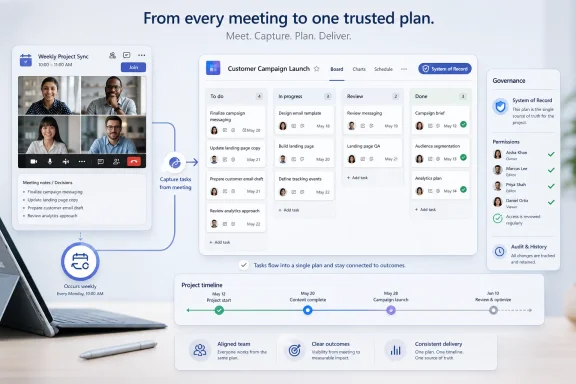
Connecting a Teams meeting to an existing Planner plan changes the default mental model. It says the meeting is not the owner of the work; the plan is. The meeting becomes a capture surface and a collaboration checkpoint, while Planner remains the system of record.
Still, the timing is revealing. Microsoft is not merely polishing Teams meeting notes; it is continuing a slow consolidation of work tracking inside Microsoft 365. Planner is no longer just the board app that sat in a Teams tab. It is being positioned as the task substrate across meetings, chats, Loop components, and user-level task lists.
That means this feature should be read alongside Microsoft’s broader Planner and Teams evolution, not as a one-off checkbox. Microsoft wants work to be captured where it happens and managed where it belongs. The problem is that those two locations are rarely the same.
For IT departments, the roadmap status also creates a familiar planning dilemma. The feature is close enough to influence workflow design, but not close enough to depend on for immediate remediation. If a department is currently drowning in meeting-created plans, it cannot simply wait for August and declare the problem solved. It needs naming conventions, plan ownership rules, and a cleanup strategy now, then a migration of habits when the feature arrives.
In Microsoft 365, every collaborative object tends to bring an identity and access story with it. Plans are not just visual boards; they are tied to groups, membership, storage expectations, and organizational visibility. When plans proliferate automatically, administrators may not experience that as an immediate security incident, but they do inherit a sprawl problem. Sprawl is not just clutter. It is uncertainty about where work lives, who can see it, and which object is authoritative.
The new capability gives organizations a chance to define project-level plans as durable workspaces rather than letting meetings mint new ones by default. That helps the people who attend the meeting, but it also helps the people who were not there and still need to understand project status. The distinction is crucial. A meeting plan serves attendees; a project plan serves the project.
This is also where Microsoft’s design will need to be careful. If the connection flow is buried, confusing, or too permissive, users will fall back to defaults. If every meeting organizer can connect any meeting to any plan without clear cues, organizations may trade fragmentation for accidental cross-contamination. The winning implementation will need to make the right thing easier than the old thing.
Microsoft has not published the full end-user flow in the roadmap text, so there are open questions. The item says users can connect Teams meetings to existing Planner plans, but it does not spell out whether the connection is per meeting instance, recurring series, organizer, tenant policy, or meeting notes component. Those distinctions will matter.
A recurring meeting series tied to an existing plan would be far more powerful than a one-time link. It would let a project meeting become a stable capture point for the life of an initiative. A one-off attachment, by contrast, would still help, but it would require users to remember to make the connection repeatedly.
Permissions will be the other hard edge. If a meeting includes people who are not members of the underlying plan, should they be able to see or create tasks? Should Teams warn the organizer? Should Planner inherit access from the meeting, or should the plan’s membership remain authoritative? Microsoft’s answer will determine whether this feature feels like a clean bridge or another place where Teams, Planner, and Microsoft 365 Groups expose their seams.
That is why this roadmap item is more important than its modest wording suggests. It is infrastructure for coherence. Before Microsoft can credibly promise that Copilot will help manage work across Microsoft 365, the underlying work objects need to be organized in ways humans can understand.
The danger for Microsoft is that AI can make fragmentation less visible without making it less real. A summary may pull together scattered tasks well enough for a moment, but an organization still needs an authoritative plan when decisions, accountability, and reporting matter. The plan is where work becomes inspectable.
Connecting meetings to existing plans is, therefore, a necessary correction to the “capture everywhere” era. Capture everywhere only helps if management somewhere remains clear. Otherwise, Microsoft 365 becomes a beautifully instrumented junk drawer.
The roadmap lists desktop, Teams, and Surface Devices as platforms, which suggests Microsoft is thinking about the meeting-room and hybrid-work context as much as the individual laptop. That matters. Tasks are not only created by someone typing into a meeting notes pane; they are created in conference rooms, during standups, on shared devices, and in hybrid meetings where the room and the remote participants are equally part of the workflow.
Surface Devices support is particularly interesting because it points toward meeting spaces where task capture may be more immediate and less personal. A project review in a room with a shared Teams device should not generate yet another isolated task board just because the meeting happened in a particular space. It should feed the same plan the team uses outside the room.
This is the kind of workflow detail that determines whether Microsoft’s collaboration stack feels integrated or merely bundled. Windows users do not need another place to click. They need fewer moments where the correct place to click is unknowable.
Administrators and collaboration leads should use the months before general availability to decide what a “real” plan is in their environment. Is every project supposed to have one shared Planner plan? Are plans tied to Teams channels, Microsoft 365 Groups, departments, portfolios, or individual initiatives? Who creates them, who owns them, and when are they archived?
There is also a cleanup opportunity. Existing meeting-generated plans may already be cluttering the tenant. Some of them contain real work; others are abandoned shells. A feature that prevents future fragmentation does not automatically consolidate the past.
The best rollout will probably pair a technical change with a behavioral one. Meeting organizers should be told when to connect to an existing plan, project leads should define the plan of record, and teams should stop treating task location as an afterthought. Microsoft can provide the plumbing, but organizations still have to decide where the pipes go.
The challenge is that each of those bets increases the cost of inconsistency. If Teams is the front door but opens into a maze of duplicate task plans, users lose trust. If Planner is the work layer but cannot distinguish between meeting artifacts and project systems of record, managers lose visibility. If Copilot is supposed to reason over work but the work is scattered into accidental containers, AI becomes a narrator of disorder.
Roadmap ID 561490 is a modest corrective measure, not a transformation by itself. But good platform changes often look like this: a small adjustment to object relationships that removes a recurring source of friction. The best version of the feature will feel obvious the first time a user sees it. The more obvious it feels, the more overdue it probably was.
 Microsoft Finally Admits the Meeting Is the Project Room
For years, Microsoft has sold Teams as the collaboration hub of Microsoft 365, but the product has often behaved as if collaboration happens in neat, separately governed containers. A team has channels. A channel has tabs. A meeting has notes. A Planner plan has buckets and tasks. The actual workplace, of course, is messier: projects live across weekly calls, ad hoc reviews, customer escalations, steering committees, chat threads, Loop components, shared files, and inbox archaeology.The new Teams-to-existing-Planner-plan capability matters because it acknowledges that many projects do not begin in a project-management tool. They begin in a meeting. Somebody says, “Can you take that?” Somebody else says, “Let’s track it.” A task is born, but the location of that task has too often been decided by the software’s default behavior rather than by the team’s operating model.
Until now, Teams meeting task capture has leaned toward automatic creation: meeting tasks could be pushed into Planner, but a meeting could produce its own plan, effectively turning the meeting title into a task-management boundary. That behavior is convenient for a standalone meeting, but toxic for recurring work. A long-running initiative can end up with tasks distributed across several meeting-generated plans, each technically valid and collectively useless.
Microsoft’s roadmap item says the quiet part out loud: when meetings are the primary collaboration surface for long-running initiatives, tasks from the same project can become scattered across multiple auto-generated plans. That sentence is unusually candid for roadmap prose. It names not just a feature gap, but a product design mismatch.
The Auto-Generated Plan Was a Convenience That Became Debt
The old model made sense if you imagined meeting tasks as meeting artifacts. In that world, each meeting is a discrete event, and the plan attached to it is a tidy container for action items from that event. It resembles the traditional meeting-minutes model: decisions, owners, due dates, next steps, archived under the date and subject of the meeting.But modern Teams usage has pushed meetings into a different role. A recurring project meeting is not a single event; it is the visible rhythm of the project itself. The work does not reset every Tuesday. It accumulates, changes ownership, gets blocked, gets reframed, and sometimes gets quietly abandoned until the same action item reappears three weeks later with a more urgent tone.
That is where auto-generated plans become debt. Every automatic container is a place someone must remember to look. Every plan created from a meeting title becomes another surface for permissions, notifications, task status, labels, buckets, and views. The user sees convenience at the moment of capture, then pays for it later in search, reconciliation, and duplicated follow-up.
The practical pain is familiar to anyone who has tried to make Microsoft 365 behave like a coherent work-management system. Tasks assigned to you may surface in aggregate views, but teams still need a shared project-level view. A scattered collection of meeting plans does not give a project manager, team lead, or department head a reliable picture of progress. It gives them a filing system with no filing clerk.
Planner’s Problem Has Never Been Task Capture Alone
Microsoft has spent the last few years trying to turn Planner into the connective tissue between personal tasks, team plans, lightweight project management, and, increasingly, AI-assisted work coordination. The new Planner in Teams was announced as a unified experience bringing together To Do, Planner, and Project-style capabilities, with Microsoft positioning Teams as the first-class home for that convergence. TechCrunch covered that broader strategy when Microsoft introduced the new Planner direction at Ignite 2023, and Microsoft’s own Planner blog has consistently emphasized integrations across Teams, Loop, Outlook, Viva Goals, and other Microsoft 365 surfaces.That ambition only works if Planner can preserve context without multiplying silos. Capture is the easy part. Microsoft has become very good at letting users create tasks from many places. The harder problem is making sure those tasks land in the right operational system.
Teams meeting integration sits at the center of that tension. Meeting notes are a natural place to record follow-up work because the discussion is fresh and the responsible people are present. But if the resulting tasks are marooned in a meeting-specific plan, the integration merely moves the problem from memory to metadata. The task exists, but not where the team manages the project.
Connecting a Teams meeting to an existing Planner plan changes the default mental model. It says the meeting is not the owner of the work; the plan is. The meeting becomes a capture surface and a collaboration checkpoint, while Planner remains the system of record.
The August 2026 Target Is Less Important Than the Direction of Travel
The roadmap item currently lists general availability for August 2026, with Targeted Release and General Availability rings, Worldwide Standard Multi-Tenant cloud availability, and support for desktop, Teams, and Surface Devices. Those details matter for administrators watching rollout timelines, but they should not be mistaken for a contract written in stone. Microsoft 365 Roadmap dates move, and “in development” is a status, not a deployment guarantee.Still, the timing is revealing. Microsoft is not merely polishing Teams meeting notes; it is continuing a slow consolidation of work tracking inside Microsoft 365. Planner is no longer just the board app that sat in a Teams tab. It is being positioned as the task substrate across meetings, chats, Loop components, and user-level task lists.
That means this feature should be read alongside Microsoft’s broader Planner and Teams evolution, not as a one-off checkbox. Microsoft wants work to be captured where it happens and managed where it belongs. The problem is that those two locations are rarely the same.
For IT departments, the roadmap status also creates a familiar planning dilemma. The feature is close enough to influence workflow design, but not close enough to depend on for immediate remediation. If a department is currently drowning in meeting-created plans, it cannot simply wait for August and declare the problem solved. It needs naming conventions, plan ownership rules, and a cleanup strategy now, then a migration of habits when the feature arrives.
This Is a Governance Feature Masquerading as a User Convenience
The obvious user-facing benefit is that people can keep related tasks together. That is true, but it undersells the impact. The larger benefit is governance: fewer redundant plans, clearer ownership, more consistent permissions, and better reporting.In Microsoft 365, every collaborative object tends to bring an identity and access story with it. Plans are not just visual boards; they are tied to groups, membership, storage expectations, and organizational visibility. When plans proliferate automatically, administrators may not experience that as an immediate security incident, but they do inherit a sprawl problem. Sprawl is not just clutter. It is uncertainty about where work lives, who can see it, and which object is authoritative.
The new capability gives organizations a chance to define project-level plans as durable workspaces rather than letting meetings mint new ones by default. That helps the people who attend the meeting, but it also helps the people who were not there and still need to understand project status. The distinction is crucial. A meeting plan serves attendees; a project plan serves the project.
This is also where Microsoft’s design will need to be careful. If the connection flow is buried, confusing, or too permissive, users will fall back to defaults. If every meeting organizer can connect any meeting to any plan without clear cues, organizations may trade fragmentation for accidental cross-contamination. The winning implementation will need to make the right thing easier than the old thing.
The Feature Will Succeed or Fail in the Picker
For all the architectural discussion, the daily experience will likely come down to a deceptively simple interface: choosing an existing Planner plan from within a Teams meeting context. That picker has to answer several questions quickly. Which plans can the user see? Which ones are relevant? What happens if the plan is premium, shared, private, group-backed, or outside the meeting’s team? What happens when external guests are in the meeting?Microsoft has not published the full end-user flow in the roadmap text, so there are open questions. The item says users can connect Teams meetings to existing Planner plans, but it does not spell out whether the connection is per meeting instance, recurring series, organizer, tenant policy, or meeting notes component. Those distinctions will matter.
A recurring meeting series tied to an existing plan would be far more powerful than a one-time link. It would let a project meeting become a stable capture point for the life of an initiative. A one-off attachment, by contrast, would still help, but it would require users to remember to make the connection repeatedly.
Permissions will be the other hard edge. If a meeting includes people who are not members of the underlying plan, should they be able to see or create tasks? Should Teams warn the organizer? Should Planner inherit access from the meeting, or should the plan’s membership remain authoritative? Microsoft’s answer will determine whether this feature feels like a clean bridge or another place where Teams, Planner, and Microsoft 365 Groups expose their seams.
Long-Running Work Needs Fewer Containers, Not More AI
Microsoft’s productivity strategy is increasingly wrapped in Copilot language, and it is easy to imagine this feature eventually feeding AI-generated follow-ups, summaries, and task recommendations. But the foundation has to be boring before it can be intelligent. If tasks are scattered across meeting-created plans, no assistant can reliably summarize the state of a project without first solving the data-location problem.That is why this roadmap item is more important than its modest wording suggests. It is infrastructure for coherence. Before Microsoft can credibly promise that Copilot will help manage work across Microsoft 365, the underlying work objects need to be organized in ways humans can understand.
The danger for Microsoft is that AI can make fragmentation less visible without making it less real. A summary may pull together scattered tasks well enough for a moment, but an organization still needs an authoritative plan when decisions, accountability, and reporting matter. The plan is where work becomes inspectable.
Connecting meetings to existing plans is, therefore, a necessary correction to the “capture everywhere” era. Capture everywhere only helps if management somewhere remains clear. Otherwise, Microsoft 365 becomes a beautifully instrumented junk drawer.
Windows Shops Will Feel This in the Monday-Morning Ritual
For many WindowsForum readers, this is not an abstract collaboration feature. It lands in the familiar Monday-morning cadence of Teams calls, Planner boards, Outlook reminders, and the occasional SharePoint tab nobody remembers creating. The Teams desktop client is often the cockpit for that routine, especially in organizations where Windows endpoints remain the managed default.The roadmap lists desktop, Teams, and Surface Devices as platforms, which suggests Microsoft is thinking about the meeting-room and hybrid-work context as much as the individual laptop. That matters. Tasks are not only created by someone typing into a meeting notes pane; they are created in conference rooms, during standups, on shared devices, and in hybrid meetings where the room and the remote participants are equally part of the workflow.
Surface Devices support is particularly interesting because it points toward meeting spaces where task capture may be more immediate and less personal. A project review in a room with a shared Teams device should not generate yet another isolated task board just because the meeting happened in a particular space. It should feed the same plan the team uses outside the room.
This is the kind of workflow detail that determines whether Microsoft’s collaboration stack feels integrated or merely bundled. Windows users do not need another place to click. They need fewer moments where the correct place to click is unknowable.
Admins Should Prepare the Ground Before the Toggle Arrives
The mistake would be to treat this as a feature users will simply discover and use correctly. Some will. Many will not. Microsoft 365 defaults have a way of becoming organizational policy by accident, and meeting task capture is exactly the kind of behavior that spreads through habit rather than training.Administrators and collaboration leads should use the months before general availability to decide what a “real” plan is in their environment. Is every project supposed to have one shared Planner plan? Are plans tied to Teams channels, Microsoft 365 Groups, departments, portfolios, or individual initiatives? Who creates them, who owns them, and when are they archived?
There is also a cleanup opportunity. Existing meeting-generated plans may already be cluttering the tenant. Some of them contain real work; others are abandoned shells. A feature that prevents future fragmentation does not automatically consolidate the past.
The best rollout will probably pair a technical change with a behavioral one. Meeting organizers should be told when to connect to an existing plan, project leads should define the plan of record, and teams should stop treating task location as an afterthought. Microsoft can provide the plumbing, but organizations still have to decide where the pipes go.
The Small Roadmap Item That Reveals the Bigger Microsoft 365 Bet
This feature sits at the intersection of three Microsoft bets. First, Teams remains the front door to work. Second, Planner is becoming the common work-management layer for everyday teams. Third, Microsoft wants context from meetings, chats, files, and tasks to be usable by both humans and AI.The challenge is that each of those bets increases the cost of inconsistency. If Teams is the front door but opens into a maze of duplicate task plans, users lose trust. If Planner is the work layer but cannot distinguish between meeting artifacts and project systems of record, managers lose visibility. If Copilot is supposed to reason over work but the work is scattered into accidental containers, AI becomes a narrator of disorder.
Roadmap ID 561490 is a modest corrective measure, not a transformation by itself. But good platform changes often look like this: a small adjustment to object relationships that removes a recurring source of friction. The best version of the feature will feel obvious the first time a user sees it. The more obvious it feels, the more overdue it probably was.
The Planner Fix That Project Meetings Have Been Waiting For
This is not a feature that will make Teams meetings shorter, Planner prettier, or Microsoft 365 simpler overnight. Its value is narrower and more practical: it helps the place where work is discussed feed the place where work is managed.- Microsoft plans to let Teams meetings connect to existing Planner plans, with general availability currently listed for August 2026.
- The feature is intended to prevent tasks from long-running initiatives from being scattered across multiple meeting-created plans.
- The biggest win is not task creation, but preserving a single project-level system of record.
- Administrators should treat the rollout as a governance moment, not just a new end-user convenience.
- The unanswered details around recurring meetings, permissions, guest access, and plan selection will determine how useful the feature becomes in real deployments.
References
- Primary source: Microsoft 365 Roadmap
Published: 2026-07-07T23:01:01.6729014Z
Microsoft 365 Roadmap | Microsoft 365
The Microsoft 365 Roadmap lists updates that are currently planned for applicable subscribers. Check here for more information on the status of new features and updates.www.microsoft.com
- Official source: learn.microsoft.com
Microsoft Planner for admins - Microsoft Planner | Microsoft Learn
This article shares information on how admins can control and manage access to Planner, and answers to some other frequently asked questions about the management of Planner.learn.microsoft.com - Official source: support.microsoft.com
Add a task list to meeting notes | Microsoft Support
Add a task list to meeting notessupport.microsoft.com - Related coverage: techcrunch.com
Microsoft combines Microsoft To Do, Planner and Project into a new Microsoft Planner in Microsoft Teams | TechCrunch
At Microsoft Ignite 2023, it was announced that "Microsoft Planner" will soon unify the company's manning planning tools.techcrunch.com - Related coverage: duallayerit.com
Microsoft Teams and Planner Integration - Dual Layer IT
Connect Teams Meetings to Existing Planner Plans Microsoft has introduced a powerful new enhancement that allows you to connect Teams meetings directly to your existing Planner plans. This means no more juggling multiple boards or losing track of tasks, everything stays streamlined in one...www.duallayerit.com - Official source: techcommunity.microsoft.com
- Official source: cdn-dynmedia-1.microsoft.com