

Lenovo’s Yoga AiO i 32 Aura Edition is a Windows 11 Home all-in-one PC sold through Lenovo with a 31.5-inch 4K OLED display, Intel Core Ultra X7 358H processor, integrated Intel Arc B390 graphics, and a listed price of $3,097.99. Windows Central’s Zac Bowden tested it for three weeks and came away with a verdict that is both enthusiastic and unusually conflicted: this may be the most visually ambitious Windows all-in-one in years, but its design choices make it a machine of trade-offs rather than simple triumph. The real story is not that Lenovo built a beautiful desktop. It is that Lenovo appears to be trying to occupy the space Microsoft abandoned when the Surface Studio stopped being the Windows world’s aspirational all-in-one.
That matters because the all-in-one PC has spent years being treated as either an office appliance or a lifestyle product, rarely as a serious flagship. Lenovo’s machine pushes hard in the opposite direction: transparent chin, RGB lighting, a floating-display illusion, 165Hz OLED, high-end mobile-class silicon, Wi-Fi 7, and a price that expects buyers to care about design as much as throughput. But the review also exposes the central tension of this category in 2026: if you turn the desktop into a showpiece, you may also turn basic serviceability, port access, audio quality, and upgrade flexibility into secondary concerns.
The Windows all-in-one market has always had a ghost in the room: Microsoft’s Surface Studio. Bowden frames the Yoga AiO i 32 Aura Edition through that lineage directly, noting that he has used all-in-one PCs since Microsoft launched the first Surface Studio in 2016 and that he moved through machines including HP’s Envy 32, HP Envy 34, and Lenovo’s previous Yoga AiO 32 after Microsoft killed off the Surface Studio line. That background matters because this review is not written from the perspective of someone casually testing a desktop. It comes from a reviewer who has lived with the category for years and understands the difference between a big monitor with a PC attached and a machine that changes the character of a desk.
Lenovo’s answer is not to clone the Surface Studio’s canvas hinge. Instead, it goes in a more theatrical direction. The Yoga AiO i 32 Aura Edition puts the computer into the stand, uses an upside-down V-shaped support geometry, and lets the display sit above a transparent chin with RGB lighting. From a normal seated position, Bowden says the stand largely disappears, creating the impression that the 31.5-inch OLED panel is floating.
That is a meaningful design bet. Traditional all-in-ones usually try to disappear into the office: slim screen, pedestal stand, ports on the rear, keyboard in the box, done. Lenovo is instead making the desktop itself the object of attention, closer to furniture or a studio instrument than a commodity PC. The “Aura Edition” branding can sound like marketing excess, but the hardware description suggests a real attempt to differentiate a category that has become visually stagnant.
The Windows ecosystem needs that kind of ambition. Apple has long understood that an all-in-one is not merely a space-saving tower replacement; it is the computer most likely to be seen by everyone entering a room. Microsoft understood that with Surface Studio, even if the product never became mainstream. Lenovo now appears to be trying to recover that emotional high ground for Windows users who want a premium desktop that is not a black box, a gaming tower, or a corporate slab.
But the Surface Studio comparison also raises the bar. Surface Studio was expensive, niche, and imperfect, yet it had a clear ergonomic idea: a display that could become a drafting surface. Lenovo’s concept is more visual than functional. Its upside-down V stand and transparent chin create drama, but Bowden’s review makes clear that the drama brings practical penalties.
That combination changes the all-in-one value equation. A 32-inch 4K OLED panel with 165Hz refresh is not merely a “nice display” bolted to a PC; it is the feature that justifies the rest of the design. Bowden calls it the best display he has seen on an all-in-one and says it blows the iMac and Lenovo’s previous 32-inch AiO out of the water. That is a reviewer’s judgment, not a lab standard, but it is the central claim of the piece and the reason the product exists.
The 165Hz refresh rate is especially important. All-in-ones have often lagged behind enthusiast monitors, even when they were expensive. A high-refresh OLED panel makes Windows itself feel better: animations, scrolling, pointer movement, and casual gaming all benefit from the fluidity. For a machine sold to creators and premium home-office buyers, that is not cosmetic. It changes the daily experience in a way benchmark numbers do not fully capture.
The non-touch specification is more complicated. On one hand, a 31.5-inch desktop display does not necessarily need touch, especially if it is not mounted on an articulating hinge like the Surface Studio. On the other hand, removing touch also makes clear that Lenovo is not trying to recreate Microsoft’s artist-table concept. This is a display-first, keyboard-and-mouse-first premium desktop, not a digital drafting board.
Color coverage also pushes the machine toward creators. A 99% DCI-P3 OLED panel will be more compelling to photographers, video editors, and visual workers than to spreadsheet users. Yet the configuration stops short of becoming a full creator workstation because Lenovo does not offer a dedicated GPU option in the reviewed model. That creates a strange split: the display is screaming “creative flagship,” while the graphics subsystem is saying “very capable integrated solution, but keep expectations in check.”
The result is a machine whose screen may outclass its internal expandability. That is not automatically a flaw; many buyers will be satisfied for years if the display is excellent and the CPU remains fast. But it does mean the Yoga AiO i 32 Aura Edition should be judged less like a modular workstation and more like an integrated premium appliance. You are buying the whole composition, not a platform you will meaningfully reshape later.
The risk is that playfulness can become maintenance. Bowden says the transparent chin is a dust and fingerprint magnet, to the point that he found himself cleaning it daily. That may sound trivial, but it is not irrelevant for a computer whose design value depends on looking pristine. Transparent materials reveal everything: smudges, desk clutter, cables, dust, and whatever has been pushed behind the display.
The stand geometry compounds that issue. The machine’s support forms an upside-down V shape, with the display chin and stand both contacting the desk. That lets the display appear to float, but it also means the machine needs more depth than a conventional all-in-one with a central base. Bowden notes that users with smaller desks may find the display too close or the rear stand uncomfortably near the desk edge.
This is where Lenovo’s design becomes polarizing. On a deep, tidy desk, the Yoga AiO i 32 Aura Edition may look spectacular. On a cramped work surface with external drives, paper, charging cables, and accessories, the same transparent design may expose the mess instead of hiding it. A conventional stand can be boring, but boring often means forgiving.
There is also a subtle ergonomic trade-off. Because the device’s stance depends on the relationship between the display chin and rear support, adjusting the screen angle can consume more desk depth. That does not make the design bad; it means buyers should think about their physical workspace before falling for product photos. An all-in-one is not just a spec sheet. It is a large object that rearranges the geometry of a desk.
For Windows enthusiasts, the transparent chin may be the most exciting part of the design because it signals that Lenovo is willing to take risks. For IT departments, educators, shared workspaces, and anyone with cable clutter, it may be the first thing to worry about. Premium industrial design often assumes a premium environment around it.
The benchmark numbers support the claim that this is a genuinely fast all-in-one. Windows Central recorded a Geekbench single-core score of 2,851 and multicore score of 16,964. CrossMark landed at 2,128. Cinebench produced a single-core score of 501 and a multicore score of 4,927. The storage results are also strong, with CrystalDiskMark showing 7,008.27 MB/s reads and 5,807.32 MB/s writes.
Those figures matter because all-in-ones have often had to choose between silence, thinness, and speed. Lenovo appears to have found a credible balance. The machine is not being described as a fanless sculpture or a throttled showpiece. It is a quiet premium desktop with enough CPU headroom for heavy multitasking, content work, and general productivity.
The more nuanced issue is graphics. The system uses Integrated Intel Arc B390 Graphics, and Bowden repeatedly frames the Intel Arc B390 as better than typical integrated graphics but not a substitute for a dedicated GPU from NVIDIA or AMD. In 3DMark, Windows Central recorded 48,631 in Night Raid, 7,793 in Time Spy, 3,630 in Time Spy Extreme, 5,633 in Steel Nomad Light, and 1,100 in Steel Nomad.
Those numbers are respectable for an integrated solution, and Bowden says games such as Halo: The Master Chief Collection and Hitman run well. He also reports that Cyberpunk 2077 runs well at 1440p high settings, while older titles such as GTA V can run at high frame rates with settings maxed even at 4K. But he is careful not to sell the Yoga AiO i 32 Aura Edition as a dedicated gaming machine, and that caution is the right reading of the product.
The 165Hz OLED panel creates an expectation problem. A display this good naturally invites gaming, but the integrated GPU cannot be expected to drive the latest demanding games at high settings, 4K resolution, and very high refresh rates. Bowden’s practical recommendation is medium 1080p for most modern games, with room for better results depending on the title. That is perfectly useful for casual gaming, but not what a hardcore PC gamer expects from a desktop costing around the $3,000 mark at its listed price.
The absence of a dedicated GPU option is therefore more important than the performance of the B390 itself. Integrated Intel Arc B390 Graphics may be efficient and capable, but Lenovo is selling a premium 32-inch OLED desktop to people likely to care about creative workflows and visual experiences. Some of those users will want GPU acceleration, gaming performance, or application-specific reliability from NVIDIA or AMD hardware. Lenovo gives them no configuration path in the reviewed model.
That makes the Yoga AiO i 32 Aura Edition a high-end generalist rather than a workstation. It can edit, render, multitask, and game casually. It can show those workloads on a superb panel. But buyers should not confuse “surprisingly capable integrated graphics” with “replace your gaming desktop or GPU workstation.”
The phrase “soldered” is doing real work here. For an all-in-one, soldered memory is not unusual, but it reinforces the appliance nature of the machine. The 32 GB capacity is generous for many users today, but it is also the ceiling buyers should assume. If the display remains desirable for many years, the memory configuration may become the limiting factor before the panel feels old.
The 1 TB SSD is fast, but capacity may be another consideration for creators. A 4K OLED machine positioned for video and photo editing will attract users with large media libraries. External storage can solve that, but the port situation makes external workflows less elegant than they should be. The storage speed is excellent; the storage strategy is less expansive.
The operating system is also worth noting. Windows 11 Home is the listed OS, which is appropriate for many consumers but less ideal for managed business deployments. Organizations considering the machine for design studios, executive offices, showrooms, or creative teams should account for licensing and management requirements rather than assuming this is ready-made for enterprise imaging and policy control.
The included accessories are a nice touch. Bowden describes the bundled keyboard as hefty and premium-feeling, with a quiet chiclet-style typing experience, and notes that the wireless dongle comes plugged in from the factory. That is the kind of out-of-box polish premium all-in-ones need. When the machine is sold as a complete desktop environment, the keyboard and mouse cannot feel like afterthoughts.
Still, the total package sends mixed signals. On one side: high-end display, modern connectivity, excellent storage speeds, premium industrial design, strong CPU, and included peripherals. On the other: soldered memory, no dedicated GPU option, Windows 11 Home, no Ethernet jack, no SD card reader, and a one-year mail-in warranty. For a consumer luxury PC, that may be acceptable. For a professional tool at this price, it is a conversation.
This is the fundamental buying decision. If the Yoga AiO i 32 Aura Edition’s configuration matches your needs now and for the next several years, its integration is a strength. If you expect to grow into more GPU, more memory, or more internal capacity, it is the wrong kind of expensive.
That complaint should not be dismissed as reviewer nitpicking. Port placement defines how a desktop behaves. If you plug in a webcam once and never touch it again, rear ports are fine. If you routinely attach cameras, SSDs, USB drives, audio equipment, capture devices, phones, or card readers, hidden rear ports become a tax on every workflow.
Lenovo includes two USB-C ports, three USB-A ports in total, HDMI, and the side-mounted audio jack. Bowden specifically calls out the absence of Ethernet and any SD card reader. Those omissions are particularly odd for a machine that otherwise courts creators. Photographers and videographers still use removable media, and wired networking remains valuable for large file transfers, low-latency work, and stable studio setups.
The lack of Ethernet can be partially defended by the inclusion of Wi-Fi 7 2×2 BE. For many homes, that will be more than adequate. But high-end desktops traditionally earn their keep by being reliable anchors, not merely wireless clients. If the machine is going to sit on a desk for years, an Ethernet jack would not have been an exotic demand.
The port issue is also magnified by the stand design. Bowden notes that on Lenovo’s previous AiO, awkward ports were at least reachable through the display stand from a seated position. On the new model, he says users must get up, lean around the display, and feel around to plug in peripherals. That is the difference between “not ideal” and “annoying every week.”
The practical workaround is obvious: buy a hub or dock and route it to the accessible USB-C port. But that workaround undercuts the design purity Lenovo is selling. The moment a dock, cable bundle, card reader, and external drive appear on the desk, the transparent floating sculpture becomes a more ordinary workstation with more visible clutter.
This is the recurring compromise of the Yoga AiO i 32 Aura Edition. Lenovo has made a computer that looks better when fewer things are attached to it, while also selling it to users likely to attach things to it. The visual design wants minimalism. The creator workflow wants ports.
That is exactly where a premium all-in-one should be strong. In a world of hybrid work, remote meetings, streaming, and video calls, a desktop with a poor camera feels out of step. A 16MP RGB+IR setup with Windows Hello support makes sense for a machine intended to be the central screen in a home office or studio.
The physical webcam kill switch is also important. Bowden notes that it sits on the right side of the display and is easy to reach. Hardware privacy controls are no longer a niche concern, and all-in-ones in particular deserve them because they are often left powered, sleeping, or signed in on desks shared with family members, co-workers, or clients.
The speakers are the troubling part. Bowden reports that both tested units produced an audible hissing or whooshing noise whenever the audio channel was open. He says the noise was present regardless of what audio was playing, more noticeable at medium or low volume, audible even when muted while an audio track was playing, and gone when the audio channel closed. After encountering the same problem on a second review unit, he could not say whether the issue was a hardware defect or something that might be fixed through firmware.
For a budget desktop, that would be unfortunate. For a premium all-in-one with a listed price of $3,097.99, it is a serious blemish. Audio is not an accessory feature in an all-in-one; it is part of the integrated promise. Buyers choose these machines partly because they want fewer boxes and fewer cables. If the speaker system pushes them toward external speakers, the product loses some of its elegance.
The fact that Bowden encountered the issue on two units does not prove every unit is affected. It does, however, make the problem harder to dismiss as one unlucky sample. His advice is blunt: if buyers encounter the issue and are unhappy, they should return the machine. That is the right consumer guidance, and it is also a warning to any organization thinking about buying more than one.
The broader lesson is that integrated systems fail differently from modular ones. A bad speaker in a tower setup can be replaced by unplugging a pair of speakers. A bad integrated speaker system in a premium all-in-one becomes part of the product’s identity. Lenovo may be able to address it with firmware if the root cause allows it, but until that is clear, buyers should treat audio quality as a check-before-keeping item.
At $2,239.99, the machine is still expensive, but the argument becomes easier. A 31.5-inch 4K OLED all-in-one with a 165Hz refresh rate, 32 GB of fast memory, a 1 TB Gen4 SSD, Wi-Fi 7, Bluetooth 5.4, 16MP RGB+IR camera, strong CPU performance, and striking industrial design is clearly not a commodity desktop. At $3,097.99, every missing port, every limitation, and every audible speaker defect feels sharper.
Bowden’s review uses the phrase “eyewatering” for the $3,097.99 figure, and that reaction is reasonable. The all-in-one category is supposed to save space and simplify setup, but at this tier it must also justify why a buyer should not assemble a separate desktop and premium OLED monitor. Lenovo’s strongest answer is integration and design. Its weakest answer is flexibility.
A separate desktop-and-monitor setup can offer a stronger GPU, easier repairs, better port access, more storage options, and future upgrades. It will probably look less magical, occupy more space, require more cables, and lack the unified presence of Lenovo’s machine. That is the trade: the Yoga AiO i 32 Aura Edition is not trying to win the parts-bin spreadsheet. It is trying to win the desk.
This is why the price cannot be analyzed as performance per dollar alone. If you care only about compute, the machine is difficult to defend at its highest listed price. If you care about having a premium 32-inch OLED centerpiece that happens to be a fast Windows PC, the value case improves. The right buyer is not shopping like a system builder. The right buyer is shopping like someone choosing a display, a workstation, and a design object at once.
Still, Lenovo should not get a free pass for luxury pricing. Luxury products are allowed to be expensive; they are not allowed to be careless. The reported speaker issue, awkward port access, lack of Ethernet, no SD card reader, and absence of a dedicated GPU option are not minor footnotes when the machine is sold as a flagship. They are the points a buyer must weigh against the beauty of the object.
The lower displayed price of $2,239.99 changes the emotional math but not the product reality. A discount can make the machine more attractive, but it does not add ports, change the GPU, or silence a hiss. Buyers should evaluate the hardware first and the sale price second.
That is a small but symbolic win for Windows. Microsoft has spent years trying to make Windows feel coherent across wildly different hardware, while OEMs have often added their own control panels, effects, and device-specific utilities. A machine like the Yoga AiO i 32 Aura Edition benefits when Windows can participate directly in the hardware experience instead of leaving the showpiece feature entirely to vendor software.
The RGB lighting could have been tacky. In this design, at least as described by Windows Central, it seems closer to ambient identity than gamer excess. The transparent chin gives the lighting a physical stage, and the floating-display effect turns it into part of the machine’s silhouette. That is a smarter use of RGB than simply putting a strip on the rear of a monitor.
This matters because Windows PCs often win on variety but lose on narrative. There are countless Windows desktops, but few become recognizable products. The Surface Studio did. Some gaming desktops do. Most all-in-ones do not. Lenovo is clearly trying to make this machine memorable at a glance.
The risk is that Windows showpieces can become niche precisely because they are so specific. A transparent, RGB-lit, 32-inch OLED all-in-one in Seashell is not a neutral corporate purchase. It has taste. Some buyers will love that; others will reject it instantly. But the existence of a Windows desktop with taste is itself encouraging.
The Yoga AiO i 32 Aura Edition also suggests that the premium Windows desktop is not dead; it is just becoming more specialized. The mainstream tower may continue fading from everyday homes, but desks still need powerful screens, strong cameras, quiet performance, and elegant integration. Lenovo’s machine is an argument that the all-in-one can evolve beyond reception desks and family rooms.
Those scenarios value the same things Bowden praises: beautiful display, strong camera, quiet operation, premium keyboard and mouse, modern wireless connectivity, and a design that makes a desk look intentional. In an executive office or creative studio, the machine’s visual presence may be a feature rather than a distraction. In a reception area or collaborative space, the 31.5-inch OLED panel and unusual stand could be part of the environment.
But administrators will notice the limits immediately. Windows 11 Home is not the default assumption for managed business fleets. The one-year mail-in warranty is modest for a premium endpoint. The lack of Ethernet may complicate standardized network setups. The absence of an SD card reader may irritate creative teams. The speaker issue reported by Windows Central needs validation before any multi-unit deployment.
Supportability is another concern. All-in-ones are elegant until something fails. A monitor problem, speaker problem, thermal issue, or internal fault can take the whole workstation out of service. With a modular desktop, the display and PC can often be swapped independently. With a premium AiO, the service model is more constrained.
That does not make the machine unsuitable for work. It means procurement should be intentional. Buy it where its design and display create value, not where a cheaper business desktop would do. Treat it as a specialized endpoint with a premium user-experience brief, not as a standard box to be replicated across rows of desks.
There is also a security and lifecycle angle. The 16MP RGB+IR camera and E-Shutter are strengths, especially for Windows Hello and privacy. Wi-Fi 7 and Bluetooth 5.4 provide modern connectivity. But the fixed memory and integrated graphics mean the machine’s lifecycle should be planned around known workloads. It is not a system to buy on the assumption that future upgrades will solve future requirements.
For small businesses and creators, the calculus is more personal. If the Yoga AiO i 32 Aura Edition replaces a monitor, webcam, speakers, desktop, keyboard, mouse, and some of the cable clutter of a traditional setup, its price becomes easier to rationalize. If it must be supplemented immediately with external speakers, a dock, Ethernet, card reader, and external storage, the simplicity story weakens.
That experience is sitting in front of a stunning 32-inch OLED Windows desktop that is quiet, fast, clean, and dramatic. It is not crawling behind the stand to connect peripherals. It is not using built-in speakers that reportedly hiss. It is not chasing maximum 4K gaming performance. It is not opening the machine later to add memory or swap in a more powerful GPU.
The temptation with premium all-in-ones is to assume that high price means no compromises. The opposite is often true. High design integration means the compromises are simply chosen earlier by the manufacturer. Lenovo chose beauty, thinness, quiet operation, and display quality. It did not choose port abundance, modularity, Ethernet, SD media support, or dedicated graphics flexibility.
For many buyers, Lenovo chose correctly. The vast majority of desktop users do not upgrade GPUs. Many never plug in Ethernet. Many use wireless peripherals and cloud storage. Many would rather have one beautiful object than a technically superior pile of components. The Yoga AiO i 32 Aura Edition understands those buyers better than a spec-sheet critic might.
But WindowsForum readers are often not average buyers. They are the people family members ask before a major PC purchase, the admins who see failure modes before marketing copy does, and the enthusiasts who know that a single missing port can become a daily irritation. For that audience, the right answer is not “buy” or “skip.” It is “know exactly which compromise you are accepting.”
Bowden ultimately says the machine is the first all-in-one since the Surface Studio to blow him away. That is high praise from a reviewer who has daily-driven the category for years. Yet he also says the speaker problem should not be something buyers tolerate at this price, and he wishes Lenovo offered a dedicated GPU option. The enthusiasm and the warnings are not contradictory. They are the review’s credibility.
The machine’s most concrete strengths are easy to name:
The Lenovo Yoga AiO i 32 Aura Edition is a reminder that the future of the premium Windows desktop may not be a faster beige box by another name, but a more integrated, more opinionated, and more emotionally designed machine. Lenovo has not solved every problem here, and the speaker issue in particular needs an answer, but it has done something more valuable than shipping another safe all-in-one: it has made the Windows desktop desirable again.
That matters because the all-in-one PC has spent years being treated as either an office appliance or a lifestyle product, rarely as a serious flagship. Lenovo’s machine pushes hard in the opposite direction: transparent chin, RGB lighting, a floating-display illusion, 165Hz OLED, high-end mobile-class silicon, Wi-Fi 7, and a price that expects buyers to care about design as much as throughput. But the review also exposes the central tension of this category in 2026: if you turn the desktop into a showpiece, you may also turn basic serviceability, port access, audio quality, and upgrade flexibility into secondary concerns.
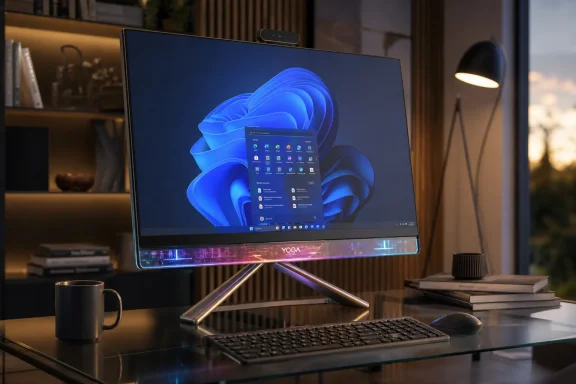 Lenovo Builds the Surface Studio Successor Microsoft Never Shipped
The Windows all-in-one market has always had a ghost in the room: Microsoft’s Surface Studio. Bowden frames the Yoga AiO i 32 Aura Edition through that lineage directly, noting that he has used all-in-one PCs since Microsoft launched the first Surface Studio in 2016 and that he moved through machines including HP’s Envy 32, HP Envy 34, and Lenovo’s previous Yoga AiO 32 after Microsoft killed off the Surface Studio line. That background matters because this review is not written from the perspective of someone casually testing a desktop. It comes from a reviewer who has lived with the category for years and understands the difference between a big monitor with a PC attached and a machine that changes the character of a desk.Lenovo’s answer is not to clone the Surface Studio’s canvas hinge. Instead, it goes in a more theatrical direction. The Yoga AiO i 32 Aura Edition puts the computer into the stand, uses an upside-down V-shaped support geometry, and lets the display sit above a transparent chin with RGB lighting. From a normal seated position, Bowden says the stand largely disappears, creating the impression that the 31.5-inch OLED panel is floating.
That is a meaningful design bet. Traditional all-in-ones usually try to disappear into the office: slim screen, pedestal stand, ports on the rear, keyboard in the box, done. Lenovo is instead making the desktop itself the object of attention, closer to furniture or a studio instrument than a commodity PC. The “Aura Edition” branding can sound like marketing excess, but the hardware description suggests a real attempt to differentiate a category that has become visually stagnant.
The Windows ecosystem needs that kind of ambition. Apple has long understood that an all-in-one is not merely a space-saving tower replacement; it is the computer most likely to be seen by everyone entering a room. Microsoft understood that with Surface Studio, even if the product never became mainstream. Lenovo now appears to be trying to recover that emotional high ground for Windows users who want a premium desktop that is not a black box, a gaming tower, or a corporate slab.
But the Surface Studio comparison also raises the bar. Surface Studio was expensive, niche, and imperfect, yet it had a clear ergonomic idea: a display that could become a drafting surface. Lenovo’s concept is more visual than functional. Its upside-down V stand and transparent chin create drama, but Bowden’s review makes clear that the drama brings practical penalties.
The Display Is the Argument
The strongest case for the Lenovo Yoga AiO i 32 Aura Edition is not the processor, the lighting, or even the transparent chin. It is the screen. The machine ships with a 31.5-inch UHD OLED panel at 3840×2160, with anti-reflection treatment, non-touch input, 99% DCI-P3 coverage, a 165Hz refresh rate, and a listed 225-nit figure in the specs table. Bowden also reports up to 1,000 nits of peak brightness in HDR content.That combination changes the all-in-one value equation. A 32-inch 4K OLED panel with 165Hz refresh is not merely a “nice display” bolted to a PC; it is the feature that justifies the rest of the design. Bowden calls it the best display he has seen on an all-in-one and says it blows the iMac and Lenovo’s previous 32-inch AiO out of the water. That is a reviewer’s judgment, not a lab standard, but it is the central claim of the piece and the reason the product exists.
The 165Hz refresh rate is especially important. All-in-ones have often lagged behind enthusiast monitors, even when they were expensive. A high-refresh OLED panel makes Windows itself feel better: animations, scrolling, pointer movement, and casual gaming all benefit from the fluidity. For a machine sold to creators and premium home-office buyers, that is not cosmetic. It changes the daily experience in a way benchmark numbers do not fully capture.
The non-touch specification is more complicated. On one hand, a 31.5-inch desktop display does not necessarily need touch, especially if it is not mounted on an articulating hinge like the Surface Studio. On the other hand, removing touch also makes clear that Lenovo is not trying to recreate Microsoft’s artist-table concept. This is a display-first, keyboard-and-mouse-first premium desktop, not a digital drafting board.
Color coverage also pushes the machine toward creators. A 99% DCI-P3 OLED panel will be more compelling to photographers, video editors, and visual workers than to spreadsheet users. Yet the configuration stops short of becoming a full creator workstation because Lenovo does not offer a dedicated GPU option in the reviewed model. That creates a strange split: the display is screaming “creative flagship,” while the graphics subsystem is saying “very capable integrated solution, but keep expectations in check.”
The result is a machine whose screen may outclass its internal expandability. That is not automatically a flaw; many buyers will be satisfied for years if the display is excellent and the CPU remains fast. But it does mean the Yoga AiO i 32 Aura Edition should be judged less like a modular workstation and more like an integrated premium appliance. You are buying the whole composition, not a platform you will meaningfully reshape later.
The Transparent Chin Is Brilliant Until the Desk Gets Real
The transparent chin is the visual signature of the Yoga AiO i 32 Aura Edition. Bowden describes it as mesmerizing, particularly when the RGB lighting shines through it. The lighting can be controlled through Lenovo Vantage or through Windows 11’s Dynamic Lighting feature, which Bowden says was his first time using Microsoft’s native RGB controls. In a category that often hides personality behind brushed metal and black bezels, this is unusually playful for a mainstream Windows desktop.The risk is that playfulness can become maintenance. Bowden says the transparent chin is a dust and fingerprint magnet, to the point that he found himself cleaning it daily. That may sound trivial, but it is not irrelevant for a computer whose design value depends on looking pristine. Transparent materials reveal everything: smudges, desk clutter, cables, dust, and whatever has been pushed behind the display.
The stand geometry compounds that issue. The machine’s support forms an upside-down V shape, with the display chin and stand both contacting the desk. That lets the display appear to float, but it also means the machine needs more depth than a conventional all-in-one with a central base. Bowden notes that users with smaller desks may find the display too close or the rear stand uncomfortably near the desk edge.
This is where Lenovo’s design becomes polarizing. On a deep, tidy desk, the Yoga AiO i 32 Aura Edition may look spectacular. On a cramped work surface with external drives, paper, charging cables, and accessories, the same transparent design may expose the mess instead of hiding it. A conventional stand can be boring, but boring often means forgiving.
There is also a subtle ergonomic trade-off. Because the device’s stance depends on the relationship between the display chin and rear support, adjusting the screen angle can consume more desk depth. That does not make the design bad; it means buyers should think about their physical workspace before falling for product photos. An all-in-one is not just a spec sheet. It is a large object that rearranges the geometry of a desk.
For Windows enthusiasts, the transparent chin may be the most exciting part of the design because it signals that Lenovo is willing to take risks. For IT departments, educators, shared workspaces, and anyone with cable clutter, it may be the first thing to worry about. Premium industrial design often assumes a premium environment around it.
Performance Is Strong, but the GPU Story Is Carefully Bounded
The Yoga AiO i 32 Aura Edition’s performance story begins with Intel’s Core Ultra X7 358H. The system’s specs list E-cores up to 3.50 GHz and P-cores up to 4.80 GHz, paired with 32 GB of soldered LPDDR5X-9600MT/s memory and a 1 TB M.2 2280 PCIe Gen4 TLC SSD. Bowden reports that the system is whisper-quiet for almost all normal use, with fans spinning up only under heavy sustained load.The benchmark numbers support the claim that this is a genuinely fast all-in-one. Windows Central recorded a Geekbench single-core score of 2,851 and multicore score of 16,964. CrossMark landed at 2,128. Cinebench produced a single-core score of 501 and a multicore score of 4,927. The storage results are also strong, with CrystalDiskMark showing 7,008.27 MB/s reads and 5,807.32 MB/s writes.
Those figures matter because all-in-ones have often had to choose between silence, thinness, and speed. Lenovo appears to have found a credible balance. The machine is not being described as a fanless sculpture or a throttled showpiece. It is a quiet premium desktop with enough CPU headroom for heavy multitasking, content work, and general productivity.
The more nuanced issue is graphics. The system uses Integrated Intel Arc B390 Graphics, and Bowden repeatedly frames the Intel Arc B390 as better than typical integrated graphics but not a substitute for a dedicated GPU from NVIDIA or AMD. In 3DMark, Windows Central recorded 48,631 in Night Raid, 7,793 in Time Spy, 3,630 in Time Spy Extreme, 5,633 in Steel Nomad Light, and 1,100 in Steel Nomad.
Those numbers are respectable for an integrated solution, and Bowden says games such as Halo: The Master Chief Collection and Hitman run well. He also reports that Cyberpunk 2077 runs well at 1440p high settings, while older titles such as GTA V can run at high frame rates with settings maxed even at 4K. But he is careful not to sell the Yoga AiO i 32 Aura Edition as a dedicated gaming machine, and that caution is the right reading of the product.
The 165Hz OLED panel creates an expectation problem. A display this good naturally invites gaming, but the integrated GPU cannot be expected to drive the latest demanding games at high settings, 4K resolution, and very high refresh rates. Bowden’s practical recommendation is medium 1080p for most modern games, with room for better results depending on the title. That is perfectly useful for casual gaming, but not what a hardcore PC gamer expects from a desktop costing around the $3,000 mark at its listed price.
The absence of a dedicated GPU option is therefore more important than the performance of the B390 itself. Integrated Intel Arc B390 Graphics may be efficient and capable, but Lenovo is selling a premium 32-inch OLED desktop to people likely to care about creative workflows and visual experiences. Some of those users will want GPU acceleration, gaming performance, or application-specific reliability from NVIDIA or AMD hardware. Lenovo gives them no configuration path in the reviewed model.
That makes the Yoga AiO i 32 Aura Edition a high-end generalist rather than a workstation. It can edit, render, multitask, and game casually. It can show those workloads on a superb panel. But buyers should not confuse “surprisingly capable integrated graphics” with “replace your gaming desktop or GPU workstation.”
The Spec Sheet Says Premium; the Upgrade Path Says Appliance
There is only one configuration in the review, and that matters. The Yoga AiO i 32 Aura Edition reviewed by Windows Central uses the Intel Core Ultra X7 358H, 32 GB of soldered LPDDR5X-9600MT/s memory, 1 TB PCIe Gen4 TLC storage, Integrated Intel Arc B390 Graphics, and Windows 11 Home. It includes a wireless mouse and Wireless Helios Gen 2 Keyboard in Seashell, Wi-Fi 7 2×2 BE, Bluetooth 5.4, a 330W power adapter, Xbox Game Pass, and a 1 Year Mail-in warranty. The part number is F0JK0009US.The phrase “soldered” is doing real work here. For an all-in-one, soldered memory is not unusual, but it reinforces the appliance nature of the machine. The 32 GB capacity is generous for many users today, but it is also the ceiling buyers should assume. If the display remains desirable for many years, the memory configuration may become the limiting factor before the panel feels old.
The 1 TB SSD is fast, but capacity may be another consideration for creators. A 4K OLED machine positioned for video and photo editing will attract users with large media libraries. External storage can solve that, but the port situation makes external workflows less elegant than they should be. The storage speed is excellent; the storage strategy is less expansive.
The operating system is also worth noting. Windows 11 Home is the listed OS, which is appropriate for many consumers but less ideal for managed business deployments. Organizations considering the machine for design studios, executive offices, showrooms, or creative teams should account for licensing and management requirements rather than assuming this is ready-made for enterprise imaging and policy control.
The included accessories are a nice touch. Bowden describes the bundled keyboard as hefty and premium-feeling, with a quiet chiclet-style typing experience, and notes that the wireless dongle comes plugged in from the factory. That is the kind of out-of-box polish premium all-in-ones need. When the machine is sold as a complete desktop environment, the keyboard and mouse cannot feel like afterthoughts.
Still, the total package sends mixed signals. On one side: high-end display, modern connectivity, excellent storage speeds, premium industrial design, strong CPU, and included peripherals. On the other: soldered memory, no dedicated GPU option, Windows 11 Home, no Ethernet jack, no SD card reader, and a one-year mail-in warranty. For a consumer luxury PC, that may be acceptable. For a professional tool at this price, it is a conversation.
| Area | What Lenovo ships | Practical consequence |
|---|---|---|
| OS | Windows 11 Home | Fine for consumers; businesses may need additional licensing or management planning |
| CPU | Intel Core Ultra X7 358H | Strong general and multicore performance for an all-in-one |
| Memory | 32 GB LPDDR5X-9600MT/s, soldered | Generous today, but not an upgrade path |
| Graphics | Integrated Intel Arc B390 Graphics | Capable for creators and casual gaming, not a dedicated GPU replacement |
| Display | 31.5-inch 3840×2160 OLED, 165Hz, 99% DCI-P3 | The core reason to buy the machine |
| Warranty | 1 Year Mail-in | Thin coverage for a premium desktop unless upgraded separately |
Ports Are Where the Sculpture Starts Charging Rent
Premium all-in-ones live or die by daily friction. Bowden’s review praises the easy-to-reach USB-C port and 3.5mm audio jack on the right edge of the display, but the rest of the port arrangement is less friendly. Most ports are on the stand, toward the back and bottom, which Bowden says makes them basically impossible to reach while sitting in front of the screen.That complaint should not be dismissed as reviewer nitpicking. Port placement defines how a desktop behaves. If you plug in a webcam once and never touch it again, rear ports are fine. If you routinely attach cameras, SSDs, USB drives, audio equipment, capture devices, phones, or card readers, hidden rear ports become a tax on every workflow.
Lenovo includes two USB-C ports, three USB-A ports in total, HDMI, and the side-mounted audio jack. Bowden specifically calls out the absence of Ethernet and any SD card reader. Those omissions are particularly odd for a machine that otherwise courts creators. Photographers and videographers still use removable media, and wired networking remains valuable for large file transfers, low-latency work, and stable studio setups.
The lack of Ethernet can be partially defended by the inclusion of Wi-Fi 7 2×2 BE. For many homes, that will be more than adequate. But high-end desktops traditionally earn their keep by being reliable anchors, not merely wireless clients. If the machine is going to sit on a desk for years, an Ethernet jack would not have been an exotic demand.
The port issue is also magnified by the stand design. Bowden notes that on Lenovo’s previous AiO, awkward ports were at least reachable through the display stand from a seated position. On the new model, he says users must get up, lean around the display, and feel around to plug in peripherals. That is the difference between “not ideal” and “annoying every week.”
The practical workaround is obvious: buy a hub or dock and route it to the accessible USB-C port. But that workaround undercuts the design purity Lenovo is selling. The moment a dock, cable bundle, card reader, and external drive appear on the desk, the transparent floating sculpture becomes a more ordinary workstation with more visible clutter.
This is the recurring compromise of the Yoga AiO i 32 Aura Edition. Lenovo has made a computer that looks better when fewer things are attached to it, while also selling it to users likely to attach things to it. The visual design wants minimalism. The creator workflow wants ports.
The Webcam Is Ready for 2026; the Speakers Reportedly Are Not
The webcam is one of the clearest generational upgrades in the review. The Yoga AiO i 32 Aura Edition includes a 16MP RGB+IR camera with an E-Shutter, mounted along the top of the display. Bowden says it looks great, is much clearer than the previous Lenovo AiO, and makes Windows Hello face unlock feel a little faster.That is exactly where a premium all-in-one should be strong. In a world of hybrid work, remote meetings, streaming, and video calls, a desktop with a poor camera feels out of step. A 16MP RGB+IR setup with Windows Hello support makes sense for a machine intended to be the central screen in a home office or studio.
The physical webcam kill switch is also important. Bowden notes that it sits on the right side of the display and is easy to reach. Hardware privacy controls are no longer a niche concern, and all-in-ones in particular deserve them because they are often left powered, sleeping, or signed in on desks shared with family members, co-workers, or clients.
The speakers are the troubling part. Bowden reports that both tested units produced an audible hissing or whooshing noise whenever the audio channel was open. He says the noise was present regardless of what audio was playing, more noticeable at medium or low volume, audible even when muted while an audio track was playing, and gone when the audio channel closed. After encountering the same problem on a second review unit, he could not say whether the issue was a hardware defect or something that might be fixed through firmware.
For a budget desktop, that would be unfortunate. For a premium all-in-one with a listed price of $3,097.99, it is a serious blemish. Audio is not an accessory feature in an all-in-one; it is part of the integrated promise. Buyers choose these machines partly because they want fewer boxes and fewer cables. If the speaker system pushes them toward external speakers, the product loses some of its elegance.
The fact that Bowden encountered the issue on two units does not prove every unit is affected. It does, however, make the problem harder to dismiss as one unlucky sample. His advice is blunt: if buyers encounter the issue and are unhappy, they should return the machine. That is the right consumer guidance, and it is also a warning to any organization thinking about buying more than one.
The broader lesson is that integrated systems fail differently from modular ones. A bad speaker in a tower setup can be replaced by unplugging a pair of speakers. A bad integrated speaker system in a premium all-in-one becomes part of the product’s identity. Lenovo may be able to address it with firmware if the root cause allows it, but until that is clear, buyers should treat audio quality as a check-before-keeping item.
The Price Forces Every Compromise Into the Open
The Yoga AiO i 32 Aura Edition’s listed price in the specs table is $3097.99, and the Windows Central purchase blurb describes it as available from Lenovo for $3,097.99. The same source material later shows a lower displayed price of $2,239.99 at Lenovo USA. That price spread is itself a reminder of how volatile premium PC pricing can look at retail, especially when manufacturer discounts enter the picture.At $2,239.99, the machine is still expensive, but the argument becomes easier. A 31.5-inch 4K OLED all-in-one with a 165Hz refresh rate, 32 GB of fast memory, a 1 TB Gen4 SSD, Wi-Fi 7, Bluetooth 5.4, 16MP RGB+IR camera, strong CPU performance, and striking industrial design is clearly not a commodity desktop. At $3,097.99, every missing port, every limitation, and every audible speaker defect feels sharper.
Bowden’s review uses the phrase “eyewatering” for the $3,097.99 figure, and that reaction is reasonable. The all-in-one category is supposed to save space and simplify setup, but at this tier it must also justify why a buyer should not assemble a separate desktop and premium OLED monitor. Lenovo’s strongest answer is integration and design. Its weakest answer is flexibility.
A separate desktop-and-monitor setup can offer a stronger GPU, easier repairs, better port access, more storage options, and future upgrades. It will probably look less magical, occupy more space, require more cables, and lack the unified presence of Lenovo’s machine. That is the trade: the Yoga AiO i 32 Aura Edition is not trying to win the parts-bin spreadsheet. It is trying to win the desk.
This is why the price cannot be analyzed as performance per dollar alone. If you care only about compute, the machine is difficult to defend at its highest listed price. If you care about having a premium 32-inch OLED centerpiece that happens to be a fast Windows PC, the value case improves. The right buyer is not shopping like a system builder. The right buyer is shopping like someone choosing a display, a workstation, and a design object at once.
Still, Lenovo should not get a free pass for luxury pricing. Luxury products are allowed to be expensive; they are not allowed to be careless. The reported speaker issue, awkward port access, lack of Ethernet, no SD card reader, and absence of a dedicated GPU option are not minor footnotes when the machine is sold as a flagship. They are the points a buyer must weigh against the beauty of the object.
The lower displayed price of $2,239.99 changes the emotional math but not the product reality. A discount can make the machine more attractive, but it does not add ports, change the GPU, or silence a hiss. Buyers should evaluate the hardware first and the sale price second.
Windows 11 Finally Gets a Showpiece Desktop Again
One of the more interesting details in Bowden’s review is his mention of Windows 11’s Dynamic Lighting feature. RGB control has historically been fragmented across vendor utilities, gaming suites, and peripheral software. Here, the transparent chin’s lighting can be controlled either through Lenovo Vantage or Windows itself, and Bowden describes the native controls as quick and easy.That is a small but symbolic win for Windows. Microsoft has spent years trying to make Windows feel coherent across wildly different hardware, while OEMs have often added their own control panels, effects, and device-specific utilities. A machine like the Yoga AiO i 32 Aura Edition benefits when Windows can participate directly in the hardware experience instead of leaving the showpiece feature entirely to vendor software.
The RGB lighting could have been tacky. In this design, at least as described by Windows Central, it seems closer to ambient identity than gamer excess. The transparent chin gives the lighting a physical stage, and the floating-display effect turns it into part of the machine’s silhouette. That is a smarter use of RGB than simply putting a strip on the rear of a monitor.
This matters because Windows PCs often win on variety but lose on narrative. There are countless Windows desktops, but few become recognizable products. The Surface Studio did. Some gaming desktops do. Most all-in-ones do not. Lenovo is clearly trying to make this machine memorable at a glance.
The risk is that Windows showpieces can become niche precisely because they are so specific. A transparent, RGB-lit, 32-inch OLED all-in-one in Seashell is not a neutral corporate purchase. It has taste. Some buyers will love that; others will reject it instantly. But the existence of a Windows desktop with taste is itself encouraging.
The Yoga AiO i 32 Aura Edition also suggests that the premium Windows desktop is not dead; it is just becoming more specialized. The mainstream tower may continue fading from everyday homes, but desks still need powerful screens, strong cameras, quiet performance, and elegant integration. Lenovo’s machine is an argument that the all-in-one can evolve beyond reception desks and family rooms.
Action Checklist for Admins
- Confirm whether Windows 11 Home meets your deployment requirements before purchase; budget for any needed OS upgrade or management changes.
- Test the built-in speakers during the return window, specifically listening for the reported hissing or whooshing noise when the audio channel is open.
- Measure desk depth before ordering, allowing for the upside-down V-shaped stand geometry and comfortable viewing distance.
- Plan peripheral strategy in advance, because most ports are on the rear stand and may be inconvenient for frequent access.
- Add a USB-C hub, SD card reader, Ethernet adapter, or dock if the machine will be used for creator workflows.
- Treat the 32 GB soldered memory and Integrated Intel Arc B390 Graphics as fixed limits, not starting points for future upgrades.
Where Enterprise IT Sees Risk and Executives See Desire
For IT buyers, the Yoga AiO i 32 Aura Edition is not a fleet desktop in the usual sense. Its design is too distinctive, its price too high, and its configuration too consumer-oriented to be treated like a standard office endpoint. But that does not mean it has no business role. It looks more like an executive desktop, design-studio workstation, client-facing showroom machine, or premium hybrid-work setup.Those scenarios value the same things Bowden praises: beautiful display, strong camera, quiet operation, premium keyboard and mouse, modern wireless connectivity, and a design that makes a desk look intentional. In an executive office or creative studio, the machine’s visual presence may be a feature rather than a distraction. In a reception area or collaborative space, the 31.5-inch OLED panel and unusual stand could be part of the environment.
But administrators will notice the limits immediately. Windows 11 Home is not the default assumption for managed business fleets. The one-year mail-in warranty is modest for a premium endpoint. The lack of Ethernet may complicate standardized network setups. The absence of an SD card reader may irritate creative teams. The speaker issue reported by Windows Central needs validation before any multi-unit deployment.
Supportability is another concern. All-in-ones are elegant until something fails. A monitor problem, speaker problem, thermal issue, or internal fault can take the whole workstation out of service. With a modular desktop, the display and PC can often be swapped independently. With a premium AiO, the service model is more constrained.
That does not make the machine unsuitable for work. It means procurement should be intentional. Buy it where its design and display create value, not where a cheaper business desktop would do. Treat it as a specialized endpoint with a premium user-experience brief, not as a standard box to be replicated across rows of desks.
There is also a security and lifecycle angle. The 16MP RGB+IR camera and E-Shutter are strengths, especially for Windows Hello and privacy. Wi-Fi 7 and Bluetooth 5.4 provide modern connectivity. But the fixed memory and integrated graphics mean the machine’s lifecycle should be planned around known workloads. It is not a system to buy on the assumption that future upgrades will solve future requirements.
For small businesses and creators, the calculus is more personal. If the Yoga AiO i 32 Aura Edition replaces a monitor, webcam, speakers, desktop, keyboard, mouse, and some of the cable clutter of a traditional setup, its price becomes easier to rationalize. If it must be supplemented immediately with external speakers, a dock, Ethernet, card reader, and external storage, the simplicity story weakens.
The Review’s Most Important Warning Is Not the One You Expect
It would be easy to reduce Bowden’s review to a familiar verdict: gorgeous machine, high price, some compromises. But the sharper warning is about category expectations. The Yoga AiO i 32 Aura Edition looks like the kind of desktop that should do everything because it is large, expensive, and visually spectacular. In reality, it is optimized for a very particular experience.That experience is sitting in front of a stunning 32-inch OLED Windows desktop that is quiet, fast, clean, and dramatic. It is not crawling behind the stand to connect peripherals. It is not using built-in speakers that reportedly hiss. It is not chasing maximum 4K gaming performance. It is not opening the machine later to add memory or swap in a more powerful GPU.
The temptation with premium all-in-ones is to assume that high price means no compromises. The opposite is often true. High design integration means the compromises are simply chosen earlier by the manufacturer. Lenovo chose beauty, thinness, quiet operation, and display quality. It did not choose port abundance, modularity, Ethernet, SD media support, or dedicated graphics flexibility.
For many buyers, Lenovo chose correctly. The vast majority of desktop users do not upgrade GPUs. Many never plug in Ethernet. Many use wireless peripherals and cloud storage. Many would rather have one beautiful object than a technically superior pile of components. The Yoga AiO i 32 Aura Edition understands those buyers better than a spec-sheet critic might.
But WindowsForum readers are often not average buyers. They are the people family members ask before a major PC purchase, the admins who see failure modes before marketing copy does, and the enthusiasts who know that a single missing port can become a daily irritation. For that audience, the right answer is not “buy” or “skip.” It is “know exactly which compromise you are accepting.”
Bowden ultimately says the machine is the first all-in-one since the Surface Studio to blow him away. That is high praise from a reviewer who has daily-driven the category for years. Yet he also says the speaker problem should not be something buyers tolerate at this price, and he wishes Lenovo offered a dedicated GPU option. The enthusiasm and the warnings are not contradictory. They are the review’s credibility.
The Buyer Who Will Love It Already Knows
The Yoga AiO i 32 Aura Edition is not for the buyer who wants the most frames per dollar, the easiest repair path, or the largest number of ports. It is for the buyer who wants a Windows desktop that feels special every time it wakes. That buyer may be a creator, a design-conscious home-office user, a Windows loyalist mourning the Surface Studio, or someone who simply refuses to put another dull monitor-and-box combination on the desk.The machine’s most concrete strengths are easy to name:
- A 31.5-inch 3840×2160 OLED panel with 165Hz refresh and 99% DCI-P3 coverage gives the product its strongest reason to exist.
- The transparent chin, RGB lighting, and upside-down V-shaped stand create a rare Windows all-in-one design that is genuinely distinctive.
- The Intel Core Ultra X7 358H, 32 GB LPDDR5X-9600MT/s memory, and fast Gen4 SSD deliver strong everyday and creative performance.
- Integrated Intel Arc B390 Graphics are capable for light-to-moderate gaming and creator workloads, but they are not a dedicated GPU substitute.
- The 16MP RGB+IR camera with E-Shutter is well matched to modern hybrid-work expectations.
- The reported hissing or whooshing speaker issue, awkward rear ports, no Ethernet, no SD card reader, and fixed configuration are the reasons to test carefully before committing.
The Lenovo Yoga AiO i 32 Aura Edition is a reminder that the future of the premium Windows desktop may not be a faster beige box by another name, but a more integrated, more opinionated, and more emotionally designed machine. Lenovo has not solved every problem here, and the speaker issue in particular needs an answer, but it has done something more valuable than shipping another safe all-in-one: it has made the Windows desktop desirable again.
References
- Primary source: Windows Central
Published: 2026-07-08T15:52:07.226084
Lenovo Yoga AiO i 32 Aura Edition review: Bold and stunning | Windows Central
Lenovo's latest flagship all-in-one might be the best looking Windows AiO we've ever seen, complete with a unique design and best-in-class display that elevates it above the competition.www.windowscentral.com
