Lenovo Sells the Feeling Before the Computer
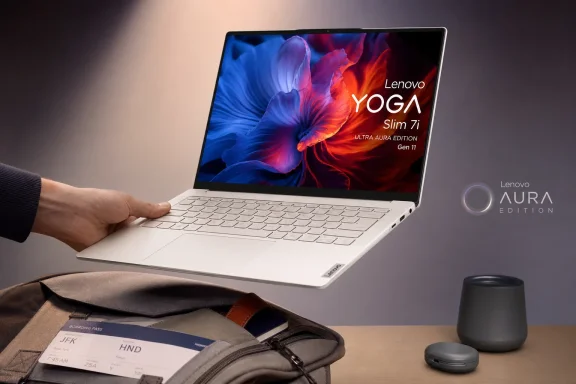
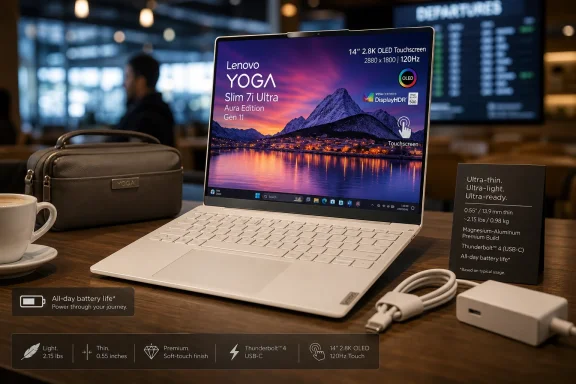
The Yoga Slim 7i Ultra Aura Edition understands one of the oldest truths in premium PC design: people often decide whether a laptop feels expensive before they finish reading the spec sheet. At roughly 0.55 inches thick and about 2.15 pounds in the tested configuration, Lenovo has built something that registers less as a conventional notebook and more as a slab of display, keyboard, and battery that somehow survived a diet.
That matters. Weight is one of the few laptop specifications users experience every day without opening an app. A few hundred grams can decide whether a machine becomes a constant travel companion or the thing left behind because the commute is already annoying enough.
Lenovo has also resisted the purely utilitarian look that still clings to parts of its business lineup. The magnesium-aluminum build, soft finish, seashell-white color, and small opening lip all point toward a machine designed to be admired in a coffee shop, airport lounge, or conference room. It is not a ThinkPad wearing a different badge. It is Lenovo trying to make a Windows ultraportable that wins on desire.
That is why the price stings. Starting at $1,889.99 and rising to $2,119.99 as tested, this Yoga is not merely competing with good Windows laptops. It is competing with the idea that a premium thin-and-light PC should be excellent at nearly everything.
The OLED Panel Is the Star, and It Knows It
If Lenovo wanted one component to make the case for the Yoga Slim 7i Ultra’s premium pricing, the display was the right place to spend. The 14-inch OLED touchscreen runs at 2,880 by 1,800 pixels with a 120Hz refresh rate, and by every practical description it is the machine’s centerpiece.
That combination hits several modern laptop sweet spots at once. The resolution is sharp without going absurdly high for a 14-inch panel. The 120Hz refresh rate makes Windows feel smoother than the 60Hz panels that still appear in too many productivity notebooks. OLED gives the screen the contrast, black levels, and color punch that LCD laptops still struggle to match.
This is not a minor luxury. Display quality affects nearly every common laptop task: reading, writing, editing photos, watching video, browsing, presenting, and staring too long at Windows wallpapers while pretending to think. A great screen can make an average laptop feel more premium than its benchmark charts suggest.
But the display also exposes the central tradeoff of the machine. A bright, high-resolution OLED touchscreen is not free in power terms. Lenovo has delivered the sensory pleasure part of the ultraportable equation; the harder question is whether the rest of the system can afford it.
Intel’s New Silicon Does the Job, Not the Selling
The tested configuration uses Intel’s Core Ultra 7 355, paired with 32GB of fast DDR5 memory and a 1TB PCIe Gen 4 SSD. On paper, that sounds comfortably premium for the kind of user who lives in browsers, Office, Slack or Teams, photo touchups, light coding, media playback, and occasional creative work.
In practice, that is also where the laptop lands. It is competent, smooth, and unlikely to feel slow during mainstream productivity. The issue is that “unlikely to feel slow” is not the same as “clearly worth more than $2,000.”
The review data provided paints a machine that performs well enough in isolation but rarely dominates its comparison group. In productivity and content-creation benchmarks, it sits in the middle rather than breaking away from less expensive machines. Even Lenovo’s own Yoga Slim 9i Gen 10 appears to beat it across several tests despite being an older cousin in the lineup.
That is awkward for a premium model. Buyers paying top-tier ultraportable money are not necessarily expecting workstation performance from a two-pound laptop, but they are entitled to expect a coherent win condition. The Yoga Slim 7i Ultra’s win condition is physical elegance, not raw output.
The Graphics Story Is Better, Until It Meets Reality
The integrated Intel graphics fare better in synthetic graphics testing than the CPU story might suggest. The Yoga Slim 7i Ultra reportedly outpaces several mainstream rivals in 3DMark-style tests, sometimes by wide margins, and can handle lightweight games such as World of Warcraft or Age of Mythology at moderate settings.
That is useful. Integrated graphics have quietly become good enough that many users no longer need a discrete GPU for casual gaming, school projects, photo edits, and light video work. The old line between “business laptop” and “can do some creative stuff” has blurred.
Still, Lenovo has not built a stealth gaming laptop. Nor should anyone expect one at this size and weight. Thin ultraportables are thermal compromises wearing premium clothes, and no amount of “Ultra” branding changes the physics of a compact chassis.
The better interpretation is that the Yoga Slim 7i Ultra gives you modern integrated graphics headroom in an unusually light package. That is valuable, but it is not the same as being a category leader.
The Battery Result Is the Crack in the Premium Pitch
Battery life is where the Yoga Slim 7i Ultra’s argument weakens most. According to the supplied review, the laptop lasted less than half as long as some comparison systems in a local video playback test, with rivals such as the HP OmniBook 5 14 and Microsoft Surface Laptop clearing 30 hours under the same methodology.
There are caveats, and they matter. Local video rundown tests do not perfectly predict real workdays. A laptop with a higher-resolution OLED screen can be penalized against lower-resolution or more efficient panels. A machine can still last long enough for most users while losing badly on a benchmark chart.
But ultraportables are judged harshly on battery because mobility is the entire premise. A laptop that is extraordinarily light but merely decent away from the wall outlet creates a strange bargain. It is easier to carry, yes, but you may think about the charger sooner than buyers of cheaper machines.
That matters even more because this is a Copilot+ era Windows laptop. The industry’s promise is not just “thin and light,” but smarter, longer-lasting, more efficient PCs built around new silicon and on-device AI capability. If the headline user experience still comes down to managing display brightness and packing a USB-C charger, the revolution feels incremental.
Port Minimalism Has Become a Tax on Everyone Else
Lenovo’s port selection is brutally simple: three Thunderbolt 4 USB-C ports and nothing else. No headphone jack. No HDMI. No USB-A. No card slot.
This is the kind of decision that makes sense on a product manager’s slide and less sense five minutes before a presentation. Thunderbolt 4 is powerful and flexible, and three ports are not nothing. But ports are not just bandwidth conduits; they are social contracts with the messy world of conference-room displays, hotel TVs, wired headphones, old mice, USB flash drives, audio interfaces, and adapters that always seem to be in the other bag.
Apple learned this lesson the hard way during its most aggressive USB-C-only years, and the Windows ecosystem should not pretend the pain went away because docks got better. A two-pound chassis may require sacrifices, but deleting the 3.5mm jack on a productivity laptop still feels less like courage than inconvenience.
For some users, this will be irrelevant. If your life is already Bluetooth headphones, USB-C chargers, cloud storage, and a dock at every desk, the Yoga Slim 7i Ultra fits neatly. For everyone else, Lenovo has effectively moved part of the laptop into a dongle.
The Aura Branding Is More Useful to Lenovo Than to Users
The “Aura Edition” label signals Lenovo’s collaboration with Intel and the presence of Copilot+ PC features. In day-to-day terms, that means the system includes Microsoft’s AI-facing Windows functionality, a dedicated Copilot key, and Lenovo’s own AI-branded software layer.
There is nothing inherently wrong with that. Copilot+ PCs are now a major part of the Windows laptop market, and local AI acceleration is becoming a baseline requirement rather than a novelty. The Core Ultra 7 355 includes an NPU capable enough for Microsoft’s current AI feature set, and Lenovo’s software can provide device-level features like presence detection, performance tuning, and battery behavior.
But the branding still outruns the user benefit. For many buyers, the AI tools remain optional, ignorable, or unevenly useful. A dedicated Copilot key may become more valuable over time, but today it is still more a statement about Microsoft’s roadmap than a reason to choose one laptop over another.
That is the larger tension around Copilot+ PCs in 2026. The hardware is arriving faster than the must-have workflows. Lenovo can truthfully sell the Yoga Slim 7i Ultra as a modern AI PC, but most buyers will still judge it by the old standards: screen, keyboard, battery, speed, ports, and price.
The Keyboard and Speakers Do the Quiet Work
Not every premium feature shows up in a benchmark. The Yoga Slim 7i Ultra’s keyboard appears to be one of its quieter successes, with 1.5mm of travel and a soft-touch feel that suits long typing sessions. In a laptop this thin, that is not guaranteed.
The speakers also seem to land better than expected. Upward-facing or side-flanking speaker systems on ultraportables vary wildly, but Lenovo’s implementation reportedly delivers clear vocals, usable bass, and balanced sound without demanding an external Bluetooth speaker. For a travel laptop, that is more than a nicety.
The webcam and microphone are more mixed. A 5MP camera is welcome, and sharpness matters for hybrid work, but washed-out colors and aggressive background noise pickup are still annoyances in a world where video calls remain part of daily professional life. Premium laptops no longer get a pass for “good enough” conferencing.
Lenovo’s software bundle is also a familiar split. Vantage can be genuinely useful for firmware updates, diagnostics, and settings. McAfee, by contrast, remains the sort of preinstall that makes a new PC feel slightly less premium the moment popups appear.
The Configuration Strategy Is Simple, Almost to a Fault
One of the stranger strengths of the Yoga Slim 7i Ultra is that Lenovo gives buyers relatively little to agonize over. The tested model includes the Core Ultra 7 355, 32GB of memory, a 1TB SSD, Windows 11 Pro, an e-shutter for the webcam, and the lighter 2.15-pound chassis. The lower-cost configuration trims small details rather than changing the personality of the machine.
That simplicity can be refreshing. Too many laptop lines bury the desirable display behind a processor upgrade, hide adequate RAM in a business-only SKU, or make buyers decode model numbers like shipping manifests. Here, the Yoga Slim 7i Ultra is basically the Yoga Slim 7i Ultra.
The downside is that price flexibility is limited. If the starting point is already close to $1,900, the lack of a meaningfully cheaper configuration narrows the audience. Lenovo is not inviting cautious buyers into the line; it is asking them to accept the premium thesis immediately.
There is also an odd value wrinkle in the storage upgrade. The cheaper model can apparently be configured with a 2TB SSD and Windows 11 Pro for only slightly more than the tested machine. That kind of pricing overlap makes the lineup feel less curated than constrained.
HP and Microsoft Make Lenovo’s Math Harder
The Yoga Slim 7i Ultra would be easier to praise in a weaker market. But the current ultraportable field is crowded with machines that deliver enough performance, excellent battery life, good screens, and far lower prices. That makes Lenovo’s premium less about capability and more about taste.
The HP OmniBook 5 14 is the uncomfortable comparison because it appears to deliver a better all-around value for average users. If a laptop costing hundreds less lasts dramatically longer and performs competitively in common workloads, Lenovo has to win somewhere else. It wins on weight, display appeal, and materials, but those are not universal priorities.
Microsoft’s Surface Laptop also complicates the picture. Surface machines have long traded on fit, finish, and a tightly controlled Windows experience. If Microsoft can deliver strong battery life and a premium feel at a lower tested price, Lenovo’s design advantage becomes more specialized.
Then there is Lenovo’s own ThinkPad X1 Carbon Gen 13 Aura Edition. For business buyers, the ThinkPad brand still carries practical advantages: keyboard reputation, manageability expectations, enterprise familiarity, and a design language that says “work tool” rather than “executive accessory.” The Yoga Slim 7i Ultra may be prettier, but enterprise IT rarely buys pretty first.
The Windows Ultraportable Has Entered Its Luxury Phase
The Yoga Slim 7i Ultra is best understood as part of a broader shift in Windows laptops. For years, PC makers chased the MacBook Air with machines that were thinner, cheaper, or more configurable. Now the high end of the Windows market is increasingly comfortable selling luxury: OLED panels, AI branding, exotic lightness, premium finishes, and prices that once seemed reserved for mobile workstations.
That shift is not necessarily bad. Windows users deserve beautiful hardware, and Lenovo has shown it can build a device that feels special. The old stereotype of the PC laptop as a plastic compromise is long dead at this tier.
But luxury changes the review standard. A $900 laptop can be forgiven for having one excellent trait and a few compromises. A $2,100 ultraportable cannot coast on charm. At that price, every missing port, every middling benchmark, and every battery-life deficit becomes part of the negotiation.
This is where Lenovo’s machine feels slightly out of phase with the market. It is extraordinary in the hand and lovely to look at, but the competitive landscape is full of laptops that are boringly good at the things most people measure after the first week. The Yoga Slim 7i Ultra may win the unboxing; it does not clearly win the spreadsheet.
The Price Drop Is Not a Footnote, It Is the Verdict
The supplied review’s most revealing line may be that the Yoga Slim 7i Ultra could become a great buy after a price drop. That is often reviewer shorthand for a good product trapped inside a bad launch price. Here, it feels exactly right.
At $2,119.99 as tested, the laptop asks buyers to overvalue thinness, lightness, and display quality relative to battery life and performance. Some will happily do that. Frequent travelers, design-conscious users, and people who simply want the lightest premium Windows OLED machine they can find may not care that cheaper laptops last longer.
But most Windows buyers are more pragmatic. They compare configurations, wait for sales, and know that Lenovo’s own storefront pricing can shift. A machine that feels hard to recommend at full retail may become compelling when discounted by several hundred dollars.
That is especially true because the core product is not flawed in an unrecoverable way. The display will still be beautiful at a lower price. The chassis will still be impressively light. The keyboard, speakers, memory, and storage will still be strong. What changes is the balance between indulgence and value.
Where This Yoga Actually Makes Sense
The Yoga Slim 7i Ultra Aura Edition is not the wrong laptop. It is the wrong laptop for the broad, average-user recommendation at its launch price. That distinction matters.
For a writer, consultant, executive, student, or traveler who prioritizes minimum weight and maximum screen quality, this machine has obvious appeal. It slips into a bag, looks more refined than most Windows notebooks, and offers enough performance for mainstream work. If your laptop mostly lives in documents, browsers, meetings, media, and light creative apps, it will feel fast enough.
For sysadmins, developers, analysts, and IT pros, the case is narrower. The lack of ports means more accessories. The battery result means more attention to charging routines. The premium price means the purchasing argument must be based on physical portability rather than fleet economics or raw capability.
For enthusiasts, the Yoga Slim 7i Ultra is more interesting as a design statement than as a performance statement. It shows how far Windows hardware can be pushed in weight and display quality, but it also shows where the compromises still collect.
The Two-Pound OLED Dream Still Needs a Sale Sticker
The Yoga Slim 7i Ultra Aura Edition Gen 11 leaves a clear impression: Lenovo has built a premium ultraportable that is easier to admire than to universally recommend. Its strengths are real, but so are the tradeoffs that arrive with its price.
- The chassis is the main event, because a roughly 2.15-pound premium Windows laptop with this level of fit and finish remains genuinely impressive.
- The OLED touchscreen gives the machine its strongest everyday advantage, especially for users who care about color, contrast, sharpness, and smooth scrolling.
- The Core Ultra 7 355 configuration is competent for mainstream productivity, but the benchmark story does not match the laptop’s luxury pricing.
- The battery-life result weakens the travel pitch, even if real-world use may still be sufficient for many workdays.
- The USB-C-only port layout makes the machine cleaner and thinner while pushing practical inconvenience onto adapters and docks.
- The laptop makes far more sense as a discounted premium buy than as a default recommendation at more than $2,000.
Lenovo’s Yoga Slim 7i Ultra Aura Edition Gen 11 is a beautiful warning about the next phase of Windows laptops: the hardware is getting lighter, brighter, and more polished, but the best machines will be the ones that make those luxuries feel inevitable rather than expensive. If Lenovo can bring this design down to a more aggressive street price, or pair its next revision with stronger battery life and a less austere port strategy, the Yoga Slim line could become more than a gorgeous niche machine. For now, it is a superb object lesson in how close a Windows ultraportable can get to greatness while still being held back by the oldest question in PC buying: what else can I get for the money?
References
- Lenovo Yoga Slim 7i Ultra Aura Edition Gen 11 PCMag UK · 2026-06-19T20:00:06.970621