

Microsoft is flagging CVE-2026-58525 as a Microsoft Edge (Chromium-based) security feature bypass in the MSRC Security Update Guide, with exploitation requiring a malicious website and a persuaded user rather than a self-starting drive-by compromise on Windows endpoints and managed browser fleets. The important word is not simply “bypass,” but “convince”: Microsoft’s own exploitation note describes an attack that lives in the familiar seam between browser hardening and social engineering. That makes this less spectacular than a wormable bug and more operationally annoying for defenders, because the browser can be patched while the lure keeps changing. For Windows users and IT teams, the practical lesson is blunt: Edge security bugs are now part of the phishing surface, not a separate browser-maintenance chore.
Microsoft’s description of CVE-2026-58525 is short, but it says enough to define the shape of the risk. Per Microsoft’s MSRC advisory, an attacker could host a specially crafted website designed to exploit the vulnerability through Microsoft Edge, then convince a user to view that site. Microsoft also says the attacker has no way to force a user to view the attacker-controlled content.
That limitation matters. This is not described as a network service bug where a packet hits a listening port and the machine falls over. It is a browser-mediated attack path in which the user’s session, trust, curiosity, workload, or fatigue becomes the delivery mechanism.
The vulnerability type is a security feature bypass, which is one of those MSRC labels that can sound less alarming than remote code execution but still deserves attention. A security feature bypass does not necessarily mean an attacker gets code execution by itself; it means a protective mechanism can be evaded under the right conditions. In browser terms, that can be consequential because modern browsers are layered defenses, not single walls.
The Chromium-based Edge model is built around multiple assumptions: web content is hostile, sites are isolated, downloads are scrutinized, permissions should be constrained, and suspicious destinations should be interrupted or warned about. A bypass vulnerability is dangerous because it may undermine one of those assumptions without being the final exploit in a chain. The attacker may still need another weakness, a credential prompt, a malicious download, or a convincing page — but the browser’s intended friction is no longer fully reliable.
Microsoft’s wording also makes clear that the likely first mile is not exotic. The advisory names enticement in email or instant message as the typical lure, and it separately names an attachment sent through email as another route to get the user to act. That is the modern enterprise intrusion story in miniature: the exploit is technical, but the initial access attempt is still written in the grammar of the inbox.
Microsoft’s own product direction has made this convergence unavoidable. Edge is tied into Microsoft Defender SmartScreen, enterprise policies, managed profiles, site controls, download warnings, enhanced security modes, and cloud-delivered reputation systems. Those layers are valuable, but they also create a larger question whenever a bypass appears: which assumption should admins stop trusting until the browser is verified safe?
The MSRC note for CVE-2026-58525 does not identify the specific Edge feature being bypassed in the source material provided. That absence is important. Without a named component, defenders should resist the temptation to declare that only one policy, only one class of sites, or only one kind of user behavior is relevant.
This is where some vulnerability write-ups tend to overstate the case. A sparse MSRC entry can quickly become a dramatic claim that the browser is broadly broken, or that every user is one click away from compromise. The better reading is narrower and more useful: Microsoft has acknowledged a bypass class issue in Chromium-based Edge, and exploitation depends on a user being persuaded to interact with attacker-controlled content.
That still gives defenders plenty to do. Browser compromise paths are valuable precisely because users are already trained to click links, open shared documents, authenticate to web apps, and approve prompts during the normal workday. The line between “normal browser use” and “exploit setup” is often not visible to the person at the keyboard.
The attacker’s hardest job may not be exploiting the vulnerability. It may be getting the right user to the right page with the right browser state, identity context, and trust relationship. In a consumer setting, that could mean a fake shipping notice, a scareware page, a bogus account alert, or a malicious attachment that opens a browser flow. In an enterprise setting, it could mean a Teams-style lure, a vendor invoice, a shared file notification, or a help-desk themed message.
Microsoft’s advisory explicitly says the attacker cannot force the user to view attacker-controlled content. That should not comfort anyone too much. Modern phishing operations are built around the fact that force is unnecessary when an attacker can imitate urgency, authority, routine, or collaboration.
The distinction matters for security teams because it affects prioritization. A no-click vulnerability in a network-facing component demands immediate perimeter triage. A user-interaction browser bug demands fast patch verification, targeted awareness, mail and messaging controls, and telemetry review around suspicious browsing and attachment behavior.
This is the part many one-paragraph vulnerability summaries miss. User interaction is not a mitigating factor in the ordinary corporate environment; it is the default operating condition. People are paid to read messages, open files, follow links, approve workflows, and investigate exceptions.
The two routes are not mutually exclusive. A malicious attachment can contain a link, a shortcut, an HTML file, a script-like wrapper, or instructions that push the user into a web flow. Likewise, an instant-message lure can move the target from chat to browser to download in a matter of seconds.
The table also shows why this is an endpoint and identity problem, not just a browser problem. The browser is where the content renders, but the lure may arrive through mail, collaboration software, or a document workflow. If security teams only ask, “Is Edge updated?” they are asking the right question too late and too narrowly.
Microsoft does not spell out in the provided advisory text which Edge feature CVE-2026-58525 bypasses. That restraint is normal in vulnerability advisories, especially when exploit details could help attackers. But it also means defenders should avoid mapping the CVE to a single imagined control unless Microsoft publishes more detail through official channels.
Think about what “security feature” means in the browser context. Edge contains protections against phishing and malicious downloads, site-isolation boundaries, permission prompts, enhanced security settings, reputation checks, and policy-enforced behavior in managed environments. A bypass does not automatically mean all of those are affected. It means one protective expectation is not holding as intended.
That is why the safest operational response is to treat CVE-2026-58525 as a reminder of defense in depth rather than a referendum on one feature. If users rely on SmartScreen-like warnings, admins should still keep mail filtering, attachment scanning, and DNS or web filtering in place. If admins rely on browser policies, they should still monitor endpoints and identity events for suspicious post-click behavior.
A browser is not a courtroom where one control either proves innocence or guilt. It is a negotiation among rendering engines, sandboxing, reputation, identity, operating-system protections, user choices, and enterprise policy. A bypass vulnerability is dangerous because it changes the terms of that negotiation without necessarily announcing itself to the user.
The phrase “attacker would have to convince a user” should therefore be read as an exploitation requirement, not as a serious barrier. Convincing users is a solved problem for many criminal crews. The defensive challenge is to make persuasion less likely to produce execution, credential theft, policy bypass, or data exposure.
There is a recurring problem in browser vulnerability coverage. Automated vulnerability databases and low-effort security posts often collapse different Edge CVEs into the same generic language: “network exploitable,” “user interaction required,” “apply updates,” “possible bypass.” Those phrases may be directionally useful, but they can blur the operational distinctions that matter.
For CVE-2026-58525, the verified facts are specific enough to guide action and limited enough to prevent overclaiming. The affected product is Microsoft Edge (Chromium-based). The vulnerability type is security feature bypass. The network exploitation scenario is a specially crafted website viewed through Edge. The attacker must persuade the user, typically through email or instant message, or by getting the user to open an email attachment.
That is the entire responsible center of gravity. There is no need to invent a named exploit, a campaign, a malware family, a build number, or a targeted sector if Microsoft has not supplied it in the advisory text being relied upon. The absence of those details should shape the article and the response.
For IT teams, this is not a call to panic. It is a call to remove ambiguity from routine browser maintenance. If an organization cannot quickly answer which Edge versions are present, which devices are lagging behind, which users can suppress update prompts, and which mail controls inspect links and attachments, then a modestly described browser bypass becomes a visibility test.
That visibility test is increasingly important because Edge rides across Windows client estates, virtual desktops, developer workstations, privileged admin machines, kiosks, and personal devices enrolled in corporate access programs. A single browser advisory can touch all of those populations unevenly. The security team’s job is to find the unevenness before attackers do.
A vulnerability that requires the user to visit a malicious website may be much less dangerous than a wormable remote flaw in a server exposed to the internet. But in an enterprise where users live in browsers and receive hundreds of prompts, links, invitations, file shares, and chat messages a week, user interaction is not rare. It is the medium of work.
Microsoft’s advisory says the attacker has no way to force a user to view the attacker-controlled content. That is a meaningful limitation because it gives defenders places to intervene. Mail security can rewrite or block suspicious links. Collaboration tools can restrict external senders. Attachment policies can detonate files. Browser policies can reduce risky behavior. EDR can watch for suspicious child processes, credential prompts, and unusual downloads.
The trap is treating those interventions as substitutes for patching. They are not. They are compensating controls that reduce exposure while the browser estate catches up and reduce the odds that the next lure succeeds. The browser still needs to be updated through the organization’s normal Edge update mechanism.
For home users, the advice is simpler but not softer. Let Edge update, restart it when prompted, and be suspicious of messages that demand immediate browser action. If a page arrives from an unsolicited email, instant message, or attachment and asks for credentials, payments, software installation, browser permissions, or security exceptions, the safest assumption is that the page deserves independent verification.
For administrators, the user-interaction requirement should also influence communications. A vague “do not click suspicious links” warning is almost useless. A better message names the current behavior: attackers may use email, instant messaging, or email attachments to persuade users to open attacker-controlled web content in Edge.
That kind of specificity helps users recognize the shape of the threat without needing to understand CVE mechanics. The security team does not need every employee to know what a browser feature bypass is. It needs them to pause when a message tries to move them from inbox or chat into an urgent web action.
Many Windows admins still think in Patch Tuesday muscle memory. That habit is useful for operating-system cumulative updates, but it can be misleading for browsers. Edge has its own update plumbing, release channels, enterprise policies, and relaunch behavior. A fully patched Windows machine can still be operationally exposed if the browser has not applied or activated its latest update.
That last verb matters. Browser updates often require a restart of the browser, not necessarily a reboot of Windows. On persistent desktops, users can keep browser sessions alive for days. On shared machines, kiosk systems, and virtual desktops, stale browser processes can survive longer than policy designers expect.
The risk is not merely theoretical. A security fix that is downloaded but not active is a security fix that exists on paper. For a browser vulnerability whose exploitation depends on viewing malicious content, the active process is what matters.
Admins should therefore treat Edge relaunch enforcement as part of vulnerability management. If policy allows users to postpone relaunch indefinitely, the organization has silently converted a fast browser patch pipeline into a slow human-consent workflow. That may be acceptable for a small subset of compatibility-sensitive users, but it should not be the fleet default.
There is a second wrinkle: managed environments often run a mix of Stable, Extended Stable, Beta, developer, virtualized, and packaged browser deployments. The CVE name says Microsoft Edge (Chromium-based), not “only the browser on standard corporate laptops.” Inventory has to include the places where Edge is embedded into workflows or preloaded images, not just the obvious user endpoints.
Email and instant messaging are not just delivery channels. They are trust channels. Users assign meaning to the sender name, thread context, logo, file name, timestamp, and tone before they ever think about the browser. Attackers know this and design around it.
This is why browser vulnerabilities and phishing defenses should not live in separate dashboards. If the exploit path begins in email and lands in Edge, then the detection story must connect those events. A user who receives a suspicious message, clicks a link, opens Edge, hits an unusual domain, downloads a file, and then triggers an identity anomaly should not be five unrelated alerts.
The attachment route deserves special attention because it can blur user expectations. Many users have been trained to distrust links but still trust documents, PDFs, archives, meeting notes, invoices, and shared files. An attachment can serve as a social wrapper around the same malicious destination.
Organizations should look hard at file types that create web transitions. HTML attachments, shortcut-like files, macro-enabled office formats, scripts, archives, and document formats with embedded links all deserve policy scrutiny. The point is not that CVE-2026-58525 requires one of those formats; Microsoft’s advisory does not say that. The point is that Microsoft explicitly includes email attachments as a way to get the user to act.
The right defensive language is therefore behavioral. “Do not open suspicious attachments” is too broad. “Be cautious with attachments that ask you to open a web page, sign in again, enable a security exception, install a browser component, or move to an external chat or file-sharing page” is closer to the actual risk.
That does not mean defenders should disable trust in browser protections. It means they should avoid building programs that depend on a single browser prompt being correct every time. If one bypass can meaningfully change the outcome of a phishing click, the environment is too brittle.
The strongest browser security posture combines fast updates, restrictive defaults, identity protections, mail filtering, attachment controls, DNS or web-layer defenses, and user reporting. None of those layers is perfect. Their value is cumulative friction.
This is especially true for privileged users. Admins, developers, finance staff, HR teams, and help-desk workers often encounter unusual files and links as part of legitimate work. They are also more valuable targets. For those groups, a browser security feature bypass paired with a tailored lure can be more dangerous than a higher-severity bug aimed at a random consumer.
Privileged workstations should be treated differently. They should have tighter browser policies, stricter attachment handling, more aggressive relaunch enforcement, and clearer rules for separating administrative browsing from ordinary web use. If an admin uses the same browser profile for privileged portals, vendor research, email, and random links, the organization is giving attackers unnecessary adjacency.
The same logic applies to unmanaged or lightly managed devices that access corporate resources. Conditional access can reduce some risk, but a browser-mediated attack still begins where the user reads and clicks. If personal or contractor devices are allowed into the environment, Edge update posture and browser security settings become part of the access conversation.
Microsoft does not say in the provided material that the attacker can force navigation. It says the opposite. Microsoft does not identify the bypassed feature in the provided text. It does not provide a campaign name, exploit chain, malware payload, or sector-specific targeting detail in the material available here.
Those omissions are not flaws in the advisory. They are signals to be careful. Security teams should not wait for a blog post with screenshots before acting, but they also should not brief executives with invented details.
A mature vulnerability response can live in that middle ground. The organization can say: we have an Edge security feature bypass advisory; exploitation requires user action; likely lures include email, instant messaging, and email attachments; we are verifying Edge update status and relaunch; we are reviewing link and attachment controls; we are watching for suspicious browser activity connected to messaging events.
That is enough. It is more accurate than hype and more useful than silence.
This is also where comparison with ordinary vulnerability scoring can mislead. Severity labels help prioritize, but they do not capture business context. A user-assisted browser bypass on machines used for privileged cloud administration may matter more than a theoretically higher-scored issue on systems with no realistic exposure.
The decisive question is not “Is this the worst CVE of the month?” It is “Can an attacker plausibly use this advisory’s path against our users before our browser fleet and messaging controls absorb the risk?” For many organizations, the honest answer is yes.
A small business with automatic updates and users who restart browsers daily may move past CVE-2026-58525 quickly. A large enterprise with strict change windows, legacy web apps, shared workstations, and virtual desktop pools may carry stale browser states longer than expected. The vulnerability is the same; the operational half-life is different.
Compatibility is the classic reason browser updates get slowed. Edge is now an application platform for line-of-business software, internal portals, SaaS tools, and identity workflows. Admins who manage brittle apps often fear browser change because a rendering or policy shift can break work.
That fear is not irrational. But it has to be balanced against the modern browser threat model. The browser is one of the most frequently attacked applications on the endpoint, precisely because it processes untrusted remote content all day. Slow-walking browser updates is not a neutral operational choice.
The answer is not reckless deployment. It is disciplined rings, telemetry, rollback planning where appropriate, and relaunch enforcement that does not depend entirely on user goodwill. Security fixes need a path through the fleet that is faster than the adversary’s ability to weaponize lures.
For regulated environments, the documentation burden also matters. Teams should be able to show when the advisory was reviewed, what populations were assessed, what Edge update posture looked like, what exceptions existed, and how user-facing controls were adjusted. That record is useful for auditors, but more importantly, it forces the organization to confront its real browser estate.
The difference is that home users often make the security decision alone. There is no SOC correlating mail events with browser telemetry. There may be no web filter, no attachment sandbox, and no admin forcing a browser restart. The user is the help desk, security analyst, and change manager at once.
That makes a few habits disproportionately valuable. Keep Edge updating automatically. Restart the browser when it says an update is ready. Do not trust urgent messages that move you from email or chat to a sign-in page. Do not open attachments from unexpected senders just because they look like invoices, receipts, shipping documents, resumes, or account notices.
Users should also remember that malicious web pages often borrow legitimacy from real brands and real workflows. A page can look professional and still be attacker-controlled. The safer route is to open the known site directly, use a saved bookmark, or contact the sender through a separate channel.
CVE-2026-58525 does not require consumers to understand browser internals. It requires them to understand that the click is the bridge. Microsoft says the attacker cannot force the user to view the content; the attacker must persuade. Breaking that persuasion loop is a real defense.
Endpoint telemetry can help identify Edge processes spawned from unusual parent processes, downloads from newly encountered domains, unexpected authentication flows, and browser activity clustered immediately after suspicious messages. Mail telemetry can identify campaigns that contain links, attachments, or language designed to push users into urgent web action. Identity telemetry can catch the downstream symptoms: impossible travel, new device registration, consent grants, MFA fatigue, or unexpected session activity.
None of that means CVE-2026-58525 is known to produce those outcomes by itself. The advisory does not say that. But browser bypasses are often useful because they help an attacker progress toward those outcomes, and defenders should monitor the plausible path rather than wait for a perfect signature.
This is also a good time to review user reporting loops. If a user reports a suspicious email after clicking, the response should not begin and end with deleting the message. Security teams should ask what opened, what browser was used, what site loaded, whether credentials were entered, whether files were downloaded, and whether the browser was current.
The best organizations make that process routine rather than punitive. Users are more likely to report quickly if they believe the security team wants facts, not confessions. For a vulnerability path that depends on persuasion, fast reporting can be the difference between one exposed user and a broader campaign.
But attackers rarely need every step to be novel. A browser bypass can be paired with credential harvesting, malicious downloads, OAuth consent abuse, fake support pages, session theft attempts, or follow-on malware. The initial page only has to make the next step more believable or less constrained.
That is why security feature bypasses deserve attention even when they lack the drama of memory corruption or remote code execution headlines. They can remove warning signs. They can weaken policy assumptions. They can make social engineering more efficient.
The relevant question for WindowsForum readers is not whether Edge is uniquely unsafe. It is not. Chrome, Edge, and other modern browsers all live under relentless pressure because they are universal remote-content processors. Edge’s special importance in Windows environments comes from its integration into Microsoft-managed identity and endpoint ecosystems.
When a browser is also the front door to work, a bypass advisory is a front-door security advisory. It belongs in the same operational conversation as phishing, identity protection, endpoint detection, and patch management. Treating it as a browser-only issue is how organizations underreact.
That should trigger a focused response rather than a generic vulnerability scramble. Teams should verify Edge currency, force stale sessions through relaunch where policy permits, tighten scrutiny of message-driven browser flows, and tell users exactly what pattern to watch for. The goal is not to make every user a CVE analyst. The goal is to reduce the chance that a message becomes a browser exploit opportunity.
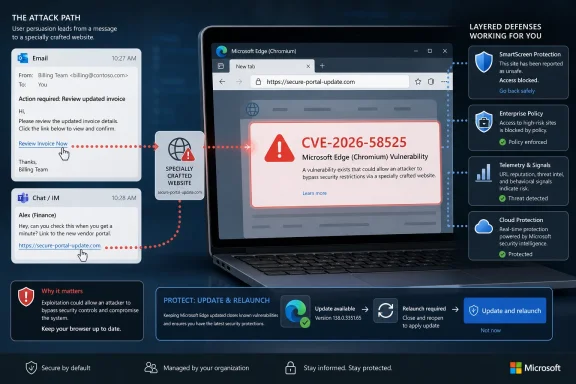 Microsoft’s Advisory Points to a Human-Triggered Browser Failure
Microsoft’s description of CVE-2026-58525 is short, but it says enough to define the shape of the risk. Per Microsoft’s MSRC advisory, an attacker could host a specially crafted website designed to exploit the vulnerability through Microsoft Edge, then convince a user to view that site. Microsoft also says the attacker has no way to force a user to view the attacker-controlled content.That limitation matters. This is not described as a network service bug where a packet hits a listening port and the machine falls over. It is a browser-mediated attack path in which the user’s session, trust, curiosity, workload, or fatigue becomes the delivery mechanism.
The vulnerability type is a security feature bypass, which is one of those MSRC labels that can sound less alarming than remote code execution but still deserves attention. A security feature bypass does not necessarily mean an attacker gets code execution by itself; it means a protective mechanism can be evaded under the right conditions. In browser terms, that can be consequential because modern browsers are layered defenses, not single walls.
The Chromium-based Edge model is built around multiple assumptions: web content is hostile, sites are isolated, downloads are scrutinized, permissions should be constrained, and suspicious destinations should be interrupted or warned about. A bypass vulnerability is dangerous because it may undermine one of those assumptions without being the final exploit in a chain. The attacker may still need another weakness, a credential prompt, a malicious download, or a convincing page — but the browser’s intended friction is no longer fully reliable.
Microsoft’s wording also makes clear that the likely first mile is not exotic. The advisory names enticement in email or instant message as the typical lure, and it separately names an attachment sent through email as another route to get the user to act. That is the modern enterprise intrusion story in miniature: the exploit is technical, but the initial access attempt is still written in the grammar of the inbox.
The Browser Is the Endpoint Now
Edge is no longer just a Windows accessory that happens to render pages. In many organizations it is the place where identity, SaaS work, file sharing, password autofill, device compliance, single sign-on, and security prompts all converge. That makes a browser security feature bypass a problem for the entire endpoint posture, not merely for people who “use Edge.”Microsoft’s own product direction has made this convergence unavoidable. Edge is tied into Microsoft Defender SmartScreen, enterprise policies, managed profiles, site controls, download warnings, enhanced security modes, and cloud-delivered reputation systems. Those layers are valuable, but they also create a larger question whenever a bypass appears: which assumption should admins stop trusting until the browser is verified safe?
The MSRC note for CVE-2026-58525 does not identify the specific Edge feature being bypassed in the source material provided. That absence is important. Without a named component, defenders should resist the temptation to declare that only one policy, only one class of sites, or only one kind of user behavior is relevant.
This is where some vulnerability write-ups tend to overstate the case. A sparse MSRC entry can quickly become a dramatic claim that the browser is broadly broken, or that every user is one click away from compromise. The better reading is narrower and more useful: Microsoft has acknowledged a bypass class issue in Chromium-based Edge, and exploitation depends on a user being persuaded to interact with attacker-controlled content.
That still gives defenders plenty to do. Browser compromise paths are valuable precisely because users are already trained to click links, open shared documents, authenticate to web apps, and approve prompts during the normal workday. The line between “normal browser use” and “exploit setup” is often not visible to the person at the keyboard.
The Attack Path Is Simple Because the Web Is the Delivery Network
Microsoft’s network exploitation description is direct: the attacker hosts a specially crafted website and persuades the user to view it in Edge. That phrasing is worth taking literally. The network is not the compromised service; the network is the delivery fabric for web content.The attacker’s hardest job may not be exploiting the vulnerability. It may be getting the right user to the right page with the right browser state, identity context, and trust relationship. In a consumer setting, that could mean a fake shipping notice, a scareware page, a bogus account alert, or a malicious attachment that opens a browser flow. In an enterprise setting, it could mean a Teams-style lure, a vendor invoice, a shared file notification, or a help-desk themed message.
Microsoft’s advisory explicitly says the attacker cannot force the user to view attacker-controlled content. That should not comfort anyone too much. Modern phishing operations are built around the fact that force is unnecessary when an attacker can imitate urgency, authority, routine, or collaboration.
The distinction matters for security teams because it affects prioritization. A no-click vulnerability in a network-facing component demands immediate perimeter triage. A user-interaction browser bug demands fast patch verification, targeted awareness, mail and messaging controls, and telemetry review around suspicious browsing and attachment behavior.
This is the part many one-paragraph vulnerability summaries miss. User interaction is not a mitigating factor in the ordinary corporate environment; it is the default operating condition. People are paid to read messages, open files, follow links, approve workflows, and investigate exceptions.
| Delivery route Microsoft describes | What the attacker controls | What the user must do | Defensive focus |
|---|---|---|---|
| Specially crafted website reached through email or instant message enticement | The attacker-controlled web content | View the website in Microsoft Edge | Link filtering, browser updating, phishing-resistant training, web telemetry |
| Email attachment that causes the user to act | The attachment and its social context | Open the attachment sent through email | Attachment detonation, file-type controls, user reporting, endpoint detection |
The table also shows why this is an endpoint and identity problem, not just a browser problem. The browser is where the content renders, but the lure may arrive through mail, collaboration software, or a document workflow. If security teams only ask, “Is Edge updated?” they are asking the right question too late and too narrowly.
“Security Feature Bypass” Is a Warning About Assumptions
Security feature bypass vulnerabilities are often misunderstood because they can sound secondary. They are not always the exploit that makes headlines, but they can be the weakness that makes a broader attack chain practical. In a hardened browser, the bypass may be the difference between an obvious warning and a believable page, between a blocked flow and a permitted one, or between contained behavior and a more exposed user decision.Microsoft does not spell out in the provided advisory text which Edge feature CVE-2026-58525 bypasses. That restraint is normal in vulnerability advisories, especially when exploit details could help attackers. But it also means defenders should avoid mapping the CVE to a single imagined control unless Microsoft publishes more detail through official channels.
Think about what “security feature” means in the browser context. Edge contains protections against phishing and malicious downloads, site-isolation boundaries, permission prompts, enhanced security settings, reputation checks, and policy-enforced behavior in managed environments. A bypass does not automatically mean all of those are affected. It means one protective expectation is not holding as intended.
That is why the safest operational response is to treat CVE-2026-58525 as a reminder of defense in depth rather than a referendum on one feature. If users rely on SmartScreen-like warnings, admins should still keep mail filtering, attachment scanning, and DNS or web filtering in place. If admins rely on browser policies, they should still monitor endpoints and identity events for suspicious post-click behavior.
A browser is not a courtroom where one control either proves innocence or guilt. It is a negotiation among rendering engines, sandboxing, reputation, identity, operating-system protections, user choices, and enterprise policy. A bypass vulnerability is dangerous because it changes the terms of that negotiation without necessarily announcing itself to the user.
The phrase “attacker would have to convince a user” should therefore be read as an exploitation requirement, not as a serious barrier. Convincing users is a solved problem for many criminal crews. The defensive challenge is to make persuasion less likely to produce execution, credential theft, policy bypass, or data exposure.
Sparse Public Coverage Makes the Official Advisory More Important
The public record around CVE-2026-58525 is thin compared with the attention given to flashy zero-days or mass-exploitation vulnerabilities. The official MSRC entry is the authoritative source, and broader coverage appears limited compared with the volume of routine vulnerability mirrors and automated summaries that often orbit Edge and Chromium security updates. That does not make the issue unimportant; it makes disciplined reading more important.There is a recurring problem in browser vulnerability coverage. Automated vulnerability databases and low-effort security posts often collapse different Edge CVEs into the same generic language: “network exploitable,” “user interaction required,” “apply updates,” “possible bypass.” Those phrases may be directionally useful, but they can blur the operational distinctions that matter.
For CVE-2026-58525, the verified facts are specific enough to guide action and limited enough to prevent overclaiming. The affected product is Microsoft Edge (Chromium-based). The vulnerability type is security feature bypass. The network exploitation scenario is a specially crafted website viewed through Edge. The attacker must persuade the user, typically through email or instant message, or by getting the user to open an email attachment.
That is the entire responsible center of gravity. There is no need to invent a named exploit, a campaign, a malware family, a build number, or a targeted sector if Microsoft has not supplied it in the advisory text being relied upon. The absence of those details should shape the article and the response.
For IT teams, this is not a call to panic. It is a call to remove ambiguity from routine browser maintenance. If an organization cannot quickly answer which Edge versions are present, which devices are lagging behind, which users can suppress update prompts, and which mail controls inspect links and attachments, then a modestly described browser bypass becomes a visibility test.
That visibility test is increasingly important because Edge rides across Windows client estates, virtual desktops, developer workstations, privileged admin machines, kiosks, and personal devices enrolled in corporate access programs. A single browser advisory can touch all of those populations unevenly. The security team’s job is to find the unevenness before attackers do.
The User-Interaction Requirement Changes the Defense, Not the Urgency
Security people sometimes argue about whether user interaction lowers severity. Technically, it can. Operationally, it depends on the population being targeted and the quality of the lure.A vulnerability that requires the user to visit a malicious website may be much less dangerous than a wormable remote flaw in a server exposed to the internet. But in an enterprise where users live in browsers and receive hundreds of prompts, links, invitations, file shares, and chat messages a week, user interaction is not rare. It is the medium of work.
Microsoft’s advisory says the attacker has no way to force a user to view the attacker-controlled content. That is a meaningful limitation because it gives defenders places to intervene. Mail security can rewrite or block suspicious links. Collaboration tools can restrict external senders. Attachment policies can detonate files. Browser policies can reduce risky behavior. EDR can watch for suspicious child processes, credential prompts, and unusual downloads.
The trap is treating those interventions as substitutes for patching. They are not. They are compensating controls that reduce exposure while the browser estate catches up and reduce the odds that the next lure succeeds. The browser still needs to be updated through the organization’s normal Edge update mechanism.
For home users, the advice is simpler but not softer. Let Edge update, restart it when prompted, and be suspicious of messages that demand immediate browser action. If a page arrives from an unsolicited email, instant message, or attachment and asks for credentials, payments, software installation, browser permissions, or security exceptions, the safest assumption is that the page deserves independent verification.
For administrators, the user-interaction requirement should also influence communications. A vague “do not click suspicious links” warning is almost useless. A better message names the current behavior: attackers may use email, instant messaging, or email attachments to persuade users to open attacker-controlled web content in Edge.
That kind of specificity helps users recognize the shape of the threat without needing to understand CVE mechanics. The security team does not need every employee to know what a browser feature bypass is. It needs them to pause when a message tries to move them from inbox or chat into an urgent web action.
Edge Update Hygiene Is Now a Security Control
The Chromium era changed the browser patching contract. Browsers update often, security fixes land outside the old monthly Windows rhythm, and enterprise controls can either make that process reliable or accidentally slow it down. CVE-2026-58525 lands squarely in that reality.Many Windows admins still think in Patch Tuesday muscle memory. That habit is useful for operating-system cumulative updates, but it can be misleading for browsers. Edge has its own update plumbing, release channels, enterprise policies, and relaunch behavior. A fully patched Windows machine can still be operationally exposed if the browser has not applied or activated its latest update.
That last verb matters. Browser updates often require a restart of the browser, not necessarily a reboot of Windows. On persistent desktops, users can keep browser sessions alive for days. On shared machines, kiosk systems, and virtual desktops, stale browser processes can survive longer than policy designers expect.
The risk is not merely theoretical. A security fix that is downloaded but not active is a security fix that exists on paper. For a browser vulnerability whose exploitation depends on viewing malicious content, the active process is what matters.
Admins should therefore treat Edge relaunch enforcement as part of vulnerability management. If policy allows users to postpone relaunch indefinitely, the organization has silently converted a fast browser patch pipeline into a slow human-consent workflow. That may be acceptable for a small subset of compatibility-sensitive users, but it should not be the fleet default.
There is a second wrinkle: managed environments often run a mix of Stable, Extended Stable, Beta, developer, virtualized, and packaged browser deployments. The CVE name says Microsoft Edge (Chromium-based), not “only the browser on standard corporate laptops.” Inventory has to include the places where Edge is embedded into workflows or preloaded images, not just the obvious user endpoints.
Action checklist for admins
- Verify that Microsoft Edge (Chromium-based) is updating successfully across managed Windows endpoints.
- Confirm that updated Edge instances have actually relaunched, rather than merely downloaded an update.
- Review mail and instant-message protections for links that lead to newly registered, suspicious, or attacker-controlled sites.
- Tighten handling of email attachments that can redirect users into browser-based flows.
- Use browser and endpoint telemetry to look for suspicious Edge activity following email, chat, or attachment events.
- Send a targeted user advisory that names the real lure pattern: email, instant message, or attachment leading to attacker-controlled web content.
The Phishing Layer Is Not a Side Note
The advisory’s most practical detail is the lure. Microsoft says the attacker would typically entice the user through email or instant message, or get the user to open an attachment sent through email. That is not boilerplate; it is the operational story.Email and instant messaging are not just delivery channels. They are trust channels. Users assign meaning to the sender name, thread context, logo, file name, timestamp, and tone before they ever think about the browser. Attackers know this and design around it.
This is why browser vulnerabilities and phishing defenses should not live in separate dashboards. If the exploit path begins in email and lands in Edge, then the detection story must connect those events. A user who receives a suspicious message, clicks a link, opens Edge, hits an unusual domain, downloads a file, and then triggers an identity anomaly should not be five unrelated alerts.
The attachment route deserves special attention because it can blur user expectations. Many users have been trained to distrust links but still trust documents, PDFs, archives, meeting notes, invoices, and shared files. An attachment can serve as a social wrapper around the same malicious destination.
Organizations should look hard at file types that create web transitions. HTML attachments, shortcut-like files, macro-enabled office formats, scripts, archives, and document formats with embedded links all deserve policy scrutiny. The point is not that CVE-2026-58525 requires one of those formats; Microsoft’s advisory does not say that. The point is that Microsoft explicitly includes email attachments as a way to get the user to act.
The right defensive language is therefore behavioral. “Do not open suspicious attachments” is too broad. “Be cautious with attachments that ask you to open a web page, sign in again, enable a security exception, install a browser component, or move to an external chat or file-sharing page” is closer to the actual risk.
Security Feature Bypasses Punish Overconfidence
Edge has real security machinery, and Microsoft has invested heavily in making it manageable for enterprises. SmartScreen-style reputation, enhanced security modes, download protections, site permissions, and policy enforcement all raise the cost for attackers. But CVE-2026-58525 is a reminder that security features are software, and software can fail.That does not mean defenders should disable trust in browser protections. It means they should avoid building programs that depend on a single browser prompt being correct every time. If one bypass can meaningfully change the outcome of a phishing click, the environment is too brittle.
The strongest browser security posture combines fast updates, restrictive defaults, identity protections, mail filtering, attachment controls, DNS or web-layer defenses, and user reporting. None of those layers is perfect. Their value is cumulative friction.
This is especially true for privileged users. Admins, developers, finance staff, HR teams, and help-desk workers often encounter unusual files and links as part of legitimate work. They are also more valuable targets. For those groups, a browser security feature bypass paired with a tailored lure can be more dangerous than a higher-severity bug aimed at a random consumer.
Privileged workstations should be treated differently. They should have tighter browser policies, stricter attachment handling, more aggressive relaunch enforcement, and clearer rules for separating administrative browsing from ordinary web use. If an admin uses the same browser profile for privileged portals, vendor research, email, and random links, the organization is giving attackers unnecessary adjacency.
The same logic applies to unmanaged or lightly managed devices that access corporate resources. Conditional access can reduce some risk, but a browser-mediated attack still begins where the user reads and clicks. If personal or contractor devices are allowed into the environment, Edge update posture and browser security settings become part of the access conversation.
What Microsoft Says — and What It Does Not Say
The cleanest reading of CVE-2026-58525 starts by respecting Microsoft’s exact boundaries. Microsoft says the product is Microsoft Edge (Chromium-based). Microsoft says the type is a security feature bypass vulnerability. Microsoft says exploitation over the network involves a specially crafted website viewed through Edge after user persuasion.Microsoft does not say in the provided material that the attacker can force navigation. It says the opposite. Microsoft does not identify the bypassed feature in the provided text. It does not provide a campaign name, exploit chain, malware payload, or sector-specific targeting detail in the material available here.
Those omissions are not flaws in the advisory. They are signals to be careful. Security teams should not wait for a blog post with screenshots before acting, but they also should not brief executives with invented details.
A mature vulnerability response can live in that middle ground. The organization can say: we have an Edge security feature bypass advisory; exploitation requires user action; likely lures include email, instant messaging, and email attachments; we are verifying Edge update status and relaunch; we are reviewing link and attachment controls; we are watching for suspicious browser activity connected to messaging events.
That is enough. It is more accurate than hype and more useful than silence.
This is also where comparison with ordinary vulnerability scoring can mislead. Severity labels help prioritize, but they do not capture business context. A user-assisted browser bypass on machines used for privileged cloud administration may matter more than a theoretically higher-scored issue on systems with no realistic exposure.
The decisive question is not “Is this the worst CVE of the month?” It is “Can an attacker plausibly use this advisory’s path against our users before our browser fleet and messaging controls absorb the risk?” For many organizations, the honest answer is yes.
The Enterprise Impact Is Uneven by Design
No two Edge deployments are quite alike. Some organizations let Edge update automatically with minimal interference. Others pin channels, stage rings, delay relaunches, manage extensions, maintain compatibility lists, or package browsers into virtual desktop images. Those choices all affect exposure.A small business with automatic updates and users who restart browsers daily may move past CVE-2026-58525 quickly. A large enterprise with strict change windows, legacy web apps, shared workstations, and virtual desktop pools may carry stale browser states longer than expected. The vulnerability is the same; the operational half-life is different.
Compatibility is the classic reason browser updates get slowed. Edge is now an application platform for line-of-business software, internal portals, SaaS tools, and identity workflows. Admins who manage brittle apps often fear browser change because a rendering or policy shift can break work.
That fear is not irrational. But it has to be balanced against the modern browser threat model. The browser is one of the most frequently attacked applications on the endpoint, precisely because it processes untrusted remote content all day. Slow-walking browser updates is not a neutral operational choice.
The answer is not reckless deployment. It is disciplined rings, telemetry, rollback planning where appropriate, and relaunch enforcement that does not depend entirely on user goodwill. Security fixes need a path through the fleet that is faster than the adversary’s ability to weaponize lures.
For regulated environments, the documentation burden also matters. Teams should be able to show when the advisory was reviewed, what populations were assessed, what Edge update posture looked like, what exceptions existed, and how user-facing controls were adjusted. That record is useful for auditors, but more importantly, it forces the organization to confront its real browser estate.
Home Users Get the Same Attack in a Less Managed Package
Consumer Windows users face the same basic exploitation pattern without the benefit of central policy. A malicious page still needs a lure. The lure still probably arrives by email, instant message, or attachment. Edge still needs to be current.The difference is that home users often make the security decision alone. There is no SOC correlating mail events with browser telemetry. There may be no web filter, no attachment sandbox, and no admin forcing a browser restart. The user is the help desk, security analyst, and change manager at once.
That makes a few habits disproportionately valuable. Keep Edge updating automatically. Restart the browser when it says an update is ready. Do not trust urgent messages that move you from email or chat to a sign-in page. Do not open attachments from unexpected senders just because they look like invoices, receipts, shipping documents, resumes, or account notices.
Users should also remember that malicious web pages often borrow legitimacy from real brands and real workflows. A page can look professional and still be attacker-controlled. The safer route is to open the known site directly, use a saved bookmark, or contact the sender through a separate channel.
CVE-2026-58525 does not require consumers to understand browser internals. It requires them to understand that the click is the bridge. Microsoft says the attacker cannot force the user to view the content; the attacker must persuade. Breaking that persuasion loop is a real defense.
The Practical Signals Defenders Should Watch
Because Microsoft’s described path begins with messaging and ends in browser content, defenders should look for chains, not isolated events. A suspicious email followed by an Edge navigation to a low-reputation or unusual domain is more meaningful than either event alone. An attachment open followed by browser activity and then an identity prompt is more meaningful still.Endpoint telemetry can help identify Edge processes spawned from unusual parent processes, downloads from newly encountered domains, unexpected authentication flows, and browser activity clustered immediately after suspicious messages. Mail telemetry can identify campaigns that contain links, attachments, or language designed to push users into urgent web action. Identity telemetry can catch the downstream symptoms: impossible travel, new device registration, consent grants, MFA fatigue, or unexpected session activity.
None of that means CVE-2026-58525 is known to produce those outcomes by itself. The advisory does not say that. But browser bypasses are often useful because they help an attacker progress toward those outcomes, and defenders should monitor the plausible path rather than wait for a perfect signature.
This is also a good time to review user reporting loops. If a user reports a suspicious email after clicking, the response should not begin and end with deleting the message. Security teams should ask what opened, what browser was used, what site loaded, whether credentials were entered, whether files were downloaded, and whether the browser was current.
The best organizations make that process routine rather than punitive. Users are more likely to report quickly if they believe the security team wants facts, not confessions. For a vulnerability path that depends on persuasion, fast reporting can be the difference between one exposed user and a broader campaign.
The Real Risk Is the Chain, Not the CVE in Isolation
CVE-2026-58525 is best understood as a possible chain component. Microsoft’s advisory describes how an attacker can get a user to attacker-controlled content through Edge. It does not claim a complete intrusion lifecycle, and defenders should not pretend it does.But attackers rarely need every step to be novel. A browser bypass can be paired with credential harvesting, malicious downloads, OAuth consent abuse, fake support pages, session theft attempts, or follow-on malware. The initial page only has to make the next step more believable or less constrained.
That is why security feature bypasses deserve attention even when they lack the drama of memory corruption or remote code execution headlines. They can remove warning signs. They can weaken policy assumptions. They can make social engineering more efficient.
The relevant question for WindowsForum readers is not whether Edge is uniquely unsafe. It is not. Chrome, Edge, and other modern browsers all live under relentless pressure because they are universal remote-content processors. Edge’s special importance in Windows environments comes from its integration into Microsoft-managed identity and endpoint ecosystems.
When a browser is also the front door to work, a bypass advisory is a front-door security advisory. It belongs in the same operational conversation as phishing, identity protection, endpoint detection, and patch management. Treating it as a browser-only issue is how organizations underreact.
What This Advisory Should Change This Week
The concrete lesson from CVE-2026-58525 is not complicated, but it is easy to dilute. Microsoft has described a security feature bypass in Chromium-based Edge that can be exploited through a crafted website if the attacker persuades the user to view it. The attacker’s likely persuasion channels are email, instant messaging, and email attachments.That should trigger a focused response rather than a generic vulnerability scramble. Teams should verify Edge currency, force stale sessions through relaunch where policy permits, tighten scrutiny of message-driven browser flows, and tell users exactly what pattern to watch for. The goal is not to make every user a CVE analyst. The goal is to reduce the chance that a message becomes a browser exploit opportunity.
- CVE-2026-58525 affects Microsoft Edge (Chromium-based), according to Microsoft’s MSRC advisory.
- Microsoft classifies it as a security feature bypass vulnerability.
- Exploitation requires attacker-controlled web content viewed through Edge.
- Microsoft says the attacker cannot force the user to view that content.
- The likely lures are email, instant message, or an email attachment that gets the user to act.
- Admins should pair browser update verification with mail, attachment, and browser-telemetry review.
References
- Primary source: MSRC
Published: 2026-07-08T07:00:00-07:00
Security Update Guide - Microsoft Security Response Center
 msrc.microsoft.com
- Related coverage: radar.offseq.com
- Related coverage: securityvulnerability.io
CVE-2026-58524 : Cross-Site Scripting in Microsoft Edge (Chromium-based)
Learn about a cross-site scripting vulnerability in Microsoft Edge (Chromium-based) that allows unauthorized spoofing. CVE-2026-58524 details.securityvulnerability.io - Related coverage: thehackerwire.com
Microsoft Edge Security Feature Bypass – TheHackerWire
SummaryCVE-2026-57983 details a high-severity improper authorization vulnerability in Microsoft Edge (Chromium-based). Published on July 3, 2026, this bug ca...www.thehackerwire.com
- Official source: learn.microsoft.com
Release notes for Microsoft Edge Security Updates | Microsoft Learn
Release notes for Microsoft Edge Security Updateslearn.microsoft.com - Official source: catalog.update.microsoft.com

- Related coverage: cyber.gc.ca
Microsoft Edge security advisory (AV26-659) - Canadian Centre for Cyber Security
Microsoft Edge security advisory (AV26-659)www.cyber.gc.ca - Related coverage: pemsync.com
Microsoft Edge | PemSync
Latest versions and release history for Microsoft Edge by Microsoft.pemsync.com - Official source: blogs.windows.com
Faster updates, enterprise-friendly schedule: the new Microsoft Edge release cycle
Microsoft Edge is moving to a two-week release cycle, bringing new features and improvements to users and organizations faster than ever. This is great news for teams that thrive on innovation: instead of waiting a full month for the next update, youblogs.windows.com - Related coverage: windowscentral.com
Major Microsoft Edge versions will now ship every two weeks: Microsoft confirms plans to ship new Edge features and changes twice a month | Windows Central
Microsoft has announced that Edge will be moving to a two-week release cycle for major versions of the browser, matching Chrome.www.windowscentral.com - Related coverage: releasebot.io

Microsoft Release Notes - July 2026 Latest Updates - Releasebot
Complete list of Microsoft latest updates for July 2026: get every product news, release note, and changelog from Microsoft summarized in one timeline.
releasebot.io
- Related coverage: techradar.com
Microsoft confirms two major Defender security issues — so update now or face possible attack | TechRadar
CISA confirms two bugs being actively exploited in the wildwww.techradar.com - Related coverage: angeles.ccn-cert.cni.es
- Related coverage: sra.io
- Related coverage: cirt.gy
- Official source: microsoft.com

Enhanced Security Mode | Microsoft Edge
Browse with confidence using Microsoft Edge’s Enhanced Security Mode. Learn how extra protection helps reduce risks from untrusted sites and keeps your browsing experience safer—without slowing you down.
www.microsoft.com
- Official source: support.microsoft.com
How can SmartScreen help protect me in Microsoft Edge? | Microsoft Support
Learn how Microsoft Defender SmartScreen safeguards your security in Microsoft Edge against phishing and malware sites.support.microsoft.com - Official source: explore.microsoft.com
Mode de sécurité amélioré | Microsoft Edge
Naviguez en toute confiance à l’aide du mode de sécurité amélioré de Microsoft Edge. Découvrez comment une protection supplémentaire permet de réduire les risques liés aux sites non fiables et de sécuriser votre expérience de navigation, sans vous ralentir.
explore.microsoft.com
- Official source: download.microsoft.com
- Official source: cdn-dynmedia-1.microsoft.com
- Related coverage: itsecure.hu