

Microsoft is developing deep citations for Microsoft 365 Copilot under Roadmap ID 523223, with the roadmap metadata current as of July 8, 2026 listing the feature as In development, Preview planned for August 2026, and General Availability planned for September 2026 across Desktop, Mac, and Web for Worldwide standard multi-tenant customers. The concrete change is that Copilot citations are planned to link users directly to the relevant part of a referenced source rather than only pointing at a file or source container. According to the roadmap description, the initial Preview scope starts with Word and PowerPoint references, with Meetings, Web, and PDF references planned as later additions.
That is the news. The dates are planned roadmap targets, not guaranteed ship dates, and Microsoft’s roadmap language should be treated as forward-looking. Still, the feature matters because it changes what a Copilot citation is supposed to do. A normal source reference tells a user where Copilot claims the answer came from. A deep citation should make the answer easier to inspect by taking the user closer to the exact supporting passage, slide, meeting segment, web excerpt, or PDF location.
For Windows users, Microsoft 365 admins, and compliance teams, the point is not that Copilot will suddenly become infallible. It is that Copilot’s answers may become easier to challenge. That is a meaningful shift. In enterprise work, the question is rarely “Can AI produce a plausible paragraph?” The harder question is “Can a human quickly verify whether that paragraph is supported by the right source?”
The basic promise of Roadmap ID 523223 is straightforward: deep citations are intended to help users verify Copilot results by linking directly to the relevant part of a reference. That phrase — “relevant part” — is the center of the feature. A generic citation tells you which file, meeting, or web source Copilot used. A deep citation should reduce the hunt from “go inspect this document” to “go inspect this passage.”
That distinction is practical, not academic. Copilot answers often appear in workflows where being vaguely right is still risky: customer responses, budget summaries, board pre-reads, HR communications, legal intake, incident reviews, procurement notes, and security triage. A citation to a long Word document helps only if the worker has time to locate the exact claim. A citation to the relevant paragraph, slide, transcript moment, web section, or PDF page is closer to what knowledge workers mean when they ask, “Show me where you got that.”
Deep citations are therefore not just a cosmetic improvement to the Copilot interface. They are part of the trust layer. If Copilot can summarize a document, deck, meeting, web source, or PDF, then the next burden is to make that summary inspectable. A worker should not have to redo the entire research task just to determine whether one generated sentence is safe to use.
The feature also changes the user’s mental model. A citation is no longer merely an appendix after the answer. It becomes part of the answer’s evidence. That is valuable, but it also raises expectations. If Microsoft gives users a precise-looking link, the link needs to be precise enough to deserve the confidence it creates.
The later additions are more complicated. Meetings introduce transcript timing, speaker attribution, recording permissions, recap behavior, and the difference between what someone said and what the organization decided. Web references introduce freshness, source quality, changing pages, and admin policy questions. PDFs are common but technically messy: they can be born-digital, scanned, redacted, table-heavy, image-based, watermarked, or assembled from inconsistent source material.
This is where the feature intersects with everyday Windows work. Microsoft 365 Copilot is not experienced as a single isolated chatbot. It appears across Office apps, Teams, Outlook, OneDrive, SharePoint, the browser, and Microsoft 365 surfaces. Users do not think in platform boundaries; they think in documents, meetings, messages, deadlines, and decisions.
The roadmap’s listed platforms — Desktop, Mac, and Web — suggest Microsoft is treating deep citations as a cross-client behavior rather than a one-off app feature. That matters. A citation model that works in the browser but not in desktop Office would frustrate the same users Microsoft needs to win over. The feature needs to feel consistent enough that a user can move from Word to PowerPoint to Teams without relearning what a citation means.
A useful way to think about deep citations is as a reduction in verification friction, not a replacement for verification. If Copilot says a contract permits renewal, a deep citation should take the user to the relevant clause. The user still has to decide whether that clause applies, whether there are exceptions elsewhere, whether the cited document is the governing version, and whether legal review is required. The link helps inspect the claim; it does not make the claim true.
That distinction is especially important because Copilot changes the order of work. In conventional search, the user reads sources and then synthesizes. In Copilot, the system often synthesizes first and shows evidence second. Deep citations improve the second step. They do not guarantee that the first step was faithful.
The right posture for enterprise users is not blind trust. It is verification before reliance. Deep citations can make that posture less painful, which is a real productivity gain. But organizations still need to teach workers that a clickable source is not an automatic green light.
Those dates should be read carefully. Microsoft 365 roadmap entries are planning signals, not binding commitments. Features can move, expand, narrow, or ship in stages. For admins, the practical takeaway is not “this will definitely arrive on a specific day.” It is “this is close enough on the roadmap that tenant preparation should start now.”
The complexity is easy to underestimate. Deep citations sit at the intersection of retrieval, permissions, document parsing, semantic chunking, client UI, source rendering, and user expectations. This is not merely a button that says “show source.”
For Word and PowerPoint, Copilot has to map a generated answer back to a meaningful location inside a document or deck. For meetings, it has to anchor an answer to the right transcript segment or meeting artifact. For web sources, it has to handle public-source volatility and policy constraints. For PDFs, it has to survive the reality of enterprise documents: scanned signatures, page headers, embedded images, multi-column text, tables, and inconsistent layouts.
The risk for Microsoft is not only that citations fail. It is that citations appear to work while pointing to something adjacent rather than decisive. Users may trust a deep link more than a generic source because it looks more authoritative. That raises the bar. A weak deep citation can be worse than no deep citation if it creates confidence exactly where skepticism is needed.
July 8, 2026 — The roadmap metadata in the draft identifies this as the last updated date, with the feature still listed as In development.
August 2026 — Preview is planned for Microsoft Copilot in Microsoft 365, beginning with Word and PowerPoint references.
September 2026 — General Availability is planned across Desktop, Mac, and Web for Worldwide standard multi-tenant customers.
Later additions — Meetings, Web, and PDF references are described as planned additions beyond the initial Word and PowerPoint scope.
This is the unglamorous enterprise truth behind Copilot adoption. AI deployment is not only a licensing project. It is an information architecture project. Deep citations may expose whether the organization’s content is clean enough for AI-assisted work.
In that sense, the feature can become a mirror. A worker who clicks a citation and lands in an obsolete policy may blame Copilot first, but the root cause may be governance. A manager who asks for the latest sales deck and receives a citation to the wrong file may have discovered not only an AI problem but a naming, retention, or permissions problem. Deep citations make those failures more visible.
That visibility is useful. It gives admins and content owners something concrete to inspect. Instead of a user saying “Copilot gave me a bad answer,” the user can say “Copilot based the answer on this section of this file.” That is a better starting point for troubleshooting.
That is not necessarily a bug. It is the access model shaping the answer. But it complicates support and training.
When a user says Copilot gave a wrong or incomplete answer, admins need to determine whether the issue was model behavior, retrieval quality, missing access, stale content, disabled source types, unsupported references, or files that were not available in the expected context. Deep citations help diagnose the issue because they reveal at least some of what Copilot used. They do not automatically reveal everything Copilot failed to consider.
This is where admins should avoid treating deep citations as a complete audit log. The roadmap description promises links to relevant parts of references. It does not promise a full forensic explanation of retrieval ranking, omitted sources, or competing evidence. A visible citation is evidence of what was surfaced, not proof that every relevant source was evaluated.
The support challenge will be practical. Help desks and Microsoft 365 administrators may need a repeatable way to ask: What source was cited? Could the user open it? Was it the authoritative source? Was a newer source available? Was the source type supported in that client? Was the user working in Preview or General Availability? Was the result different on Desktop, Mac, or Web?
A transcript can show that someone proposed an idea. It may not show that the team accepted it. A recap can list action items. It may not capture whether an action item was tentative, conditional, disputed, or later revised. A deep citation into a meeting reference could be powerful if it takes a user to the exact segment that supports an answer. It could also be risky if workers treat transcript snippets as contractual truth.
This matters in HR, legal, sales, procurement, support, and incident response workflows. A meeting citation might support the statement that a vendor agreed to provide a revised quote. It may not capture whether the agreement depended on pricing, timing, or executive approval. A cited meeting segment might show that a manager discussed performance concerns. It may not mean that segment should be broadly reused or summarized outside the right context.
Meeting hygiene will matter more as Copilot becomes more capable of reasoning over meeting artifacts. Organizations should decide which meetings are recorded, how transcripts are retained, how sensitivity labels apply, who keeps access after a meeting ends, and when meeting-derived AI output requires human review. Deep citations can make meeting evidence easier to inspect, but they can also make casual meeting language easier to overuse.
A Word document in SharePoint has ownership, permissions, version history, and organizational context. A web page may have variable quality, uncertain longevity, and changing content. A deep citation to a relevant web passage may be accurate at the time an answer is generated and less meaningful later if the page changes.
That makes web grounding a policy issue as much as a feature issue. If web references are available in a tenant, organizations need to decide when web-grounded answers are acceptable and when internal confirmation is required. If web references are not available or are restricted, users need to understand why Copilot’s answers may feel narrower.
There is also a training issue. Users often confuse source quantity with source quality. An answer with several web citations can still be weak if the sources are poor, outdated, or misunderstood. Deep citations improve traceability. They do not eliminate the need for source evaluation.
For admins, the key question is not simply whether users can click web citations. It is whether the organization has rules for acting on them. A public web citation may be fine for background research. It may not be enough for customer commitments, legal positions, financial assumptions, or regulated decisions.
But PDFs are also a trap. A polished PDF can hide poor structure. Text extraction may confuse headers, footers, columns, tables, footnotes, stamps, and scanned pages. The same page may contain a summary chart, a caveat in small text, and a footnote that changes the meaning of the whole section. A citation that lands on a PDF page is helpful, but the reliability of the answer depends on how well Copilot understood the document’s structure.
For admins, PDF deep citations should prompt a content-quality audit. Are important PDFs searchable? Are scanned documents OCR’d properly? Are old policy PDFs clearly retired? Are contract repositories permissioned correctly? Are sensitive PDFs labeled and governed? Are duplicate vendor reports cluttering the same library as authoritative documents?
Deep citations may make PDF problems more obvious. A user who clicks a citation and lands on a page where the relevant text is garbled, split across columns, or embedded in an image has found an edge of the system. That is not only a Copilot issue. It is a document-management issue that AI has made harder to ignore.
That changes how Copilot fits into multitasking. On a Windows desktop, users often move between Teams, Outlook, Word, PowerPoint, Edge, OneDrive, SharePoint, and Microsoft 365 surfaces. Deep citations could reduce the switching cost by making the source jump more direct. They could also give workers a faster way to decide whether an answer is usable.
The danger is automation bias. A clean citation chip or deep link can make an answer feel institutionally approved. Microsoft needs to be careful with the interface. The citation should encourage inspection, not merely decorate output with authority.
The best version of this feature would make skepticism easy. It would let a user see the cited passage, understand the source type, open the broader context, and detect whether the answer depends on one source or several. The weakest version would bury complexity behind a reassuring clickable object.
Start with tenant basics. Use test accounts with different access levels: a standard employee, a manager, a contractor or guest-like role where appropriate, and an admin-controlled pilot user. Confirm whether each user can open the cited source and whether Copilot avoids citing content the user should not access. Test the same prompt across Desktop, Mac, and Web if those clients are in scope for the pilot.
Then test source quality. Use a clean authoritative document, a superseded draft, a duplicate file with a similar title, and a document stored in a less obvious SharePoint location. Ask Copilot a question where the right answer depends on choosing the authoritative source. If Copilot cites the wrong file, the organization may have a content governance problem to fix before broad rollout.
Specific scenarios should include Word, PowerPoint, and meeting-style workflows.
For Word, admins can test a policy document with numbered sections, tracked changes, comments, and an older retired version in the same library. Ask Copilot to summarize the current reimbursement rule, identify the approval threshold, and explain any exceptions. The important check is whether the deep citation lands near the actual rule and whether it avoids the retired version.
For PowerPoint, admins can test a sales or executive deck where the headline slide simplifies details that appear in speaker notes or appendix slides. Ask Copilot to summarize quarterly risks, extract customer commitments, or identify the source for a revenue assumption. The important check is whether the citation points only to the visible slide or also gives enough context to validate the claim.
For meeting transcripts, admins can test a recorded project meeting where an action item is proposed, revised, and clarified later in the discussion. Ask Copilot to list decisions, owners, and deadlines. The important check is whether the citation distinguishes between a suggestion and a final decision. If meeting references are not yet available in the initial Preview scope, keep the scenario ready for the later phase when Microsoft adds Meetings.
Admins should also test web and PDF scenarios when those references become available. For web, compare answers that rely on stable authoritative pages against answers based on lower-quality public sources. For PDFs, use a clean born-digital PDF, a scanned OCR’d PDF, and a table-heavy PDF. The question is not only whether Copilot answers correctly. It is whether the citation lands somewhere a human can reasonably verify.
The first preparation step is permissions review. Overshared SharePoint sites, abandoned Teams, broad sharing links, and stale guest access become more consequential when AI can retrieve and summarize content at speed. If users can already access too much, Copilot may make that overexposure easier to exploit unintentionally.
The second step is content lifecycle. Deep citations are useful when the cited source is authoritative. They are risky when the source is a draft, duplicate, superseded policy, outdated vendor document, or forgotten planning file. Organizations should identify where official content lives and make it easier for both users and Copilot to land there.
The third step is training. Workers should know how to ask Copilot to use specific files where appropriate, how to recognize the source type behind a citation, and how to verify cited passages before acting. Training should be simple and repeated: open the citation, read the surrounding context, check the source date and ownership, and escalate when the output affects customers, compliance, money, safety, employment, or legal obligations.
The fourth step is support readiness. Help desks should know how to collect a useful Copilot citation issue report. A good report should include the user role, client, prompt, cited source, expected source, access context, and whether the problem reproduced for another user. Without that structure, admins will be left chasing vague complaints about AI quality.
But traceability is not the same as defensibility. A cited passage may show what Copilot used. It does not prove the source was current, that the user interpreted it correctly, that the output was reviewed, or that the use case was appropriate. Deep citations supply evidence. They do not supply governance.
The feature may also create new expectations. If Copilot can link directly to relevant parts of references, reviewers may ask why important AI-assisted documents lack visible support for key claims. That could be healthy. It could push teams away from unsupported AI-generated prose. It could also create friction if citation behavior differs across source types during rollout.
The key is to define policy before users improvise. Organizations should decide which Copilot-assisted outputs require manual source verification, which workflows are too sensitive for unreviewed AI assistance, and how citations should be handled when sources include meeting content, sensitive documents, public web material, or PDFs of uncertain quality.
Compliance leaders should also resist the illusion that a citation solves accountability. The user and organization remain responsible for the final output. Deep citations can make review faster and more concrete, but they do not transfer judgment to the tool.
That is why the feature’s name matters. “Deep citations” implies more than a source list. It implies granularity, context, and a shorter path from answer to evidence. Microsoft is effectively acknowledging that shallow citations are not enough for serious work.
The business logic is obvious. If Copilot is going to be part of everyday work, users must be able to verify it quickly enough that verification does not erase the productivity gain. A citation that merely points to a file is sometimes helpful. A citation that points to the relevant part of the file is much more useful.
But trust is fragile. If early Preview users find that deep citations land in the wrong paragraph, miss newer sources, fail across clients, or behave inconsistently by source type, the feature could damage confidence rather than build it. Precision is the product. The UI cannot simply look trustworthy; it has to help users test whether the answer deserves trust.
The feature should make Copilot answers easier to inspect by linking users to the relevant part of a source. That is a meaningful improvement, especially for organizations that want AI assistance without losing human review. But deep citations do not make Copilot automatically correct, complete, or compliant. They reduce the distance between answer and evidence.
For admins, the work starts before Preview. Clean up permissions. Identify authoritative repositories. Retire stale content. Prepare test prompts. Validate behavior across clients. Teach users to click citations and read the surrounding context. Treat meeting, web, and PDF references as separate risk areas rather than interchangeable source types.
For users, the habit should be simple: do not stop at the Copilot answer. Follow the citation. Check the source. Read enough context to know whether the answer is supported. Then decide whether it is safe to use.
If Microsoft gets deep citations right, Copilot becomes easier to challenge, easier to troubleshoot, and easier to fit into serious work. If Microsoft gets them wrong, the feature risks turning a source link into a false sense of certainty. The difference will matter, because the next phase of enterprise AI will not be judged only by how confidently it answers. It will be judged by how quickly humans can prove whether those answers are worth trusting.
That is the news. The dates are planned roadmap targets, not guaranteed ship dates, and Microsoft’s roadmap language should be treated as forward-looking. Still, the feature matters because it changes what a Copilot citation is supposed to do. A normal source reference tells a user where Copilot claims the answer came from. A deep citation should make the answer easier to inspect by taking the user closer to the exact supporting passage, slide, meeting segment, web excerpt, or PDF location.
For Windows users, Microsoft 365 admins, and compliance teams, the point is not that Copilot will suddenly become infallible. It is that Copilot’s answers may become easier to challenge. That is a meaningful shift. In enterprise work, the question is rarely “Can AI produce a plausible paragraph?” The harder question is “Can a human quickly verify whether that paragraph is supported by the right source?”
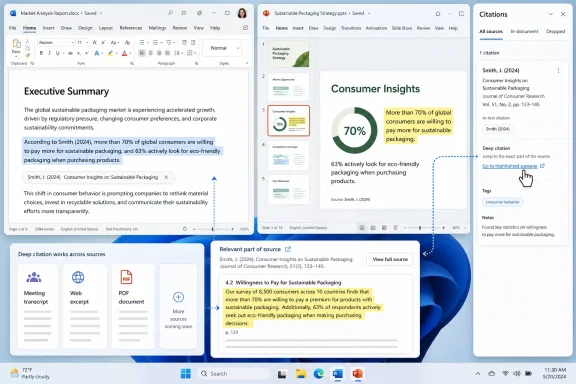 Microsoft Is Moving the Citation From Appendix to Evidence
The basic promise of Roadmap ID 523223 is straightforward: deep citations are intended to help users verify Copilot results by linking directly to the relevant part of a reference. That phrase — “relevant part” — is the center of the feature. A generic citation tells you which file, meeting, or web source Copilot used. A deep citation should reduce the hunt from “go inspect this document” to “go inspect this passage.”That distinction is practical, not academic. Copilot answers often appear in workflows where being vaguely right is still risky: customer responses, budget summaries, board pre-reads, HR communications, legal intake, incident reviews, procurement notes, and security triage. A citation to a long Word document helps only if the worker has time to locate the exact claim. A citation to the relevant paragraph, slide, transcript moment, web section, or PDF page is closer to what knowledge workers mean when they ask, “Show me where you got that.”
Deep citations are therefore not just a cosmetic improvement to the Copilot interface. They are part of the trust layer. If Copilot can summarize a document, deck, meeting, web source, or PDF, then the next burden is to make that summary inspectable. A worker should not have to redo the entire research task just to determine whether one generated sentence is safe to use.
The feature also changes the user’s mental model. A citation is no longer merely an appendix after the answer. It becomes part of the answer’s evidence. That is valuable, but it also raises expectations. If Microsoft gives users a precise-looking link, the link needs to be precise enough to deserve the confidence it creates.
The First Rollout Starts Where Office Work Already Lives
The roadmap description says deep citations start with Word and PowerPoint references, then add Meetings, Web, and PDF references. That sequencing makes sense. Word and PowerPoint are structured, familiar, and central to Microsoft 365 business workflows. They are also the places where many organizations already expect Copilot to summarize, draft, rewrite, compare, and prepare content.The later additions are more complicated. Meetings introduce transcript timing, speaker attribution, recording permissions, recap behavior, and the difference between what someone said and what the organization decided. Web references introduce freshness, source quality, changing pages, and admin policy questions. PDFs are common but technically messy: they can be born-digital, scanned, redacted, table-heavy, image-based, watermarked, or assembled from inconsistent source material.
| Reference type | Rollout position | Why it matters | Practical verification problem |
|---|---|---|---|
| Word files | Initial Preview scope | Core Microsoft 365 document format | Claims may sit inside long drafts, tracked changes, comments, or revised sections |
| PowerPoint files | Initial Preview scope | Executive summaries and decision decks often live here | Slide meaning can depend on speaker notes, surrounding slides, or source data |
| Meetings | Planned later addition | Decisions and commitments often originate in calls | Transcript snippets may not equal final decisions or follow-up commitments |
| Web | Planned later addition | Allows external public grounding where enabled and available | Pages can change, disappear, or vary widely in reliability |
| PDF references | Planned later addition | Common for contracts, reports, policies, filings, and vendor documents | OCR, page structure, tables, scans, and embedded images can distort extraction |
The roadmap’s listed platforms — Desktop, Mac, and Web — suggest Microsoft is treating deep citations as a cross-client behavior rather than a one-off app feature. That matters. A citation model that works in the browser but not in desktop Office would frustrate the same users Microsoft needs to win over. The feature needs to feel consistent enough that a user can move from Word to PowerPoint to Teams without relearning what a citation means.
Deep Links Do Not Magically Make AI Right
The biggest mistake would be to treat deep citations as a cure for hallucinations. They are not. A citation can be precise and still support the wrong inference. It can point to an outdated clause. It can cite a sentence that is true but incomplete. It can reference one accessible file while ignoring a newer or more authoritative one. It can show where Copilot found something without proving that Copilot understood it correctly.A useful way to think about deep citations is as a reduction in verification friction, not a replacement for verification. If Copilot says a contract permits renewal, a deep citation should take the user to the relevant clause. The user still has to decide whether that clause applies, whether there are exceptions elsewhere, whether the cited document is the governing version, and whether legal review is required. The link helps inspect the claim; it does not make the claim true.
That distinction is especially important because Copilot changes the order of work. In conventional search, the user reads sources and then synthesizes. In Copilot, the system often synthesizes first and shows evidence second. Deep citations improve the second step. They do not guarantee that the first step was faithful.
The right posture for enterprise users is not blind trust. It is verification before reliance. Deep citations can make that posture less painful, which is a real productivity gain. But organizations still need to teach workers that a clickable source is not an automatic green light.
The Current Roadmap Dates Are Planned, Not Promised
As of the July 8, 2026 roadmap metadata in the article draft, Roadmap ID 523223 is listed as In development, with Preview planned for August 2026 and General Availability planned for September 2026. The item is described as applying to Microsoft Copilot in Microsoft 365 across Desktop, Mac, and Web for Worldwide standard multi-tenant cloud customers.Those dates should be read carefully. Microsoft 365 roadmap entries are planning signals, not binding commitments. Features can move, expand, narrow, or ship in stages. For admins, the practical takeaway is not “this will definitely arrive on a specific day.” It is “this is close enough on the roadmap that tenant preparation should start now.”
The complexity is easy to underestimate. Deep citations sit at the intersection of retrieval, permissions, document parsing, semantic chunking, client UI, source rendering, and user expectations. This is not merely a button that says “show source.”
For Word and PowerPoint, Copilot has to map a generated answer back to a meaningful location inside a document or deck. For meetings, it has to anchor an answer to the right transcript segment or meeting artifact. For web sources, it has to handle public-source volatility and policy constraints. For PDFs, it has to survive the reality of enterprise documents: scanned signatures, page headers, embedded images, multi-column text, tables, and inconsistent layouts.
The risk for Microsoft is not only that citations fail. It is that citations appear to work while pointing to something adjacent rather than decisive. Users may trust a deep link more than a generic source because it looks more authoritative. That raises the bar. A weak deep citation can be worse than no deep citation if it creates confidence exactly where skepticism is needed.
Timeline
December 18, 2025 — The roadmap metadata in the draft identifies this as the creation date for Roadmap ID 523223.July 8, 2026 — The roadmap metadata in the draft identifies this as the last updated date, with the feature still listed as In development.
August 2026 — Preview is planned for Microsoft Copilot in Microsoft 365, beginning with Word and PowerPoint references.
September 2026 — General Availability is planned across Desktop, Mac, and Web for Worldwide standard multi-tenant customers.
Later additions — Meetings, Web, and PDF references are described as planned additions beyond the initial Word and PowerPoint scope.
Grounding Is the Real Product, Citations Are the Receipt
Deep citations matter because Copilot’s value depends on the material it can retrieve, interpret, summarize, and cite. If the system finds the wrong document, the citation layer cannot save the answer. If the user has access to thousands of stale or duplicate files, Copilot may surface material that is technically available but operationally misleading. If a SharePoint site is full of old drafts, vendor PDFs, retired policies, and confusing file names, deep citations may faithfully guide users into the wrong part of the content estate.This is the unglamorous enterprise truth behind Copilot adoption. AI deployment is not only a licensing project. It is an information architecture project. Deep citations may expose whether the organization’s content is clean enough for AI-assisted work.
In that sense, the feature can become a mirror. A worker who clicks a citation and lands in an obsolete policy may blame Copilot first, but the root cause may be governance. A manager who asks for the latest sales deck and receives a citation to the wrong file may have discovered not only an AI problem but a naming, retention, or permissions problem. Deep citations make those failures more visible.
That visibility is useful. It gives admins and content owners something concrete to inspect. Instead of a user saying “Copilot gave me a bad answer,” the user can say “Copilot based the answer on this section of this file.” That is a better starting point for troubleshooting.
Permissions Still Define the Boundary of the Answer
Deep citations do not remove the importance of permissions. They make permissions more visible. Two employees can ask the same question and receive different answers because they have access to different files, meetings, sites, or decks. A manager may see a citation to a document that a frontline employee cannot open. A contractor may receive a narrower answer because their access is intentionally limited.That is not necessarily a bug. It is the access model shaping the answer. But it complicates support and training.
When a user says Copilot gave a wrong or incomplete answer, admins need to determine whether the issue was model behavior, retrieval quality, missing access, stale content, disabled source types, unsupported references, or files that were not available in the expected context. Deep citations help diagnose the issue because they reveal at least some of what Copilot used. They do not automatically reveal everything Copilot failed to consider.
This is where admins should avoid treating deep citations as a complete audit log. The roadmap description promises links to relevant parts of references. It does not promise a full forensic explanation of retrieval ranking, omitted sources, or competing evidence. A visible citation is evidence of what was surfaced, not proof that every relevant source was evaluated.
The support challenge will be practical. Help desks and Microsoft 365 administrators may need a repeatable way to ask: What source was cited? Could the user open it? Was it the authoritative source? Was a newer source available? Was the source type supported in that client? Was the user working in Preview or General Availability? Was the result different on Desktop, Mac, or Web?
Meetings Will Be the Most Politically Sensitive Source
The planned addition of meeting references may become the most consequential expansion after Word and PowerPoint. Meetings are where organizations make decisions, contradict themselves, revise commitments, and leave important context unsaid. They are also socially and politically complex in a way documents are not.A transcript can show that someone proposed an idea. It may not show that the team accepted it. A recap can list action items. It may not capture whether an action item was tentative, conditional, disputed, or later revised. A deep citation into a meeting reference could be powerful if it takes a user to the exact segment that supports an answer. It could also be risky if workers treat transcript snippets as contractual truth.
This matters in HR, legal, sales, procurement, support, and incident response workflows. A meeting citation might support the statement that a vendor agreed to provide a revised quote. It may not capture whether the agreement depended on pricing, timing, or executive approval. A cited meeting segment might show that a manager discussed performance concerns. It may not mean that segment should be broadly reused or summarized outside the right context.
Meeting hygiene will matter more as Copilot becomes more capable of reasoning over meeting artifacts. Organizations should decide which meetings are recorded, how transcripts are retained, how sensitivity labels apply, who keeps access after a meeting ends, and when meeting-derived AI output requires human review. Deep citations can make meeting evidence easier to inspect, but they can also make casual meeting language easier to overuse.
Web Citations Bring Freshness and a New Failure Mode
Web references are attractive because they let Copilot move beyond internal knowledge. That can be useful when users ask about public documentation, market developments, product details, regulatory updates, or external events. But web citations are not like file citations.A Word document in SharePoint has ownership, permissions, version history, and organizational context. A web page may have variable quality, uncertain longevity, and changing content. A deep citation to a relevant web passage may be accurate at the time an answer is generated and less meaningful later if the page changes.
That makes web grounding a policy issue as much as a feature issue. If web references are available in a tenant, organizations need to decide when web-grounded answers are acceptable and when internal confirmation is required. If web references are not available or are restricted, users need to understand why Copilot’s answers may feel narrower.
There is also a training issue. Users often confuse source quantity with source quality. An answer with several web citations can still be weak if the sources are poor, outdated, or misunderstood. Deep citations improve traceability. They do not eliminate the need for source evaluation.
For admins, the key question is not simply whether users can click web citations. It is whether the organization has rules for acting on them. A public web citation may be fine for background research. It may not be enough for customer commitments, legal positions, financial assumptions, or regulated decisions.
PDFs Are the Enterprise Graveyard Copilot Must Navigate
PDF support is inevitable because PDFs are where enterprises preserve things they do not want to touch: contracts, invoices, regulatory filings, HR policies, vendor reports, engineering manuals, scanned letters, board packs, and historical records. Adding PDF references to deep citations is therefore not a bonus. It is a practical necessity.But PDFs are also a trap. A polished PDF can hide poor structure. Text extraction may confuse headers, footers, columns, tables, footnotes, stamps, and scanned pages. The same page may contain a summary chart, a caveat in small text, and a footnote that changes the meaning of the whole section. A citation that lands on a PDF page is helpful, but the reliability of the answer depends on how well Copilot understood the document’s structure.
For admins, PDF deep citations should prompt a content-quality audit. Are important PDFs searchable? Are scanned documents OCR’d properly? Are old policy PDFs clearly retired? Are contract repositories permissioned correctly? Are sensitive PDFs labeled and governed? Are duplicate vendor reports cluttering the same library as authoritative documents?
Deep citations may make PDF problems more obvious. A user who clicks a citation and lands on a page where the relevant text is garbled, split across columns, or embedded in an image has found an edge of the system. That is not only a Copilot issue. It is a document-management issue that AI has made harder to ignore.
Windows Users Will Feel This as a Workflow Change, Not a Feature Toggle
For Windows users, the practical effect of deep citations will show up in the daily rhythm of work. A user asks Copilot to summarize a deck, compare policy versions, extract action items from a meeting, or draft a customer response from internal documents. Instead of accepting a summary or manually opening a source and searching, the user should be able to jump closer to the supporting context.That changes how Copilot fits into multitasking. On a Windows desktop, users often move between Teams, Outlook, Word, PowerPoint, Edge, OneDrive, SharePoint, and Microsoft 365 surfaces. Deep citations could reduce the switching cost by making the source jump more direct. They could also give workers a faster way to decide whether an answer is usable.
The danger is automation bias. A clean citation chip or deep link can make an answer feel institutionally approved. Microsoft needs to be careful with the interface. The citation should encourage inspection, not merely decorate output with authority.
The best version of this feature would make skepticism easy. It would let a user see the cited passage, understand the source type, open the broader context, and detect whether the answer depends on one source or several. The weakest version would bury complexity behind a reassuring clickable object.
What Admins Should Test in Preview
Because the roadmap places Preview in August 2026, admins should enter Preview with specific tests rather than vague curiosity. The goal is not just to see whether citations appear. The goal is to learn whether citations are accurate, useful, permission-aware, and consistent across clients.Start with tenant basics. Use test accounts with different access levels: a standard employee, a manager, a contractor or guest-like role where appropriate, and an admin-controlled pilot user. Confirm whether each user can open the cited source and whether Copilot avoids citing content the user should not access. Test the same prompt across Desktop, Mac, and Web if those clients are in scope for the pilot.
Then test source quality. Use a clean authoritative document, a superseded draft, a duplicate file with a similar title, and a document stored in a less obvious SharePoint location. Ask Copilot a question where the right answer depends on choosing the authoritative source. If Copilot cites the wrong file, the organization may have a content governance problem to fix before broad rollout.
Specific scenarios should include Word, PowerPoint, and meeting-style workflows.
For Word, admins can test a policy document with numbered sections, tracked changes, comments, and an older retired version in the same library. Ask Copilot to summarize the current reimbursement rule, identify the approval threshold, and explain any exceptions. The important check is whether the deep citation lands near the actual rule and whether it avoids the retired version.
For PowerPoint, admins can test a sales or executive deck where the headline slide simplifies details that appear in speaker notes or appendix slides. Ask Copilot to summarize quarterly risks, extract customer commitments, or identify the source for a revenue assumption. The important check is whether the citation points only to the visible slide or also gives enough context to validate the claim.
For meeting transcripts, admins can test a recorded project meeting where an action item is proposed, revised, and clarified later in the discussion. Ask Copilot to list decisions, owners, and deadlines. The important check is whether the citation distinguishes between a suggestion and a final decision. If meeting references are not yet available in the initial Preview scope, keep the scenario ready for the later phase when Microsoft adds Meetings.
Admins should also test web and PDF scenarios when those references become available. For web, compare answers that rely on stable authoritative pages against answers based on lower-quality public sources. For PDFs, use a clean born-digital PDF, a scanned OCR’d PDF, and a table-heavy PDF. The question is not only whether Copilot answers correctly. It is whether the citation lands somewhere a human can reasonably verify.
Action checklist for admins
- Confirm the roadmap status again before Preview because the August 2026 and September 2026 dates are planned targets.
- Build a pilot group with different roles, permissions, devices, and Microsoft 365 usage patterns.
- Review SharePoint, OneDrive, Teams, and Microsoft 365 group permissions before Preview begins.
- Identify authoritative repositories for policies, sales materials, contracts, technical documentation, and operational procedures.
- Retire, archive, or clearly label obsolete Word, PowerPoint, and PDF files that Copilot might otherwise surface.
- Prepare test prompts for Word documents, PowerPoint decks, meeting transcripts, web references, and PDFs.
- Compare citation behavior across Desktop, Mac, and Web clients.
- Validate whether cited sources open correctly for each test user.
- Record examples where Copilot cites the wrong source, cites the right source but wrong location, or gives a correct answer with weak support.
- Train pilot users to click citations and inspect the supporting passage before relying on Copilot output.
The Admin Job Is to Prepare the Tenant Before the Feature Arrives
The organizations that benefit most from deep citations will be the ones that enter Preview with clean permissions, sensible retention, tested workflows, and user training. Waiting for the feature to appear before starting governance work is the wrong approach.The first preparation step is permissions review. Overshared SharePoint sites, abandoned Teams, broad sharing links, and stale guest access become more consequential when AI can retrieve and summarize content at speed. If users can already access too much, Copilot may make that overexposure easier to exploit unintentionally.
The second step is content lifecycle. Deep citations are useful when the cited source is authoritative. They are risky when the source is a draft, duplicate, superseded policy, outdated vendor document, or forgotten planning file. Organizations should identify where official content lives and make it easier for both users and Copilot to land there.
The third step is training. Workers should know how to ask Copilot to use specific files where appropriate, how to recognize the source type behind a citation, and how to verify cited passages before acting. Training should be simple and repeated: open the citation, read the surrounding context, check the source date and ownership, and escalate when the output affects customers, compliance, money, safety, employment, or legal obligations.
The fourth step is support readiness. Help desks should know how to collect a useful Copilot citation issue report. A good report should include the user role, client, prompt, cited source, expected source, access context, and whether the problem reproduced for another user. Without that structure, admins will be left chasing vague complaints about AI quality.
The Compliance Story Is Better Traceability, Not Automatic Defensibility
Compliance teams should welcome deep citations, but cautiously. Traceability is useful. If a worker uses Copilot to draft a memo, summarize a policy, or answer a customer question, a deep citation can help show which source informed the output. That is better than an answer with no visible support.But traceability is not the same as defensibility. A cited passage may show what Copilot used. It does not prove the source was current, that the user interpreted it correctly, that the output was reviewed, or that the use case was appropriate. Deep citations supply evidence. They do not supply governance.
The feature may also create new expectations. If Copilot can link directly to relevant parts of references, reviewers may ask why important AI-assisted documents lack visible support for key claims. That could be healthy. It could push teams away from unsupported AI-generated prose. It could also create friction if citation behavior differs across source types during rollout.
The key is to define policy before users improvise. Organizations should decide which Copilot-assisted outputs require manual source verification, which workflows are too sensitive for unreviewed AI assistance, and how citations should be handled when sources include meeting content, sensitive documents, public web material, or PDFs of uncertain quality.
Compliance leaders should also resist the illusion that a citation solves accountability. The user and organization remain responsible for the final output. Deep citations can make review faster and more concrete, but they do not transfer judgment to the tool.
Microsoft’s Trust Problem Is Now a Product Surface
Microsoft has spent years embedding Copilot across its productivity stack. The challenge is no longer simply getting users to try AI. It is getting them to rely on it without causing preventable mistakes. Deep citations are one answer to that challenge because they make trust more inspectable.That is why the feature’s name matters. “Deep citations” implies more than a source list. It implies granularity, context, and a shorter path from answer to evidence. Microsoft is effectively acknowledging that shallow citations are not enough for serious work.
The business logic is obvious. If Copilot is going to be part of everyday work, users must be able to verify it quickly enough that verification does not erase the productivity gain. A citation that merely points to a file is sometimes helpful. A citation that points to the relevant part of the file is much more useful.
But trust is fragile. If early Preview users find that deep citations land in the wrong paragraph, miss newer sources, fail across clients, or behave inconsistently by source type, the feature could damage confidence rather than build it. Precision is the product. The UI cannot simply look trustworthy; it has to help users test whether the answer deserves trust.
The Bottom Line
Deep citations for Microsoft 365 Copilot are a small-looking feature with large operational consequences. As of the July 8, 2026 roadmap metadata, Microsoft lists Roadmap ID 523223 as In development, with Preview planned for August 2026 and General Availability planned for September 2026 across Desktop, Mac, and Web for Worldwide standard multi-tenant customers. The initial scope starts with Word and PowerPoint references, with Meetings, Web, and PDF references planned later.The feature should make Copilot answers easier to inspect by linking users to the relevant part of a source. That is a meaningful improvement, especially for organizations that want AI assistance without losing human review. But deep citations do not make Copilot automatically correct, complete, or compliant. They reduce the distance between answer and evidence.
For admins, the work starts before Preview. Clean up permissions. Identify authoritative repositories. Retire stale content. Prepare test prompts. Validate behavior across clients. Teach users to click citations and read the surrounding context. Treat meeting, web, and PDF references as separate risk areas rather than interchangeable source types.
For users, the habit should be simple: do not stop at the Copilot answer. Follow the citation. Check the source. Read enough context to know whether the answer is supported. Then decide whether it is safe to use.
If Microsoft gets deep citations right, Copilot becomes easier to challenge, easier to troubleshoot, and easier to fit into serious work. If Microsoft gets them wrong, the feature risks turning a source link into a false sense of certainty. The difference will matter, because the next phase of enterprise AI will not be judged only by how confidently it answers. It will be judged by how quickly humans can prove whether those answers are worth trusting.
References
- Primary source: Microsoft 365 Roadmap
Published: 2026-07-08T23:11:07.7961302Z
Microsoft 365 Roadmap | Microsoft 365
The Microsoft 365 Roadmap lists updates that are currently planned for applicable subscribers. Check here for more information on the status of new features and updates.www.microsoft.com
- Official source: support.microsoft.com
What information does Copilot use to answer my prompt? | Microsoft Support
Learn what information Copilot uses to answer your prompts.support.microsoft.com - Official source: learn.microsoft.com
Afficher les citations avec la sémantique de réponse dans les agents déclaratifs | Microsoft Learn
Découvrez comment utiliser la sémantique de réponse afin que le contenu du plug-in MCP ou api exposé par votre agent déclaratif s’affiche sous forme de citations liées à la source cliquables dans Microsoft 365 Copilot.learn.microsoft.com - Related coverage: cloro.dev
Copilot Sources API — Microsoft Copilot Citations in JSON
Extract Microsoft Copilot's citations as structured JSON: the Bing-grounded source list plus inline citation pills behind every Copilot answer. cloro.dev
- Related coverage: team400.ai
Microsoft 365 Copilot Citations in Plugins - Why They Matter More Than You Think | Team 400 Blog
A practical guide to adding citations in Microsoft 365 Copilot plugins - what they unlock for users, the patterns that work, and the trust mechanics behind enterprise AI.team400.ai
- Official source: techcommunity.microsoft.com
- Related coverage: files.oxavi.com
- Related coverage: p2pexams.com
- Related coverage: ddazcdn01.z8.web.core.windows.net
- Official source: cdn-dynmedia-1.microsoft.com
- Official source: adoption.microsoft.com
