

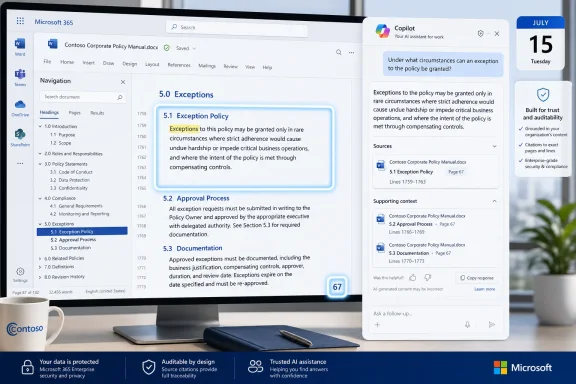
Microsoft plans to ship a Microsoft 365 Copilot improvement in July 2026 that lets Copilot navigate long and complex files by using document structure, including sections and pages, before generating answers with clearer source citations. The feature, listed as Roadmap ID 559614, is still in development and targets general availability for Android and desktop users in the worldwide commercial cloud. The important part is not that Copilot can read more words. It is that Microsoft is trying to make Copilot less like a chatbot staring at a blob of text and more like a worker who understands how a document is built.
For nearly three years, the sales pitch for Microsoft 365 Copilot has rested on a deceptively simple promise: ask a question about your work, and Copilot will find the answer inside your documents, messages, meetings, and files. That promise sounds straightforward until the document in question is a 180-page policy manual, a contract with nested exhibits, a board deck with appendix slides, or a migration plan with tables buried after the executive summary.
The new roadmap item tackles that problem directly. Microsoft says Copilot is becoming more aware of document structure so it can navigate to the most relevant parts of a file before answering. In plain English, Copilot should be better at knowing where to look before it starts sounding confident.
That distinction matters. A language model can produce a polished answer from incomplete retrieval, and in business software that polish can be dangerous. Users often do not know whether Copilot missed the key clause on page 67, skipped a footnote, or summarized the section that looked most semantically similar while ignoring the section that was actually authoritative.
This is where citations become more than decoration. A citation that points vaguely to a file is not much help when the file is long enough to hide an error in plain sight. A citation that points users back to the specific section or page that informed the answer is a different kind of product behavior: it gives the human a fighting chance to audit the machine.
Long business documents are not just long strings of text. They are structured artifacts with headings, appendices, tables, change logs, legal definitions, version notes, and references to other files. The correct answer is often not the most repeated idea in the document; it is the exception, the limitation, the date, the dependency, or the clause that overrules the friendly summary at the top.
Anyone who has worked in IT has seen this pattern. The executive summary says the rollout begins in Q3. The implementation section says pilot tenants go first. The risk register says the identity dependency must be resolved before deployment. The appendix says mobile is excluded until a later phase. A human reader reconciles those layers by moving through the structure of the document, not by treating the file as a bag of paragraphs.
That is the product gap Microsoft is now trying to close. If Copilot can use headings, sections, and pages as navigational signals, it may become better at retrieving the part of the document that actually answers the question. The improvement is subtle, but it cuts directly into one of the most frustrating AI failure modes: an answer that is plausible, well-written, and sourced to the right file, yet still wrong because it came from the wrong part of the file.
The roadmap language is careful. Microsoft is not promising perfect legal analysis, flawless policy interpretation, or immunity from hallucination. It is promising that Copilot can find relevant parts of a document more reliably and provide clearer citations. That is less glamorous than a new agent demo, but for many organizations it is far more useful.
A procurement file may include the contract, redlines, vendor responses, security questionnaires, pricing tables, and an appendix that contradicts an earlier draft. A compliance manual may have a definitions section that changes the meaning of a requirement fifty pages later. A technical design document may contain a diagram on page 12, the firewall rules on page 43, and the rollback procedure at the end because no one wanted to break the template.
The value of Microsoft’s improvement will be judged in precisely those files. If Copilot can answer “What are the Android deployment exceptions?” and trace its answer to the mobile section rather than the general rollout section, users will notice. If it can distinguish between a current policy and a historical appendix, admins will notice even faster.
This is also why the Android and desktop platforms in the roadmap entry are notable. Microsoft 365 work no longer happens only inside Word on a large monitor. Users review documents from Teams, Outlook, OneDrive, SharePoint, mobile Office apps, and Copilot surfaces that blur the line between app and assistant. Long-file navigation needs to work where people ask the question, not just where the document was authored.
There is a tension here. Mobile Copilot experiences can be convenient because they collapse the distance between a question and an answer. But mobile is also where users are least likely to manually verify a long citation, scroll through a dense PDF, or inspect a table in detail. Better citations are therefore not merely a desktop productivity enhancement; they are a guardrail for the growing habit of asking business-critical questions from a small screen.
The roadmap does not say whether the feature behaves identically across Android and desktop. It also does not specify supported file types, maximum file lengths, or whether “pages” means native pagination in Word, page references in PDFs, or a more general internal segmentation system. Those details will matter, especially for organizations that live in PDFs, exported reports, and SharePoint libraries full of aging Office files.
That is why citations have become a central part of Microsoft 365 Copilot’s identity. They are the bridge between conversational convenience and enterprise accountability. Copilot can be charming, but the enterprise buyer wants to know where the answer came from.
The problem is that not all citations are equal. A citation to a document title is little more than a breadcrumb. A citation to a section or page is closer to evidence. A citation that is easy to trace back to the source changes the user’s posture from passive acceptance to active verification.
This is especially important because many Copilot use cases are not about creating new prose. They are about compressing review time. A manager asks what changed in a policy. A security analyst asks whether a control is documented. A project lead asks which milestones are delayed. A salesperson asks whether a customer contract permits a certain renewal term. In each case, the answer is only as valuable as the user’s ability to inspect the underlying evidence.
Microsoft’s phrasing — “improving confidence” with clearer citations — is doing a lot of work. Confidence does not mean certainty. It means the system is trying to make its reasoning trail easier for a human to evaluate. That is the right bar for enterprise AI, because the alternative is pretending the assistant can be trusted without inspection.
The timing also fits Microsoft’s broader Copilot strategy. The company has spent the last two years pushing Copilot deeper into Microsoft 365, Windows, Edge, Teams, Outlook, SharePoint, and the agent ecosystem. As Copilot becomes more ambient, the risk of casual reliance increases. Better source grounding is not a bonus feature; it is the plumbing that has to mature if Microsoft wants Copilot to become routine infrastructure rather than an expensive novelty.
But that is exactly why the feature is important. The most useful AI improvements often look boring because they imitate ordinary professional habits. The assistant becomes more useful not by sounding more futuristic, but by doing the basic work a competent analyst would do before answering.
In the early Copilot era, many disappointments came from a mismatch between user expectations and system behavior. Users assumed “answer from this document” meant “understand the document like a person who knows how reports are organized.” In practice, retrieval systems often chunk documents, index passages, and search for semantically relevant fragments. That can work beautifully for simple questions, but it can struggle when structure carries meaning.
A heading is not just formatting. It tells the reader whether a paragraph is a requirement, an exception, an appendix, a definition, or a background note. A page boundary in a PDF may correspond to a table, a signature block, a slide, or a scanned exhibit. A section number may determine whether a clause applies broadly or only to a narrow scenario. If Copilot ignores that scaffolding, it can answer from text that is related but not controlling.
The roadmap item suggests Microsoft is trying to preserve more of that scaffolding during retrieval. That does not mean Copilot is “understanding” documents in the human sense. It means the system may be using structural metadata as part of its search and grounding process. For users, the distinction is less important than the outcome: fewer missed details and citations that point closer to the evidence.
There is a practical lesson here for anyone preparing documents for AI-assisted work. The better structured your files are, the more useful this class of feature becomes. Sloppy documents with vague headings, pasted images of text, inconsistent section numbering, and unlabeled tables will still be hard for machines to navigate. Microsoft can improve the reader, but organizations still have to clean up what they expect the reader to consume.
If Copilot becomes more reliable against long and complex files, users will naturally move more sensitive workflows into it. They will ask about contracts, HR policies, security exceptions, audit evidence, architecture documents, and customer commitments. That makes permissions, data classification, retention, and sensitivity labeling even more important.
Microsoft 365 Copilot inherits much of its value from Microsoft Graph and the access controls around SharePoint, OneDrive, Teams, and Exchange. That is powerful when permissions are clean. It is alarming when years of oversharing have turned SharePoint into a quiet museum of documents everyone can read but nobody owns.
The more capable Copilot becomes at finding buried details, the less safe it is to rely on obscurity. A document that was technically accessible but practically invisible can become discoverable through a natural-language question. Better document navigation amplifies this effect, because Copilot may become more effective at finding the exact buried paragraph users did not know existed.
That is not an argument against the feature. It is an argument for cleaning the house before inviting an AI assistant to index the closets. Organizations should review permissions, sensitivity labels, external sharing, stale sites, and ownership before celebrating better retrieval as a pure productivity win.
The same applies to records management. If Copilot cites a superseded policy because it remains accessible in an old library, the failure may look like an AI problem but originate as an information governance problem. Long-document navigation can help Copilot find the right section inside a file. It cannot decide that your organization’s obsolete files should never have been in scope.
The listed release ring is General Availability, not a preview ring, which suggests Microsoft intends this to reach mainstream commercial users rather than only early adopters. The cloud instance is worldwide standard multi-tenant, so the entry is aimed at the broad Microsoft 365 commercial base rather than a sovereign or specialized environment. Those details matter because they frame the feature as a baseline Copilot improvement, not a niche experiment.
Still, IT teams should avoid overreading the entry. It does not say whether administrators will get a toggle. It does not say whether the feature requires a particular app version. It does not say how citations will appear in every client. It does not say whether the improvement applies equally to Word documents, PDFs, PowerPoint decks, Excel files, or files accessed through connectors.
That ambiguity is normal for a roadmap item, but it matters for deployment planning. A user-facing Copilot improvement can arrive before help desk scripts, training material, and internal guidance are ready. If your organization already has Copilot champions, this is the sort of change they should test with real internal files, not sanitized demo documents.
The right test set is obvious: the documents users currently complain Copilot mishandles. Long policy files. Dense PDFs. Migration plans. Project charters. Board packs. Technical runbooks. If the new behavior improves answers in those files, Microsoft has solved a meaningful problem. If it merely produces cleaner citations for easy documents, the feature will be harder to defend.
That shift favors vendors with deep access to enterprise content systems. Microsoft’s advantage is not that it has the only capable language model. It is that Microsoft 365 is where enormous amounts of work already live. Word documents, SharePoint sites, Teams conversations, Outlook threads, OneDrive folders, Loop components, and Purview controls create a context layer competitors cannot easily replicate at the same depth.
But that advantage only matters if Copilot can retrieve accurately. A bad answer from your own document is worse than a generic answer from the open web because it carries the authority of internal context. Users assume the assistant has checked the file. They assume the citation means the answer is grounded. When those assumptions fail, trust erodes quickly.
This is why better navigation through long files may matter more than flashier agent announcements. Agents that take action are only as reliable as the information they use. If Copilot cannot correctly interpret the implementation plan, the compliance memo, or the contract appendix, giving it more autonomy simply automates confusion.
Microsoft’s product strategy increasingly depends on Copilot becoming the interface to work. The interface to work cannot be a smooth talker that loses its place in a document. It has to be a careful reader.
This will be uncomfortable for organizations with weak document hygiene. Many corporate files are Frankensteined from old templates, manual formatting, pasted screenshots, and inconsistent heading styles. A human can sometimes fight through that mess. AI retrieval systems may struggle, especially when the text is present but the structure is incoherent.
If Microsoft’s feature performs well, it may reward well-structured documents in a measurable way. A policy with clean headings and clear section numbering may yield better Copilot answers than a visually similar document built from bolded normal text and improvised formatting. A PDF exported with accessible text may work better than a scanned image. A table with meaningful labels may be more retrievable than a screenshot dropped into a page.
That creates a new kind of productivity work for IT, records teams, legal operations, and business owners. Organizations that want better Copilot outcomes should not only train users how to prompt. They should train document owners how to publish content that machines can navigate.
This is not glamorous work. It is template governance, information architecture, accessibility, metadata, and lifecycle management. But these are the disciplines that determine whether AI feels magical or maddening inside a real enterprise.
Long-document retrieval can fail for many reasons. The document may be poorly structured. The relevant information may be in an image, chart, footnote, embedded object, or scanned page. The file may exceed an indexing or processing limit. The user’s question may be ambiguous. The answer may require reconciling multiple documents with conflicting dates. The citation may point to the right neighborhood but not the full context.
Even a structurally aware Copilot can still stumble over authority. Suppose a file contains “Draft,” “Approved,” and “Archived” sections. If the document structure is clear, Copilot may navigate well. If the organizational meaning of those labels depends on an external policy or workflow, Copilot may still need more context than the file itself provides.
There is also the problem of tables and figures. Many of the most important details in enterprise documents live in tables: risk matrices, cost models, schedules, control mappings, and exception lists. Navigating to the right section is helpful, but extracting the right relationship from a dense table is its own challenge. Microsoft’s roadmap item does not claim to solve that entire class of problem.
So the correct posture is optimism without surrender. Users should treat improved citations as an invitation to verify, not a reason to stop verifying. Admins should update training to reinforce that Copilot can accelerate review, but it does not transfer accountability from the human to the assistant.
That is exactly where Microsoft needs to focus. The company has saturated its product line with Copilot branding, but adoption depends on whether users find the assistant reliable in the mundane moments that make up a workday. The question is not whether Copilot can generate a passable summary of a short document. The question is whether it can help a busy person avoid missing the one paragraph that matters.
For WindowsForum readers, this is also a reminder that Copilot is no longer just a Windows sidebar or a chat button in Office. It is becoming a layer across Microsoft’s productivity stack, and improvements in that layer will increasingly affect how people interact with files on Windows PCs, Android devices, and cloud-backed Microsoft 365 environments.
The irony is that the future of AI at work may depend less on dazzling conversation and more on old-fashioned document literacy. Microsoft’s roadmap item is a small window into that reality. Copilot has to become a better reader before it can become a better coworker.
 Microsoft Is Admitting That “Read the File” Was Never Enough
For nearly three years, the sales pitch for Microsoft 365 Copilot has rested on a deceptively simple promise: ask a question about your work, and Copilot will find the answer inside your documents, messages, meetings, and files. That promise sounds straightforward until the document in question is a 180-page policy manual, a contract with nested exhibits, a board deck with appendix slides, or a migration plan with tables buried after the executive summary.The new roadmap item tackles that problem directly. Microsoft says Copilot is becoming more aware of document structure so it can navigate to the most relevant parts of a file before answering. In plain English, Copilot should be better at knowing where to look before it starts sounding confident.
That distinction matters. A language model can produce a polished answer from incomplete retrieval, and in business software that polish can be dangerous. Users often do not know whether Copilot missed the key clause on page 67, skipped a footnote, or summarized the section that looked most semantically similar while ignoring the section that was actually authoritative.
This is where citations become more than decoration. A citation that points vaguely to a file is not much help when the file is long enough to hide an error in plain sight. A citation that points users back to the specific section or page that informed the answer is a different kind of product behavior: it gives the human a fighting chance to audit the machine.
The Long-Document Problem Is a Workflow Problem, Not Just an AI Problem
The industry tends to talk about long documents as a context-window problem. If only the model could ingest more tokens, the thinking goes, the issue would go away. That is true in the narrow engineering sense, but it misses the lived reality of enterprise files.Long business documents are not just long strings of text. They are structured artifacts with headings, appendices, tables, change logs, legal definitions, version notes, and references to other files. The correct answer is often not the most repeated idea in the document; it is the exception, the limitation, the date, the dependency, or the clause that overrules the friendly summary at the top.
Anyone who has worked in IT has seen this pattern. The executive summary says the rollout begins in Q3. The implementation section says pilot tenants go first. The risk register says the identity dependency must be resolved before deployment. The appendix says mobile is excluded until a later phase. A human reader reconciles those layers by moving through the structure of the document, not by treating the file as a bag of paragraphs.
That is the product gap Microsoft is now trying to close. If Copilot can use headings, sections, and pages as navigational signals, it may become better at retrieving the part of the document that actually answers the question. The improvement is subtle, but it cuts directly into one of the most frustrating AI failure modes: an answer that is plausible, well-written, and sourced to the right file, yet still wrong because it came from the wrong part of the file.
The roadmap language is careful. Microsoft is not promising perfect legal analysis, flawless policy interpretation, or immunity from hallucination. It is promising that Copilot can find relevant parts of a document more reliably and provide clearer citations. That is less glamorous than a new agent demo, but for many organizations it is far more useful.
Copilot’s Real Test Is Whether It Can Survive the Appendix
Most AI demos live in tidy documents. Enterprise reality lives in messy ones.A procurement file may include the contract, redlines, vendor responses, security questionnaires, pricing tables, and an appendix that contradicts an earlier draft. A compliance manual may have a definitions section that changes the meaning of a requirement fifty pages later. A technical design document may contain a diagram on page 12, the firewall rules on page 43, and the rollback procedure at the end because no one wanted to break the template.
The value of Microsoft’s improvement will be judged in precisely those files. If Copilot can answer “What are the Android deployment exceptions?” and trace its answer to the mobile section rather than the general rollout section, users will notice. If it can distinguish between a current policy and a historical appendix, admins will notice even faster.
This is also why the Android and desktop platforms in the roadmap entry are notable. Microsoft 365 work no longer happens only inside Word on a large monitor. Users review documents from Teams, Outlook, OneDrive, SharePoint, mobile Office apps, and Copilot surfaces that blur the line between app and assistant. Long-file navigation needs to work where people ask the question, not just where the document was authored.
There is a tension here. Mobile Copilot experiences can be convenient because they collapse the distance between a question and an answer. But mobile is also where users are least likely to manually verify a long citation, scroll through a dense PDF, or inspect a table in detail. Better citations are therefore not merely a desktop productivity enhancement; they are a guardrail for the growing habit of asking business-critical questions from a small screen.
The roadmap does not say whether the feature behaves identically across Android and desktop. It also does not specify supported file types, maximum file lengths, or whether “pages” means native pagination in Word, page references in PDFs, or a more general internal segmentation system. Those details will matter, especially for organizations that live in PDFs, exported reports, and SharePoint libraries full of aging Office files.
Clearer Citations Are Microsoft’s Quiet Trust Strategy
Microsoft has learned that the enterprise AI adoption curve is not blocked only by model quality. It is blocked by trust, auditability, governance, and the quiet fear that a user will paste an AI-generated summary into a decision process without checking it.That is why citations have become a central part of Microsoft 365 Copilot’s identity. They are the bridge between conversational convenience and enterprise accountability. Copilot can be charming, but the enterprise buyer wants to know where the answer came from.
The problem is that not all citations are equal. A citation to a document title is little more than a breadcrumb. A citation to a section or page is closer to evidence. A citation that is easy to trace back to the source changes the user’s posture from passive acceptance to active verification.
This is especially important because many Copilot use cases are not about creating new prose. They are about compressing review time. A manager asks what changed in a policy. A security analyst asks whether a control is documented. A project lead asks which milestones are delayed. A salesperson asks whether a customer contract permits a certain renewal term. In each case, the answer is only as valuable as the user’s ability to inspect the underlying evidence.
Microsoft’s phrasing — “improving confidence” with clearer citations — is doing a lot of work. Confidence does not mean certainty. It means the system is trying to make its reasoning trail easier for a human to evaluate. That is the right bar for enterprise AI, because the alternative is pretending the assistant can be trusted without inspection.
The timing also fits Microsoft’s broader Copilot strategy. The company has spent the last two years pushing Copilot deeper into Microsoft 365, Windows, Edge, Teams, Outlook, SharePoint, and the agent ecosystem. As Copilot becomes more ambient, the risk of casual reliance increases. Better source grounding is not a bonus feature; it is the plumbing that has to mature if Microsoft wants Copilot to become routine infrastructure rather than an expensive novelty.
The Feature Sounds Small Because the Original Failure Was Embarrassingly Human
There is something almost comical about a 2026 roadmap item that says an AI assistant is getting better at using document structure. Human readers have been doing this forever. We scan the table of contents, jump to headings, check page numbers, and use document hierarchy to decide what matters.But that is exactly why the feature is important. The most useful AI improvements often look boring because they imitate ordinary professional habits. The assistant becomes more useful not by sounding more futuristic, but by doing the basic work a competent analyst would do before answering.
In the early Copilot era, many disappointments came from a mismatch between user expectations and system behavior. Users assumed “answer from this document” meant “understand the document like a person who knows how reports are organized.” In practice, retrieval systems often chunk documents, index passages, and search for semantically relevant fragments. That can work beautifully for simple questions, but it can struggle when structure carries meaning.
A heading is not just formatting. It tells the reader whether a paragraph is a requirement, an exception, an appendix, a definition, or a background note. A page boundary in a PDF may correspond to a table, a signature block, a slide, or a scanned exhibit. A section number may determine whether a clause applies broadly or only to a narrow scenario. If Copilot ignores that scaffolding, it can answer from text that is related but not controlling.
The roadmap item suggests Microsoft is trying to preserve more of that scaffolding during retrieval. That does not mean Copilot is “understanding” documents in the human sense. It means the system may be using structural metadata as part of its search and grounding process. For users, the distinction is less important than the outcome: fewer missed details and citations that point closer to the evidence.
There is a practical lesson here for anyone preparing documents for AI-assisted work. The better structured your files are, the more useful this class of feature becomes. Sloppy documents with vague headings, pasted images of text, inconsistent section numbering, and unlabeled tables will still be hard for machines to navigate. Microsoft can improve the reader, but organizations still have to clean up what they expect the reader to consume.
IT Admins Should Read This as a Governance Signal
For administrators, the immediate temptation is to treat Roadmap ID 559614 as a user-experience enhancement. That is partly true, but it undersells the governance implications. Better long-file navigation changes what users may be willing to ask Copilot, and therefore changes the risk surface.If Copilot becomes more reliable against long and complex files, users will naturally move more sensitive workflows into it. They will ask about contracts, HR policies, security exceptions, audit evidence, architecture documents, and customer commitments. That makes permissions, data classification, retention, and sensitivity labeling even more important.
Microsoft 365 Copilot inherits much of its value from Microsoft Graph and the access controls around SharePoint, OneDrive, Teams, and Exchange. That is powerful when permissions are clean. It is alarming when years of oversharing have turned SharePoint into a quiet museum of documents everyone can read but nobody owns.
The more capable Copilot becomes at finding buried details, the less safe it is to rely on obscurity. A document that was technically accessible but practically invisible can become discoverable through a natural-language question. Better document navigation amplifies this effect, because Copilot may become more effective at finding the exact buried paragraph users did not know existed.
That is not an argument against the feature. It is an argument for cleaning the house before inviting an AI assistant to index the closets. Organizations should review permissions, sensitivity labels, external sharing, stale sites, and ownership before celebrating better retrieval as a pure productivity win.
The same applies to records management. If Copilot cites a superseded policy because it remains accessible in an old library, the failure may look like an AI problem but originate as an information governance problem. Long-document navigation can help Copilot find the right section inside a file. It cannot decide that your organization’s obsolete files should never have been in scope.
The Roadmap Date Is a Promise With an Asterisk
The Microsoft 365 Roadmap lists general availability for July 2026, with the feature in development as of the June 25 update. That puts the release window close enough for planning but not close enough to treat as a guaranteed switch-flip on a specific day. Microsoft roadmap dates are estimates, and Copilot features in particular can roll out unevenly across tenants, clients, and rings.The listed release ring is General Availability, not a preview ring, which suggests Microsoft intends this to reach mainstream commercial users rather than only early adopters. The cloud instance is worldwide standard multi-tenant, so the entry is aimed at the broad Microsoft 365 commercial base rather than a sovereign or specialized environment. Those details matter because they frame the feature as a baseline Copilot improvement, not a niche experiment.
Still, IT teams should avoid overreading the entry. It does not say whether administrators will get a toggle. It does not say whether the feature requires a particular app version. It does not say how citations will appear in every client. It does not say whether the improvement applies equally to Word documents, PDFs, PowerPoint decks, Excel files, or files accessed through connectors.
That ambiguity is normal for a roadmap item, but it matters for deployment planning. A user-facing Copilot improvement can arrive before help desk scripts, training material, and internal guidance are ready. If your organization already has Copilot champions, this is the sort of change they should test with real internal files, not sanitized demo documents.
The right test set is obvious: the documents users currently complain Copilot mishandles. Long policy files. Dense PDFs. Migration plans. Project charters. Board packs. Technical runbooks. If the new behavior improves answers in those files, Microsoft has solved a meaningful problem. If it merely produces cleaner citations for easy documents, the feature will be harder to defend.
The Competitive AI Story Is Moving From Generation to Retrieval
This roadmap item also reflects a broader shift in enterprise AI. The first wave was about generation: write the email, summarize the meeting, draft the deck, produce the plan. The next wave is about retrieval and grounding: find the answer, prove where it came from, and do not miss the detail that changes the decision.That shift favors vendors with deep access to enterprise content systems. Microsoft’s advantage is not that it has the only capable language model. It is that Microsoft 365 is where enormous amounts of work already live. Word documents, SharePoint sites, Teams conversations, Outlook threads, OneDrive folders, Loop components, and Purview controls create a context layer competitors cannot easily replicate at the same depth.
But that advantage only matters if Copilot can retrieve accurately. A bad answer from your own document is worse than a generic answer from the open web because it carries the authority of internal context. Users assume the assistant has checked the file. They assume the citation means the answer is grounded. When those assumptions fail, trust erodes quickly.
This is why better navigation through long files may matter more than flashier agent announcements. Agents that take action are only as reliable as the information they use. If Copilot cannot correctly interpret the implementation plan, the compliance memo, or the contract appendix, giving it more autonomy simply automates confusion.
Microsoft’s product strategy increasingly depends on Copilot becoming the interface to work. The interface to work cannot be a smooth talker that loses its place in a document. It has to be a careful reader.
Document Authors Are Now Part of the AI Supply Chain
There is a quieter implication for every department that writes documents: formatting is becoming operational metadata. Headings, sections, page organization, table labels, file names, and version discipline are no longer just matters of readability. They are signals that AI systems can use to retrieve and cite information.This will be uncomfortable for organizations with weak document hygiene. Many corporate files are Frankensteined from old templates, manual formatting, pasted screenshots, and inconsistent heading styles. A human can sometimes fight through that mess. AI retrieval systems may struggle, especially when the text is present but the structure is incoherent.
If Microsoft’s feature performs well, it may reward well-structured documents in a measurable way. A policy with clean headings and clear section numbering may yield better Copilot answers than a visually similar document built from bolded normal text and improvised formatting. A PDF exported with accessible text may work better than a scanned image. A table with meaningful labels may be more retrievable than a screenshot dropped into a page.
That creates a new kind of productivity work for IT, records teams, legal operations, and business owners. Organizations that want better Copilot outcomes should not only train users how to prompt. They should train document owners how to publish content that machines can navigate.
This is not glamorous work. It is template governance, information architecture, accessibility, metadata, and lifecycle management. But these are the disciplines that determine whether AI feels magical or maddening inside a real enterprise.
The Win Is Real, but the Failure Modes Do Not Disappear
Microsoft’s roadmap language says the improvement should reduce missed details. It does not say missed details are gone. That caveat deserves emphasis because user expectations around Copilot often outrun the product.Long-document retrieval can fail for many reasons. The document may be poorly structured. The relevant information may be in an image, chart, footnote, embedded object, or scanned page. The file may exceed an indexing or processing limit. The user’s question may be ambiguous. The answer may require reconciling multiple documents with conflicting dates. The citation may point to the right neighborhood but not the full context.
Even a structurally aware Copilot can still stumble over authority. Suppose a file contains “Draft,” “Approved,” and “Archived” sections. If the document structure is clear, Copilot may navigate well. If the organizational meaning of those labels depends on an external policy or workflow, Copilot may still need more context than the file itself provides.
There is also the problem of tables and figures. Many of the most important details in enterprise documents live in tables: risk matrices, cost models, schedules, control mappings, and exception lists. Navigating to the right section is helpful, but extracting the right relationship from a dense table is its own challenge. Microsoft’s roadmap item does not claim to solve that entire class of problem.
So the correct posture is optimism without surrender. Users should treat improved citations as an invitation to verify, not a reason to stop verifying. Admins should update training to reinforce that Copilot can accelerate review, but it does not transfer accountability from the human to the assistant.
Microsoft Is Building the Copilot That Enterprises Thought They Were Buying
The most interesting thing about this feature is how practical it is. It does not promise a new personality, a sci-fi interface, or a dramatic redefinition of work. It promises that Copilot will be better at doing something every knowledge worker already does: opening a long file, finding the relevant section, and backing up an answer with a traceable reference.That is exactly where Microsoft needs to focus. The company has saturated its product line with Copilot branding, but adoption depends on whether users find the assistant reliable in the mundane moments that make up a workday. The question is not whether Copilot can generate a passable summary of a short document. The question is whether it can help a busy person avoid missing the one paragraph that matters.
For WindowsForum readers, this is also a reminder that Copilot is no longer just a Windows sidebar or a chat button in Office. It is becoming a layer across Microsoft’s productivity stack, and improvements in that layer will increasingly affect how people interact with files on Windows PCs, Android devices, and cloud-backed Microsoft 365 environments.
The irony is that the future of AI at work may depend less on dazzling conversation and more on old-fashioned document literacy. Microsoft’s roadmap item is a small window into that reality. Copilot has to become a better reader before it can become a better coworker.
July’s Copilot Upgrade Rewards the Tenants That Prepared Their Files
The practical message is not to wait passively for July. Organizations that already use Microsoft 365 Copilot should treat this as a prompt to test their document estate, refine guidance, and identify where better structure could translate into better answers. The feature may ship from Microsoft, but the quality of the experience will depend heavily on the quality of the content it encounters.- Microsoft is targeting July 2026 general availability for Roadmap ID 559614 across Android and desktop in the worldwide commercial cloud.
- The feature is designed to help Copilot navigate long and complex files by using document structure before answering.
- Clearer citations should make answers easier to verify, especially when the relevant detail sits deep inside a long document.
- IT teams should test the improvement against real internal files, not short demo documents that already work well.
- Better retrieval increases the importance of permissions, sensitivity labels, stale content cleanup, and document lifecycle governance.
- Document owners should treat headings, sections, accessible text, and version discipline as part of the Copilot readiness process.
References
- Primary source: Microsoft 365 Roadmap
Published: 2026-06-25T23:15:45.5477468Z
Microsoft 365 Roadmap | Microsoft 365
The Microsoft 365 Roadmap lists updates that are currently planned for applicable subscribers. Check here for more information on the status of new features and updates.www.microsoft.com
- Related coverage: m365admin.handsontek.net
Microsoft Copilot (Microsoft 365): Copilot improved long files navigation using document structure, enabling more accurate answers and clearer citations - M365 Admin
We’ve improved how Copilot reads long and complex files by making it more aware of document structure. When you ask a question, Copilot can now navigate to the most relevant parts of your document (for example, specific sections/pages) before answering—helping reduce missed details and improving...m365admin.handsontek.net - Official source: learn.microsoft.com
Release Notes for Microsoft 365 Copilot | Microsoft Learn
Lists the features that reach General Availability in each release of Microsoft 365 Copilot.learn.microsoft.com - Official source: cdn-dynmedia-1.microsoft.com
- Related coverage: techradar.com
Microsoft's planned new AI trick for Edge will 'automatically open the Copilot side pane' with Outlook email links — and I can feel the hate already | TechRadar
New feature is on the roadmap for May 2026www.techradar.com - Related coverage: windowscentral.com
Microsoft confirms plans to integrate Copilot with the Taskbar on Windows 11 this summer: Ask Copilot expected to debut "mid-2026" | Windows Central
First announced last year, a new document has confirmed that Microsoft's upcoming "Ask Copilot" feature for Windows 11's Taskbar is arriving mid-2026.www.windowscentral.com
