

Microsoft is rolling out a July 2026 Microsoft Teams update that gives users a clearer way to request access to admin-blocked apps and agents, while giving Teams administrators better request review, action, notification, and awareness tools in Teams Admin Center. The change sounds procedural, but it lands in one of the most politically charged corners of modern collaboration software: who gets to bring new software into the workplace. Microsoft is not removing admin control; it is trying to make the denial-and-appeal loop less opaque. That distinction matters, because the Teams app store is no longer merely a catalog of tabs and bots — it is increasingly the front door for AI agents, workflow tools, and third-party services that want a seat inside the tenant.
For years, the most frustrating enterprise software moments have not involved crashes or outages. They have involved a user clicking an app, discovering that it is blocked, and being left to guess whether the next step is a help desk ticket, a Teams message to IT, a shadow-IT workaround, or giving up entirely.
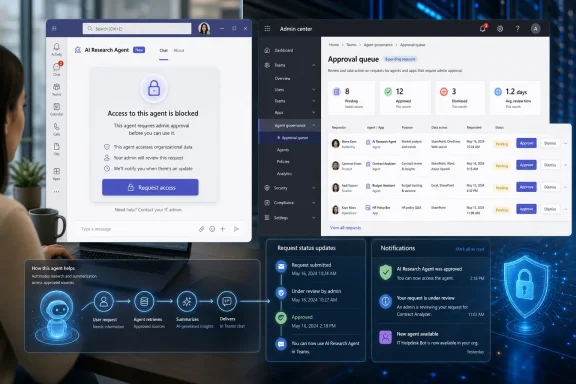
Microsoft’s new Teams request flow is meant to replace that ambiguity with a guided, end-to-end experience. When a user encounters an app or agent that an administrator has blocked, Teams can now lead them through a clearer request process and notify them when the request changes state. On the admin side, Teams Admin Center gets a cleaner path for reviewing those requests and taking action.
That sounds small until you put it inside the daily mechanics of a Microsoft 365 tenant. Teams is where users meet calendar apps, CRM connectors, project management tools, meeting assistants, security integrations, low-code workflows, and now Copilot-era agents. Blocking something is easy; governing demand for it is harder.
The old model treated blocked apps as a policy endpoint. The new model treats them as a workflow. That is the meaningful shift.
That ambiguity creates a predictable pattern. Users assume administrators are blocking productivity. Administrators assume users are requesting risky tools without context. The actual problem is often that neither side has enough information at the moment when a decision is needed.
Microsoft’s improved flow acknowledges that a request is not just a button press. A useful request needs routing, context, visibility, and feedback. If Teams can tell users that their request is received and later updated, it reduces the psychological black hole that has surrounded blocked app approvals.
The bigger gain may be for IT. A request counter buried in an admin console is not the same thing as an operational signal. If Microsoft can make admins more aware of new requests before they stall, Teams becomes less of a passive policy surface and more of a governance dashboard.
That changes the risk profile. A blocked project-management tab may inconvenience a team. A poorly governed agent may touch sensitive files, summarize restricted conversations, invoke connectors, or create a false impression that automation has been approved by the company. The administrative decision is no longer just “Can users install this app?” It is “What can this software see, infer, trigger, and retain?”
Microsoft has spent the last several years pulling Teams apps, Copilot agents, integrated apps, permission policies, and broader Microsoft 365 admin experiences into a more unified governance story. The new request flow belongs to that same movement. It tries to make app and agent demand visible without surrendering the tenant to whatever users discover first.
That balance is delicate. If Microsoft makes requests too easy, admins may drown in low-quality demand. If it makes requests too hard, users route around policy with browser extensions, personal accounts, unmanaged SaaS, or unofficial meeting bots. The best governance system is not the one with the tallest wall; it is the one that turns demand into reviewable evidence before users find another door.
That matters because app governance is rarely a single switch. An administrator may need to evaluate the app’s publisher, certification status, data access, requested permissions, audience, installation scope, and business justification. In some organizations, approving a Teams app also requires security review, legal review, procurement review, data protection review, or all of the above.
The danger in any admin center is that it becomes a museum of pending decisions. Requests accumulate, counters rise, and nobody knows which item matters. Microsoft’s language about increasing admin awareness is a quiet admission that the existing experience could let user requests sit without meaningful action.
A better admin flow does not necessarily mean faster approvals. In well-run enterprises, the correct answer may still be no. But a governed no, communicated through a visible workflow, is very different from a silent no created by administrative neglect.
That distinction will matter to security teams. Microsoft has every incentive to make the Teams app and agent ecosystem feel alive. Developers want discoverability, users want tools, and Microsoft wants Teams to remain the operating layer for collaborative work. But enterprise customers buy Microsoft 365 partly because they expect centralized governance over what runs in their tenant.
The update therefore walks a familiar Microsoft line: more self-service at the edge, more control at the center. Users can initiate the request from the place where they encounter the block. Administrators retain the power to approve, dismiss, allow, or continue blocking based on organizational policy.
This is Microsoft’s preferred answer to shadow IT. Do not pretend users will stop looking for tools. Give them a sanctioned route to ask, then give IT a better place to say yes, no, or not yet.
Administrative silence has a cost. A team trying to adopt a customer-support integration may lose days waiting for an app approval that nobody saw. A developer experimenting with a workflow agent may move to a personal environment rather than wait. A department may standardize on a tool outside IT’s line of sight because the official route felt performative.
The new flow does not solve every one of those problems. Microsoft has not turned Teams app governance into a full procurement, risk, and exception-management platform. But it does acknowledge that communication is part of control.
That is the lesson many enterprise systems learn late. A locked door is more tolerable when someone can tell you who has the key, why the door is locked, and whether your request is being considered.
IT teams will need to decide what kind of requests deserve review and what kind deserve automation, deflection, or policy-level denial. A single request from one user for an obscure app may not justify a security review. Fifty requests from a revenue team for the same CRM integration probably do. A Copilot agent that reads internal documents may require a different bar than a simple tab that embeds a public dashboard.
The better Microsoft makes the intake process, the more obvious it becomes that app governance needs triage rules. Admins should not wait for the Teams Admin Center queue to become the new shared mailbox nobody owns. The feature’s value depends on whether organizations build an operating model around it.
That operating model does not have to be grandiose. For many tenants, the basics are enough: assign ownership, define review thresholds, document rejection reasons, decide how often requests are reviewed, and establish a path for high-risk agents. The technology can expose demand, but only the organization can decide how demand becomes policy.
That is not fearmongering; it is the architecture. Agents are designed to reason across context, respond to prompts, call tools, retrieve content, and automate steps that used to belong to humans. Even when Microsoft’s permission and consent models constrain those actions, the user experience can make access feel deceptively natural.
Admins reviewing agent requests therefore need to think beyond installation. They need to understand identity, permissions, data residency, audit logs, connector access, retention, eDiscovery implications, and whether the agent’s behavior can be explained after the fact. A request flow that treats agents and apps together may simplify discovery, but reviewers should not treat them as equivalent risk.
This is where Microsoft’s governance story will be tested. If the admin experience surfaces enough detail for informed decisions, the new flow will help. If it merely makes more requests easier to file, security teams will respond by tightening defaults and discouraging use.
When a blocked app provides a clear request route, users are more likely to stay inside the tenant’s governance process. When Teams tells them a request has been updated, they are less likely to pepper IT with side-channel messages or assume no one is listening. When the admin center records demand in one place, administrators get a better picture of which tools users actually need.
That does not make every request legitimate. It does make the request itself a data point. Over time, those data points can reveal mismatches between policy and work: departments that need an integration, apps that should be pre-approved for certain groups, agents that require a formal review pattern, or categories of tools that should remain blocked by default.
In that sense, Microsoft is not merely improving convenience. It is making policy feedback more visible. For an enterprise product, that is a governance feature disguised as a usability fix.
That convergence creates administrative pressure. The more Microsoft encourages organizations to build and adopt agents, the more those organizations need a manageable path for approving them. A world full of agents cannot run on ad hoc email approvals and buried request counters.
The roadmap item’s scope is also notable: desktop, Mac, and web, with worldwide standard multi-tenant availability. This is not a niche mobile tweak or a preview for a narrow customer segment. It is a mainstream Teams governance improvement aimed at the ordinary places where knowledge workers encounter blocked tools.
The absence of government cloud support in adjacent Teams request documentation is also worth watching. Microsoft often brings features to commercial tenants first, then expands based on compliance, architecture, and demand. For regulated environments, the concept may be attractive, but implementation details will matter more than the roadmap label.
That does not mean developers get a free pass. A clearer request process may actually raise the quality bar. Admins faced with a visible queue will favor apps with credible publisher information, clear permissions, strong documentation, Microsoft 365 certification where applicable, sensible data practices, and a deployment model that maps cleanly to users and groups.
The Teams store has always been a marketplace, but enterprise marketplaces are governed by trust more than impulse. A consumer app wins with frictionless installation. A Teams app wins when an administrator can defend allowing it.
For agent builders, the challenge is sharper. They will need to explain not only what the agent does, but what it can access, how it behaves, how it is updated, and what happens when permissions change. The request flow may create the conversation, but the developer still has to survive the review.
Some organizations will want to document the new process immediately. If a user asks why an app is blocked, support staff should know whether to direct them to Teams’ request flow, an internal service catalog, a security review form, or a custom approval URL. Inconsistent guidance will recreate the confusion Microsoft is trying to remove.
The feature also creates a communications moment. IT departments can tell employees that requesting an app does not guarantee approval, that high-risk tools may take longer, and that agents are reviewed differently from simple apps. Clear expectations will prevent the new button from being interpreted as a promise.
That is the human side of the rollout. Microsoft can improve the UI, but the organization still has to explain the policy.
There is also the risk of request fatigue. If every blocked app becomes easy to request, administrators may respond by ignoring the queue or routing all requests to a generic process. That would preserve the appearance of self-service without delivering actual governance.
Another open question is how much context users can provide. A good approval request should capture the business purpose, intended users, urgency, data involved, and whether an alternative approved tool exists. A thin request that simply says “I want this app” is not enough for a serious review.
Finally, agents complicate prioritization. Some agents may be low-risk productivity helpers. Others may be powerful orchestrators attached to sensitive systems. Microsoft’s request experience needs to help admins see that difference without forcing every organization to build its own risk taxonomy from scratch.
That workflow should feel ordinary. It should not require a war room, a PowerShell script, a dozen browser tabs, or a chain of messages through three managers. Enterprise governance works best when the safe path is also the obvious path.
This is why the update matters even though it is not flashy. Microsoft Teams has become too important for blocked-app handling to feel like an afterthought. The app and agent ecosystem is now part of how work gets designed, automated, and monitored.
A mature platform does not merely let admins say no. It helps them understand what users are asking for and respond before the business invents its own answer.
Microsoft’s Teams update is not a revolution in app governance, and that is precisely why it matters. The company is sanding down a rough edge that has quietly shaped how users, admins, and software vendors negotiate access inside Microsoft 365. As Teams becomes a host for more agents and more consequential automation, the humble blocked-app request is becoming a control point for the future of work; the tenants that handle it deliberately will get more value from the ecosystem, and the tenants that ignore it will discover that silence is still a policy — just a bad one.
 Microsoft Turns a Dead End Into a Managed Queue
For years, the most frustrating enterprise software moments have not involved crashes or outages. They have involved a user clicking an app, discovering that it is blocked, and being left to guess whether the next step is a help desk ticket, a Teams message to IT, a shadow-IT workaround, or giving up entirely.Microsoft’s new Teams request flow is meant to replace that ambiguity with a guided, end-to-end experience. When a user encounters an app or agent that an administrator has blocked, Teams can now lead them through a clearer request process and notify them when the request changes state. On the admin side, Teams Admin Center gets a cleaner path for reviewing those requests and taking action.
That sounds small until you put it inside the daily mechanics of a Microsoft 365 tenant. Teams is where users meet calendar apps, CRM connectors, project management tools, meeting assistants, security integrations, low-code workflows, and now Copilot-era agents. Blocking something is easy; governing demand for it is harder.
The old model treated blocked apps as a policy endpoint. The new model treats them as a workflow. That is the meaningful shift.
The Lock Icon Was Doing Too Much Work
A lock icon in an app store is an elegant symbol only if everyone agrees what it means. In Teams, it has often meant several things at once: the app may be blocked by an org-wide setting, restricted by a permission policy, unavailable to a user group, waiting for publisher configuration, or tangled in broader Microsoft 365 app governance. To an end user, all of those conditions collapse into one message: IT said no.That ambiguity creates a predictable pattern. Users assume administrators are blocking productivity. Administrators assume users are requesting risky tools without context. The actual problem is often that neither side has enough information at the moment when a decision is needed.
Microsoft’s improved flow acknowledges that a request is not just a button press. A useful request needs routing, context, visibility, and feedback. If Teams can tell users that their request is received and later updated, it reduces the psychological black hole that has surrounded blocked app approvals.
The bigger gain may be for IT. A request counter buried in an admin console is not the same thing as an operational signal. If Microsoft can make admins more aware of new requests before they stall, Teams becomes less of a passive policy surface and more of a governance dashboard.
AI Agents Raise the Stakes for an Old App-Governance Problem
The word “agents” is doing a lot of work in this roadmap item. A few years ago, Teams app governance mostly meant deciding whether employees could install a Trello tab, a Jira connector, or a meeting poll app. In 2026, the same governance plane increasingly applies to Copilot agents and other AI-driven tools that can act across data, conversations, and business workflows.That changes the risk profile. A blocked project-management tab may inconvenience a team. A poorly governed agent may touch sensitive files, summarize restricted conversations, invoke connectors, or create a false impression that automation has been approved by the company. The administrative decision is no longer just “Can users install this app?” It is “What can this software see, infer, trigger, and retain?”
Microsoft has spent the last several years pulling Teams apps, Copilot agents, integrated apps, permission policies, and broader Microsoft 365 admin experiences into a more unified governance story. The new request flow belongs to that same movement. It tries to make app and agent demand visible without surrendering the tenant to whatever users discover first.
That balance is delicate. If Microsoft makes requests too easy, admins may drown in low-quality demand. If it makes requests too hard, users route around policy with browser extensions, personal accounts, unmanaged SaaS, or unofficial meeting bots. The best governance system is not the one with the tallest wall; it is the one that turns demand into reviewable evidence before users find another door.
Teams Admin Center Becomes the Arbitration Layer
The Teams Admin Center has long been the place where administrators allow, block, upload, approve, and assign Teams apps. The roadmap update sharpens that role by improving the request-review experience and giving admins a better chance to notice new requests quickly.That matters because app governance is rarely a single switch. An administrator may need to evaluate the app’s publisher, certification status, data access, requested permissions, audience, installation scope, and business justification. In some organizations, approving a Teams app also requires security review, legal review, procurement review, data protection review, or all of the above.
The danger in any admin center is that it becomes a museum of pending decisions. Requests accumulate, counters rise, and nobody knows which item matters. Microsoft’s language about increasing admin awareness is a quiet admission that the existing experience could let user requests sit without meaningful action.
A better admin flow does not necessarily mean faster approvals. In well-run enterprises, the correct answer may still be no. But a governed no, communicated through a visible workflow, is very different from a silent no created by administrative neglect.
Microsoft Is Selling Clarity, Not Freedom
It would be easy to read this update as Microsoft loosening controls around Teams apps and agents. That is not what is happening. The feature improves how users ask for access and how administrators review those requests; it does not erase the policies that block apps in the first place.That distinction will matter to security teams. Microsoft has every incentive to make the Teams app and agent ecosystem feel alive. Developers want discoverability, users want tools, and Microsoft wants Teams to remain the operating layer for collaborative work. But enterprise customers buy Microsoft 365 partly because they expect centralized governance over what runs in their tenant.
The update therefore walks a familiar Microsoft line: more self-service at the edge, more control at the center. Users can initiate the request from the place where they encounter the block. Administrators retain the power to approve, dismiss, allow, or continue blocking based on organizational policy.
This is Microsoft’s preferred answer to shadow IT. Do not pretend users will stop looking for tools. Give them a sanctioned route to ask, then give IT a better place to say yes, no, or not yet.
The Real Productivity Killer Is Administrative Silence
The most important part of the update may be user notification. A request flow without feedback is only marginally better than no request flow at all. Users need to know whether a request has been received, reviewed, approved, rejected, or changed; otherwise, they will continue to behave as if the system is broken.Administrative silence has a cost. A team trying to adopt a customer-support integration may lose days waiting for an app approval that nobody saw. A developer experimenting with a workflow agent may move to a personal environment rather than wait. A department may standardize on a tool outside IT’s line of sight because the official route felt performative.
The new flow does not solve every one of those problems. Microsoft has not turned Teams app governance into a full procurement, risk, and exception-management platform. But it does acknowledge that communication is part of control.
That is the lesson many enterprise systems learn late. A locked door is more tolerable when someone can tell you who has the key, why the door is locked, and whether your request is being considered.
The Admin Burden Moves From Blocking to Judging
The uncomfortable consequence of a better request system is that it produces more visible demand. If users understand how to request blocked apps and agents, more of them will do so. That is good for transparency and potentially painful for administrators who have treated the block list as a static control.IT teams will need to decide what kind of requests deserve review and what kind deserve automation, deflection, or policy-level denial. A single request from one user for an obscure app may not justify a security review. Fifty requests from a revenue team for the same CRM integration probably do. A Copilot agent that reads internal documents may require a different bar than a simple tab that embeds a public dashboard.
The better Microsoft makes the intake process, the more obvious it becomes that app governance needs triage rules. Admins should not wait for the Teams Admin Center queue to become the new shared mailbox nobody owns. The feature’s value depends on whether organizations build an operating model around it.
That operating model does not have to be grandiose. For many tenants, the basics are enough: assign ownership, define review thresholds, document rejection reasons, decide how often requests are reviewed, and establish a path for high-risk agents. The technology can expose demand, but only the organization can decide how demand becomes policy.
Agents Make “Allow” a More Dangerous Verb
The word “allow” used to sound simple. In classic app-store governance, allowing an app meant users could install it, launch it, and perhaps connect it to a service. In the agent era, allowing something can mean letting software participate in work.That is not fearmongering; it is the architecture. Agents are designed to reason across context, respond to prompts, call tools, retrieve content, and automate steps that used to belong to humans. Even when Microsoft’s permission and consent models constrain those actions, the user experience can make access feel deceptively natural.
Admins reviewing agent requests therefore need to think beyond installation. They need to understand identity, permissions, data residency, audit logs, connector access, retention, eDiscovery implications, and whether the agent’s behavior can be explained after the fact. A request flow that treats agents and apps together may simplify discovery, but reviewers should not treat them as equivalent risk.
This is where Microsoft’s governance story will be tested. If the admin experience surfaces enough detail for informed decisions, the new flow will help. If it merely makes more requests easier to file, security teams will respond by tightening defaults and discouraging use.
The User Experience Is Also a Compliance Control
There is a tendency in enterprise IT to treat user experience as decoration and compliance as substance. In app governance, that split is false. A bad user experience creates compliance failures because it pushes people outside sanctioned paths.When a blocked app provides a clear request route, users are more likely to stay inside the tenant’s governance process. When Teams tells them a request has been updated, they are less likely to pepper IT with side-channel messages or assume no one is listening. When the admin center records demand in one place, administrators get a better picture of which tools users actually need.
That does not make every request legitimate. It does make the request itself a data point. Over time, those data points can reveal mismatches between policy and work: departments that need an integration, apps that should be pre-approved for certain groups, agents that require a formal review pattern, or categories of tools that should remain blocked by default.
In that sense, Microsoft is not merely improving convenience. It is making policy feedback more visible. For an enterprise product, that is a governance feature disguised as a usability fix.
The Roadmap Timing Fits Microsoft’s Agent Push
The July 2026 general availability target arrives as Microsoft continues to normalize agents across Microsoft 365, Copilot, Teams, and the admin experience. The company has been clear in product direction if not always in clean naming: apps, extensions, agents, connectors, and workflows are converging into a broader ecosystem of tenant-resident capabilities.That convergence creates administrative pressure. The more Microsoft encourages organizations to build and adopt agents, the more those organizations need a manageable path for approving them. A world full of agents cannot run on ad hoc email approvals and buried request counters.
The roadmap item’s scope is also notable: desktop, Mac, and web, with worldwide standard multi-tenant availability. This is not a niche mobile tweak or a preview for a narrow customer segment. It is a mainstream Teams governance improvement aimed at the ordinary places where knowledge workers encounter blocked tools.
The absence of government cloud support in adjacent Teams request documentation is also worth watching. Microsoft often brings features to commercial tenants first, then expands based on compliance, architecture, and demand. For regulated environments, the concept may be attractive, but implementation details will matter more than the roadmap label.
For Developers, the Gate Gets More Visible
Teams app and agent developers should pay attention to this update because it may change how blocked demand reaches administrators. If users can request access more clearly, developers may see more enterprise prospects asking IT to evaluate their apps rather than abandoning the install flow.That does not mean developers get a free pass. A clearer request process may actually raise the quality bar. Admins faced with a visible queue will favor apps with credible publisher information, clear permissions, strong documentation, Microsoft 365 certification where applicable, sensible data practices, and a deployment model that maps cleanly to users and groups.
The Teams store has always been a marketplace, but enterprise marketplaces are governed by trust more than impulse. A consumer app wins with frictionless installation. A Teams app wins when an administrator can defend allowing it.
For agent builders, the challenge is sharper. They will need to explain not only what the agent does, but what it can access, how it behaves, how it is updated, and what happens when permissions change. The request flow may create the conversation, but the developer still has to survive the review.
The Help Desk May Feel This First
The first operational impact of this rollout may land not with global admins but with help desk and collaboration support teams. Users who previously saw a block and opened a vague ticket may now use the built-in request path. That should reduce confusion, but it may also change ticket patterns.Some organizations will want to document the new process immediately. If a user asks why an app is blocked, support staff should know whether to direct them to Teams’ request flow, an internal service catalog, a security review form, or a custom approval URL. Inconsistent guidance will recreate the confusion Microsoft is trying to remove.
The feature also creates a communications moment. IT departments can tell employees that requesting an app does not guarantee approval, that high-risk tools may take longer, and that agents are reviewed differently from simple apps. Clear expectations will prevent the new button from being interpreted as a promise.
That is the human side of the rollout. Microsoft can improve the UI, but the organization still has to explain the policy.
Where Enterprise IT Should Be Skeptical
There are reasons to be cautious. Microsoft’s roadmap language promises a clearer and guided experience, but the practical value will depend on the depth of the admin workflow. If admins still need to jump between Teams Admin Center, Microsoft 365 admin center, Entra consent surfaces, app permission policies, app-centric management, and internal review tools, the improved flow may solve only the first mile.There is also the risk of request fatigue. If every blocked app becomes easy to request, administrators may respond by ignoring the queue or routing all requests to a generic process. That would preserve the appearance of self-service without delivering actual governance.
Another open question is how much context users can provide. A good approval request should capture the business purpose, intended users, urgency, data involved, and whether an alternative approved tool exists. A thin request that simply says “I want this app” is not enough for a serious review.
Finally, agents complicate prioritization. Some agents may be low-risk productivity helpers. Others may be powerful orchestrators attached to sensitive systems. Microsoft’s request experience needs to help admins see that difference without forcing every organization to build its own risk taxonomy from scratch.
The Best Version of This Feature Is Boring
The ideal outcome is not dramatic. In the best version, users encounter a blocked app, submit a request with enough context, receive confirmation, and later get notified when IT acts. Admins see the request promptly, review relevant information, apply policy, and either allow the app for the right audience or dismiss the request with a defensible reason.That workflow should feel ordinary. It should not require a war room, a PowerShell script, a dozen browser tabs, or a chain of messages through three managers. Enterprise governance works best when the safe path is also the obvious path.
This is why the update matters even though it is not flashy. Microsoft Teams has become too important for blocked-app handling to feel like an afterthought. The app and agent ecosystem is now part of how work gets designed, automated, and monitored.
A mature platform does not merely let admins say no. It helps them understand what users are asking for and respond before the business invents its own answer.
The July Rollout Gives Admins a Governance Chore They Should Not Defer
Organizations should treat this rollout as a prompt to revisit Teams app and agent governance, not as a minor interface refresh. The new request flow will be most useful in tenants where someone owns the queue, understands the policy layers, and can distinguish routine app demand from higher-risk agent adoption.- Administrators should verify who is responsible for reviewing Teams app and agent requests before users begin relying on the improved flow.
- Support teams should update internal guidance so employees know when to use the Teams request experience and when a separate security or procurement review is required.
- Security teams should define a higher review bar for agents that can access sensitive data, invoke connectors, or automate business processes.
- Collaboration owners should monitor repeated requests as evidence that existing app policy may not match how teams are actually working.
- Developers and app publishers should expect clearer user demand to produce more serious admin scrutiny, not automatic approval.
- Organizations should communicate that a request is a review path, not a guarantee that an app or agent will be enabled.
Microsoft’s Teams update is not a revolution in app governance, and that is precisely why it matters. The company is sanding down a rough edge that has quietly shaped how users, admins, and software vendors negotiate access inside Microsoft 365. As Teams becomes a host for more agents and more consequential automation, the humble blocked-app request is becoming a control point for the future of work; the tenants that handle it deliberately will get more value from the ecosystem, and the tenants that ignore it will discover that silence is still a policy — just a bad one.
References
- Primary source: Microsoft 365 Roadmap
Published: 2026-07-01T23:03:18.2442931Z
Microsoft 365 Roadmap | Microsoft 365
The Microsoft 365 Roadmap lists updates that are currently planned for applicable subscribers. Check here for more information on the status of new features and updates.www.microsoft.com
- Official source: learn.microsoft.com
User requests for admins - Microsoft Teams | Microsoft Learn
Learn how to manage and configure user request for approval of the apps that are blocked in an organization.learn.microsoft.com - Official source: support.microsoft.com
Request app approval in Microsoft Teams - Microsoft Support
App tiles that have a lock icon mean that you must request approval from your IT admin before you can access these apps. Filter the apps to discover their availability.support.microsoft.com - Related coverage: m365admin.handsontek.net
Microsoft Teams: Improved request flows for apps and agents blocked by admins - M365 Admin
We are improving how users request access to apps and agents blocked by admins in Teams by introducing a clear, guided, and end-to-end request experience. This work reduces end-user friction by driving clarity into the request process and notifying users when there’s been an update to...m365admin.handsontek.net - Official source: techcommunity.microsoft.com
- Official source: adoption.microsoft.com
Get started With Microsoft Agent 365 in Microsoft 365 admin center
PDF documentadoption.microsoft.com
- Related coverage: adobe.com
