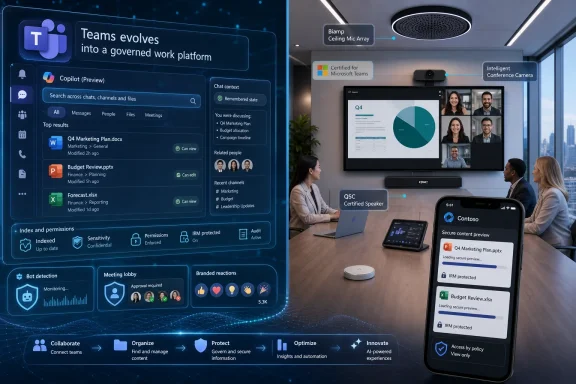
Microsoft’s June 2026 Teams update added Copilot-powered contextual search, richer channel file discovery, faster mobile Office previews, restored chat context, smarter meeting bot controls, branded reactions, Teams Phone AI previews, frontline and platform improvements, and a fresh wave of certified meeting-room hardware. The theme is not novelty for novelty’s sake. Microsoft is trying to turn Teams from a place where work is discussed into the operating surface where work is found, governed, routed, and increasingly automated.
The most important June change is contextual search, because search is where Teams has historically exposed the gap between Microsoft’s collaboration ambitions and the lived experience of using the product all day. Teams contains chats, channels, files, meetings, apps, Loop components, call history, transcripts, and a steady stream of half-remembered decisions. Yet users still often search like detectives, guessing the exact phrase someone used three weeks ago.
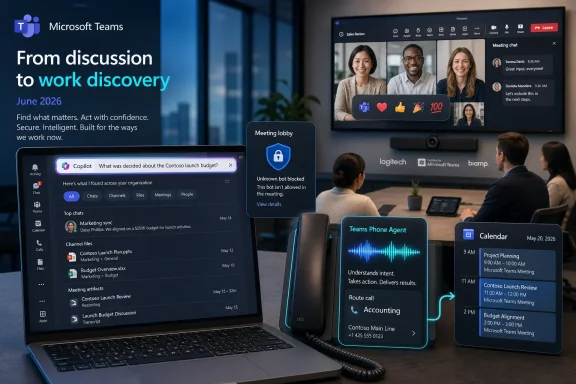
Contextual search in Copilot changes the premise. Instead of relying only on exact keywords, users can ask for what they mean and let Copilot surface relevant Teams content from the search experience itself. That is a small interface change with a much larger implication: Microsoft wants natural language to become the front door to the Microsoft 365 work graph.
The same logic appears in channel search. Microsoft says Teams can now index every file uploaded to a channel, including files added outside messages, while adding filters for file type, sender, and date. That matters because channels are supposed to be durable project spaces, but they frequently degrade into long-running feeds where the canonical document is obvious only to the person who last touched it.
This is the kind of feature that sounds mundane until it saves a team from asking, “Can someone resend the latest deck?” for the hundredth time. Teams does not need more places to put content. It needs fewer moments where content effectively disappears.
That distinction matters. Meeting summaries are useful, but they are episodic. Search is constant. If Copilot becomes the interpreter between a user’s vague memory and the sprawling Teams corpus, it becomes less of a flashy AI feature and more of an ambient productivity layer.
There is also a governance angle hiding under the convenience. When people cannot find things in sanctioned systems, they duplicate documents, forward attachments, create shadow repositories, and move conversations into private chats. Better discovery inside Teams is not just a user-experience improvement; it is a compliance and knowledge-management play.
Still, the burden is on Microsoft to make the experience reliable. Natural-language search that returns plausible but incomplete results can be worse than keyword search, because users may trust the system’s confidence more than its coverage deserves. For IT departments, the question will not be whether Copilot search is clever. It will be whether it is predictable enough to become part of daily operations.
The added ability to open Information Rights Management-protected files in the improved preview experience is equally important. Secure content has historically carried a usability tax. Microsoft is trying to reduce that tax without weakening the underlying controls.
For regulated organizations, that balance is central. A protected spreadsheet that cannot be opened conveniently on mobile will be worked around. A protected spreadsheet that opens quickly inside Teams is more likely to remain inside the managed Microsoft 365 boundary.
The broader story is that Teams mobile is becoming less of a companion app and more of a legitimate work surface. Microsoft cannot claim Teams is the hub for hybrid work if the mobile version remains a place for notifications and emergency replies. File previews are a small but telling step toward parity.
Context switching is not merely annoying. It is expensive. A user who has to reopen a panel, reselect a tab, or reconstruct the view they were using is paying a small tax on every transition. In Teams, where users bounce between chats, meetings, channels, files, and apps, that tax compounds quickly.
The list view for “View more apps” fits the same pattern. Microsoft is admitting, implicitly, that the Teams app surface has become too cluttered for many users. A streamlined list is not a reinvention, but it is an acknowledgment that density and discoverability are now competing priorities.
These are not features that win keynote applause. They are features that make Teams feel less like a web of modal interruptions and more like a coherent desktop application. For a product still living down years of performance complaints and UX churn, that matters.
Microsoft’s new admin policy is designed to identify likely external bots, route them into the lobby as a separate group, and require organizer approval before they enter. The goal is to make bot admission deliberate rather than accidental. That is the right direction, because the Teams meeting lobby was designed around people, not autonomous services acting on behalf of people.
This is also where Microsoft’s platform interests collide. Teams benefits when more AI agents integrate with meetings, calls, and workflows. But enterprise customers need controls that treat those agents as security-relevant participants. Microsoft cannot sell Teams as an AI-native collaboration platform while pretending all automated attendees are harmless.
The coming challenge will be false positives, trusted vendor registration, and user education. If the system blocks too aggressively, meetings will be slowed by admin friction. If it blocks too weakly, organizations will fall back to blanket policies and distrust. The useful middle ground is one where admins can distinguish approved assistants from opportunistic or unknown bots without turning every meeting into an access-control seminar.
For large organizations, branded reactions may actually have a place in town halls, internal campaigns, training sessions, and customer-facing events. They give communications teams a lightweight way to make Teams feel less generic. Whether that improves collaboration is debatable, but it does reinforce Microsoft’s argument that Teams is not just software; it is a venue.
The risk is that Teams becomes over-customized in ways that distract from clarity. Meeting reactions are supposed to be quick, universally understood signals. If every organization fills the reaction tray with campaign graphics and seasonal icons, the feature could become visual noise.
Still, the feature is less important on its own than as part of a trend. Microsoft is steadily giving IT and communications teams more ways to shape the meeting experience. The meeting window is no longer just a video grid. It is a branded, governed, extensible interface.
This is Microsoft’s contact-center ambition distilled into Teams Phone. The company is not just adding AI to internal meetings; it is pushing AI toward the edge of customer and employee service interactions. If Teams Phone can become the place where voice agents are deployed, managed, and governed, Microsoft gains another route into workflows traditionally owned by PBX vendors, contact-center platforms, and specialized automation providers.
Integration with Copilot Studio voice agents is the key strategic link. Organizations can build custom voice agents for specialized processes, then connect those agents to Teams Phone. In theory, that creates a path from low-code automation to real-world call handling.
In practice, this will depend on reliability, latency, escalation quality, and customer tolerance. A voice agent that handles simple scheduling well is valuable. A voice agent that traps callers in a conversational cul-de-sac will damage trust quickly. Microsoft’s opportunity is large, but so is the reputational risk when an AI system becomes the first voice a customer hears.
That is why features like bot detection matter more than their short descriptions suggest. Teams is no longer simply a client app that receives updates. It is infrastructure. Admins need to understand whether a change affects meeting admission, data access, external collaboration, device certification, or user training.
The growing list of Teams-certified hardware also reinforces that Teams has become a room-system platform. June brought certification for new Biamp and Logitech configurations across Teams Rooms on Windows and Android, including ceiling microphones, Rally Bar bundles, MeetUp 2 setups, desk mounts, carts, and huddle-room equipment. This matters for organizations standardizing hybrid meeting rooms, where “works with Teams” is not good enough; certification reduces deployment risk and support ambiguity.
The split between Teams Rooms on Windows and Teams Rooms on Android remains important. Many enterprises now run mixed estates, choosing form factors and management models based on room size, cost, and vendor preference. Microsoft’s steady certification drumbeat keeps Teams central even as the underlying hardware ecosystem diversifies.
That delay can be frustrating, but it is also part of the bargain. Government tenants want modern collaboration, but they need it inside a more controlled boundary. Bringing live meeting indicators to threaded channels in those environments helps close the usability gap without pretending that all clouds move at the same pace.
Threaded channels themselves remain part of Microsoft’s broader attempt to make Teams channels feel less like noisy chat rooms and more like structured collaboration spaces. Live meeting indicators help users see when a channel conversation has moved into a synchronous session. That may seem small, but in large organizations it can prevent parallel confusion: one group chatting in the thread while another is already discussing the issue live.
For public-sector and regulated users, the practical value is straightforward. Better presence around live discussions means fewer missed meetings, fewer duplicated updates, and a clearer sense of where a conversation is happening right now.
Teams suffers from abundance. It contains too many surfaces, too many notification types, too many embedded apps, too many ways for a conversation to become a file, meeting, task, or workflow. Microsoft’s challenge is no longer persuading users that Teams can do more. It is convincing them that Teams can do more without becoming more exhausting.
Grouping muted and meeting chats more intelligently helps users separate signal from noise. Quick Share for images recognizes that lightweight sharing is part of everyday collaboration. Better download visibility and control speaks to both user confidence and admin governance.
These are modest improvements, but they point in the right direction. Teams does not need to win every month with a spectacular new capability. It needs to become less punishing in the ordinary moments when people are just trying to move work forward.
The practical change is that users in an in-room meeting will be able to tap “Take notes” and have Teams generate real-time notes, decisions, and action items without needing to run a hybrid or scheduled Teams meeting. Those notes will be stored in SharePoint and made available within the tenant. Microsoft also plans to bring a similar AI notes experience to Teams Rooms on Android later.
The report also says Microsoft is testing a more proactive version of Facilitator that can detect possible knowledge gaps during a meeting, search the web, and post AI-generated answers into chat. Microsoft is not enabling that behavior by default, and a new Meeting AI toggle will let organizers and participants turn off meeting AI features, though guests will not have that control.
Separately, Teams guest invitation emails are changing: instead of coming from a no-reply address, invitations can be sent from the inviter’s email address. That rollout is already underway and is expected to finish by the end of July 2026. For admins, the bigger takeaway is that Teams’ AI meeting layer is moving from recap and search into live room behavior, which will require clearer tenant policies, user expectations, and SharePoint governance.

 www.windowslatest.com
 Microsoft Is Teaching Teams to Remember Where Work Lives
The most important June change is contextual search, because search is where Teams has historically exposed the gap between Microsoft’s collaboration ambitions and the lived experience of using the product all day. Teams contains chats, channels, files, meetings, apps, Loop components, call history, transcripts, and a steady stream of half-remembered decisions. Yet users still often search like detectives, guessing the exact phrase someone used three weeks ago.Contextual search in Copilot changes the premise. Instead of relying only on exact keywords, users can ask for what they mean and let Copilot surface relevant Teams content from the search experience itself. That is a small interface change with a much larger implication: Microsoft wants natural language to become the front door to the Microsoft 365 work graph.
The same logic appears in channel search. Microsoft says Teams can now index every file uploaded to a channel, including files added outside messages, while adding filters for file type, sender, and date. That matters because channels are supposed to be durable project spaces, but they frequently degrade into long-running feeds where the canonical document is obvious only to the person who last touched it.
This is the kind of feature that sounds mundane until it saves a team from asking, “Can someone resend the latest deck?” for the hundredth time. Teams does not need more places to put content. It needs fewer moments where content effectively disappears.
Copilot Moves From Meeting Trick to Navigation Layer
Microsoft’s Teams strategy has been wrapped in Copilot marketing for years, but June’s update shows a subtler and more useful direction. Copilot is not merely being placed inside meetings to summarize what happened. It is being threaded into the act of finding work before, during, and after collaboration.That distinction matters. Meeting summaries are useful, but they are episodic. Search is constant. If Copilot becomes the interpreter between a user’s vague memory and the sprawling Teams corpus, it becomes less of a flashy AI feature and more of an ambient productivity layer.
There is also a governance angle hiding under the convenience. When people cannot find things in sanctioned systems, they duplicate documents, forward attachments, create shadow repositories, and move conversations into private chats. Better discovery inside Teams is not just a user-experience improvement; it is a compliance and knowledge-management play.
Still, the burden is on Microsoft to make the experience reliable. Natural-language search that returns plausible but incomplete results can be worse than keyword search, because users may trust the system’s confidence more than its coverage deserves. For IT departments, the question will not be whether Copilot search is clever. It will be whether it is predictable enough to become part of daily operations.
The Mobile Client Gets a Practical Fix, Not a Demo Feature
Teams mobile is often where Microsoft’s grand collaboration vision meets weak networks, small screens, and a user trying to open a spreadsheet between meetings. June’s faster PowerPoint and Excel previews are not glamorous, but they address a real point of friction. If a file takes too long to preview, the mobile collaboration workflow collapses into “I’ll look later,” which usually means “I’ll forget.”The added ability to open Information Rights Management-protected files in the improved preview experience is equally important. Secure content has historically carried a usability tax. Microsoft is trying to reduce that tax without weakening the underlying controls.
For regulated organizations, that balance is central. A protected spreadsheet that cannot be opened conveniently on mobile will be worked around. A protected spreadsheet that opens quickly inside Teams is more likely to remain inside the managed Microsoft 365 boundary.
The broader story is that Teams mobile is becoming less of a companion app and more of a legitimate work surface. Microsoft cannot claim Teams is the hub for hybrid work if the mobile version remains a place for notifications and emergency replies. File previews are a small but telling step toward parity.
Teams Finally Notices That Context Is Work
One of June’s most user-friendly updates is context preservation in chats. If a user opens a side panel, changes a layout, moves to another chat, and then returns, Teams can restore the previous state. That sounds like housekeeping, but it touches one of the deepest frustrations in modern productivity software: every app wants to be a workspace, but too many of them forget the workspace the moment you turn away.Context switching is not merely annoying. It is expensive. A user who has to reopen a panel, reselect a tab, or reconstruct the view they were using is paying a small tax on every transition. In Teams, where users bounce between chats, meetings, channels, files, and apps, that tax compounds quickly.
The list view for “View more apps” fits the same pattern. Microsoft is admitting, implicitly, that the Teams app surface has become too cluttered for many users. A streamlined list is not a reinvention, but it is an acknowledgment that density and discoverability are now competing priorities.
These are not features that win keynote applause. They are features that make Teams feel less like a web of modal interruptions and more like a coherent desktop application. For a product still living down years of performance complaints and UX churn, that matters.
Meeting Bots Force Microsoft to Draw a Boundary
The sharper security story in June is bot detection for Teams meetings. AI note-takers and meeting assistants have become common enough that they now represent a governance problem, not merely a novelty. A third-party bot joining a sensitive meeting is not equivalent to another employee joining late.Microsoft’s new admin policy is designed to identify likely external bots, route them into the lobby as a separate group, and require organizer approval before they enter. The goal is to make bot admission deliberate rather than accidental. That is the right direction, because the Teams meeting lobby was designed around people, not autonomous services acting on behalf of people.
This is also where Microsoft’s platform interests collide. Teams benefits when more AI agents integrate with meetings, calls, and workflows. But enterprise customers need controls that treat those agents as security-relevant participants. Microsoft cannot sell Teams as an AI-native collaboration platform while pretending all automated attendees are harmless.
The coming challenge will be false positives, trusted vendor registration, and user education. If the system blocks too aggressively, meetings will be slowed by admin friction. If it blocks too weakly, organizations will fall back to blanket policies and distrust. The useful middle ground is one where admins can distinguish approved assistants from opportunistic or unknown bots without turning every meeting into an access-control seminar.
Branded Reactions Are Fluff With a Platform Message
Branded reactions are the easiest June feature to mock. Allowing organizations to upload custom reaction icons for meetings sounds like a marketing department’s dream and an administrator’s mild headache. But even here, Microsoft is sending a platform message: Teams meetings are becoming programmable corporate spaces.For large organizations, branded reactions may actually have a place in town halls, internal campaigns, training sessions, and customer-facing events. They give communications teams a lightweight way to make Teams feel less generic. Whether that improves collaboration is debatable, but it does reinforce Microsoft’s argument that Teams is not just software; it is a venue.
The risk is that Teams becomes over-customized in ways that distract from clarity. Meeting reactions are supposed to be quick, universally understood signals. If every organization fills the reaction tray with campaign graphics and seasonal icons, the feature could become visual noise.
Still, the feature is less important on its own than as part of a trend. Microsoft is steadily giving IT and communications teams more ways to shape the meeting experience. The meeting window is no longer just a video grid. It is a branded, governed, extensible interface.
Teams Phone Shows Where Microsoft Wants Agents to Answer First
June’s Teams Phone updates point toward a more consequential future than custom emojis. Microsoft is previewing Teams Phone Agent, an AI calling experience that can answer incoming calls for a department or organization, understand what the caller needs, handle common requests, schedule appointments, and route calls when a human is required.This is Microsoft’s contact-center ambition distilled into Teams Phone. The company is not just adding AI to internal meetings; it is pushing AI toward the edge of customer and employee service interactions. If Teams Phone can become the place where voice agents are deployed, managed, and governed, Microsoft gains another route into workflows traditionally owned by PBX vendors, contact-center platforms, and specialized automation providers.
Integration with Copilot Studio voice agents is the key strategic link. Organizations can build custom voice agents for specialized processes, then connect those agents to Teams Phone. In theory, that creates a path from low-code automation to real-world call handling.
In practice, this will depend on reliability, latency, escalation quality, and customer tolerance. A voice agent that handles simple scheduling well is valuable. A voice agent that traps callers in a conversational cul-de-sac will damage trust quickly. Microsoft’s opportunity is large, but so is the reputational risk when an AI system becomes the first voice a customer hears.
The Admin Story Is Bigger Than the User Changelog
The user-facing June roundup is only half the story. For administrators, Teams is increasingly a policy engine, a hardware estate, a phone system, a frontline worker platform, and an AI governance surface. Every new feature comes with an operational question: who gets it, who controls it, how is it audited, and what breaks when it rolls out?That is why features like bot detection matter more than their short descriptions suggest. Teams is no longer simply a client app that receives updates. It is infrastructure. Admins need to understand whether a change affects meeting admission, data access, external collaboration, device certification, or user training.
The growing list of Teams-certified hardware also reinforces that Teams has become a room-system platform. June brought certification for new Biamp and Logitech configurations across Teams Rooms on Windows and Android, including ceiling microphones, Rally Bar bundles, MeetUp 2 setups, desk mounts, carts, and huddle-room equipment. This matters for organizations standardizing hybrid meeting rooms, where “works with Teams” is not good enough; certification reduces deployment risk and support ambiguity.
The split between Teams Rooms on Windows and Teams Rooms on Android remains important. Many enterprises now run mixed estates, choosing form factors and management models based on room size, cost, and vendor preference. Microsoft’s steady certification drumbeat keeps Teams central even as the underlying hardware ecosystem diversifies.
Government Clouds Get the Same Collaboration Pressure
The live meeting indicator for threaded channels in government clouds is a reminder that Microsoft’s cloud segmentation creates staggered realities. Commercial tenants often see collaboration features first. Government cloud customers receive them later, after additional compliance and deployment requirements are satisfied.That delay can be frustrating, but it is also part of the bargain. Government tenants want modern collaboration, but they need it inside a more controlled boundary. Bringing live meeting indicators to threaded channels in those environments helps close the usability gap without pretending that all clouds move at the same pace.
Threaded channels themselves remain part of Microsoft’s broader attempt to make Teams channels feel less like noisy chat rooms and more like structured collaboration spaces. Live meeting indicators help users see when a channel conversation has moved into a synchronous session. That may seem small, but in large organizations it can prevent parallel confusion: one group chatting in the thread while another is already discussing the issue live.
For public-sector and regulated users, the practical value is straightforward. Better presence around live discussions means fewer missed meetings, fewer duplicated updates, and a clearer sense of where a conversation is happening right now.
The Smallest Features Reveal the Product’s Biggest Problem
Improved grouping of muted and meeting chats, Quick Share for images, and enhanced visibility and control over downloads are not headline features. They are cleanup work. But cleanup work is exactly what Teams needs.Teams suffers from abundance. It contains too many surfaces, too many notification types, too many embedded apps, too many ways for a conversation to become a file, meeting, task, or workflow. Microsoft’s challenge is no longer persuading users that Teams can do more. It is convincing them that Teams can do more without becoming more exhausting.
Grouping muted and meeting chats more intelligently helps users separate signal from noise. Quick Share for images recognizes that lightweight sharing is part of everyday collaboration. Better download visibility and control speaks to both user confidence and admin governance.
These are modest improvements, but they point in the right direction. Teams does not need to win every month with a spectacular new capability. It needs to become less punishing in the ordinary moments when people are just trying to move work forward.
June’s Teams Drop Is Really a Search, Security, and AI Governance Release
Microsoft’s June 2026 Teams update looks like a broad feature roundup, but the center of gravity is clear: Teams is being reshaped around AI-assisted discovery, controlled automation, and a more persistent sense of user context. The most concrete takeaways are the ones administrators and power users should test before they become assumptions.- Contextual search in Copilot makes natural language a more central way to find Teams content, but organizations should validate result quality before treating it as a replacement for disciplined information architecture.
- Channel file search is becoming more useful because Teams now indexes more channel files and adds filters that reduce the need to manually scroll or ask colleagues to resend documents.
- Faster PowerPoint and Excel previews on mobile, including support for IRM-protected files, should reduce the usability penalty for secure content.
- Meeting bot detection gives admins a needed control point as external AI note-takers and assistants become routine participants in collaboration workflows.
- Teams Phone Agent and Copilot Studio voice-agent integration show Microsoft pushing Teams deeper into customer-facing and departmental call handling.
- The new certified Biamp and Logitech hardware reinforces Teams Rooms as a mature deployment platform rather than a loose collection of compatible devices.
Update: Teams Rooms will add AI notes for in-person meetings (July 7, 2026)
Windows Latest reports that Microsoft is preparing a follow-up Teams update that expands AI Facilitator beyond standard Teams meetings into physical meetings on Teams Rooms on Windows. The feature is expected to begin rolling out in August, with broader availability targeted for October 2026.The practical change is that users in an in-room meeting will be able to tap “Take notes” and have Teams generate real-time notes, decisions, and action items without needing to run a hybrid or scheduled Teams meeting. Those notes will be stored in SharePoint and made available within the tenant. Microsoft also plans to bring a similar AI notes experience to Teams Rooms on Android later.
The report also says Microsoft is testing a more proactive version of Facilitator that can detect possible knowledge gaps during a meeting, search the web, and post AI-generated answers into chat. Microsoft is not enabling that behavior by default, and a new Meeting AI toggle will let organizers and participants turn off meeting AI features, though guests will not have that control.
Separately, Teams guest invitation emails are changing: instead of coming from a no-reply address, invitations can be sent from the inviter’s email address. That rollout is already underway and is expected to finish by the end of July 2026. For admins, the bigger takeaway is that Teams’ AI meeting layer is moving from recap and search into live room behavior, which will require clearer tenant policies, user expectations, and SharePoint governance.
Microsoft Teams' big update brings AI notes to physical meetings, chat sections, and more
Microsoft shipped a major release for Teams in June 2026, but a bigger update is on the way and will roll out in the coming weeks.
www.windowslatest.com
References
- Primary source: Neowin
Published: 2026-07-01T11:12:11.788850
Here are all the new features Microsoft added to Teams in June 2026 | Neowin
If you use Microsoft Teams daily, you'll want to catch up on all the features and improvements added in June. www.neowin.net
- Official source: techcommunity.microsoft.com
- Official source: support.microsoft.com
Novità in Microsoft Teams | Microsoft Support
Queste note di rilascio vengono aggiornate regolarmente con le informazioni più recenti sulle nuove funzionalità per Microsoft Teams.support.microsoft.com - Official source: learn.microsoft.com
Release Notes for Microsoft 365 Copilot | Microsoft Learn
Lists the features that reach General Availability in each release of Microsoft 365 Copilot.learn.microsoft.com - Related coverage: it.osu.edu
Upcoming Microsoft Updates: Key Changes to Teams, Planner, and Core Apps | Office of Technology and Digital Innovation
Microsoft updates rolling out over the coming months focus on streamlining collaboration in Teams, enhancing project coordination with Planner, and modernizingit.osu.edu - Related coverage: uctoday.com
Teams to Block External AI Bots - UC Today
Microsoft Teams will let admins automatically block all detected external AI bots from meetings, with rollout starting August 2026www.uctoday.com
- Related coverage: techriver.com
- Related coverage: content.focusgroup.co.uk
Last edited: