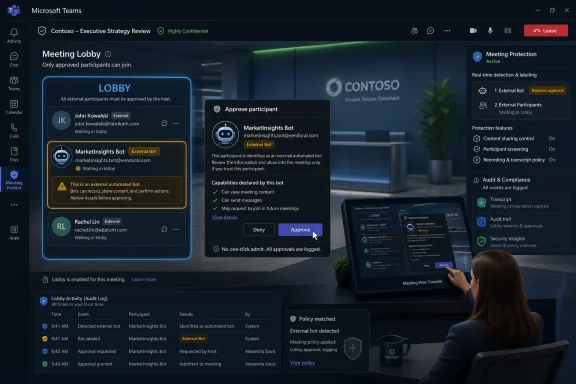
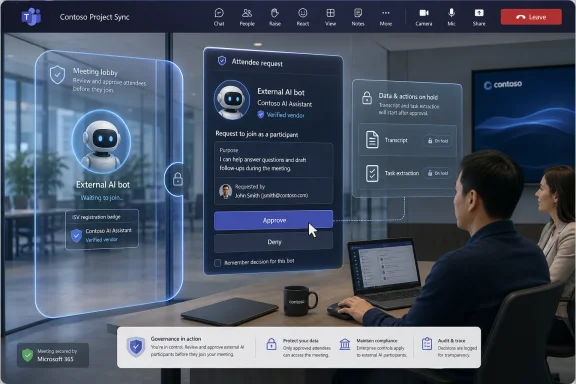
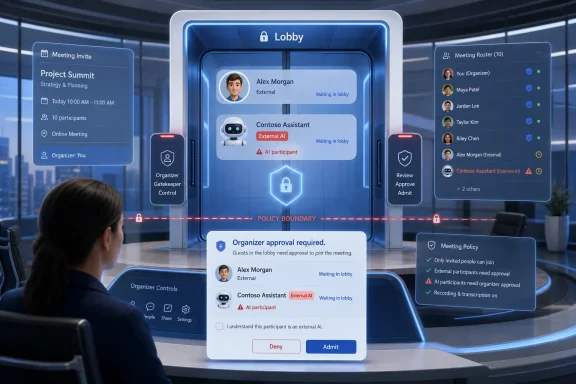
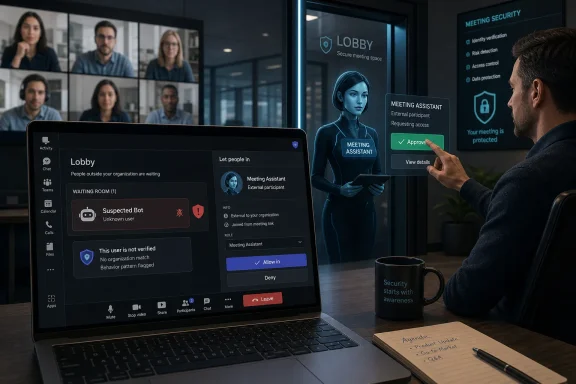
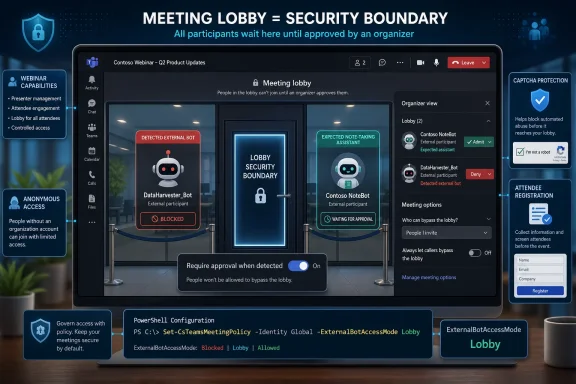
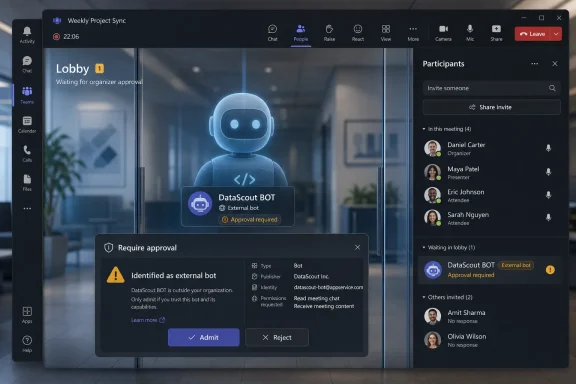
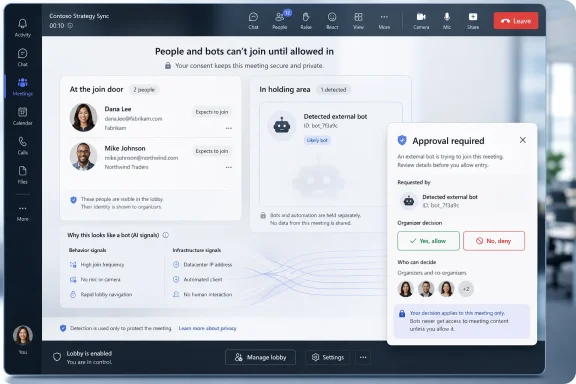
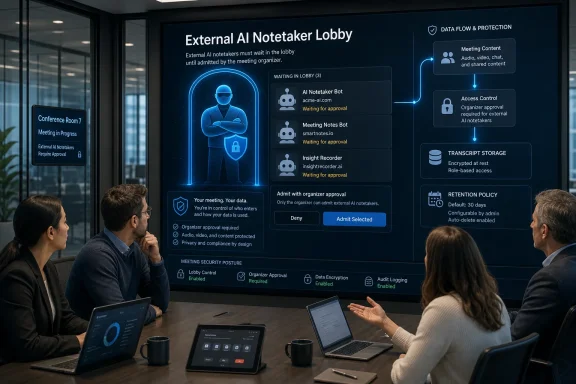
Microsoft Teams is rolling out an admin-controlled external bot detection system in 2026 that routes suspected third-party meeting bots into the lobby, requires explicit organizer approval, and begins replacing CAPTCHA-based join verification across Teams meetings. The change is not just another Teams security toggle; it is Microsoft acknowledging that AI meeting assistants have become a governance problem hiding in plain sight. The company is trying to make the bot visible before the transcript exists, before the recording leaves the tenant, and before the meeting owner realizes that “someone” in the participant list was not a person at all.
For years, collaboration security has centered on the human attendee: the guest, the anonymous joiner, the federated user, the dial-in participant, the person who should or should not bypass the lobby. AI note-takers have complicated that model because they often arrive dressed as participants while behaving like data collection infrastructure.
That distinction matters. A human guest can remember sensitive information, but a bot can record it, transcribe it, summarize it, store it, process it with another vendor’s AI stack, and potentially retain it under terms the meeting organizer never reviewed. In compliance language, that is a data boundary problem. In ordinary office language, it is the awkward moment when a vendor’s note-taking bot has been quietly sitting through a legal, finance, HR, incident-response, or product strategy call.
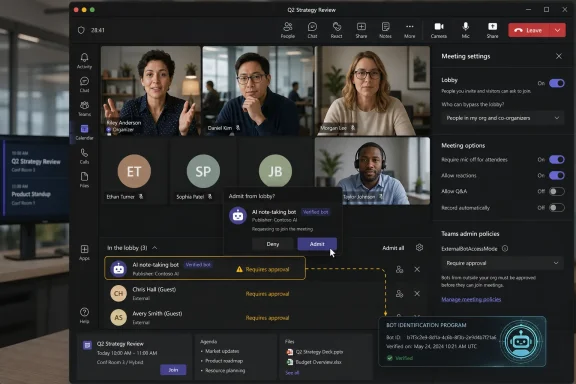
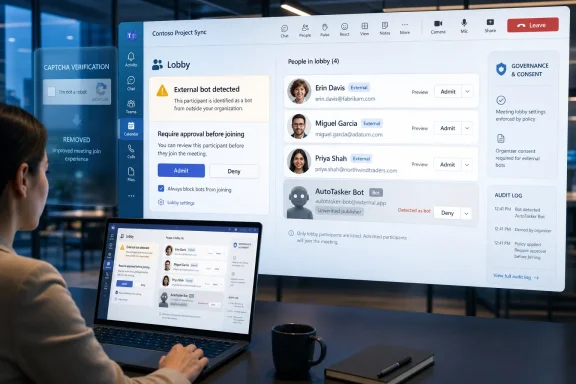
Microsoft’s new Teams policy, called “Manage external bots and their access to meetings,” gives administrators a native way to intervene at the join stage. The default behavior is “When detected, require approval before joining,” which places detected external bots in the lobby until an organizer or co-organizer explicitly admits them. Admins can also disable the detection experience, though Microsoft’s own framing makes clear which setting it considers safer.
The move marks a subtle but important shift in Teams governance. Rather than asking every organizer to inspect every unfamiliar attendee name, Microsoft is adding a classification layer that says, in effect, this participant may not be a participant. That does not solve every risk, but it changes the admission decision from guesswork into a deliberate act.
That makes CAPTCHA an increasingly poor fit. If the bot’s operator has calendar access, an invitation, or a workflow that submits it as an attendee, a CAPTCHA challenge becomes friction rather than governance. Worse, it risks giving organizations a false sense of control: a meeting may feel protected because a verification wall exists, while the real question is whether a third-party assistant should be present at all.
The new Teams approach moves from generic challenge-response verification toward contextual bot detection. Microsoft says Teams can use infrastructure signals during the join process to distinguish between humans and external bots. The company has not publicly turned that into a neat checklist, and it probably should not; once detection criteria become predictable, bot vendors and bad actors can optimize around them.
This is where the policy becomes more interesting than the feature name suggests. Microsoft is not saying all bots are bad. It is saying that bots are a class of attendee that needs different handling. That is a more mature position than either banning AI assistants outright or pretending they are just another guest account.
Microsoft is also tightening the surrounding controls to reduce accidental approvals. Teams will avoid a one-click admit path for identified bots, show confirmation prompts when admitted participants include bots, and warn organizers when “Admit all” would sweep a bot into the meeting. These are small interface decisions with large consequences.
The most important design choice is friction. Enterprise software often treats friction as the enemy, but security sometimes depends on putting a pause in front of the dangerous click. If a bot is legitimate, the organizer can still admit it. If it is unexpected, mislabeled, or unwanted, the lobby becomes the moment where the meeting owner can stop data from leaving before the discussion begins.
Microsoft is also recommending that only organizers and co-organizers manage access to meetings. That advice is practical, not cosmetic. If any presenter can admit lobby participants, then the weakest link is not the policy but the hurried person who clicks “Admit all” while joining late from a phone.
But the enterprise cost is also obvious. Meeting content is often more sensitive than email because people speak before they sanitize. They discuss customers, personnel, budgets, acquisitions, security incidents, product defects, legal exposure, and internal disagreements. When a bot captures that stream, the organization has to know where the data goes, who can access it, how long it is retained, and whether it can be used to train or improve models.
This is why the most serious Teams administrators will read Microsoft’s bot admission controls as a compliance feature, not just a meeting convenience. The question is not whether AI note-taking is good or bad. The question is who authorized it, under which policy, for which meetings, with which retention and audit guarantees.
Microsoft’s own roadmap points in that direction. The company says future capabilities may include allow-lists, organization-wide policies, admin reports, audit logs, and more granular controls. Those are the features that turn a clever lobby warning into a real governance system.
But “known” must not become a synonym for “safe.” A registered bot can still be inappropriate for a particular meeting. A trusted vendor can still be misconfigured. A sanctioned AI assistant can still create data residency, retention, legal discovery, or confidentiality issues if used in the wrong context.
The strongest version of this model would let administrators define not only which bots are allowed, but where they are allowed. A sales call may permit an approved note-taker. An internal security incident bridge may not. A board meeting may require a different policy from a weekly engineering stand-up. A meeting with external counsel may need stricter controls than a customer webinar.
This is where Microsoft’s future allow-list and audit-log work becomes essential. Visibility at join time is useful, but policy at scale requires evidence after the fact. Admins need to know which bots attempted to join, which were admitted, by whom, into what meeting, and under which policy.
That is also the politically easier path. Completely blocking external meeting bots would anger users who have already built workflows around AI assistants. Turning detection off would be reckless in organizations that handle regulated or confidential information. Requiring explicit approval threads the needle: Microsoft can support AI productivity while making the meeting owner visibly accountable for admitting the agent.
For sysadmins, the immediate work is less glamorous. They need to review Teams meeting policies, decide which users or groups should receive stricter handling, and revisit lobby permissions. They also need to communicate the change to organizers before the first executive sees a bot waiting in the lobby and assumes Teams is malfunctioning.
The hardest part will be policy consistency. If one department welcomes any note-taker and another bans them, users will route around restrictions through calendar forwarding, external meeting platforms, or personal productivity tools. The technology can identify some bots, but governance still has to explain which bots belong in which rooms.
Traditional meeting norms are built around visible participants. If a person joins, you can see their name, challenge them, remove them, or ask why they are present. Bots blur that because their purpose may be defined outside the meeting, by the person who connected the assistant, by the vendor that runs it, or by an automation that adds it whenever a calendar invite appears.
That makes admission control a consent mechanism. The organizer’s explicit approval is not just a security click; it is a declaration that this meeting may be processed by a non-human service. If Microsoft implements the rest of its roadmap well, that declaration can become auditable.
There is still a gap, though. Meeting participants also deserve clarity. A bot admitted by the organizer may still surprise attendees who did not expect recording, transcription, or third-party processing. Teams already has meeting recording and transcription notices, but the broader AI assistant ecosystem will need more consistent disclosure if organizations want trust rather than quiet resentment.
External bots entering as participants are different from native Microsoft 365 AI features governed through tenant controls and Microsoft’s compliance boundary. That distinction is real. It is also commercially convenient for Microsoft, which would prefer customers to use AI inside the Microsoft 365 stack rather than through a parade of third-party meeting assistants.
For administrators, the right response is not cynicism but scrutiny. If Copilot or another Microsoft-native feature processes meeting content, it still needs policy, licensing review, retention understanding, and user education. The fact that an AI assistant is first-party does not magically make every meeting suitable for AI capture.
The larger trend is clear: collaboration platforms are becoming AI control planes. The meeting app is no longer just a place where audio, video, and chat converge. It is becoming the enforcement point for which machine agents may observe, summarize, and remember organizational work.
This also raises the stakes for configuration drift. A permissive lobby policy that felt reasonable in 2021 may look careless in 2026. The old assumption was that letting people join quickly improved collaboration. The new risk is that the same convenience lets automated observers enter conversations they should never hear.
Admins should expect this area to become more complicated, not less. Bot categorization into trusted and suspected threat buckets will help, but categories require maintenance. Vendor registration will help, but only if organizations decide which registered vendors align with their contracts and risk posture. Audit logs will help, but only if someone actually reviews them.
The best Teams environments will pair the new controls with meeting classification. Highly sensitive meetings should have stricter defaults than casual collaboration. External-facing meetings should have clear rules about AI assistants. Recurring meetings that handle confidential topics should not rely on the host noticing an odd participant name while presenting slides.
Security often fails when the risky thing looks ordinary. A bot that appears like another attendee can benefit from the chaos of modern meetings: late arrivals, overlapping chats, screen sharing, multitasking, and the reflexive click on “Admit.” Labeling the bot interrupts that pattern.
That interruption is valuable even when the bot is benign. It reminds the organizer that an AI system is entering the conversation. It reminds the business that meeting data has become portable, processable, and valuable. It reminds vendors that stealthy admission will become harder to justify as platforms build native detection.
The next battle will be over false positives and false negatives. A legitimate assistant mistakenly flagged as suspicious will frustrate users. A clever bot that evades detection will create a sense of betrayal. Microsoft’s challenge is to make the system cautious without making every meeting feel like airport security.
 Microsoft Finally Treats the Meeting Bot as a Security Principal
For years, collaboration security has centered on the human attendee: the guest, the anonymous joiner, the federated user, the dial-in participant, the person who should or should not bypass the lobby. AI note-takers have complicated that model because they often arrive dressed as participants while behaving like data collection infrastructure.That distinction matters. A human guest can remember sensitive information, but a bot can record it, transcribe it, summarize it, store it, process it with another vendor’s AI stack, and potentially retain it under terms the meeting organizer never reviewed. In compliance language, that is a data boundary problem. In ordinary office language, it is the awkward moment when a vendor’s note-taking bot has been quietly sitting through a legal, finance, HR, incident-response, or product strategy call.
Microsoft’s new Teams policy, called “Manage external bots and their access to meetings,” gives administrators a native way to intervene at the join stage. The default behavior is “When detected, require approval before joining,” which places detected external bots in the lobby until an organizer or co-organizer explicitly admits them. Admins can also disable the detection experience, though Microsoft’s own framing makes clear which setting it considers safer.
The move marks a subtle but important shift in Teams governance. Rather than asking every organizer to inspect every unfamiliar attendee name, Microsoft is adding a classification layer that says, in effect, this participant may not be a participant. That does not solve every risk, but it changes the admission decision from guesswork into a deliberate act.
CAPTCHA Was a Speed Bump, Not a Bot Strategy
Microsoft’s retirement of CAPTCHA verification for Teams meeting joins is the tell. CAPTCHA was designed for an older problem: stopping automated abuse by forcing a user-like challenge before entry. But the new wave of meeting bots is not necessarily trying to spam a public link or flood a meeting with junk traffic. It is often attempting to join a legitimate meeting with a plausible business purpose.That makes CAPTCHA an increasingly poor fit. If the bot’s operator has calendar access, an invitation, or a workflow that submits it as an attendee, a CAPTCHA challenge becomes friction rather than governance. Worse, it risks giving organizations a false sense of control: a meeting may feel protected because a verification wall exists, while the real question is whether a third-party assistant should be present at all.
The new Teams approach moves from generic challenge-response verification toward contextual bot detection. Microsoft says Teams can use infrastructure signals during the join process to distinguish between humans and external bots. The company has not publicly turned that into a neat checklist, and it probably should not; once detection criteria become predictable, bot vendors and bad actors can optimize around them.
This is where the policy becomes more interesting than the feature name suggests. Microsoft is not saying all bots are bad. It is saying that bots are a class of attendee that needs different handling. That is a more mature position than either banning AI assistants outright or pretending they are just another guest account.
The Organizer Becomes the Last Human Firewall
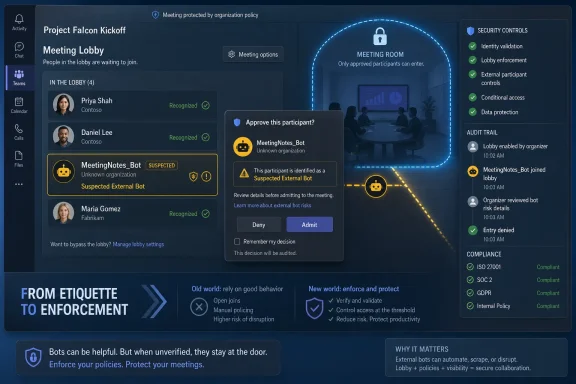
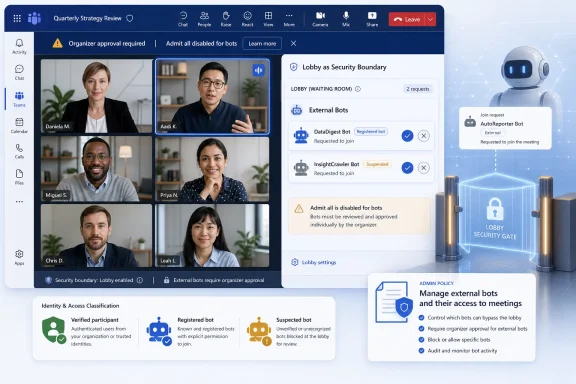
The default flow places detected bots in the lobby and asks the organizer to approve them. That sounds simple, but it changes the meeting host’s job. The organizer is no longer just managing who gets to speak or present; they are deciding whether a third-party data-processing agent can enter the room.Microsoft is also tightening the surrounding controls to reduce accidental approvals. Teams will avoid a one-click admit path for identified bots, show confirmation prompts when admitted participants include bots, and warn organizers when “Admit all” would sweep a bot into the meeting. These are small interface decisions with large consequences.
The most important design choice is friction. Enterprise software often treats friction as the enemy, but security sometimes depends on putting a pause in front of the dangerous click. If a bot is legitimate, the organizer can still admit it. If it is unexpected, mislabeled, or unwanted, the lobby becomes the moment where the meeting owner can stop data from leaving before the discussion begins.
Microsoft is also recommending that only organizers and co-organizers manage access to meetings. That advice is practical, not cosmetic. If any presenter can admit lobby participants, then the weakest link is not the policy but the hurried person who clicks “Admit all” while joining late from a phone.
The Bot Economy Has Outgrown Meeting Etiquette
The rise of AI meeting assistants has been unusually fast because the value proposition is obvious. Nobody wants to take minutes. Nobody wants to search a one-hour recording for the 90 seconds where the decision was made. Summaries, action items, transcripts, and searchable memory are genuinely useful.But the enterprise cost is also obvious. Meeting content is often more sensitive than email because people speak before they sanitize. They discuss customers, personnel, budgets, acquisitions, security incidents, product defects, legal exposure, and internal disagreements. When a bot captures that stream, the organization has to know where the data goes, who can access it, how long it is retained, and whether it can be used to train or improve models.
This is why the most serious Teams administrators will read Microsoft’s bot admission controls as a compliance feature, not just a meeting convenience. The question is not whether AI note-taking is good or bad. The question is who authorized it, under which policy, for which meetings, with which retention and audit guarantees.
Microsoft’s own roadmap points in that direction. The company says future capabilities may include allow-lists, organization-wide policies, admin reports, audit logs, and more granular controls. Those are the features that turn a clever lobby warning into a real governance system.
Known Bots Are Coming, and That Will Create a New Trust Layer
Microsoft also plans to trial a registration experience for independent software vendors, allowing bots to be registered with Microsoft and marked as known. On paper, this is the logical next step. If Teams can distinguish a registered, accountable service from a suspicious or unknown participant, organizers can make faster and better decisions.But “known” must not become a synonym for “safe.” A registered bot can still be inappropriate for a particular meeting. A trusted vendor can still be misconfigured. A sanctioned AI assistant can still create data residency, retention, legal discovery, or confidentiality issues if used in the wrong context.
The strongest version of this model would let administrators define not only which bots are allowed, but where they are allowed. A sales call may permit an approved note-taker. An internal security incident bridge may not. A board meeting may require a different policy from a weekly engineering stand-up. A meeting with external counsel may need stricter controls than a customer webinar.
This is where Microsoft’s future allow-list and audit-log work becomes essential. Visibility at join time is useful, but policy at scale requires evidence after the fact. Admins need to know which bots attempted to join, which were admitted, by whom, into what meeting, and under which policy.
Enterprise IT Gets Another Default to Defend
The default setting matters because most organizations live with defaults longer than they care to admit. Microsoft choosing “require approval when detected” as the baseline is therefore meaningful. It nudges tenants toward caution without requiring a full bot blockade.That is also the politically easier path. Completely blocking external meeting bots would anger users who have already built workflows around AI assistants. Turning detection off would be reckless in organizations that handle regulated or confidential information. Requiring explicit approval threads the needle: Microsoft can support AI productivity while making the meeting owner visibly accountable for admitting the agent.
For sysadmins, the immediate work is less glamorous. They need to review Teams meeting policies, decide which users or groups should receive stricter handling, and revisit lobby permissions. They also need to communicate the change to organizers before the first executive sees a bot waiting in the lobby and assumes Teams is malfunctioning.
The hardest part will be policy consistency. If one department welcomes any note-taker and another bans them, users will route around restrictions through calendar forwarding, external meeting platforms, or personal productivity tools. The technology can identify some bots, but governance still has to explain which bots belong in which rooms.
The Sneaky Bot Problem Is Really a Consent Problem
Microsoft’s language around organizer awareness and consent is doing a lot of work. The core issue is not merely that a bot can join. It is that a bot can join without the people in the meeting understanding what has changed about the privacy of the conversation.Traditional meeting norms are built around visible participants. If a person joins, you can see their name, challenge them, remove them, or ask why they are present. Bots blur that because their purpose may be defined outside the meeting, by the person who connected the assistant, by the vendor that runs it, or by an automation that adds it whenever a calendar invite appears.
That makes admission control a consent mechanism. The organizer’s explicit approval is not just a security click; it is a declaration that this meeting may be processed by a non-human service. If Microsoft implements the rest of its roadmap well, that declaration can become auditable.
There is still a gap, though. Meeting participants also deserve clarity. A bot admitted by the organizer may still surprise attendees who did not expect recording, transcription, or third-party processing. Teams already has meeting recording and transcription notices, but the broader AI assistant ecosystem will need more consistent disclosure if organizations want trust rather than quiet resentment.
Microsoft Is Drawing a Boundary Around Its Own AI Ambitions
There is an unavoidable strategic layer here. Microsoft is both policing external AI meeting bots and pushing its own AI experiences deeper into Teams through Copilot, intelligent recap, facilitators, summaries, and related features. That does not make the bot detection work illegitimate, but it does mean customers should read the policy with clear eyes.External bots entering as participants are different from native Microsoft 365 AI features governed through tenant controls and Microsoft’s compliance boundary. That distinction is real. It is also commercially convenient for Microsoft, which would prefer customers to use AI inside the Microsoft 365 stack rather than through a parade of third-party meeting assistants.
For administrators, the right response is not cynicism but scrutiny. If Copilot or another Microsoft-native feature processes meeting content, it still needs policy, licensing review, retention understanding, and user education. The fact that an AI assistant is first-party does not magically make every meeting suitable for AI capture.
The larger trend is clear: collaboration platforms are becoming AI control planes. The meeting app is no longer just a place where audio, video, and chat converge. It is becoming the enforcement point for which machine agents may observe, summarize, and remember organizational work.
The Admin Console Is Becoming the New Meeting Door
Teams has long had a lobby, but the lobby was originally about people. The new bot policy turns it into something closer to a security gateway. That is a more accurate model for modern meetings, where some participants are accounts, some are guests, some are rooms, some are dial-in lines, and some are software agents.This also raises the stakes for configuration drift. A permissive lobby policy that felt reasonable in 2021 may look careless in 2026. The old assumption was that letting people join quickly improved collaboration. The new risk is that the same convenience lets automated observers enter conversations they should never hear.
Admins should expect this area to become more complicated, not less. Bot categorization into trusted and suspected threat buckets will help, but categories require maintenance. Vendor registration will help, but only if organizations decide which registered vendors align with their contracts and risk posture. Audit logs will help, but only if someone actually reviews them.
The best Teams environments will pair the new controls with meeting classification. Highly sensitive meetings should have stricter defaults than casual collaboration. External-facing meetings should have clear rules about AI assistants. Recurring meetings that handle confidential topics should not rely on the host noticing an odd participant name while presenting slides.
The Real Win Is Making Automation Socially Visible
The most promising part of Microsoft’s move is not that Teams can detect every bot. It cannot, and Microsoft is unlikely to claim otherwise. The real win is that Teams is making automation socially visible inside the meeting workflow.Security often fails when the risky thing looks ordinary. A bot that appears like another attendee can benefit from the chaos of modern meetings: late arrivals, overlapping chats, screen sharing, multitasking, and the reflexive click on “Admit.” Labeling the bot interrupts that pattern.
That interruption is valuable even when the bot is benign. It reminds the organizer that an AI system is entering the conversation. It reminds the business that meeting data has become portable, processable, and valuable. It reminds vendors that stealthy admission will become harder to justify as platforms build native detection.
The next battle will be over false positives and false negatives. A legitimate assistant mistakenly flagged as suspicious will frustrate users. A clever bot that evades detection will create a sense of betrayal. Microsoft’s challenge is to make the system cautious without making every meeting feel like airport security.
The Controls That Matter Before the Bots Knock
This rollout gives Windows and Microsoft 365 administrators a useful new lever, but it is not a substitute for policy discipline. The organizations that benefit most will be the ones that treat bot admission as part of a broader meeting data strategy, not as a single checkbox in the Teams admin center.- Organizations should leave the default approval requirement enabled unless they have a documented reason to disable bot detection.
- Meeting access should be limited so that organizers and co-organizers, not every presenter, control whether detected bots enter the room.
- Approved AI meeting assistants should be mapped to business use cases, data retention expectations, and vendor risk reviews before users normalize them.
- Sensitive recurring meetings should be reviewed because they are often where accidental bot admission becomes routine rather than exceptional.
- Admins should prepare users for bot labels, lobby prompts, and warnings so that the new controls are understood as protection rather than Teams behaving strangely.
- Future allow-lists, audit logs, reports, and organization-wide controls should be treated as core governance features, not optional polish.
References
- Primary source: Neowin
Published: 2026-06-29T18:42:10.395476
Microsoft Teams gets smarter at spotting sneaky meeting bots - Neowin
Microsoft is changing how bots join Teams meetings, adding new protections that could prevent unwanted AI assistants from slipping in. www.neowin.net
- Official source: learn.microsoft.com
Manage external bots and their access to meetings hosted in your organization - Microsoft Teams | Microsoft Learn
Learn how to configure the access that external bots get to Teams meetings hosted in your organizationlearn.microsoft.com - Official source: support.microsoft.com
Using the lobby in Microsoft Teams meetings | Microsoft Support
In Teams, the meeting lobby keeps participants from joining a meeting until they’re admitted by an organizer, co-organizer, or presenter. When people are in the lobby, organizers, co-organizers, and presenters are notified and can choose when to admit them to the meeting.support.microsoft.com - Related coverage: blog-en.topedia.com
Meeting Bot Detection in Microsoft Teams | Topedia Blog
Microsoft is rolling out bot detection for Teams Meetings, requiring an additional approval step before external meeting assistant bots can be admitted from the lobby. Administrators can configure a new policy setting to control bot access tenant-wide, including blocking detected bots entirely.blog-en.topedia.com - Official source: techcommunity.microsoft.com
- Related coverage: northernstar.co.uk
Securing Your Microsoft Teams Meetings Against External AI Bots - Northern Star
Microsoft Teams is rolling out native detection for external AI meeting bots across commercial and GCC tenants in June 2026. If your business has not made a clear policy decision about what should happen when an external AI notetaker tries to join one of your meetings, now is the time to make...northernstar.co.uk
- Related coverage: windowscentral.com
Microsoft Teams will block unwanted bots from meetings | Windows Central
That silent "AI Assistant" in the corner isn't always a company tool. Microsoft is finally giving you a way to lock the door on data-scraping hitchhikers.www.windowscentral.com - Related coverage: techriver.com