

Microsoft has launched a worldwide, web-based approval flow that lets employees request Microsoft-built Frontier agents blocked by organizational policy. Those agents appear in Agent Store, and administrators can approve or reject requests in the Microsoft 365 admin center under Copilot Control System > agents & connectors. Roadmap ID 494809 lists General Availability in July 2026 for Worldwide Standard Multi-Tenant customers. The practical change is straightforward: a blocked agent is no longer necessarily a dead end, but each organization still needs a clear process for reviewing the request and communicating its decision.
That is a useful but deliberately narrow change. Agent Store visibility means an employee can discover that an agent exists; it does not mean the organization has approved that agent for use. Likewise, submitting a request does not create an entitlement, establish business need, or demonstrate that the agent is suitable for the requester’s work.
The approval flow gives administrators a decision point rather than a complete decision method. The mechanical action occurs in the Microsoft 365 admin center, but the basis for approving or rejecting a request remains organization-specific. Depending on internal requirements, a reviewer may need to understand the requester’s purpose, identify the responsible business owner, consult an existing policy authority, or determine who will handle questions after access is approved.
General Availability should therefore be read as availability of the described request-and-decision workflow for the stated platform and cloud environment. It should not be treated as a declaration that every Frontier agent is appropriate for every tenant, department, user population, or business purpose. The fact that an agent is Microsoft-built and appears in Agent Store does not replace an organization’s own review or policy judgment.
The workflow may provide operational benefits when it replaces informal messages or generic support requests with a recognizable administrative process. Those benefits are possible outcomes, however, not guaranteed product effects. Whether the feature produces faster, more consistent decisions will depend on whether someone monitors requests, applies a usable policy, and communicates the result.
A workable internal review can begin with four questions:
Administrators should also separate decision authority from control operation. In a small tenant, the same person may evaluate the request and select Approve or Reject. In a larger organization, an administrator may operate the control only after a business, security, privacy, legal, or compliance owner provides the relevant policy judgment. The operating model should identify both responsibilities without implying that the product automatically routes requests between them.
Response targets can make the procedure more credible, but they should remain realistic. An organization might establish a target for acknowledging requests and a separate target for completing straightforward decisions. Requests requiring consultation may take longer. The roadmap does not promise service-level tracking, so any target is an internal commitment that the designated queue owner must monitor through available organizational processes.
If similar requests recur, administrators may choose to document a standard position so reviewers do not repeatedly reconstruct the same decision. Repeated demand may justify a broader policy review, but it should not create automatic approval. It can indicate a legitimate shared business need, a misunderstanding about the agent, or insufficient communication about an existing restriction. Unless Microsoft separately provides reporting capabilities, identifying such patterns may require proportionate internal recordkeeping.
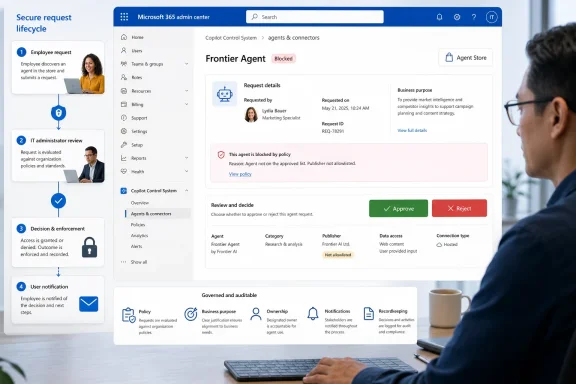 What Changed, Where to Manage It, and What Admins Should Do Now
- What changed: A user can request a Microsoft-built Frontier agent shown in Agent Store when organizational policy blocks it.
- Where administrators manage requests: Microsoft 365 admin center > Copilot Control System > agents & connectors.
- What administrators can do: Approve or reject the request.
- What administrators should do now: Assign a queue owner, establish a response target, and define the minimum business context needed to make a decision.
Roadmap ID 494809: Compact Fact Box
| Item | Verified detail |
|---|---|
| Roadmap ID | 494809 |
| Status | Launched |
| General Availability | July 2026 |
| Platform | Web |
| Cloud environment | Worldwide Standard Multi-Tenant |
| Agent scope | Microsoft-built Frontier agents appearing in Agent Store |
| User action | Request an agent blocked by organizational policy |
| Management location | Microsoft 365 admin center > Copilot Control System > agents & connectors |
| Administrative action | Approve or reject the request |
A Policy Block Can Now Become an Administrative Decision
Enterprise access policies frequently produce a binary user experience: a service is available, or policy blocks it. Roadmap ID 494809 adds a defined request capability for the Microsoft-built Frontier agents covered by the entry. Users can express interest in a blocked agent, while administrators retain authority over whether the request is approved or rejected.That is a useful but deliberately narrow change. Agent Store visibility means an employee can discover that an agent exists; it does not mean the organization has approved that agent for use. Likewise, submitting a request does not create an entitlement, establish business need, or demonstrate that the agent is suitable for the requester’s work.
The approval flow gives administrators a decision point rather than a complete decision method. The mechanical action occurs in the Microsoft 365 admin center, but the basis for approving or rejecting a request remains organization-specific. Depending on internal requirements, a reviewer may need to understand the requester’s purpose, identify the responsible business owner, consult an existing policy authority, or determine who will handle questions after access is approved.
General Availability should therefore be read as availability of the described request-and-decision workflow for the stated platform and cloud environment. It should not be treated as a declaration that every Frontier agent is appropriate for every tenant, department, user population, or business purpose. The fact that an agent is Microsoft-built and appears in Agent Store does not replace an organization’s own review or policy judgment.
The workflow may provide operational benefits when it replaces informal messages or generic support requests with a recognizable administrative process. Those benefits are possible outcomes, however, not guaranteed product effects. Whether the feature produces faster, more consistent decisions will depend on whether someone monitors requests, applies a usable policy, and communicates the result.
What the roadmap does not confirm
Roadmap ID 494809 confirms that users can request covered agents blocked by organizational policy and that administrators can approve or reject those requests from the specified Microsoft 365 admin center location. It does not confirm:
An organization can implement some of these practices through its existing support, service-management, compliance, or governance processes. Those supplementary processes should not be described as capabilities supplied by this roadmap item unless Microsoft documents them separately.
- The precise user-interface sequence from the blocked experience to request submission.
- What business, technical, or ownership information accompanies a request.
- Custom questionnaires, required justification fields, or configurable request forms.
- Queue assignment, workload routing, escalation rules, or response-time automation.
- Request analytics, demand dashboards, departmental reporting, or trend analysis.
- Conditional approvals, pilot groups, staged deployment, or temporary access.
- Expiration dates, periodic reapproval, automated reassessment, or lifecycle controls.
- Detailed historical records, custom audit fields, or an organization-specific decision log.
- Automatic recommendations for alternative agents after rejection.
- A Microsoft-prescribed governance framework or mandatory review criteria.
WindowsForum Operating Model: One Queue, One Practical Procedure
The most useful preparation is not a large governance program. It is a compact procedure that ensures every request reaches an accountable decision.- Check the management area. Review Microsoft 365 admin center > Copilot Control System > agents & connectors for Frontier agent requests.
- Assign a queue owner. Name an administrator or team responsible for checking requests and moving them toward a decision. The person operating the admin control may consult another policy owner, but responsibility for the queue should be unambiguous.
- Review the available business purpose. Determine whether the request provides enough context to apply the organization’s existing policy. A request should not be treated as proof that the agent is necessary or suitable.
- Use the existing support channel when context is missing. If the native request does not explain the intended use, accountable owner, or other information required by policy, contact the requester through the organization’s established help-desk, service-management, or governance process. Do not assume the roadmap workflow contains a built-in clarification or escalation mechanism.
- Approve or reject the request. Complete the verified administrative action after the necessary review or consultation.
- Notify the requester. Communicate the outcome through the organization’s normal channel so the employee is not left waiting without a clear answer. When policy allows, a concise rejection reason can make the process easier to understand.
- Record the decision if internal policy requires it. Use the organization’s approved recordkeeping process rather than assuming the roadmap feature automatically stores every justification, consultation, or decision detail.
A workable internal review can begin with four questions:
- Who is requesting the agent?
- What business purpose is the requester trying to meet?
- Does an existing organizational policy already resolve the request?
- Who owns the decision, follow-up questions, or support implications?
Administrators should also separate decision authority from control operation. In a small tenant, the same person may evaluate the request and select Approve or Reject. In a larger organization, an administrator may operate the control only after a business, security, privacy, legal, or compliance owner provides the relevant policy judgment. The operating model should identify both responsibilities without implying that the product automatically routes requests between them.
Response targets can make the procedure more credible, but they should remain realistic. An organization might establish a target for acknowledging requests and a separate target for completing straightforward decisions. Requests requiring consultation may take longer. The roadmap does not promise service-level tracking, so any target is an internal commitment that the designated queue owner must monitor through available organizational processes.
If similar requests recur, administrators may choose to document a standard position so reviewers do not repeatedly reconstruct the same decision. Repeated demand may justify a broader policy review, but it should not create automatic approval. It can indicate a legitimate shared business need, a misunderstanding about the agent, or insufficient communication about an existing restriction. Unless Microsoft separately provides reporting capabilities, identifying such patterns may require proportionate internal recordkeeping.
Action Checklist for Microsoft 365 Administrators
- Confirm the management path: Verify access to Microsoft 365 admin center > Copilot Control System > agents & connectors.
- Confirm administrative permissions: Make sure the designated operator can reach the relevant area and perform the required administrative action under the organization’s role-management policy.
- Name the queue owner: Assign one administrator or team to check and handle incoming requests. Avoid shared responsibility with no clearly accountable owner.
- Identify the policy decision-maker: Clarify whether the queue owner can make the substantive decision or must obtain direction from another internal authority.
- Set a reasonable response target: Define how quickly the organization aims to acknowledge straightforward requests and when users should expect a decision or status update.
- Write a short triage rule: State which requests can be decided directly and which conditions require consultation with security, privacy, legal, compliance, records, business, or support owners.
- Use existing support channels: When a request lacks sufficient business context, contact the requester through the established help-desk or service-management process rather than assuming the product provides clarification tools.
- Confirm the business purpose: Determine what the requester is trying to accomplish and whether the proposed use fits existing policy.
- Identify accountable ownership: Establish who owns the business use and who will handle follow-up or support questions if the request is approved.
- Approve or reject: Complete the verified administrative action after applying the organization’s policy and obtaining any necessary internal input.
- Notify the requester: Communicate the outcome through the organization’s normal channel. Do not assume the roadmap entry guarantees a particular automated notification sequence.
- Explain rejections when appropriate: If organizational policy permits, provide a concise reason such as insufficient business context, lack of an accountable owner, or conflict with current policy.
- Record the decision when required: Capture the requester, stated purpose, outcome, reviewer, date, and reason in the organization’s approved system if internal policy requires those details.
- Handle repeat requests consistently: When the same agent and business purpose recur, consult the existing decision record or documented policy position instead of improvising a new answer each time.
- Review unresolved requests: Periodically check for requests that have not received a decision or status update, especially when consultation is taking longer than expected.
- Keep product claims narrow: Do not present Roadmap ID 494809 as proof of analytics, assignment automation, custom forms, conditional approvals, pilot deployment, expiration controls, detailed audit records, or lifecycle management.
- Update internal guidance: Tell employees where to ask questions, what context they may need to provide, and how decisions will be communicated without promising an interface sequence Microsoft has not explicitly documented.
- Revisit the operating process after use: Adjust ownership, response targets, or triage guidance if the initial procedure proves unclear or disproportionate, while keeping any organizational enhancements distinct from the verified Microsoft workflow.
References
- Primary source: Microsoft 365 Roadmap
Published: 2026-07-10T21:58:35.1674832Z
Microsoft 365 Roadmap | Microsoft 365
The Microsoft 365 Roadmap lists updates that are currently planned for applicable subscribers. Check here for more information on the status of new features and updates.www.microsoft.com
- Official source: learn.microsoft.com
Copilot Control System Management Controls | Microsoft Learn
Learn how to use the Copilot Control System framework to manage licensing, agent lifecycle, and customize management controls for Microsoft 365 Copilot and agents.learn.microsoft.com - Official source: adoption.microsoft.com
- Official source: fpc.microsoft.com
- Official source: download.microsoft.com
- Related coverage: windowscentral.com
Microsoft Copilot Wave 3 adds AI agents and E7 Frontier Suite | Windows Central
Microsoft Copilot is rolling out more agentic AI control and model support in a new subscription tier for Microsoft 365.www.windowscentral.com
- Related coverage: techradar.com
Microsoft is reportedly planning a new 365 tier which charges AI agents like humans | TechRadar
Microsoft 365 E7 could be in the workswww.techradar.com - Related coverage: itpro.com
Copilot Cowork is now generally available: Everything you need to know, including pricing, usage limits, and new features | IT Pro
Microsoft has announced that Copilot Cowork is now generally available for users globally, following a beta period via the tech giant’s Frontier program.www.itpro.com