

Alphr’s guide explains that Microsoft Teams users can create AI agents with Microsoft Copilot Studio, connect them to organizational knowledge, configure their behavior, and publish them into Teams chats or channels without writing code, provided their tenant licensing and admin policies allow it. That is the practical answer, but it is not the whole story. Microsoft is turning Teams from a collaboration surface into an operating layer for workplace automation. The promise is less “chatbot in a channel” than a new, admin-governed way to put business logic beside the conversations where work already happens.
The appeal of a Teams agent is obvious because Teams is already where many organizations conduct the messy middle of work. Decisions are debated in channels, meetings generate follow-ups, files are shared in context, and institutional knowledge is scattered across SharePoint, Outlook, chat history, and third-party systems. An agent that can summarize, retrieve, draft, and trigger workflows from that environment feels less like a novelty than a natural extension of the collaboration suite.
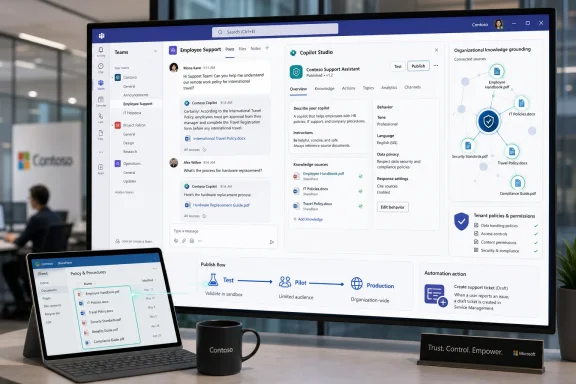
Alphr’s walkthrough captures Microsoft’s preferred route: use Copilot Studio, describe the agent you want, ground it in relevant information, define its behavior, and publish it to Teams. The important shift is that Microsoft no longer wants “building an assistant” to sound like a developer project. It wants it to sound like configuring a SharePoint list or creating a Power Automate flow.
That framing matters. If agents are only for developers, they become another backlog item. If they are for business users, subject-matter experts, and departmental admins, they become an everyday customization layer for Microsoft 365.
But no-code does not mean no-risk. An agent that can read SharePoint content, summarize conversations, or take actions through connectors is not just a friendly bot; it is a delegated interface into business data. The moment it can answer from policy documents, file repositories, ticketing systems, or CRM records, it inherits the quality, permissions, and compliance problems of those systems.
That is why the real deployment story runs through licensing, tenant policy, publishing scope, and admin approval. In a small demo, the agent appears after a few clicks. In a real enterprise, it should pass through the same scrutiny as any app that touches company data.
The second step is grounding. This is where the difference between a toy assistant and a useful enterprise agent appears. A Teams agent that only produces generic answers is little better than a web chatbot; one connected to approved SharePoint documents, internal websites, manuals, service records, or Microsoft Graph-connected content can answer in the language of the organization.
Then comes behavior. Makers can define tone, limits, escalation patterns, suggested prompts, and the kinds of actions the agent may perform. That last category is the sharp edge: reading knowledge is one thing, but sending emails, creating tickets, updating records, or calling external APIs turns the agent into an actor.
That distinction is not bureaucratic trivia. A personal agent that helps one user draft meeting notes has a very different risk profile from a departmental agent that answers HR questions for every employee. A helpdesk agent that searches public troubleshooting articles is different again from one that can open and update support tickets.
Administrators should pay close attention to the publishing scope. Who can use the agent, where it appears, which data sources it can access, and whether it has tools capable of taking action are all part of the same governance decision. In the agent era, “installing an app” and “approving a workflow” start to converge.
Putting agents inside Teams makes them mundane in the best sense. The support agent can live where support staff coordinate. The project agent can sit in a channel where status updates already happen. The meeting agent can turn discussion into follow-up without forcing users to export notes to yet another service.
That is also why Teams agents can become sticky. A browser chatbot is easy to ignore; an assistant embedded in a team’s daily workflow is harder to dislodge once people rely on it for summaries, triage, and retrieval.
Internal support is an obvious starting point. Organizations can create agents that answer common IT questions, guide users through password resets, explain VPN requirements, or surface Windows troubleshooting steps from approved documentation. If the agent cannot solve the problem, it can collect context before handing off to a human.
Meeting and project workflows are another strong fit. Agents can summarize discussions, identify action items, draft follow-up messages, and retrieve relevant documents from a project library. The point is not to replace the meeting; it is to reduce the administrative sludge that follows it.
Treating it as a person encourages misplaced trust. Users may assume the agent “knows” the latest policy, understands nuance, or has checked all relevant sources. In reality, it may be constrained by stale files, incomplete indexing, misconfigured permissions, vague instructions, or hallucinated connective tissue between facts.
The healthier framing is that an agent is a controlled interface. It can be extremely useful when scoped tightly, grounded well, and monitored. It becomes risky when organizations anthropomorphize it and forget that confidence is not correctness.
This is the uncomfortable truth of enterprise AI: agents magnify information hygiene. They do not magically fix it. A company that cannot tell employees which travel policy is current should not expect an agent to resolve the ambiguity without deliberate curation.
That does not make the project hopeless. It means the first agent initiative should include content cleanup, source selection, access review, and a plan for keeping knowledge current. The best agent builders may turn out to be the people who understand both the process and the document graveyard behind it.
But permission-respecting systems can still surprise administrators. An agent may make it easier for users to discover information they technically already had access to but never knew existed. It may combine fragments from multiple accessible sources into a more revealing answer than any single document would have provided. It may also expose poor permission practices that were previously hidden by obscurity.
That is not a reason to avoid agents. It is a reason to audit permissions before agents make those permissions more visible. The old security model of “nobody will find that file” is particularly brittle when conversational retrieval arrives.
The first generation of internal Teams agents should be conservative about actions. Let them draft rather than send, recommend rather than execute, and escalate rather than silently mutate systems. Human-in-the-loop design may sound less magical, but it is often the difference between useful automation and a governance incident.
Over time, trusted agents can earn more autonomy. But that trust should be based on observed performance, narrow scope, and clear accountability, not on a vendor demo or the novelty of having a bot in a channel.
Some capabilities are available through Microsoft 365 Copilot entitlements, while broader Copilot Studio functionality may require standalone licensing or metered capacity. Trial access may be enough to experiment but not necessarily enough to publish production agents. Teams-specific plans and newer web-based Copilot Studio experiences also differ in what they can create and where they can publish.
For IT leaders, the practical question is not “Can someone build an agent?” It is “Who is allowed to build which kind of agent, for which users, against which data, under which license?” That is a procurement and governance question as much as a technical one.
Agents are the AI-era version of that bet. Instead of building a form, a flow, or a chatbot topic tree, a maker can describe an outcome and connect knowledge and tools. Instead of forcing users into a custom app, Microsoft can surface the experience in Teams, Copilot Chat, SharePoint, or other Microsoft 365 contexts.
This is why the Teams agent story is bigger than Teams. It is Microsoft’s attempt to make AI customization a platform feature rather than an add-on. The company wants every department to see agents as something they configure inside Microsoft 365, not something they buy from a separate AI startup.
The approval workflow is therefore not a nuisance; it is the control plane. An agent submitted for broad deployment should disclose what it does, what it can read, what it can call, and who is responsible for maintaining it. If those answers are vague, the agent is not ready for production.
Microsoft’s challenge is to keep that governance usable. If approval is too loose, security teams will object. If it is too heavy, business units will route around it. The winning model is lightweight for pilots, stricter for production, and transparent enough that makers understand the path from experiment to deployment.
The trap is over-promising. A Windows support agent that confidently gives outdated registry advice or misstates a deployment policy can create real cleanup work. If it is connected to ticketing or device-management actions, the stakes rise again.
The right first project is narrow and measurable. Pick a domain with stable documentation, high question volume, and low risk if the agent escalates instead of answers. Then measure deflection, answer quality, user satisfaction, and the number of times the agent had to admit uncertainty.
But the operating manual begins after the publish button. Someone must own the agent’s content sources. Someone must review failed answers. Someone must decide when the agent can take action. Someone must retire or revise agents when policies change.
That is the difference between an interesting Teams add-on and a durable enterprise capability. The creation experience may be no-code, but the lifecycle is not no-management.
A good agent reduces low-value interruptions, accelerates access to approved knowledge, and makes handoffs cleaner. A bad one generates false confidence, increases support escalations, or forces experts to correct its answers in public channels. The difference will not be determined by the model alone.
It will be determined by scope, data quality, governance, and feedback loops. Those are boring words, but they are the difference between AI as infrastructure and AI as theater.
 Microsoft’s Agent Pitch Is Really a Teams Pitch
The appeal of a Teams agent is obvious because Teams is already where many organizations conduct the messy middle of work. Decisions are debated in channels, meetings generate follow-ups, files are shared in context, and institutional knowledge is scattered across SharePoint, Outlook, chat history, and third-party systems. An agent that can summarize, retrieve, draft, and trigger workflows from that environment feels less like a novelty than a natural extension of the collaboration suite.Alphr’s walkthrough captures Microsoft’s preferred route: use Copilot Studio, describe the agent you want, ground it in relevant information, define its behavior, and publish it to Teams. The important shift is that Microsoft no longer wants “building an assistant” to sound like a developer project. It wants it to sound like configuring a SharePoint list or creating a Power Automate flow.
That framing matters. If agents are only for developers, they become another backlog item. If they are for business users, subject-matter experts, and departmental admins, they become an everyday customization layer for Microsoft 365.
No-Code Does Not Mean No Governance
The phrase “no coding required” is doing a lot of work here. Copilot Studio can let a user describe an agent in natural language, select templates, add knowledge sources, and configure responses without opening an IDE. That lowers the barrier dramatically, especially for internal support desks, HR teams, sales operations, and project management groups that know their processes better than central IT does.But no-code does not mean no-risk. An agent that can read SharePoint content, summarize conversations, or take actions through connectors is not just a friendly bot; it is a delegated interface into business data. The moment it can answer from policy documents, file repositories, ticketing systems, or CRM records, it inherits the quality, permissions, and compliance problems of those systems.
That is why the real deployment story runs through licensing, tenant policy, publishing scope, and admin approval. In a small demo, the agent appears after a few clicks. In a real enterprise, it should pass through the same scrutiny as any app that touches company data.
Copilot Studio Turns Agent Building Into Configuration
The basic creation flow is straightforward. A maker can start by describing the agent’s purpose, such as “answer questions about our travel policy” or “help the support team triage common Windows issues.” Copilot Studio then provides a starting structure that can be refined with instructions, topic handling, knowledge, tools, and publishing settings.The second step is grounding. This is where the difference between a toy assistant and a useful enterprise agent appears. A Teams agent that only produces generic answers is little better than a web chatbot; one connected to approved SharePoint documents, internal websites, manuals, service records, or Microsoft Graph-connected content can answer in the language of the organization.
Then comes behavior. Makers can define tone, limits, escalation patterns, suggested prompts, and the kinds of actions the agent may perform. That last category is the sharp edge: reading knowledge is one thing, but sending emails, creating tickets, updating records, or calling external APIs turns the agent into an actor.
Publishing Is Where the Demo Meets the Tenant
Alphr’s summary treats publishing as the final step, and for an individual creator it may feel that way. In practice, publishing is the moment an agent crosses from private experiment into shared organizational tool. Microsoft’s ecosystem now distinguishes between testing an agent, sharing it with a narrow group, and making it broadly available through Teams or Microsoft 365 Copilot surfaces.That distinction is not bureaucratic trivia. A personal agent that helps one user draft meeting notes has a very different risk profile from a departmental agent that answers HR questions for every employee. A helpdesk agent that searches public troubleshooting articles is different again from one that can open and update support tickets.
Administrators should pay close attention to the publishing scope. Who can use the agent, where it appears, which data sources it can access, and whether it has tools capable of taking action are all part of the same governance decision. In the agent era, “installing an app” and “approving a workflow” start to converge.
Teams Makes Agents Useful by Making Them Mundane
The reason Teams is the right surface for Microsoft’s agent strategy is not that Teams is beloved. It is that Teams is already unavoidable. Workers do not want a separate destination for every AI helper, and administrators do not want another uncontrolled shadow-AI ecosystem growing outside the tenant.Putting agents inside Teams makes them mundane in the best sense. The support agent can live where support staff coordinate. The project agent can sit in a channel where status updates already happen. The meeting agent can turn discussion into follow-up without forcing users to export notes to yet another service.
That is also why Teams agents can become sticky. A browser chatbot is easy to ignore; an assistant embedded in a team’s daily workflow is harder to dislodge once people rely on it for summaries, triage, and retrieval.
The Strongest Use Cases Are Boring, Which Is Good
The most valuable Teams agents will not be the ones that sound most futuristic. They will be the ones that remove repetitive friction from daily work. A policy agent that answers “what is the reimbursement limit?” correctly 500 times a month may create more value than a flashy autonomous assistant that only works in carefully staged demos.Internal support is an obvious starting point. Organizations can create agents that answer common IT questions, guide users through password resets, explain VPN requirements, or surface Windows troubleshooting steps from approved documentation. If the agent cannot solve the problem, it can collect context before handing off to a human.
Meeting and project workflows are another strong fit. Agents can summarize discussions, identify action items, draft follow-up messages, and retrieve relevant documents from a project library. The point is not to replace the meeting; it is to reduce the administrative sludge that follows it.
The Weakest Use Cases Pretend the Agent Is a Person
Microsoft, like the rest of the industry, sometimes leans into language that makes agents sound like digital coworkers. That metaphor is useful for marketing and dangerous for operations. A Teams agent is not a colleague; it is software that predicts, retrieves, formats, and sometimes acts based on instructions and permissions.Treating it as a person encourages misplaced trust. Users may assume the agent “knows” the latest policy, understands nuance, or has checked all relevant sources. In reality, it may be constrained by stale files, incomplete indexing, misconfigured permissions, vague instructions, or hallucinated connective tissue between facts.
The healthier framing is that an agent is a controlled interface. It can be extremely useful when scoped tightly, grounded well, and monitored. It becomes risky when organizations anthropomorphize it and forget that confidence is not correctness.
Knowledge Quality Is the Hidden Deployment Cost
The hard part of building a Teams agent is rarely the first prompt. It is the information estate behind it. If SharePoint is full of duplicate policies, abandoned drafts, obsolete PDFs, and unclear ownership, the agent will faithfully expose that mess in conversational form.This is the uncomfortable truth of enterprise AI: agents magnify information hygiene. They do not magically fix it. A company that cannot tell employees which travel policy is current should not expect an agent to resolve the ambiguity without deliberate curation.
That does not make the project hopeless. It means the first agent initiative should include content cleanup, source selection, access review, and a plan for keeping knowledge current. The best agent builders may turn out to be the people who understand both the process and the document graveyard behind it.
Permissions Remain the Security Boundary
Microsoft’s pitch relies heavily on the idea that agents respect existing permissions. That is essential, because Teams agents will often operate near sensitive data. If a user cannot access a document directly, the agent should not become a shortcut around that restriction.But permission-respecting systems can still surprise administrators. An agent may make it easier for users to discover information they technically already had access to but never knew existed. It may combine fragments from multiple accessible sources into a more revealing answer than any single document would have provided. It may also expose poor permission practices that were previously hidden by obscurity.
That is not a reason to avoid agents. It is a reason to audit permissions before agents make those permissions more visible. The old security model of “nobody will find that file” is particularly brittle when conversational retrieval arrives.
Actions Raise the Stakes Beyond Search
A read-only agent is primarily a knowledge tool. An agent with actions is a workflow participant. Once it can create a ticket, send a report, update a record, or call an external service, the organization must think about authentication, logging, error handling, and blast radius.The first generation of internal Teams agents should be conservative about actions. Let them draft rather than send, recommend rather than execute, and escalate rather than silently mutate systems. Human-in-the-loop design may sound less magical, but it is often the difference between useful automation and a governance incident.
Over time, trusted agents can earn more autonomy. But that trust should be based on observed performance, narrow scope, and clear accountability, not on a vendor demo or the novelty of having a bot in a channel.
Licensing Will Shape Who Actually Builds This
Alphr correctly notes that access depends on how an organization has Microsoft 365 Copilot, Copilot Studio, or trial licensing configured. That caveat deserves emphasis. Microsoft’s agent story is powerful, but it is also entangled with licensing tiers, capacity models, and product boundaries that can confuse even experienced administrators.Some capabilities are available through Microsoft 365 Copilot entitlements, while broader Copilot Studio functionality may require standalone licensing or metered capacity. Trial access may be enough to experiment but not necessarily enough to publish production agents. Teams-specific plans and newer web-based Copilot Studio experiences also differ in what they can create and where they can publish.
For IT leaders, the practical question is not “Can someone build an agent?” It is “Who is allowed to build which kind of agent, for which users, against which data, under which license?” That is a procurement and governance question as much as a technical one.
Microsoft Is Rebuilding Power Platform Around AI
Copilot Studio sits in a lineage that includes Power Virtual Agents, Power Automate, Dataverse, and the broader Power Platform. The branding has changed, but the strategic logic is familiar: let non-developers build business software while giving IT enough controls to keep the tenant from becoming chaos.Agents are the AI-era version of that bet. Instead of building a form, a flow, or a chatbot topic tree, a maker can describe an outcome and connect knowledge and tools. Instead of forcing users into a custom app, Microsoft can surface the experience in Teams, Copilot Chat, SharePoint, or other Microsoft 365 contexts.
This is why the Teams agent story is bigger than Teams. It is Microsoft’s attempt to make AI customization a platform feature rather than an add-on. The company wants every department to see agents as something they configure inside Microsoft 365, not something they buy from a separate AI startup.
The Admin Center Becomes the New App Store Gatekeeper
If every department can propose an agent, the admin center becomes more important, not less. Administrators need visibility into requested agents, their data sources, their actions, their intended audience, and their ownership. Without that inventory, organizations will recreate the same sprawl they already experienced with macros, unmanaged SaaS, and ad hoc Power Platform apps.The approval workflow is therefore not a nuisance; it is the control plane. An agent submitted for broad deployment should disclose what it does, what it can read, what it can call, and who is responsible for maintaining it. If those answers are vague, the agent is not ready for production.
Microsoft’s challenge is to keep that governance usable. If approval is too loose, security teams will object. If it is too heavy, business units will route around it. The winning model is lightweight for pilots, stricter for production, and transparent enough that makers understand the path from experiment to deployment.
Windows Shops Should See the Opportunity and the Trap
For WindowsForum readers, the obvious angle is IT operations. Teams agents could become a practical front door for endpoint support, Windows 11 migration questions, Intune policy explanations, patching schedules, hardware request workflows, and known-issue lookups. A well-grounded agent in an IT channel could save technicians from answering the same question endlessly.The trap is over-promising. A Windows support agent that confidently gives outdated registry advice or misstates a deployment policy can create real cleanup work. If it is connected to ticketing or device-management actions, the stakes rise again.
The right first project is narrow and measurable. Pick a domain with stable documentation, high question volume, and low risk if the agent escalates instead of answers. Then measure deflection, answer quality, user satisfaction, and the number of times the agent had to admit uncertainty.
The Alphr Walkthrough Is the On-Ramp, Not the Operating Manual
Alphr’s piece is useful because it demystifies the first mile. It tells users that they can start in Copilot Studio, describe an agent, provide knowledge, configure responses, and publish to Teams. For many organizations, that is enough to get a pilot moving.But the operating manual begins after the publish button. Someone must own the agent’s content sources. Someone must review failed answers. Someone must decide when the agent can take action. Someone must retire or revise agents when policies change.
That is the difference between an interesting Teams add-on and a durable enterprise capability. The creation experience may be no-code, but the lifecycle is not no-management.
The Real Test Is Whether Agents Reduce Work or Redistribute It
Every workplace AI tool arrives with a promise to save time. The honest question is whose time it saves and whose time it consumes. If a Teams agent reduces repetitive employee questions but creates a new review burden for IT, the net value depends on whether the trade is worth it.A good agent reduces low-value interruptions, accelerates access to approved knowledge, and makes handoffs cleaner. A bad one generates false confidence, increases support escalations, or forces experts to correct its answers in public channels. The difference will not be determined by the model alone.
It will be determined by scope, data quality, governance, and feedback loops. Those are boring words, but they are the difference between AI as infrastructure and AI as theater.
The Teams Agent Playbook Starts Small
The safest reading of Microsoft’s agent strategy is not that every team needs a digital coworker tomorrow. It is that organizations should begin treating Teams as a deployment surface for tightly scoped AI utilities. That means pilots, owners, controls, and evidence.- Organizations should start with read-only knowledge agents before granting agents the ability to change records, send messages, or trigger external workflows.
- Makers should ground agents in curated SharePoint sites, approved documents, or well-maintained systems rather than dumping entire content repositories into scope.
- Administrators should review an agent’s data sources, actions, audience, and owner before allowing broad publication in Teams or Microsoft 365 Copilot.
- Teams agents should be measured against practical outcomes such as fewer repeat questions, faster ticket triage, cleaner meeting follow-ups, and better policy discovery.
- Every production agent should have a maintenance owner, a review cadence, and a clear path for users to report incorrect or risky answers.
References
- Primary source: Alphr
Published: Mon, 29 Jun 2026 07:00:00 GMT
How to Set Up an AI Agent for Teams
With the help of Microsoft Copilot Studio, you can create, customize, and deploy an AI agent for Teams. Learn how it works in this guide.www.alphr.com - Official source: learn.microsoft.com
Quickstart: Create a classic agent and publish it to Microsoft Teams - Microsoft Copilot Studio | Microsoft Learn
Create a classic agent in Microsoft Copilot Studio with a Teams plan, part of select Microsoft 365 subscriptions, and publish it in minutes.learn.microsoft.com - Official source: microsoft.com
What's new in Copilot Studio: April 2026 updates and features | Microsoft Copilot Blog
See what's new in Copilot Studio, April 2026: updates to workflows, more control over agent operations, and an expanded agent usage estimator.www.microsoft.com - Official source: developer.microsoft.com
Microsoft Teams Platform | Build agents
With Microsoft Teams, you can build agents that make communication seamless, connected, and intelligent.developer.microsoft.com - Official source: support.microsoft.com
Frequently asked questions about agents in Microsoft Teams | Microsoft Support
Get answers to frequently asked questions about using Facilitator and Channel Agent in Microsoft Teams, including how artificial intelligence (AI) helps you automate notetaking in chats and meetings.support.microsoft.com
